Facebook exploit – Confirm website visitor identities
An endpoint returned different responses depending on whether a supplied user ID matched the logged-in Facebook user, and lacked a protective prefix in the matching case. An attacker could use script tags to detect the difference and confirm whether a visitor was logged in to a specific account, checking hundreds of IDs per second.
 Published on tomanthony.co.uk
In last years coverage of the Facebook / Cambridge Analytica privacy concerns, Mark Zuckerberg was asked to testify before Congress, and one of the questions they asked was around whether Facebook could track users even on other websites. There was a lot of news coverage around this aspect of Facebook, and a lot of…
The full write-up lives on its author's site
It belongs to its author, so we link to it rather than copy it. The other two tabs are our own rewrites, checked against it.
Context
Facebook exposes a large number of backend endpoints that its own pages call over AJAX. Most of them are protected in two ways: an access-control-allow-origin header, which stops other origins from reading the response with XHR, and a magic prefix on JSON responses, which prevents JSON hijacking and similar attacks. The magic prefix is a string prepended to the JSON body so that the response is not directly parseable as a script or as plain JSON by a cross-origin caller.
The endpoint at the centre of this write-up is a pagelet used by the timeline activity log. It takes a profile_id inside a JSON data parameter and a __user URL parameter.
The goal was to answer a question that had been raised publicly during the Cambridge Analytica hearings: can Facebook identify a logged-in user while that user is browsing some other website? The researcher set out to see whether he could do it himself, without any Facebook API.
Setup
No special accounts or tooling are described. The work was done by browsing Facebook's own site, collecting the AJAX endpoints it uses, and testing them from a separate origin. The proof of concept is a page hosted on the researcher's own domain, which is the attacker-controlled origin in the scenario. The only precondition is that the victim is logged in to Facebook in the same browser while visiting the attacker's page.
Finding it
The starting observation is that Facebook's endpoints are almost all protected by the access-control-allow-origin header and by magic prefixes on JSON responses. The search was therefore for endpoints that lacked these protections and that also carried the user ID in the URL, so that a response could be parsed to confirm whether the UID in the URL was the logged-in user.
Several avenues were tried and rejected:
- Images whose URL contains the user ID and which behave differently when the UID matches the logged-in user. The closest candidate did behave differently, but its URL also contained Facebook's well-known
fb_dtsgparameter, which is unique per user and changes regularly, so it could not be abused. - 301/302 redirects on these URLs, which might have allowed a redirect to an image and hence the same trick. This did not pan out either.
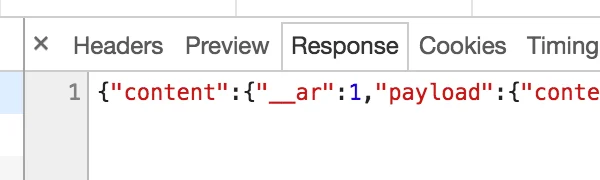
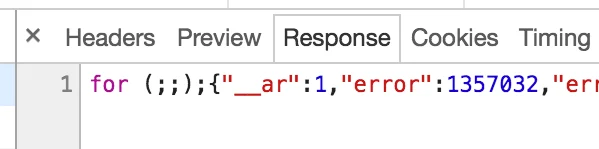
After checking dozens of endpoints, one showed a slight inconsistency. It did send an access-control-allow-origin header, but it only included the magic prefix when the user ID in the __user URL parameter did not match. When the ID did match, the response was pure JSON.
Exploitation
Step 1: the endpoint
The endpoint takes its parameters in the query string. The example URL from the report is:
https://www.facebook.com/ajax/pagelet/generic.php/TimelineEntStoryActivityLogPagelet?dpr=2&ajaxpipe=1&ajaxpipe_token=AXjeDM6DZ_aiAeG-&no_script_path=1&data=%7B%22year%22%3A2017%2C%22month%22%3A9%2C%22log_filter%22%3A%22hidden%22%2C%22profile_id%22%3A1159016196%7D&__user=XXXXXXXXXXXX&__a=1&__dyn=7AgNe-[redacted]-1-[redacted]&__req=fetchstream_8&__be=1&__pc=PHASED%3ADEFAULT&__rev=3832430&__spin_r=3832430&__spin_b=trunk&__spin_t=1524222703&__adt=8&ajaxpipe_fetch_stream=1
The __user parameter is the ID being tested. The __user value in the example is redacted here.
Step 2: getting around the CORS header
Because of the access-control-allow-origin header, the endpoint cannot be read with an XHR request: the browser blocks it. The way around this is to load the URL as the src of a normal script block:
<script>
The request will fail, but it fails differently depending on whether the response was the prefixed body or the pure JSON body, and that difference is also driven by the content-type header. The two outcomes can be distinguished with onload and onerror event handlers on the script element.
Step 3: scaling it
A script takes a list of user IDs, generates many script tags, and uses the callbacks to record success or failure for each ID. Because the endpoint is served over HTTP/2, many requests can be in flight at once. In a small test the researcher was able to test 400 to 500 user IDs per second. Run in the background of a normal page that a user keeps open for a minute, that would allow thousands of IDs to be checked. There did not appear to be any rate limiting on the endpoint.
Step 4: the demo
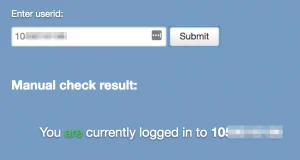
The proof of concept page checks a small list of known user IDs automatically on arrival, and also lets you enter an ID and will confirm whether you are logged in to that account.
Root cause
The weakness is an inconsistency in how the endpoint builds its response. It sends an access-control-allow-origin header, which suggests it is meant to be protected, but it only applies the magic prefix when the __user parameter does not match the logged-in user. When the ID matches, the body is pure JSON. That difference in body, together with the content-type header, is observable from a cross-origin script tag through onload and onerror, so the CORS header does not actually prevent the information from leaking. The magic prefix, the defence that would have made the two cases indistinguishable, is missing in exactly the case that carries the signal.
Impact
The attack confirms whether a visitor is logged in to a specific Facebook account. It cannot discover an unknown identity: you need a list of candidate IDs to test against. That narrows the scope considerably, and for many users the impact is small. For some it could be high.
Three groups are called out. Anyone affected by the Cambridge Analytica data situation whose data is already known could now be identified and tracked across websites without using any Facebook API. A repressive regime with a list of people it cares about identifying could narrow that list further using location and other factors. And anyone on a corporate IP address or network, where the list of users is fairly easy to harvest and fairly finite, is exposed as well. For any Facebook user who is identified, this is a violation of privacy.
Fix
Facebook fixed the issue. The report does not describe the change that was made. It is unclear when the final fix rolled out; it looks like 6 to 9 months after the report was filed.
Variants to test
- Look for AJAX endpoints that take a user or object ID in the URL and return JSON. A positive result is a response whose body or
content-typediffers depending on whether the ID matches the logged-in user. - Check whether the magic prefix is applied conditionally. A positive result is a response that is prefixed in one case and pure JSON in the other.
- Try loading candidate endpoints as a script
srcfrom another origin and compareonloadversusonerrorfor matching and non-matching IDs. A positive result is a reliable difference between the two cases. - Look for images or redirects that vary with the logged-in user but do not carry a per-user token such as
fb_dtsg. A positive result is a resource whose behaviour depends on the session without any rotating parameter in the URL. - Measure throughput and rate limiting by firing many requests over HTTP/2. A positive result is hundreds of checks per second with no throttling.
Disclosure timeline
- 20th April 2018: initial bug report filed.
- 20th April 2018: Facebook replied that it was being handed to the correct team.
- 1st May 2018: update requested.
- 2nd May 2018: Facebook replied, still investigating.
- 23rd May 2018: update requested, noting the issue was fixed in Chrome but not Safari.
- 23rd May 2018: Facebook replied that it was investigating solutions.
- 20th June 2018: a $1000 bounty was awarded.
- 1st October 2018: permission to publish requested.
- 1st October 2018: Facebook replied that it was still working on the fix.
- 19th February 2019: follow-up sent, and Facebook seemed happy for the write-up to be published.
What happened, in plain words
In 2018, Facebook was in the news because of the Cambridge Analytica scandal. People were worried that Facebook could follow them around the internet, even when they were not on Facebook. Mark Zuckerberg was asked about this in front of Congress. As part of its response, Facebook started a Data Abuse Bounty: a programme that pays people who find ways that Facebook user data could be misused.
Tom Anthony had just found a bug in Google's search engine, and he decided to see whether he could track or identify Facebook users while they were on other websites. After a few false starts he found a bug that lets a website check whether the person visiting it is logged in to a specific Facebook account. It could test hundreds of identities per second, in the range of 500 per second. Facebook fixed it over the following months and paid a $1000 bounty.
To understand the bug you need three ideas.
- An endpoint is a web address on a server that does one specific job and returns data rather than a normal web page. Think of it as a service counter in a big building: you go to the right counter, hand over some details, and get an answer back.
- A cookie is a small piece of data that your browser stores for a website and sends back with every request to that site. It is how a site remembers that you are logged in. Think of it as a wristband you get at the door of a club: you show it at the bar and nobody asks for your ID again.
- A cross-origin request is a request made by a page on one website (say,
attacker.example) to a different website (say,facebook.com). Browsers treat these carefully, because otherwise any page you visit could quietly read data from any other site you are logged in to.
The whole bug is about a small difference in how one Facebook endpoint answers when you ask about your own account versus somebody else's account, and whether a page on another website can notice that difference.
The background: how Facebook protects its endpoints
Facebook's own pages constantly talk to Facebook's servers in the background. When you scroll a timeline or open an activity log, your browser sends requests to backend endpoints and gets data back, usually as JSON. JSON is just a text format for structured data, made of names and values in curly braces, like a form filled in by a computer.
Most of these endpoints are protected in two ways.
- An
access-control-allow-originheader. A header is a small line of extra information that travels with a web response, a bit like the label on a parcel. This particular header tells the browser which websites are allowed to read the response. If a page on another site tries to read it with XHR (a way for a page to fetch data in the background), the browser blocks it. - A magic prefix on JSON responses. A magic prefix is a short string of characters stuck on the front of the response body, so the body is no longer valid JSON. It is like putting a cover sheet on a report: the content is still there, but a machine expecting a clean document will refuse to read it. This stops a class of attacks where a browser is tricked into treating someone's private data as a script (JSON hijacking).
The endpoint at the centre of this write-up is a pagelet used by the timeline activity log. A pagelet is a small reusable piece of a Facebook page. It takes a profile_id inside a JSON data parameter and a __user URL parameter. A URL parameter is the part of a web address after a question mark, in name=value pairs, like the options you tick on a form before submitting it.
The question the researcher wanted to answer was the one raised in the hearings: can Facebook identify a logged-in user while that user is browsing some other website? He set out to see whether he could do it himself, without using any Facebook API. An API is a documented, official way for one program to ask another for data; the point here was to avoid it and use the site's own internal plumbing instead.
Setting up
The report describes no special accounts or tools. The work was done by browsing Facebook's own site, collecting the background endpoints its pages use, and testing them from a separate website. The proof of concept (a small demo built to show that an attack works) is a page hosted on the researcher's own domain, which plays the role of the attacker-controlled site. The only precondition is that the victim is logged in to Facebook in the same browser while visiting the attacker's page.
Finding it
The starting observation was that Facebook's endpoints are almost all protected by the access-control-allow-origin header and by magic prefixes on JSON responses. So the search was for endpoints that lacked these protections and that also carried the user ID in the URL. If the user ID is in the URL, then a page can put different IDs into that URL and see whether the answer changes, which would confirm whether the ID in the URL is the logged-in user.
Several avenues were tried and rejected.
- Images whose URL contains the user ID and which behave differently when the ID matches the logged-in user. The closest candidate did behave differently, but its URL also contained Facebook's well-known
fb_dtsgparameter. That parameter is unique per user and changes regularly, so an attacker cannot know it in advance and the trick cannot be abused. - 301 and 302 redirects on these URLs. A redirect is a response that tells the browser "the thing you want is over there, go and fetch it instead". The idea was that a redirect might lead to an image and allow the same trick as above. This did not pan out either.
After checking dozens of endpoints, one showed a slight inconsistency. It did send an access-control-allow-origin header, but it only included the magic prefix when the user ID in the __user URL parameter did not match. When the ID did match, the response was pure JSON.
Exploitation
Step 1: the endpoint
The endpoint takes its parameters in the query string. The example URL from the report is:
https://www.facebook.com/ajax/pagelet/generic.php/TimelineEntStoryActivityLogPagelet?dpr=2&ajaxpipe=1&ajaxpipe_token=AXjeDM6DZ_aiAeG-&no_script_path=1&data=%7B%22year%22%3A2017%2C%22month%22%3A9%2C%22log_filter%22%3A%22hidden%22%2C%22profile_id%22%3A1159016196%7D&__user=XXXXXXXXXXXX&__a=1&__dyn=7AgNe-[redacted]-1-[redacted]&__req=fetchstream_8&__be=1&__pc=PHASED%3ADEFAULT&__rev=3832430&__spin_r=3832430&__spin_b=trunk&__spin_t=1524222703&__adt=8&ajaxpipe_fetch_stream=1
https://www.facebook.com/ajax/pagelet/generic.php/TimelineEntStoryActivityLogPageletis the address of the endpoint itself. Everything after the?is the list of parameters being handed to it.dpr=2andajaxpipe=1are settings that tell Facebook's front end how to format the answer.ajaxpipe_token=AXjeDM6DZ_aiAeG-is a token that Facebook's own pages include with this kind of request. A token is a short value that a server issues and expects back, a bit like a cloakroom ticket: it shows the request came from a page the server already knows about.no_script_path=1is another formatting switch.data=%7B%22year%22%3A2017%2C%22month%22%3A9%2C%22log_filter%22%3A%22hidden%22%2C%22profile_id%22%3A1159016196%7Dis the interesting one. The%7B,%22and similar sequences are URL encoding: characters that are not allowed in a web address are written in a coded form. Decoded, this value is JSON containingyear,month,log_filterandprofile_id. In other words, the request is asking for the activity log of a particular profile for a particular month, filtered to hidden items.__user=XXXXXXXXXXXXis the ID being tested. This is the value the attacker changes on every attempt. It is redacted here.- The remaining parameters (
__a,__dyn,__req,__be,__pc,__rev,__spin_r,__spin_b,__spin_t,__adt,ajaxpipe_fetch_stream) are the usual Facebook background-request plumbing: version numbers, request names and similar bookkeeping that Facebook's own pages send along.
Step 2: getting around the CORS header
Because of the access-control-allow-origin header, the endpoint cannot be read with an XHR request: the browser blocks it. CORS stands for Cross-Origin Resource Sharing, and it is the browser rule that decides whether a page on one site may read a response from another. The header is the server's answer to that rule.
The way around this is to load the URL as the src of a normal script block:
<script>
A <script> tag tells the browser "go and fetch this address and run what comes back as JavaScript". The browser does not apply the CORS reading rule to a script tag in the same way, so the request is sent. The request will fail, because the response is not valid JavaScript, but it fails differently depending on whether the response was the prefixed body or the pure JSON body. That difference is also driven by the content-type header, which says what kind of data the response contains. The two outcomes can be distinguished with onload and onerror event handlers on the script element. An event handler is a small piece of code that runs when something happens; onload runs when the resource loads successfully, onerror runs when it does not. So the attacker's page never reads the data, it only listens for which of the two outcomes occurred, and that is enough to learn whether the ID matched.
Step 3: scaling it
A script takes a list of user IDs, generates many script tags, and uses the callbacks to record success or failure for each ID. Because the endpoint is served over HTTP/2, a newer version of the protocol that lets many requests travel over one connection at the same time, many requests can be in flight at once. In a small test the researcher was able to test 400 to 500 user IDs per second. Run in the background of a normal page that a user keeps open for a minute, that would allow thousands of IDs to be checked. There did not appear to be any rate limiting on the endpoint. Rate limiting is a server-side cap on how many requests one client may make in a period, like a bouncer who only lets a few people in per minute.
Step 4: the demo
The proof of concept page checks a small list of known user IDs automatically on arrival, and also lets you enter an ID and will confirm whether you are logged in to that account.
Root cause
The weakness is an inconsistency in how the endpoint builds its response. It sends an access-control-allow-origin header, which suggests it is meant to be protected, but it only applies the magic prefix when the __user parameter does not match the logged-in user. When the ID matches, the body is pure JSON. That difference in body, together with the content-type header, is observable from a cross-origin script tag through onload and onerror, so the CORS header does not actually prevent the information from leaking. The magic prefix, the defence that would have made the two cases indistinguishable, is missing in exactly the case that carries the signal.
Impact
The attack confirms whether a visitor is logged in to a specific Facebook account. It cannot discover an unknown identity: you need a list of candidate IDs to test against. That narrows the scope considerably, and for many users the impact is small. For some it could be high.
Three groups are called out. Anyone affected by the Cambridge Analytica data situation whose data is already known could now be identified and tracked across websites without using any Facebook API. A repressive regime with a list of people it cares about identifying could narrow that list further using location and other factors. And anyone on a corporate IP address or network, where the list of users is fairly easy to harvest and fairly finite, is exposed as well. For any Facebook user who is identified, this is a violation of privacy.
Fix
Facebook fixed the issue. The report does not describe the change that was made. It is unclear when the final fix rolled out; it looks like 6 to 9 months after the report was filed.
Variants to test
- Look for background endpoints that take a user or object ID in the URL and return JSON. A positive result is a response whose body or
content-typediffers depending on whether the ID matches the logged-in user. - Check whether the magic prefix is applied conditionally. A positive result is a response that is prefixed in one case and pure JSON in the other.
- Try loading candidate endpoints as a script
srcfrom another origin and compareonloadversusonerrorfor matching and non-matching IDs. A positive result is a reliable difference between the two cases. - Look for images or redirects that vary with the logged-in user but do not carry a per-user token such as
fb_dtsg. A positive result is a resource whose behaviour depends on the session without any rotating parameter in the URL. - Measure throughput and rate limiting by firing many requests over HTTP/2. A positive result is hundreds of checks per second with no throttling.
Disclosure timeline
- 20th April 2018: initial bug report filed.
- 20th April 2018: Facebook replied that it was being handed to the correct team.
- 1st May 2018: update requested.
- 2nd May 2018: Facebook replied, still investigating.
- 23rd May 2018: update requested, noting the issue was fixed in Chrome but not Safari.
- 23rd May 2018: Facebook replied that it was investigating solutions.
- 20th June 2018: a $1000 bounty was awarded.
- 1st October 2018: permission to publish requested.
- 1st October 2018: Facebook replied that it was still working on the fix.
- 19th February 2019: follow-up sent, and Facebook seemed happy for the write-up to be published.
Glossary
- API: a documented, official way for one program to ask another for data.
- Bounty: a payment made by a company to someone who reports a security bug to it.
- Cookie: a small piece of data stored by the browser for a website and sent back with requests to that site, used to remember that you are logged in.
- CORS (Cross-Origin Resource Sharing): the browser rule that decides whether a page on one site may read a response from another site.
- Cross-origin request: a request made by a page on one website to a different website.
content-typeheader: a header that says what kind of data a response contains.- Endpoint: a web address on a server that does one specific job and returns data rather than a normal page.
- Event handler: a small piece of code that runs when something happens, such as
onloadoronerroron a script element. - Header: a small line of extra information that travels with a web request or response.
- HTTP/2: a newer version of the web protocol that lets many requests travel over one connection at the same time.
- JSON: a text format for structured data, made of names and values.
- JSON hijacking: an attack that tricks a browser into treating someone's private data as a script.
- Magic prefix: a short string stuck on the front of a response body so that it is no longer valid JSON and cannot be read as a script.
onerror: an event that fires when a resource fails to load.onload: an event that fires when a resource loads successfully.- Pagelet: a small reusable piece of a Facebook page.
- Proof of concept: a small demo built to show that an attack works.
- Rate limiting: a server-side cap on how many requests one client may make in a period.
- Redirect (301/302): a response that tells the browser to fetch a different address instead.
- Token: a short value issued by a server and expected back, used to show a request came from a page the server already knows about.
- URL encoding: the coded form used to write characters that are not allowed in a web address.
- URL parameter: a
name=valuepair after the question mark in a web address. - XHR: a way for a page to fetch data in the background and read the response.





