Facebook Messenger server random memory exposure through corrupted GIF image
A GIF file with no image data caused Facebook Messenger's web image renderer to return uninitialised server memory as the displayed picture. An attacker could upload such a crafted GIF and receive fragments of other users' image data back.
 Published on vulnano.com
By Dzmitry - March 06, 2019
The full write-up lives on its author's site
It belongs to its author, so we link to it rather than copy it. The other two tabs are our own rewrites, checked against it.
Context
Facebook Messenger renders images that users send to each other. When a GIF is uploaded, the Messenger server processes it and returns a rendered image that the client displays. The researcher, Dzmitry Lukyanenka, was interested in how Messenger handles malformed GIF files, in particular GIFs whose image data is missing entirely.
The work started in February 2018 on Facebook Messenger for Android, inspired by the ImageMagick "uninitialized memory disclosure in gif coder" bug and the proof-of-concept tool called "gifoeb". On Android, the generated images only crashed the app with a null pointer dereference, and Facebook did not award a bounty for that denial of service. The interesting result came later, on Messenger for Web.
Setup
No accounts, roles or special tooling beyond a Python interpreter are described. The researcher generated GIF files locally with a short Python script and uploaded them through Messenger. The successful observation came from the Messenger web page opened on a laptop.
Finding it
The researcher first read up on the GIF format. The header layout used as a reference is:
Offset   Length   Contents
  0      3 bytes  "GIF"
  3      3 bytes  "87a" or "89a"
  6      2 bytes  <Logical Screen Width>
  8      2 bytes  <Logical Screen Height>
 10      1 byte   bit 0:    Global Color Table Flag (GCTF)
                  bit 1..3: Color Resolution
                  bit 4:    Sort Flag to Global Color Table
                  bit 5..7: Size of Global Color Table: 2^(1+n)
 11      1 byte   <Background Color Index>
 12      1 byte   <Pixel Aspect Ratio>
 13      ? bytes  <Global Color Table(0..255 x 3 bytes) if GCTF is one>
         ? bytes  <Blocks>
         1 bytes  <Trailer> (0x3b)
The idea was to build the smallest valid GIF: a correct header, an image descriptor, and then straight to the trailer, with no image data blocks at all. Such a file declares a size but carries no pixels.
Exploitation
Step 1: generate a GIF with no image data
The researcher wrote a Python script that writes the header fields, an image separator, the image position and size, the packed colour table flags, and the trailer. The LZW minimum code size, the block size, the image data and the block terminator are all commented out, so nothing between the image descriptor and the trailer is written.
import struct

screenWidth = 640
screenHeight = 480

f = open('test.gif', 'wb')

# Offset   Length   Contents
#   0      3 bytes  "GIF"
#   3      3 bytes  "87a" or "89a"
f.write(b"GIF89a")

#   6      2 bytes  <Logical Screen Width>
f.write(struct.pack('<h', screenWidth))

#   8      2 bytes  <Logical Screen Height>
f.write(struct.pack('<h', screenHeight))

#  10      1 byte   bit 0:    Global Color Table Flag (GCTF)
#                   bit 1..3: Color Resolution
#                   bit 4:    Sort Flag to Global Color Table
#                   bit 5..7: Size of Global Color Table: 2^(1+n)
bits = int('00000010', 2)
f.write(struct.pack('<b', bits))

#  11      1 byte   <Background Color Index>
f.write(struct.pack('<b', 0))

#  12      1 byte   <Pixel Aspect Ratio>
f.write(struct.pack('<b', 1))

#  13      ? bytes  <Global Color Table(0..255 x 3 bytes) if GCTF is one>

#          ? bytes  <Blocks>

# Offset   Length   Contents
#   0      1 byte   Image Separator (0x2c)
f.write(struct.pack('<b', 0x2c))

#   1      2 bytes  Image Left Position
f.write(struct.pack('<h', 0))

#   3      2 bytes  Image Top Position
f.write(struct.pack('<h', 0))

#   5      2 bytes  Image Width
f.write(struct.pack('<h', screenWidth))

#   7      2 bytes  Image Height
f.write(struct.pack('<h', screenHeight))

#   8      1 byte   bit 0:    Local Color Table Flag (LCTF)
#                   bit 1:    Interlace Flag
#                   bit 2:    Sort Flag
#                   bit 2..3: Reserved
#                   bit 4..7: Size of Local Color Table: 2^(1+n)
#          ? bytes  Local Color Table(0..255 x 3 bytes) if LCTF is one
f.write(struct.pack('<b', int('00000100', 2)))

#          1 byte   LZW Minimum Code Size
#f.write(struct.pack('<b', 1))

# [ // Blocks
#          1 byte   Block Size (s)
#f.write(struct.pack('<b', 1))

#         (s)bytes  Image Data
# ]*
#          1 byte   Block Terminator(0x00)
#f.write(struct.pack('<b', 0))

#          1 bytes  <Trailer> (0x3b)

f.write(struct.pack('<b', 0x3b))

f.close()
The script writes a GIF with logical screen and image dimensions of 640 by 480 and no image data. The researcher notes that the file is empty after the colour table flags: the trailer follows directly.
Step 2: upload to Messenger for Android
Variations of the generated GIF with different sizes and header fields were uploaded through Messenger for Android. Nothing happened there beyond the crash already seen with the gifoeb output.
Step 3: open Messenger for Web
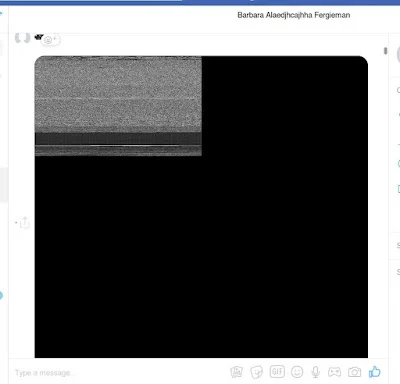
When the same kind of file was viewed in Messenger on the web, the returned image was not empty. The first result was a small image, which the researcher enlarged to inspect it.
Since the uploaded GIF has no content, the question was where the returned image came from.
Step 4: change the GIF size
After changing the GIF size, the returned image became white noise, described as looking like a television without a signal.
Step 5: upload the same binary again
Uploading the identical binary a second time produced a different image again, this time resembling an embedded TV screen inside Messenger.
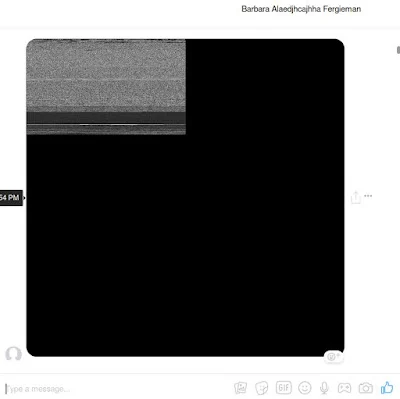
The image changed between uploads even though the file was the same.
Step 6: vary the screen and image sizes
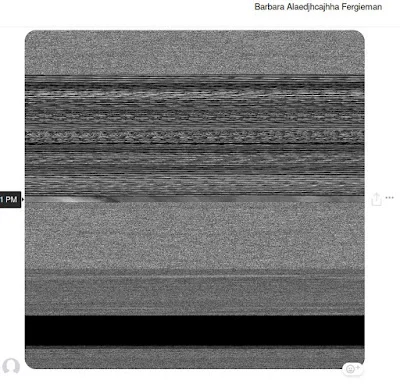
Playing with the GIF screen and image sizes produced a full screen picture. The researcher compares the behaviour to reading an image from a file and using the width where the height should be.
Step 7: catch a semi-stable output
Eventually the output settled into something that looked like a semi-stable TV signal in Messenger.
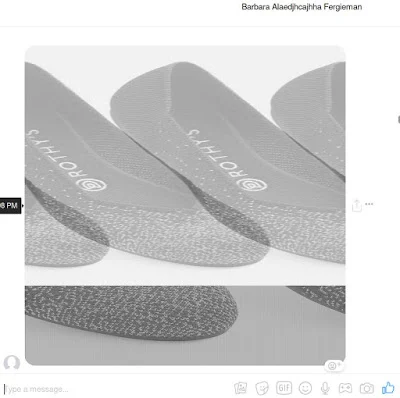
At this point the conclusion was that the server was returning part of a previous buffer as the GIF image, because the uploaded image has no content body of its own.
Root cause
The report states the mechanism at a high level: the image has no content body, and the server returns some previous buffer for the GIF image. In other words, the decoder reads pixel data that was never written by this file, and whatever was already in that memory is rendered and sent back. The report does not describe the server-side code, the library involved or the exact allocation, so the precise mistake is not stated. The researcher compares the behaviour to reading an image from a file and using width instead of height, but the report does not confirm a cause.
Impact
Uploading a crafted GIF with no image data returned an image that appeared to come from a previous buffer on the server. The report does not characterise what kind of data could be exposed, how much, or under which conditions other users' data might appear. The practical effect shown is that the returned image contained data not present in the uploaded file.
Fix
The timeline lists the issue as fixed on 09 MAR 2018, after triage on 01 MAR 2018. The report does not describe the change that was made.
Timeline
| Date | Event |
|---|---|
| 26 FEB 2018 | Report sent to Facebook Team |
| 01 MAR 2018 | Triaged |
| 09 MAR 2018 | Fixed |
| 21 MAR 2018 | 10,000 USD bounty |
Variants to test
- Strip the image data from other formats. Build a valid header and descriptor for PNG, JPEG or WebP with no pixel payload, upload it to an image-processing endpoint, and look for output that contains content not present in the file.
- Vary declared dimensions against actual data. Keep the file empty but change the logical screen and image width and height independently, and check whether the returned image changes shape or content, which would point at a stride or size mix-up.
- Upload the same malformed file repeatedly. If the rendered output differs between identical uploads, the pipeline is reading uninitialised or reused buffers rather than rejecting the file.
- Try truncated files. Cut a valid image at various offsets before the data blocks and observe whether the service returns an error or a rendered image with unexpected content.
- Test thumbnail and preview generation separately. The same file may be handled differently by the upload path, the preview path and the full-size renderer, so check each one for leaked content.
What happened, in plain words
Facebook Messenger lets people send pictures to each other. When you send a GIF (a small animated image file), it does not go straight to your friend's phone. It goes to a Facebook server first. The file goes to a Facebook server, which processes it before it is displayed. This is normal and happens for every image you send.
A security researcher, Dzmitry Lukyanenka, wondered what would happen if he sent a GIF that was deliberately broken: a file that claims to be a picture of a certain size but contains no actual picture data at all. He built such files himself with a short computer program and uploaded them through Messenger.
On the Android Messenger app, the broken files only made the app crash. But when he opened Messenger in a web browser on his laptop, the server sent back images that were not empty. They contained strange pictures: white noise, something that looked like a TV screen, and other shapes. Because his uploaded file had no picture data of its own, the only place those pixels could come from was memory on the Facebook server that had been used for something else earlier. In other words, the server was showing him leftovers from its own memory.
This kind of bug is called information disclosure: a system reveals data to someone who should not be able to see it. The timeline lists the issue as fixed on 09 MAR 2018 and a 10,000 USD bounty on 21 MAR 2018.
Background: what a GIF actually is
Before building anything, the researcher read up on the GIF file format. A file format is just an agreed layout: which bytes go where, and what each one means. Think of it like a paper form with numbered boxes. If you fill in the boxes in the right order, any program that knows the form can read it.
The GIF format starts with a fixed header. The layout the researcher used as a reference is:
Offset   Length   Contents
  0      3 bytes  "GIF"
  3      3 bytes  "87a" or "89a"
  6      2 bytes  <Logical Screen Width>
  8      2 bytes  <Logical Screen Height>
 10      1 byte   bit 0:    Global Color Table Flag (GCTF)
                  bit 1..3: Color Resolution
                  bit 4:    Sort Flag to Global Color Table
                  bit 5..7: Size of Global Color Table: 2^(1+n)
 11      1 byte   <Background Color Index>
 12      1 byte   <Pixel Aspect Ratio>
 13      ? bytes  <Global Color Table(0..255 x 3 bytes) if GCTF is one>
         ? bytes  <Blocks>
         1 bytes  <Trailer> (0x3b)
Line by line, in plain words:
- Offset is the position in the file, counted in bytes from the start. A byte is the smallest unit of data a computer stores; one byte can hold a number from 0 to 255.
- Length is how many bytes that field takes up.
- The first three bytes must spell
GIF, so any program can recognise the file type. - The next three bytes say which version of the format it is,
87aor89a. - Bytes 6 and 7 hold the logical screen width: how wide the whole picture is meant to be.
- Bytes 8 and 9 hold the logical screen height: how tall it is.
- Byte 10 is a packed byte: a single byte where each individual bit (a 0 or 1) carries a different setting. Bit 0 is the Global Colour Table Flag, which says whether a shared list of colours follows. The other bits describe colour depth and sorting.
- Byte 11 is the background colour index: which entry of the colour list to use as the background.
- Byte 12 is the pixel aspect ratio, a hint about how wide each pixel should look compared with its height.
- From byte 13 onward there may be a global colour table (a list of colours, three bytes per colour), then blocks (the actual image data), and finally a trailer byte
0x3bthat marks the end of the file.
The plan was to build the smallest possible valid GIF: a correct header, a description of one image, and then straight to the trailer, with no image data blocks at all. Such a file declares a size but carries no pixels. It is like handing someone a blank sheet of paper with the words "a 640 by 480 photo" written on it.
Step 1: generate a GIF with no image data
The researcher used Python, a popular programming language, to write the bytes of the file one by one. The script is:
import struct

screenWidth = 640
screenHeight = 480

f = open('test.gif', 'wb')

# Offset   Length   Contents
#   0      3 bytes  "GIF"
#   3      3 bytes  "87a" or "89a"
f.write(b"GIF89a")

#   6      2 bytes  <Logical Screen Width>
f.write(struct.pack('<h', screenWidth))

#   8      2 bytes  <Logical Screen Height>
f.write(struct.pack('<h', screenHeight))

#  10      1 byte   bit 0:    Global Color Table Flag (GCTF)
#                   bit 1..3: Color Resolution
#                   bit 4:    Sort Flag to Global Color Table
#                   bit 5..7: Size of Global Color Table: 2^(1+n)
bits = int('00000010', 2)
f.write(struct.pack('<b', bits))

#  11      1 byte   <Background Color Index>
f.write(struct.pack('<b', 0))

#  12      1 byte   <Pixel Aspect Ratio>
f.write(struct.pack('<b', 1))

#  13      ? bytes  <Global Color Table(0..255 x 3 bytes) if GCTF is one>

#          ? bytes  <Blocks>

# Offset   Length   Contents
#   0      1 byte   Image Separator (0x2c)
f.write(struct.pack('<b', 0x2c))

#   1      2 bytes  Image Left Position
f.write(struct.pack('<h', 0))

#   3      2 bytes  Image Top Position
f.write(struct.pack('<h', 0))

#   5      2 bytes  Image Width
f.write(struct.pack('<h', screenWidth))

#   7      2 bytes  Image Height
f.write(struct.pack('<h', screenHeight))

#   8      1 byte   bit 0:    Local Color Table Flag (LCTF)
#                   bit 1:    Interlace Flag
#                   bit 2:    Sort Flag
#                   bit 2..3: Reserved
#                   bit 4..7: Size of Local Color Table: 2^(1+n)
#          ? bytes  Local Color Table(0..255 x 3 bytes) if LCTF is one
f.write(struct.pack('<b', int('00000100', 2)))

#          1 byte   LZW Minimum Code Size
#f.write(struct.pack('<b', 1))

# [ // Blocks
#          1 byte   Block Size (s)
#f.write(struct.pack('<b', 1))

#         (s)bytes  Image Data
# ]*
#          1 byte   Block Terminator(0x00)
#f.write(struct.pack('<b', 0))

#          1 bytes  <Trailer> (0x3b)

f.write(struct.pack('<b', 0x3b))

f.close()
What each part does:
import structloads a Python helper that turns ordinary numbers into the exact byte sequences a file needs. Computers store numbers in different orders (big-endian and little-endian);structhandles that for us.screenWidth = 640andscreenHeight = 480set the declared size of the picture.f = open('test.gif', 'wb')creates a new file calledtest.gif. The'wb'means write binary: raw bytes, not text.f.write(b"GIF89a")writes the six-byte signature that identifies the file as a GIF.- The two
struct.pack('<h', ...)lines write the screen width and height as two-byte numbers. The<hmeans a small integer stored in little-endian order. bits = int('00000010', 2)builds the packed settings byte. The binary value00000010is written as the packed settings byte.- The next two lines write the background colour index (0) and the pixel aspect ratio (1).
f.write(struct.pack('<b', 0x2c))writes the image separator, the byte0x2cthat announces "an image starts here".- The next four
struct.pack('<h', ...)lines write the image's left position, top position, width and height. The width and height reuse the same 640 and 480 values. f.write(struct.pack('<b', int('00000100', 2)))writes the packed byte for the image itself. The binary value00000100is written as the packed byte for the image.- The lines for the LZW minimum code size, the block size, the image data and the block terminator are all commented out with
#. A commented line is ignored by Python. That means no image data blocks are written between the image description and the trailer. f.write(struct.pack('<b', 0x3b))writes the trailer byte, which marks the end of the file.f.close()saves and closes the file.
The result is a GIF that declares a 640 by 480 picture and then jumps straight to the end. The researcher notes that the file is empty after the colour table flags: the trailer follows directly. There is no picture inside, only a claim that there is one.
Step 2: upload to Messenger for Android
The first target was the Messenger app on Android phones. The researcher uploaded variations of the generated GIF, with different sizes and different header fields, through the app. Nothing interesting happened: the app only crashed, with a null pointer dereference. That is a programming error where a program tries to use a piece of memory that points nowhere, like following a signpost to an address that does not exist. Facebook did not pay a bounty for that crash, because a crash is a denial of service (the app stops working) rather than a leak of information.
Step 3: open Messenger for Web
The researcher then opened the Messenger web page on his laptop and looked at the same kind of file there. The returned image was not empty. The first result was a small image, which he enlarged to inspect it.
Since the uploaded GIF has no content, the obvious question was: where did the returned image come from? A normal image pipeline would either reject the file or show a blank box. Showing something else means the server filled the picture with data from somewhere.
Step 4: change the GIF size
He changed the size declared in the GIF and uploaded again. This time the returned image was white noise, which he described as looking like a television with no signal.
The researcher described the returned image as white noise, looking like a television with no signal.
Step 5: upload the same binary again
He uploaded the identical file a second time. The result was different again: this time it looked like a TV screen embedded inside Messenger.
The image changed between uploads even though the file was byte-for-byte the same. That is important. If the server were simply drawing the file, the output would be identical every time. The image changed between uploads even though the file was the same.
Step 6: vary the screen and image sizes
He then played with the GIF's screen size and image size, changing them independently. One result was a full screen picture. He compares the behaviour to a common programming mistake: reading an image from a file and using the width where the height should be.
That comparison is useful for a beginner. Imagine a photo stored as a long line of pixels, row after row. To rebuild the picture you need to know how many pixels make one row. If you use the wrong number, the rows shift and the picture looks stretched, wrapped or scrambled. The researcher compares the behaviour to reading an image from a file and using the width where the height should be.
Step 7: catch a semi-stable output
Eventually the output settled into something that looked like a semi-stable TV signal inside Messenger.
At this point the conclusion was clear: the server was returning part of a previous buffer as the GIF image, because the uploaded image has no content body of its own. A buffer is a chunk of memory a program sets aside to hold data temporarily, like a tray used to carry plates from the kitchen. If a program reads the tray without first putting anything on it, it gets whatever the previous user left behind.
Why this is a security problem
This is information disclosure: the server reveals data to someone who should not see it. The report shows that a crafted image with no data returned an image containing data not present in the file. The pixels they receive are bytes from the server's memory that belonged to some earlier processing.
The report does not say what kind of data could be exposed, how much of it, or whether other users' data could appear. What it does show is that server memory can be read back through an image the attacker can retrieve.
The fix and the timeline
Facebook triaged the report on 01 MAR 2018 and fixed the issue on 09 MAR 2018. The report does not describe the change that was made. The bounty of 10,000 US dollars was paid on 21 MAR 2018.
| Date | Event |
|---|---|
| 26 FEB 2018 | Report sent to Facebook Team |
| 01 MAR 2018 | Triaged |
| 09 MAR 2018 | Fixed |
| 21 MAR 2018 | 10,000 USD bounty |
Triaged means the security team confirmed the report was valid and started working on it. A bounty is a payment a company makes to a researcher who reports a real security problem responsibly, instead of exploiting it.
What a beginner can take from this
- Broken input is worth trying. A file that claims to be an image but has no image data is not something a normal user would send. Testing inputs that the developer did not expect is one of the simplest ways to find bugs.
- The same file can behave differently on different platforms. The Android app crashed; the web version leaked memory. Always test the same input against every client and every server path you can reach.
- Different output from identical input is a red flag. If you upload the same file twice and get two different pictures, the service is not drawing your file. It is reading something else.
- Changing declared sizes changes the output. When only the numbers in the header change the shape of the result, the code is using those numbers to decide how to read memory, and a mix-up between width and height is a common cause.
- Report responsibly. The researcher sent the report to the Facebook Team, and the timeline lists a fix and a bounty. Publishing a working exploit before a fix would have put users at risk.
Glossary
- Bounty: a payment a company makes to a researcher who reports a valid security problem privately.
- Buffer: a chunk of memory a program reserves to hold data temporarily.
- Byte: the basic unit of computer data, holding a value from 0 to 255.
- Denial of service (DoS): a bug that makes a program or service stop working, without necessarily revealing data.
- GIF: a common image file format, often used for small animations.
- Header: the fixed set of bytes at the start of a file that describes what the file is and how to read it.
- Image separator: the byte
0x2cin a GIF that marks the start of an image block. - Information disclosure: a bug where a system reveals data to someone who should not be able to see it.
- Little-endian: a way of storing numbers where the least significant byte comes first.
- Logical screen width / height: the overall size a GIF declares for its picture.
- LZW: the compression method GIF uses for pixel data.
- Null pointer dereference: a programming error where a program tries to use a memory address that points nowhere, usually causing a crash.
- Offset: the position of a byte within a file, counted from the start.
- Pixel: a single dot of colour in an image.
- Python: a popular programming language, often used for small scripts.
- struct: a Python module that converts numbers into exact byte sequences.
- Trailer: the final byte of a GIF file (
0x3b) that marks the end. - Triaged: confirmed as valid by a security team and queued for fixing.
- Uninitialised memory: memory that a program has reserved but not yet written to, so it still holds whatever was there before.




