Meta Quest: Attacker could make any Oculus user to follow (subscribe) him without any approval
The Oculus follow request acceptance endpoint did not verify that the authenticated user was the intended recipient of the follow request. An attacker could force any Oculus user to follow them without approval by changing the follow requester ID in the request.
 Published on vulnano.com
By Dzmitry - January 09, 2023
The full write-up lives on its author's site
It belongs to its author, so we link to it rather than copy it. The other two tabs are our own rewrites, checked against it.
Context
Oculus accounts have a follower model. A user can be followed by other users, and the follower list is shown in several places: on the Oculus Quest device when you open a user profile, in the profile opened in Meta Quest for Android, and on the web page that lists followers. The report focuses on that web page:
https://secure.oculus.com/my/people/
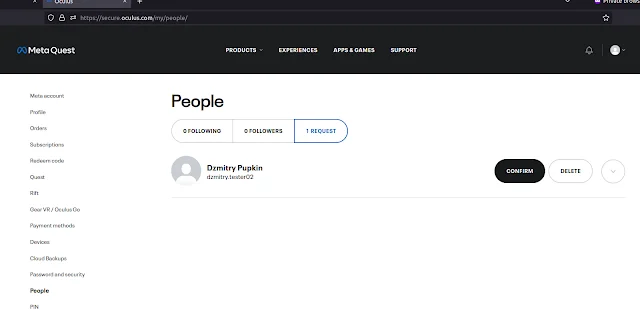
The page displays the Oculus user's followers. The account owner can also enable confirmation for follow requests, in which case every person who wants to follow them has to be approved by the owner before the follow takes effect.
Setup
The researcher used an Oculus account with confirmation for follow requests enabled, so that the approval flow, and the request behind it, could be observed. The attacker account had confirmation for follow requests enabled, so that the approval flow, and the request behind it, could be observed. The work was done in a desktop browser (the captured request shows Firefox 107 on Ubuntu),
Finding it
The bug was first submitted as an issue found in the People app on the Oculus Quest device. At that point the researcher did not know which HTTP request was behind the behaviour, but the effect was reproducible through the People app. Later the same behaviour was reproduced through the secure.oculus.com/my/people/ page, which allowed the vulnerable request to be captured and submitted with more detail.
The interesting observation is that the follow relationship is created by a client-side mutation whose only statement about who is being followed is a user ID taken from the request. When the account owner presses "confirm" on a pending follow request, the browser sends a GraphQL mutation to graph.oculus.com that carries the requester's ID. If the server trusts that ID without checking that the requester actually has a pending request against the authenticated account, then any ID can be substituted.
Exploitation
Step 1: enable follow request confirmation on the attacker account
With confirmation enabled, any user who wants to follow the attacker must first be approved. This is the normal, intended flow, and it is the flow whose request we are about to capture.
Step 2: capture the approval request
When the owner presses "confirm", the following request is executed:
POST /graphql?locale=en_US HTTP/2
Host: graph.oculus.com
User-Agent: Mozilla/5.0 (X11; Ubuntu; Linux x86_64; rv:107.0) Gecko/20100101 Firefox/107.0
Accept: */*
Accept-Language: en-US,en;q=0.5
Accept-Encoding: gzip, deflate
Referer: https://secure.oculus.com/
Content-Type: application/x-www-form-urlencoded
X-Fb-Friendly-Name: OCAccountFollowRequestButtonsAcceptMutation
Content-Length: 1149
Origin: https://secure.oculus.com
Dnt: 1
Sec-Fetch-Dest: empty
Sec-Fetch-Mode: cors
Sec-Fetch-Site: same-site
Te: trailers

access_token=[oculus_token]&__user=0&__a=1&__dyn=7xxxxxxx&__csr=&__req=b&__hs=19319.BP%3ADEFAULT.2.0.0.0.0&dpr=1&__ccg=UNKNOWN&__rev=1006635818&__s=0r9wew%3Ahv568o%3A8ypvmx&__hsi=7169288311854648182&__comet_req=0&fb_dtsg=[redacted]-YjAtUBXQ%3A25%3A1669198279&jazoest=25286&lsd=9-B9N5_yEmkNxprj42tPAh&__jssesw=1&fb_api_caller_class=RelayModern&fb_api_req_friendly_name=OCAccountFollowRequestButtonsAcceptMutation&variables=%7B%22follow_requester_id%22%3A%22109035146728215%22%2C%22add_connections%22%3A%5B%22client%3A10487732912XXXX%[redacted](orderby%3A%5C%22NAME_OR_ALIAS%5C%22)%22%5D%2C%22remove_connections%22%3A%5B%22client%3A10487732912XXXX%[redacted](orderby%3A%5C%22NAME_OR_ALIAS%5C%22)%22%5D%7D&server_timestamps=true&doc_id=5253592544678660
The parts that matter:
X-Fb-Friendly-Nameandfb_api_req_friendly_nameboth name the operation,OCAccountFollowRequestButtonsAcceptMutation, which is the accept action for a pending follow request.access_tokenis the session credential of the account owner performing the approval. It is sent in the body, not in a cookie header.fb_dtsgandjazoestare the anti-CSRF style tokens that accompany Facebook GraphQL requests.doc_id=5253592544678660selects the persisted GraphQL document on the server.variablesis a URL-encoded JSON object. Decoded, it containsfollow_requester_id, the Oculus ID of the user who wants to follow the account owner, plusadd_connectionsandremove_connectionsentries that move the relationship between the follower list and the pending request list.
In the captured request the requester ID appears as 109035146728215. The report refers to this value as 109035146728YYY and to the account owner's own ID as 10487732912XXXX inside the connection strings.
Step 3: substitute a victim's Oculus ID
Replace the requester ID with any other valid Oculus ID and execute the request again, keeping the attacker's own access_token and anti-CSRF tokens. The report describes the substituted value as XXXXX:
Step 4: result
The user whose ID was substituted becomes subscribed to the attacker's account. They follow the attacker without any approval on their side. Because the mutation is executed with the attacker's session, the victim's approval is not required.
Root cause
The accept mutation takes the identity of the follower from a client-supplied parameter, follow_requester_id, and acts on it. The server appears to authorise the request only on the basis of the caller's own session (the access_token belongs to the account owner doing the accepting) and does not verify that the named follow_requester_id has an outstanding follow request against that account. Likely, the connection updates in add_connections and remove_connections are applied to whatever IDs the client names, so the server writes a follower edge for a user who never asked to follow anyone.
They do not constrain which other user the owner is allowed to attach to their own follower list, so they do not stop this.
Impact
An attacker could make any Oculus user follow the attacker's account without that user's approval. The effect is visible wherever followers are displayed: on the Oculus Quest device when the profile is opened, in the profile in Meta Quest for Android, and on the secure.oculus.com/my/people/ page. In practice this allows building an account with many real followers who never chose to follow it, which is what the researcher highlights as the abuse case. The report does not describe any further capability obtained through the follow relationship, and the researcher notes that they expected a higher impact than the reward reflected.
Fix
Meta fixed the issue on 07.12.2022, according to the timeline. The report does not describe the change itself.
Timeline
| Date | Event |
|---|---|
| 23.11.2022 | Bug submitted as an issue found in the People app for Oculus Quest; the underlying HTTP request was not yet known |
| 23.11.2022 | Vulnerable request found via https://secure.oculus.com/my/people/ and further details submitted |
| 24.11.2022 | Triaged |
| 26.11.2022 | Reward of $863 (750 + 113 bonus) |
| 26.11.2022 | Researcher asked for an explanation of the reward amount |
| 30.11.2022 | Payment dispute |
| 07.12.2022 | Fixed |
| 14.12.2022 | Additional reward of $863 (750 + 113 bonus), total $1500 + $226 bonus |
Variants to test
- Other accept/reject style mutations. Look for GraphQL operations that take an actor ID from
variables(follow requests, friend requests, group invitations, event invitations, page invites). Replay the accept with a different valid ID and check whether the relationship is created for that ID. A positive result is a new edge on the attacker's object that the named user never requested. - The reject/remove counterpart. If accept trusts the ID, remove or reject may too, letting an attacker drop a legitimate follower or pending request. A positive result is a relationship disappearing without the owner's action.
- Connection strings in
add_connections/remove_connections. These name the lists the edge is written to. Try pointing them at another user's list, or at a list the caller should not write to, and see whether the server validates ownership of the connection. A positive result is an edge appearing in a list belonging to someone else. - Persisted document IDs. The request selects the operation by
doc_id. Enumerate otherdoc_idvalues used by the same page and replay them with modifiedvariablesto find mutations with the same missing ownership check. - Cross-surface consistency. Reproduce the same action from the device app and from the web page and compare what the server accepts. A positive result is the device path accepting an ID the web path rejects, or vice versa, which points at where the check lives.
- Batch and alias abuse. Send several
follow_requester_idvalues in one request, or repeat the mutation with different IDs, and observe whether rate limiting or per-request validation stops the mass creation of follower edges.
What happened, in plain words
Oculus (now part of Meta, and the software behind the Quest headset) lets people follow each other, much like following someone on a social network. Normally, if you have turned on a setting that says "ask me before anyone follows me", a person who wants to follow you sends a request, and you press a button to approve it. Only then do they appear in your follower list.
The researcher found that the approval step could be tricked. When you press the approve button, your browser sends a message to Meta's servers saying "please let this particular person follow me". The message contains the ID number of the person you are approving. The researcher discovered that the server did not check whether that person had actually asked to follow you. So anyone could take that same message, swap in the ID number of any other Oculus user, and send it again. The result: that user was added to the attacker's follower list, even though they never asked to follow anyone and never approved anything.
In short, an attacker could make any Oculus user follow them without that user's knowledge or consent. The server accepted a value sent by the browser (the ID of who to follow) without the user having asked to follow anyone.
Background: what you need to know
Before walking through the steps, here are a few ideas that come up repeatedly.
- Oculus account: your login for Meta's VR products. It has a profile, and other users can follow it.
- Follower: someone who has chosen to see your activity. On Oculus, followers are shown on your profile.
- Follow request: if you have turned on "confirm follow requests", anyone who wants to follow you must first send a request, and you must approve it.
- Web page vs. app: the same follower list can be seen in several places: on the Quest headset itself, in the Meta Quest app for Android, and on a web page at
https://secure.oculus.com/my/people/. - HTTP request: the message your browser sends to a server when you click something. It has a method (like
POST), a URL, headers (extra information), and a body (the data being sent). - API: a way for one piece of software to talk to another. Here, the web page talks to Meta's servers through an API called GraphQL.
- GraphQL: a way of asking a server for data or asking it to perform an action, using a structured request. Each action has a name (here, a "mutation", which means "change something").
- Token / access token: a secret string that proves who you are, like a temporary ID badge. If someone else gets your token, they can act as you. In this report, the token belongs to the attacker's own account, which is why the attacker can use it freely.
- CSRF token (Cross-Site Request Forgery token): an extra value added to requests to make sure the request really came from the legitimate user's browser and not from a malicious website. Examples here are
fb_dtsgandjazoest. - ID: a unique number that identifies a user. Every Oculus account has one.
The vulnerable page
The report focuses on this page:
https://secure.oculus.com/my/people/
This page shows the Oculus user's followers. The screenshot above shows the follower list as it appears on that page. The account owner can also enable confirmation for follow requests, so that anyone who wants to follow them must be approved first.
How the researcher found it
The bug was first noticed as a problem in the People app on the Oculus Quest device. At that point the researcher did not know which HTTP request was behind the behaviour, but the effect could be reproduced through the People app. Later, the same behaviour was reproduced through the secure.oculus.com/my/people/ web page, which allowed the vulnerable request to be captured and submitted with more detail.
The key observation: the follow relationship is created by a request whose only statement about who is being followed is a user ID taken from the request itself. When the account owner presses "confirm" on a pending follow request, the browser sends a GraphQL mutation to graph.oculus.com that carries the requester's ID. If the server trusts that ID without checking that the requester actually has a pending request against the authenticated account, then any ID can be substituted.
Step by step
Step 1: enable follow request confirmation on the attacker account
With confirmation enabled, any user who wants to follow the attacker must first be approved. This is the normal, intended flow, and it is the flow whose request we are about to capture. The researcher used an attacker account with confirmation turned on.
Step 2: capture the approval request
When the owner presses "confirm", the following request is executed:
POST /graphql?locale=en_US HTTP/2
Host: graph.oculus.com
User-Agent: Mozilla/5.0 (X11; Ubuntu; Linux x86_64; rv:107.0) Gecko/20100101 Firefox/107.0
Accept: */*
Accept-Language: en-US,en;q=0.5
Accept-Encoding: gzip, deflate
Referer: https://secure.oculus.com/
Content-Type: application/x-www-form-urlencoded
X-Fb-Friendly-Name: OCAccountFollowRequestButtonsAcceptMutation
Content-Length: 1149
Origin: https://secure.oculus.com
Dnt: 1
Sec-Fetch-Dest: empty
Sec-Fetch-Mode: cors
Sec-Fetch-Site: same-site
Te: trailers

access_token=[oculus_token]&__user=0&__a=1&__dyn=7xxxxxxx&__csr=&__req=b&__hs=19319.BP%3ADEFAULT.2.0.0.0.0&dpr=1&__ccg=UNKNOWN&__rev=1006635818&__s=0r9wew%3Ahv568o%3A8ypvmx&__hsi=7169288311854648182&__comet_req=0&fb_dtsg=[redacted]-YjAtUBXQ%3A25%3A1669198279&jazoest=25286&lsd=9-B9N5_yEmkNxprj42tPAh&__jssesw=1&fb_api_caller_class=RelayModern&fb_api_req_friendly_name=OCAccountFollowRequestButtonsAcceptMutation&variables=%7B%22follow_requester_id%22%3A%22109035146728215%22%2C%22add_connections%22%3A%5B%22client%3A10487732912XXXX%[redacted](orderby%3A%5C%22NAME_OR_ALIAS%5C%22)%22%5D%2C%22remove_connections%22%3A%5B%22client%3A10487732912XXXX%[redacted](orderby%3A%5C%22NAME_OR_ALIAS%5C%22)%22%5D%7D&server_timestamps=true&doc_id=5253592544678660
Let's break this down line by line.
POST /graphql?locale=en_US HTTP/2: this is a POST request (sending data to the server) to the/graphqlendpoint, with a language parameterlocale=en_US, using HTTP version 2.Host: graph.oculus.com: the server being contacted.User-Agent: ...: tells the server which browser and operating system made the request. Here it is Firefox 107 on Ubuntu Linux.Accept: */*: the browser will accept any type of response.Accept-Language: en-US,en;q=0.5: the browser prefers English.Accept-Encoding: gzip, deflate: the browser can handle compressed responses.Referer: https://secure.oculus.com/: the page the request came from.Content-Type: application/x-www-form-urlencoded: the body is formatted as key=value pairs separated by&.X-Fb-Friendly-Name: OCAccountFollowRequestButtonsAcceptMutation: a human-readable name for the operation, here "accept follow request".Content-Length: 1149: the length of the body in bytes.Origin: https://secure.oculus.com: the site that initiated the request.Dnt: 1: the browser is asking the server not to track it.Sec-Fetch-Dest,Sec-Fetch-Mode,Sec-Fetch-Site: browser security headers describing the request's context.Te: trailers: the browser can handle trailers (extra data at the end of a response).
The body (after the blank line) is a long string of key=value pairs. The important ones:
access_token=[oculus_token]: the session credential of the account owner performing the approval. It is sent in the body, not in a cookie header.fb_dtsg=...andjazoest=25286: anti-CSRF tokens that accompany Facebook GraphQL requests.fb_api_req_friendly_name=OCAccountFollowRequestButtonsAcceptMutation: the operation name again.doc_id=5253592544678660: selects the persisted GraphQL document on the server.variables=...: a URL-encoded JSON object. Decoded, it containsfollow_requester_id, the Oculus ID of the user who wants to follow the account owner, plusadd_connectionsandremove_connectionsentries that move the relationship between the follower list and the pending request list.
In the captured request the requester ID appears as 109035146728215. The report refers to this value as 109035146728YYY and to the account owner's own ID as 10487732912XXXX inside the connection strings.
Step 3: substitute a victim's Oculus ID
Replace the requester ID with any other valid Oculus ID and execute the request again, keeping the attacker's own access_token and anti-CSRF tokens. The report describes the substituted value as XXXXX:
This is the heart of the bug. The attacker is not changing their own token or their own identity; they are only changing the ID of the person they are supposedly approving. If the server checked that the named ID had actually sent a follow request, the substitution would fail. Because it did not, the server accepted the new ID.
Step 4: result
The user whose ID was substituted becomes subscribed to the attacker's account. They follow the attacker without any approval on their side. Because the mutation is executed with the attacker's session, the victim's approval is not required.
Why it worked (root cause)
The accept mutation takes the identity of the follower from a client-supplied parameter, follow_requester_id, and acts on it. The server appears to authorise the request only on the basis of the caller's own session (the access_token belongs to the account owner doing the accepting) and does not verify that the named follow_requester_id has an outstanding follow request against that account. Likely, the connection updates in add_connections and remove_connections are applied to whatever IDs the client names, so the server writes a follower edge for a user who never asked to follow anyone.
They do not constrain which other user the owner is allowed to attach to their own follower list, so they do not stop this.
Impact
An attacker could make any Oculus user follow the attacker's account without that user's approval. The effect is visible wherever followers are displayed: on the Oculus Quest device when the profile is opened, in the profile in Meta Quest for Android, and on the secure.oculus.com/my/people/ page. In practice this allows building an account with many real followers who never chose to follow it, which is what the researcher highlights as the abuse case. The report does not describe any further capability obtained through the follow relationship, and the researcher notes that they expected a higher impact than the reward reflected.
Fix
Meta fixed the issue on 07.12.2022, according to the timeline. The report does not describe the change itself.
Timeline
| Date | Event |
|---|---|
| 23.11.2022 | Bug submitted as an issue found in the People app for Oculus Quest; the underlying HTTP request was not yet known |
| 23.11.2022 | Vulnerable request found via https://secure.oculus.com/my/people/ and further details submitted |
| 24.11.2022 | Triaged |
| 26.11.2022 | Reward of $863 (750 + 113 bonus) |
| 26.11.2022 | Researcher asked for an explanation of the reward amount |
| 30.11.2022 | Payment dispute |
| 07.12.2022 | Fixed |
| 14.12.2022 | Additional reward of $863 (750 + 113 bonus), total $1500 + $226 bonus |
Variants to test
If you want to look for similar bugs yourself, here are some directions. Each one is a variation on the same idea: find a request that takes an ID from the client and acts on it, then try a different valid ID.
- Other accept/reject style mutations. Look for GraphQL operations that take an actor ID from
variables(follow requests, friend requests, group invitations, event invitations, page invites). Replay the accept with a different valid ID and check whether the relationship is created for that ID. A positive result is a new edge on the attacker's object that the named user never requested. - The reject/remove counterpart. If accept trusts the ID, remove or reject may too, letting an attacker drop a legitimate follower or pending request. A positive result is a relationship disappearing without the owner's action.
- Connection strings in
add_connections/remove_connections. These name the lists the edge is written to. Try pointing them at another user's list, or at a list the caller should not write to, and see whether the server validates ownership of the connection. A positive result is an edge appearing in a list belonging to someone else. - Persisted document IDs. The request selects the operation by
doc_id. Enumerate otherdoc_idvalues used by the same page and replay them with modifiedvariablesto find mutations with the same missing ownership check. - Cross-surface consistency. Reproduce the same action from the device app and from the web page and compare what the server accepts. A positive result is the device path accepting an ID the web path rejects, or vice versa, which points at where the check lives.
- Batch and alias abuse. Send several
follow_requester_idvalues in one request, or repeat the mutation with different IDs, and observe whether rate limiting or per-request validation stops the mass creation of follower edges.
Glossary
- Access token: a secret string that proves who you are to a server, like a temporary ID badge. If someone else gets it, they can act as you.
- Here, the web page talks to Meta's servers through an API.
- Broken access control: a class of bug where the server lets someone do something they should not be allowed to do, because it does not check permissions properly.
- Follower: someone who has chosen to see your activity on a social platform.
- Follow request: a request sent by one user asking to follow another, which the other user can approve or reject.
- Each action has a name.
- It has a method (like
POST), a URL, headers, and a body. - ID: a unique number that identifies a user or object.
- Mutation: in GraphQL, a request that changes something on the server (as opposed to a query, which only reads).
- Oculus Quest: a VR headset made by Meta (formerly Oculus).
- Root cause: the underlying reason a bug exists, as opposed to its visible symptom.
- Server-side validation: checking data on the server, rather than trusting what the browser sends.
- Token: see access token.
- URL-encoded: a way of writing special characters in a URL or form body so they can be transmitted safely (for example,
%22means a double quote). - Variables: in GraphQL, the values passed into an operation, such as an ID.


