Facebook page admin disclosure by “Create doc” button (Bounty: 5000 USD)
A Facebook page admin's identity could be revealed through the version history of a group document created by the page. An attacker could determine which user was the page admin by editing the document and viewing the edit history.
 Published on theshubh77.medium.com
Hi guys, it's Shubham Bhamare again. In this write-up, I'm going to tell you about my 2nd valid bug that I found on Facebook.
The full write-up lives on its author's site
It belongs to its author, so we link to it rather than copy it. The other two tabs are our own rewrites, checked against it.
Context
Facebook Groups let members create and share documents inside a group. The "Create doc" button, available in the post editor, opens a document editor where the author can set options before publishing, including whether ordinary group members are allowed to edit the document. Documents keep a version history, and that history records who made each edit.
This write-up describes a logic flaw in that flow: when a document was created and edited while acting as a Page, the version history showed the name of the person behind the Page rather than the Page itself. For a Page admin who deliberately keeps their personal identity separate from the Page, that is an unintended disclosure. The report was submitted on 13 October 2018 and the bounty was awarded on 9 February 2019.
Setup
The scenario in the report uses one person and two identities:
- A Facebook user, Sarah, is the admin of Sarah's Page.
- Sarah's Page is linked to Sarah's Group.
- Sarah has not made her personal account an admin of the group, because she does not want to disclose her identity.
- The group therefore has exactly one admin, Sarah's Page. Sarah's personal account is only a member of the group and always acts as the Page.
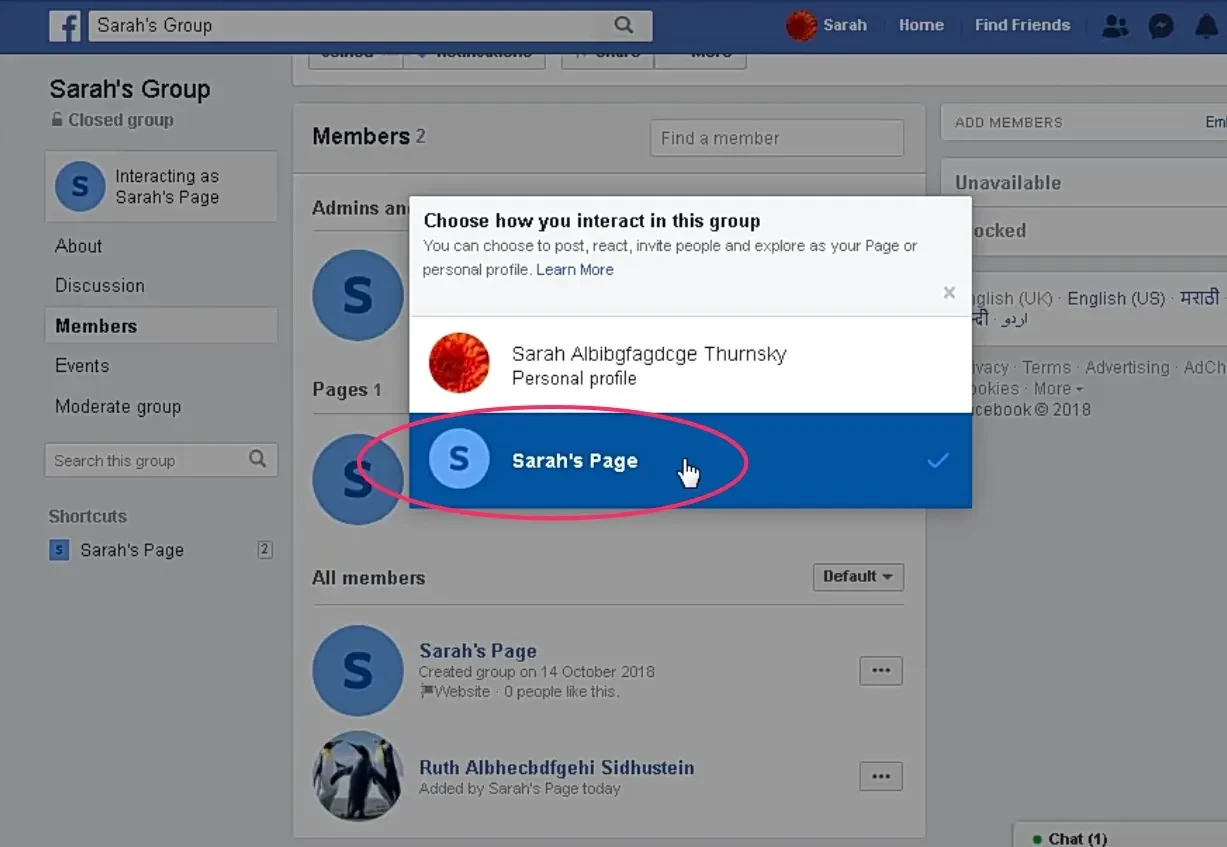
The image shows the group membership arrangement: the Page is the sole admin, and the personal account is an ordinary member.
No special tools are involved. The reproduction was done on the Facebook web interface, acting as the Page.
Finding it
The researcher's reasoning starts from a permission rule that the document editor exposes: when "Allow group members to edit this document" is unchecked, only the document owners or admins can edit the document. That rule is visible to everyone, so any member who can edit the document is, by definition, an owner or an admin.
The version history then adds a second piece of information: the name attached to each edit. If a member edits a document that ordinary members cannot edit, and the history shows a personal name, the two facts together identify the person behind the admin Page. The name in the edit history was not intended to be there, which is what made the behaviour a bug rather than expected design.
Exploitation
Step 1: create the document as the Page
Using the Facebook web, acting as Sarah's Page, create a document in Sarah's Group with the "Create doc" button.
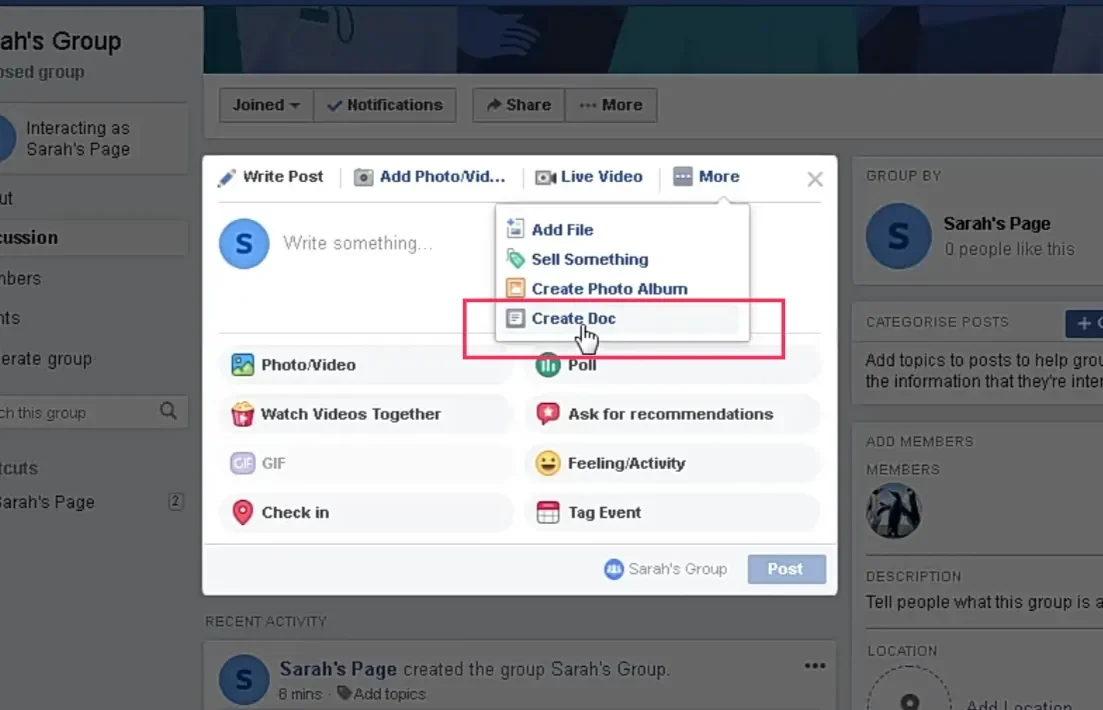
The button sits in the post editor.
Step 2: restrict editing to owners and admins
Before publishing the document, uncheck the option "Allow group members to edit this document", so that only the document owners or admins can edit it.
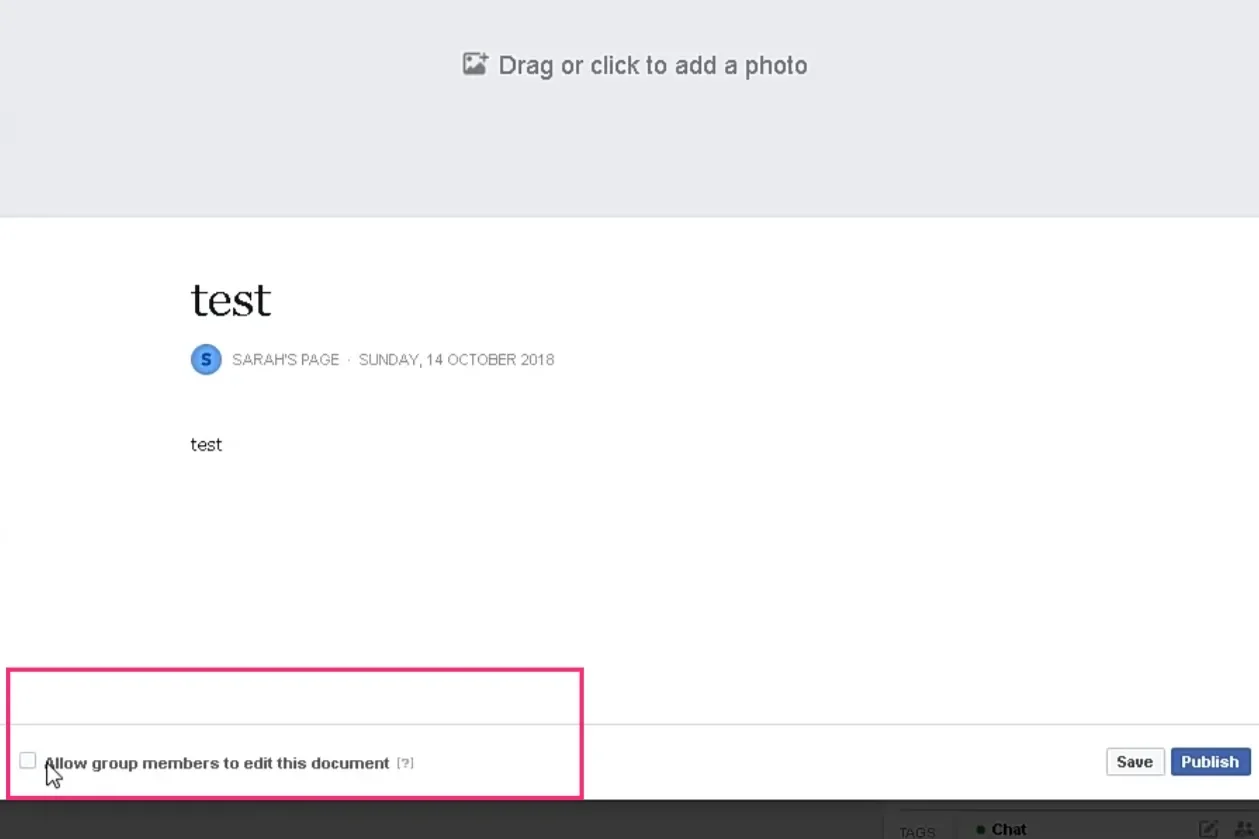
This is the precondition that makes the later disclosure meaningful: after this change, the set of people who can edit the document is exactly the set of owners and admins.
Step 3: edit and save as the Page
Now, still acting as Sarah's Page, edit and save the document.
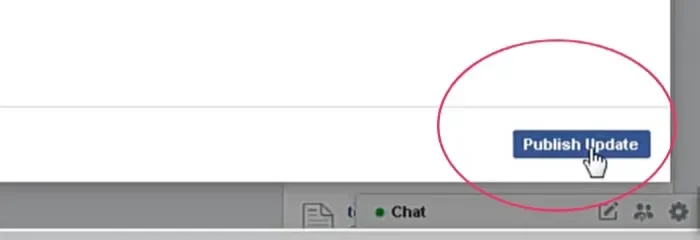
The edit is performed while acting as Sarah's Page.
Step 4: read the version history
Open the version history of the document. It contains the name of Sarah.
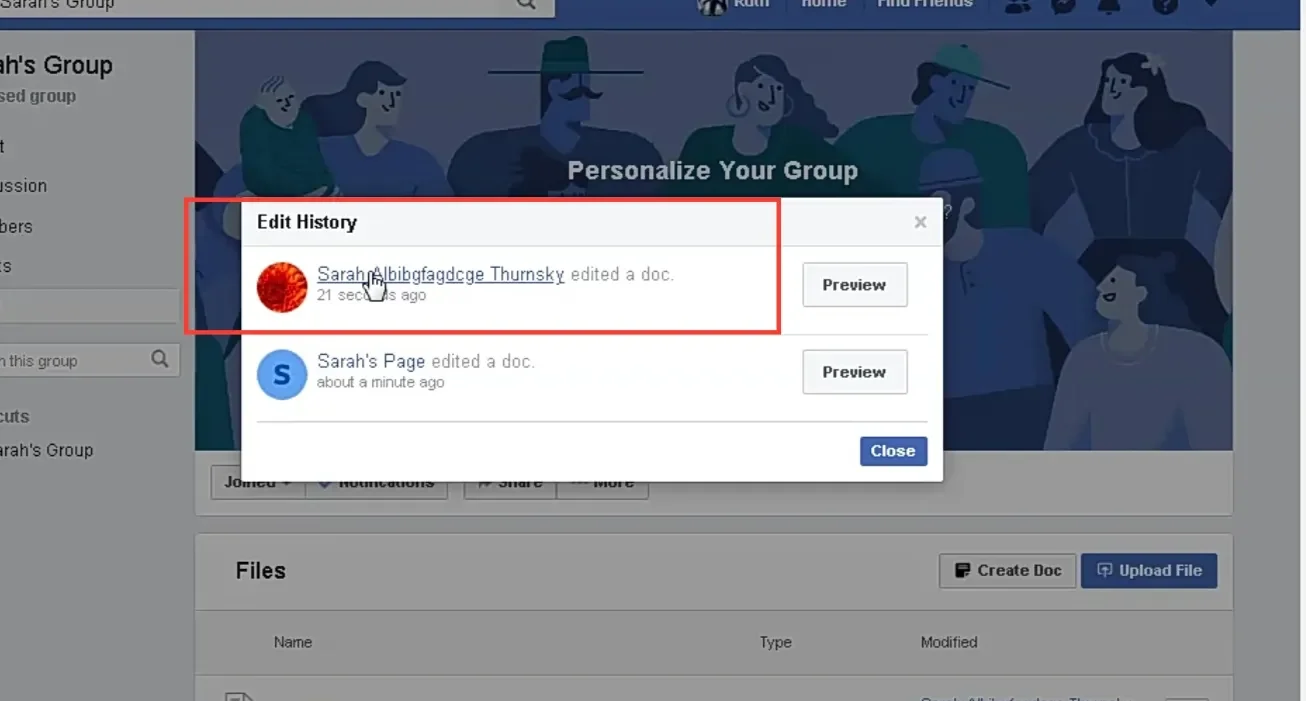
The history attributes the edit to the personal account rather than to the Page. Combined with the restriction from step 2, this tells any group member who looks at the history that the person named there is an owner or admin of the document, and therefore an admin of the group.
Root cause
The version history showed the name of Sarah rather than the Page. The permission model and the audit trail disagreed about who the actor was: the permission check treated the Page as the editor, while the history stored the human behind it.
The existing defence, the "Allow group members to edit this document" restriction, did not help. It correctly limited editing to owners and admins, but that restriction is precisely what turns the leaked name into an identity disclosure: it narrows the candidate set to the group's administrators. The report does not describe the server-side implementation, so the exact place where the wrong identity was written is not stated.
Impact
A group member could learn the personal identity of the admin of a Page that administers the group, in a setup where the admin deliberately kept that link hidden. The disclosure requires the admin to create a document through the "Create doc" button while acting as the Page, to restrict editing to owners and admins, and to edit the document; any member able to view the document's version history can then read the name. The report frames the outcome as an accidental identity disclosure rather than as a route to account takeover or data access.
Fix
Facebook fixed the issue for the "Create doc" button in the post editor. While checking the fix, the researcher found another similar button on the "Files" page that was also vulnerable, and reported it. During verification of that second fix, the team internally identified a third vector that could also be abused. The report states that the issue was fixed completely on 9 February 2019 and that the 5000 USD reward covers all three vulnerabilities.
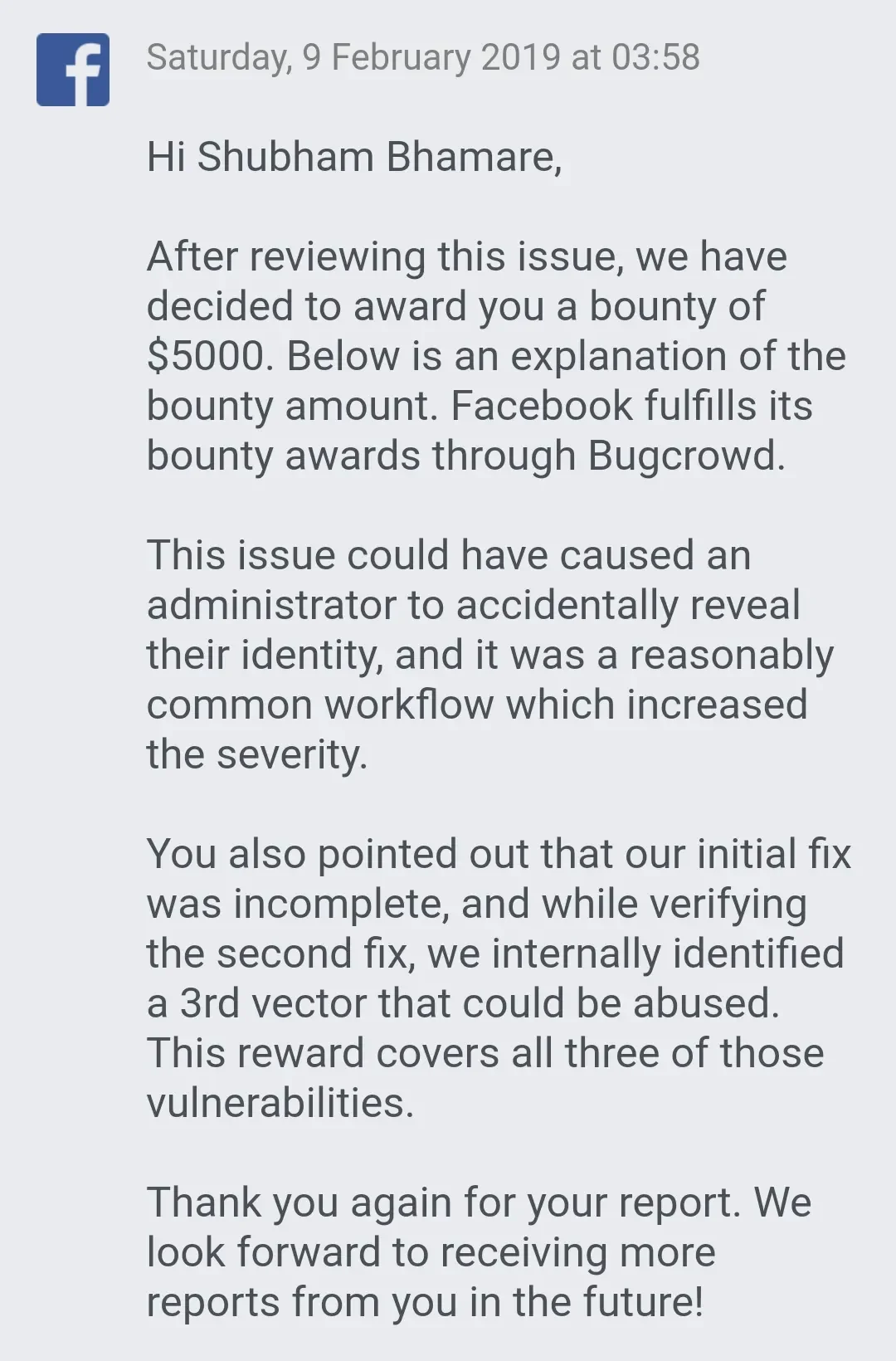
The image accompanies the bounty section of the write-up.
Variants to test
- Look for other entry points that create the same object. The report itself found a second "Create doc" button on the "Files" page after the first one was fixed. A positive result is a similar document-creation button that is also vulnerable.
- A positive result is a personal name where the Page identity should appear.
- A positive result is a permission setting that narrows the editor set to admins while the history still names the underlying user.
- When a fix is announced, retest the original path and then look for parallel paths to the same functionality, as happened here. A positive result is any remaining path that still records the personal account.
The researcher's own takeaway is to hold findings until you are confident there is no bypass, and to check other endpoints and features for the same issue.
What happened, in plain words
Facebook Groups are places where people gather around a topic. Inside a group, members can write posts, share links, and also create documents: longer pieces of text that live in the group, a bit like a shared note that everyone in the group can open. The button that starts this is called "Create doc" and it sits in the post editor, the box where you normally type a post.
When you create a document, you can choose who is allowed to edit it. One of the options is "Allow group members to edit this document". If you untick it, only the document owners or the group admins can edit it.
Documents also keep a version history. Think of it like the "track changes" or "see revision history" feature in a word processor: every time someone saves an edit, the document remembers that an edit happened and who made it.
Facebook Pages are a different kind of identity from a personal profile. A Page is what a business, a brand or a public figure uses. A real person (the admin) manages the Page, and can act "as the Page" so that posts and actions appear under the Page's name, not the person's name. Many Page admins want this separation: they run a Page without revealing which human is behind it.
The bug in this write-up is a small mismatch between those two ideas. When the admin acted as the Page and edited a document, the edit itself was done as the Page, but the version history recorded the name of the real person behind the Page. So a group member who looked at the history could learn who the admin really was, even though the admin had deliberately kept that hidden.
This is called an information disclosure: the software reveals a piece of information (here, a person's identity) that it was not supposed to reveal. It is not a break-in and it does not give anyone extra access. It is a leak of a fact.
The researcher who found it is Shubham Bhamare. He reported it on 13 October 2018, and Facebook awarded a 5000 USD bounty on 9 February 2019. A bounty is a reward a company pays to someone who reports a security problem responsibly instead of abusing it.
The setup: one person, two identities
To understand the bug you need to picture the scenario the report uses. It involves one real person and two Facebook identities:
- A Facebook user, Sarah, is the admin of Sarah's Page.
- Sarah's Page is linked to Sarah's Group.
- Sarah has not made her personal account an admin of the group, because she does not want to disclose her identity.
- The group therefore has exactly one admin, Sarah's Page. Sarah's personal account is only a member of the group and always acts as the Page.
The image shows the group membership arrangement: the Page is the sole admin, and the personal account is an ordinary member.
Why does this matter? Because the whole point of the setup is that Sarah wants her personal name to stay out of the group. If the group's only admin is the Page, then anyone who can work out which human runs that Page has learned something Sarah chose not to share. The bug is what makes that possible.
No special tools are involved. Everything was done in the normal Facebook website in a browser, while acting as the Page. You do not need to install anything or write any code to follow along.
Finding it: the reasoning
The researcher did not use a scanner or an exploit tool. He used logic, starting from two facts that anyone in the group can see.
Fact one: the editing rule. The document editor tells you that when "Allow group members to edit this document" is unticked, only the document owners or admins can edit the document. That rule is visible to everyone. So if you see that a document has this restriction on, and you notice that some member is able to edit it, then that member must be an owner or an admin. The restriction turns "can edit" into a label that says "is an admin".
Fact two: the version history. The history attaches a name to each edit. Normally you would expect that name to be the Page, because the edit was made as the Page.
Put the two facts together. A member edits a document that ordinary members are not allowed to edit. The history shows a personal name. Therefore the person with that personal name is an owner or admin of the document, and since the group's only admin is the Page, that person is the human behind the Page. The name in the edit history was not intended to be there, and that is what made the behaviour a bug rather than expected design.
A useful everyday comparison: imagine a club where only committee members are allowed to sign the visitors' book. If you see an unsigned entry in the book, you still do not know who wrote it. But if the book also prints the writer's home address next to every entry, then the rule "only committee members may sign" plus the printed address tells you exactly which committee member was there. Neither fact is a secret on its own; together they reveal something that was meant to stay private.
Exploitation: the four steps
Step 1: create the document as the Page
Using the Facebook web, acting as Sarah's Page, create a document in Sarah's Group with the "Create doc" button.
The button sits in the post editor. If Sarah created the document as her personal account, there would be nothing surprising about her name appearing in the history.
Step 2: restrict editing to owners and admins
Before publishing the document, uncheck the option "Allow group members to edit this document", so that only the document owners or admins can edit it.
This is the precondition that makes the later disclosure meaningful. After this change, the set of people who can edit the document is exactly the set of owners and admins. Without this step, any member could edit the document, so seeing a name in the history would not tell you anything about who is an admin. With this step, the ability to edit becomes a badge that says "admin", and the history supplies the name to pin on that badge.
Step 3: edit and save as the Page
Now, still acting as Sarah's Page, edit and save the document.
The edit is performed while acting as Sarah's Page. From Sarah's point of view, she is simply doing what a Page admin does: making a small change to a document and saving it. She has no reason to expect her personal name to be recorded anywhere.
Step 4: read the version history
Open the version history of the document. It contains the name of Sarah.
The history attributes the edit to the personal account rather than to the Page. Combined with the restriction from step 2, this tells any group member who looks at the history that the person named there is an owner or admin of the document, and therefore an admin of the group.
Why it happened
The version history showed the name of Sarah rather than the Page. The permission model and the audit trail disagreed about who the actor was: the permission check treated the Page as the editor, while the history stored the human behind it.
Two terms are worth unpacking here. The permission model is the set of rules that decides who is allowed to do what: here, who may edit the document. The audit trail is the record of what was done and by whom: here, the version history. In a well-built system these two should agree. In this case they did not, and the gap between them is the bug.
The existing defence, the "Allow group members to edit this document" restriction, did not help. It correctly limited editing to owners and admins, but that restriction is precisely what turns the leaked name into an identity disclosure: it narrows the candidate set to the group's administrators. A defence that is supposed to protect the document ended up sharpening the leak.
The report does not describe the server-side implementation, so the exact place where the wrong identity was written is not stated. We know the effect, not the line of code that caused it.
Who is affected, and how bad it is
A group member could learn the personal identity of the admin of a Page that administers the group, in a setup where the admin deliberately kept that link hidden. That is the impact: a privacy leak, not a break-in.
A few conditions have to line up for the leak to happen:
- The admin must create a document through the "Create doc" button while acting as the Page.
- The admin must restrict editing to owners and admins.
- The admin must then edit the document.
- Any member able to view the document's version history can then read the name.
The report frames the outcome as an accidental identity disclosure rather than as a route to account takeover or data access. In plain terms: nobody gains control of the Page or the group. But for someone who runs an anonymous Page, having their real name attached to it can matter a great deal.
The fix, and the two extra paths
Facebook fixed the issue for the "Create doc" button in the post editor. While checking the fix, the researcher found another similar button on the "Files" page that was also vulnerable, and reported it. During verification of that second fix, the team internally identified a third vector that could also be abused.
A vector here simply means a way in: another button or page that leads to the same underlying behaviour. The lesson is that fixing one button does not necessarily fix the feature. If the same document-creation code is reachable from more than one place in the interface, each place has to be checked.
The report states that the issue was fixed completely on 9 February 2019 and that the 5000 USD reward covers all three vulnerabilities.
The image accompanies the bounty section of the write-up.
Timeline
The report gives these dates:
| Date | Event |
|---|---|
| Oct 13, 2018 | Report sent |
| Oct 17, 2018 | Pre-triaged |
| Oct 17, 2018 | Triaged |
| Oct 17, 2018 | Sent additional information about another vulnerable "Create doc" button |
| Feb 09, 2019 | Fixed completely |
| Feb 09, 2019 | 5000 USD bounty awarded |
Triaged means the company's security team looked at the report and accepted it as a real issue worth working on. Pre-triaged is the earlier check before that acceptance. Notice that the extra button was reported on the same day the report was triaged, and that the complete fix came about four months later.
What to take away
The researcher's own advice, in his words:
- Don't reveal your findings until you fully believe that there won't be any bypass for it. Check other endpoints/features too for similar issues.
- Sometimes you just need logical thinking instead of any advanced tools or knowledge. Because Logic == Magic.
- Again, if you're new to Facebook bug bounty, try to find logical bugs the most.
In plain words: an endpoint is one specific address or feature in a web application that does something when you interact with it, for example the button that creates a document. A bypass is a way around a fix: the company patches one path, and the same problem remains reachable through another. That is why the advice is to check other endpoints and features for similar issues.
And the broader point: this bug needed no special software. It needed someone to notice that two visible facts, the editing restriction and the name in the history, combined into something the product did not intend.
Glossary
- Bounty: a reward a company pays to someone who reports a security problem responsibly instead of abusing it.
- Bug: a behaviour in software that does not match what the designers intended.
- Information disclosure: a flaw that reveals information the software was not supposed to reveal, without giving the person extra access.
- Page: a public identity on Facebook used by a business, brand or public figure, managed by one or more real people called admins.
- Admin: a person who manages a Page or a group and has more permissions than an ordinary member.
- Group: a Facebook space where members gather around a topic and can post and share content.
- Document: a longer piece of text created inside a group, which members can open and, depending on settings, edit.
- Version history: the record of every saved edit to a document, including who made each edit.
- Permission model: the rules that decide who is allowed to do what.
- Audit trail: the record of what was done and by whom.
- Endpoint: one specific address or feature in a web application that performs an action when you interact with it.
- Vector: a way in; here, another button or page that leads to the same vulnerable behaviour.
- Bypass: a way around a fix, where the same problem remains reachable through a different path.
- Triaged: the state of a report after the company's security team has reviewed it and accepted it as a real issue.
- Pre-triaged: the earlier check a report goes through before it is formally accepted.
- Root cause: the underlying reason a bug exists, as opposed to its visible symptom.
- Reproduction steps: the exact sequence of actions that makes a bug happen, so that someone else can confirm it.




