Missing rate-limiting. How I was able to add any unowned phone number to my Facebook account? (Bounty: 5000 USD)
The OTP verification step for confirming a phone number lacked rate-limiting, allowing an attacker to brute-force the code and confirm any unowned phone number. This could let an attacker add someone else's phone number to their own Facebook account without the victim's knowledge.
 Published on theshubh77.medium.com
Hi guys, I’m Shubham Bhamare again. In this write-up, I’m going to tell you how I was able to add any unowned phone number to my Facebook account without the victim’s knowledge.
The full write-up lives on its author's site
It belongs to its author, so we link to it rather than copy it. The other two tabs are our own rewrites, checked against it.
Context
Facebook lets a user attach a phone number to an account, and it verifies that number by sending a one-time password (OTP) by SMS. The verification screen is meant to accept a limited number of guesses, so that an attacker cannot simply enumerate the six-digit space. This write-up is about a flow on the mobile-oriented subdomain d.facebook.com where that limit was absent, which allowed the author to confirm a phone number he did not own and attach it to his own account without the owner's knowledge.
The author notes that the main Facebook domain was not vulnerable, but that d.facebook.com was, and that m.facebook.com, x.facebook.com, mbasic.facebook.com, touch.facebook.com and iphone.facebook.com were vulnerable as well.
Setup
No special tooling is described beyond a browser and something to send many OTP guesses (the author refers to brute-forcing and to "payloads"). The preconditions are:
- A phone number that belongs to someone else and is not yet confirmed on any Facebook account.
- The ability to create a new Facebook account through
d.facebook.comusing that number. - The ability to complete a CAPTCHA and to reach the phone-confirmation checkpoint.
The author's own account, created while he was browsing meme pages, was made with a second phone number of his own that was not verified, which is how he first met the checkpoint.
Finding it
The author was not hunting at the time. He created a new Facebook account with another of his phone numbers, and because the number was not verified, Facebook blocked him and asked him to confirm the number. He asked himself why he should not brute-force there, tried it, and found that rate-limiting was missing.

Exploitation
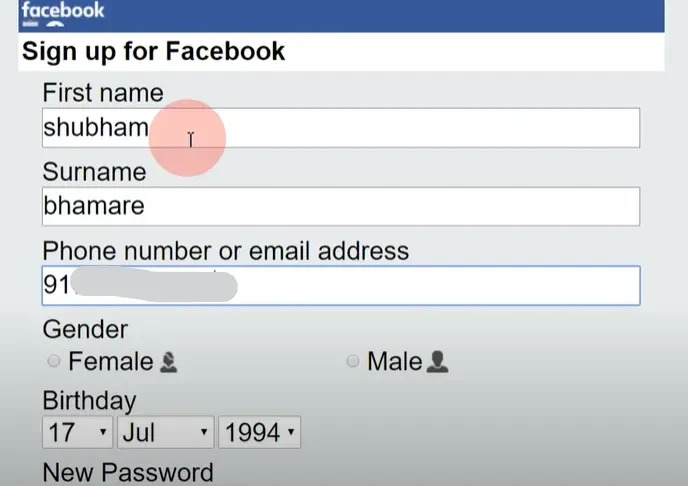
Step 1: create an account with the victim's number
Using the d.facebook.com subdomain, create a new Facebook account with the victim's phone number.
Step 2: trigger the checkpoint
After the account is created, perform suspicious activities, for example send friend requests to random people or post multiple comments, so that Facebook blocks further activity and shows the checkpoint screen.
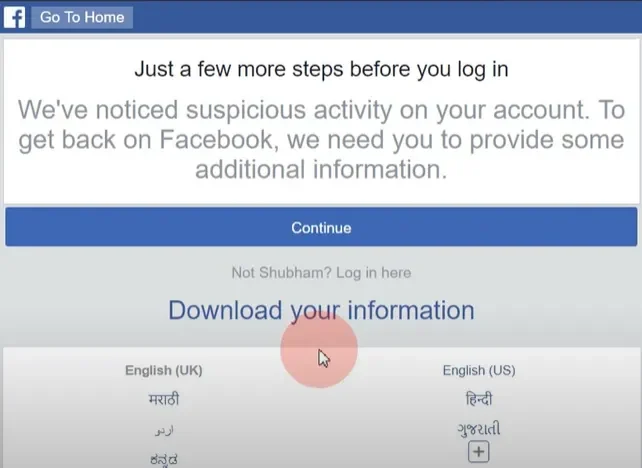
Step 3: pass the CAPTCHA
Click Continue and complete the CAPTCHA verification. You are then redirected to a screen that asks for the same phone number of the victim that was used to create the account.
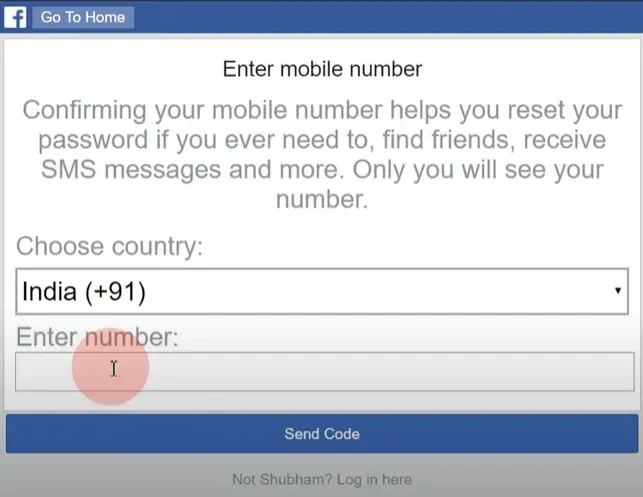
Step 4: request a code
Enter the victim's phone number and click Send Code. You are redirected to a screen that asks for the OTP.
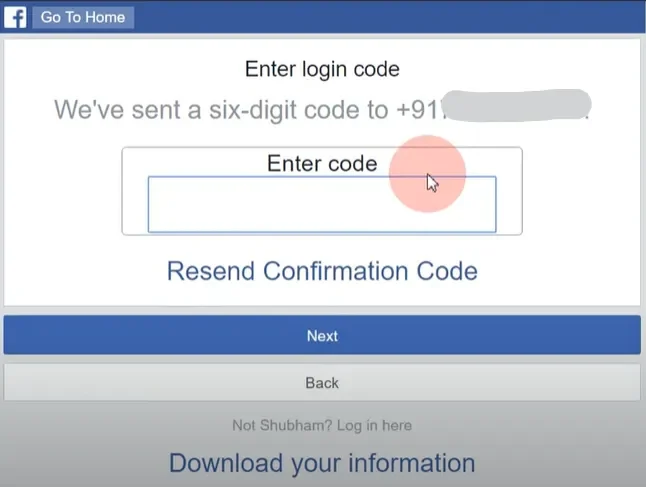
Step 5: brute-force the OTP
If you try to brute-force at this screen, you find that rate-limiting is missing, so any unowned phone number can be confirmed.
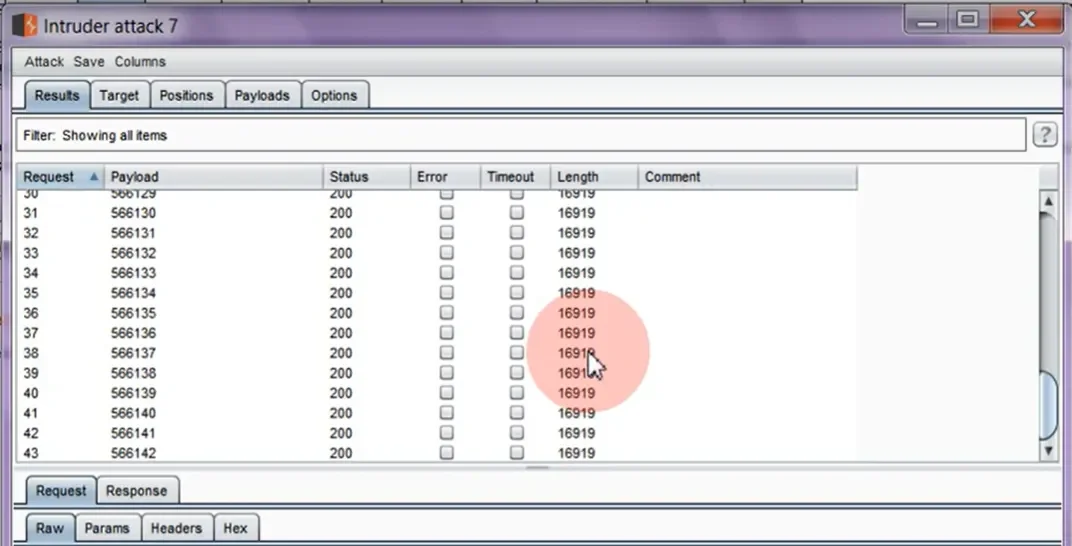
The author tested this with more than 5000 payloads. The system did not block him, and he was able to confirm the unowned phone number with a valid payload after more than 5000 requests.
He first tested the issue on the main Facebook domain, where it was not vulnerable, and then on d.facebook.com, where it was. The other subdomains listed above were also vulnerable.
Root cause
The OTP submission behind the phone-confirmation checkpoint on d.facebook.com did not enforce rate-limiting on repeated guesses. Because the OTP space is small and guesses were accepted indefinitely, an attacker who could reach the checkpoint could keep guessing until the correct code was submitted. The author tested the main domain and found it was not vulnerable.
Impact
An attacker could confirm a phone number he did not own and attach it to an account he controlled, without the owner's knowledge. The author frames this as adding any unowned phone number to his Facebook account. The attack requires the number to be reachable through the account-creation flow on the affected subdomains and requires enough requests to hit the correct OTP, which the author did in more than 5000 attempts.
Fix
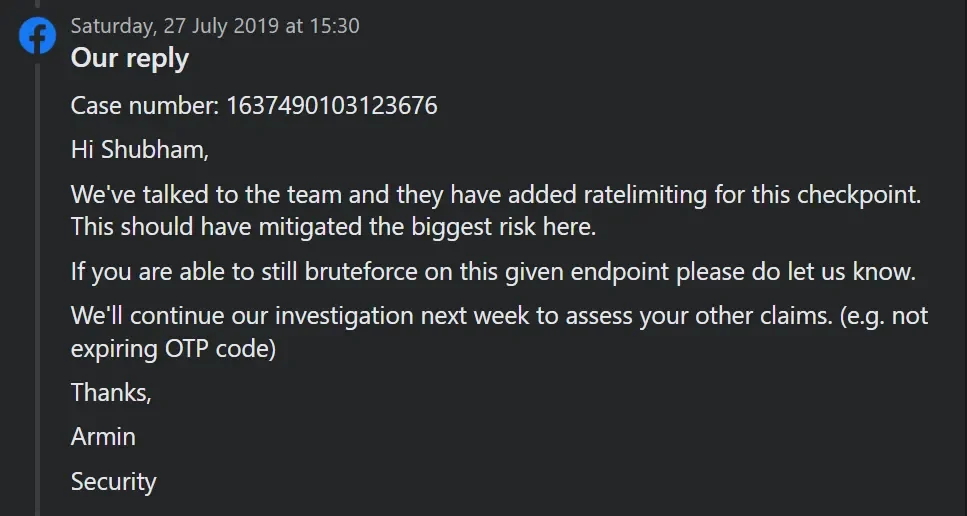
The issue was mitigated on Jul 27, 2019, and fixed completely on Aug 01, 2019. The report does not describe the code change.
Variants to test
- Repeat the flow on every mobile and lite subdomain of the target, since the author found the same weakness on
m.facebook.com,x.facebook.com,mbasic.facebook.com,touch.facebook.comandiphone.facebook.comwhile the main domain was protected. A positive result is that OTP guesses keep being accepted without a limit. - Try the same OTP screen after passing a CAPTCHA, to see whether the CAPTCHA is the only gate and the submissions behind it are unlimited. A positive result is a long run of wrong codes with no lockout.
- Try IP rotation to see whether the limit, where it exists, is keyed on the client address. The author tried this technique after reading an article on IP rotation in Burp Suite and could not bypass the issue with it.
Timeline
| Date | Event |
|---|---|
| Jul 17, 2019 | Report sent |
| Jul 22, 2019 | Pre-triaged |
| Jul 26, 2019 | Triaged |
| Jul 27, 2019 | Issue mitigated |
| Aug 01, 2019 | Fixed completely |
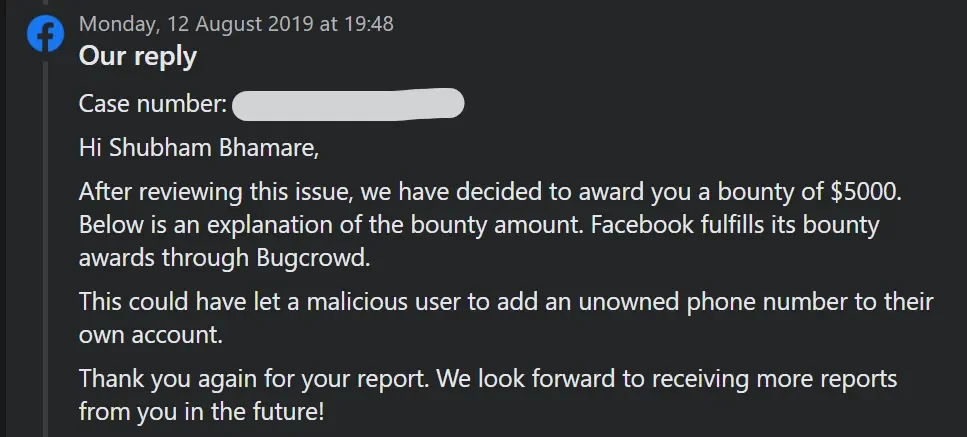
| Aug 12, 2019 | 5000 USD bounty awarded |
What happened, in plain words
Facebook lets you attach a phone number to your account. To prove the number is really yours, Facebook sends a short code to that number by text message. You then type the code into a screen on the website. This kind of short code is called a one-time password, or OTP. The idea is simple: only the person holding the phone can read the text, so only that person can type the code.
The code is short, so there are not that many possible codes. If a website lets someone keep guessing, a computer can try every possibility in a reasonable time. That is why such screens are supposed to stop you after a few wrong tries. This stopping mechanism is called rate limiting: a limit on how many attempts you may make in a given period.
In this report, the author found a phone confirmation screen on a Facebook subdomain where that limit was missing. He could keep guessing the code until he hit the right one, and so confirm a phone number that belonged to someone else and attach it to his own account, without the owner knowing.
A subdomain is a part of a website address that sits in front of the main name. Here the main site is facebook.com, and d.facebook.com is one of its subdomains. Facebook runs several of these for different kinds of devices and connection speeds. The author says the main domain was not vulnerable, but d.facebook.com was, and so were m.facebook.com, x.facebook.com, mbasic.facebook.com, touch.facebook.com and iphone.facebook.com.
The story behind it
The author was not looking for bugs at the time. He was browsing meme pages on Facebook and decided to start a meme page of his own, so he created a new Facebook account with another of his phone numbers. That number was not verified, so Facebook blocked him and asked him to confirm the number.
At that moment he asked himself why he should not just try many codes there. He tried, and found that the rate limiting was missing. That is how the whole finding started: a normal user hitting a normal screen, and wondering what happens if you push it.
What you need before you start
No special tools are described beyond a browser and something that can send many code guesses. The author talks about brute-forcing and about payloads. Brute-forcing means trying possibilities one after another until one works, like trying every key on a keyring on a locked door. A payload, in this context, is simply one guess: one code value sent to the server.
A server is the computer that runs the website and answers your browser's requests. Every time you press a button on a page, your browser sends a request to that server and the server sends back a response, usually a new page or a piece of data.
The preconditions are:
- A phone number that belongs to someone else and is not yet confirmed on any Facebook account.
- The ability to create a new Facebook account through
d.facebook.comusing that number. - The ability to complete a CAPTCHA and to reach the phone-confirmation checkpoint.
A CAPTCHA is the little puzzle with distorted letters or pictures that you sometimes have to solve. Its purpose is to prove a human is present, because computers find such puzzles hard.
Finding it
The author was not hunting at the time. He created a new Facebook account with another of his phone numbers, and because the number was not verified, Facebook blocked him and asked him to confirm the number. He asked himself why he should not brute-force there, tried it, and found that rate limiting was missing.
Exploitation, step by step
Exploitation means actually using a weakness to make something happen that should not be possible. Each step below is there for a reason, and the reason is given with it.
Step 1: create an account with the victim's number
Using the d.facebook.com subdomain, create a new Facebook account with the victim's phone number.
Why this step: the whole flow only appears when an account exists with an unverified number. The author needs an account of his own that is tied to the victim's number, because the confirmation screen will then ask him to prove that number.
Step 2: trigger the checkpoint
After the account is created, perform suspicious activities, for example send friend requests to random people or post multiple comments, so that Facebook blocks further activity and shows the checkpoint screen.
Why this step: the confirmation screen is not shown to everyone at all times. Facebook shows it when it wants to check that an account is genuine, and it decides that after seeing behaviour it considers suspicious. The author deliberately behaves like a spammer so that Facebook puts him in front of the checkpoint.
Step 3: pass the CAPTCHA
Click Continue and complete the CAPTCHA verification. You are then redirected to a screen that asks for the same phone number of the victim that was used to create the account.
Why this step: the CAPTCHA is a gate in front of the confirmation screen. You have to solve it once to get through. The author notes later that this gate does not help against the real problem, because it only controls who reaches the screen, not how many codes can be submitted once you are there.
Step 4: request a code
Enter the victim's phone number and click Send Code. You are redirected to a screen that asks for the OTP.
Why this step: this is the moment Facebook sends a text message with a code to the victim's phone. The victim receives a message they did not ask for. The author, meanwhile, is now on the screen where the code has to be typed in.
Step 5: brute-force the OTP
If you try to brute-force at this screen, you find that rate limiting is missing, so any unowned phone number can be confirmed.
Why this step: this is the actual test. A correctly built screen would refuse further guesses after a handful of wrong ones. Here it kept accepting them.
The author tested this with more than 5000 payloads. The system did not block him, and he was able to confirm the unowned phone number with a valid payload after more than 5000 requests.
He first tested the issue on the main Facebook domain, where it was not vulnerable, and then on d.facebook.com, where it was. The other subdomains listed above were also vulnerable.
Why it worked
The code submission behind the phone-confirmation checkpoint on d.facebook.com did not enforce rate-limiting on repeated guesses. Because the OTP space is small and guesses were accepted indefinitely, an attacker who could reach the checkpoint could keep guessing until the correct code was submitted.
Think of a door with a guard who checks your identity once, then lets you walk in and out as often as you like: the check at the door does nothing about what you do inside.
The author tested the main domain and found it was not vulnerable. This is a common pattern: one part of a large website is protected and another part, often an older or mobile-specific one, is forgotten.
What an attacker could do with it
An attacker could confirm a phone number he did not own and attach it to an account he controlled, without the owner's knowledge. The author frames this as adding any unowned phone number to his Facebook account.
The attack requires the number to be reachable through the account-creation flow on the affected subdomains, and it requires enough requests to hit the correct OTP, which the author did in more than 5000 attempts.
How it was fixed
The issue was mitigated on Jul 27, 2019, and fixed completely on Aug 01, 2019. The report does not describe the code change.
A lockout means the screen stops accepting guesses for a while, or asks for a new challenge, after too many failures. The important part is that the rule has to be applied everywhere, not just on the main site.
Variants to test
These are the same ideas an attacker or a tester would try on a similar target. Each one comes with what a positive result looks like.
- Repeat the flow on every mobile and lite subdomain of the target, since the author found the same weakness on
m.facebook.com,x.facebook.com,mbasic.facebook.com,touch.facebook.comandiphone.facebook.comwhile the main domain was protected. A positive result is that OTP guesses keep being accepted without a limit. - Try the same OTP screen after passing a CAPTCHA, to see whether the CAPTCHA is the only gate and the submissions behind it are unlimited. A positive result is a long run of wrong codes with no lockout.
- Try IP rotation to see whether the limit, where it exists, is keyed on the client address. The author tried this technique after reading an article on IP rotation in Burp Suite and could not bypass the issue with it.
An IP address is the number that identifies a device on a network, a bit like a postal address for a computer. IP rotation means sending each request from a different address, so that a server counting attempts per address sees many different visitors instead of one. Burp Suite is a tool that sits between your browser and the website and lets you look at and change the requests. A session is the period during which a website remembers who you are, usually by giving your browser a small piece of data to hold on to.
Timeline
| Date | Event |
|---|---|
| Jul 17, 2019 | Report sent |
| Jul 22, 2019 | Pre-triaged |
| Jul 26, 2019 | Triaged |
| Jul 27, 2019 | Issue mitigated |
| Aug 01, 2019 | Fixed completely |
| Aug 12, 2019 | 5000 USD bounty awarded |
Triaged means the security team looked at the report and accepted it as a real issue worth working on. A bounty is the money a company pays a researcher for reporting a valid security problem.
What the author took away from it
- While browsing something, even when you are not in the mood for hunting bugs, always observe whether something is working as intended or not.
- Always try to bypass the fix of every finding. Even if you cannot bypass it, you will learn something new. In his case, he learned how to rotate IPs.
Glossary
- Subdomain: a part of a website address placed in front of the main name, such as
d.facebook.comin front offacebook.com. - OTP (one-time password): a short code, usually sent by text message, that proves you hold a particular phone or device.
- Rate limiting: a rule that stops you after a certain number of attempts in a given period.
- Brute-force: trying possibilities one after another until one works.
- Payload: here, a single guess sent to the server, in this case one OTP value.
- Server: the computer that runs a website and answers requests from browsers.
- Request: a message your browser sends to a server, for example when you press a button.
- Response: what the server sends back, usually a page or a piece of data.
- CAPTCHA: a small puzzle meant to prove a human is present, because computers find it hard.
- Checkpoint: a screen Facebook shows to make you prove something about your account before you continue.
- Exploitation: actually using a weakness to make something happen that should not be possible.
- IP address: the number that identifies a device on a network.
- IP rotation: sending each request from a different IP address.
- Burp Suite: a tool that sits between your browser and a website so you can inspect and change requests.
- Session: the period during which a website remembers who you are.
- Triaged: reviewed and accepted by a security team as a real issue.
- Bounty: money paid by a company for a valid security report.
- Mitigated: a temporary fix or protection put in place.
- Lockout: refusing further attempts for a while after too many failures.



