How I found SSRF on TheFacebook.com
A Facebook-hosted endpoint fetched a user-supplied URL on the server side, allowing an attacker to make the server request arbitrary hosts. By measuring response delays, the author could tell whether an internal host was up or down, indicating a blind SSRF.

{{media:4}} |
The full write-up lives on its author's site
It belongs to its author, so we link to it rather than copy it. The other two tabs are our own rewrites, checked against it.
What the report shows
The write-up is titled "How I found SSRF on TheFacebook.com" and was published on a personal blog. It describes a server-side request forgery finding against Facebook, submitted through the program's own process. The report is very short: it names the bug class, states that reproduction steps were submitted, and then presents a sequence of screenshots. It does not name the endpoint, the parameter, the request method, any header, or the affected version of anything, and it gives no bounty amount, severity rating or fix status.
The researcher's own framing is that the interesting part was finding the domain in the first place, which is why the first section is headed "How I found this domain!". The body of that section is not present in the text; what follows is the reproduction material.
The reproduction material
The steps were submitted to Facebook as a set of images. The report presents a sequence of screenshots as the reproduction material.
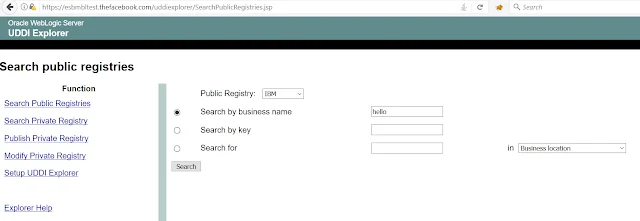
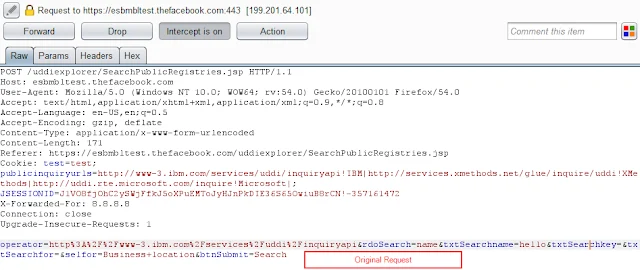
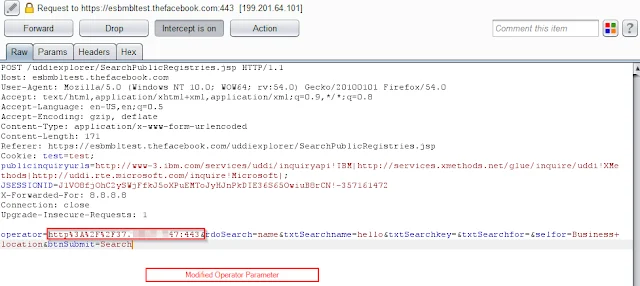
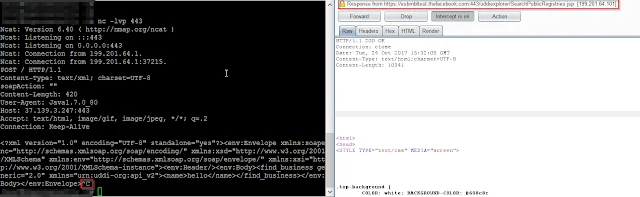
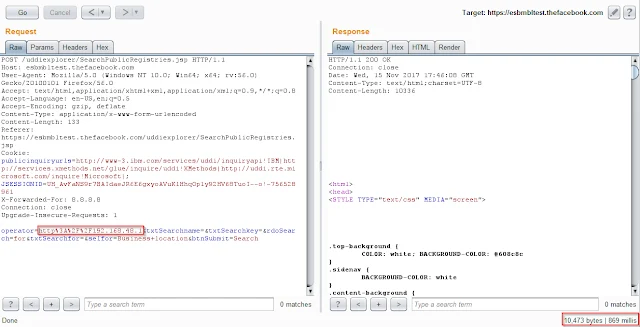
The key observation is a timing difference that depends on whether the host being requested is reachable. The report states that the time delay in response is around 800-900 milliseconds when the host is up and running.
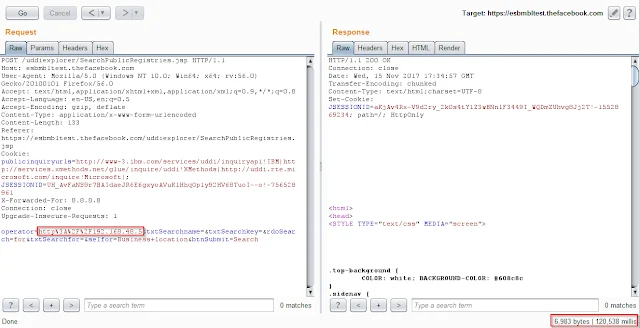
When the host is down, the same request takes far longer: the report gives 120,000 milliseconds as the delay in that case.
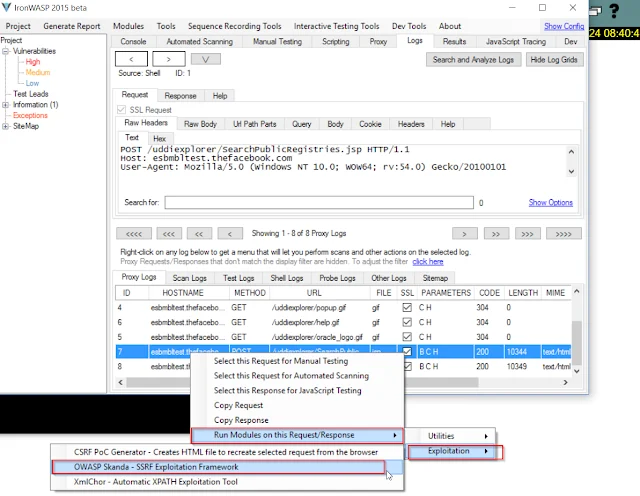
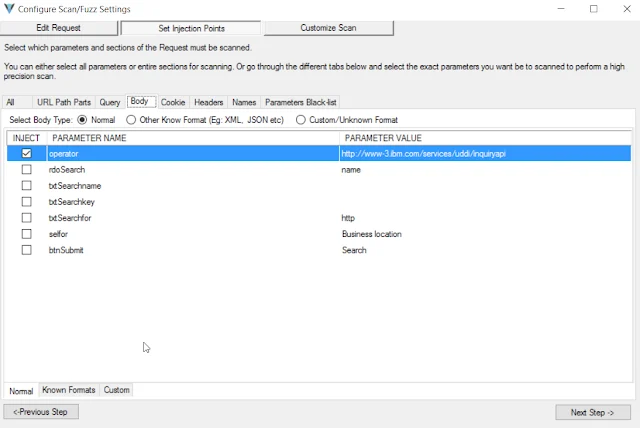
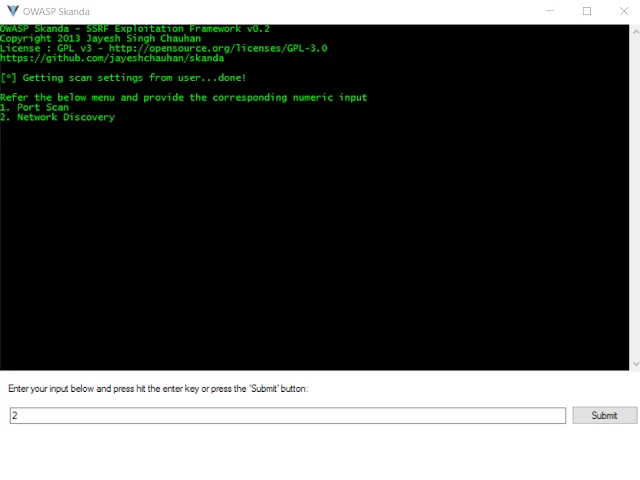
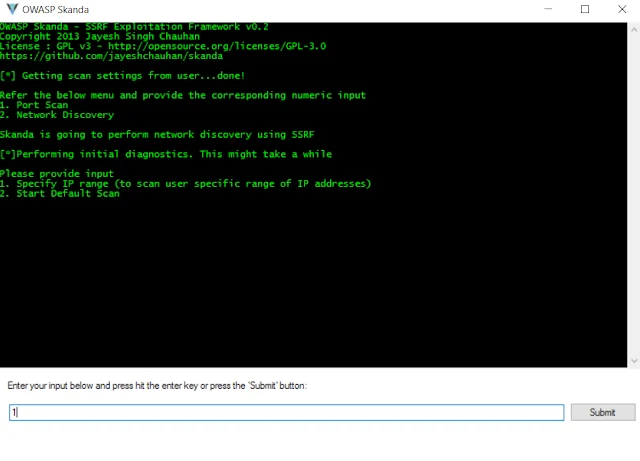
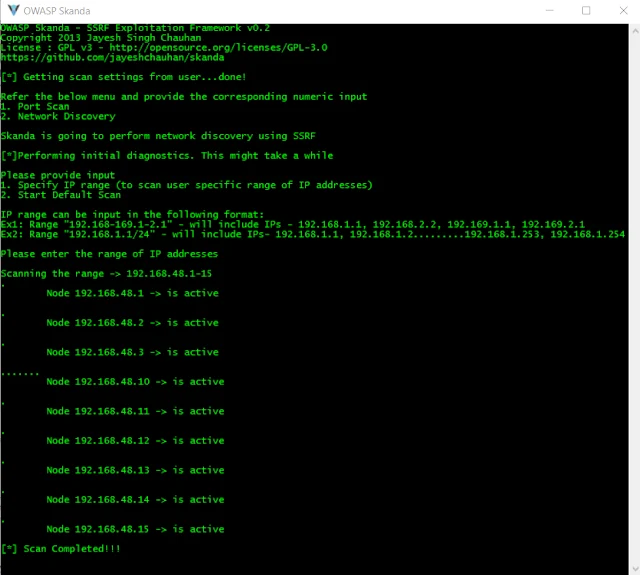
That contrast is the whole of the evidence presented. A reachable destination answers in around 800-900 milliseconds, an unreachable one takes 120,000 milliseconds.
Root cause
The report does not analyse the cause. The report does not analyse the cause; the timing difference is the only behaviour documented. The timing signal shows the server behaves differently for a host that is up and one that is down. Whether the destination was validated at all, and how, is not stated.
Impact
The report does not describe impact beyond the timing observation. In a blind SSRF of this shape, an attacker who controls the destination can confirm that the server made the connection, and can use the delay to probe which internal hosts and ports respond. The report itself claims nothing about reading internal services, reaching metadata endpoints or pivoting further, so those remain unproven here.
How this kind of bug works
SSRF arises when an application fetches a resource on behalf of the user and lets the user influence the destination. The server sits in a more privileged network position than the attacker: it can reach internal addresses, cloud metadata services, and services bound to localhost that are never exposed publicly. When the fetched content is returned to the user the bug is easy to see; when it is not, the bug is blind and has to be inferred from side channels.
The most reliable side channel is time. A connection to a live host completes or is refused quickly, while a packet to a filtered or non-existent address waits for a timeout. Differences of hundreds of milliseconds against tens of seconds are usually clear enough to measure. Other side channels include error messages that differ by destination, DNS lookups arriving at a collaborator domain, and subtle differences in response length or status code.
Defences work at several layers: allowlisting the destinations an outbound fetch may reach, resolving the hostname and rejecting private, loopback and link-local ranges after resolution (and re-checking after redirects), disabling unnecessary URL schemes, isolating the fetching component in a network segment that cannot reach sensitive services, and requiring metadata services to use session-oriented access that a plain fetch cannot satisfy.
How to test for it
- Find features where the server fetches something: URL previews, image or avatar import, webhooks, PDF and screenshot generators, RSS or feed importers, translation and archive features, and any parameter that looks like a URL, host, path or port.
- Establish a baseline. Send the request with a destination you control and record the response time and body.
- Point the parameter at a host you control that is listening, then at one that is not. Compare the timings. A consistent gap between a fast live host and a slow dead one is the signal.
- Use a collaborator or your own DNS to confirm the server actually resolved and connected, rather than a proxy or cache answering.
- Sweep internal ranges and common ports, measuring time per attempt, to map what responds. Keep the request rate low.
- Try redirects from your own server to internal addresses, and alternative representations of addresses (decimal, octal, IPv6 forms) if a filter appears to be in place.
A positive result is a repeatable timing or callback difference tied to the destination you supplied. Common false positives are your own network latency, caching layers that answer without the origin, WAF or proxy behaviour that varies by hostname, and DNS resolution failures that look like timeouts. Repeat each measurement several times before concluding anything.
How it is fixed
Allowlist destinations where the feature permits it. Otherwise resolve the hostname first and block private, loopback, link-local and reserved ranges, then re-validate after every redirect. Restrict schemes to HTTP and HTTPS, disable unnecessary redirect following, and apply short connect and read timeouts so timing differences shrink. Run the fetcher in a segmented network with no route to internal management planes, and prefer metadata access methods that require a session token the fetcher does not hold.
Hunting notes
Blind SSRF hides in features that were built for convenience: link unfurling in chat and comments, import-from-URL flows, integrations that call customer endpoints, and anything that renders a remote resource server-side. Recon signals include parameters named after URLs, hosts or ports, endpoints that accept a callback address, and features that produce a preview or thumbnail. Because the response often carries no content, the report has to lean on a clean, repeatable measurement: show the same request against a live host and a dead one, several times, with the timings, and show the callback arriving at your own infrastructure. That evidence is what turns a timing curiosity into an accepted finding.
What happened, in plain words
This is a short write-up titled "How I found SSRF on TheFacebook.com", published on a personal blog. It describes a server-side request forgery (SSRF) finding against Facebook, submitted through the program's own process. The report is brief: it names the bug class, says that reproduction steps were submitted, and then shows a sequence of screenshots. It does not name the endpoint, the parameter, the request method, any header, or any version, and it gives no bounty amount, severity rating or fix status.
The researcher's own framing is that the interesting part was finding the domain in the first place, which is why the first section is headed "How I found this domain!". The body of that section is not present in the text; what follows is the reproduction material.
The reproduction material
The steps were submitted to Facebook as a set of images. The report presents a sequence of screenshots as the reproduction material.
The key observation is a timing difference that depends on whether the host being requested is reachable. The report states that the time delay in response is around 800-900 milliseconds when the host is up and running.
When the host is down, the same request takes far longer: the report gives 120,000 milliseconds as the delay in that case.
That contrast is the whole of the evidence presented. A reachable destination answers in around 800-900 milliseconds, an unreachable one takes 120,000 milliseconds.
In general, how this kind of bug works
SSRF arises when an application fetches a resource on behalf of the user and lets the user influence the destination. Think of a hotel concierge who will call any number you write on a slip of paper: you are not allowed into the back office, but the concierge is, and you can ask them to dial a number that only works from inside the building. The server sits in a more privileged network position than the attacker: it can reach internal addresses, cloud metadata services, and services bound to localhost that are never exposed publicly. When the fetched content is returned to the user the bug is easy to see; when it is not, the bug is blind and has to be inferred from side channels.
The most reliable side channel is time. A connection to a live host completes or is refused quickly, while a packet to a filtered or non-existent address waits for a timeout. Differences of hundreds of milliseconds against tens of seconds are usually clear enough to measure. Other side channels include error messages that differ by destination, DNS lookups arriving at a collaborator domain, and subtle differences in response length or status code.
Defences work at several layers: allowlisting the destinations an outbound fetch may reach, resolving the hostname and rejecting private, loopback and link-local ranges after resolution (and re-checking after redirects), disabling unnecessary URL schemes, isolating the fetching component in a network segment that cannot reach sensitive services, and requiring metadata services to use session-oriented access that a plain fetch cannot satisfy.
How to test for it
- Find features where the server fetches something: URL previews, image or avatar import, webhooks, PDF and screenshot generators, RSS or feed importers, translation and archive features, and any parameter that looks like a URL, host, path or port.
- Establish a baseline. Send the request with a destination you control and record the response time and body.
- Point the parameter at a host you control that is listening, then at one that is not. Compare the timings. A consistent gap between a fast live host and a slow dead one is the signal.
- Use a collaborator or your own DNS to confirm the server actually resolved and connected, rather than a proxy or cache answering.
- Sweep internal ranges and common ports, measuring time per attempt, to map what responds. Keep the request rate low.
- Try redirects from your own server to internal addresses, and alternative representations of addresses (decimal, octal, IPv6 forms) if a filter appears to be in place.
A positive result is a repeatable timing or callback difference tied to the destination you supplied. Common false positives are your own network latency, caching layers that answer without the origin, WAF or proxy behaviour that varies by hostname, and DNS resolution failures that look like timeouts. Repeat each measurement several times before concluding anything.
How it is fixed
Allowlist destinations where the feature permits it. Otherwise resolve the hostname first and block private, loopback, link-local and reserved ranges, then re-validate after every redirect. Restrict schemes to HTTP and HTTPS, disable unnecessary redirect following, and apply short connect and read timeouts so timing differences shrink. Run the fetcher in a segmented network with no route to internal management planes, and prefer metadata access methods that require a session token the fetcher does not hold.
Hunting notes
Blind SSRF hides in features that were built for convenience: link unfurling in chat and comments, import-from-URL flows, integrations that call customer endpoints, and anything that renders a remote resource server-side. Recon signals include parameters named after URLs, hosts or ports, endpoints that accept a callback address, and features that produce a preview or thumbnail. Because the response often carries no content, the report has to lean on a clean, repeatable measurement: show the same request against a live host and a dead one, several times, with the timings, and show the callback arriving at your own infrastructure. That evidence is what turns a timing curiosity into an accepted finding.
Glossary
- SSRF (server-side request forgery): a bug where an attacker can make a server send a request to a destination the attacker chooses.
- Blind SSRF: an SSRF where the response content is not returned to the attacker, so the result has to be inferred indirectly.
- Endpoint: a specific URL or address on a server that accepts requests.
- Parameter: a named value sent with a request, such as a URL or host name the feature acts on.
- Request: a message a browser or program sends to a server asking it to do something.
- Response: the message a server sends back after a request.
- Header: extra information attached to a request or response, such as the content type.
- Host: a machine on a network, identified by a name or address.
- Port: a numbered channel on a host that a particular service listens on.
- Localhost: the machine itself, reachable from the server without going over the network.
- Loopback range: addresses that always point back to the same machine.
- Link-local range: addresses used only on the local network segment.
- Private range: addresses reserved for internal networks and not routable on the public internet.
- Cloud metadata service: an internal service that cloud instances can query for configuration and credentials.
- Side channel: an indirect signal, such as timing or error text, that reveals something about a request.
- Timeout: the point at which a program stops waiting for a connection or response.
- Millisecond: one thousandth of a second.
- DNS: the system that turns host names into IP addresses.
- Collaborator domain: a domain you control that records when something looks it up or connects to it.
- Allowlist: a list of destinations that are explicitly permitted, with everything else blocked.
- Redirect: a response that tells the client to go to a different address.
- URL scheme: the prefix of a URL, such as http or https, that says how to fetch it.
- WAF (web application firewall): a filter that inspects traffic and blocks requests it considers malicious.
- Proxy: an intermediary that forwards requests on behalf of a client.
- Cache: a store that keeps a copy of a response so it can be served again without asking the origin.
- False positive: a result that looks like a bug but is caused by something else.
- Recon: the early stage of looking for possible targets and weak points.
- Webhook: a callback that one service sends to a URL you supply when an event happens.
- Link unfurling: a feature that fetches a URL to build a preview of it.
- Session token: a value that proves a caller is authorised, which a plain fetch does not have.




