How I hacked Facebook: Part One
A password reset endpoint accepted a new password for arbitrary email addresses without proper verification, allowing an attacker to change any user's password. The attacker could then log in as that user, potentially including Facebook workers.
 Published on infosecwriteups.com
I never found a vulnerability on one of Facebook subdomains, and I took a look at some writeups and I saw one writeup in one of Facebook subdomains which got all my attention It was a great write up you can check it out (HTML to PDF converter bug leads to RCE in Facebook server.)
The full write-up lives on its author's site
It belongs to its author, so we link to it rather than copy it. The other two tabs are our own rewrites, checked against it.
Context
The target was https://legal.tapprd.thefacebook.com, a Facebook subdomain. The researcher's stated goal was RCE or something similar, and the write-up describes the application as large, with many directories and services behind it. The feature that mattered in the end was the login flow: the application redirects users into a Login SSO, and the login page exposes a password reset path. Facebook workers logged in to this application with their workplace accounts, which the researcher says means they were using their Facebook account access token.
Setup
The researcher had just finished the OSWE certification (exam on 8 August) and started looking at Facebook subdomains in mid-September. Before this target he had never found a vulnerability on a Facebook subdomain. He read a public write-up about an HTML to PDF converter bug leading to RCE on a Facebook server, which shaped his expectations about how many vulnerabilities a large web app can hold. No specific tool versions are given. The tools used were fuzzing tools for directory and endpoint discovery, Burp Suite (manual requests and Intruder), and Python for the final exploit script.
Finding it
Directory fuzzing returned a set of paths answering with 403:
Dirs found with a 403 response:/tapprd//tapprd/content//tapprd/services//tapprd/Content//tapprd/api//tapprd/Services//tapprd/temp//tapprd/logs//tapprd/logs/portal//tapprd/logs/api//tapprd/certificates//tapprd/logs/auth//tapprd/logs/Portal//tapprd/API//tapprd/webroot//tapprd/logs/API//tapprd/certificates/sso//tapprd/callback//tapprd/logs/callback//tapprd/Webroot//tapprd/certificates/dkim//tapprd/SERVICES/
Reading the JavaScript files showed how the site works and which methods it uses. The researcher found a way to bypass the redirection into the Login SSO at:
https://legal.tapprd.thefacebook.com/tapprd/portal/authentication/login
Analysing the login page revealed this endpoint:
/tapprd/auth/identity/user/forgotpassword
Fuzzing the user endpoint turned up another one, /savepassword, which expected a POST request. The JavaScript showed that the page should send a generated token and an XSRF token. The first manual attempt in Burp Suite, changing the password by hand, returned an error: execution this operation failed. The researcher suspected the email was wrong, so he built a list of random emails as a wordlist and ran Intruder against the endpoint.
Exploitation
Step 1: Brute the reset endpoint with Intruder
Requests were sent with a CSRF token and random emails plus a new password to /savepassword. Most results returned the same error, but one returned a 302 redirect to the login page.
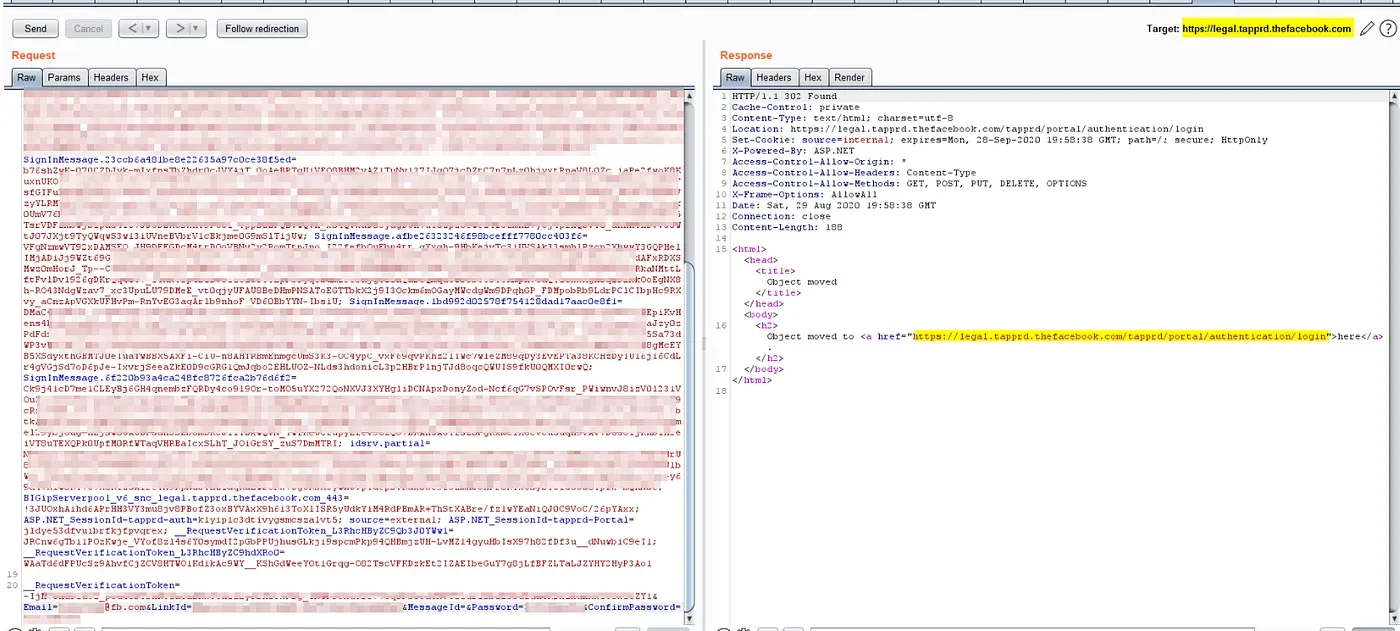
The screenshot shows the Intruder results where one request stands out with a 302 redirect instead of the error response.
Step 2: Log in with the changed password
The researcher went to the login page, entered the email that had produced the 302 together with the new password, and logged in successfully, reaching the admin panel.
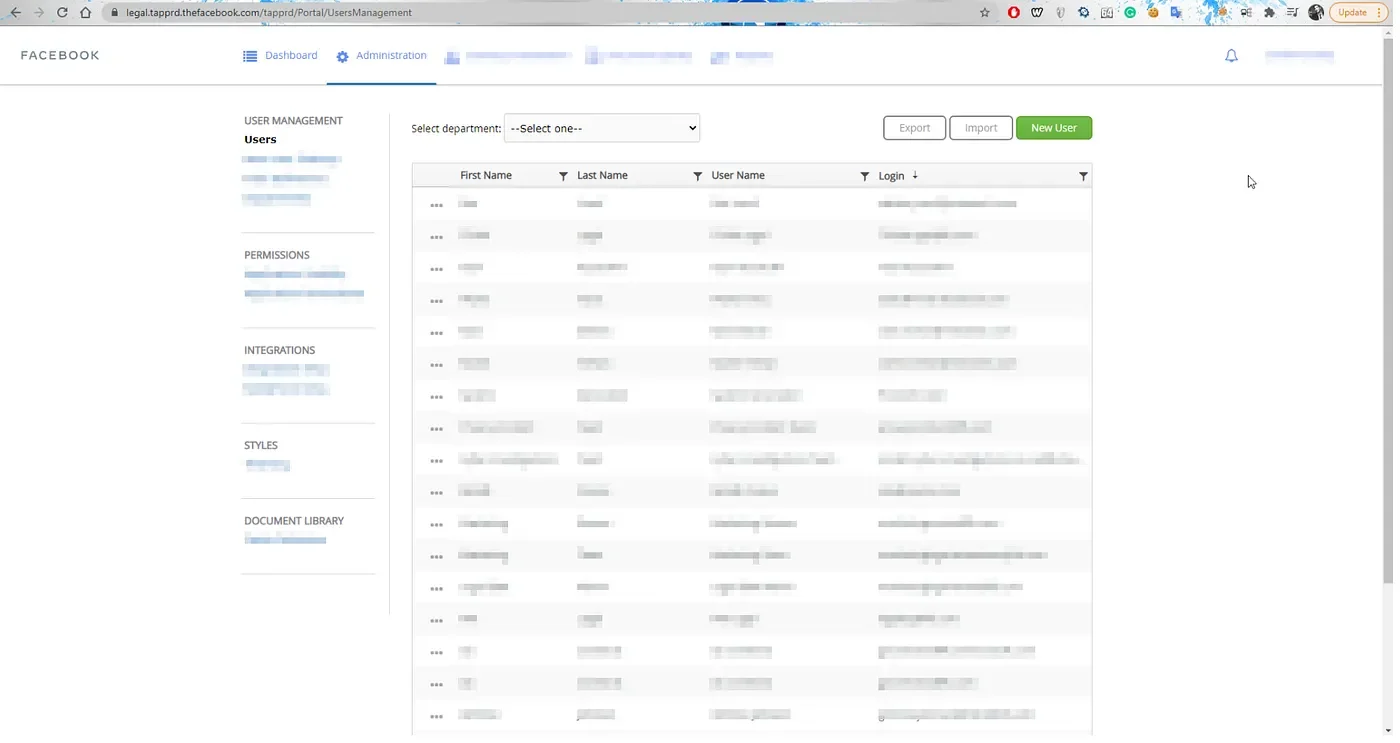
The screenshot shows the successful login into the application and access to the admin panel.
Step 3: Automate it
A short Python script was written to exploit the issue: give it the email and the new password, and it changes the password.

The screenshot shows the Python script used to perform the password change.
Root cause
The /savepassword endpoint accepted a POST with an email and a new password, and for one email in the Intruder run it returned a 302 redirect instead of the error. The page's JavaScript indicated that a generated token and an XSRF token were expected. The 302 redirect on a single email in the Intruder run is the signal that the request succeeded for that account, while other emails produced the execution this operation failed error. The report does not describe the server-side check that was missing.
Impact
The researcher rated the impact high because Facebook workers logged in to this application with their workplace accounts, which he says means they used their Facebook account access token. The researcher argued that an attacker who could change a worker's password might potentially gain access to some Facebook workers' accounts. The researcher frames this as a possibility ("maybe", "might"), not as a demonstrated account takeover of a named account. The report does not state how many accounts were affected or which account the 302 belonged to.
Fix
Variants to test
- Fuzz sibling endpoints of a password reset path (for example, paths next to
/forgotpasswordunder the same user API) and look for ones that accept POST. A positive result is an endpoint that returns a different status (such as a 302) for a valid account than for invalid ones. - Send the reset request without a session cookie and without the XSRF token. A positive result is a success response rather than an authentication or token error.
- Run an Intruder-style sweep over candidate emails against the reset endpoint and compare response codes and lengths. A positive result is a single outlier status (302 versus an error page) that identifies a real account.
- After a successful reset, log in with the new password from a clean browser session. A positive result is a session that reaches privileged pages such as an admin panel.
- Check whether the endpoint accepts the email as a parameter that can be swapped independently of the authenticated user. A positive result is a password change applied to an account other than the caller's.
Timeline
The vulnerability was reported and the report was triaged. On 2 October the researcher received a bounty of 7500 USD. The write-up was published on 11 December 2020. Two more vulnerabilities were found on the same application and are left for a Part Two write-up.
What happened, in plain words
A security researcher spent some free time during the pandemic working on Facebook's bug bounty programme. A bug bounty programme is a deal offered by a company: if you find a security problem in their systems and report it privately, they pay you a reward instead of punishing you. The researcher's goal was to find a serious flaw on a Facebook-owned website, ideally one that would let an attacker run their own code on the server (that is what "RCE", remote code execution, means).
What he actually found was simpler but still serious. A Facebook website used by workers had a password reset page. The site had an endpoint, /savepassword, that expected a POST request. Sending it a list of guessed email addresses produced one request that returned a 302 redirect instead of the error. By sending it a list of random email addresses, one request returned a 302 redirect, and he could then log in with that email and the new password. Because Facebook workers signed in to this site with their workplace accounts, which the researcher says means they used their Facebook account access token, he argued an attacker might potentially reach workers' accounts.
He reported it, the report was triaged (a Facebook security team member confirmed it was a real issue worth investigating), and on 2 October he received a bounty of 7500 USD. The write-up was published on 11 December 2020, and he later found two more issues on the same application, saved for a Part Two.
Background and setup
The researcher had just finished the OSWE certification, an exam he took on 8 August. OSWE is a hands-on certification about finding and exploiting bugs in web applications, so it gave him a good mental model of how web apps are built and where they tend to break. After a couple of weeks of rest, in mid-September he decided to try to get his name into the Facebook hall of fame for 2020, as he had done in previous years. The hall of fame is a public list of researchers who have reported valid issues.
He had never found a vulnerability on a Facebook subdomain before. A subdomain is a site that belongs to a larger domain: legal.tapprd.thefacebook.com is a subdomain of thefacebook.com. To get ideas, he read public write-ups by other researchers. One in particular caught his attention: a write-up about an HTML to PDF converter bug that led to RCE on a Facebook server. Reading it gave him a sense of how many vulnerabilities a very large web application can contain.
His main target was:
https://legal.tapprd.thefacebook.com
This is a URL: the address a browser uses to reach a page. https:// means the connection is encrypted. legal.tapprd.thefacebook.com is the host name of the server. His goal on this target was RCE or something similar.
He ran fuzzing tools against the site. Fuzzing means sending many automatically generated requests, usually from a wordlist of common names, to discover pages and features that are not linked from the visible site. Then he took a two-hour nap and watched a movie while the tools ran, and came back to the results.
Finding the interesting paths
The fuzzing produced a set of directories that answered with HTTP status 403. HTTP is the language browsers and servers use to talk; every response carries a status code. 200 means "here is the page", 404 means "not found", and 403 means "forbidden": the server understood the request but refuses to show you that path. A 403 is interesting because it proves something exists there, even if you cannot see it yet.
Dirs found with a 403 response:/tapprd//tapprd/content//tapprd/services//tapprd/Content//tapprd/api//tapprd/Services//tapprd/temp//tapprd/logs//tapprd/logs/portal//tapprd/logs/api//tapprd/certificates//tapprd/logs/auth//tapprd/logs/Portal//tapprd/API//tapprd/webroot//tapprd/logs/API//tapprd/certificates/sso//tapprd/callback//tapprd/logs/callback//tapprd/Webroot//tapprd/certificates/dkim//tapprd/SERVICES/
Line by line, this is a list of paths on the server, all starting with /tapprd/. Each entry is a directory name that the fuzzer tried and that came back forbidden. Some are obvious from their names: api (an interface for programs to talk to the server), logs (where the application writes records of what happened), certificates (files used to prove identity and encrypt traffic), webroot (the folder that holds the public website files), temp (temporary files), callback (a URL another service calls back to). The list repeats some names in different capitalisations (api and API, logs and Logs), which is common in fuzzing output because servers can treat capital and lowercase paths differently. The researcher read this as evidence that the application was very large, which supported his theory that it would contain several bugs.
Next he read the site's JavaScript files. JavaScript is the code that runs inside your browser and makes a page interactive. Reading it is like reading the instructions the site gives to the browser: it reveals which URLs the page calls, which parameters it sends, and which checks it performs. This is how he learned how the website works and what methods it uses.
The login flow and the password reset path
While reading, he noticed a way to bypass the redirection into the Login SSO. SSO stands for single sign-on: instead of a separate username and password for every site, you log in once with a central account and other sites trust that login. When you visit a page that requires SSO, the site normally bounces you to the central login page. The URL he found was:
https://legal.tapprd.thefacebook.com/tapprd/portal/authentication/login
This is the application's own login page, reached directly rather than through the SSO redirect. Analysing that page, he found this endpoint:
/tapprd/auth/identity/user/forgotpassword
An endpoint is a specific URL that performs an action rather than just showing a page. This one is the "forgot password" feature: the thing you click when you cannot remember your password and want the site to help you recover access. The path is readable from right to left: forgotpassword is the action, user is the kind of thing it acts on, identity and auth are the areas of the application that deal with who you are, and tapprd is the application's name.
Then he fuzzed around the user endpoint and found another one, /savepassword, which expected a POST request. A POST request is one of the ways a browser can talk to a server: instead of just asking for a page (a GET), it sends data to be processed, such as a form submission. "Expects a POST" means the endpoint is designed to receive data and do something with it, here presumably saving a new password.
Reading the JavaScript told him how the page was supposed to work: there should be a generated token and an XSRF token. A token is a short value, usually a long random string, that the server hands to the browser and expects back on the next request. It works like a cloakroom ticket: the server gives you a ticket, and when you come back it checks the ticket before handing over your coat. An XSRF (also written CSRF) token is a token specifically designed to stop cross-site request forgery, an attack where a malicious site makes your browser send a request to another site using your existing login. The idea is that the attacker's site cannot know the random token, so its forged request will be rejected.
First attempt and the error
His first idea was simple: test whether the endpoint would change a password. He tried to change it manually using Burp Suite. Burp Suite is a tool that sits between your browser and the server, letting you see and edit every request before it is sent. The attempt returned an error: execution this operation failed.
He wondered whether the email was wrong, or something similar. So he decided to get an admin email. He put random emails into a list to make a wordlist, and then used Intruder. Intruder is the part of Burp Suite that takes one request and repeats it many times, swapping a chosen part for each entry in a list. It is the standard way to try many candidate values quickly.
Step 1: Brute the reset endpoint with Intruder
He sent requests using Intruder with a CSRF token and random emails plus a new password to the endpoint /savepassword. Most results returned the same error, but one returned a 302 redirect to the login page. A 302 is an HTTP status meaning "the thing you asked for is somewhere else, go there instead". In a login flow, a 302 back to the login page after a form submission usually means the action worked and the site is sending you to sign in.
The screenshot shows the Intruder results, where one request stands out with a 302 redirect instead of the error response.
Why this step mattered: the page's JavaScript indicated a generated token and an XSRF token were expected. He sent the request with a CSRF token and random emails plus a new password to /savepassword. The single 302 among many errors was the signal that, for one email, the request had succeeded.
Step 2: Log in with the changed password
He went to the login page, entered the email that had produced the 302 together with the new password, and logged in successfully. He could then enter the admin panel. The admin panel is the privileged part of a site where administrators manage users and settings.
The screenshot shows the successful login into the application and access to the admin panel.
He logged in with the email and the new password and could enter the admin panel.
Step 3: Automate it
He then wrote a quick and simple Python script to exploit the issue. Python is a popular programming language, often used for small automation scripts. The script takes an email and a new password, and changes the password for that account.
The screenshot shows the Python script used to perform the password change.
Automating matters because a manual Burp Suite request is fine for proving a point, but a script turns the finding into something repeatable: you supply the two values and it performs the same request every time. The report does not include the script's code, so the exact requests it sends are not shown here.
Why it worked
The /savepassword endpoint accepted a POST with an email and a new password, and for one email returned a 302 redirect instead of the error. The report does not describe the server-side check that was missing. The page's JavaScript indicated that a generated token and an XSRF token were expected.
The 302 on a single email in the Intruder run is the signal that the request succeeded for that account, while the other emails produced the execution this operation failed error.
Impact
The researcher rated the impact high because Facebook workers logged in to this application with their workplace accounts, which he says means they were using their Facebook account access token. An access token is a credential a program presents to prove it is allowed to act on your behalf; it is like a temporary key card rather than your password. If an attacker could change a worker's password, the researcher argued, that could potentially give access to some Facebook workers' accounts. He frames this as a possibility ("maybe", "might"), not as a demonstrated takeover of a named account. The report does not state how many accounts were affected or which account the 302 belonged to.
The report and the reward
He reported the vulnerability and the report was triaged. On 2 October he received a bounty of 7500 USD.
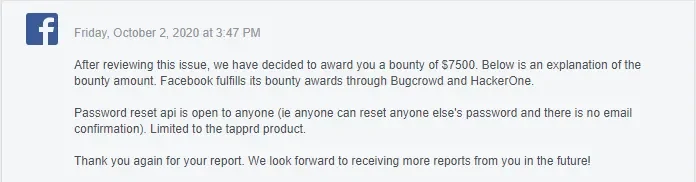
The screenshot shows the bounty notification for 7500 USD.
He enjoyed exploiting the vulnerability so much that he decided the script was weak and went digging further. He found two more vulnerabilities on the same application, which he left for a Part Two write-up.
What the fix implies
In plain terms: the server should check the cloakroom ticket against the person holding it, and refuse to hand over a coat that belongs to someone else.
Variants to test
If you want to look for similar issues on a site you are authorised to test, these are the directions the write-up points to. Only test systems you have permission to test.
- Fuzz sibling endpoints of a password reset path (for example, paths next to
/forgotpasswordunder the same user API) and look for ones that accept POST. A positive result is an endpoint that returns a different status (such as a 302) for a valid account than for invalid ones. - Send the reset request without a session cookie and without the XSRF token. A cookie is a small piece of data the browser stores for a site and sends back on every request; a session cookie is the one that identifies your logged-in session. A positive result is a success response rather than an authentication or token error.
- Run an Intruder-style sweep over candidate emails against the reset endpoint and compare response codes and lengths. A positive result is a single outlier status (302 versus an error page) that identifies a real account.
- After a successful reset, log in with the new password from a clean browser session. A positive result is a session that reaches privileged pages such as an admin panel.
- Check whether the endpoint accepts the email as a parameter that can be swapped independently of the authenticated user. A positive result is a password change applied to an account other than the caller's.
Glossary
- API: an interface that lets one program talk to another, usually over HTTP, without a human clicking through pages.
- Access token: a credential a program presents to prove it may act on a user's behalf, like a temporary key card.
- Account takeover: gaining control of someone else's account, for example by changing their password and logging in as them.
- Admin panel: the privileged area of a site where administrators manage users and settings.
- Authentication: proving who you are, usually with a password or a token.
- Authorisation: deciding what an authenticated user is allowed to do.
- Bug bounty programme: a scheme where a company pays researchers who privately report security problems in its systems.
- Burp Suite: a tool that sits between browser and server so you can inspect and edit requests; Intruder is its component for repeating a request with many different values.
- Cookie: a small piece of data a site stores in your browser and receives back on later requests; a session cookie identifies your logged-in session.
- CSRF / XSRF: cross-site request forgery, an attack where a malicious site makes your browser send a request to another site using your existing login; an XSRF token is a random value added to requests to block it.
- Endpoint: a specific URL that performs an action rather than just displaying a page.
- Fuzzing: automatically sending many generated requests, often from a wordlist, to discover pages and features.
- GET / POST: two HTTP methods; GET asks for a page or resource, POST sends data to be processed.
- HTTP: the protocol browsers and servers use to exchange requests and responses.
- HTTP status code: a number in every response saying what happened, such as 200 (OK), 302 (redirect), 403 (forbidden) or 404 (not found).
- Intruder: the Burp Suite component that repeats one request many times, swapping a chosen part for each entry in a list.
- JavaScript: code that runs in your browser and makes a page interactive; reading it reveals the URLs and parameters a page uses.
- OSWE: a hands-on certification about finding and exploiting bugs in web applications.
- Parameter: a named value sent with a request, such as an email address or a password.
- Python: a programming language often used for small automation scripts.
- RCE (remote code execution): a flaw that lets an attacker run their own code on a server.
- Redirect (302): an HTTP response telling the browser to go to a different URL instead.
- Session: the server-side record of your logged-in state, usually referenced by a session cookie.
- Single sign-on (SSO): logging in once with a central account, with other sites trusting that login.
- Subdomain: a site that belongs to a larger domain, such as
legal.tapprd.thefacebook.comunderthefacebook.com. - Token: a short, usually random value the server hands out and expects back, used to prove a request belongs to a particular flow or session.
- Triaged: reviewed by the security team and confirmed as a real issue worth investigating.
- URL: the address a browser uses to reach a page or endpoint.
- Wordlist: a list of candidate values, such as common directory names or email addresses, used to drive automated requests.



