Initial Analysis
SparkAR Studio extracted ZIP-based project files without sanitising entry paths, allowing an attacker to write files outside the intended cache directory. By writing a .yarnrc file and a JavaScript file to known locations, the attacker could achieve remote code execution when the project was opened.
 Published on blog.fadyothman.com
Hi Everyone, As promised this is the write-up for the Spark AR RCE I discovered a while ago.
The full write-up lives on its author's site
It belongs to its author, so we link to it rather than copy it. The other two tabs are our own rewrites, checked against it.
Context
Spark AR Studio is Meta's desktop tool for building augmented reality effects. Projects are saved and shared in a package format called arprojpkg, which bundles the project assets together with an arproj file. The same ZIP-based container is used by the arexport and arproj file types.
The bug described here is a path traversal in the way Spark AR Studio extracts arprojpkg files. Because the archive is unpacked to disk, a crafted package can place files outside the intended extraction directory, and the researcher turned that arbitrary file write into remote code execution through the Node.js process Spark AR starts when a project is opened.
The work was prompted by a Facebook bug bounty note announcing increased payouts for binary reports, which stated:
A vulnerability that results in remote code execution when running a Spark AR effect, either through a bug that exploits the Hermes JavaScript VM or the Spark AR platform directly. Providing a full proof of concept that demonstrates the remote code execution would result in an average payout of $40,000 (including the proof of concept bonus).
The researcher initially read that as covering client-side issues too. Meta later clarified that the larger payout applied to issues executing directly on their infrastructure. The report was rewarded with $2,500.
Setup
- Spark AR Studio installed on a virtual machine.
- Microsoft
procmon, part of the Sysinternals Suite, for behavioural analysis of file operations. evilarc, a tool that builds ZIP archives whose entries contain directory traversal characters in their embedded paths.- A Spark AR project created and packaged as an
arprojpkgfile for inspection.
The researcher's usual starting point is attack surface analysis: which file formats and protocols are associated with the application, which ports it listens on, which hosts it connects to, and which RPC interfaces are available.
Finding it
Looking at the file types associated with Spark AR Studio turned up the following list.
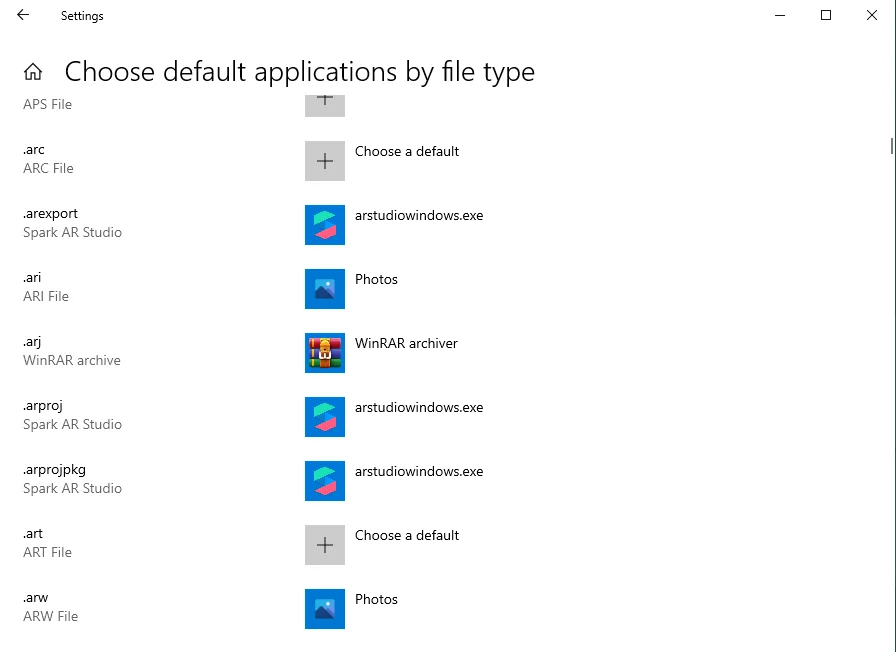
The arprojpkg extension stood out because of the pkg suffix: package files bundle other files, and most programs use the ZIP format to do so, a format with a long history of security issues. The researcher also points to a livestream by Gynvael Coldwind on the subject.
A project was created in Spark AR and packaged as arprojpkg. The first assumption to confirm was that the format is ZIP-based. A hex editor shows the usual PK characters at the start of a ZIP file, and the file command on Linux can identify the type as well. Both confirmed that arprojpkg is a plain ZIP file, and that arexport and arproj are ZIP files too.
Exploitation
Step 1: confirm that the archive is extracted to disk
Some developers never write bundled files to disk and read them into memory instead, so the next question was whether Spark AR extracts the archive. Opening the package in a regular ZIP application shows its contents.
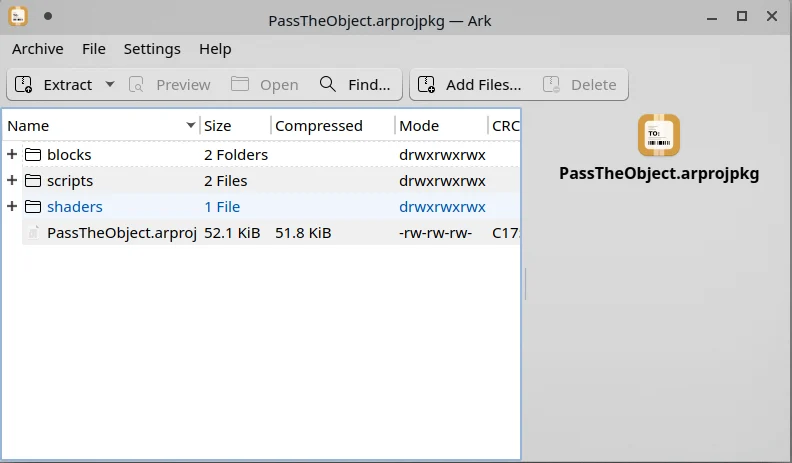
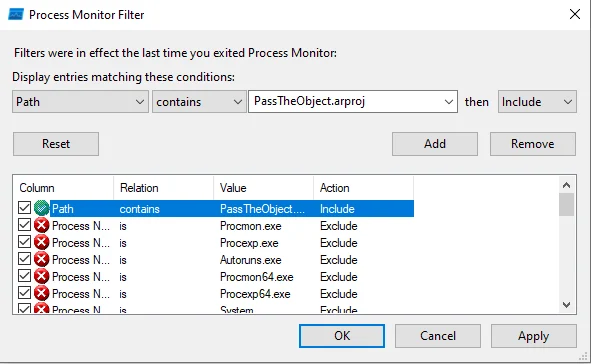
The archive holds folders with the project assets and a bundled arproj file. To see whether those files reach the file system, the researcher used procmon. Since the archive contains a file named PassTheObject.arproj, a filter rule was added for file operations related to that name, so that any write to disk would appear in the procmon logs.
Opening the file in Spark AR showed the file being written to a cache folder inside the user's AppData directory.
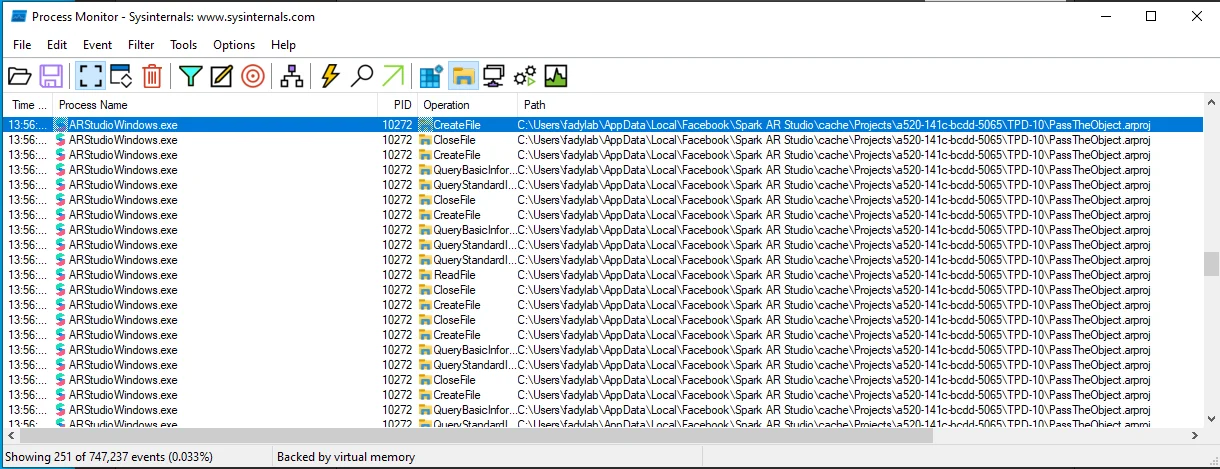
Extraction to disk is confirmed, which makes a traversal attack worth testing.
Step 2: test for path traversal
A file was added to the archive to check that arbitrary files can be included, then evilarc was used to give an entry a traversal path. The following command adds test.txt with a depth of 8 folders to the Spark project file:
evilarc.py -d 8 -f 1.zip test.txt
After running Spark AR and opening the file, test.txt was written to the user's home folder. That confirms an arbitrary file write, which now has to be turned into code execution.
Step 3: rule out DLL hijacking
The first idea was DLL hijacking: place a DLL in the package and have Spark AR load it. Two problems appeared during analysis. The first is permissions: a privileged path cannot be written to, and writing to C:\ failed. The second is location: the missing DLLs were either in the Program Files directory, which is privileged, or loaded from the same location as the project file. The latter is unreliable because the exact location where a user downloaded the project is unknown, and the exploit would probably not fire the first time anyway, since the DLL is extracted only after Spark AR has already started.
Writing to the Start menu startup directory was considered as an alternative. It works but needs a restart or a log out and log in before the code runs, which is not reliable enough.
Step 4: look at the Node.js process
Further analysis showed that Spark AR starts a Node.js process (node.exe) after opening a project. The question was whether that process executes a js file that the traversal can write or overwrite, in the same spirit as DLL hijacking. procmon was used again to watch the files Node.js touches.
The js files executed by Node.js were loaded from a privileged location, so they cannot be written through the traversal. Digging further into other files the process tries to load revealed that Node.js looks for a .yarnrc file, which did not exist, in several locations including the user's home folder. The home folder is not privileged, so the traversal can write there.
Step 5: abuse yarn-path
The Yarn documentation describes the .yarnrc settings. One of them, yarn-path, points to the Yarn path, which means it can execute js files from an arbitrary location. The path is relative, and in this case it was relative to C:\, apparently because of the command line used to start the Node.js process.
The plan was therefore:
- Extract a
jsfile to a known path relative toC:\. - Write a
.yarnrcfile whoseyarn-pathpoints to thatjsfile.
/Users/Public was chosen for the js file because it exists by default and does not require admin privileges. The user's home folder would work too, but it would require knowing the username, which adds a limitation. The .yarnrc file created was:
yarnPath: /Users/Public/test.js
test.js was created with the following content:
const { exec} = require('child_process');
const child = exec('calc.exe', []);
console.log('error', child.error);
console.log('stdout ', child.stdout);
console.log('stderr ', child.stderr);
Step 6: bundle and trigger
Both files were added to the .arprojpkg with evilarc:
evilarc.py -d 10 --path=Users\\Public -f 1.zip test.js
evilarc.py -d 8 -f 1.zip .yarnrc
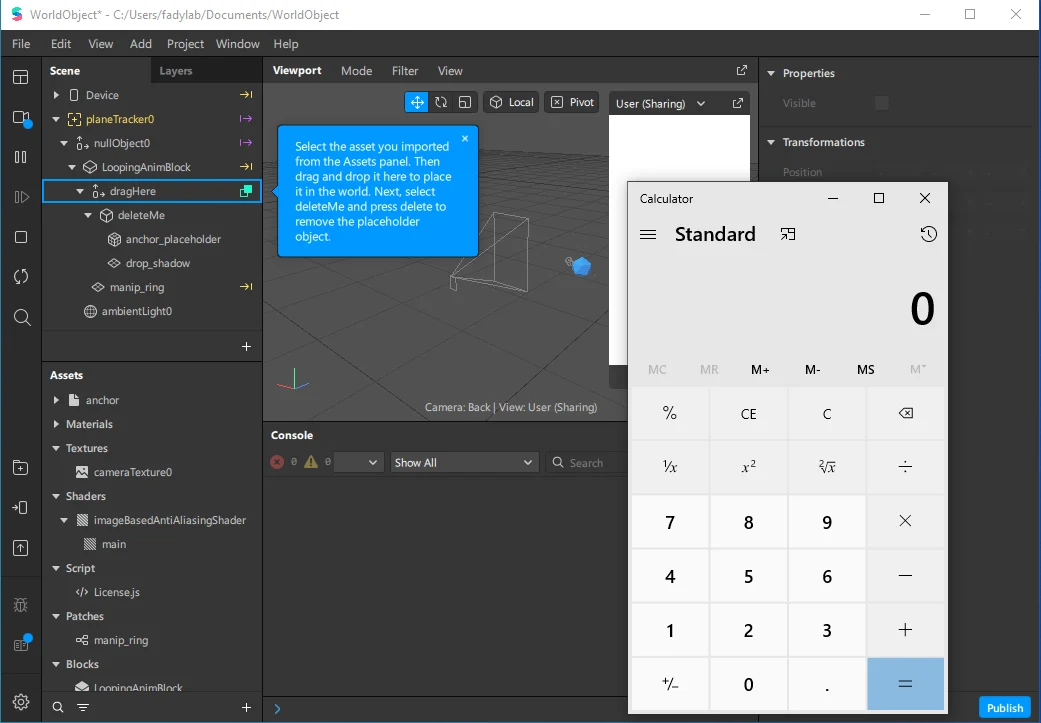
1.zip was renamed to 1.arprojpkg and opened with Spark AR. On opening, test.js is extracted to c:\Users\Public, .yarnrc is extracted to the user's home folder, the nodejs process starts, loads the .yarnrc, and executes test.js, giving remote code execution.
Root cause
The archive is a plain ZIP file, and the traversal characters live in the embedded entry paths, which is exactly what evilarc produces. The report does not describe how the extractor handles those paths internally.
Existing defences did not stop the chain because the write itself is unprivileged: the home folder and C:\Users\Public are writable by a normal user, so no elevation is needed. The privileged locations that would have allowed a simpler DLL or script hijack are protected, which is why the researcher moved to a configuration file that Node.js reads from an unprivileged location. The .yarnrc lookup and the yarn-path setting then turn a file write into execution.
Impact
An attacker who convinces a user to open a crafted arprojpkg file in Spark AR Studio can write files to locations the user can write to and execute code in the context of that user. The proof of concept launches calc.exe. The attack does not require administrator rights, and the payload is placed in C:\Users\Public so the username does not have to be known for that file. The main precondition is user interaction: the victim has to open the package. Meta explained that the larger advertised payout applied to issues executing on its infrastructure, not to this client-side chain.
Fix
Sanitise entry paths during extraction: reject or normalise names containing .. segments or absolute paths, and verify that every resolved destination stays inside the intended extraction directory before writing. The report does not describe the fix Meta applied.
Variants to test
- Other archive-based project or package formats handled by desktop applications: build an archive with
evilarcand check whether an entry lands outside the extraction directory. A positive result is a file appearing in the home folder or another writable path you chose. - Applications that spawn Node.js or another runtime on opening a document: watch with
procmonfor configuration files read from unprivileged locations, such as.yarnrc,.npmrcor similar. A positive result is a config file being read from a path the traversal can write. - Runtime configuration settings that point to a script or binary, like
yarn-path: if such a file is loaded from a writable location, a positive result is your script executing when the document is opened. - DLL search order on document open: check whether any missing DLL is loaded from the document's own directory or another writable path. A positive result is your DLL being loaded, though timing may require the file to be present before the process starts.
- Startup folder writes: if the traversal can reach the Start menu startup directory, a positive result is code running after the next logon, at the cost of requiring a restart.
What happened, in plain words
Spark AR Studio is a program made by Meta (the company behind Facebook) that runs on your computer and lets people build augmented reality effects: the kind of thing where a camera shows a funny hat on your head or a virtual object in your room. People who build these effects share their projects as a single file with the extension arprojpkg. That file is really a container, like a cardboard box with many smaller files inside it.
This report is about a security bug in the way Spark AR Studio opens that box. When you double-click an arprojpkg file, the program unpacks the files inside it onto your computer. The bug is a path traversal: a crafted package can place files outside the folder where they were supposed to go, anywhere the person opening the file is allowed to write. When the program unpacks it, files land outside the folder where they were supposed to go, anywhere the person opening the file is allowed to write. Security people call this a path traversal.
On its own, writing a file somewhere is annoying but not dangerous. The researcher, Fady Othman, went further: he found a way to make Spark AR Studio actually run one of the files he planted. That turns a harmless file write into remote code execution (RCE), which means someone else's code runs on your machine as if you had started it yourself. The proof of concept simply opens the Windows calculator (calc.exe), which is the polite way of showing "I could have run anything".
Meta paid a bounty of $2,500 for the finding. The researcher had hoped for more, because a Facebook bug bounty note had advertised an average payout of $40,000 for remote code execution in Spark AR. Meta explained that the bigger figure was for bugs that run on Meta's own servers, not on a user's computer. The report was disclosed on 7 April 2022.
Background: what you need to know before we start
A few ideas come up again and again, so here they are from zero.
File extension. The letters after the last dot in a file name, like .jpg or .exe. Windows uses the extension to decide which program opens the file when you double-click it. Spark AR Studio registers several extensions as "mine": when you open a file with one of those extensions, Windows launches Spark AR Studio.
ZIP file. A ZIP file is a single file that holds many other files inside it, usually compressed to save space. Think of it as an envelope with several letters inside. Every letter has a name written on it, and that name can include a folder path, for example images/hat.png. When you unpack (extract) the ZIP, the program reads each name and creates the matching folders and files.
Path traversal. A folder path is a list of folder names separated by slashes, like Documents/Projects/hat. Two special names exist in every operating system: . means "this folder" and .. means "the folder above this one". So ../secret.txt means "go up one folder, then write secret.txt". If a program takes a name from inside a ZIP and blindly sticks it onto the end of its extraction folder, a name full of ../ can climb out of that folder and land anywhere. That is path traversal: using .. to escape the place you were meant to stay in. It is like a hotel guest writing "room 12, then climb out of the window and into room 14" on a room-service form, and the staff following the instructions literally.
Arbitrary file write. The result of a successful path traversal: you can create a file with content you choose at a location you choose, as long as the user running the program has permission to write there. It is a stepping stone, not the destination.
Remote code execution (RCE). Getting a program on someone else's computer to run code that you wrote. It is the most serious class of bug, because once your code runs, it can do anything the user can do: read files, install software, steal data.
DLL. On Windows, a DLL (dynamic-link library) is a file full of ready-made code that programs load when they need it, a bit like a shared toolbox. Many programs look for their DLLs in several places, and if an attacker can put a file with the right name in one of those places, the program loads the attacker's code instead. That trick is called DLL hijacking.
Node.js and JavaScript. Node.js is a program that runs JavaScript code outside a web browser. JavaScript is the language web pages use. Many desktop applications, Spark AR Studio included, use Node.js internally to do parts of their work. When a program starts another program like this, we say it spawns a process.
Yarn and .yarnrc. Yarn is a tool used by JavaScript developers to download and manage the pieces of code their project depends on. It reads a small settings file called .yarnrc to learn how it should behave. One of the settings in that file, yarn-path, tells Yarn where its own code lives, and Yarn will run a JavaScript file from that location. If an attacker can write that settings file, they can point Yarn at their own script.
procmon. A free Microsoft tool (part of the Sysinternals Suite) that watches a program and records everything it does with files, folders and the registry. Think of it as a security camera for a program's behaviour. You can add filters so you only see the events you care about.
Privileged path. A folder that a normal user is not allowed to write to, such as C:\ or C:\Program Files. Writing there requires administrator rights. The opposite, an unprivileged path, is a folder any normal user can write to, such as the user's own home folder.
Home folder and AppData. On Windows, every user has a personal folder, usually C:\Users\<name>. Inside it, AppData is a hidden folder where programs store their own settings and caches. Both are writable by that user without any special rights.
Attack surface analysis. The first thing a security researcher does with a new target: list all the ways in. Which file types does the program open? Which network ports does it listen on? Which servers does it talk to? The more doors, the more chances one is unlocked.
Bug bounty. A program where a company pays researchers for reporting security bugs responsibly instead of exploiting them or selling them.
The starting point: a bounty announcement
The researcher began after reading a note from the Facebook bug bounty program announcing higher payouts for reports about binary (desktop) software. The note said:
A vulnerability that results in remote code execution when running a Spark AR effect, either through a bug that exploits the Hermes JavaScript VM or the Spark AR platform directly. Providing a full proof of concept that demonstrates the remote code execution would result in an average payout of $40,000 (including the proof of concept bonus).
In plain words: if you can make Spark AR run your code, either by attacking the JavaScript engine it uses (Hermes) or the platform itself, and you send a working demonstration, the average reward is $40,000. The researcher read this as covering bugs on the user's computer too. Meta later clarified that the larger amount was for bugs that execute on their own servers. The finding was rewarded with $2,500.
Step 1: look at the doors (attack surface analysis)
The researcher installed Spark AR Studio on a virtual machine. A virtual machine is a computer simulated inside your computer: if the program misbehaves or gets infected, you throw the whole simulated machine away and your real computer is untouched. A sensible precaution when you are about to poke at software with a stick.
The first question was: which file types does Spark AR Studio open? On Windows you can see this in the list of file associations, the table that says "this extension belongs to this program". The list looked like this:
The image shows the file types associated with Spark AR Studio. One of them, arprojpkg, caught the researcher's eye for a simple reason: the pkg at the end suggests a package, and packages bundle other files inside them. Bundled files mean parsing, and parsing means bugs. On top of that, most programs bundle files using the ZIP format, and ZIP has a long history of security problems. The researcher points readers to a livestream by Gynvael Coldwind that covers those problems:
Step 2: confirm the file is a ZIP
To study the format, the researcher created a project in Spark AR Studio and packaged it as an arprojpkg file. The first assumption to check was that this is a ZIP file underneath.
There are two easy ways to check. A hex editor, a tool that shows a file's raw bytes, will show the letters PK at the start of any ZIP file (PK are the initials of Phil Katz, who created the format). Alternatively, on Linux, the file command inspects a file and tells you what type it is. Both confirmed it: arprojpkg is a plain ZIP file. The other two Spark AR formats, arexport and arproj, are ZIP files as well.
Why does this matter? Because if the format is ZIP, then all the known tricks against ZIP extraction apply, and there are ready-made tools to build malicious ZIPs.
Step 3: does the program unpack the files to disk?
Not every program writes bundled files to disk. Some read them straight into memory, which means there is no file to attack. So the next question was whether Spark AR Studio extracts the archive onto the file system.
Opening the package in an ordinary ZIP application shows what is inside:
The image shows folders with the project assets and a bundled arproj file.
To find out whether those files reach the disk, the researcher used procmon. Remember the security-camera comparison: it records every file operation a program performs. Since the archive contains a file named PassTheObject.arproj, a filter rule was added so that only operations touching that name would be shown. If the file is written to disk, it will appear in the logs. Here is the rule:
The image shows the rule added to procmon to filter file operations related to PassTheObject.arproj. Filtering is important because a program like Spark AR touches thousands of files in a few seconds; without a filter the interesting event is lost in the noise.
With the filter in place, the researcher opened the file in Spark AR Studio. The logs showed the file being written to a cache folder inside the user's AppData directory:
The image accompanies the procmon results showing the file written to a cache folder in the user's AppData directory. That settles it: the archive is extracted to disk. A file write is exactly what a path traversal needs, so the next step was to test for one.
Step 4: test for path traversal
First, a sanity check: can an arbitrary file be added to the archive at all? Yes, the researcher added one. Then came the real test: can the name of an entry contain .. so that the file lands outside the extraction folder?
Doing this by hand is fiddly, so the researcher used a small tool called evilarc. It builds a ZIP file whose entries have traversal sequences baked into their names. The command used was:
evilarc.py -d 8 -f 1.zip test.txt
After building the archive, the researcher opened it with Spark AR Studio. The result: test.txt appeared in the user's home folder, not in the cache folder where extracted files normally go. That is the path traversal confirmed. We now have an arbitrary file write, and the job is to turn it into code execution.
Step 5: the first idea, DLL hijacking, and why it failed
The obvious next move is DLL hijacking: put a DLL with the right name into the package, and hope Spark AR loads it. It looked like a quick win, but two problems appeared.
- Permissions. The traversal can only write where the user is allowed to write. Writing to
C:\failed, andC:\Program Filesis equally protected. - Location. The DLLs that Spark AR was missing were either in
Program Files(privileged, see above) or loaded from the same folder as the project file. That second case is unreliable: the attacker does not know where the victim saved the project, and even if the location were guessed correctly, the DLL is extracted only after Spark AR has already started, so the program has already looked for it and moved on.
A second idea was to write a file into the Start menu startup folder, which Windows runs automatically when the user logs in. That works, but it needs a restart or a log out and log in before anything happens. The researcher wanted something that fires immediately and reliably.
Step 6: follow the Node.js process
So the analysis continued. The researcher noticed that Spark AR Studio starts a Node.js process (node.exe) after opening a project. That is interesting because Node.js runs JavaScript files, and a JavaScript file is just text. If the traversal can write or overwrite a JavaScript file that Node.js runs, we have code execution.
The method is the same as for DLL hijacking: use procmon to watch which files the Node.js process touches, and look for one that lives in a place we can write to.
The JavaScript files that Node.js executed were loaded from a privileged location, so they cannot be overwritten. But digging further into the other files the process tries to load turned up something better: Node.js looks for a settings file called .yarnrc, which did not exist on the machine, in several locations, including the user's home folder. The home folder is not privileged. The traversal can write there. That is the door.
Step 7: turn the settings file into code execution
The researcher read the Yarn documentation to see what .yarnrc can do. One setting stood out: yarn-path. It tells Yarn where its own code lives, which means Yarn will run a JavaScript file from that location. If we control the settings file, we control which script runs.
One detail: the path is relative, and in this case it was relative to C:\, apparently because of the command line used to start the Node.js process. So the plan became:
- Extract a JavaScript file to a known path relative to
C:\. - Write a
.yarnrcfile whoseyarn-pathpoints to that JavaScript file.
The researcher chose /Users/Public for the JavaScript file. That folder exists on every Windows machine by default and any normal user can write to it, so no administrator rights are needed. The user's home folder would also work, but it would require knowing the victim's username, which adds a limitation. The settings file created was:
yarnPath: /Users/Public/test.js
The script itself was:
const { exec} = require('child_process');
const child = exec('calc.exe', []);
console.log('error', child.error);
console.log('stdout ', child.stdout);
console.log('stderr ', child.stderr);
Step 8: bundle everything and trigger it
Both files were added to the archive with evilarc:
evilarc.py -d 10 --path=Users\\Public -f 1.zip test.js
evilarc.py -d 8 -f 1.zip .yarnrc
First command:
test.jsis the file being packaged.
Second command:
.yarnrcis the settings file being packaged.
Finally, 1.zip was renamed to 1.arprojpkg and opened with Spark AR Studio. The chain then runs by itself: on opening, test.js is extracted to c:\Users\Public, .yarnrc is extracted to the user's home folder, the nodejs process starts, loads the .yarnrc, and executes test.js. The calculator opens. That is remote code execution.
The image accompanies the description of the chain: test.js extracted to c:\Users\Public, .yarnrc extracted to the user's home folder, and the nodejs process loading it and executing test.js.
Why it worked
The archive is an ordinary ZIP, and the traversal characters live in the entry names, which is exactly what evilarc produces. The report does not describe how the extractor handles those paths internally.
The existing defences did not stop the chain because the write itself needs no special rights: the home folder and C:\Users\Public are writable by any normal user. The privileged locations that would have allowed a simpler DLL or script hijack are protected, which is why the researcher moved to a settings file that Node.js reads from an unprivileged location. The .yarnrc lookup and the yarn-path setting then turn a file write into execution.
What the impact is
Someone who convinces a user to open a crafted arprojpkg file in Spark AR Studio can write files to any location that user can write to, and run code with that user's rights. The proof of concept opens the calculator. No administrator rights are needed, and the payload goes into C:\Users\Public so the username does not have to be known for that file. The main precondition is user interaction: the victim has to open the package. Meta explained that the larger advertised payout applied to bugs running on its infrastructure, not to this chain on a user's computer.
How to fix it
Clean up entry paths during extraction: reject or normalise names containing .. segments or absolute paths, and check that every resolved destination stays inside the intended extraction folder before writing. The report does not describe the fix Meta applied.
Variants worth testing
If you want to look for similar bugs yourself, these are the directions the researcher suggests. Each one names what a positive result looks like.
- Other archive-based project formats. Many desktop applications open package files that are really ZIPs. Build an archive with
evilarcand check whether an entry lands outside the extraction folder. A positive result is a file appearing in your home folder or another writable path you chose. - Applications that start Node.js or another runtime when opening a document. Watch with
procmonfor settings files read from unprivileged locations, such as.yarnrc,.npmrcor similar. A positive result is a settings file being read from a path the traversal can write. - Runtime settings that point to a script or program, like
yarn-path. If such a file is loaded from a writable location, a positive result is your script running when the document is opened. - DLL search order when a document is opened. Check whether any missing DLL is loaded from the document's own folder or another writable path. A positive result is your DLL being loaded, though timing may require the file to be present before the process starts.
- Startup folder writes. If the traversal can reach the Start menu startup folder, a positive result is code running after the next logon, at the cost of requiring a restart.
Glossary
- AppData: a hidden folder inside a Windows user's home folder where programs keep their settings and caches.
- Arbitrary file write: the ability to create a file with content you choose at a location you choose, limited only by the victim's permissions.
arprojpkg: the package format Spark AR Studio uses to save and share projects; it is a ZIP file underneath.- Attack surface analysis: listing all the ways into a program (file types, ports, servers, interfaces) before looking for bugs.
- Bug bounty: a program where a company pays researchers for reporting security bugs responsibly.
- DLL: a Windows file full of shared code that programs load when needed.
- DLL hijacking: placing a malicious DLL where a program will look for a legitimate one, so the program loads the attacker's code.
evilarc: a tool that builds ZIP files whose entry names contain../sequences, used to test for path traversal.- File extension: the letters after the last dot in a file name, used by the operating system to decide which program opens the file.
- Hex editor: a tool that shows and edits a file's raw bytes.
- Home folder: a Windows user's personal folder, usually
C:\Users\<name>, writable by that user. - JavaScript: the programming language web pages use, also run outside browsers by Node.js.
- Node.js: a program that runs JavaScript outside a web browser; Spark AR Studio starts it when opening a project.
- Path traversal: using
..sequences in a file path to escape the folder a program intended to stay in. - Privileged path: a folder a normal user cannot write to without administrator rights, such as
C:\orC:\Program Files. - procmon: a free Microsoft tool that records a program's file, folder and registry activity.
- Process: a running instance of a program.
- Remote code execution (RCE): getting a program on someone else's computer to run code you wrote.
- Spark AR Studio: Meta's desktop program for building augmented reality effects.
- Virtual machine: a computer simulated inside your computer, used to test risky software safely.
- Yarn: a tool JavaScript developers use to manage their project's code dependencies.
.yarnrc: Yarn's settings file; itsyarn-pathsetting tells Yarn where its own code lives and which script to run.- YAML: a simple settings format written as
key: valuelines. - ZIP: a file format that bundles many files, each with a name and folder path, into one file.





