Third-Party Apps were still getting your private Facebook data
A third-party app could still access a user's friend list data after the user's Facebook app access had expired, because Facebook did not properly expire that access. An attacker could use this to see private friend connections that should no longer be available.
 Published on infosecwriteups.com
About a year ago; while I was randomly browsing an app named ‘Smule’ (where users can do karaokes), I reached to ‘Facebook Friends’ section inside the app where it was showing the list of my friends who were also using that app and who had also provided the required access(email, friend list data) from their Facebook…
The full write-up lives on its author's site
It belongs to its author, so we link to it rather than copy it. The other two tabs are our own rewrites, checked against it.
Context
This write-up covers a logic flaw in Facebook's handling of third-party application access, found through the Facebook Bug Bounty Program. The feature at the centre of it is the 'Login with Facebook' functionality, which lets a third-party app request access to data from a user's Facebook account, including the user's friend list. Facebook's own settings page describes the intended behaviour for expired apps:
These are apps and websites that you've used Facebook to log in to. They can receive information that you chose to share with them. Expired and removed apps may still have access to information that was previously shared with them, but they can't receive additional non-public information.
So once an app's access expires, for example after 90 days of inactivity, it should no longer receive new non-public information from that account. The researcher found that this was not properly enforced when the data being looked up was the friend list of a given user.
Setup
The observation started from a real app, Smule, a karaoke app that offers a 'Facebook Friends' section. That section lists friends who also use the app and who have granted it access to their email and friend list data via 'Login with Facebook'.
For the experimental part, the researcher created two dummy Facebook accounts, both used to log in to the third-party app. Initially the two accounts were not friends with each other on Facebook. No special tools are described beyond the Facebook account settings pages and the app itself.
Finding it
While browsing Smule, the researcher opened the profile of a friend, Prabesh, who had recently been added on Facebook (about a week earlier). Prabesh's latest duet in the app was from about two years earlier, and his activity had stopped abruptly after a continuous run of duets. From that inactivity the researcher suspected that Prabesh's Facebook access for his Smule account had expired due to over 90 days of inactivity.
The interesting part was that the two had become friends on Facebook only about a week before, well after the app access would have expired. The researcher asked Prabesh to check the 'Apps and Websites' security settings in his Facebook account, in the 'Expired' section, and received a screenshot of it.
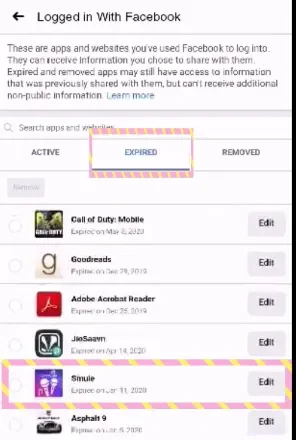

The screenshot showed the expired apps, with the notice quoted above at the top: expired and removed apps may still have access to information previously shared with them, but cannot receive additional non-public information.
The researcher laid out the flow of events that looked wrong:
- UserA gives data access, including private friend list data, to the third-party app via 'Login with Facebook'.
- UserA stops using the third-party app.
- Over 90 days pass and the app's access expires.
- The app should no longer get any new private data from UserA's Facebook account.
- UserA then becomes friends with UserB.
- UserB opens his account in the same third-party app.
- UserB sees UserA in the 'Facebook Friends who also use this app' list.
The question was how the app could show UserA in UserB's friend list inside the app when it was not receiving friend list data from UserA to confirm that UserB really is a friend of UserA, since UserA's access had expired before the two became friends. The hypothesis was that Facebook was still providing data to third-party apps after expiry, so the app had received UserA's latest friend list, including UserB, and could therefore confirm the friendship.

A counter-argument follows: the app was still getting friend list data from UserB's account, which was active, so it might be showing UserA simply because UserA appears in UserB's friend list. The researcher's answer is that the app cannot know from UserB's data alone that a given friend uses the app too. That confirmation requires access to UserA's account as well, specifically the friend list data, which lets the app confirm that UserB is a friend of UserA. Only with friend list data from both accounts can the app confirm that both users use the app and are friends on Facebook, which is what allows it to show UserA in UserB's 'Facebook friends who use this app too' section.
Exploitation
Step 1: Create two accounts and log both into the app
Two dummy Facebook accounts were created and used to log in to the third-party app. At this point the two accounts were not friends with each other on Facebook.
Step 2: Disable friend list sharing for one account
From the first Facebook account, the researcher went to the 'Apps and Websites' section in Security Settings, then to the active-apps section, clicked 'Edit' next to the connected third-party app, and toggled off the option for providing additional friend list data to the app.
This reproduces the expired case: the app gets friend list data from one user but not from the other.
Step 3: Make the two accounts friends
Only after disabling friend list sharing for the first account did the researcher make the two accounts friends with each other on Facebook.
Step 4: Check the app's friend list
In the 'Facebook Friends' section inside the third-party app, the two accounts were not shown to each other, even though the app was still receiving friend list data from the second account, which included the first account.
This matched the predicted behaviour: the app needs friend list data from both users' Facebook accounts, with each included in the other's friend list, before it will show them to each other. Since the setup is analogous to the expired case, the result confirmed that third-party apps were still getting a user's private data from their Facebook account even after expiry.

Root cause
The report describes the flaw as the app's access not being properly expired when looking up friends of a given user. Specifically, if the target user's app access had expired but the source user's had not, Facebook would still return data about the target user to the third-party app. The report does not describe the server-side code or the exact check that failed, so the precise implementation mistake is not stated.
Impact
A third-party app whose access to a user's account had expired could still receive that user's private friend list data, as long as another user whose access was still active triggered the lookup. In the observed case this let the app confirm a friendship that was formed after the target user's access had expired, and show the target user in another user's 'Facebook friends who use this app too' section. The report frames this as expired apps continuing to receive private data, contrary to the notice shown in Facebook's settings. The report does not describe any wider exploitation beyond this friend list disclosure.
Fix
Variants to test
- Other permission types after expiry. Repeat the two-account setup with permissions other than friend list, such as email or profile data, and check whether an expired app still receives the target user's data when another active user triggers a lookup. A positive result is data about the expired user appearing in the app despite the expiry.
- Revoked versus expired access. Instead of waiting for expiry, remove the app entirely from one account and repeat the flow. A positive result is the removed user still being confirmed through the other account's data.
- Asymmetric permission states. Test combinations where one account has granted a permission and the other has explicitly toggled it off, as in the report, versus where one account never granted it at all. A positive result is the app showing the pair as friends in a case where it should lack the data to confirm it.
- Timing around the friendship change. Form the friendship before and after the permission change and compare results. A positive result is the app reflecting the new friendship only when the target's access should have prevented it.
- Other social graph edges. Try the same pattern with other relationships the platform exposes to apps, checking whether an expired account's data still flows through an active counterpart.
What happened, in plain words
A security researcher found that Facebook was still handing a user's private friend list to third-party apps after those apps' access to the account had supposedly expired. He noticed it by accident inside a karaoke app, then reproduced the behaviour with two test accounts, reported it to Facebook's bug bounty programme, and was eventually paid a reward.
Before going further, a few words that come up constantly below.
- A third-party app is any app or website that is not Facebook itself but that lets you sign in with your Facebook account. Smule, the karaoke app in this story, is one.
- Login with Facebook is the button that lets such an app ask Facebook for information about you, for example your email address or your list of friends. You see a permission screen and you agree, or you do not.
- An API (application programming interface) is the set of doors a service like Facebook opens so that other software can ask it questions and get answers in a structured form. A useful comparison: a restaurant menu. You do not walk into the kitchen; you order from the menu and food comes out. An API is the menu that apps order data from.
- A permission (Facebook calls some of them scopes) is one specific item on that menu, such as "read this person's friend list".
- Expiry here means that if you stop using an app for long enough, Facebook cuts the app off from your account. The report mentions 90 days of inactivity as the trigger.
- A bug bounty programme is a scheme where a company pays people who report security problems to it, instead of suing them or ignoring them.
- A logic flaw is a bug where nothing crashes and no password is stolen by force; the program simply does the wrong thing in a particular situation. Think of a ticket machine that checks your ticket when you enter but forgets to check it when you leave through a different gate. The rule exists, it is just not applied everywhere it should be.

The feature and the rule it was supposed to follow
The feature at the centre of this is 'Login with Facebook'. When you use it, the app receives whatever data you agreed to share. Facebook's own settings page, in the section that lists apps you have used, states the intended behaviour for apps whose access has expired:
These are apps and websites that you've used Facebook to log in to. They can receive information that you chose to share with them. Expired and removed apps may still have access to information that was previously shared with them, but they can't receive additional non-public information.
Read that last sentence slowly, because the whole report hangs on it. An expired app may keep whatever it already copied, but it must not receive anything new and non-public from your account. Your friend list is non-public information. So after expiry, the app should stop learning anything new about who your friends are.
The researcher found that this rule was not properly enforced when the data being looked up was the friend list of a particular user.
How he stumbled on it
He was browsing Smule, a karaoke app where people record duets, and opened its 'Facebook Friends' section. That section lists the friends who also use the app and who have granted it access to their email and friend list data through 'Login with Facebook'.
Among those names he found Prabesh, a friend he had added on Facebook only about a week earlier. He opened Prabesh's Smule profile and saw that the latest duet was from about two years back. Before that, Prabesh had posted duets in a fairly continuous stream, and then the activity stopped abruptly. From that silence the researcher guessed that Prabesh's Facebook access for his Smule account had expired because he had not used the app for over 90 days.
The interesting part was the timing. The two had become friends on Facebook only about a week before, long after the app access would have expired. So he asked Prabesh to open the 'Apps and Websites' security settings in his Facebook account and look at the 'Expired' section, and Prabesh sent back a screenshot.
The screenshot showed the expired apps, with the notice quoted above at the top: expired and removed apps may still have access to information previously shared with them, but cannot receive additional non-public information.
Why that looked wrong
He wrote out the sequence of events that seemed to contradict the notice:
- UserA gives data access, including private friend list data, to the third-party app via 'Login with Facebook'.
- UserA stops using the third-party app.
- Over 90 days pass and the app's access expires.
- The app should no longer get any new private data from UserA's Facebook account.
- UserA then becomes friends with UserB.
- UserB opens his account in the same third-party app.
- UserB sees UserA in the 'Facebook Friends who also use this app' list.
The question was how the app could show UserA in UserB's friend list inside the app when it was not receiving friend list data from UserA to confirm that UserB really is a friend of UserA, since UserA's access had expired before the two became friends. His hypothesis was that Facebook was still providing data to third-party apps after expiry, so the app had received UserA's latest friend list, including UserB, and could therefore confirm the friendship.
Then he raised the obvious objection himself. The app was still getting friend list data from UserB's account, which was active, so perhaps it was showing UserA simply because UserA appears in UserB's friend list. His answer: the app cannot know from UserB's data alone that a given friend uses the app too. That confirmation requires access to UserA's account as well, specifically the friend list data, which lets the app confirm that UserB is a friend of UserA. Only with friend list data from both accounts can the app confirm that both users use the app and are friends on Facebook, which is what allows it to show UserA in UserB's 'Facebook friends who use this app too' section.
Reproducing it with two test accounts
He built a setup that mimics the expired case. Instead of letting an app's access expire, he switched off the friend list permission for one account. The app then has friend list data from one user but not from the other, which is the same situation as an expired account sitting next to an active one.
Step 1: Create two accounts and log both into the app
Two dummy Facebook accounts were created and used to log in to the third-party app. At this point the two accounts were not friends with each other on Facebook. The two accounts were not friends with each other on Facebook at this point.
Step 2: Disable friend list sharing for one account
From the first Facebook account, he went to the 'Apps and Websites' section in Security Settings, then to the active-apps section, clicked 'Edit' next to the connected third-party app, and toggled off the option for providing additional friend list data to the app.
This reproduces the expired case: the app gets friend list data from one user but not from the other. The app still receives friend list data from one user but not from the other, which the researcher treats as analogous to the expired case.
Step 3: Make the two accounts friends
Only after disabling friend list sharing for the first account did he make the two accounts friends with each other on Facebook. The order is the whole point.
Step 4: Check the app's friend list
In the 'Facebook Friends' section inside the third-party app, the two accounts were not shown to each other, even though the app was still receiving friend list data from the second account, which included the first account.
This matched the predicted behaviour: the app needs friend list data from both users' Facebook accounts, with each included in the other's friend list, before it will show them to each other. Since the setup is analogous to the expired case, the result confirmed that third-party apps were still getting a user's private data from their Facebook account even after expiry.
The underlying mistake
The report describes the flaw as a logic flaw: the expiry of a third-party app's access was not properly enforced when the data being served was the friend list of a given user. Specifically, if the target user's app access had expired but the source user's had not, Facebook would still return data about the target user to the third-party app. The report does not describe the server-side code or the exact check that failed, so the precise implementation mistake is not stated.
A comparison that may help: a club that checks members' cards at the front door but not at the side door. The rule exists and is written on the wall; it is just not applied on every path into the building.
What it meant in practice
A third-party app whose access to a user's account had expired could still receive that user's private friend list data, as long as another user whose access was still active triggered the lookup. In the observed case this let the app confirm a friendship that was formed after the target user's access had expired, and show the target user in another user's 'Facebook friends who use this app too' section. The report frames this as expired apps continuing to receive private data, contrary to the notice shown in Facebook's settings. The report does not describe any wider exploitation beyond this friend list disclosure.
The fix
Other things worth testing
These are variations on the same idea, useful if you want to explore the pattern yourself.
- Other permission types after expiry. Repeat the two-account setup with permissions other than friend list, such as email or profile data, and check whether an expired app still receives the target user's data when another active user triggers a lookup. A positive result is data about the expired user appearing in the app despite the expiry.
- Revoked versus expired access. Instead of waiting for expiry, remove the app entirely from one account and repeat the flow. A positive result is the removed user still being confirmed through the other account's data.
- Asymmetric permission states. Test combinations where one account has granted a permission and the other has explicitly toggled it off, as in the report, versus where one account never granted it at all. A positive result is the app showing the pair as friends in a case where it should lack the data to confirm it.
- Timing around the friendship change. Form the friendship before and after the permission change and compare results. A positive result is the app reflecting the new friendship only when the target's access should have prevented it.
- Other social graph edges. Try the same pattern with other relationships the platform exposes to apps, checking whether an expired account's data still flows through an active counterpart.
How the report was handled
He sent the report to the Facebook Security team in descriptive form, with a couple of proof-of-concept videos showing how he had convinced himself and how he had tested it. The reply thread, as he presents it, went through several rounds.
The report was closed four times in a row.
He kept trying to make his case.

Then came the first better reply from their side.
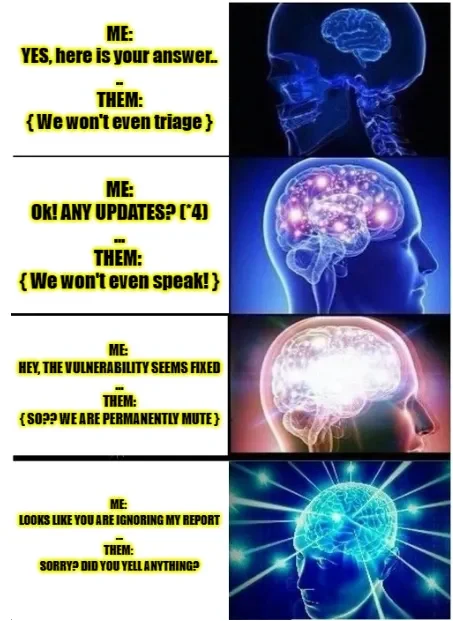
What followed was a long wait, shown in the screenshots as lasting four months.
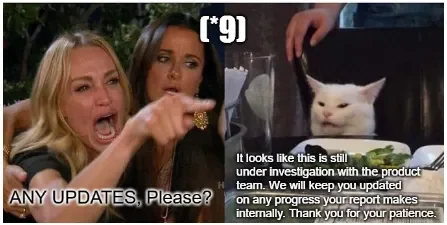
Similar replies kept coming, according to the caption on the screenshot.
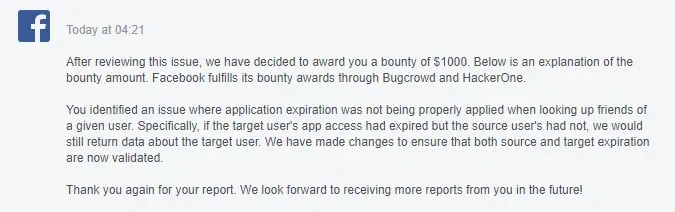
Finally the reward message arrived. After a year of investigation and a total of 42 reply exchanges, he received it on the day he published the write-up.
Glossary
- API: the set of doors a service opens so other software can ask it for data in a structured way; like a menu you order from rather than walking into the kitchen.
- Bug bounty programme: a scheme where a company pays people who report security problems to it.
- Dummy account: a test account created for experiments rather than for real use.
- Expiry (of app access): Facebook cutting an app off from a user's account after a period of inactivity, described in the report as over 90 days.
- Friend list data: the private list of who a user is friends with on Facebook.
- Logic flaw: a bug where the program runs without crashing but applies a rule incorrectly in some situation, such as checking a ticket at one gate but not another.
- Login with Facebook: the feature that lets a third-party app ask Facebook for information about you, after you agree on a permission screen.
- Permission (scope): one specific item of data or action an app is allowed to use, such as reading your friend list.
- Proof of concept (POC): a demonstration that a problem is real, usually a recording or a small test that shows the behaviour happening.
- Third-party app: an app or website that is not Facebook but that lets you sign in with your Facebook account.
- Token: a piece of data that stands in for your login, so an app can talk to a service on your behalf without your password; treat it like a key and never share it.
- Toggled off: switched a setting to the off position.




