User’s private videos/saved videos exposed through a messenger call from a locked smartphone.
The Watch Together feature in Messenger could be accessed from a locked Android phone during an incoming call, allowing anyone with physical access to view the user's private watched videos, saved videos, and videos shared in chat threads. An attacker could pick up the call and navigate to the feature without unlocking the device.
 Published on medium.com
Infosec
The full write-up lives on its author's site
It belongs to its author, so we link to it rather than copy it. The other two tabs are our own rewrites, checked against it.
Context
Facebook's Messenger gained a feature called Watch Together, which lets people in a call watch videos together. The feature surfaces several video lists tied to the user: the videos the user has watched, the videos the user has saved, and the videos shared in the chat thread.
The report concerns what happens to those lists when the phone is locked. Messenger calls can be answered on a locked Android device, and the researcher found that the Watch Together section could be reached from that locked state, exposing private video lists to anyone holding the phone.
This is a follow-up to an earlier, already fixed bug by another researcher, in which Messenger calls exposed a user's private friends list from a locked phone. That earlier issue had been closed by adding an extra security layer so the feature could not be used without unlocking the phone. The researcher retested that same day and found nothing leaking, then moved on.
Setup
The reproduction steps describe User B calling User A, whose smartphone is in a locked state. Testing of the Watch Together section was done with Burp. No specific app version, Android version or device model is given in the report.
The precondition is physical access to a locked phone that is receiving a Messenger call, plus the ability to answer that call from the lock screen, which Messenger permits.
Finding it
After Facebook launched Watch Together, the researcher spent some time on the feature and tested the section with Burp. He found nothing interesting that day.
The next day he remembered the earlier locked-device bug and decided to test the new feature under the same condition: a locked phone. That turned out to be the case: the Watch Together section was reachable from a locked device and displayed the user's private lists.
Exploitation
Step 1: Lock the victim's phone
User A's smartphone is left in a locked state. This is the condition the whole attack depends on.
Step 2: Call the victim
User B calls User A. The call arrives on the locked device.
Step 3: Answer the call from the lock screen
The intruder, holding the phone, picks up the call without unlocking the device.
Step 4: Open Watch Together
From the ongoing call, the intruder goes to the Watch Together option. The report does not describe any request or response for this step; the section was simply reachable from the call UI on the locked phone.
Step 5: Read the private lists
The intruder sees User A's entire private lists of watched videos, saved videos, videos shared in the chat thread, and similar content, all without unlocking the phone.
No HTTP traffic, endpoints, parameters or headers are reproduced in the report. The researcher reported the issue with a short proof-of-concept video rather than with captured requests.
Root cause
The report does not analyse the code. What it establishes is behavioural: the Watch Together section of a Messenger call did not require the device to be unlocked, so the authorisation check that protects the user's video lists was effectively bypassed by answering a call from the lock screen. The earlier fix, an extra security layer that stopped call features being used without unlocking the phone, did not cover the newly launched Watch Together feature.
Impact
Anyone with physical access to the victim's device could view the user's private saved videos, the user's entire watched videos, and the videos shared in the chat thread, without unlocking the phone. In the researcher's words, this would have affected the privacy and security of the user heavily. The exposure is limited to someone who can physically reach the device while it is locked and can answer an incoming call on it.
Fix
Facebook fixed the issue after some weeks. After the fix, the phone has to be unlocked to use the Watch Together feature. The report gives no further detail on what was changed.
Timeline as reported:
| Event | Date |
|---|---|
| Reported | Saturday, 17 October 2020 |
| Pre-Triaged | Thursday, 22 October 2020 |
| Triaged | Thursday, 22 October 2020 |
| Fixed | Monday, 9 November 2020 |
| Fixed confirmed | Thursday, 12 November 2020 |
| Bounty Rewarded | Thursday, 12 November 2020 |
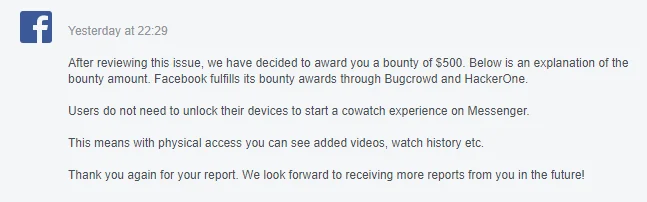
The bounty was 500.00 USD.
Variants to test
- Other call features on a locked device. Answer a call on a locked phone and walk through every option reachable from the call UI. A positive result is any screen that shows account data, lists or history without an unlock prompt.
- Newly launched features after a locked-device fix. When a platform fixes a lock-screen leak in one feature, retest sibling and newly shipped features under the same condition. A positive result is a feature that behaves like the pre-fix one.
- Shared-content surfaces inside calls. Look for lists of content shared in a thread, saved items or history that are rendered inside the call. A positive result is private content belonging to the device owner being displayed to whoever holds the locked phone.
- Direct navigation versus UI gating. If the UI hides an option on a locked device, try reaching the same section through other entry points in the app. A positive result is the section loading when the UI would not normally offer it.
What happened, in plain words
Facebook's Messenger app has a feature called Watch Together. When two people are on a call, Watch Together lets them watch videos together, like sitting on the same sofa with one screen. To make that work, the feature shows several lists of videos that belong to you: the videos you have watched, the videos you have saved, and the videos that were shared in that chat thread.
Normally, those lists are private. They are yours, and they should only appear after you have unlocked your phone and opened the app yourself.
The researcher found that this was not true. Messenger lets you answer an incoming call on a locked Android phone, without typing your PIN or using your fingerprint. From that answered call, the Watch Together section could be opened, and it showed the phone owner's private video lists to whoever was holding the phone. So a person who picked up your locked phone and answered a call could browse your watched videos, your saved videos and the videos shared in the chat, all without unlocking anything.
This was a follow-up to an earlier bug by another researcher. In that earlier bug, Messenger calls exposed a user's private friends list from a locked phone. Facebook had fixed it by adding an extra security layer, so the call features could not be used without unlocking the phone. The researcher retested that same day and found nothing leaking, then moved on. When Watch Together launched later, he tested it again, and this time the new feature did not have that same protection.
The idea behind the bug
Two security ideas are at work here, and both are worth knowing before the steps make sense.
Authentication is proving who you are. On a phone, unlocking with a PIN, pattern or fingerprint is authentication. Authorisation is what you are allowed to do once you are in. A locked phone is supposed to be a state where almost nothing is authorised, because the person holding it has not proved they are the owner.
When Messenger allows a call to be answered from the lock screen, it deliberately relaxes authentication for one narrow purpose: taking the call. The question the researcher asked is whether the app also relaxed authorisation for things beyond the call itself. It did. The Watch Together screen was reachable, and it displayed data that should have required an unlocked phone.
A useful everyday comparison: a hotel gives a cleaner a key card that opens the room to change the towels. That is fine. The problem is if the same card also opens the guest's safe. Answering a call from the lock screen is the cleaner's card. The private video lists are the safe.
Setting up the test
The reproduction steps describe User B calling User A, whose smartphone is in a locked state. He tested the Watch Together section with Burp.
Burp (short for Burp Suite) is a tool that sits between an app or browser and the internet. It records every request the app sends and every response the server sends back, and it lets you read and change them. Think of it as a glass pipe fitted into the connection: you can see what flows through and turn the taps. Security testers use it to understand what an app is really asking the server for, which is often more than the screen shows.
The report does not give an app version, an Android version or a device model. The only precondition it states is physical access to a locked phone that is receiving a Messenger call, plus the ability to answer that call from the lock screen, which Messenger permits.
Finding it
After Facebook launched Watch Together, the researcher spent some time on the feature and tested the section with Burp. He found nothing interesting that day.
The next day he remembered the earlier locked-device bug and decided to test the new feature under the same condition: a locked phone. When a company fixes a leak in one feature, the fix is often a gate placed in front of that feature. A brand new feature, built later by a different team or on a different schedule, may simply not be behind that gate. So the new feature deserves the same test the old one failed.
That turned out to be the case. The Watch Together section was reachable from a locked device and displayed the user's private lists.
Exploitation
The report gives the reproduction steps as a numbered list. Here they are exactly as written:
Reproduction Steps*==
- User A's smartphone is in a locked state.
- User B calls User A.
- Intruder picks up the call.
- Intruder goes to the 'Watch Together' option.
- Intruder sees User A's entire private lists of Watched videos, Saved videos, videos shared in the chat thread, etc. without unlocking the phone.*
Step 1: Lock the victim's phone
User A's smartphone is left in a locked state. This is the condition the whole attack depends on. Without a locked phone there is no bug, because an unlocked phone is already in the owner's hands by definition.
Step 2: Call the victim
User B calls User A. The call arrives on the locked device. The caller can be anyone; the point is that a call is ringing on a phone nobody has unlocked.
Step 3: Answer the call from the lock screen
The intruder, holding the phone, picks up the call without unlocking the device. This is normal Messenger behaviour, not a flaw in itself: being able to answer a call without unlocking is a convenience many people rely on.
Step 4: Open Watch Together
From the ongoing call, the intruder goes to the Watch Together option. The report does not describe any request or response for this step. The section was simply reachable from the call screen on the locked phone. That is the moment the security gate is missing: the app should have asked for an unlock here and did not.
Step 5: Read the private lists
The intruder sees User A's entire private lists of watched videos, saved videos, videos shared in the chat thread, and similar content, all without unlocking the phone.
No HTTP traffic, endpoints, parameters or headers appear in the report. The researcher reported the issue with a short proof-of-concept video rather than with captured requests. A proof of concept, usually shortened to PoC, is a small demonstration that proves the bug is real: here, a recording of the steps above being carried out on a locked phone.
Why it worked
The report does not analyse the code. What it establishes is behavioural: the Watch Together section of a Messenger call did not require the device to be unlocked, so the check that protects the user's video lists was effectively bypassed by answering a call from the lock screen.
The earlier fix, an extra security layer that stopped call features being used without unlocking the phone, did not cover the newly launched Watch Together feature. This is a common pattern in large apps: a rule is enforced feature by feature rather than in one central place, so every new feature has to remember to apply it, and one that forgets becomes a hole.
Impact
Anyone with physical access to the victim's device could view the user's private saved videos, the user's entire watched videos, and the videos shared in the chat thread, without unlocking the phone. In the researcher's words, this would have affected the privacy and security of the user heavily.
The exposure is limited to someone who can physically reach the device while it is locked and can answer an incoming call on it.
The fix
Facebook fixed the issue after some weeks. After the fix, the phone has to be unlocked to use the Watch Together feature. The report gives no further detail on what was changed.
Timeline and reward
The dates as reported:
| Event | Date |
|---|---|
| Reported | Saturday, 17 October 2020 |
| Pre-Triaged | Thursday, 22 October 2020 |
| Triaged | Thursday, 22 October 2020 |
| Fixed | Monday, 9 November 2020 |
| Fixed confirmed | Thursday, 12 November 2020 |
| Bounty Rewarded | Thursday, 12 November 2020 |
Triaged means the security team looked at the report and accepted it as a real issue worth working on. The bounty was 500.00 USD.
The image shows the bounty reward message from Facebook.
What to try yourself
These are the same ideas the researcher used, written so you can follow them on your own device or in a test account.
- Other call features on a locked device. Answer a call on a locked phone and walk through every option reachable from the call screen. A positive result is any screen that shows account data, lists or history without an unlock prompt.
- Newly launched features after a locked-device fix. When a platform fixes a lock-screen leak in one feature, retest sibling and newly shipped features under the same condition. A positive result is a feature that behaves like the pre-fix one.
- Shared-content surfaces inside calls. Look for lists of content shared in a thread, saved items or history that are rendered inside the call. A positive result is private content belonging to the device owner being displayed to whoever holds the locked phone.
- Direct navigation versus UI gating. If the interface hides an option on a locked device, try reaching the same section through other entry points in the app. A positive result is the section loading when the interface would not normally offer it.
Glossary
- API: the set of addresses and rules an app uses to ask a server for data or to send it something; the app's private menu of requests.
- Authentication: proving who you are, for example by unlocking a phone with a PIN or fingerprint.
- Authorisation: what you are allowed to do once you are identified; authentication gets you in the door, authorisation decides which rooms open.
- Broken authorisation: a flaw where the app lets someone do or see something they should not be allowed to, even though they are correctly identified.
- Bounty: a payment a company makes to a researcher who reports a security bug responsibly.
- Burp (Burp Suite): a tool that sits between an app and the internet, recording and letting you edit the requests and responses.
- Call UI: the screen shown during a call, with buttons such as mute, hang up and extra features.
- Endpoint: a specific address on a server that an app talks to, for example the one that returns a list of videos.
- Header: extra information attached to a request or response, such as what kind of data is being sent.
- HTTP request / response: the message a browser or app sends to a server, and the message the server sends back.
- Information disclosure: a bug where data that should stay private is shown to someone who should not see it.
- Lock screen: the screen a phone shows while locked, which normally requires a PIN, pattern or fingerprint before the phone can be used.
- Parameter: a named value sent along with a request, such as an identifier for which list to fetch.
- Physical access: being able to hold and touch the device, as opposed to reaching it over the internet.
- PoC (proof of concept): a small demonstration, often a video or a few steps, that proves a bug is real.
- Pre-triaged / triaged: the stages where a security team first looks at a report and then accepts it as a genuine issue.
- Security layer: an extra check added on top of existing behaviour, here the requirement to unlock the phone before using call features.
- Watch Together: a Messenger feature that lets people on a call watch videos together and shows lists of watched, saved and shared videos.




