Two Factor Authentication Bypass On Facebook
The endpoint that verifies a 6-digit code when adding a phone number or email to a linked Facebook account lacked rate limiting, so an attacker could brute-force the code. By confirming a victim's already-registered phone number, an attacker could disable SMS-based two-factor authentication on the victim's Facebook account.

This is Gtm Mänôzfrom Kathmandu, Nepal. This is my first ever bug bounty write-up and the highest bounty reward from facebook.
The full write-up lives on its author's site
It belongs to its author, so we link to it rather than copy it. The other two tabs are our own rewrites, checked against it.
Context
Meta's Accounts Center is the settings surface where a user manages details shared across their linked Facebook and Instagram accounts. In the version the researcher encountered, the personal details section offered to add an email address or phone number to both the Instagram account and the linked Facebook account, and to verify the new contact point by entering a six-digit code sent to it.
The report describes a lack of rate limiting on the endpoint that verifies that six-digit code. Because the same verification endpoint served both Instagram and linked Facebook contact points, an attacker could confirm a contact point that was already registered on a victim's Facebook account, and in the SMS 2FA case could turn off the victim's two-factor authentication.
Setup
The researcher, Gtm Mänôz, was invited to BountyCon 2022 in Singapore on the strength of earlier performance in the Meta Bug Bounty programme, and was looking for a valid bug to place on the live hacking event leaderboard. The work was done against a new-looking Accounts Center interface in Instagram, with a linked Facebook account. Requests were captured and replayed with Burp Suite, including the Intruder for the brute-force step. No specific account configuration beyond a linked Facebook account and an Instagram account is described.
Finding it
Looking at the new Accounts Center UI, the researcher noticed that the personal details section could add an email or phone number to both the Instagram account and the linked Facebook account, with verification by a six-digit code sent to the contact point. At the time of reporting, the endpoint that checked the code had no rate-limit protection, so anyone could confirm an unknown or already-known email address or phone number on both Instagram and linked Facebook accounts.
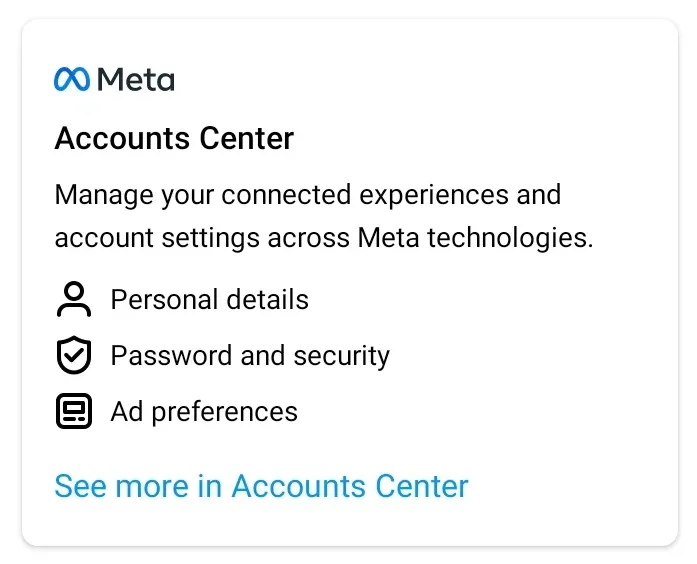
The screenshot shows the new Instagram Accounts Center.
Exploitation
Step 1: generation of the encrypted authproof
In the personal details section, the researcher entered an already-registered Facebook mobile number to add it to the Instagram account's linked Facebook account.
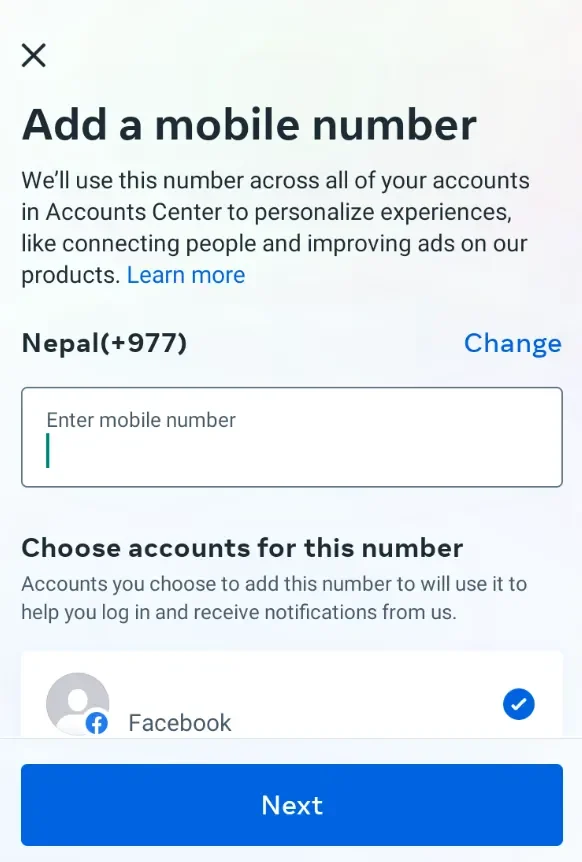
At the same time, the client sends a POST request to /api/v1/fxcal/get_native_linking_auth_blob/ to generate an Instagram encrypted authproof (token). That token is then used in step 2 to add contact points and later to verify the confirmation code.
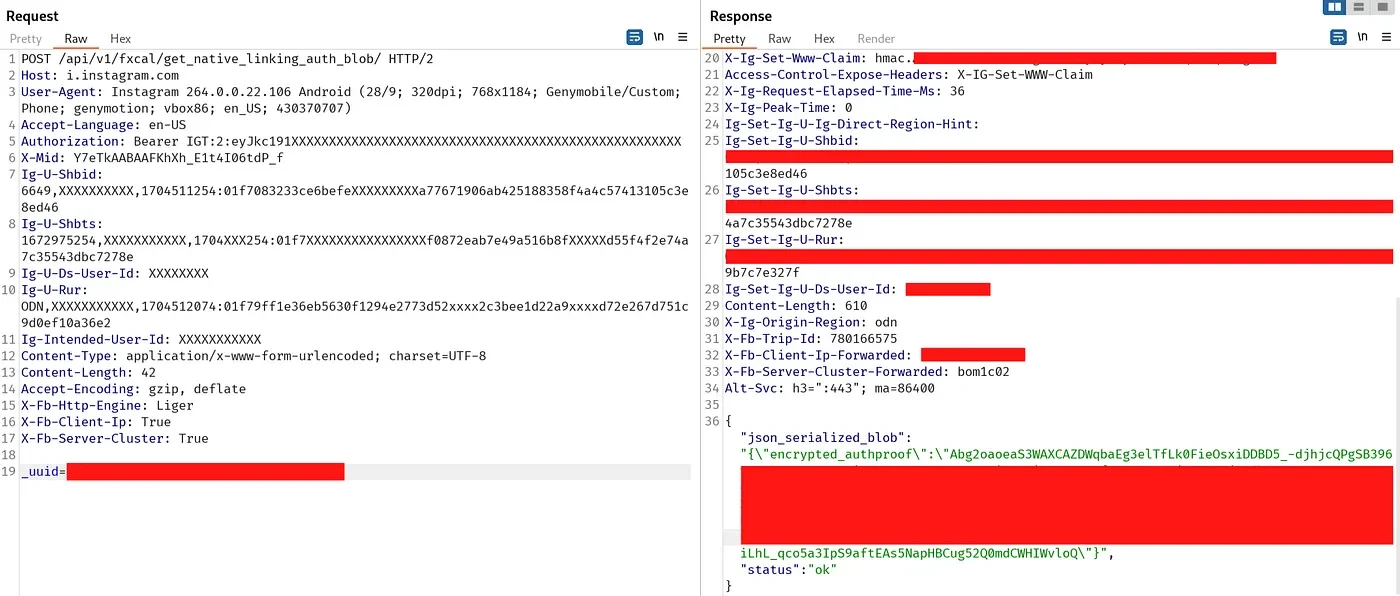
The screenshot shows step 1, generation of the encrypted authproof.
Step 2: adding contact points
When adding a contact point (email or phone), the client sends a POST request to /api/v1/bloks/apps/com.bloks.www.fx.settings.contact_point.add.async/ asking the server to send the six-digit code for verification.
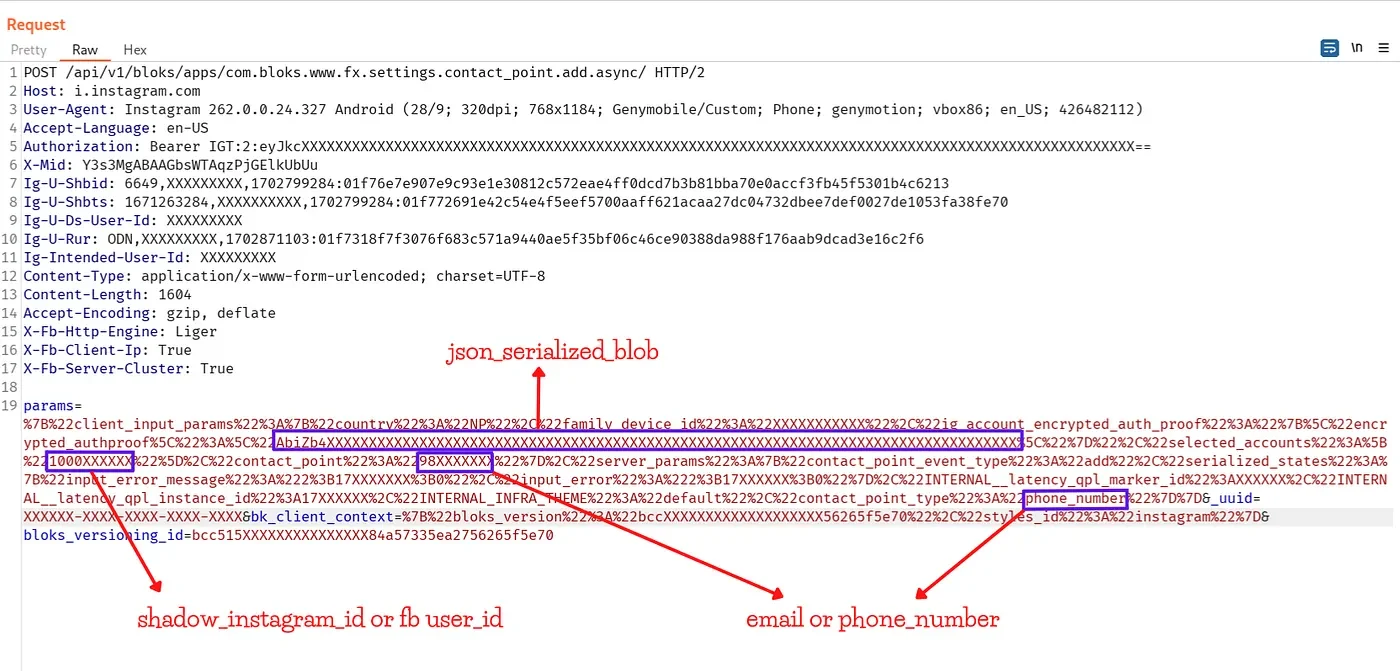
The screenshot shows step 2, adding contact points.
Step 3: code verification
Enter any random six-digit code and intercept the request with a web proxy such as Burp Suite.
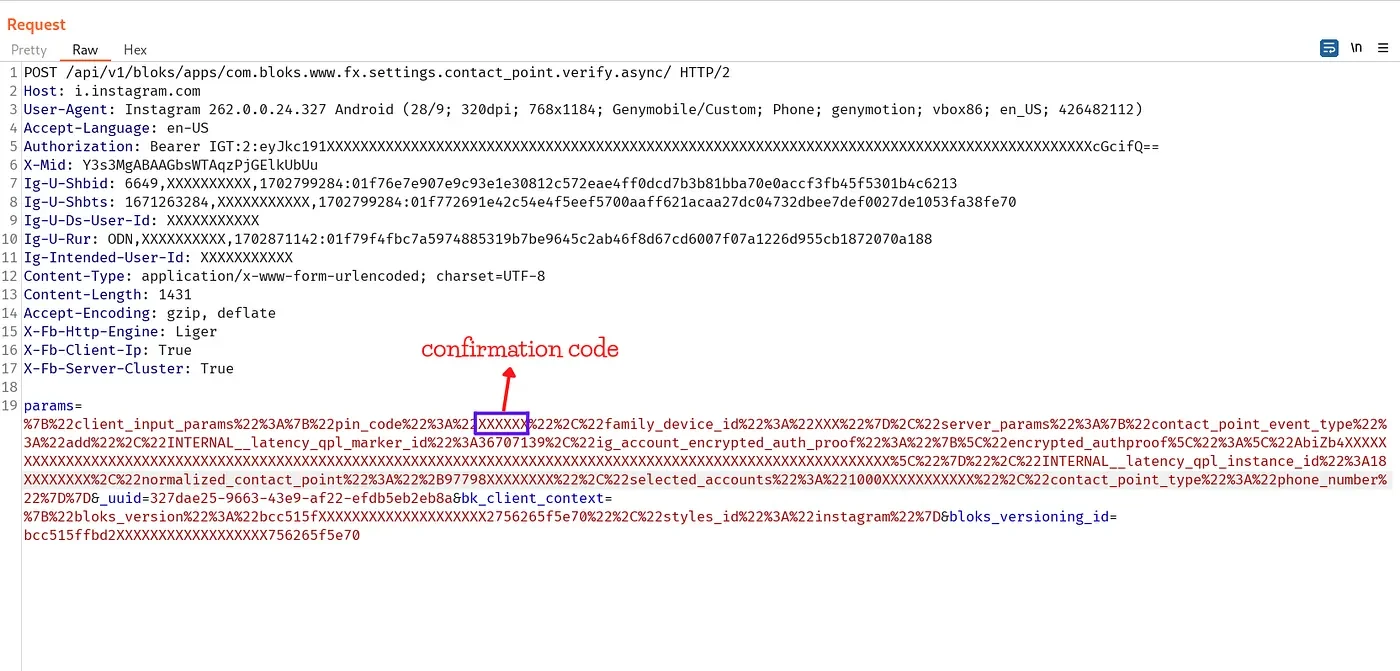
The screenshot shows step 3, code verification.
Send that request to Intruder and put the $$ placeholder in the pin_code value to brute-force the confirmation code. The verification endpoint is /api/v1/bloks/apps/com.bloks.www.fx.settings.contact_point.verify.async/, and it had no rate-limit protection at all, so the contact point verification could be bypassed.
While brute-forcing, a wrong six-digit code produces this response:
Wrong code: That code didn’t work. Please check the code and try again.
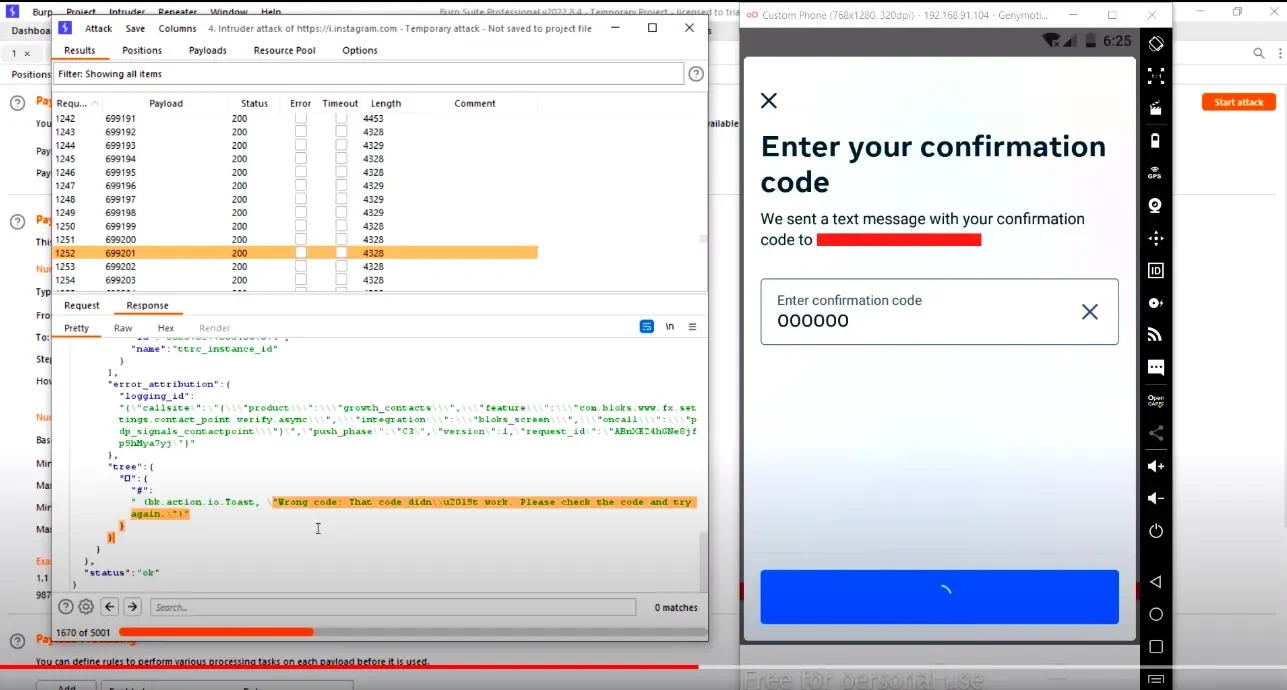
A matching six-digit code produces a long response, and the entered email or phone is confirmed to the attacker's account.
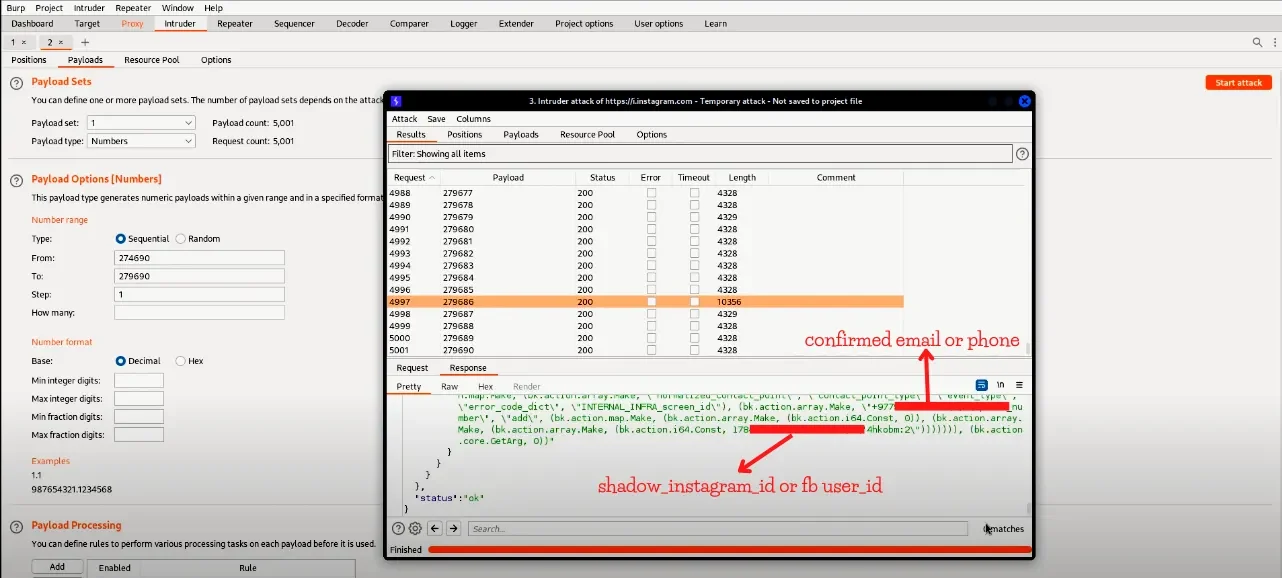
Result
If the phone number was fully confirmed and 2FA was enabled on Facebook, the 2FA is turned off or disabled on the victim's account. If the phone number was only partially confirmed, meaning it was used only for 2FA, the 2FA is revoked and the phone number is removed from the victim's account.
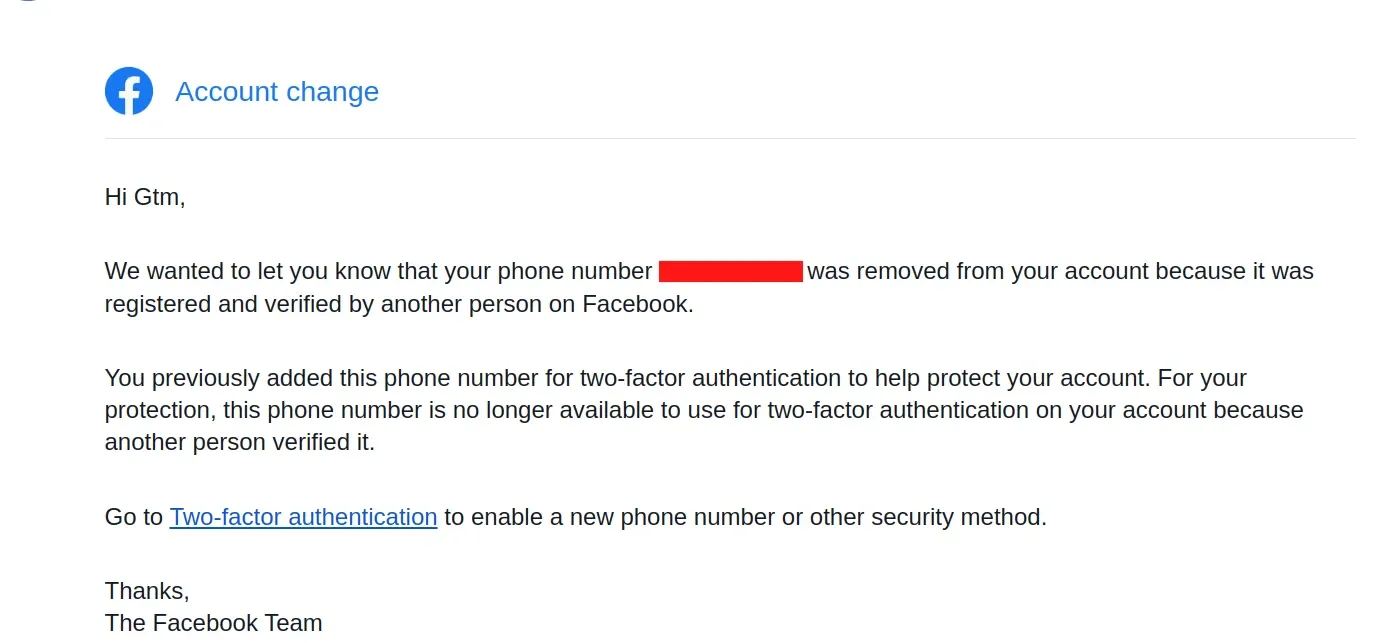
Because the endpoint verifying both contact points (email and phone) on Instagram and on the linked Facebook account was the same, both unknown and already-registered contact points could be verified on Instagram and Facebook. The researcher notes one limit: an email that already existed on Facebook could not be added.
Root cause
The verification endpoint accepted an unlimited number of attempts against a six-digit code. With no rate limiting, the roughly one-in-a-million guess space of a six-digit code can be exhausted by automated requests, and the only feedback needed to tell a hit from a miss is the difference between the short wrong-code message and the long success response. The same endpoint verified contact points on both Instagram and linked Facebook accounts, and the 2FA impact applied to SMS-based Facebook 2FA.
Impact
The report lists two impacts:
- Revoke anyone's SMS-based Facebook 2FA.
- Bypass contact point verification for both unknown and already-registered email addresses and phone numbers on Instagram and Facebook, with the stated exception that an already-existing email on Facebook could not be added.
The 2FA outcome depends on the state of the phone number on the victim's Facebook account: a fully confirmed number with 2FA enabled has 2FA turned off, while a number used only for 2FA has 2FA revoked and the number removed.
Fix
Meta confirmed the fix on 17 October 2022. The report does not describe the change itself.
Variants to test
- Contact point verification on other Meta surfaces. Add an email or phone in a linked-account settings flow and replay the verify request with the
pin_codevalue fuzzed. A positive result is a wrong-code response that stays identical in shape while a correct code returns a distinctly longer success response, with no lockout or throttling after many attempts. - Shared verification endpoints across products. Where one endpoint serves two products (here Instagram and linked Facebook), test whether a code confirmed in the lower-privilege product affects the higher-privilege one. A positive result is a contact point confirmed on the second product without a separate verification.
- 2FA state changes through contact point changes. On an account with SMS 2FA, attempt to add or confirm the same number through a linked product. A positive result is 2FA being disabled or the number being removed as a side effect of the confirmation.
- Response-length oracles. Where the wrong-code message is short and the success response is long, measure response length or timing across attempts. A positive result is a clear, stable separation that lets an automated loop identify the correct code.
What happened, in plain words
Meta runs Facebook and Instagram, and it lets you link the two accounts together so that some settings are shared. One of those shared settings is the Accounts Center, a page where you manage details that apply to both accounts, such as your email address and your phone number.
In the version of Accounts Center that the researcher looked at, you could add an email address or a phone number and have it apply to both your Instagram account and your linked Facebook account. To prove the contact point really belongs to you, the server sends a six-digit code to that email or phone, and you type the code back into the page. If the code matches, the contact point is confirmed.
The researcher found that the part of Meta's system that checks the six-digit code had no limit on how many times you could try. A six-digit code has a million possible values, which sounds like a lot, but a computer can send guesses very quickly. With no limit, an attacker can simply try codes until the right one comes up. Because the same checking system was used for both Instagram and linked Facebook contact points, guessing the code let the attacker confirm a phone number that already belonged to a victim's Facebook account. In the case where that number was used for SMS-based two-factor authentication, confirming it had the side effect of turning the victim's two-factor authentication off.
This article walks through the same steps the researcher took, explaining each concept from scratch along the way.
Background concepts, before we start
A few ideas come up again and again, so it helps to meet them first.
What an API is. A website page is what you see; an API (Application Programming Interface) is the set of addresses behind the page that the page talks to in order to get things done. Think of a restaurant: the menu and the dining room are the page you see, and the kitchen is the server. The API is the waiter who carries your order to the kitchen and brings back the result. When you click a button, your browser usually sends a request to one of these API addresses, and the server sends back an answer.
What a request is. A request is a message your browser sends to a server. It has a method (such as GET to fetch something or POST to send something), an address (the endpoint), sometimes a body with data, and headers with extra information. The server replies with a response, which has a status and usually some content.
What an endpoint is. An endpoint is one specific address on the server that does one specific job. In this report the endpoints look like paths such as /api/v1/.... Each path is like a different counter in a large office: you go to the counter that handles your particular task.
What a token is. A token is a short piece of text that proves something, a bit like a cloakroom ticket. You hand in your coat and get a ticket; later you show the ticket and get the coat back, without the attendant needing to remember your face. In web applications a token often proves that a request comes from a session that has already passed some check. Here the token is called an "encrypted authproof" and is generated by the server for the linking flow.
What a cookie is. A cookie is a small piece of data the server asks your browser to store and send back with later requests, so the server can recognise you between page loads. It is how a website remembers that you are logged in. Cookies and tokens are related ideas: both are things you carry to prove who you are.
What rate limiting is. Rate limiting is a cap on how often something may be done in a period of time. A everyday comparison is a cash machine that lets you try your card three times and then keeps the card. Without a cap, someone can keep trying forever. The vulnerability class here is exactly that: missing rate limiting on a check that guards a secret.
What brute force is. Brute force means trying every possibility until one works, instead of being clever. If a secret has only a million possible values and nothing stops you from trying them all, brute force wins.
What two-factor authentication (2FA) is. 2FA means logging in needs two different things, usually your password plus a code sent to your phone. The point is that stealing the password alone is not enough. If an attacker can turn 2FA off, the second lock is gone.
What Burp Suite is. Burp Suite is a tool that sits between your browser and the server. It lets you look at each request and response, change a request before it is sent, and send the same request many times with small changes. Its Intruder feature automates repeated requests, which is what makes brute forcing practical.
The setup
The researcher, Gtm Mänôz, had been invited to BountyCon 2022 in Singapore because of earlier results in the Meta Bug Bounty programme. A bug bounty programme is a scheme where a company pays people who report security problems to it, instead of punishing them. BountyCon is a live hacking event connected to that programme, and the researcher wanted to find a valid bug to get on the event's leaderboard.
The testing was done against a new-looking Accounts Center interface in Instagram, with a Facebook account linked to it. Requests were captured and replayed with Burp Suite, including Intruder for the brute-force step. Beyond having a linked Facebook account and an Instagram account, the report does not describe any special account setup.
Finding it
Looking at the new Accounts Center interface, the researcher noticed that the personal details section could add an email address or a phone number to both the Instagram account and the linked Facebook account. The new contact point was verified by a six-digit code sent to it. At the time of reporting, the endpoint that checked the code had no rate-limit protection, so anyone could confirm an unknown or already-known email address or phone number on both Instagram and linked Facebook accounts.
The screenshot shows the new Instagram Accounts Center.
Exploitation
Step 1: generation of the encrypted authproof
In the personal details section, the researcher entered an already-registered Facebook mobile number, in order to add it to the Instagram account's linked Facebook account.
At the same time, the client sends a POST request to /api/v1/fxcal/get_native_linking_auth_blob/ to generate an Instagram encrypted authproof (token). That token is then used in step 2 to add contact points and later to verify the confirmation code.
The screenshot shows step 1, generation of the encrypted authproof.
Why this step matters: the token is added in step 2 to add contact points and later to verify the confirmation code. Capturing it in Burp means the researcher can replay the whole flow by hand, changing one value at a time, which is what makes the next steps possible.
Step 2: adding contact points
When adding a contact point (email or phone), the client sends a POST request to /api/v1/bloks/apps/com.bloks.www.fx.settings.contact_point.add.async/, asking the server to send the six-digit code for verification.
The screenshot shows step 2, adding contact points.
Why this step matters: this is the request that makes the server generate and send a code. The researcher needs a code to exist before there is anything to guess. The endpoint name ends in add.async, which is just part of the address; the important part is that this is the "please send me a code" request.
Step 3: code verification
Enter any random six-digit code and intercept the request with a web proxy such as Burp Suite.
The screenshot shows step 3, code verification.
Why this step matters: entering a random code makes the browser send the verification request, which Burp can intercept. Now the request can be copied, edited and repeated as many times as needed.
Send that request to Intruder and put the $$ placeholder in the pin_code value to brute-force the confirmation code. The $$ marker tells Intruder where to substitute each new guess. The verification endpoint is /api/v1/bloks/apps/com.bloks.www.fx.settings.contact_point.verify.async/, and it had no rate-limit protection at all, so the contact point verification could be bypassed.
Why this step matters: this is the heart of the bug. The server is willing to check a guess, and it is willing to check as many guesses as you send. A six-digit code has one million possible values, and with no cap the attacker can simply work through them.
While brute-forcing, a wrong six-digit code produces this response:
Wrong code: That code didn’t work. Please check the code and try again.
This is the "miss" signal: the wrong-code response.
A matching six-digit code produces a long response, and the entered email or phone is confirmed to the attacker's account.
This is the "hit" signal. The difference between the short wrong-code message and the long success response is all the feedback the attacker needs to tell when the correct code has been found.
Result
If the phone number was fully confirmed and 2FA was enabled on Facebook, the 2FA is turned off or disabled on the victim's account. If the phone number was only partially confirmed, meaning it was used only for 2FA, the 2FA is revoked and the phone number is removed from the victim's account.
Because the endpoint verifying both contact points (email and phone) on Instagram and on the linked Facebook account was the same, both unknown and already-registered contact points could be verified on Instagram and Facebook. The researcher notes one limit: an email that already existed on Facebook could not be added.
Root cause
The verification endpoint accepted an unlimited number of attempts against a six-digit code. With no rate limiting, the roughly one-in-a-million guess space of a six-digit code can be exhausted by automated requests, and the only feedback needed to tell a hit from a miss is the difference between the short wrong-code message and the long success response. The same endpoint verified contact points on both Instagram and linked Facebook accounts, and the 2FA impact applied to SMS-based Facebook 2FA.
Impact
The report lists two impacts:
- Revoke anyone's SMS-based Facebook 2FA.
- Bypass contact point verification for both unknown and already-registered email addresses and phone numbers on Instagram and Facebook, with the stated exception that an already-existing email on Facebook could not be added.
The 2FA outcome depends on the state of the phone number on the victim's Facebook account: a fully confirmed number with 2FA enabled has 2FA turned off, while a number used only for 2FA has 2FA revoked and the number removed.
Fix
Meta confirmed the fix on 17 October 2022. The report does not describe the change itself.
Variants to test
These are the same kinds of checks, written so that someone new to security can follow them.
- Contact point verification on other Meta surfaces. Add an email or phone in a linked-account settings flow and replay the verify request with the
pin_codevalue fuzzed. A positive result is a wrong-code response that stays identical in shape while a correct code returns a distinctly longer success response, with no lockout or throttling after many attempts. - Shared verification endpoints across products. Where one endpoint serves two products (here Instagram and linked Facebook), test whether a code confirmed in the lower-privilege product affects the higher-privilege one. A positive result is a contact point confirmed on the second product without a separate verification.
- 2FA state changes through contact point changes. On an account with SMS 2FA, attempt to add or confirm the same number through a linked product. A positive result is 2FA being disabled or the number being removed as a side effect of the confirmation.
- Response-length oracles. Where the wrong-code message is short and the success response is long, measure response length or timing across attempts. A positive result is a clear, stable separation that lets an automated loop identify the correct code.
Glossary
- 2FA (two-factor authentication): a login that needs two different proofs, usually a password plus a code sent to your phone.
- API: the set of server addresses a web page talks to behind the scenes, like a waiter carrying orders to a kitchen.
- Authproof: the token generated by the server in this flow to prove that later requests belong to the same linking attempt.
- Brute force: trying every possible value of a secret until one works.
- Bug bounty programme: a scheme where a company pays people who report security problems to it.
- Burp Suite: a tool that sits between your browser and the server so you can inspect, edit and repeat requests.
- Contact point: an email address or phone number attached to an account.
- Cookie: a small piece of data your browser stores and sends back so the server can recognise you between requests.
- Endpoint: one specific server address that performs one specific job.
- GET / POST: request methods; GET fetches something, POST sends something.
- Headers: extra information attached to a request or response.
- Intruder: the Burp Suite feature that repeats a request many times with a changing value.
- Rate limiting: a cap on how many times something may be done in a period of time.
- Request: a message your browser sends to a server.
- Response: the server's reply to a request.
- Token: a short piece of text that proves something, like a cloakroom ticket.
- Vulnerability class: a general category of security weakness, such as missing rate limiting.


