Editing Pentest Summary Report Answers After Submitting Them
The web interface disables the pentest summary report form after submission, but the underlying GraphQL mutation still accepts edits. A pentest lead could change answers after they had been submitted for review.
 Originally disclosed on HackerOne
- Triaged in 11 hours
- Fixed in 33 days
- Disclosed after 38 days
Summary:
Pentest leads should not be able to edit pentest summary report answers after submitting them.
Steps To Reproduce:
- After submitting the pentest summary report, try to edit it:
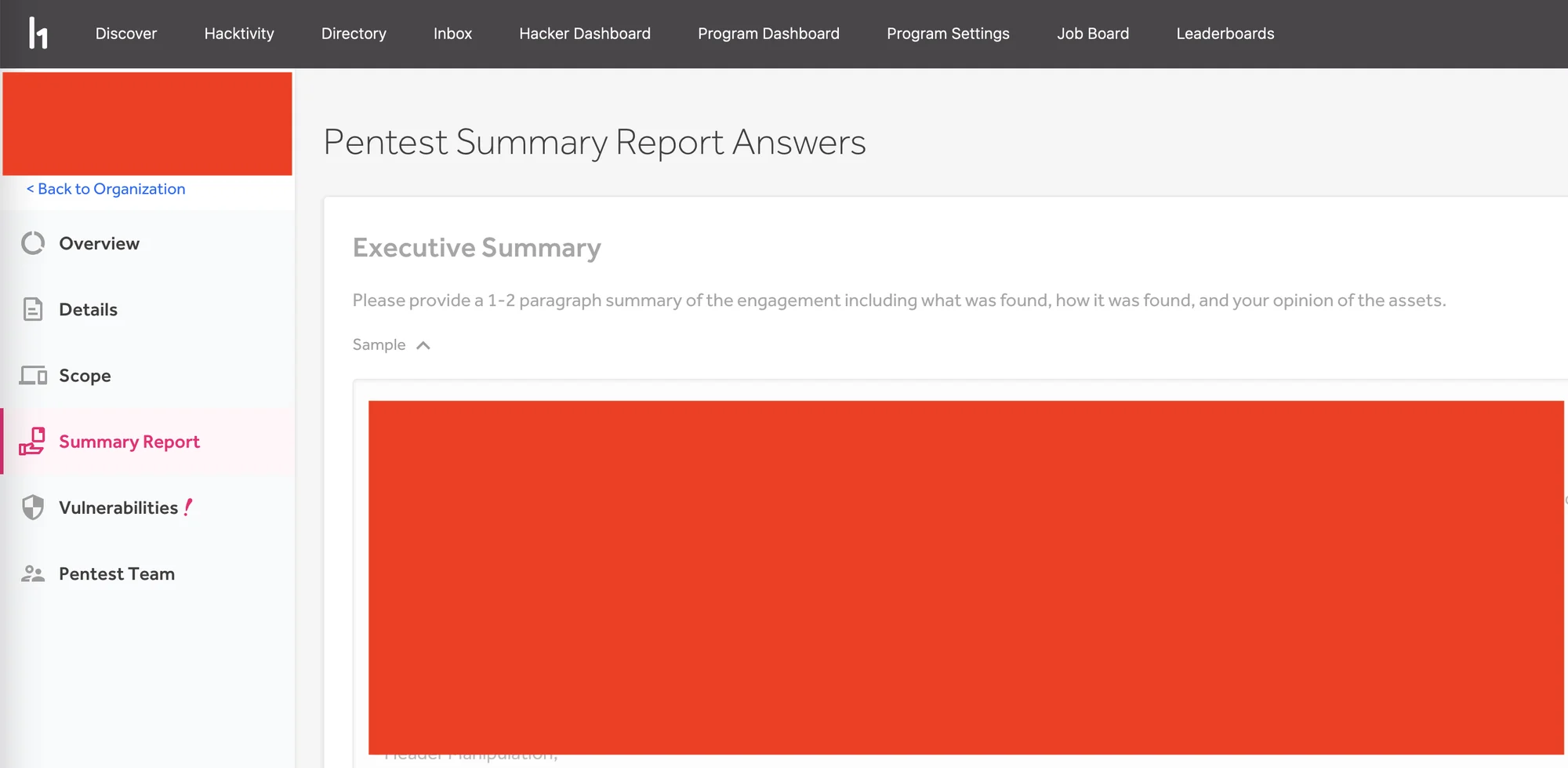
You can't. The form is disabled.
- Use the HTTP Request below (update
X-Auth-Token,Cookieand thepentestFormAnswerId):
POST /graphql HTTP/1.1
Host: hackerone.com
User-Agent: Mozilla/5.0 (X11; Linux i686; rv:75.0) Gecko/20100101 Firefox/75.0
Accept: */*
Accept-Language: pt-BR,en-US;q=0.5
Accept-Encoding: gzip, deflate
Referer: https://hackerone.com/******************************************************************
content-type: application/json
X-Auth-Token: ******************************************************************
Content-Length: 1498
Origin: https://hackerone.com
DNT: 1
Connection: close
Cookie: ******************************************************************

{"operationName":"UpdatePentestFormAnswer","variables":{"pentestFormAnswerId":"******************************************************************","content":"Blah blah blah"},"query":"mutation UpdatePentestFormAnswer($pentestFormAnswerId: ID!, $content: String!) {\n  updatePentestFormAnswer(input: {pentest_form_answer_id: $pentestFormAnswerId, content: $content}) {\n    was_successful\n    pentest_form_answer {\n      id\n      content\n      __typename\n    }\n    __typename\n  }\n}\n"}
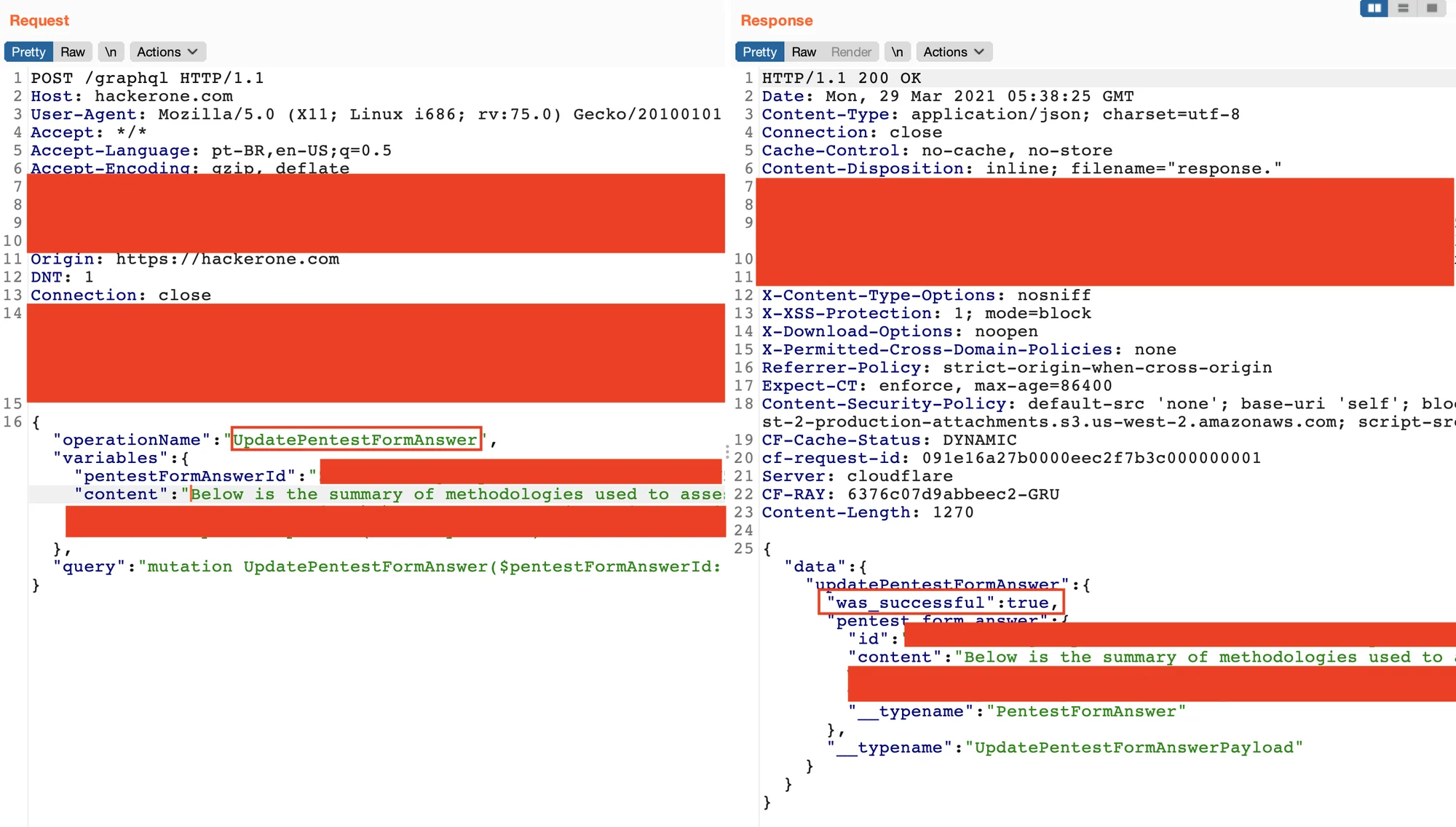
The pentest summary report will be edited.
Recommendation:
Show an error instead of allowing the modification of pentest summary report answers.
Impact
A pentest lead can modify the pentest summary report answers after submitting them to review.
Context
HackerOne's platform includes a pentest product, where a pentest lead fills in a pentest summary report and submits it for review. Once submitted, the answers in that summary are meant to be final: the interface disables the form so the lead cannot change what was sent to review. The report here is about that assumption breaking at the API layer. The asset named is the GraphQL endpoint at http://hackerone.com/graphql, and the weakness class recorded is Modification of Assumed-Immutable Data (MAID), rated low severity with a CVSS score of 3.1.
Setup
To reproduce, you need to be acting as a pentest lead with a pentest summary report already submitted. You also need a way to send arbitrary HTTP requests, such as a proxy or an intercepting client, and you need to capture your own authenticated session: the X-Auth-Token header, the Cookie header, and the identifier of the form answer you want to change (pentestFormAnswerId). The report does not describe how those values are obtained beyond saying they must be updated in the request.
Finding it
The starting observation is simple: after a pentest summary report is submitted, the web form is disabled, so the lead cannot edit it through the UI. That is the intended behaviour. The disabled form is the intended behaviour; the researcher then sent the update mutation directly.
Exploitation
Step 1: Confirm the UI blocks editing
After submitting the pentest summary report, the researcher tried to edit it in the browser. The form is disabled, so no edit is possible through the interface.
The screenshot accompanies the step where the form is found disabled. This establishes the expected behaviour: the UI presents the answers as immutable after submission.
Step 2: Replay the update mutation directly
The researcher then sent the following request, substituting their own X-Auth-Token, Cookie and the target pentestFormAnswerId:
POST /graphql HTTP/1.1
Host: hackerone.com
User-Agent: Mozilla/5.0 (X11; Linux i686; rv:75.0) Gecko/20100101 Firefox/75.0
Accept: */*
Accept-Language: pt-BR,en-US;q=0.5
Accept-Encoding: gzip, deflate
Referer: https://hackerone.com/******************************************************************
content-type: application/json
X-Auth-Token: ******************************************************************
Content-Length: 1498
Origin: https://hackerone.com
DNT: 1
Connection: close
Cookie: ******************************************************************

{"operationName":"UpdatePentestFormAnswer","variables":{"pentestFormAnswerId":"******************************************************************","content":"Blah blah blah"},"query":"mutation UpdatePentestFormAnswer($pentestFormAnswerId: ID!, $content: String!) {\n  updatePentestFormAnswer(input: {pentest_form_answer_id: $pentestFormAnswerId, content: $content}) {\n    was_successful\n    pentest_form_answer {\n      id\n      content\n      __typename\n    }\n    __typename\n  }\n}\n"}
The important parts:
- The request targets the GraphQL endpoint at
/graphqlonhackerone.com. - Authentication is carried in the
X-Auth-Tokenheader and theCookieheader, both of which the researcher had to supply from their own session. - The JSON body names the operation
UpdatePentestFormAnswerand passes two variables:pentestFormAnswerId, the identifier of the answer to change, andcontent, the new text. In the researcher's example the new content is the placeholderBlah blah blah. - The
queryfield contains the mutation itself. It declares$pentestFormAnswerId: ID!and$content: String!, callsupdatePentestFormAnswerwithpentest_form_answer_idandcontent, and asks forwas_successful, plus the returned answer'sidandcontent.
The server accepted the mutation and the pentest summary report was edited, despite the form being disabled in the UI.
The second screenshot follows the statement that the pentest summary report was edited.
Root cause
The form is disabled in the UI, yet the mutation succeeded, so the submitted state was not enforced for this request. The researcher, acting as a pentest lead, called the mutation directly with their own form answer identifier and new content. The report does not describe the server-side implementation, so the exact check that is missing is not stated; what is clear is that the mutation does not reject updates to answers that have already been submitted for review.
Impact
A pentest lead can modify the pentest summary report answers after submitting them to review.
Fix
The recommendation in the report is to show an error instead of allowing the modification of pentest summary report answers. The recommendation is to show an error instead of allowing the modification.
Variants to test
- Other GraphQL mutations that back disabled or read-only forms: send the mutation directly after the UI locks the form and check whether the response reports success and the data changes.
- State transitions such as submit, approve or close: replay the mutation that performs the transition after it has already happened, and look for a successful response instead of an error.
- Identifier substitution: try the same mutation with identifiers belonging to other records to see whether authorisation is checked per object, not just per session.
- Fields hidden from the UI: include fields in the mutation input that the form does not render, and see whether they are accepted.
A positive result in each case is a successful response (was_successful true, or the updated object returned) together with a visible change in the stored data, where the UI or the documented workflow says the change should be impossible.
Hunting notes
This kind of bug hides wherever a restriction is enforced only in the front end: disabled forms, hidden buttons, read-only views and multi-step workflows. During recon, GraphQL endpoints are a strong signal, because every mutation the front end uses is discoverable and callable directly. Capture the mutation from your own browser session, then replay it after the UI has locked the action. The report shows the disabled form and then states that the summary report was edited after the request.
What happened, in plain words
HackerOne runs a platform where security researchers and companies work together on bug reports. Part of that platform involves a pentest lead who fills in a pentest summary report and submits it for review. When the lead is finished, they submit the summary for review.
Once submitted, the answers are supposed to be final. The website makes this clear by greying out the form: the text boxes become disabled and you cannot type in them any more. That is what a normal user sees.
But a website is really two things working together: the pages you see in your browser (the "front end") and the servers that store and process the data (the "back end"). Disabling a text box only changes what your browser shows you. It does not, by itself, stop the back end from accepting a change if someone asks it directly. The researcher then sent the update request directly to the server.
It turned out to be only in the browser. By sending a carefully crafted request straight to the server, the researcher changed an answer in an already-submitted summary report. The platform recorded this as a low severity issue (CVSS 3.1) under the weakness class "Modification of Assumed-Immutable Data", which simply means data that everyone assumes cannot change after a certain point, but which can.
Background you need first
A few ideas come up again and again below, so here they are from zero.
API. An API is the way one piece of software talks to another. Think of a restaurant: the menu and the waiter are the API. You do not walk into the kitchen yourself; you tell the waiter what you want and they bring it back. Your browser is the customer, the server is the kitchen, and the API is the waiter taking orders and returning results.
GraphQL. GraphQL is a particular style of API. Instead of many separate addresses (one for reading a report, one for editing it, and so on), there is usually a single address, here /graphql, and every request says in its body what it wants to do. Requests that only read data are called queries; requests that change data are called mutations. The name is literal: a mutation mutates (changes) something.
HTTP request. When your browser loads a page or submits a form, it sends an HTTP request to a server. A request has a first line (the method, such as POST, and the path), then a list of headers (small labelled pieces of information), then optionally a body (the actual content). You can send these by hand with a tool instead of a browser, which is what the researcher did here.
Cookie and token. When you log in, the server needs a way to recognise you on the next request. It gives your browser a cookie, a small piece of text that the browser automatically sends back with every request to that site. Many sites also use a token, a longer secret string sent in a header (here X-Auth-Token) that proves who you are. Both are like a wristband at an event: show it and you are let in without proving your identity again. Anyone who steals it can pretend to be you, which is why they are secrets.
Identifier. A database needs a way to tell one record from another. It gives each one an identifier (often called an ID), a unique string. Here the identifier of a single answer inside the summary form is called pentestFormAnswerId.
Client-side versus server-side checks. A check done in your browser (client-side) can be bypassed, because you control your browser. A check done on the server (server-side) cannot be bypassed by fiddling with the page. Locking a door by putting a "do not enter" sign on it is client-side; locking it with a key is server-side.
The setup
To reproduce this, you need three things:
- An account acting as a pentest lead, with a pentest summary report that has already been submitted.
- A way to send your own HTTP requests, such as a proxy tool or an intercepting client, rather than only using the normal browser interface.
- Your own logged-in session details: the
X-Auth-Tokenheader value, theCookieheader value, and the identifier of the form answer you want to change (pentestFormAnswerId).
The report does not explain how those values are obtained beyond saying they must be filled into the request.
Step 1: Confirm the form is locked in the browser
After submitting the pentest summary report, the researcher tried to edit it in the normal interface. The form is disabled, so no edit is possible that way.
The screenshot accompanies the step where the form is found disabled. This is the expected behaviour: the interface presents the answers as unchangeable once submitted. The point of this step is to establish the baseline, so that later we can show the server behaving differently from what the interface promises.
Step 2: Send the update request directly to the server
The researcher then sent the following request by hand, substituting their own X-Auth-Token, Cookie and the target pentestFormAnswerId:
POST /graphql HTTP/1.1
Host: hackerone.com
User-Agent: Mozilla/5.0 (X11; Linux i686; rv:75.0) Gecko/20100101 Firefox/75.0
Accept: */*
Accept-Language: pt-BR,en-US;q=0.5
Accept-Encoding: gzip, deflate
Referer: https://hackerone.com/******************************************************************
content-type: application/json
X-Auth-Token: ******************************************************************
Content-Length: 1498
Origin: https://hackerone.com
DNT: 1
Connection: close
Cookie: ******************************************************************

{"operationName":"UpdatePentestFormAnswer","variables":{"pentestFormAnswerId":"******************************************************************","content":"Blah blah blah"},"query":"mutation UpdatePentestFormAnswer($pentestFormAnswerId: ID!, $content: String!) {\n  updatePentestFormAnswer(input: {pentest_form_answer_id: $pentestFormAnswerId, content: $content}) {\n    was_successful\n    pentest_form_answer {\n      id\n      content\n      __typename\n    }\n    __typename\n  }\n}\n"}
Line by line, in plain words:
POST /graphql HTTP/1.1is the first line.POSTmeans "I am sending data to change something"./graphqlis the single address of the GraphQL API.HTTP/1.1is the version of the protocol being spoken.Host: hackerone.comtells the server which website this request is for. One server can host many sites, so it needs to know which one you mean.User-Agent: ...says which browser and operating system the request claims to come from. Here it looks like Firefox on Linux. Tools often copy this from a real browser so the request looks ordinary.Accept: */*means "I will accept any kind of response".Accept-Language: pt-BR,en-US;q=0.5says the sender prefers Brazilian Portuguese, then English. It is just a language preference and has no security meaning here.Accept-Encoding: gzip, deflatesays the sender can handle compressed responses, which saves bandwidth.Referer: https://hackerone.com/...normally tells the server which page the request came from. The path is redacted here.content-type: application/jsonannounces that the body is in JSON, a common text format for structured data (think of it as a very strict way of writing lists and labelled values).X-Auth-Token: ...is the secret token that proves who is making the request. It is redacted here because it is a credential.Content-Length: 1498says how many bytes long the body is, so the server knows when it has read it all.Origin: https://hackerone.comtells the server which site the request originates from. Browsers add this automatically; it is part of how browsers decide whether one site may talk to another.DNT: 1is the old "Do Not Track" preference, asking not to be tracked. It has no effect on this bug.Connection: closeasks the server to close the connection after replying, rather than keeping it open for more requests.Cookie: ...is the session cookie, another credential that identifies the logged-in user. It is redacted for the same reason as the token.- The blank line separates the headers from the body. Everything after it is the body.
Now the body, which is one long JSON object:
"operationName":"UpdatePentestFormAnswer"names the operation being run. GraphQL uses this to pick out which named operation in the request to execute."variables":{...}holds the values the operation needs.pentestFormAnswerIdis the identifier of the specific answer to change (redacted here), andcontentis the new text. In the researcher's example the new text is the placeholderBlah blah blah."query":"..."contains the actual GraphQL mutation, written as a string with\nstanding for line breaks. Read it as:mutation UpdatePentestFormAnswer($pentestFormAnswerId: ID!, $content: String!)declares a mutation namedUpdatePentestFormAnswerthat takes two inputs: an ID (the!means it is required) and a string of text (also required).updatePentestFormAnswer(input: {pentest_form_answer_id: $pentestFormAnswerId, content: $content})is the call itself: "update the form answer with this ID, setting its content to this text".was_successfulasks the server to report whether the change worked.pentest_form_answer { id content __typename }asks the server to send back the updated answer's identifier and content, plus its type name (__typenameis a GraphQL built-in that returns the name of the object type).- The trailing
__typenamedoes the same for the outer result object.
The server accepted the mutation and the pentest summary report was edited, even though the form was disabled in the interface.
The second screenshot follows the statement that the pentest summary report was edited. Together, the two screenshots make the gap obvious: the interface said "locked", the server said "changed".
Why it worked
The form is disabled in the browser, yet the mutation succeeded, so the submitted state was not enforced for this request. The researcher, acting as a pentest lead, called the mutation directly with their own form answer identifier and new content.
The report does not describe how the server is built, so the exact missing check is not stated. What is clear is that the mutation does not reject updates to answers that have already been submitted for review.
What the impact is
A pentest lead can change the answers in a pentest summary report after submitting it for review.
The suggested fix
The recommendation is to show an error instead of allowing the modification of pentest summary report answers. The recommendation is to show an error instead of allowing the modification.
Other places to look for the same pattern
This kind of bug hides wherever a restriction lives only in the front end: disabled forms, hidden buttons, read-only views and multi-step workflows. A few variations worth trying:
- Other GraphQL mutations behind disabled or read-only forms: send the mutation directly after the interface locks the form, and check whether the response says it succeeded and the data actually changed.
- State changes such as submit, approve or close: replay the mutation that performs the change after it has already happened, and look for a success response instead of an error.
- Swapping identifiers: try the same mutation with identifiers belonging to other records, to see whether permission is checked per record, not just per session.
- Fields the interface does not show: include fields in the mutation input that the form never renders, and see whether they are accepted.
In each case, a positive result is a successful response (was_successful true, or the updated object returned) together with a visible change in the stored data, where the interface or the documented workflow says the change should be impossible.
How to hunt for this yourself
During recon, GraphQL endpoints are a strong signal, because every mutation the front end uses can be discovered and called directly. Capture the mutation from your own browser session, then replay it after the interface has locked the action. The report shows the disabled form and then states that the summary report was edited after the request.
Glossary
- API: the agreed way for one piece of software to ask another for data or actions, like a waiter taking your order to the kitchen.
- Back end: the servers and databases that store and process data, out of sight of the user.
- Client-side: anything that happens in your browser, which you control and can therefore bypass.
- Cookie: a small piece of text a site stores in your browser and that your browser sends back with each request, often used to recognise your logged-in session.
- CVSS: a standard scoring system for how serious a security issue is; 3.1 is a low score.
- Front end: the part of a website you see and interact with in the browser.
- GraphQL: a style of API with a single address where each request states in its body what it wants to read or change.
- Header: a labelled piece of information attached to an HTTP request or response, such as
CookieorContent-Type. - HTTP request: the message a browser or tool sends to a server to ask for a page or to submit data.
- Identifier (ID): a unique string that tells one record in a database apart from another.
- JSON: a common text format for structured data, made of labelled values in curly braces and lists in square brackets.
- Modification of Assumed-Immutable Data (MAID): a weakness where data that is supposed to be unchangeable after a certain point can still be changed.
- Mutation: in GraphQL, a request that changes data, as opposed to a query that only reads it.
- Pentest: a security test where specialists deliberately try to break into a system, with permission, to find weaknesses.
- Pentest lead: the person in charge of a pentest team, who fills in and submits the summary report.
- Query: in GraphQL, a request that only reads data.
- Server-side: anything that happens on the server, which the user cannot directly alter and which therefore cannot be bypassed from the browser.
- Session: the period during which a server remembers that you are logged in, usually tracked with a cookie or token.
- Token: a secret string, sent in a header, that proves who is making a request; anyone holding it can act as that user.
- UI (user interface): the visible part of a website or app that a person interacts with.

