Able to Takeover Merchants Accounts Even They Have Already Setup SSO, After Bypassing the Email Confirmation
After bypassing email confirmation, an attacker merging a self-created store into a victim merchant's account was blocked by a request for the victim's master password. By changing the URL path from the login page to the account-merge new-password page while keeping the query string, the attacker could set a new password on the victim account and take it over even when SSO was enabled.

- Triaged in under an hour
- Fixed in 47 days
- Paid in 12 days
- Disclosed after 47 days
Able to Takeover Merchants Accounts Even They Have Already Setup SSO, After Bypassing the Email Confirmation
Summary
This report is based on the scenario that email confirmation has been bypassed already, like shown in #791775.
What happened in #791775 was, I was too excited and didn't take a step further to try to takeover merchant's account even they have SSO setup, and after reading the comment An important mitigating factor was that this bug only affected user accounts which had not yet adopted our single login system. , I know I have to find a way to bypass that to prove my point.
Description
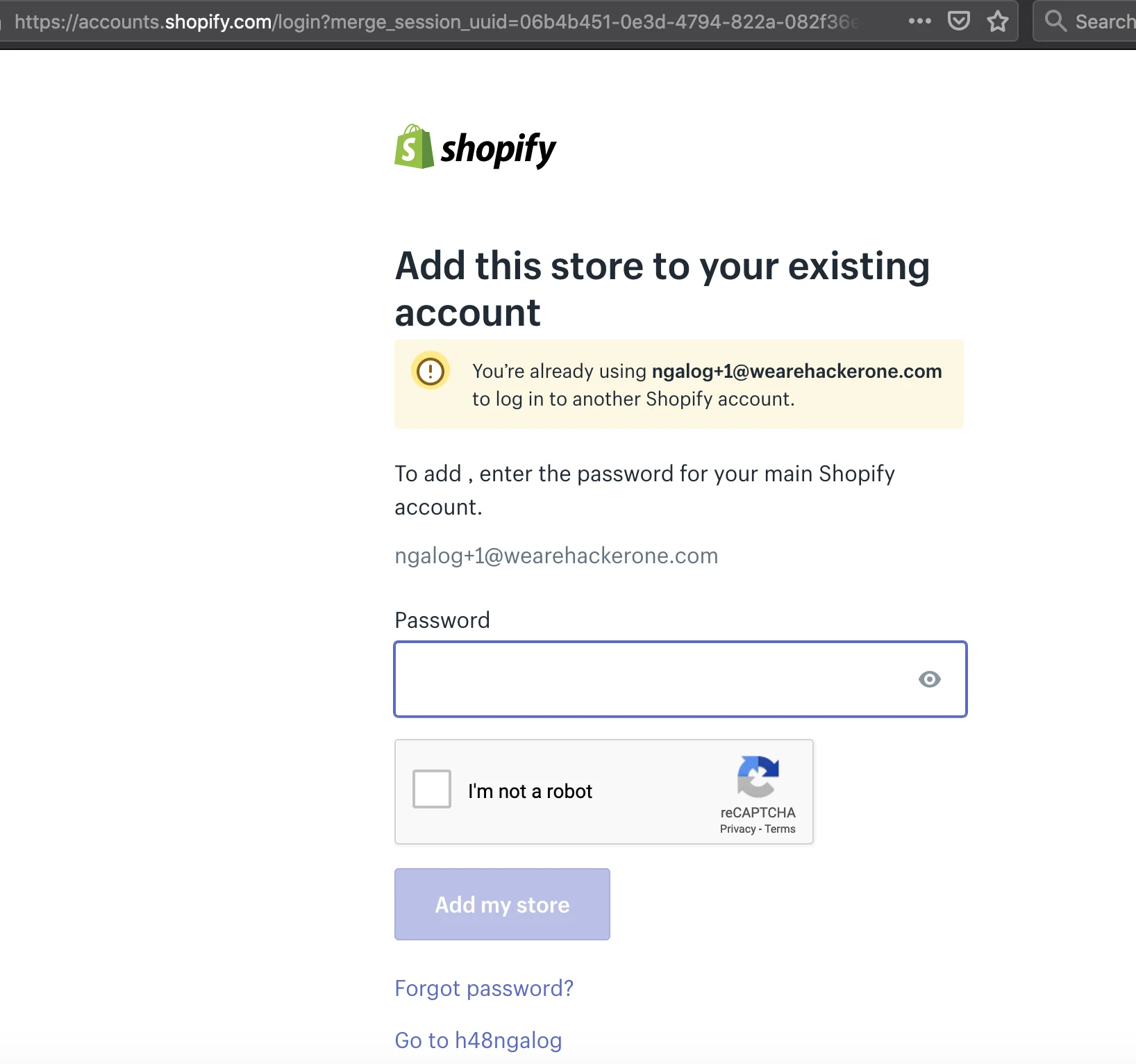
For merchant that have accounts already setup SSO, even attacker has bypassed the email confirmation, they would have no ways to takeover the rest of the accounts of the merchant, because they will need to enter the master password of the merchant in the process of merging accounts.
Let me illustrate this in graphs, in this example, the merchant that has SSO already setup is [email protected], the attacker sign-up a store h48ngalog.myshopify.com, with email [email protected]
Stage 1. First, for whatever reason, maybe a new feature appeared that allows attacker to bypass email confirmation again or an old bug bypass, that as an attacker with [email protected] confirmed, he should see this in the shop
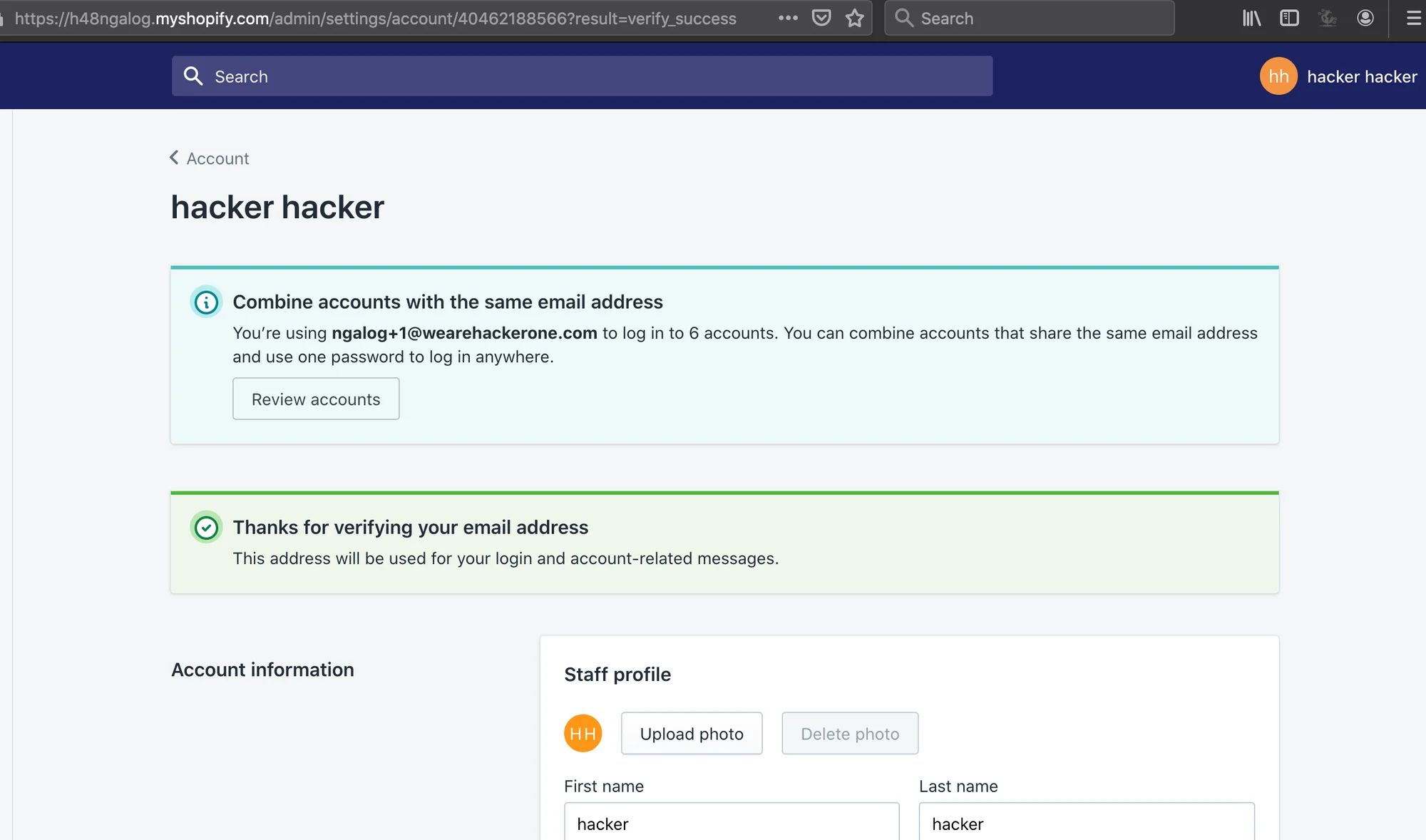
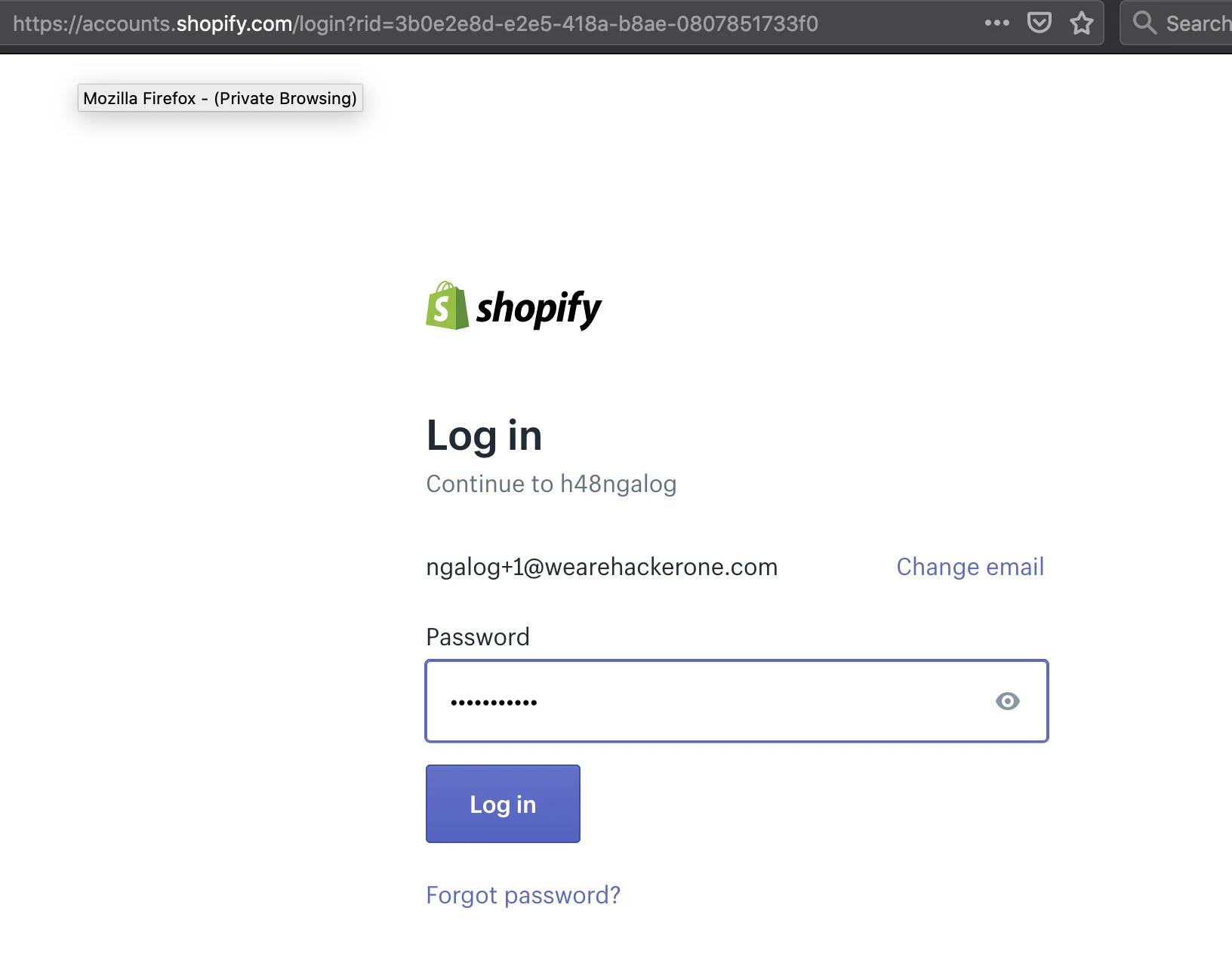
Stage 2. Then, when attacker clicks Review accounts, attacker needs to put in the store password first, which is fine cause attacker signup this store account himself, so it should have no problem
Stage 3. After authenticating, here is the real obstacle, Shopify asks attacker for the main shop's password, for sure the attacker doesn't know the password, otherwise he could just go on and takeover the store without these steps.
Stage 4. Here's the magic step, note that the url path is /login now at stage3, change the path to /accounts_merge/new-password while keeping the query part the same
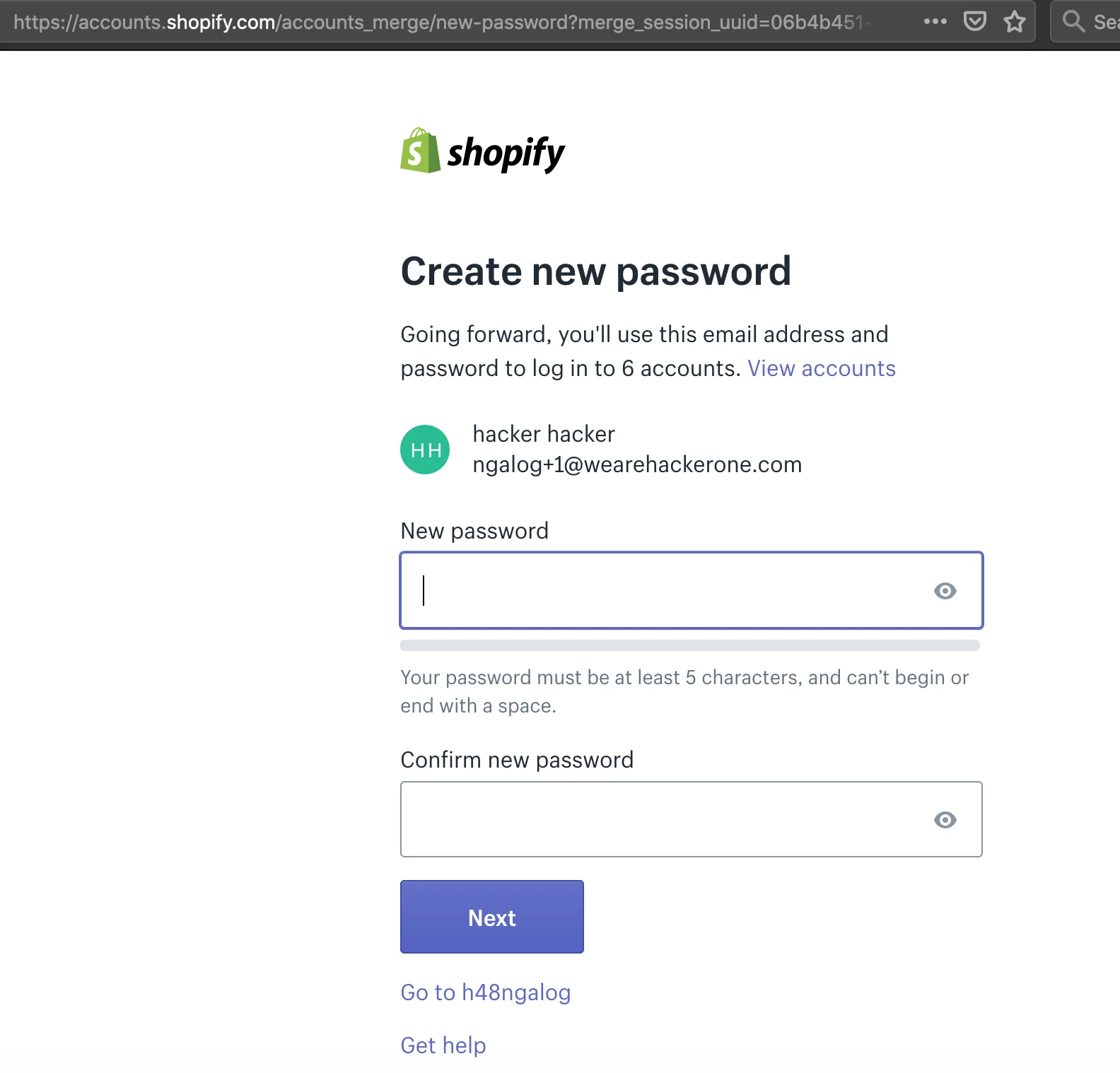
Stage 5. The victim [email protected] account has no 2FA configured, after submitting this report I'll try again with the 2FA enabled victim account and see if this still works, for now stay with me, enter a new password of attackers choice, and click do not enable 2FA etc.., and finally you'll be redirected to this page, asking you to confirm the change of password, click the button
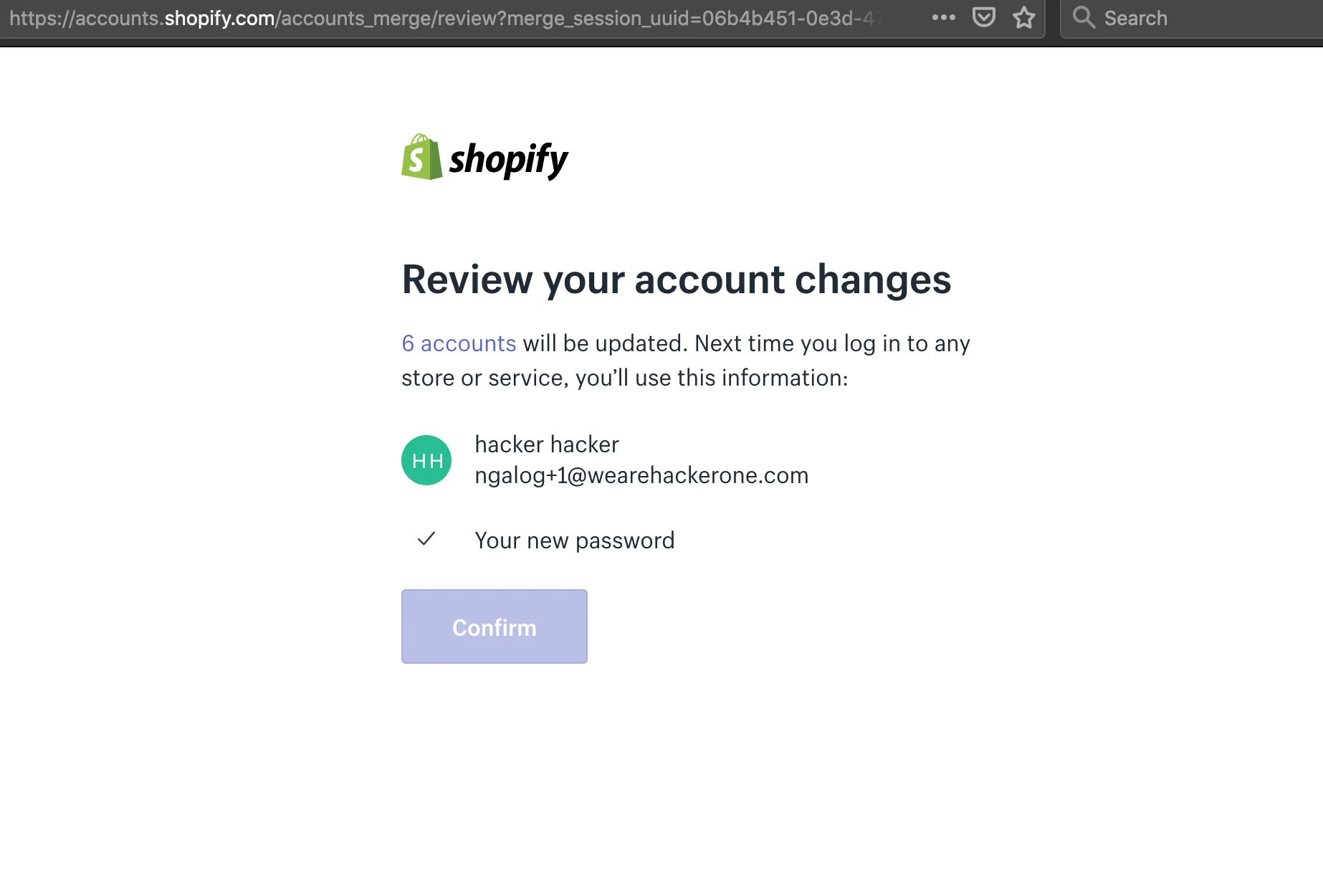
And now we are done, you should be redirected to your old store, and feel free to change stores on the upper left switch store tab, or use your new password to login victim's store.
Steps to reproduce
- Create a store, and confirm your email with victim's email, and this victim should not have 2FA setup, and should have SSO setup already
- Click the button shown in
stage1.png From the original on HackerOne - enter your store's own password
- the url should now be accounts.shopify.com/login?xxxxxx, change
/loginto/accounts_merge/new-passwordwhile keeping the query part xxx the samestage4.png From the original on HackerOne - Enter your new password and continue without setting up the 2FA, you can try to setup the 2FA for victim, I never tried, guess it is not important, since the impact would just be locking victim out of their account
- Finally, click confirm button on the password change
stage5.png From the original on HackerOne
Impact
Able to takeover merchant's account even they have SSO enabled after email confirmation bypass
Not written yet. The AI write-up for this report has not been written yet. The Original tab links to the source.
How it worked
Root cause
Likely the account-merge new-password endpoint did not verify the current master password or otherwise confirm the user's identity before allowing a password change.
Impact
An attacker could take over a merchant's account, including one with SSO enabled, provided the email confirmation bypass and the absence of 2FA on the victim account; the researcher had not tested whether 2FA blocks it.
What the attacker needed
Email confirmation bypass; victim has SSO set up; victim has no 2FA; attacker creates own store
How it was found
- Create a store and confirm it using the victim's email address; the victim must have SSO set up and no 2FA.
- Click the button that offers to review accounts for merging.
- Enter the attacker's own store password to authenticate.
- On the login URL, replace the login path with the account-merge new-password path while keeping the query string.
- Enter a new password of the attacker's choice and skip enabling 2FA.
- Confirm the password change and then switch to the victim's store or log in with the new password.
Explained by bugbounty.wiki with AI from the original and checked against quotes from it; it can still be wrong. Read the original before relying on a detail.
Not written yet. The AI write-up for this report has not been written yet. The Original tab links to the source.
A merchant account can be linked to several stores, and merging them normally asks for the main account's password. The researcher found that a different page on the same site would accept a new password without checking that password first, so anyone who reached that page could set a password on someone else's account. This only worked because an earlier step, confirming an email address that did not belong to the attacker, had already been bypassed.
What is Account takeover?
Getting into someone else's account through a flaw in sign-in, password reset, second factor, single sign-on or session handling.







