XSS Blind Stored at 2 Assets TikTok
A seller account product name was stored without proper escaping and later rendered inside a meta tag's content attribute on two TikTok assets, allowing an attacker to inject an image tag with an event handler that executed script. The attacker could run arbitrary JavaScript in the context of the affected pages when a victim viewed the product.
 Published on aidilarf.medium.com
In this article, I share the findings of XSS Blind Stored at 2 TikTok Assets.
The full write-up lives on its author's site
It belongs to its author, so we link to it rather than copy it. The other two tabs are our own rewrites, checked against it.
Context
This is a write-up of a blind stored XSS found across two TikTok assets. The entry point was a product name on a TikTok seller account, and the payload surfaced later in a different part of the TikTok ecosystem: the product view served through the TikTok Android app and the associated web endpoints.
The feature involved is the seller product listing. A seller creates a product with a name, and that name is then rendered in various places: the seller dashboard, the product view page, and the metadata of those pages. The report shows the product name appearing inside a <meta name='keywords'> tag in the product view page source, which is where the stored payload executed.

The researcher spent about one month hunting for this XSS in the TikTok program before it landed.
Setup
The preconditions are simple:
- A TikTok seller account at
https://seller-id.tiktok.com/. - The ability to create a product and set its name.
- The TikTok Android app, used to reach the product view and its share URL.
No special tooling is described. The work was done by creating a product, editing its name, and inspecting the page source of the resulting product view.
Finding it
The researcher started by creating a product on the seller account and putting an XSS payload into the product name.
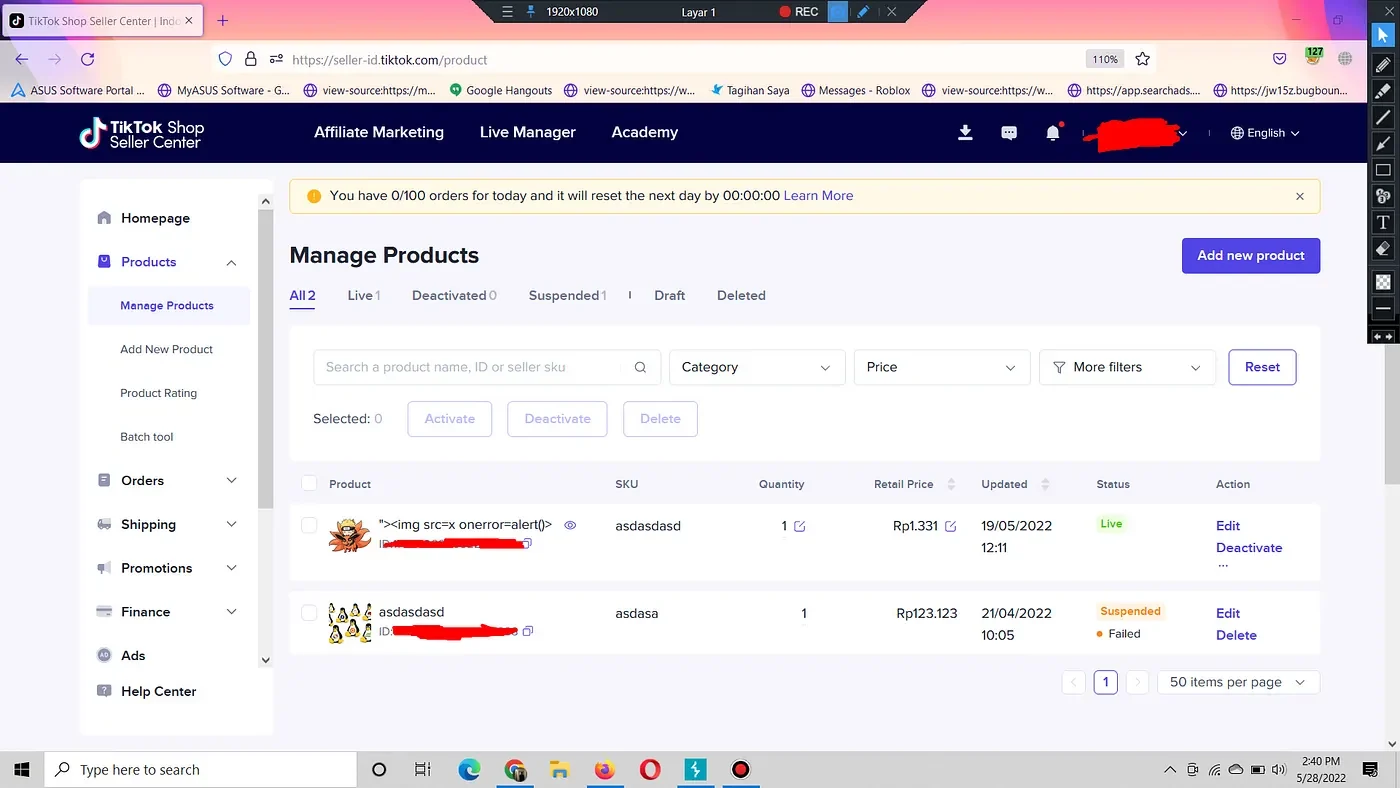
The result on https://seller-id.tiktok.com/ itself showed no XSS, so the researcher stopped looking there.
The next day, while testing TikTok Android app assets, the researcher found the product features again and looked at the Product URL from the Share feature.
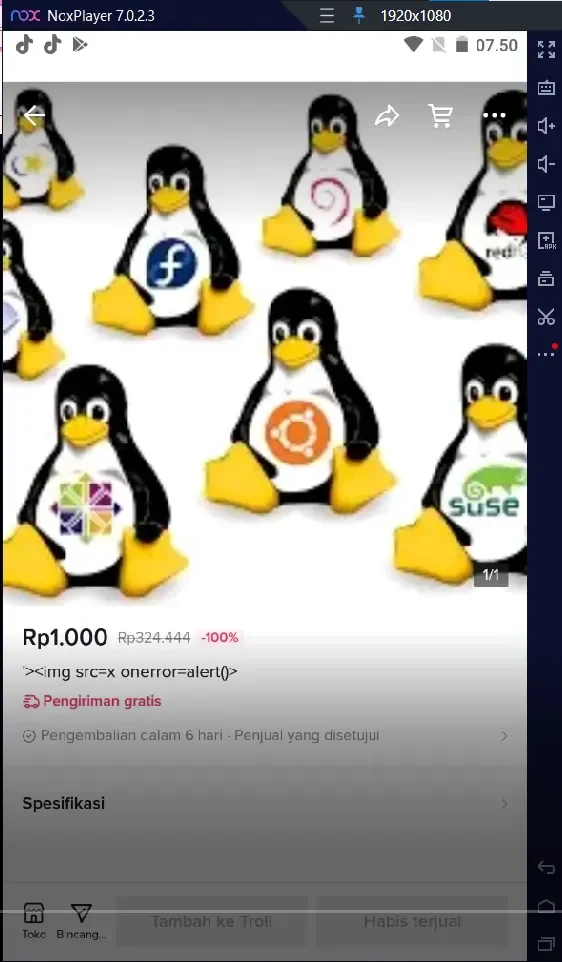
The share feature produced a URL of this form:
https://oec-api.tiktokv.com/view/product/1231414124124124
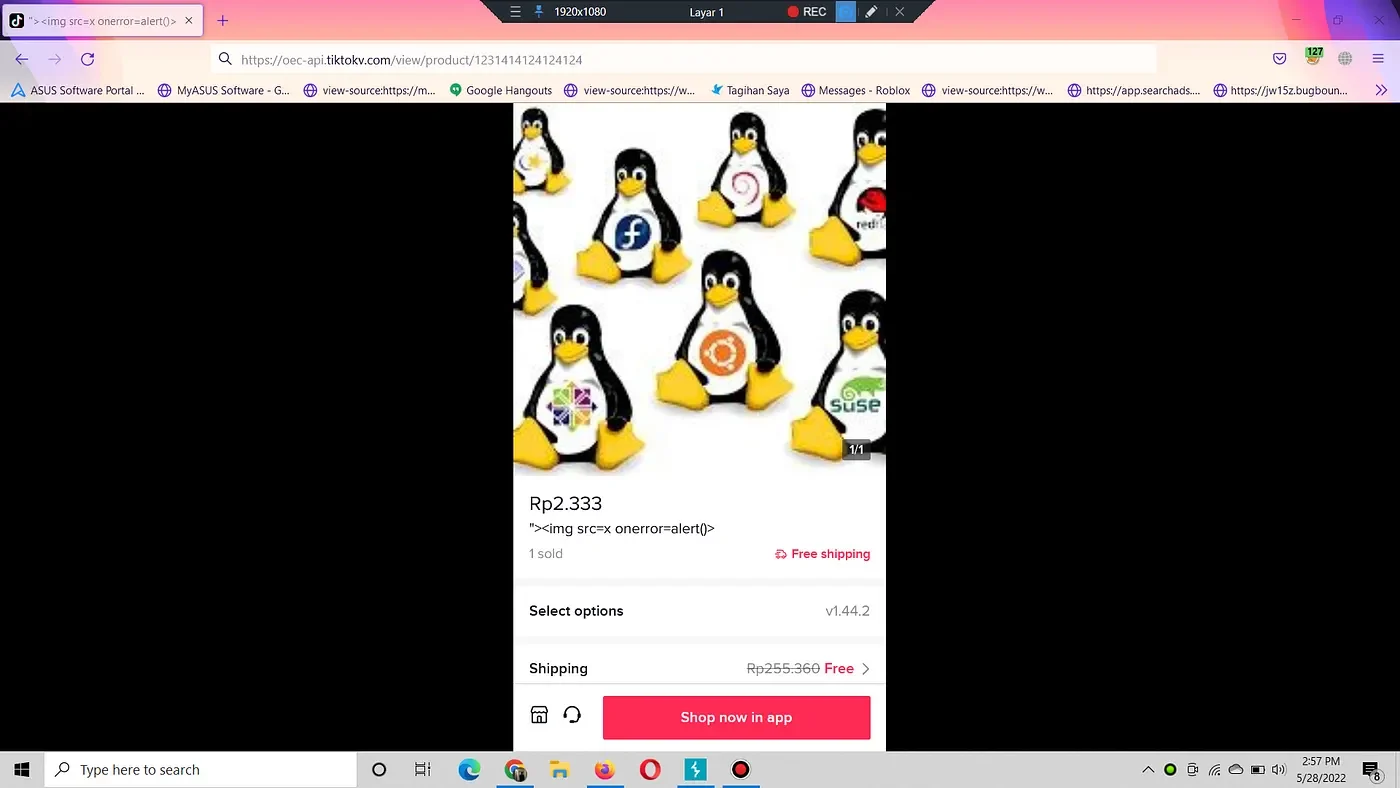
That page also did not execute the payload. The turning point was viewing the source of the page. In it, the product name appeared inside a meta tag:
<meta name='keywords' content='["><img src=x onerror=alert()>], TikTok, TokTok Shop' />
The payload was present in the response, but nothing executed. That is why the first attempt appeared to fail.
Exploitation
Step 1: adjust the payload to the quoting context
Knowing the snippet from the response, the researcher went back to the seller account and changed the product name to a payload prefixed with a single quote:
'><img src=x onerror=alert()>
The single quote closes the content='...' attribute value, > closes the meta tag, and the <img> element with an onerror handler is injected after it.
Step 2: confirm execution on the product view
With the new product name in place, a pop up appeared.
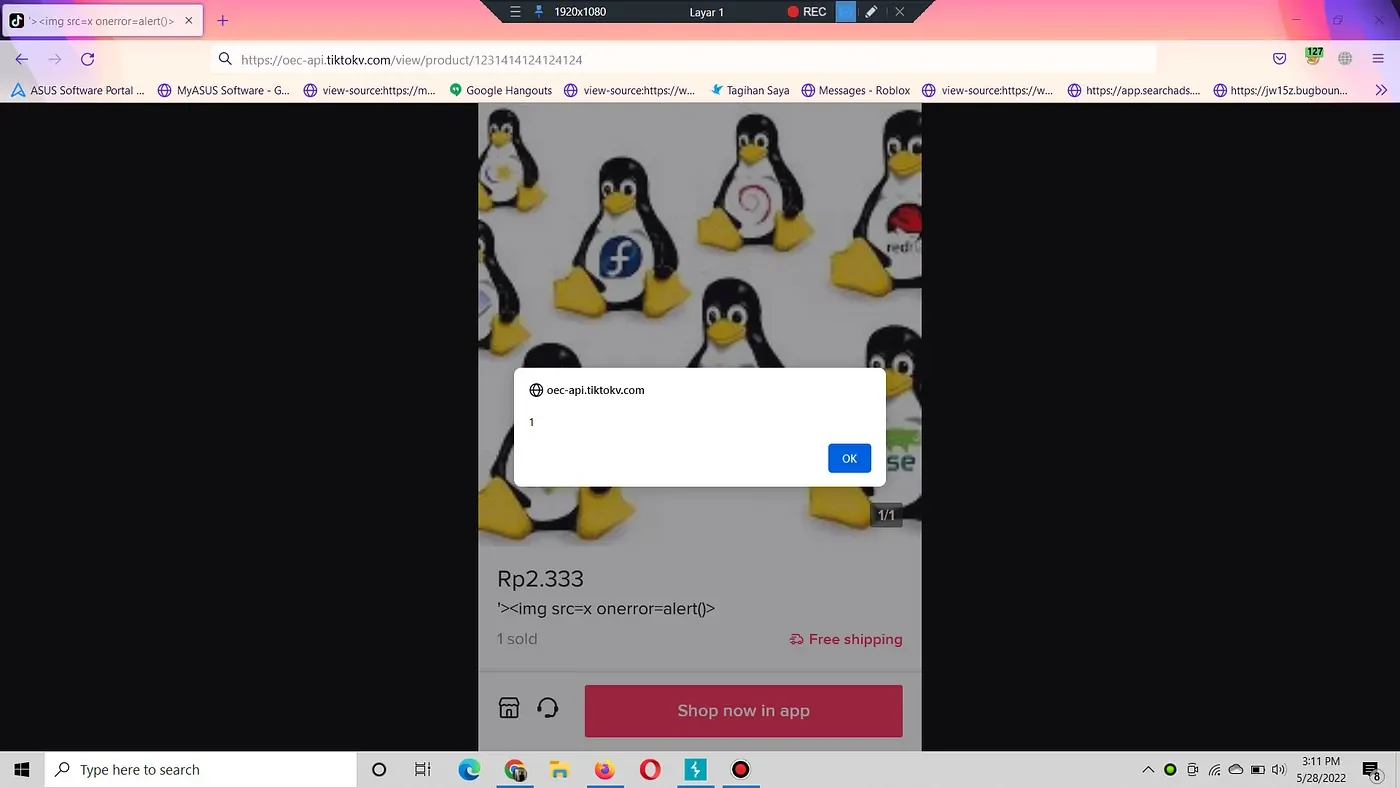
The response source now looked like this:
<meta name='keywords' content='['><img src=x onerror=alert()>], TikTok, TokTok Shop' />
The '> prefix closed the input value in the meta tag, and the injected <img> ran its handler. This confirmed a blind stored XSS: the payload was stored through the seller account and executed on a different asset when the product view was rendered.

The researcher reported it to the TikTok team straight away.
Step 3: find a second affected asset
After reporting, the researcher kept testing and found that other TikTok asset URLs were affected by the same issue from the initial findings. The affected asset is https://shop.tiktok.com/.
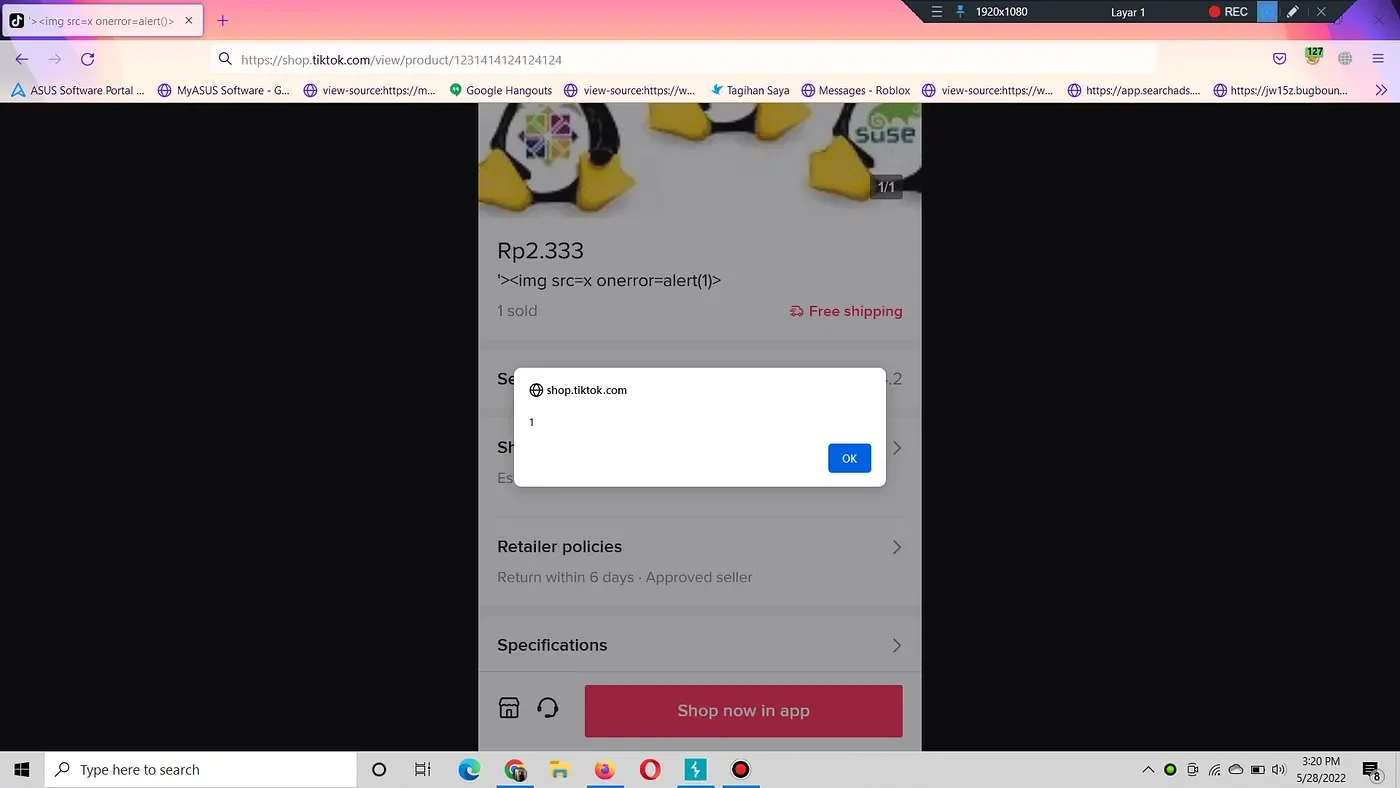
This was reported to the TikTok team as well.
Root cause
The product name was inserted into the content attribute of a <meta name='keywords'> tag without escaping the single quote (and without encoding the value for an HTML attribute context). Because the attribute was delimited with single quotes, a product name containing ' could terminate the attribute, and the following > closed the tag, allowing arbitrary HTML to be injected.
The first payload used a double quote, which did not match the delimiter and therefore stayed inert inside the attribute. The single-quote prefix matched the delimiter and broke out. The report does not describe any server-side or client-side filtering that should have caught this; the escaping of the attribute value is the missing control.
Impact
The stored payload executed in the context of the product view page on https://oec-api.tiktokv.com/, and https://shop.tiktok.com/ was also reported as affected. An attacker who can set a product name (that is, a seller) could store script that runs for anyone who views the affected product page. The report does not go into what an attacker could do beyond the alert() proof of concept, nor does it describe victim counts or session impact.
Fix
The timeline lists the issue as fixed and resolved on May 13. It does not describe the specific code change. The appropriate fix is to HTML-encode the product name for the attribute context, in particular escaping single quotes (and double quotes) so the value cannot terminate the attribute, and to apply the same encoding wherever the product name is rendered, including meta tags.
Variants to test
- Other attribute contexts. Put a payload with both quote types into any field that ends up in an attribute, for example
'"><img src=x onerror=alert()>and"><img src=x onerror=alert()>. A positive result is the payload appearing unescaped in the page source and executing. - Meta tag fields. Test other metadata fields (description, keywords, og tags) with the same single-quote prefix. A positive result is a broken-out attribute and an injected element in the source.
- Cross-asset rendering. Store a payload in one asset (seller dashboard) and check other assets that render the same data (product view, share URLs, shop pages). A positive result is execution on an asset different from the one where the data was entered.
- Share URL parameters. Inspect the product view reached through the share URL and check whether any query parameters are reflected into the page source. A positive result is reflected markup in the response.
Timeline
| Event | Date |
|---|---|
| Report | Apr 29 |
| Fix and resolved | May 13 |
The report links to the HackerOne report at https://hackerone.com/reports/1554048 and lists the affected assets as https://oec-api.tiktokv.com/view/product/1231414124124124 and https://shop.tiktok.com/view/product/1729427946450225776?locale=en®ion=ID.
What happened, in plain words
A security researcher found a way to make a small piece of code run inside TikTok pages that other people would open. The trick was to hide that code in the name of a product on a TikTok seller account. The seller account itself did not run the code. The code sat there quietly, and only ran later, when the same product was viewed somewhere else in TikTok: in the TikTok Android app and on a related web page. This is why it is called blind and stored: blind because the person who plants it does not see it run where they planted it, and stored because the server keeps it and hands it back to later visitors.
The feature involved is the seller product listing. A seller creates a product and gives it a name. That name is then shown in the product view page, including the hidden information at the top of the page that search engines and social networks read. The report shows the product name appearing inside one of those hidden pieces, a <meta name='keywords'> tag. That is where the stored code finally ran.
The researcher spent about one month hunting for this kind of bug in the TikTok program before it landed.
Setup
Before any of this works, a few simple things have to be in place:
- A TikTok seller account at
https://seller-id.tiktok.com/. A seller account is the kind of account a shop uses to list products for sale, as opposed to a normal viewer account. - The ability to create a product and set its name. The product name is just a text field, like the title of a listing on any shopping site.
- The TikTok Android app, used to reach the product view and its share link. The app is a separate program from the website, but it shows the same product data.
No special tooling is described. The work was done by creating a product, editing its name, and looking at the page source of the resulting product view. "Page source" means the raw text a browser receives from the server before it draws anything on screen. You can see it in most browsers with a right click and "View page source", or with a keyboard shortcut. It is the recipe, not the cake.
Finding it
The researcher started by creating a product on the seller account and putting a small attack string into the product name. An attack string like this is often called a payload: the exact text you feed in, hoping the site will treat it as code rather than as plain words.
The result on https://seller-id.tiktok.com/ itself showed no code running, so the researcher stopped looking there. This is the "blind" part: the place where you type the payload is not the place where it fires.
The next day, while testing TikTok Android app assets, the researcher found the product features again and looked at the Product URL from the Share feature. The share feature is the button that gives you a link you can send to a friend so they open the same product.
The share feature produced a URL of this form:
https://oec-api.tiktokv.com/view/product/1231414124124124
Line by line, this is just a web address. https:// is the usual secure web protocol. oec-api.tiktokv.com is the name of the server that answers. view/product/ is the path that says "show me a product". The long number at the end is the product's identifier, the same idea as an order number: a unique label for that one product. An API is simply a server endpoint built to hand data to programs (here, the app) rather than to draw a page for a human. The app asks this address for the product, and the server replies with the product's details.
That page also did not run the payload. The turning point was viewing the source of the page. In it, the product name appeared inside a meta tag:
<meta name='keywords' content='["><img src=x onerror=alert()>], TikTok, TokTok Shop' />
This needs unpacking slowly, because the whole bug lives in it.
<meta ... />is an HTML tag that carries information about the page rather than showing it on screen. Search engines and link previews read these tags.name='keywords'says this particular meta tag holds keywords.content='...'is the value of that tag. Everything between the two single quotes is the keyword list.["><img src=x onerror=alert()>]is the product name the researcher typed, sitting inside those single quotes., TikTok, TokTok Shopis the rest of the keyword list the site adds by itself.
HTML attributes can be wrapped in single quotes or double quotes. Here the site chose single quotes. The researcher's first payload used a double quote ("), and nothing executed. The payload was present in the response, but nothing executed. That is why the first attempt appeared to fail.
Exploitation
Step 1: adjust the payload to the quoting context
Knowing the snippet from the response, the researcher went back to the seller account and changed the product name to a payload prefixed with a single quote:
'><img src=x onerror=alert()>
Read it piece by piece:
'is a single quote. It matches the quote the site used to wrap the attribute, so it ends the value early.>closes the meta tag, so whatever comes next is treated as a new piece of HTML rather than as part of the tag.<img src=x onerror=alert()>is an image tag.src=xpoints at an image that does not exist, so the image fails to load.onerror=alert()says: when that failure happens, run the JavaScriptalert(), which pops up a small dialog box. The failure is deliberate: it is the trigger.
In everyday terms, imagine a form where you write your name on a line that already has quotation marks printed around it. If you write a quotation mark yourself, you can "close" the printed one and start writing instructions in the margin. The site trusted the text and did not check for stray quotation marks.
Step 2: confirm execution on the product view
With the new product name in place, a pop up appeared.
A pop up is the classic proof that code ran. It is harmless by itself, but it proves the browser executed the researcher's JavaScript instead of showing it as text.
The response source now looked like this:
<meta name='keywords' content='['><img src=x onerror=alert()>], TikTok, TokTok Shop' />
Line by line: the site still wraps the value in single quotes (content='). The researcher's leading ' closes that value. The > closes the meta tag. The <img ...> is now a real element in the page, and its onerror handler runs. The trailing ], TikTok, TokTok Shop' /> is the leftover of the site's own template, now stranded after the injected element.
The '> prefix closed the input value in the meta tag, and the injected <img> ran its handler. This confirmed a blind stored XSS: the payload was stored through the seller account and executed on a different asset when the product view was rendered. XSS, cross-site scripting, means getting your own code to run inside someone else's web page, in the visitor's browser, as if the site had written it.
The researcher reported it to the TikTok team straight away.
Step 3: find a second affected asset
After reporting, the researcher kept testing and found that other TikTok asset URLs were affected by the same issue from the initial findings. The affected asset is https://shop.tiktok.com/.
This was reported to the TikTok team as well.
Root cause
The product name was inserted into the content attribute of a <meta name='keywords'> tag without escaping the single quote, and without encoding the value for an HTML attribute context. Because the attribute was delimited with single quotes, a product name containing ' could terminate the attribute, and the following > closed the tag, allowing arbitrary HTML to be injected.
The first payload used a double quote, which did not match the delimiter and therefore stayed inert inside the attribute. The single-quote prefix matched the delimiter and broke out. The report does not describe any server-side or client-side filtering that should have caught this; the escaping of the attribute value is the missing control.
A useful comparison: a site that escapes properly is like a form where every quotation mark you write is automatically turned into a picture of a quotation mark, so it can never close the printed one. Here, the quotation mark went through as a real one.
Impact
The stored payload executed in the context of the product view page on https://oec-api.tiktokv.com/, and https://shop.tiktok.com/ was also reported as affected. An attacker who can set a product name (that is, a seller) could store script that runs for anyone who views the affected product page. The report does not go into what an attacker could do beyond the alert() proof of concept, nor does it describe victim counts or session impact.
Fix
The timeline lists the issue as fixed and resolved on May 13. It does not describe the specific code change. The appropriate fix is to HTML-encode the product name for the attribute context, in particular escaping single quotes (and double quotes) so the value cannot terminate the attribute, and to apply the same encoding wherever the product name is rendered, including meta tags.
Variants to test
- Other attribute contexts. Put a payload with both quote types into any field that ends up in an attribute, for example
'"><img src=x onerror=alert()>and"><img src=x onerror=alert()>. A positive result is the payload appearing unescaped in the page source and executing. - Meta tag fields. Test other metadata fields (description, keywords, og tags) with the same single-quote prefix. A positive result is a broken-out attribute and an injected element in the source.
- Cross-asset rendering. Store a payload in one asset (seller dashboard) and check other assets that render the same data (product view, share URLs, shop pages). A positive result is execution on an asset different from the one where the data was entered.
- Share URL parameters. Inspect the product view reached through the share URL and check whether any query parameters are reflected into the page source. A positive result is reflected markup in the response.
Timeline
| Event | Date |
|---|---|
| Report | Apr 29 |
| Fix and resolved | May 13 |
The report links to the HackerOne report at https://hackerone.com/reports/1554048 and lists the affected assets as https://oec-api.tiktokv.com/view/product/1231414124124124 and https://shop.tiktok.com/view/product/1729427946450225776?locale=en®ion=ID.
Glossary
- XSS (cross-site scripting): a bug where text you supply to a site is later treated as code by a visitor's browser, letting your code run inside the site's page.
- Stored XSS: the malicious text is saved on the server and served back to later visitors, rather than being reflected only in the immediate response.
- Blind XSS: the payload does not run where you enter it; it runs somewhere else, often a page you cannot see directly.
- Payload: the exact text you feed into a field, crafted so the site treats it as code.
- HTML: the language that describes the structure of a web page, made of tags like
<meta>and<img>. - Tag: a piece of HTML such as
<meta ... />or<img ...>that tells the browser what to do. - Attribute: a setting inside a tag, written as
name='value', for examplecontent='...'. - Meta tag: an HTML tag that carries information about the page (keywords, description) rather than showing it on screen.
- Escaping / encoding: converting characters that have special meaning (like quotes) into harmless forms so they cannot break out of their context.
- Delimiter: the quote character that marks where an attribute value starts and ends.
- API: a server endpoint built to hand data to programs, such as a mobile app, rather than to draw a page for a person.
- URL: a web address, made of protocol, server name, path and often an identifier or parameters.
- Page source: the raw text the browser receives from the server, before it renders anything.
- JavaScript: the programming language browsers run inside web pages.
alert(): a JavaScript function that shows a small pop up; used here only as proof that code ran.onerror: an HTML attribute that runs code when an image fails to load.- Product view: the page or app screen that shows a single product's details.
- Share feature: the button that produces a link to a product so it can be sent to someone else.
- Seller account: the type of account a shop uses to list products for sale.
- Asset: one specific system, site or app belonging to the target; here, the seller site, the product view API and the shop site.
- Root cause: the underlying mistake in the code that makes the bug possible.
- HackerOne: a platform where researchers report security bugs to companies.




