First Valid BUG Finding At Microsoft And I Got the Acknowledgments Page Microsoft
A stored cross-site scripting vulnerability existed in a Microsoft forum subdomain where user-supplied text in a form field was rendered as HTML without sanitisation. An attacker could inject script that would execute in the context of other users viewing the affected page.
 Published on aidilarf.medium.com
This time I would like to share an article about the findings of the XSS STORED Vulnerability in one of Microsoft Forum subdomains, namely https://powerusers.microsoft.com/ .
The full write-up lives on its author's site
It belongs to its author, so we link to it rather than copy it. The other two tabs are our own rewrites, checked against it.
Context
This write-up covers a stored cross-site scripting (XSS) finding in a Microsoft forum subdomain, https://powerusers.microsoft.com/. The Power Users community site hosts discussion boards where members can post questions and replies. The feature involved is the "POST QUESTIONS" form, which lets a user submit a new question with a subject and a title, and one of the forms also renders an embedded YouTube video.

The author describes this as their first valid vulnerability finding in the Microsoft Security Response Center (MSRC) programme.
Setup
The report does not describe any special accounts, roles, tools or versions. The work was done against the public Power Users forum, using the ordinary question-posting form. The only precondition that matters is the ability to submit a question through the form, which is what any forum user can do.
Finding it
Before this finding, the author had been searching for XSS across Microsoft subdomains without success.

After a period of giving up, a post by another bug hunter on social media, showing an XSS finding at Microsoft, prompted another attempt. That search led to the Power Users forum, which offers many "POST QUESTIONS" upload features. The author started testing those forms.
Exploitation
Step 1: test the Subject field on the first form
The first attempt used the question form at this URL:
https://powerusers.microsoft.com/t5/forums/postpage/choose-node/true/board-id/BuildingFlows?message-subject=undefined
The XSS payload was entered in the "Subject" section of the Questions form.
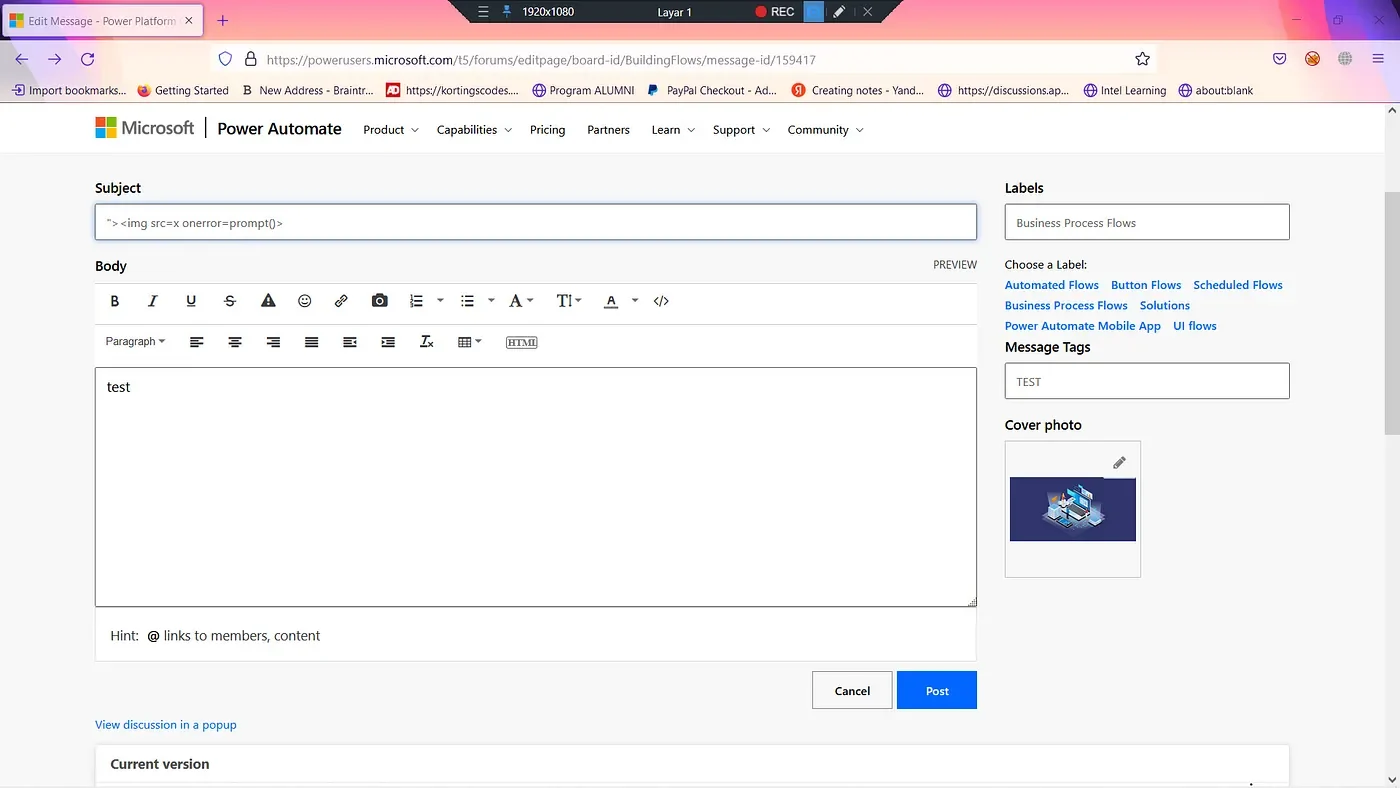
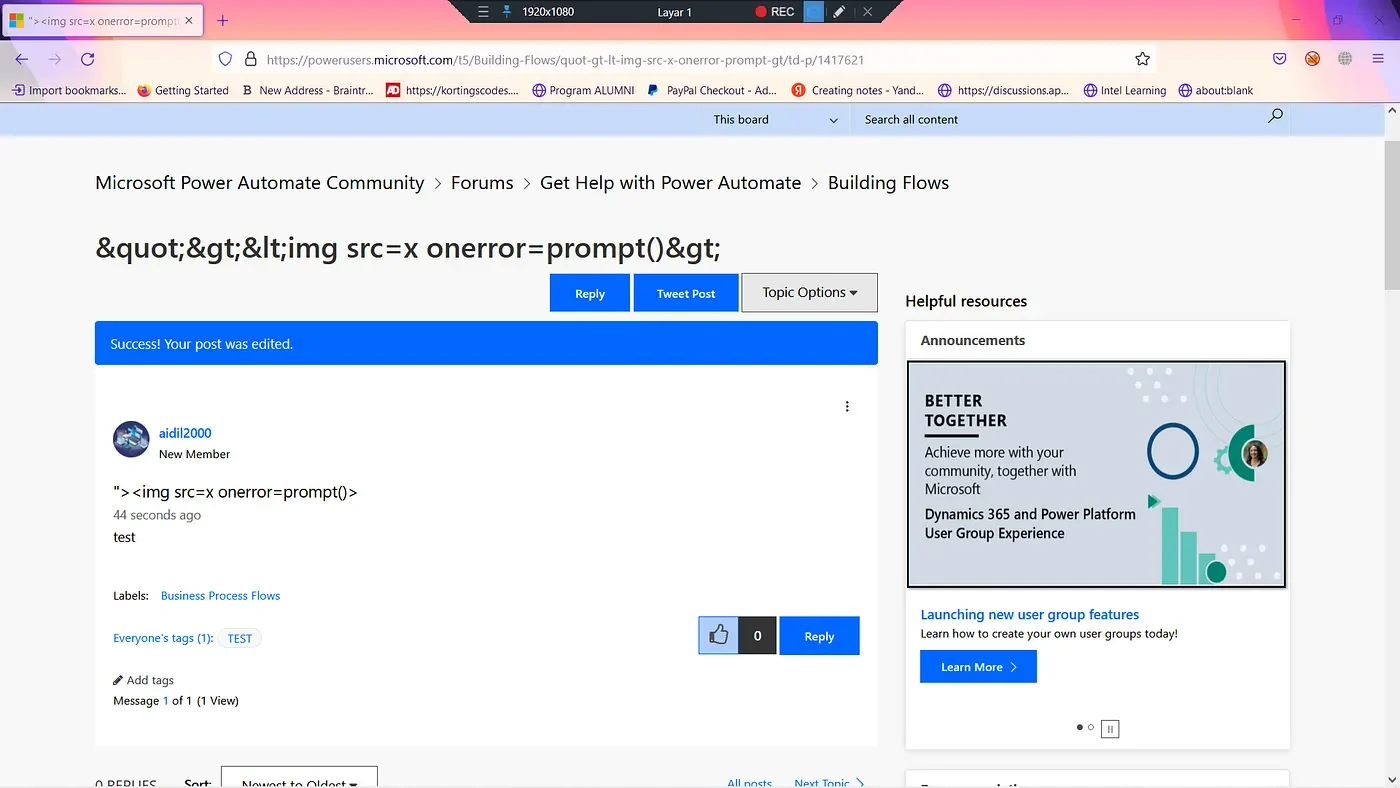
The result was that the form was not vulnerable: the text output carrying the XSS payload in "Subject" was already sanitised or filtered.
Step 2: test other forms
The author tried POST QUESTIONS on another form with the same outcome: the text output carrying the payload in "Subject" was sanitised or filtered.
Step 3: find a form that renders a YouTube iframe
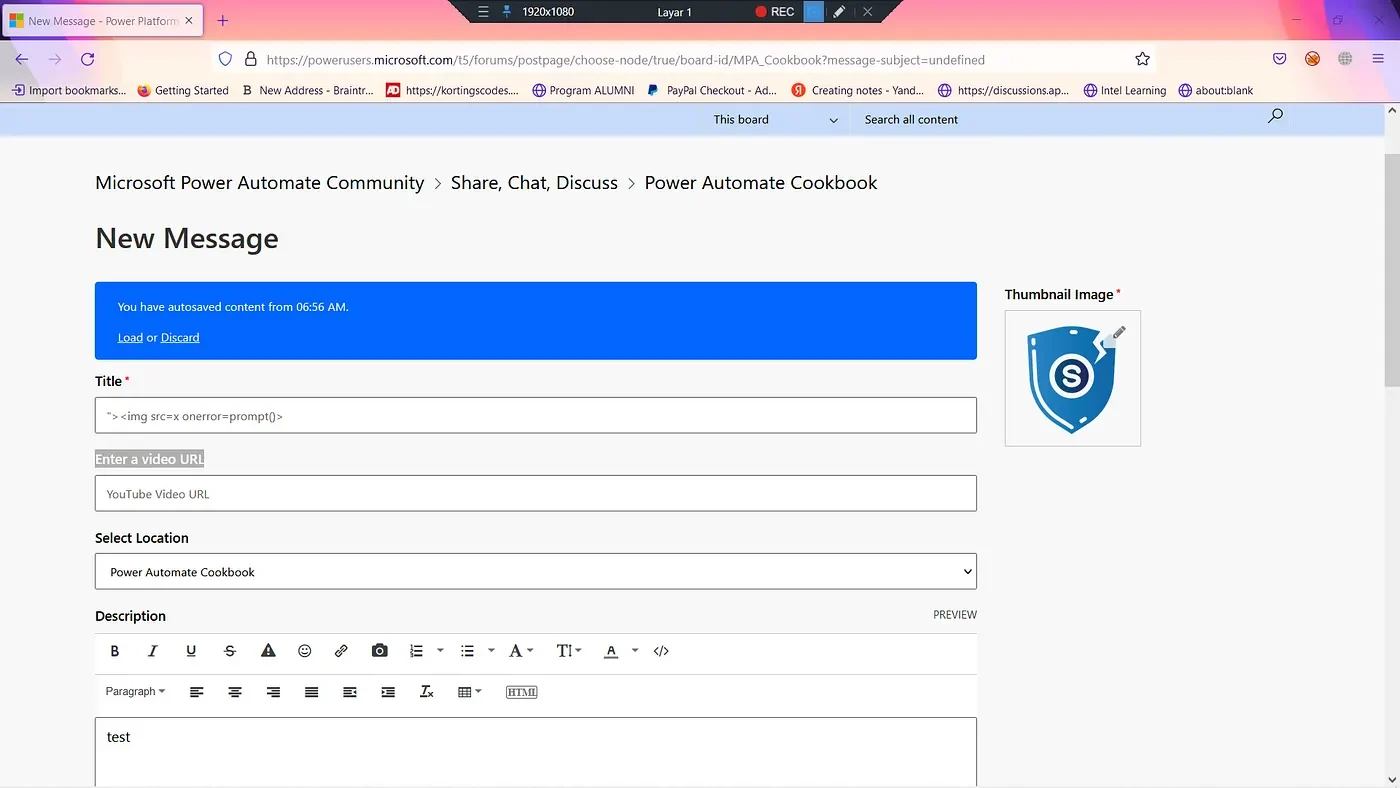
One of the forms displayed the IFRAME of a YouTube video. The author reasoned that this form might be vulnerable, because the text output carrying the XSS payload there was likely not sanitised.
Step 4: confirm the trigger
The assumption held. The output text carrying the XSS content in the "Title" form was not sanitised or filtered, so the plain text carrying the XSS content was treated as HTML and the XSS triggered.
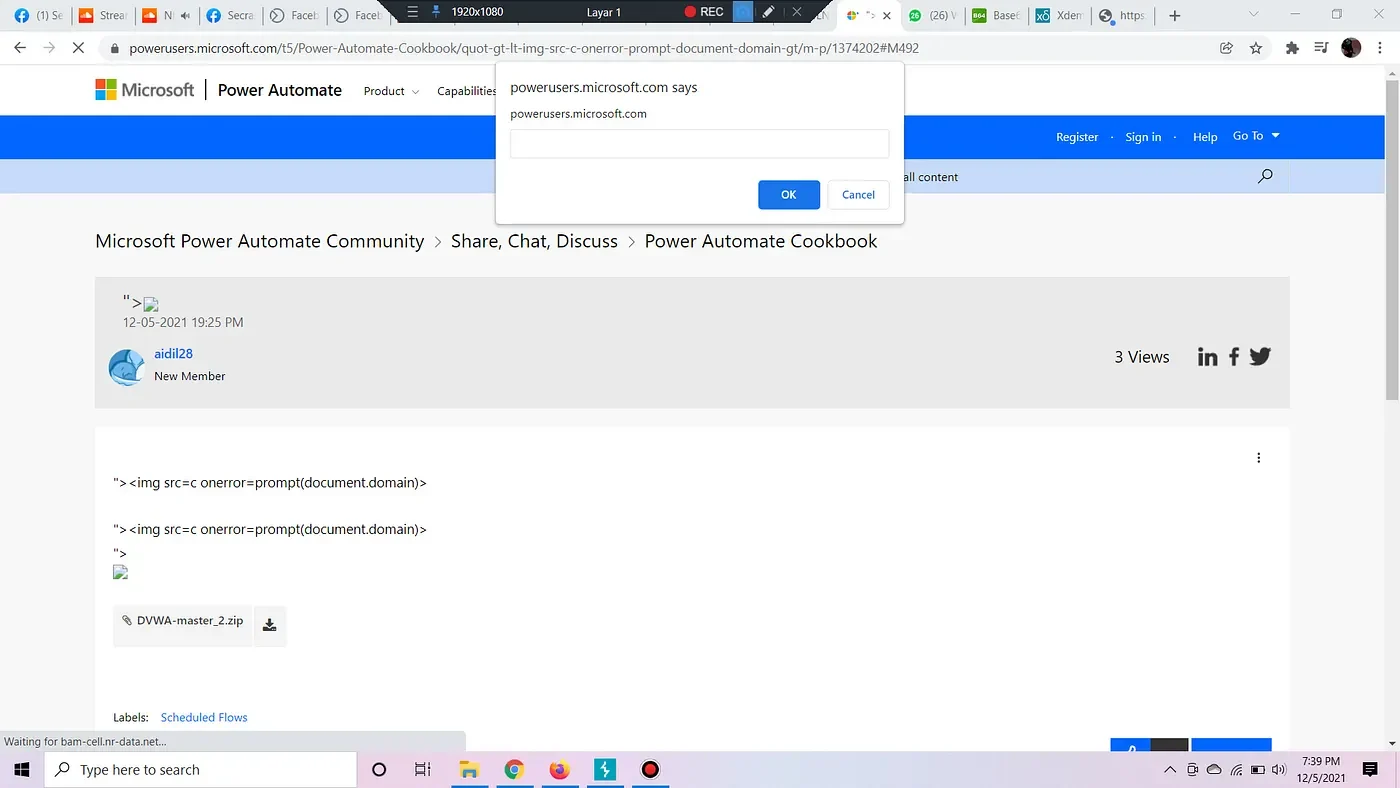
The report does not include the exact payload string used, nor the raw request or response.
Step 5: report to MSRC
The finding was reported to the MSRC Team through the report form at:
https://msrc.microsoft.com/create-report

The published timeline is:
| Stage | Date |
|---|---|
| Report | Dec 6, 2021 |
| Review/Repro | Dec 7, 2021 |
| Develop | Dec 13, 2021 |
| PreRelease | Jan 13, 2022 |
| Complete | Jan 13, 2022 |
Root cause
The mistake is a missing output encoding step. In the affected form, the value submitted in the "Title" field is written back into the page as HTML rather than as text, so markup in the value is interpreted by the browser. The forms tested earlier did sanitise or filter the same kind of input in "Subject", which is why they did not trigger. The report does not identify the specific code path or component responsible, so the exact location of the missing encoding is not stated.
Impact
The payload is stored and rendered back into the page, so this is a stored XSS: script supplied through the form would run in the browser of anyone who views the affected output. The report does not describe which users see the output. Those details are not given.
Fix
The general remedy for this class of bug is to encode the "Title" value on output so that it is rendered as text, matching the behaviour already observed on the "Subject" field of the other forms.
Variants to test
- Test every field of a multi-field form, not just the obvious one. Here "Subject" was filtered but "Title" was not. A positive result is the payload appearing as live markup in the rendered page.
- Test forms that embed third-party content such as a YouTube iframe. The author's reasoning was that such forms may handle text differently. A positive result is the same: the stored value is interpreted as HTML.
- Test the same form across different boards. The first URL used
board-id/BuildingFlows; other board identifiers may route to different templates. A positive result is a board where the title is rendered unencoded. - Compare how each field is reflected after submission rather than only in the form itself. A positive result is the payload executing when the stored question is viewed.
What happened, in plain words
A security researcher found a bug on a Microsoft community website. The website is a forum where people ask and answer questions about Microsoft products. The bug is called stored cross-site scripting, or stored XSS for short. In plain words: the forum let someone type text into a form, saved that text, and later showed it back to other visitors as if it were part of the website itself. If the text contains instructions that a browser understands as code, the browser will run that code. That is the bug.
The researcher tested several forms on the forum. Most of them cleaned up the text before showing it again, which is the correct behaviour. One form did not clean up one particular field, and that is where the bug appeared. The researcher reported it to Microsoft through the Microsoft Security Response Center (MSRC), which is the team that receives security reports about Microsoft products.
This was the researcher's first valid finding in the MSRC programme.
The website and the feature
The site is https://powerusers.microsoft.com/. It is a discussion board: members post questions, other members reply, and the threads stay online so that people can read them later. The feature involved is the POST QUESTIONS form. A form is just a page with boxes you fill in and a button you press to send the contents to the server. This particular form asks for a subject and a title, and one of the forms also shows an embedded YouTube video.
An embedded YouTube video means the forum page includes a small window that plays a YouTube video. Under the hood, the page contains an iframe, which is a way to place one web page inside another. The video lives on YouTube's servers, but it appears inside the forum page. The researcher noticed this detail because pages that build iframes often assemble HTML from pieces of text, and that is exactly the kind of place where text can accidentally be treated as code.
What XSS means, from zero
A web page is not only words. It is a document written in HTML, a language made of tags such as <b> for bold or <img> for an image. The browser reads the HTML and draws the page. Some tags can carry JavaScript, a programming language that browsers run. JavaScript on a page can read what is on the page, change it, and send requests to the server on your behalf.
Normally the website author writes the HTML, and you only supply plain text, such as a forum post. The danger is when the website takes your plain text and drops it into the HTML without cleaning it first. If your text contains something that looks like a tag, the browser cannot tell the difference between the author's tags and yours. It will treat your text as part of the page and run it.
That is cross-site scripting: getting your own code to run inside someone else's website, in the browser of a person who visits it. It is called stored when the website saves your input and shows it again later to other people, rather than showing it only to you once. A stored XSS is worse than a one-off because every visitor who opens the affected page runs the code.
A useful comparison: imagine a noticeboard where people pin handwritten notes. If the person who runs the board copies each note onto official letterhead before pinning it up, a note that says "pay this money to me" still looks like a note, not an official instruction. If they instead photocopy the note directly onto letterhead, a cleverly worded note can pass for an official notice. Sanitising or filtering input is the copying step: it makes sure the text stays text. Output encoding is the same idea at the moment of display: turning characters that have special meaning in HTML into harmless versions of themselves.
Setup
The report does not describe any special accounts, roles, tools or software versions. The work was done against the public forum, using the ordinary question-posting form. The only thing you need is the ability to submit a question, which any forum user can do.
Finding it
Before this finding, the researcher had been looking for XSS across Microsoft subdomains without success. A subdomain is a name that sits under a main domain: powerusers.microsoft.com is a subdomain of microsoft.com. Large companies have many of them, and each one is a separate application with its own code and its own mistakes.
After a while the researcher gave up. Then a post by another bug hunter on social media showed an XSS finding at Microsoft, and that prompted another attempt. That search led to the Power Users forum, which offers many POST QUESTIONS forms. The researcher started testing them.
Why test forms? Because a form is the place where a website accepts text from a stranger. Every field in a form is a possible entry point, and the question is always the same: does this text come back out as text, or as code?
Exploitation
Step 1: test the Subject field on the first form
The first attempt used the question form at this URL:
https://powerusers.microsoft.com/t5/forums/postpage/choose-node/true/board-id/BuildingFlows?message-subject=undefined
Line by line, this URL says:
https://powerusers.microsoft.comis the site./t5/forums/postpage/choose-node/true/is the path to the page that lets you choose where your question goes and then write it.board-id/BuildingFlowsnames the board, here one called BuildingFlows. A board is a section of the forum, like a shelf in a library.?message-subject=undefinedis the query string, the part after the question mark. It carries extra values to the page. Here the subject is set to the literal wordundefined, which is what a program prints when a value is missing.
The XSS payload was entered in the "Subject" section of the Questions form. A payload is the piece of text you submit to try to trigger the bug. The report does not include the exact payload string used.
The result was that the form was not vulnerable: the text output carrying the XSS payload in "Subject" was already sanitised or filtered. In other words, when the forum showed the subject back, it had turned the special characters into harmless text, so the browser displayed them instead of running them.
Step 2: test other forms
The researcher tried POST QUESTIONS on another form with the same outcome: the text output carrying the payload in "Subject" was sanitised or filtered. This is a normal part of testing. One negative result tells you about one field on one form, not about the whole site.
Step 3: find a form that renders a YouTube iframe
One of the forms displayed the IFRAME of a YouTube video. The researcher reasoned that this form might be vulnerable, because the text output carrying the XSS payload there was likely not sanitised. The reasoning is worth spelling out: a page that builds an iframe has to assemble HTML from pieces, and code that assembles HTML is often careless about which pieces are trusted.
Step 4: confirm the trigger
The assumption held. The output text carrying the XSS content in the "Title" form was not sanitised or filtered, so the plain text carrying the XSS content was treated as HTML and the XSS triggered. Note the difference from step 1: there the field was "Subject", here it is "Title". Same kind of input, different field, different handling.
The report does not include the exact payload string used, nor the raw request or response. A request is the message your browser sends to the server when you submit a form; a response is what the server sends back.
Step 5: report to MSRC
The finding was reported to the MSRC Team through the report form at:
https://msrc.microsoft.com/create-report
This is a single address: the MSRC site, and the page named create-report where a researcher describes what they found. Reporting through the official channel is what makes a finding count; a bug that is never reported helps nobody and can be illegal to test further.
The published timeline is:
| Stage | Date |
|---|---|
| Report | Dec 6, 2021 |
| Review/Repro | Dec 7, 2021 |
| Develop | Dec 13, 2021 |
| PreRelease | Jan 13, 2022 |
| Complete | Jan 13, 2022 |
In plain words: the report arrived on 6 December 2021. The next day the team reviewed it and reproduced the bug, meaning they confirmed it themselves. The timeline lists a Develop stage on 13 December, a PreRelease stage on 13 January 2022 and Complete on 13 January 2022.
Root cause
The mistake is a missing output encoding step. In the affected form, the value submitted in the "Title" field is written back into the page as HTML rather than as text, so markup in the value is interpreted by the browser. The forms tested earlier did sanitise or filter the same kind of input in "Subject", which is why they did not trigger. The report does not identify the specific code path or component responsible, so the exact location of the missing encoding is not stated.
Impact
The payload is stored and rendered back into the page, so this is a stored XSS: script supplied through the form would run in the browser of anyone who views the affected output. The report does not describe which users see the output. Those details are not given.
Fix
The general remedy for this class of bug is to encode the "Title" value on output so that it is rendered as text, matching the behaviour already observed on the "Subject" field of the other forms.
Variants to test
- Test every field of a multi-field form, not just the obvious one. Here "Subject" was filtered but "Title" was not. A positive result is the payload appearing as live markup in the rendered page.
- Test forms that embed third-party content such as a YouTube iframe. The researcher's reasoning was that such forms may handle text differently. A positive result is the same: the stored value is interpreted as HTML.
- Test the same form across different boards. The first URL used
board-id/BuildingFlows; other board identifiers may route to different templates. A positive result is a board where the title is rendered unencoded. - Compare how each field is reflected after submission rather than only in the form itself. A positive result is the payload executing when the stored question is viewed.
Glossary
- XSS (cross-site scripting): a bug where a website lets someone else's text run as code in a visitor's browser.
- Stored XSS: XSS where the malicious text is saved by the site and shown again later to other visitors.
- Payload: the piece of text a tester submits to try to trigger a bug.
- HTML: the language web pages are written in, made of tags such as
<b>and<img>. - JavaScript: a programming language that browsers run inside web pages.
- Sanitising / filtering: cleaning input so that special characters cannot act as code.
- Output encoding: converting special characters into harmless versions at the moment they are displayed.
- Form: a page with boxes you fill in and a button that sends the contents to the server.
- Field: one box in a form, such as Subject or Title.
- Subdomain: a name under a main domain, such as
powerusers.microsoft.comundermicrosoft.com. - Board: a section of a forum where related questions are grouped.
- Query string: the part of a URL after the question mark that carries extra values to the page.
- iframe: a way to place one web page inside another, used here for an embedded YouTube video.
- Request: the message a browser sends to a server, for example when a form is submitted.
- Response: what the server sends back to the browser.
- MSRC (Microsoft Security Response Center): the Microsoft team that receives and handles security reports.
- Reproduce (repro): to confirm a reported bug by triggering it yourself.




