XSS Blind Stored at Asset Domain Android Apps TikTok
A form in TikTok's Android app for creating live events accepted an image tag with an error handler as input, and the value was stored and later rendered without sanitisation on a TikTok asset domain. After the event was approved, the stored script ran for other users who viewed the promoted event, turning a self-XSS into a blind stored XSS.
 Published on aidilarf.medium.com
First, let me introduce a little background, I am a young teenager graduated from Senior High School and IT Security Enthusiast from Indonesia. Now, I am 21 years old.
The full write-up lives on its author's site
It belongs to its author, so we link to it rather than copy it. The other two tabs are our own rewrites, checked against it.
Context
TikTok's Android app includes a Create Live Event feature. A creator fills in a form to set up a live event, and the event then goes through a review by the TikTok team before it becomes publicly accessible. The write-up identifies the vulnerable asset as the TikTok asset domain https://webcast.tiktokv.com/, where the content entered in that form is rendered.
The researcher's goal was to find XSS starting from the Android app rather than from the web application, in order to reach new coverage URLs and reduce the chance of duplicate findings already reported by other researchers. The bug class that resulted was a blind stored XSS: the payload was stored through the app's event creation form and executed in the asset domain, and after the event was promoted through a video post it reached other users.
Setup
The write-up does not describe any special tooling, accounts or versions. The precondition was simply access to the Create Live Event feature in the TikTok Android app, which the researcher used to submit the payload. A second precondition mattered for the impact: a newly created Live Event is not public until the TikTok review team approves it, so the researcher had to wait for that review before testing whether other users would see the payload.
Finding it
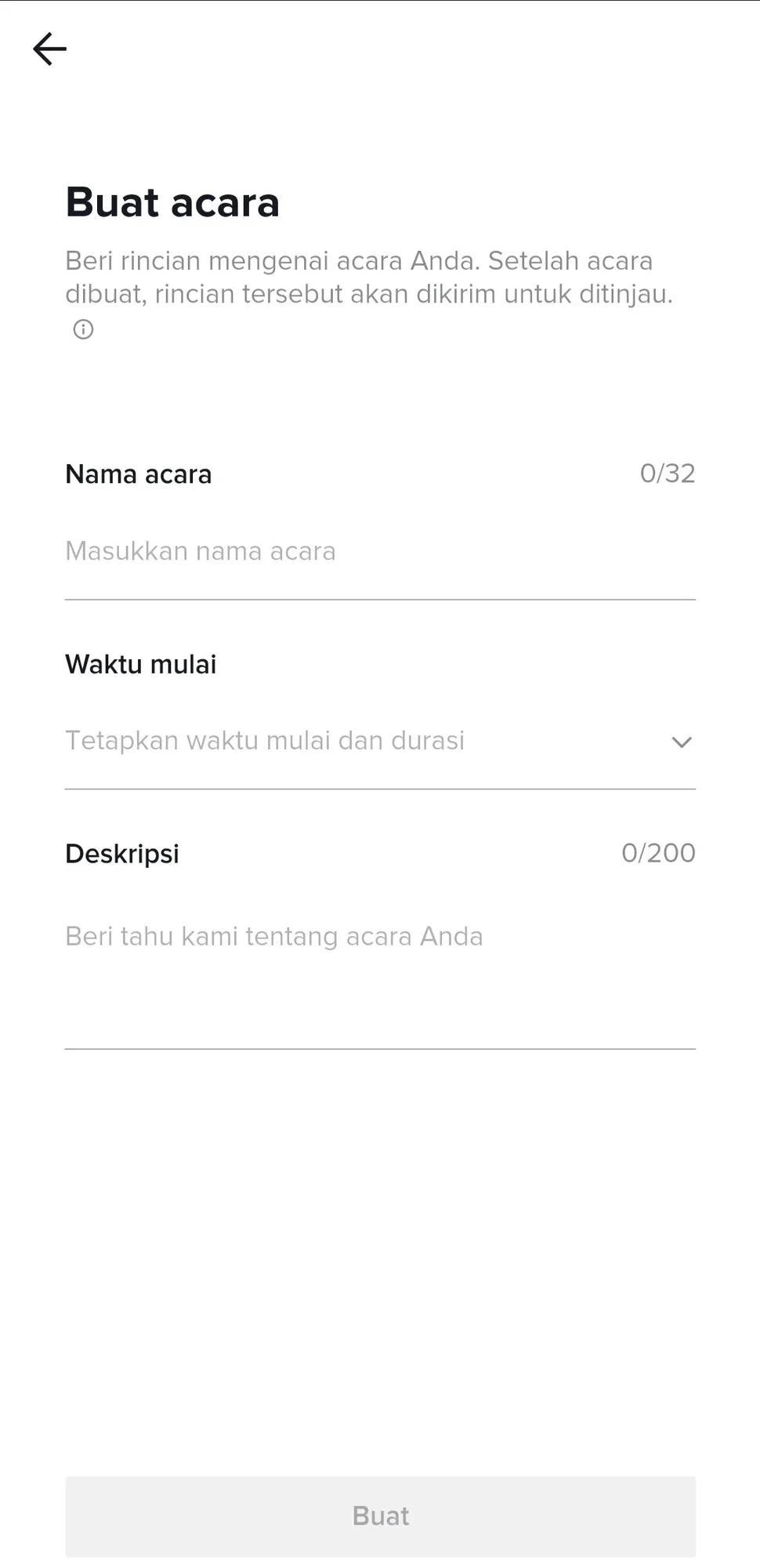
While looking for XSS from the Android app, the researcher found the Create Live Event feature and tried the payload in all of the forms it offers. The payload used was:
"><img src=x onerror=write(document.domain)>
The choice of write() instead of alert() was deliberate. The researcher reasoned that alert() does not work inside the Android app, so write() was used to see whether the XSS fired at all. The payload did fire, and it fired in the TikTok asset domain rather than in the app itself.
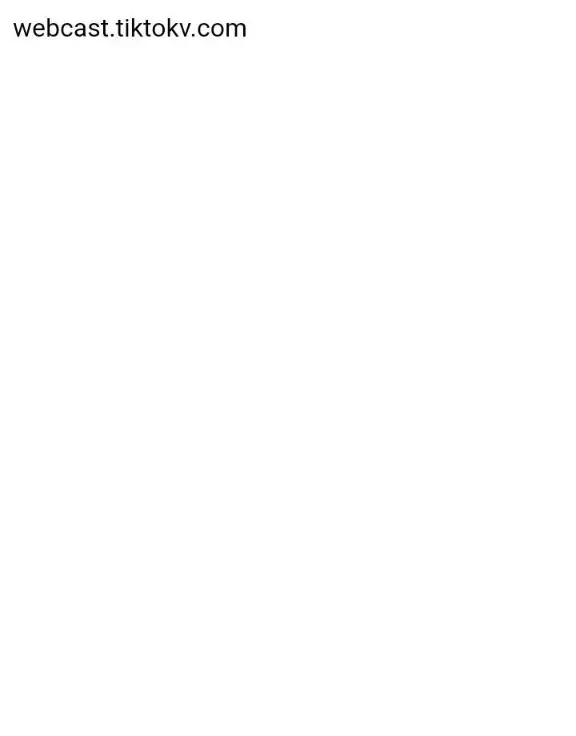
At that point the researcher could not tell whether the execution was only for the creator's own session or would also happen for other users. The event had to pass TikTok's review before it was publicly accessible, which initially made the finding look like self XSS only.
Exploitation
Step 1: submit the payload in the Create Live Event form
The payload was entered into all the forms of the Create Live Event feature:
"><img src=x onerror=write(document.domain)>
The handler calls write(document.domain), which writes the current domain into the document, giving visible proof of execution without relying on alert(), which the researcher found did not work in the Android app.
Step 2: confirm execution in the asset domain
The payload triggered in the TikTok asset domain, https://webcast.tiktokv.com/. This confirmed stored execution of the injected markup on that domain, but not yet whether it reached anyone other than the creator.
Step 3: wait for review
The Live Event had to be reviewed by the TikTok team before it could be accessed by the public. The researcher waited, and after 30 minutes the event was approved by the TikTok review team. The finding was not reported at the earlier stage, because at that point it appeared to be self XSS only.
Step 4: reach other users through a video post
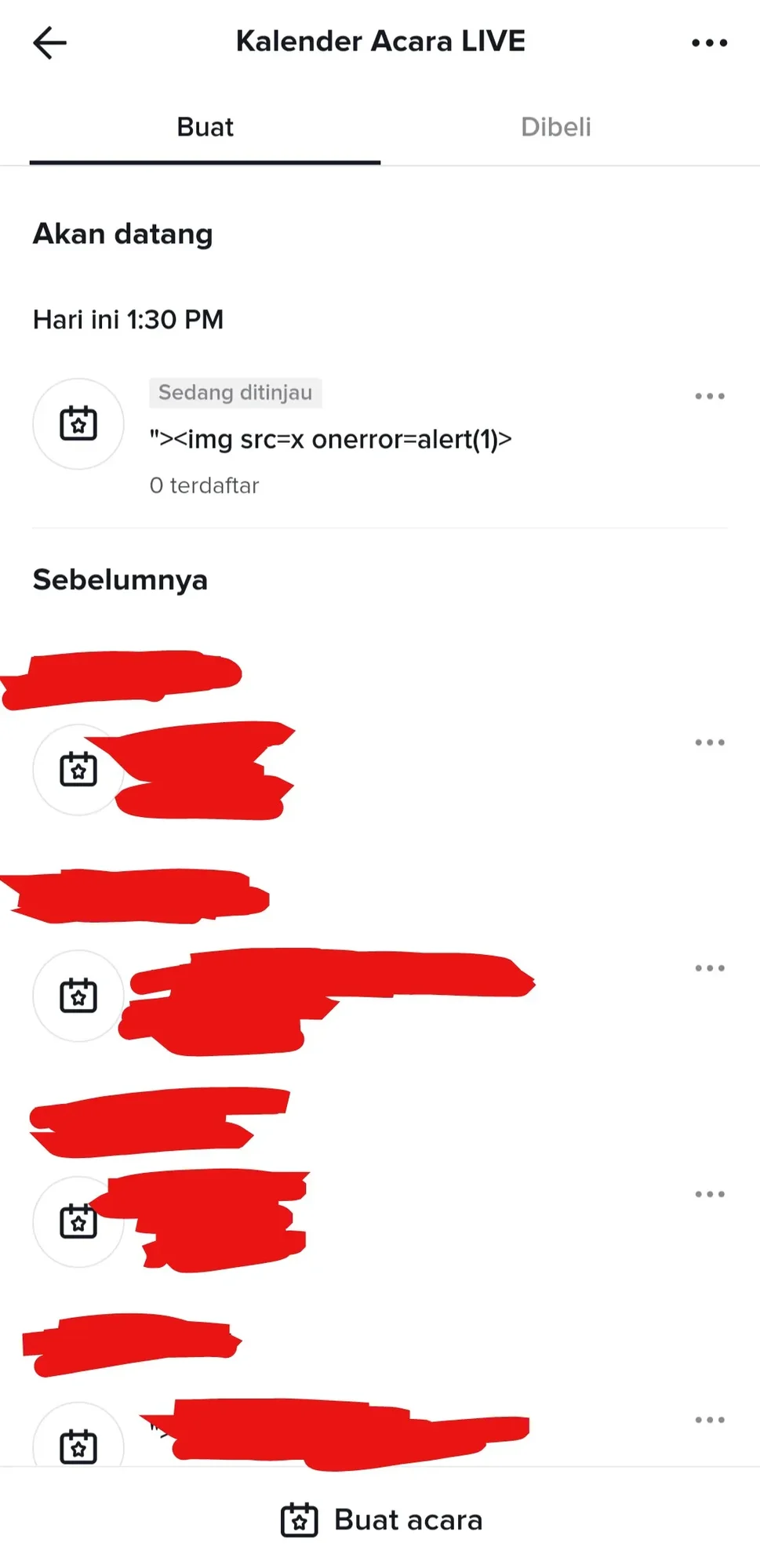
Once the event was approved, the researcher found that a Live Event can be promoted by posting a video to the TikTok account, which reaches other users. The video post was the delivery mechanism that turned the stored payload into something other users would encounter.
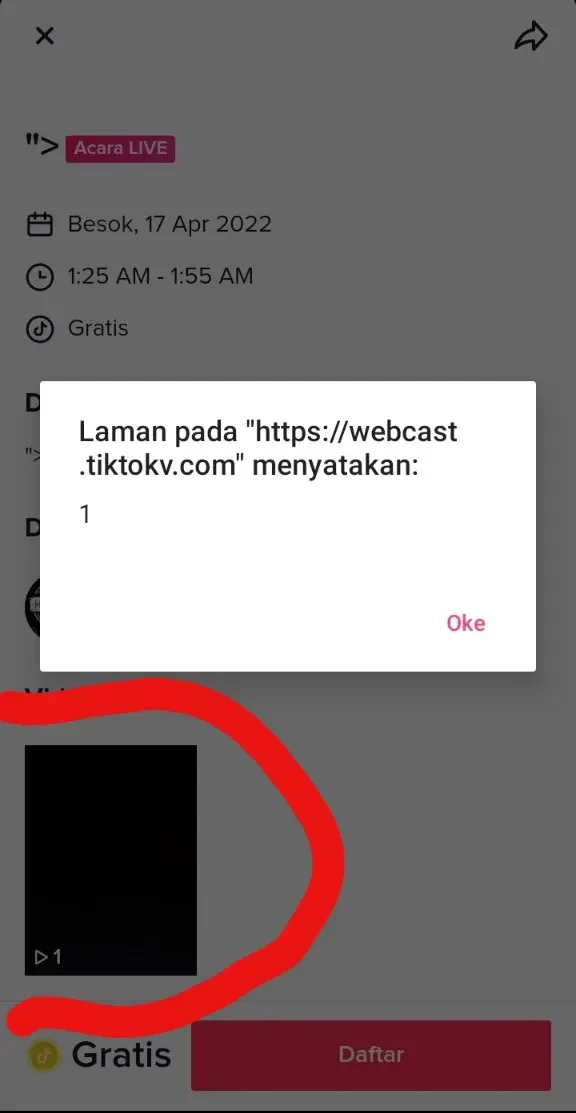
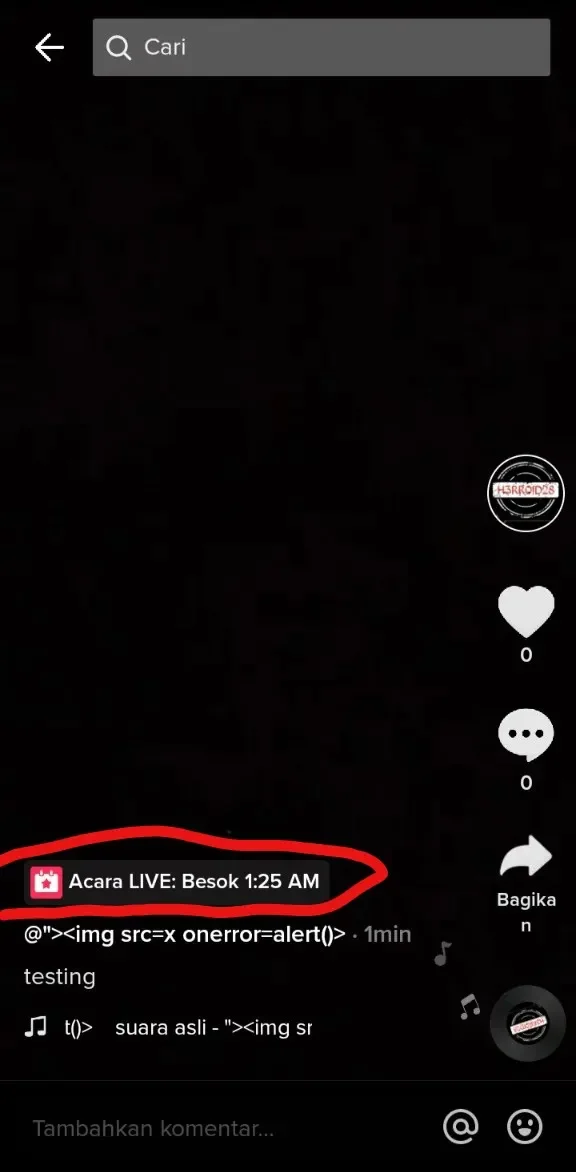
With the event public and promoted through a video post, the researcher leveraged the self XSS into a blind stored XSS, since the event reached other users.

Root cause
The write-up does not describe the server-side code or the exact rendering path, so the root cause can only be inferred. The Create Live Event form accepted the payload and it was later rendered in the TikTok asset domain, where it executed as script.
Impact
The impact depends on the event being approved and reaching other users. Once the Live Event passed review and was promoted through a video post, the stored payload executed for users who viewed the event in the asset domain, which is what made it a blind stored XSS rather than self XSS.
Fix
The report gives a timeline rather than a description of the change: reported on 16 April, triaged on 21 April, and fixed on 11 May. The appropriate fix for this class of issue is output encoding of user-supplied content when it is rendered in the asset domain, so that markup entered in the Create Live Event form is treated as text rather than as HTML.
Variants to test
- Submit the same breakout payload in each individual field of a multi-field creation form, one field at a time, to find which field is rendered unencoded. A positive result is the
write(document.domain)output appearing in the rendered page. - Test other contexts in the same form, such as values placed inside attributes or inside script blocks, using context-appropriate breakouts. A positive result is execution of the injected handler in the asset domain.
- Check whether the review step sanitises content or only approves it, by submitting a payload and inspecting the approved event. A positive result is the payload surviving review unchanged.
- Look for promotion or sharing features that expose stored content to other users, as the video post did here. A positive result is the payload executing in a session other than the creator's.
- Try
write()alongsidealert()when testing inside mobile app webviews, since the report notes thatalert()did not work in the Android app. A positive result is visible output fromwrite()wherealert()produced nothing.
What happened, in plain words
A security researcher from Indonesia, who describes himself as an IT security enthusiast, set himself a goal: find a real, valid vulnerability on a large technology company's site. He chose TikTok. The vulnerability he found was a cross-site scripting (XSS) issue in a TikTok asset domain, https://webcast.tiktokv.com/, reached through a feature in TikTok's Android app called Create Live Event.
In everyday terms, XSS is what happens when a website takes text that a user typed and later shows it to someone else as if it were part of the page's own instructions. A web page is built from instructions (HTML), and if your text is inserted into those instructions without being neutralised, your text can become an instruction. Imagine a noticeboard where visitors can pin notes. If the board copies whatever you write straight onto an official-looking sign, you could write something that looks like an official instruction, and other visitors would follow it. XSS is that, but with a browser.
What made this finding interesting is the path the payload took. The researcher typed a small piece of HTML into the Create Live Event form in the Android app. The event then had to be approved by TikTok's review team before anyone else could see it. At first the researcher thought the script only ran for himself (this is called self XSS, and it is generally not considered a serious bug because the only person you can attack is yourself). But after the event was approved, he found he could promote the event by posting a video to his TikTok account, which other users would see. That turned the self XSS into a blind stored XSS: the payload was stored on TikTok's side and the event reached other users, though the researcher did not see those victims directly.
The write-up was published with a HackerOne report link, and the timeline was: reported on 16 April, triaged on 21 April, fixed on 11 May.
Background: what the researcher was trying to do
The researcher explains that he wanted to find XSS starting from the Android app rather than from the website. There is a practical reason for this. Bug bounty programmes pay for findings, but they do not pay twice for the same bug. If many researchers have already tested the main website, the same obvious bugs have probably been reported already, and a new report of the same thing is a duplicate, which usually earns nothing. Testing a different surface, such as a mobile app, can lead to URLs and features that other researchers have not covered yet. That is what he means by getting new coverage URLs and minimising duplicates.
While exploring the Android app, he found the Create Live Event feature. A live event is a scheduled broadcast that a creator sets up in advance. The creator fills in a form with details about the event, and TikTok's team reviews the event before it becomes publicly accessible. The form is the input side; the event page that viewers see is the output side. The vulnerability lives in the gap between the two: the form accepted the payload, and the event page later rendered it.
Finding it: trying the payload in the form
The researcher tried the same payload in all the forms the Create Live Event feature offers. The payload was:
"><img src=x onerror=write(document.domain)>
Line by line, in plain words:
">is two characters, a double quote and a greater-than sign. In HTML, a double quote often closes an attribute value, and>often closes a tag. Sending both is an attempt to break out of whatever context the form's text is placed into, so that what follows is treated as new HTML rather than as ordinary text.<img ...>starts an image element. The browser will try to load the image from the address given insrc.src=xtells the browser the image is at the addressx. That address does not exist, so the image fails to load.onerror=write(document.domain)is an event handler. When the image fails to load, the browser runs the JavaScript inonerror. That JavaScript callswrite(document.domain), which writes the current domain name into the page. Seeing the domain appear on the page is proof that the injected code ran.
The researcher explains why he used write() and not the more common alert(). alert() pops up a dialog box. He reasoned that inside the Android app, alert() does not work, so he used write() instead, which writes text into the page itself. That way he could see whether the XSS fired at all.
The payload did fire, and it fired in the TikTok asset domain, not in the app's own interface. The image below is captioned XSS trigger and shows the moment the injected code ran.
At this point the researcher could not tell whether the script ran only for his own session or would also run for other users. A newly created Live Event is not public until TikTok's review team approves it, so the event was not yet visible to anyone else. That made the finding look like self XSS only, which is not a valuable bug. He decided not to report it at that stage.
Exploitation, step by step
Step 1: submit the payload in the Create Live Event form
The payload was entered into all the forms of the Create Live Event feature:
"><img src=x onerror=write(document.domain)>
This is the same payload as above. By putting it everywhere, he maximised the chance that at least one field would carry it through to the output. The "> tries to close the surrounding attribute or tag, the img with a broken src forces the browser to hit the error path, and onerror runs the JavaScript. write(document.domain) then prints the domain into the page as visible proof.
Step 2: confirm execution in the asset domain
The payload triggered in the TikTok asset domain, https://webcast.tiktokv.com/. This confirmed that the injected markup was rendered on that domain. It did not yet confirm that anyone other than the creator would see it. That distinction matters: a bug that only affects your own account is usually not worth reporting, because an attacker cannot use it against anyone else.
Step 3: wait for review
The Live Event had to be reviewed by the TikTok team before it could be accessed by the public. The researcher waited. After 30 minutes, the event was approved by the TikTok review team. He had deliberately not reported the finding earlier, because at that point it looked like self XSS only. Waiting was the right call: the review step is part of the product's normal flow, and whether the payload survived it was the key question.
Step 4: reach other users through a video post
Once the event was approved, the researcher found something he describes as unique: a Live Event can be promoted by posting a video to the TikTok account. A video post reaches other users through the normal TikTok feed. That made the video post the delivery mechanism: it was how other people would arrive at the event page where the stored payload sat.
The image above shows the result of the video post. With the event public and promoted through a video post, the self XSS became a blind stored XSS: the payload executed in the asset domain for users who reached the event, not only for its creator. The word blind here means the researcher did not see the victims' browsers himself.
Why it worked (root cause)
The write-up does not describe the server-side code or the exact rendering path, so the root cause can only be inferred. Output encoding means converting characters that have special meaning in HTML (such as <, > and ") into harmless equivalents before putting them on the page, so the browser displays them as text instead of treating them as instructions. The payload was rendered in the asset domain and executed as script. The report does not state which parameter or field carried the payload, nor which defence, if any, was expected to apply.
Impact
The impact depends on the event being approved and reaching other users. Once the Live Event passed review and was promoted through a video post, the event reached other users, which is what made it a blind stored XSS rather than self XSS. That is what made it a blind stored XSS rather than self XSS.
Fix
The report gives a timeline rather than a description of the change: reported on 16 April, triaged on 21 April, and fixed on 11 May. The appropriate fix for this class of issue is output encoding of user-supplied content when it is rendered in the asset domain, so that markup entered in the Create Live Event form is treated as text rather than as HTML.
Variants to test
If you want to practise this kind of testing on a programme that allows it, here are the same ideas written out for a beginner:
- Submit the same breakout payload in each individual field of a multi-field creation form, one field at a time, to find which field is rendered unencoded. A positive result is the
write(document.domain)output appearing in the rendered page. - Test other contexts in the same form, such as values placed inside attributes or inside script blocks, using context-appropriate breakouts. A positive result is execution of the injected handler in the asset domain.
- Check whether the review step sanitises content or only approves it, by submitting a payload and inspecting the approved event. A positive result is the payload surviving review unchanged.
- Look for promotion or sharing features that expose stored content to other users, as the video post did here. A positive result is the payload executing in a session other than the creator's.
- Try
write()alongsidealert()when testing inside mobile app webviews, since the report notes thatalert()did not work in the Android app. A positive result is visible output fromwrite()wherealert()produced nothing.
Glossary
- Stored XSS: XSS where the malicious text is saved on the server and served to later visitors, rather than being reflected back in a single response.
- Blind stored XSS: stored XSS where the attacker does not directly see the victim's browser; the payload is stored and later runs for other users.
- Self XSS: XSS that only runs in the session of the person who injected it, so it cannot be used against anyone else.
- Payload: the piece of text or code an attacker submits in order to trigger a bug.
- HTML: the language used to describe the structure of a web page, made of tags and attributes.
- Tag: an HTML building block such as
<img>, which tells the browser to do something. - Attribute: a setting inside a tag, such as
srcoronerror. - Event handler: code that the browser runs when something happens, such as an image failing to load (
onerror). alert(): a JavaScript function that shows a pop-up dialog; commonly used as a simple proof that script ran.write(): a JavaScript function that writes text into the page, used here becausealert()did not work in the Android app.document.domain: a JavaScript property holding the current page's domain name.- Output encoding: converting special characters into harmless equivalents before displaying user text, so it is shown as text and not interpreted as HTML.
- Asset domain: a domain owned by the company that serves part of its content; here
https://webcast.tiktokv.com/. - Create Live Event: a TikTok feature where a creator fills in a form to set up a live broadcast, which is reviewed before it becomes public.
- Review team: the TikTok team that checks a newly created Live Event before it is made publicly accessible.
- Bug bounty programme: a scheme where companies pay researchers for reporting security bugs.
- Duplicate: a report of a bug that has already been reported, which usually earns no reward.
- Coverage: the parts of a company's products and URLs that have been tested; new coverage means testing areas others have not.
- Triaged: the stage where the programme has reviewed a report and confirmed it is valid.
- Webview: a component inside a mobile app that displays web pages, which is why web bugs can appear inside an app.
- HackerOne: a platform where security researchers submit reports to companies.




