Wordpress unzip_file path traversal
The WordPress unzip_file function does not validate that extracted file paths stay within the target directory, allowing a malicious zip to write files outside it. An attacker could place arbitrary PHP files in the web server's document root, leading to code execution.
 Originally disclosed on HackerOne
- Triaged in 58 days
- Fixed in 7 months
- Paid in 8 months
- Disclosed after 3.0 years
Summary
The Wordpress unzip_file function (https://codex.wordpress.org/Function_Reference/unzip_file) is vulnerable to path traversal when extracting zip files. Extracting untrusted zip files using this function this could lead to code execution through placing arbitrary PHP files in the DocumentRoot of the webserver.
Analysis
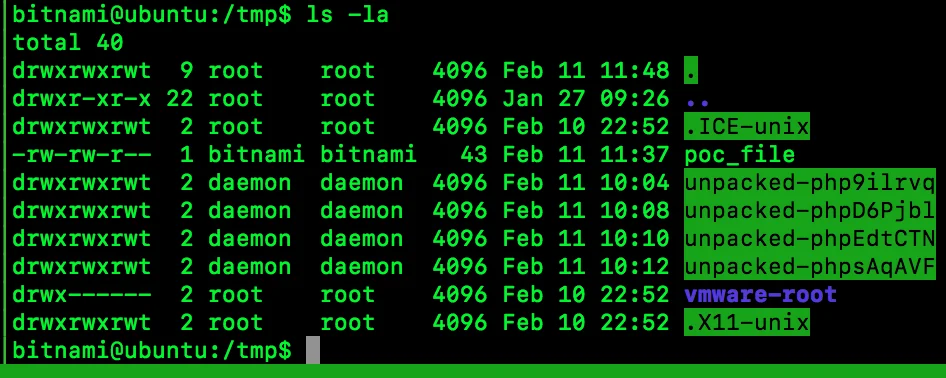
The unzip_file function takes a target directory, $to, as an argument into which the files in the zip should be extracted. If a maliciously crafted zip file is extracted with a filename starting with the parent directory specifier (../) the file will be extracted into the parent of the '$to' argument target directory. Filenames can be crafted in order to place files in any directory which the webserver has write permissions, for example a zip entry with a filename of ../../../../../../../../../../tmp/poc_file would place the file contents in the '/tmp/poc_file' directory.
This vulnerability exists both when unzip_file uses PHP's built-in ZipArchive (/wp-admin/includes/file.php:_unzip_file_ziparchive) and the 3rd party PclZip (/wp-admin/includes/file.php:_unzip_file_pclzip) extraction methods. Neither of these functions check to confirm that the normalised output path is within the $to target directory.
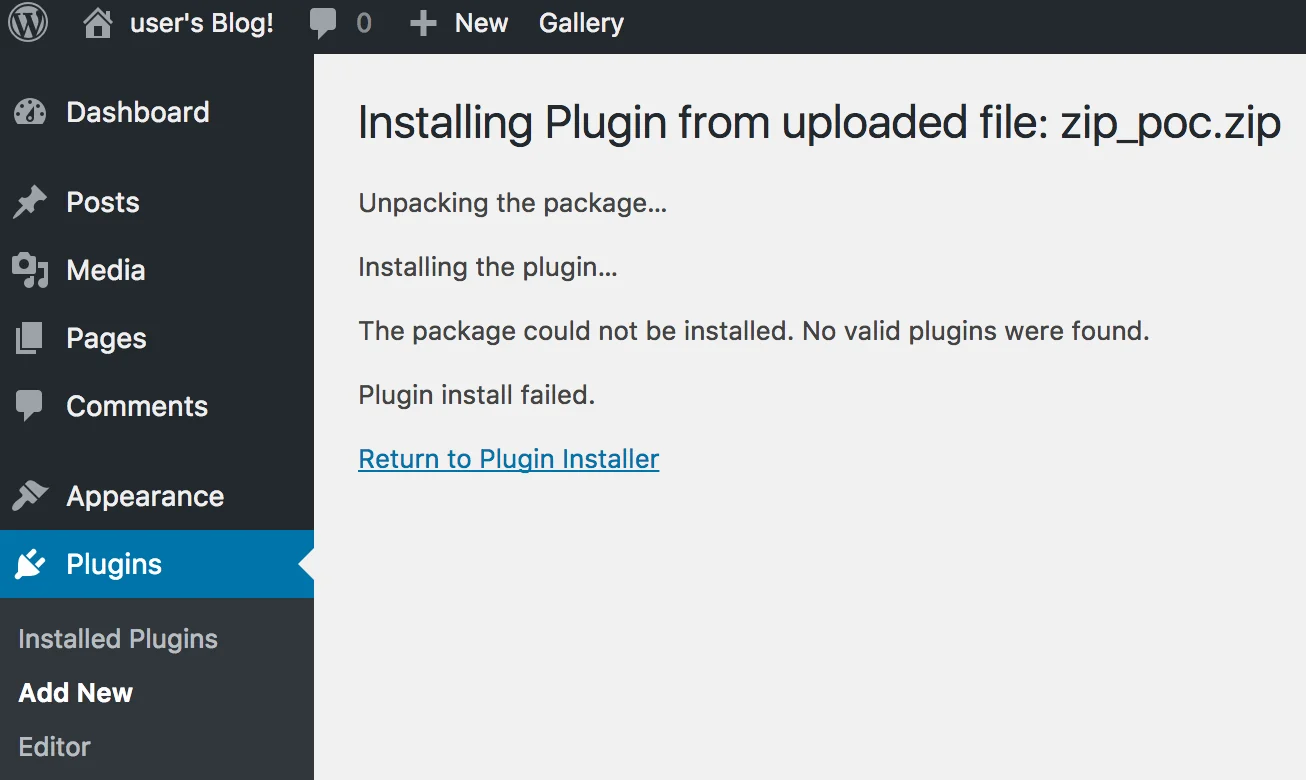
An example zip, 'zip_poc.zip' is attached. If this is extracted with the unzip_file function, for example through the "Upload Plugin" admin function or the attached 'poc.php', a file called 'poc_output' will be extracted to the operating system '/tmp' directory. The 'poc.php' attachment shows how the unzip_file function may be used in a wordpress plugin. This Proof of Concept has been tested on Wordpress 4.7.2 running on Ubuntu 14.04 LTS.
It should be noted that the built-in PHP ZipArchive extractTo method is not vulnerable to this path traversal.
Cursory analysis of a number of popular Wordpress plugins suggests that gallery plugins, such as NextGen Gallery, which allow lower privilege non-admin users to upload zips to be extracted would be particularly susceptible to this issue.
Suggested Remediation
The _unzip_file_ziparchive and _unzip_file_pclzip functions should normalise the output paths of zip file entries ensuring that after normalisation the paths reside within the $to argument target directory.
Attachments
Not written yet. The AI write-up for this report has not been written yet. The Original tab links to the source.
How it worked
Root cause
Likely the extraction functions do not normalise and check that each entry's output path remains within the intended target directory.
Impact
An attacker could write arbitrary files, including PHP scripts, to any directory the web server can write to, potentially leading to code execution.
What the attacker needed
Ability to supply a zip file to unzip_file; web server write permissions to target directory
The fix
The extraction functions should normalise the output paths of zip entries and ensure they reside within the target directory.
How it was found
- Create a zip file containing an entry whose filename uses parent directory specifiers to point outside the target directory.
- Extract the zip using the unzip_file function, for example through the Upload Plugin admin feature or a plugin that calls it.
- Observe that the file is written to the path outside the intended directory, such as /tmp.
Explained by bugbounty.wiki with AI from the original and checked against quotes from it; it can still be wrong. Read the original before relying on a detail.
Not written yet. The AI write-up for this report has not been written yet. The Original tab links to the source.
When a program extracts a zip file, it should only write files inside the folder you chose. Here, the program trusted the file names inside the zip, so a name like '../something' could make it write outside that folder. An attacker could then put a harmful script on the web server and run it.
What is Path traversal?
Input that builds a file path escapes the intended folder, reading or writing files the application should never touch.