$10,000 for a vulnerability that doesn’t exist
A path traversal on an HTTP-only subdomain allowed reading of /proc/self/environ, which exposed AWS keys, database credentials, and FCM/GCM keys. The attacker could use these to access AWS infrastructure, a Postgres database, and send notifications to all users.
 Published on krevetk0.medium.com
A couple of months ago, an interesting story happened to me. At that time I was working in a field not strongly connected with application security.
The full write-up lives on its author's site
It belongs to its author, so we link to it rather than copy it. The other two tabs are our own rewrites, checked against it.
Context
This is a story about a bug bounty target that the researcher calls example.com. A new target had been added to a program's scope, and the program accepted critical bugs on other domains belonging to the same organisation. The registered domains of the organisation were hidden; all that was publicly known was example.com. The researcher was between contracts and used three weeks of accrued vacation to hunt, working on a target whose real name is not disclosed.
The bug itself was a path traversal on a subdomain of a second domain, example.net, reachable over plain HTTP. The traversal returned file contents from the server, and the most valuable file it returned was /proc/self/environ, which held the environment variables of the running process: cloud API passwords, basic auth passwords, a database URL, AWS access key ID and secret key, and FCM/GCM API keys.
Setup
The tooling was deliberately light:
- Subdomain enumeration for
example.comandexample.net. - No
httprobefiltering. The researcher explicitly says that runninghttprobe --prefer-httpswould have prevented the discovery, because the traversal only worked over HTTP. - Basic checks sent through nuclei.
- Later, the AWS CLI to test the leaked credentials, and a Postgres client for the leaked connection string.
The scope expansion came from a redirect: example.org, example.io and example.ca gave results that did not establish affiliation with the organisation, but example.net redirected to example.com, which put both domains in scope. The bug was on the discovered domain.
Finding it
After gathering subdomains for both domains (there were not many), the researcher skipped httprobe and ran nuclei against the raw list. Anomalies appeared in responses from a subdomain of example.net served over HTTP. The researcher recognised the pattern as the classic path traversal usually seen on test labs. A request in this format returned the contents of the passwd file:
example.net/../../../../../../../../../../../../../../etc/passwd
At that point the obvious move would have been to file a report and wait. The researcher held back, reasoning that file read alone could be on a test server and would earn nothing more than a thank you. A local file include to web shell path was considered, but the researcher states that option did not work at all: this was only reading directories and files.
Exploitation
Step 1: enumerate interesting files through the traversal
Guided by a local file inclusion reference, the researcher ran a word list of /proc paths:
/proc/sched_debug /proc/mounts/proc/net/arp/proc/net/route/proc/net/tcp/proc/net/udp/proc/net/fib_trie/proc/version/proc/self/environ
Most returned content that was not very useful. The last one, /proc/self/environ, returned a very large response body containing all the keys the server needed to talk to services inside the network:
CLOUD_API_PASSWORDBASIC_AUTH_PASSWORDDATABASE_URLAWS_ACCESS_KEY_IDSECRET_KEYFCM_API_KEYGCM_API_KEY
The researcher saved a screenshot and a note of the full contents. That note later mattered, because the traversal stopped working.
Step 2: file the report, and lose reproducibility
The report was submitted and a triager picked it up almost immediately. By then the path traversal no longer worked. The researcher's assessment is that the traversal had been luck and temporary failure on the balancer server, because the same vector stopped working when accessed over HTTPS. The triager tried to reproduce and got a connection reset:
“I am trying to reproduce it but I am getting a “Connection reset” in burpsuit when I try to send your provided request. Can you try again and provide any steps you may have forgotten?”

The request for proc/self/environ could not be repeated. The triager reasonably tried to move the conversation elsewhere and close the report.
Step 3: argue that a short-lived bug is still an incident
The researcher pushed back with the position that a vulnerability which works for a short period is still a security incident for the company, and should be analysed from the point of view of a real attacker, not only an unlucky researcher. Three precedents were cited:
- Jason Haddix (@jhaddix) and a soft-patched SQL injection, where the soft patch stopped the triager confirming the bug but the report was accepted on the strength of full proof (version, table name) and a reward was paid: https://youtu.be/8MhoDQqcJSc?t=4321.
- Shubham Shah (@infosec_au) and a short-term accessible
.gitrepository, including Slack AWS keys valid for only two hours: https://youtu.be/fLR5zBb5jz8?t=378. - A HackerOne session leak, also a short-term issue, where an investigation was conducted and the researcher rewarded: https://hackerone.com/reports/745324.
The triager took the arguments into account and began working on the incident, although the bug was not triaged at that moment.
Step 4: test the leaked AWS credentials
The researcher took the AWS profile from the environment file and checked it against several API methods:
aws s3api list-bucketsaws iam list-rolesaws dynamodb describe-endpointsaws ec2 describe-security-groupsaws ec2 describe-addressesaws sts get-caller-identity
The results showed a working AWS profile with visibility over the organisation's AWS infrastructure. The identity call returned:
{ "Account": "7876********", "UserId": "AIDA*****************", "Arn": "arn:aws:iam::7876********:user/*********_production" }
The researcher notes there was no way to run RCE through SSM on AWS, referencing https://hackerone.com/reports/401136. Even after these results were demonstrated, the report stayed in new status.
Step 5: use the database connection string
Because the report was technically a security incident with all environment keys compromised, the researcher went through every key in the saved note. The connection string left in the file gave access to the Postgres DB, and the connection was not limited from the outside.
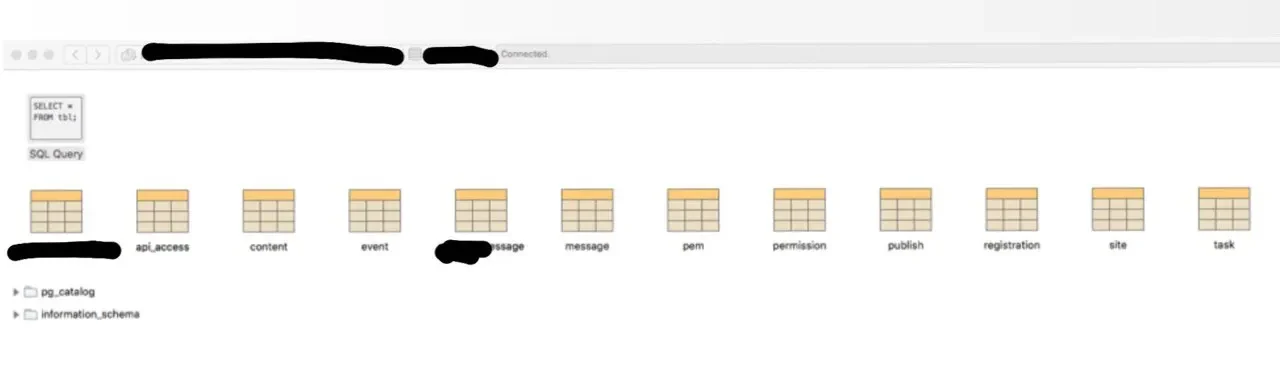
These results were also shown to the triager.
Step 6: FCM/GCM keys and portals
The FCM/GCM keys worked and allowed sending notifications to all users; that PoC was shown to the triager as well, with credit to @absshax for the technique at https://abss.me/posts/fcm-takeover/. Access to several working portals under keys from the same proc/self/environ file was also demonstrated.
Step 7: triage and remediation
After a week of daily demonstrations, the triager responded:
“Unfortunately, since it is not possible to reproduce the Path Traversal we cannot take it into account for the triage of the report, but at least the rest of the information you have provided us with, in case we can also verify that it is real information and that sensitive information can be found in this data, we will proceed to triage it. Please give us some time to verify the data you have provided. Good job here and thank you so much for your research”
The results were summarised in the report summary and the status moved to triaged.
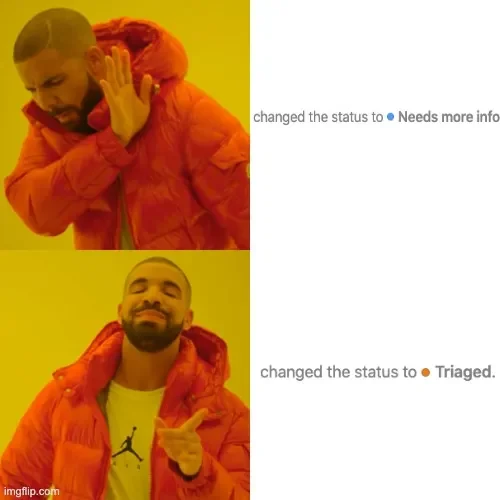
“Good news, the bug has been triaged, congratulations. Very good work.”
The company started fixing. One week later the AWS credentials stopped working, then the database and other services. All compromised credentials had been reset. Another week later the report was closed, with a reward of $10,000, attributed to the original problem: path traversal.

Root cause
The report does not describe the server-side code. What it shows is that a request whose path contains a long run of ../ segments, sent over HTTP to a subdomain of example.net, returned files from the filesystem, including /proc/self/environ. The researcher's own explanation is that finding it was luck and temporary failures on the balancer server, since the same vector stopped working over HTTPS. That is an inference from the observed behaviour, not a code-level finding.
The process environment held cloud credentials, a database connection string and push notification keys, and the database accepted connections from outside the network.
Impact
Under the conditions observed, an attacker who reached the traversal during its window could read arbitrary files from the server, including the process environment. From that file the researcher obtained:
- AWS credentials that listed buckets, IAM roles, DynamoDB endpoints, security groups and addresses, and identified a
*_productionIAM user. - A Postgres connection string that worked from outside the network.
- FCM/GCM keys that allowed sending notifications to all users.
- Credentials for several working portals.
The researcher could not achieve RCE through SSM with the AWS profile. The report does not state which services the portals exposed or how many users the notifications could reach.
Fix
The company reset all compromised credentials, which the researcher observed as loss of access to AWS, the database and other services.
Variants to test
- Send traversal payloads over HTTP as well as HTTPS. A positive result is a response containing file contents over one scheme and not the other, which points at a protocol-specific backend or balancer path.
- Request
/proc/self/environand other/procfiles through any confirmed file read. A positive result is a large body containing environment variable names and values. - Test leaked AWS keys with identity and enumeration calls. A positive result is a valid
get-caller-identityresponse and successful listing calls. - Try leaked database connection strings from outside the network. A positive result is a successful connection where the host should be internal only.
- Test leaked FCM/GCM keys by attempting to send a notification. A positive result is delivery to users you do not control.
- Keep a full copy of every file you read, because the window may close before triage. A positive result is a report that survives loss of reproducibility.
What happened, in plain words
A security researcher had three weeks of holiday between jobs and decided to spend them hunting for bugs in companies' websites, a hobby and sometimes a job called bug bounty hunting. Companies publish a list of their websites (a "program") and pay people who find security holes in them. The researcher picked one program, found a way to make one of the company's servers hand over files it should never have handed over, and used the secrets inside those files to reach the company's AWS infrastructure, its database and its push notification system. The original hole stopped working almost as soon as the report was filed, so the company initially could not confirm it. The researcher spent a week proving the consequences instead, the company eventually agreed, fixed everything, and paid $10,000.
The hole itself is called path traversal. Imagine a hotel receptionist who is told "take this note to room 12". If a guest writes "take this note to room 12, then keep walking down the corridor, through the staff door, into the manager's office", a careless receptionist might do exactly that. Websites work the same way: when you ask for a file, the server builds a path like /var/www/images/cat.jpg. The two dots .. mean "go up one folder". If the server does not check the path you sent, you can write a path that climbs out of the folder you are supposed to be limited to and lands somewhere else on the machine, such as the system's list of user accounts.
This article walks through the whole story in order: how the researcher found the target, how the traversal was discovered, what files it exposed, why the report nearly died, and how the leaked secrets were turned into proof. Every command and request below is copied exactly as it appeared in the write-up.
Setting the scene
The researcher calls the target example.com. That is a stand-in name: the real company is not named in the write-up. A new target had been added to the program's scope, and the program accepted critical bugs on other domains belonging to the same organisation. The organisation's registered domains were hidden, so all that was publicly known was example.com.
A few terms first, because they come up constantly:
- A domain is the part of a web address after the
www, such asexample.com. One company usually owns several:example.com,example.net,example.organd so on. - A subdomain is a prefix on a domain, such as
shop.example.comorapi.example.com. Companies often have dozens, and each one is a separate website that can have its own bugs. - Scope is the list of things a program allows you to test. Testing outside scope is not allowed and can get a hunter banned.
- HTTP and HTTPS are the two ways a browser can talk to a website. HTTPS is the same conversation with encryption wrapped around it, so nobody in between can read it. The padlock in your browser's address bar means HTTPS.
How the target was expanded
The researcher tried to work out which domains belonged to the organisation. example.org gave a strange result. example.io and example.ca gave results that did not establish any connection to the organisation. Then example.net redirected to example.com.
A redirect is what happens when you type an old address into your browser and it automatically takes you to a new one. If example.net sends visitors to example.com, the two are almost certainly run by the same people. That reasoning put both domains in scope, and the bug turned out to be on the newly discovered one.
Gathering subdomains and the decision that mattered
Next came the classic first step of any hunt: collect all the subdomains of example.com and example.net. There were not many.
Normally a hunter then runs a tool called httprobe over that list. httprobe knocks on each subdomain and reports whether it answers over HTTP or HTTPS. The researcher skipped it and sent basic checks straight through nuclei, a tool that fires a large set of standard test requests at a list of hosts and reports anything unusual.
The researcher is emphatic that this was the most important decision of the whole hunt: running httprobe --prefer-https would have meant only talking to the HTTPS versions of each site, and the vulnerability would never have been found. Keep that in mind, because it explains almost everything that follows.
Finding the path traversal
Among the responses from a subdomain of example.net served over plain HTTP, certain anomalies appeared. The researcher recognised the pattern as the most common path traversal, the kind usually seen on practice labs built for training.
A request in this format returned the contents of the passwd file:
example.net/../../../../../../../../../../../../../../etc/passwd
Line by line:
example.netis the host being asked.- Each
../means "go up one folder". There are many of them, far more than any real folder structure would need. That is deliberate: the attacker does not know how deep the web server's starting folder is, so they climb far more levels than necessary. Once you reach the top of the filesystem, extra../segments simply stay at the top. /etc/passwdis a file present on almost every Linux machine. It lists the user accounts on the system. It does not contain passwords despite the name, but it is the standard proof that a file read works, because its contents are recognisable and harmless to show.
If the server returns that file's contents, the server is reading files from anywhere on the machine, not just from the website's own folder.
At this point most hunters would file a report and wait for the money. The researcher held back, for a good reason: a file read on its own might be sitting on some test server that nobody cares about, and the reward for that is a polite "thank you".
The researcher also considered the more powerful version of this bug, called local file include. In that scenario a website lets you upload a file and then includes it as if it were part of the site's own code, so you can upload a small program (a web shell) and run commands on the server. The researcher states plainly that this option did not work at all here. It was only reading directories and files.
Step 1: hunting for interesting files
After reading around the subject, the researcher settled on a guide about local file inclusion and ran a word list of paths under /proc:
/proc/sched_debug /proc/mounts/proc/net/arp/proc/net/route/proc/net/tcp/proc/net/udp/proc/net/fib_trie/proc/version/proc/self/environ
What is /proc? On Linux, /proc is a special folder that is not really a folder on disk. It is a window into the running system, maintained by the operating system itself. Reading files there tells you about the machine's current state: what is mounted, what network connections exist, what version of the kernel is running, and so on. The list above is a set of those files, each requested through the traversal.
Most of them returned content that was not very useful. The very last one, /proc/self/environ, returned a very large response body. self means "the process making this request", and environ is that process's environment variables.
An environment variable is a named setting that a program receives when it starts. Think of the sticky note taped to a new employee's monitor on their first day: "the printer is on floor 2, the wifi password is on the card in your drawer". Programs get the same kind of note, and it often contains exactly the things they need to talk to other services: passwords, addresses, keys. The researcher looked inside and was amazed. The file contained all the keys the server needed to communicate with services inside the network:
CLOUD_API_PASSWORDBASIC_AUTH_PASSWORDDATABASE_URLAWS_ACCESS_KEY_IDSECRET_KEYFCM_API_KEYGCM_API_KEY
That block is the list of variable names as they appeared, run together. Reading it as separate names:
CLOUD_API_PASSWORD: a password for a cloud service's programming interface.BASIC_AUTH_PASSWORD: a password for basic authentication, the simplest login scheme, where the browser sends a username and password with every request.DATABASE_URL: the address, username and password needed to connect to the company's database, all in one string.AWS_ACCESS_KEY_IDandSECRET_KEY: the two halves of a login for Amazon Web Services, Amazon's cloud platform. The key ID is like a username and the secret key is like a password.FCM_API_KEYandGCM_API_KEY: keys for Firebase Cloud Messaging and Google Cloud Messaging, Google's services for sending push notifications to phones.
There were lots of other interesting and unusual things in the file too. The researcher saved a screenshot and a note of the full contents, which turned out to be a very good idea, because the traversal soon stopped working.
Step 2: filing the report and losing the proof
The report was submitted. A triager picked it up almost immediately. A triager is the person a bug bounty platform employs to read incoming reports, try to reproduce them, and decide whether they are real. They are the gatekeeper between the hunter and the reward.
By the time the triager looked, the path traversal no longer worked. The researcher's own assessment is that finding it had been luck and a temporary failure on the balancer server. A balancer (or load balancer) is the machine that sits in front of a company's servers and spreads incoming traffic across them, like a host at a restaurant seating guests at whichever table is free. If one of those backend servers is misconfigured, only requests that happen to land on it will show the problem, and only while it stays in rotation. The researcher adds that the same vector stopped working when accessed over HTTPS, which fits the idea that only one particular path through the infrastructure was affected.
The triager tried to reproduce the request and got a connection reset:
“I am trying to reproduce it but I am getting a “Connection reset” in burpsuit when I try to send your provided request. Can you try again and provide any steps you may have forgotten?”
A connection reset means the connection was closed abruptly by the other side, without a proper answer. Burp Suite, spelled "burpsuit" in the quote, is a tool for intercepting and editing web requests, the standard workbench for this kind of testing.
The researcher could not repeat the request for proc/self/environ any more. The triager reasonably tried to move the conversation in another direction and close the report.
Step 3: arguing that a short-lived bug is still an incident
The researcher pushed back. The argument: a vulnerability that works for only a short period is still a security incident for the company, and it should be analysed from the point of view of a real attacker, not only from the point of view of an unlucky researcher. The researcher notes a pattern seen across many companies, where a problem that no longer reproduces is dismissed even though exploitation was demonstrated.
Three precedents were cited:
- Jason Haddix (@jhaddix) and a soft-patched SQL injection. A soft patch is a quick fix applied to stop an attack without repairing the underlying flaw. In that story the soft patch stopped the triager confirming the bug, but the report was accepted on the strength of full proof (version, table name) and a reward was paid: https://youtu.be/8MhoDQqcJSc?t=4321.
- Shubham Shah (@infosec_au) and a short-term accessible
.gitrepository. A.gitfolder is the hidden history of a code project; if a website accidentally serves it, anyone can download the source code. The example includes Slack AWS keys that were valid for only two hours: https://youtu.be/fLR5zBb5jz8?t=378. - A HackerOne session leak, also a short-term issue, where an investigation was conducted and the researcher was rewarded: https://hackerone.com/reports/745324. A session is the logged-in state of a user; if someone else gets hold of it, they can act as that user without knowing the password.
The triager took the arguments into account and began working on the incident, although the bug was not triaged at that moment. The researcher found it strange and set out to demonstrate the problems that nobody had wanted to take into account.
Step 4: testing the leaked AWS credentials
The researcher took the AWS profile from the environment file and checked it against several API methods:
aws s3api list-bucketsaws iam list-rolesaws dynamodb describe-endpointsaws ec2 describe-security-groupsaws ec2 describe-addressesaws sts get-caller-identity
That block is a list of commands run with the AWS command line tool, written out one after another. An API is the set of commands one program offers to another over the network, like a restaurant menu: you do not walk into the kitchen, you order from the list. The AWS CLI is a program that lets you order from Amazon's menu using the leaked key instead of a normal login.
Line by line:
aws s3api list-bucketsasks Amazon's storage service, S3, to list all the storage containers (buckets) the account owns. Buckets often hold files that should not be public.aws iam list-rolesasks the identity service, IAM, to list the roles defined in the account. A role is a set of permissions that a program or person can assume.aws dynamodb describe-endpointsasks about DynamoDB, Amazon's database service, and where it can be reached.aws ec2 describe-security-groupsasks about EC2, Amazon's virtual server service, and lists the firewall rules (security groups) attached to those servers.aws ec2 describe-addresseslists the fixed public IP addresses the account has reserved.aws sts get-caller-identityasks "who am I?" and returns the identity the key belongs to. It is the standard first check on any unknown key, because it is harmless and immediately tells you whether the key is live.
The results were stunning. The researcher had a working AWS profile that allowed a view of the entire infrastructure on AWS for the organisation. The identity call returned:
{ "Account": "7876********", "UserId": "AIDA*****************", "Arn": "arn:aws:iam::7876********:user/*********_production" }
Line by line:
Accountis the AWS account number, with most digits masked here. Every AWS resource belongs to an account.UserIdis the unique identifier of the key's owner, again masked.Arnstands for Amazon Resource Name, the full address of the identity. Theuser/part shows this is an IAM user rather than a role, and the_productionsuffix shows the key belongs to the live production environment rather than a test one.
The researcher notes there was no way to run RCE through SSM on AWS, referencing https://hackerone.com/reports/401136. RCE means remote code execution, the ability to run your own commands on someone else's machine, the worst outcome in most bug reports. SSM is AWS Systems Manager, a service for managing servers remotely; if the key had allowed it, the researcher could have run commands on the company's servers. It did not.
Even after these results were demonstrated, the report stayed in new status. "New" is the state a report sits in before a triager has accepted it.
Step 5: using the database connection string
Because the report was technically a security incident with all the environment keys compromised, the researcher went through every key in the saved note. The note mattered here: the traversal was dead, but the copy of the file was not.
The connection string left in the file gave access to the Postgres DB, and the connection was not limited from the outside. Postgres is a popular open-source database. A connection string packs the server address, the username and the password into one line, like a full delivery address with the door code written on the same label. "Not limited from the outside" means the database accepted connections from anywhere on the internet, not only from inside the company's own network, which is how databases are normally protected.
These results were also shown to the triager.
Step 6: push notification keys and portals
The FCM/GCM keys worked and allowed sending notifications to all users. That proof was shown to the triager as well, with credit to @absshax for the technique at https://abss.me/posts/fcm-takeover/.
Why is that serious? Push notifications are the messages that pop up on a phone from an app. The key is what proves to Google that a message really comes from the app's owner. Anyone holding the key can send a message that appears to come from the app, to every user of it. That is a perfect channel for phishing, because users trust notifications from an app they installed.
Access to several working portals under keys from the same proc/self/environ file was also demonstrated. A portal here means an internal web application, the kind of site a company's staff log into to manage things.
Day after day the researcher kept investigating and showing the impact in the report.
Step 7: triage and remediation
After a week of daily demonstrations, the triager responded:
“Unfortunately, since it is not possible to reproduce the Path Traversal we cannot take it into account for the triage of the report, but at least the rest of the information you have provided us with, in case we can also verify that it is real information and that sensitive information can be found in this data, we will proceed to triage it. Please give us some time to verify the data you have provided. Good job here and thank you so much for your research”
The results were summarised in the report summary and the status moved to triaged. "Triaged" means the report has been accepted as valid and is now being handled as a real issue.
“Good news, the bug has been triaged, congratulations. Very good work.”
The company started fixing. One week later the AWS credentials stopped working, then the database and other services. All compromised credentials had been reset. Another week later the report was closed, with a reward of $10,000, attributed to the original problem: path traversal.
Why it worked
The report does not describe the server-side code. What it shows is that a request whose path contains a long run of ../ segments, sent over HTTP to a subdomain of example.net, returned files from the filesystem, including /proc/self/environ. The researcher's own explanation is that finding it was luck and temporary failures on the balancer server, since the same vector stopped working over HTTPS. That is an inference from the observed behaviour, not a code-level finding.
The process environment held cloud credentials, a database connection string and push notification keys, and the database accepted connections from outside the network. "Scoped" means each credential is limited to the smallest job it needs; "rotated" means replaced regularly so an old copy stops working.
What an attacker could have done
Under the conditions observed, an attacker who reached the traversal during its window could read arbitrary files from the server, including the process environment. From that file the researcher obtained:
- AWS credentials that listed buckets, IAM roles, DynamoDB endpoints, security groups and addresses, and identified a
*_productionIAM user. - A Postgres connection string that worked from outside the network.
- FCM/GCM keys that allowed sending notifications to all users.
- Credentials for several working portals.
The researcher could not achieve RCE through SSM with the AWS profile. The report does not state which services the portals exposed or how many users the notifications could reach.
How it was fixed
The company reset all compromised credentials, which the researcher observed as loss of access to AWS, the database and other services.
Things worth trying yourself
- Send traversal payloads over HTTP as well as HTTPS. A positive result is a response containing file contents over one scheme and not the other, which points at a protocol-specific backend or balancer path.
- Request
/proc/self/environand other/procfiles through any confirmed file read. A positive result is a large body containing environment variable names and values. - Test leaked AWS keys with identity and enumeration calls. A positive result is a valid
get-caller-identityresponse and successful listing calls. - Try leaked database connection strings from outside the network. A positive result is a successful connection where the host should be internal only.
- Test leaked FCM/GCM keys by attempting to send a notification. A positive result is delivery to users you do not control.
- Keep a full copy of every file you read, because the window may close before triage. A positive result is a report that survives loss of reproducibility.
Glossary
- API: the set of commands one program offers to another over a network, like a menu you order from.
- ARN (Amazon Resource Name): the full unique address of a resource or identity inside AWS.
- AWS: Amazon Web Services, Amazon's cloud platform for renting servers, storage and databases.
- AWS CLI: the command line program used to send commands to AWS.
- Balancer (load balancer): the machine in front of a company's servers that spreads incoming traffic across them.
- Basic authentication: the simplest login scheme, where the browser sends a username and password with every request.
- Bug bounty: a program where a company pays people for finding and reporting security holes in its systems.
- Connection reset: an abrupt close of a network connection by the other side, without a proper answer.
- Connection string: one line containing the address, username and password needed to reach a database.
- Domain: the main part of a web address, such as
example.com. - DynamoDB: Amazon's database service.
- EC2: Amazon's service for renting virtual servers.
- Environment variable: a named setting a program receives when it starts, often holding passwords and addresses.
- FCM / GCM: Google's services for sending push notifications to phones.
- HackerOne: a bug bounty platform where companies publish programs and researchers submit reports.
- HTTP / HTTPS: the two ways a browser talks to a website; HTTPS is the same conversation with encryption around it.
- httprobe: a tool that checks whether hosts answer over HTTP or HTTPS.
- IAM: Amazon's identity and access management service, which defines users, roles and permissions.
- Local file include: a bug where a website includes a file you can influence as if it were part of its own code, sometimes allowing a web shell.
- nuclei: a tool that sends a large set of standard test requests at hosts and reports anything unusual.
- Path traversal: a bug where
../sequences in a file path let you climb out of the intended folder and read other files. - Portal: an internal web application that staff log into to manage things.
- Postgres: a popular open-source database.
- Production: the live environment real users and customers use, as opposed to a test environment.
- Push notification: a message that pops up on a phone from an installed app.
- RCE (remote code execution): the ability to run your own commands on someone else's machine.
- Redirect: when one web address automatically sends the visitor to another.
- Role (IAM role): a set of permissions that a program or person can assume.
- Rotated (credentials): replaced with new ones so that old copies stop working.
- S3: Amazon's file storage service, organised into buckets.
- Scope: the list of systems a bug bounty program allows you to test.
- Scoped (credentials): limited to the smallest set of permissions needed for their job.
- Session: the logged-in state of a user; stealing it lets someone act as that user.
- Soft patch: a quick fix that stops an attack without repairing the underlying flaw.
- SSM (AWS Systems Manager): Amazon's service for managing servers remotely, which can run commands on them.
- Subdomain: a prefix on a domain, such as
shop.example.com, that is a separate website. - Triager: the person at a bug bounty platform who reads reports, tries to reproduce them and decides whether they are valid.
- Triaged: the status of a report that has been accepted as valid and is being handled.
- Web shell: a small program uploaded to a server that lets an attacker run commands through the browser.
- Word list: a file of common names or paths that a tool tries one by one.





