API Misconfiguration - Algolia API Key
The Algolia API key, application ID and index name were exposed in a client-side JavaScript file, and the key had write permissions. An attacker could use them to create, read and update data in the Algolia index, and deletion was also possible but not tested.
 Published on shahjerry33.medium.com
CRUD stands for Create, Read, Update, and Delete which are the four basic operations that are performed on data stored in a database. When building an API, these CRUD operations are often used for creating a basic interface for interacting with a database to perform these operations.
The full write-up lives on its author's site
It belongs to its author, so we link to it rather than copy it. The other two tabs are our own rewrites, checked against it.
Context
Algolia is a hosted search service. An application that uses it keeps its data in indexes, and it talks to the Algolia REST API using three pieces of information: an API key, an application ID and an index name. The API exposes the usual CRUD operations over those indexes, and the report opens by explaining what CRUD means because the whole issue is about those operations being reachable with a key that should not have been able to reach them.
The report's own summary of the four operations:
- Create: creates a new record in the database. The API accepts the data as input, usually in JSON, and inserts it as a new record.
- Read: retrieves data from the database. The API accepts a query, such as the ID of a specific record, and returns the data for that record.
- Update: modifies an existing record. The API accepts the data as input, usually in JSON, and updates the corresponding record.
- Delete: deletes a record. The API accepts a query, such as the ID of a specific record, and deletes the corresponding record.
The corresponding HTTP verbs, as listed in the report:
| Operation | HTTP verb |
|---|---|
| Create | POST |
| Read | GET |
| Update | PUT or PATCH |
| Delete | DELETE |
The target was one of the programs on YesWeHack. The researcher reports that the finding was awarded 500 Euros.
Setup
The report does not describe any account or role. The tooling mentioned is Burp Suite and curl. The precondition was simply that the application's front end loaded a JavaScript file that contained the Algolia credentials. No authenticated position on the target is mentioned.
Finding it
The researcher found a path to a .js file in the source code of the application and then searched that file for the API key. All three values needed to exploit the Algolia API were disclosed in the .js file: the Algolia API Key, the Algolia Application ID and the Algolia Index Name.
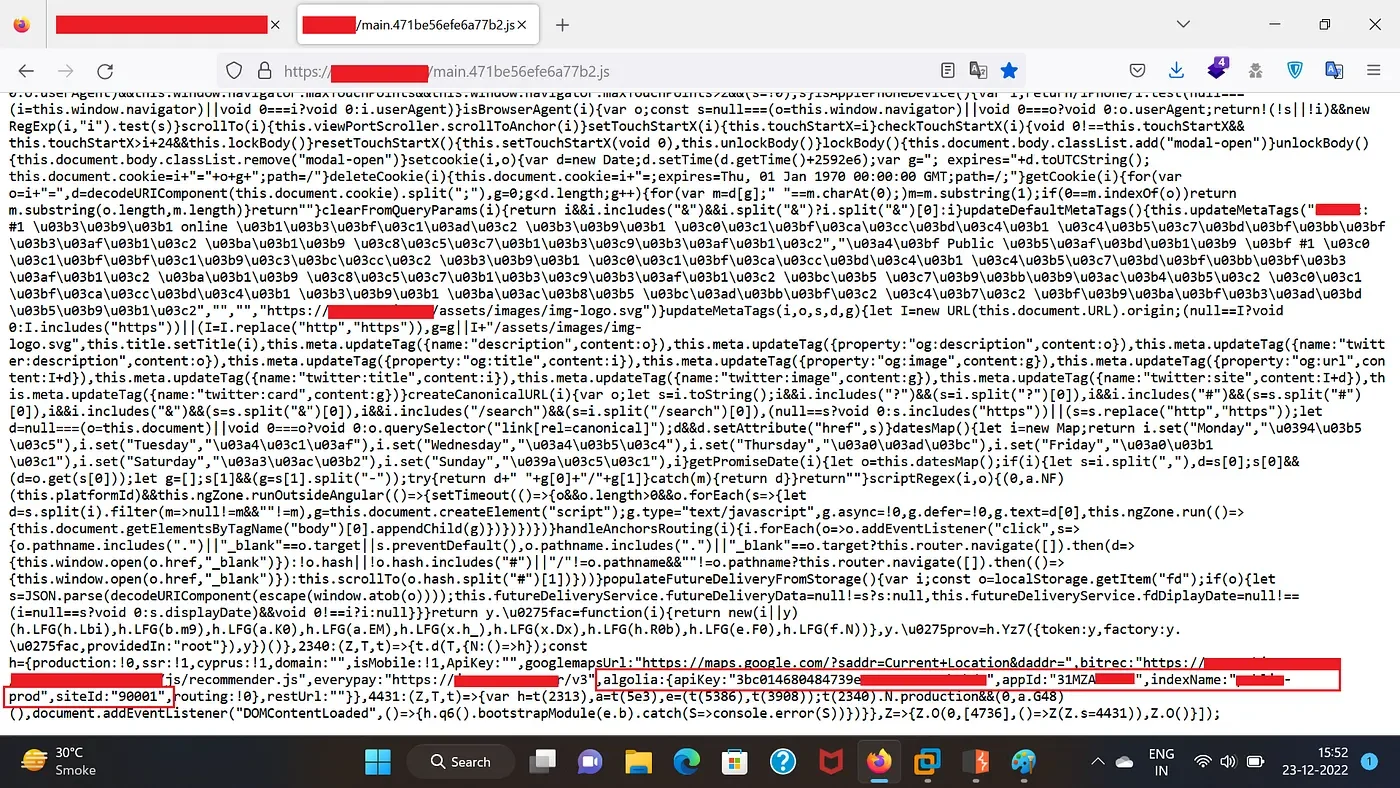
The screenshot shows the Algolia API key as it appeared in the JavaScript file.
With all three values in hand, the researcher took the exploit from the GitHub Keyhacks project and used it against the API key.
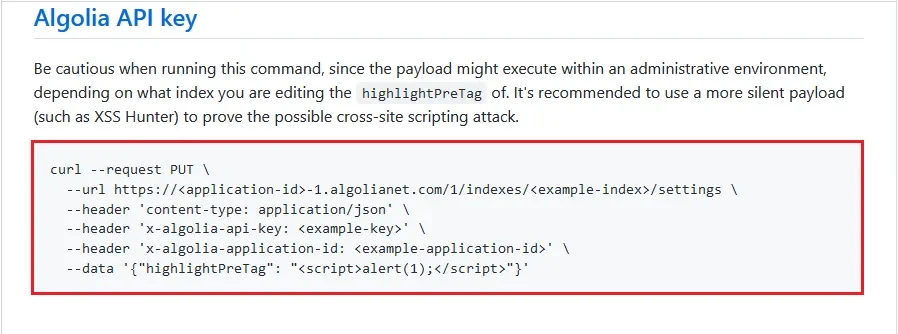
The Keyhacks page on GitHub, which is where the curl invocation used in the next step comes from.
Exploitation
Step 1: extract the credentials from the JavaScript file
A path to a .js file was found in the source code, and the file was searched for the API key. The application ID and index name were disclosed in the same file. This is the whole of the discovery phase: no guessing, no brute force, just reading a client-side asset.
Step 2: test the key with curl (update operation)
The researcher used the curl command from Keyhacks to check the basic misconfiguration of the Algolia API key, starting with the update operation.
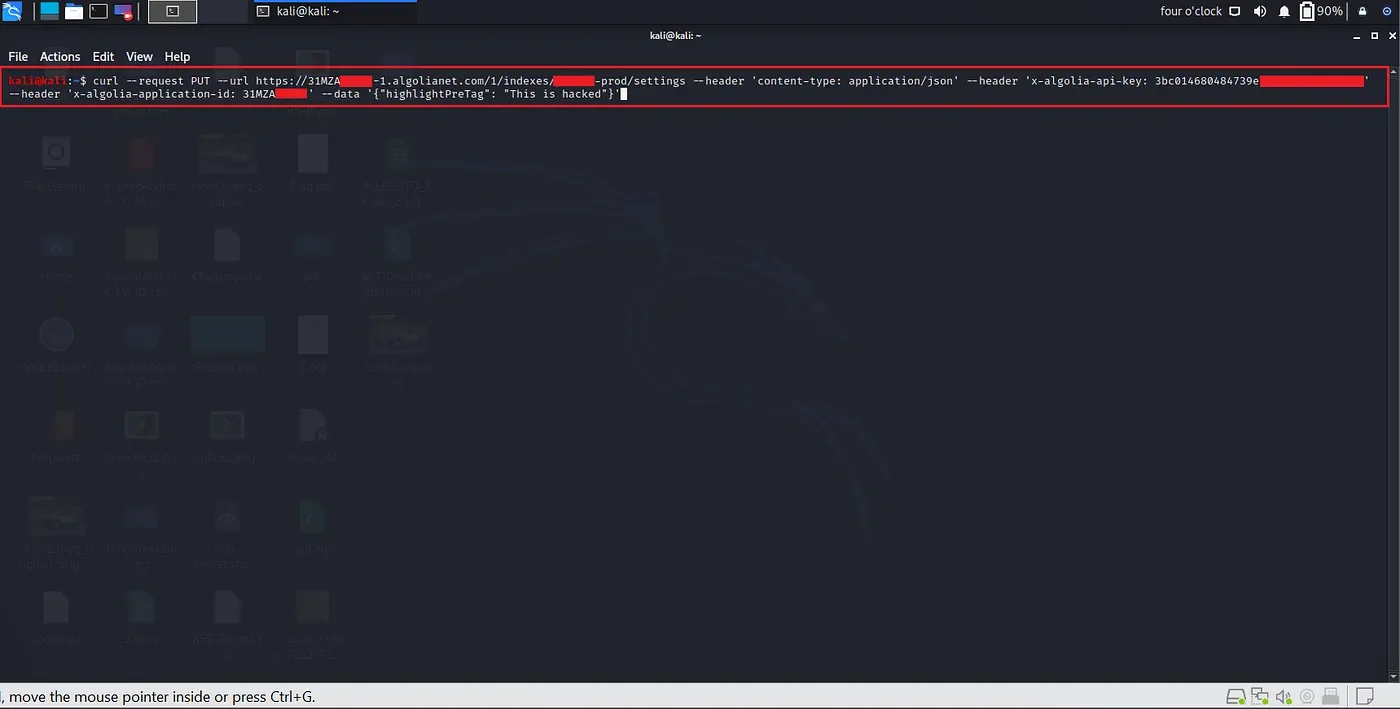
The curl command as it was run.
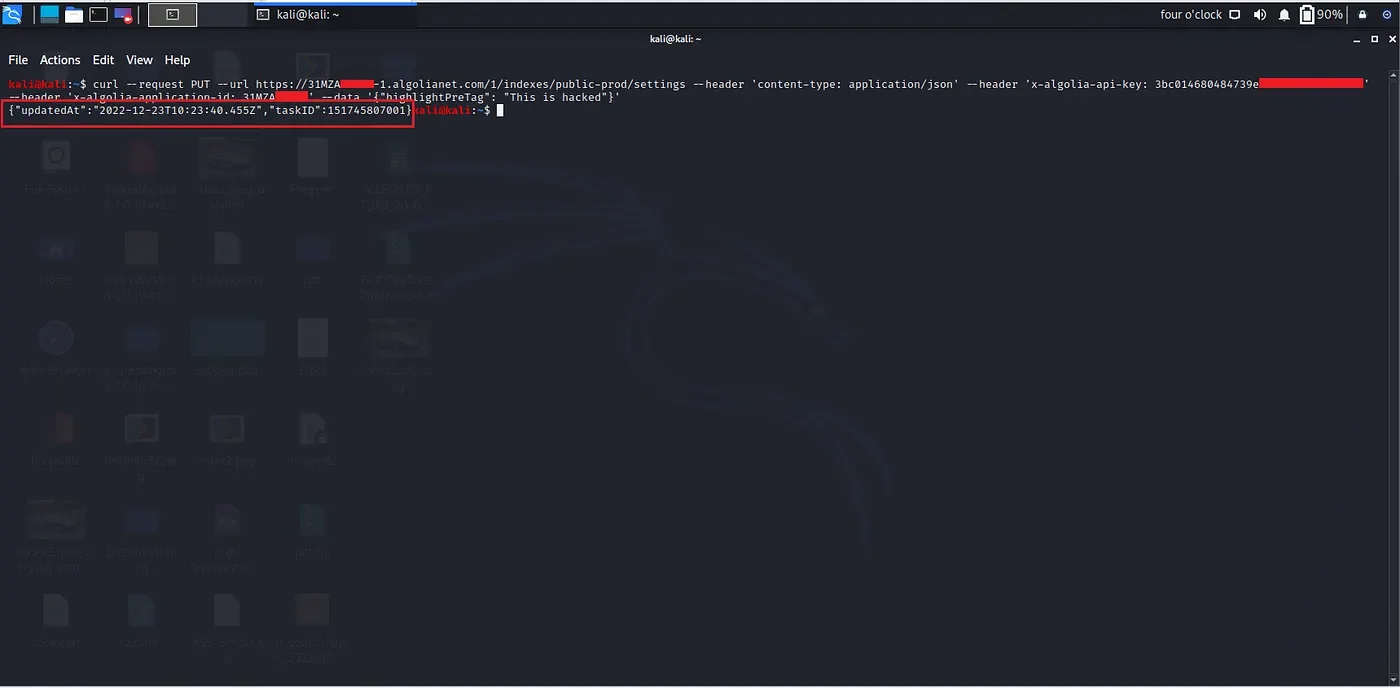
The update operation succeeding.
The Keyhacks invocation, as reproduced in the report, is:
curl -X POST --url https://<application-id>-1.algolianet.com/1/indexes/<example-index>/settings --header ‘content-type: application/json’ --header ‘x-algolia-api-key: <example-key>’ --header ‘x-algolia-application-id: <example-application-id>’ --data ‘{“highlightPreTag”: “This is hacked”}’
The important parts are the host, which is built from the application ID (<application-id>-1.algolianet.com), the path, which targets the settings of a named index, and the two headers that carry the credentials: x-algolia-api-key and x-algolia-application-id. The body sets highlightPreTag to This is hacked.
Step 3: replay the request in Burp Suite and inspect the response
Using Burp Suite, the researcher visited the URL shown in the Algolia API key exploit and checked the response.
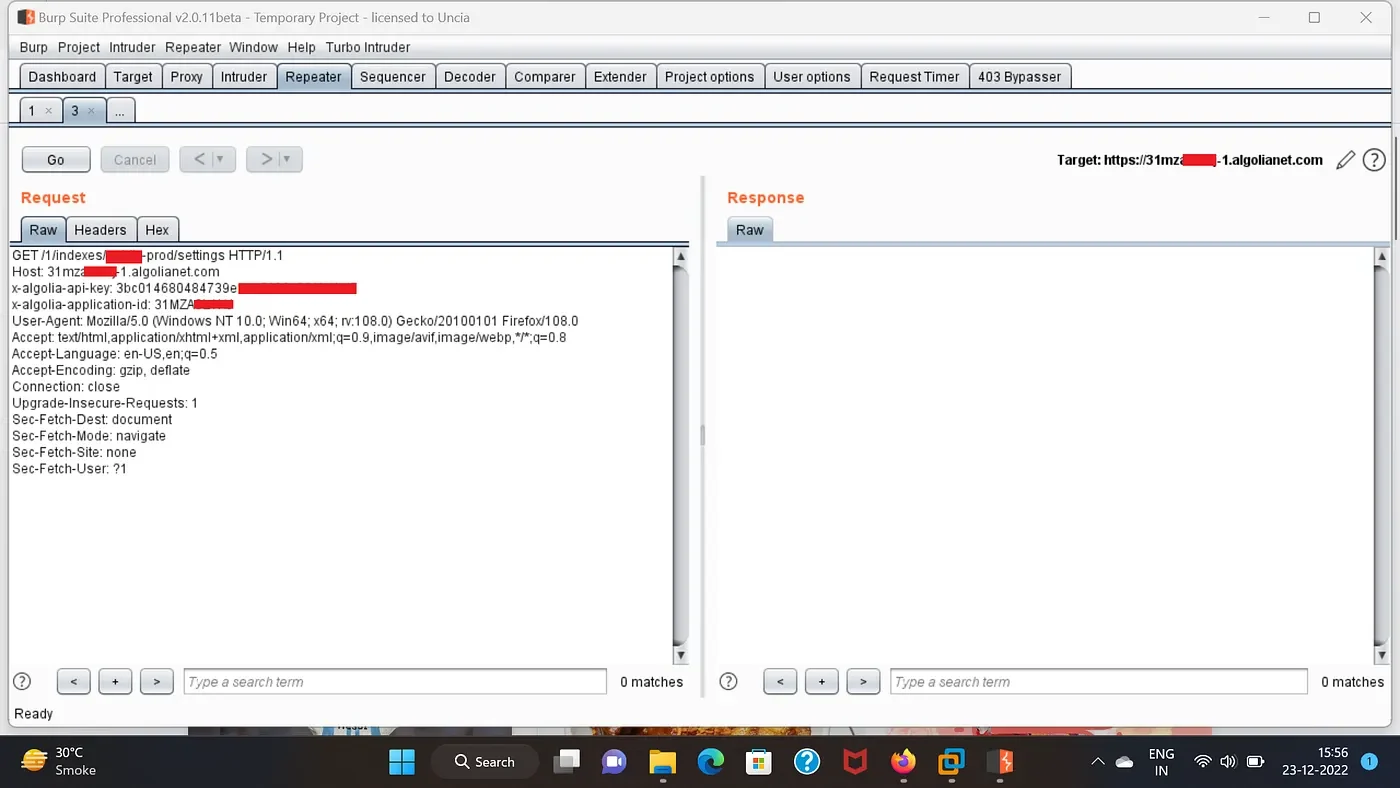
The request in Burp Suite.
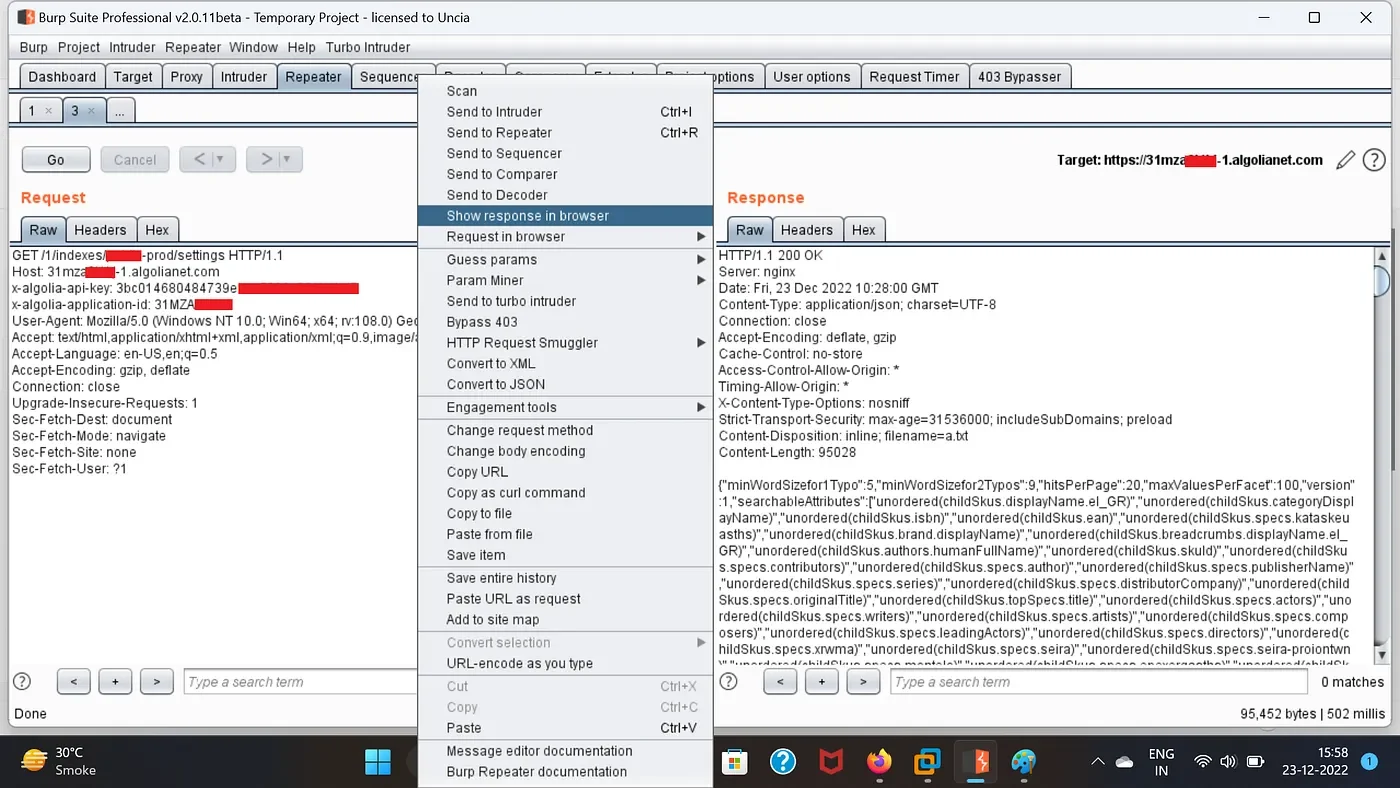
The response returned by the API.
Step 4: open the response in the browser
The response was then opened in a browser.
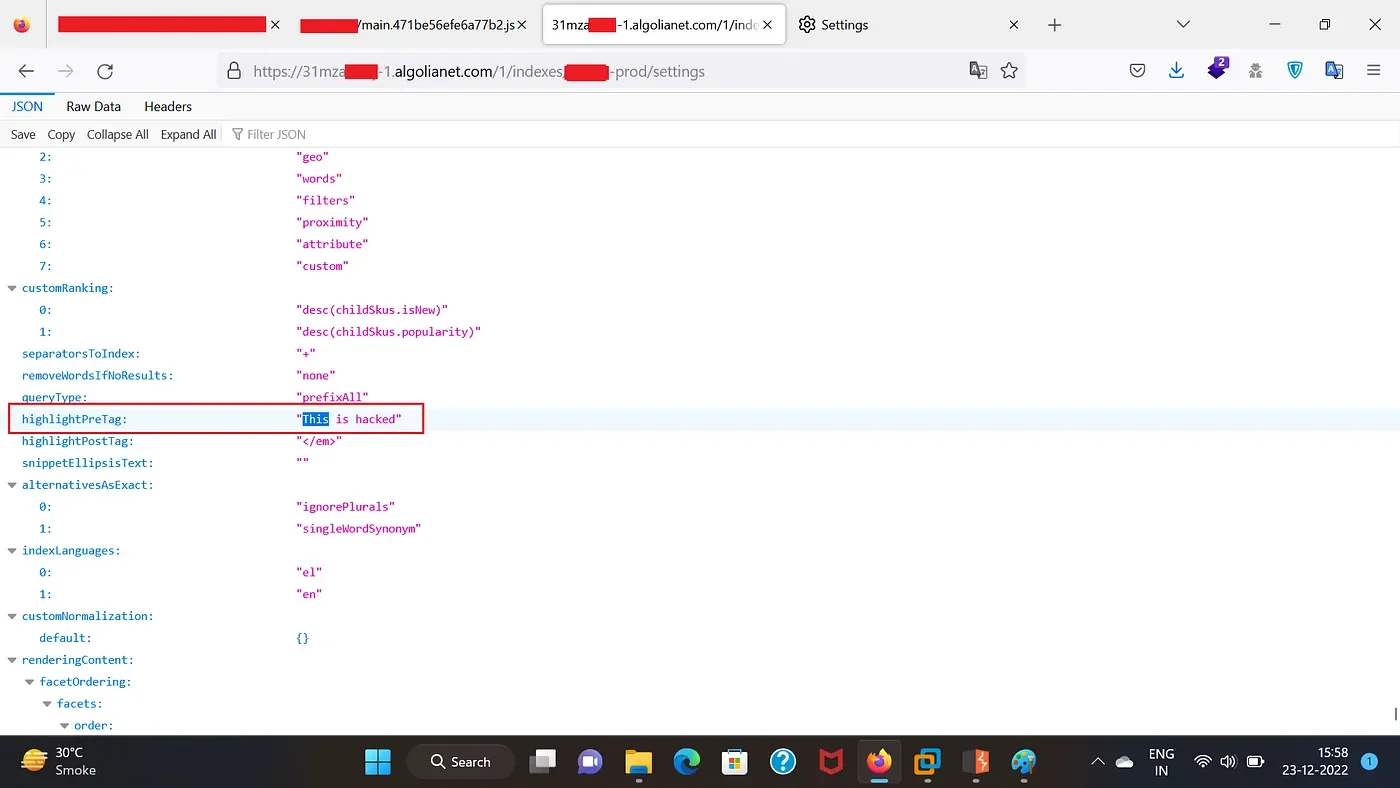
The create operation as seen in the browser.
Step 5: read different indexes
The researcher then performed the read operation to read different indexes.
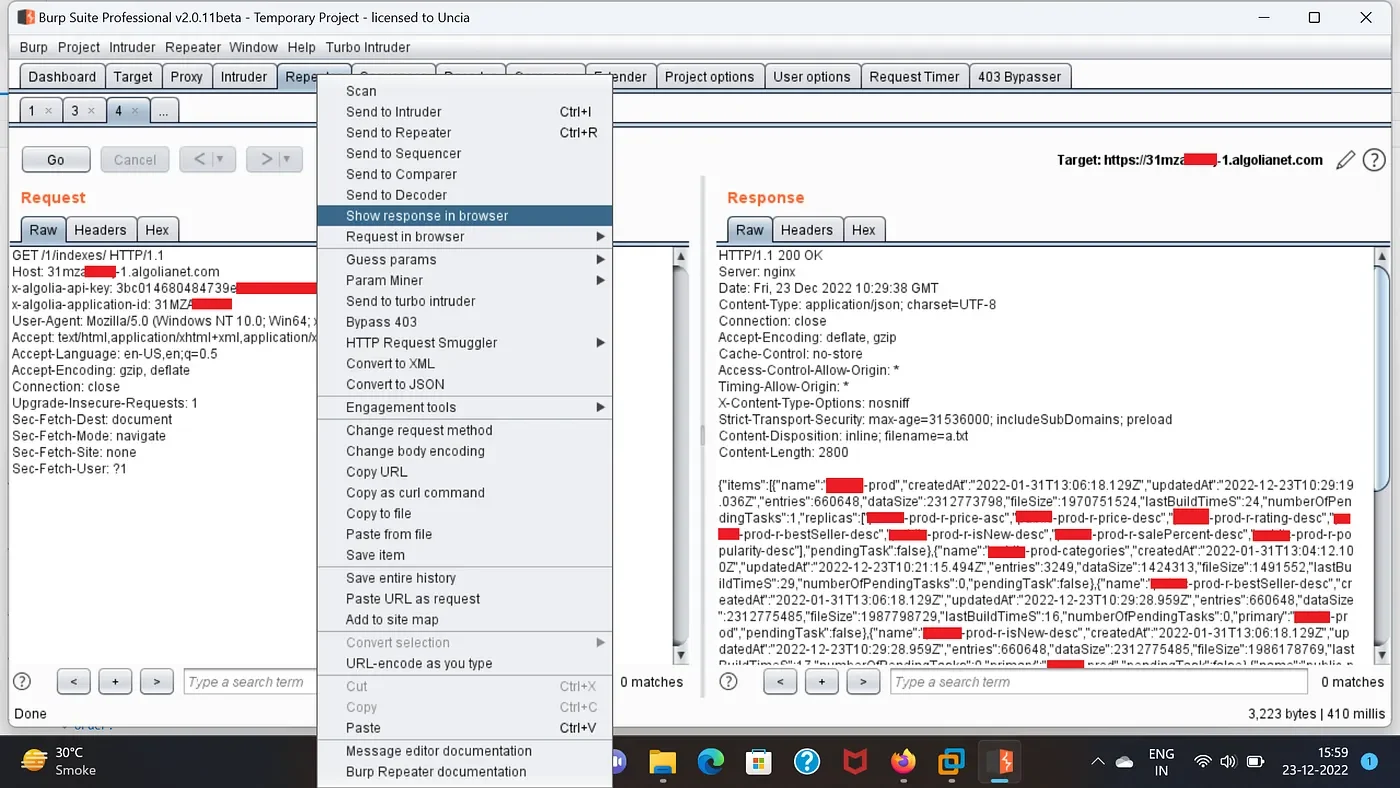
The read request in Burp Suite.
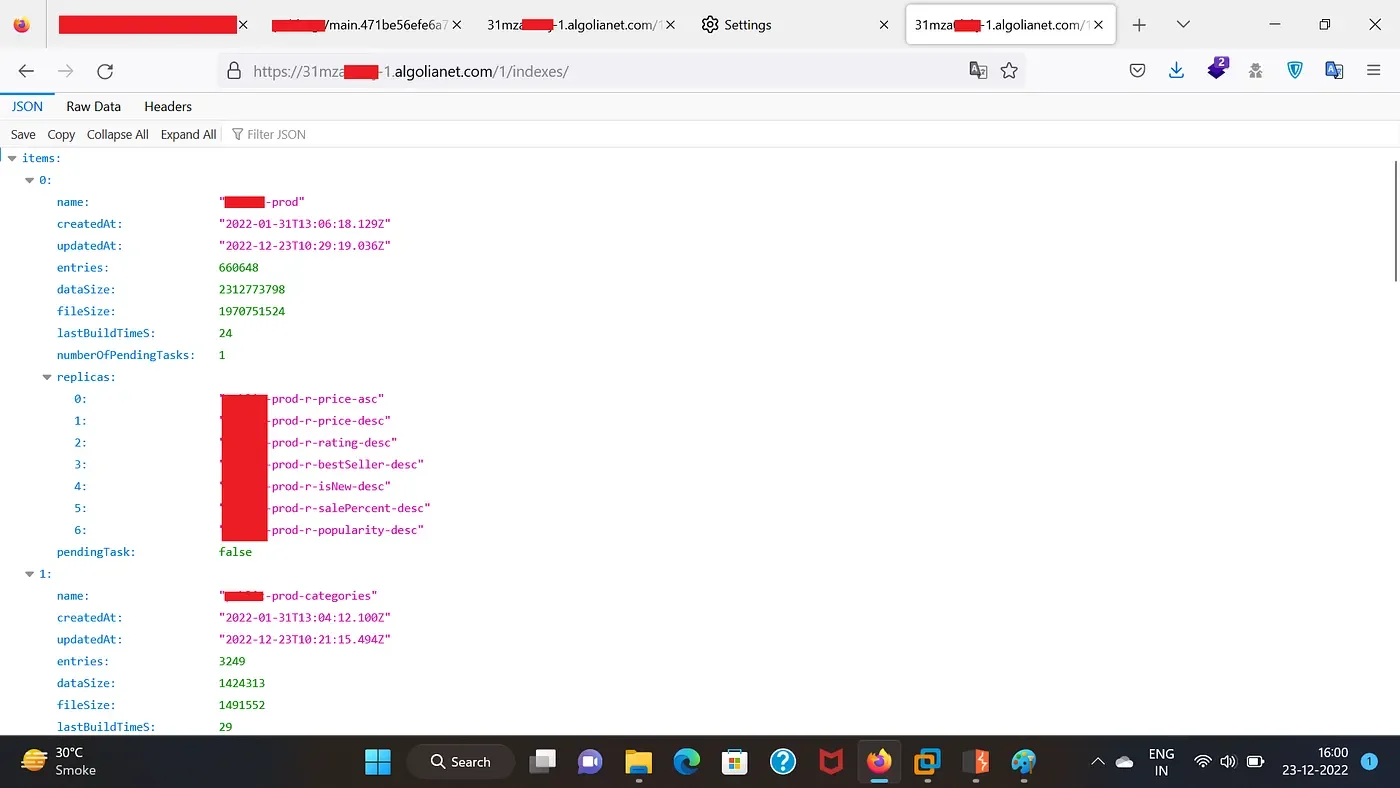
The read operation returning index data.
The report also lists the generic curl forms for each verb against the same endpoint, which is what makes the CRUD coverage explicit:
curl --url https://<application-id>-1.algolianet.com/1/indexes/<example-index>/settings --header ‘content-type: application/json’ --header ‘x-algolia-api-key: <example-key>’ --header ‘x-algolia-application-id: <example-application-id>’
curl -X PUT --url https://<application-id>-1.algolianet.com/1/indexes/<example-index>/settings --header ‘content-type: application/json’ --header ‘x-algolia-api-key: <example-key>’ --header ‘x-algolia-application-id: <example-application-id>’ --data ‘{“highlightPreTag”: “This is hacked”}’
curl -X PATCH --url https://<application-id>-1.algolianet.com/1/indexes/<example-index>/settings --header ‘content-type: application/json’ --header ‘x-algolia-api-key: <example-key>’ --header ‘x-algolia-application-id: <example-application-id>’ --data ‘{“highlightPreTag”: “This is hacked”}’
curl -X DELETE --url https://<application-id>-1.algolianet.com/1/indexes/<example-index>/settings --header ‘content-type: application/json’ --header ‘x-algolia-api-key: <example-key>’ --header ‘x-algolia-application-id: <example-application-id>’ --data ‘{“highlightPreTag”: “This is hacked”}’
PUT replaces the entire settings object, PATCH changes only the fields supplied, and DELETE removes the resource identified by the URL with an empty payload.
A deliberate limit: no DELETE
The report notes that the delete operation was also possible, but after discussing it with the company it was not allowed to be performed. The delete capability is therefore asserted rather than demonstrated.
Root cause
In the researcher's opinion the issue came from three flaws:
- Client-side API storage. The application stored the API key and its data on the client side.
- Improper authorisation. The application did not have a proper authorisation check against the API calls being made.
- Insecure API endpoints. The sensitive API endpoints were accessible to all users.
In other words, the key was stored on the client side and the API accepted write operations with it. The report does not describe the key's configured ACLs, so the exact restriction that was missing is not stated.
Impact
Any user would be able to create, read, update and delete things on the website. An attacker could add their own content to the website and delete the content that was already there. The researcher calculated the severity as:
CVSS:3.0/AV:N/AC:L/PR:N/UI:N/S:U/C:H/I:H/A:H
That is a score of 9.8 (Critical). The impact depends on the key being present in a publicly served JavaScript file and on the key permitting write operations, which is what the steps above show.
Fix
The report lists three things that need to be implemented:
- Implement proper authentication and authorisation mechanisms so that only authorised users can perform CRUD operations.
- Do not store API keys and secrets on the client side.
- Keep the API up to date with the latest security patches and updates to prevent known vulnerabilities and exploits.
Variants to test
- Search-only keys used for writes. Take any Algolia key found in a client bundle and replay the
settingsrequest withPUTorPATCH. A positive result is the write being accepted, as in the update step above. - Index enumeration. With a key that reads, request indexes other than the one named in the bundle. A positive result is data from an index the front end never references.
- Other hosted search and analytics keys. The same pattern applies to any service whose credentials are embedded in JavaScript: check whether the key is scoped to reads only. A positive result is any write, delete or settings change accepted with a key taken from a public asset.
- Application ID and index name leakage. Even where the key is restricted, confirm whether the application ID and index name are exposed, since they are two of the three values needed to exploit the key.
Collaboration on this report was done with Sushil.

What happened, in plain words
A website used a search service called Algolia to power the search box on its pages. Algolia is a hosted search service: instead of building a search engine themselves, a company uploads its content to Algolia and Algolia answers the search queries. The company's website then talks to Algolia over the internet.
To talk to Algolia, the website needs three pieces of information: an API key (a long password-like string that proves who is calling), an application ID (which account at Algolia the call belongs to) and an index name (which collection of content to search). All three were sitting in a JavaScript file that every visitor's browser downloads. Anyone who opened the browser's developer tools could read them.
With those three values, the researcher was able to do more than search. They could create new content, read existing content, change settings and, in principle, delete content. The service accepted these operations because the API did not have a proper authorisation check against the calls being made.
The researcher reported this to a bug bounty program on YesWeHack and was awarded 500 Euros.
The four operations: CRUD
The report starts by explaining CRUD because the whole issue is about these four operations being reachable with a key that should not have been able to reach them. CRUD stands for Create, Read, Update and Delete. These are the four basic things you can do with data stored in a database. Think of a notebook: you can write a new entry (create), look at an entry (read), correct an entry (update) and tear an entry out (delete).
When a website offers an API, it is offering a way for other software to perform these operations. An API (Application Programming Interface) is a set of addresses and rules that a program can use to ask another program to do something. A useful comparison is a restaurant menu: the menu lists what you can order and how to order it, but you never walk into the kitchen yourself. The API is the menu; the database is the kitchen.
The report's own summary of the four operations:
- Create: creates a new record in the database. The API accepts the data as input, usually in JSON, and inserts it as a new record.
- Read: retrieves data from the database. The API accepts a query, such as the ID of a specific record, and returns the data for that record.
- Update: modifies an existing record. The API accepts the data as input, usually in JSON, and updates the corresponding record.
- Delete: deletes a record. The API accepts a query, such as the ID of a specific record, and deletes the corresponding record.
JSON is a way of writing data as text so that programs can read it easily. It looks like a list of labels and values in curly brackets, for example {"name": "example"}. It is the common language that APIs use to send and receive data.
Each operation is sent over the internet using a specific HTTP verb. An HTTP verb is a word at the start of a web request that says what kind of action you want. When you type a website address into your browser, your browser sends a GET request, which means "give me this page". The report lists the verbs like this:
| Operation | HTTP verb |
|---|---|
| Create | POST |
| Read | GET |
| Update | PUT or PATCH |
| Delete | DELETE |
POST means "add something new". GET means "give me something". PUT means "replace this with what I am sending". PATCH means "change only the parts I am sending". DELETE means "remove this".
Finding the credentials
The researcher found a path to a .js file in the source code of the application and then searched that file for the API key. A .js file is a JavaScript file: the code that runs inside your browser to make a web page interactive. Because your browser has to download it to run it, anyone can read it. It is like a recipe card left on the counter: if it is out, anyone can copy it.
All three values needed to exploit the Algolia API were disclosed in that .js file: the Algolia API Key, the Algolia Application ID and the Algolia Index Name.
The screenshot shows the Algolia API key as it appeared in the JavaScript file.
With all three values in hand, the researcher took the exploit from the GitHub Keyhacks project and used it against the API key. Keyhacks is a public collection of ready-made commands for testing whether a leaked key from a well-known service actually works.
The Keyhacks page on GitHub, which is where the curl invocation used in the next step comes from.
Exploitation
Step 1: extract the credentials from the JavaScript file
A path to a .js file was found in the source code, and the file was searched for the API key. The application ID and index name were disclosed in the same file. This is the whole of the discovery phase: no guessing, no brute force, just reading a file that the browser downloads anyway.
Why do this first? Because without the key, the application ID and the index name, you cannot talk to Algolia at all. These three values are the address and the password combined.
Step 2: test the key with curl (update operation)
The researcher used the curl command from Keyhacks to check the basic misconfiguration of the Algolia API key, starting with the update operation. curl is a small program that sends web requests from a terminal window, the same way a browser does, but it shows you the raw request and the raw answer. It is useful because you can see exactly what is being sent.
The curl command as it was run.
The update operation succeeding.
The Keyhacks invocation, as reproduced in the report, is:
curl -X POST --url https://<application-id>-1.algolianet.com/1/indexes/<example-index>/settings --header ‘content-type: application/json’ --header ‘x-algolia-api-key: <example-key>’ --header ‘x-algolia-application-id: <example-application-id>’ --data ‘{“highlightPreTag”: “This is hacked”}’
Line by line, in plain words:
curlis the program being run.-X POSTsays which HTTP verb to use. Here it is POST, the create verb.--url https://<application-id>-1.algolianet.com/1/indexes/<example-index>/settingsis the address being called. The first part,<application-id>-1.algolianet.com, is built from the application ID: Algolia gives each customer a hostname that starts with their ID. The path/1/indexes/<example-index>/settingspoints at the settings of one named index. So this request is aimed at the configuration of a specific collection of content.--header ‘content-type: application/json’tells the server that the body of the request is written in JSON.--header ‘x-algolia-api-key: <example-key>’carries the API key. This is the password-like value taken from the JavaScript file.--header ‘x-algolia-application-id: <example-application-id>’carries the application ID, which tells Algolia which account the key belongs to.--data ‘{“highlightPreTag”: “This is hacked”}’is the body of the request. It sets a setting calledhighlightPreTagto the textThis is hacked. If the write succeeds, that value will appear in the index settings, which is an easy way to prove the change happened.
Why start with an update? Because a search key is supposed to be able to read. If a key can also change settings, it is more powerful than a search box needs, and that is the misconfiguration being tested.
Step 3: replay the request in Burp Suite and inspect the response
Using Burp Suite, the researcher visited the URL shown in the Algolia API key exploit and checked the response. Burp Suite is a tool that sits between your browser and the internet and lets you see and edit every request and response. Think of it as a transparent envelope you can open, read and reseal before it reaches the recipient.
The request in Burp Suite.
The response returned by the API.
Why do this? Because curl gives you the answer in text, but Burp Suite lets you see the request and the response side by side and change one detail at a time. It confirms that the answer is a real success and not an error page that happens to look similar.
Step 4: open the response in the browser
The response was then opened in a browser.
The create operation as seen in the browser.
Why open it in a browser? Because a browser renders the answer in a readable way, and it shows that the same result can be reached without special tools. It also confirms the operation is not limited to one program.
Step 5: read different indexes
The researcher then performed the read operation to read different indexes. An index is a collection of content that Algolia searches through, like a folder of documents. Reading a different index means asking for content that the website's search box never shows to a normal visitor.
The read request in Burp Suite.
The read operation returning index data.
Why read other indexes? Because a key that can read one index may be able to read all of them. If it can, the leak is bigger than the one search box suggests.
The report also lists the generic curl forms for each verb against the same endpoint, which is what makes the CRUD coverage explicit:
curl --url https://<application-id>-1.algolianet.com/1/indexes/<example-index>/settings --header ‘content-type: application/json’ --header ‘x-algolia-api-key: <example-key>’ --header ‘x-algolia-application-id: <example-application-id>’
This is the read form. There is no -X because GET is the default verb for curl, and there is no --data because a read does not send a body. It asks the server to return the settings of the named index.
curl -X PUT --url https://<application-id>-1.algolianet.com/1/indexes/<example-index>/settings --header ‘content-type: application/json’ --header ‘x-algolia-api-key: <example-key>’ --header ‘x-algolia-application-id: <example-application-id>’ --data ‘{“highlightPreTag”: “This is hacked”}’
This is the replace form. PUT replaces the entire settings object with the body you send. If the settings had other values, they would be overwritten by this request.
curl -X PATCH --url https://<application-id>-1.algolianet.com/1/indexes/<example-index>/settings --header ‘content-type: application/json’ --header ‘x-algolia-api-key: <example-key>’ --header ‘x-algolia-application-id: <example-application-id>’ --data ‘{“highlightPreTag”: “This is hacked”}’
This is the partial update form. PATCH changes only the fields you supply and leaves the rest alone. It is the gentler version of PUT.
curl -X DELETE --url https://<application-id>-1.algolianet.com/1/indexes/<example-index>/settings --header ‘content-type: application/json’ --header ‘x-algolia-api-key: <example-key>’ --header ‘x-algolia-application-id: <example-application-id>’ --data ‘{“highlightPreTag”: “This is hacked”}’
This is the delete form. DELETE removes the resource identified by the URL. The report notes that the payload is usually empty for a delete, because the server only needs the address to know what to remove.
A deliberate limit: no DELETE
The report notes that the delete operation was also possible, but after discussing it with the company it was not allowed to be performed. The delete capability is therefore asserted rather than demonstrated. This is a normal courtesy in bug bounty work: you stop before doing something that could destroy real data, and you agree the limit with the company first.
Why this happened
In the researcher's opinion the issue came from three flaws:
- Client-side API storage. The application stored the API key and its data on the client side. "Client side" means inside the browser, on the visitor's computer. Anything on the client side can be read by the visitor.
- Improper authorisation. The application did not have a proper authorisation check against the API calls being made. Authorisation is the check that asks "is this caller allowed to do this?". Without it, the server trusts whoever holds the key.
- Insecure API endpoints. The sensitive API endpoints were accessible to all users. An endpoint is one specific address on the API, like one item on the menu. If every item is open to everyone, the menu is too generous.
In other words, the key was stored on the client side and the API accepted write operations with it. The report does not describe the key's configured permissions, so the exact restriction that was missing is not stated.
Impact
Any user would be able to create, read, update and delete things on the website. An attacker could add their own content to the website and delete the content that was already there. Imagine a noticeboard in a public square where anyone can pin a note, take a note down or change what a note says: that is the situation the website was in.
The researcher calculated the severity as:
CVSS:3.0/AV:N/AC:L/PR:N/UI:N/S:U/C:H/I:H/A:H
CVSS is a standard scoring system for security issues. The string is a list of answers to questions about the issue, and each answer is a short code. AV:N means the attack can be carried out over the network, from anywhere. AC:L means it is easy to carry out. PR:N means the attacker needs no account or privileges. UI:N means no action from a victim is needed. S:U means the impact stays within the affected system. C:H, I:H and A:H mean the attacker can fully read data, fully change data and fully disrupt availability. The score that comes out of this is 9.8, which the report labels Critical.
The impact depends on the key being present in a publicly served JavaScript file and on the key permitting write operations, which is what the steps above show.
Fix
The report lists three things that need to be implemented:
- Implement proper authentication and authorisation mechanisms so that only authorised users can perform CRUD operations. Authentication asks "who are you?"; authorisation asks "what are you allowed to do?". You need both.
- Do not store API keys and secrets on the client side.
- Keep the API up to date with the latest security patches and updates to prevent known vulnerabilities and exploits.
Variants to test
- Search-only keys used for writes. Take any Algolia key found in a client bundle and replay the
settingsrequest withPUTorPATCH. A positive result is the write being accepted, as in the update step above. - Index enumeration. With a key that reads, request indexes other than the one named in the bundle. A positive result is data from an index the front end never references.
- Other hosted search and analytics keys. The same pattern applies to any service whose credentials are embedded in JavaScript: check whether the key is scoped to reads only. A positive result is any write, delete or settings change accepted with a key taken from a public asset.
- Application ID and index name leakage. Even where the key is restricted, confirm whether the application ID and index name are exposed, since they are two of the three values needed to exploit the key.
Collaboration on this report was done with Sushil.
Glossary
- API: a set of addresses and rules that one program uses to ask another program to do something, like a menu in a restaurant.
- API key: a long password-like string that proves which application is making a call.
- Application ID: the identifier of an account at a hosted service, used together with the API key.
- Index: a collection of content that a search service searches through, like a folder of documents.
- Index name: the name that identifies one index.
- CRUD: Create, Read, Update, Delete, the four basic operations on stored data.
- HTTP verb: the word at the start of a web request that says what kind of action is wanted, such as GET, POST, PUT, PATCH or DELETE.
- GET: the verb that asks the server to return something.
- POST: the verb that asks the server to add something new.
- PUT: the verb that asks the server to replace something entirely with what is sent.
- PATCH: the verb that asks the server to change only the parts that are sent.
- DELETE: the verb that asks the server to remove something.
- JSON: a text format for writing data as labels and values, used by APIs to send and receive data.
- Header: an extra line of information attached to a web request or response, such as the content type or a key.
- Body: the part of a request that carries the data being sent, separate from the address and the headers.
- Endpoint: one specific address on an API that performs one specific action.
- Client side: running on the visitor's own computer, inside the browser, where the visitor can read it.
- Server side: running on the company's computer, where the visitor cannot see it.
- JavaScript file (.js): code that the browser downloads and runs to make a page interactive; anyone can read it.
- curl: a small program that sends web requests from a terminal and shows the raw request and response.
- Burp Suite: a tool that sits between the browser and the internet so you can see and edit requests and responses.
- Authentication: the check that asks who you are.
- Authorisation: the check that asks what you are allowed to do.
- Misconfiguration: a setting left in a state that is less safe than it should be, rather than a flaw in the code itself.
- CVSS: a standard scoring system for security issues, expressed as a vector string and a number.
- Bug bounty program: an arrangement where a company pays researchers for reporting security issues to it.
- Keyhacks: a public collection of ready-made commands for testing whether a leaked key from a well-known service actually works.




