API Misconfiguration - No Swag of SwaggerUI
An exposed SwaggerUI endpoint required a bearer token, but the application stored a valid token in local storage that was overly permissive. By reusing that token and changing a service identifier to 1, the reporter could enumerate a user list containing employee details.
 Published on shahjerry33.medium.com
API misconfiguration refers to the improper or insecure setup of an application programming interface (API). This can include issues such as weak authentication, lack of input validation, or improper access controls.
The full write-up lives on its author's site
It belongs to its author, so we link to it rather than copy it. The other two tabs are our own rewrites, checked against it.
Context
This write-up covers an API misconfiguration found on a SwaggerUI endpoint of a web application on a private bug bounty program. Swagger UI is a user-friendly interface for displaying and testing the endpoints of a RESTful API defined using the OpenAPI specification. It lets developers interact with the API and view requests and responses in a simple, intuitive format.
The researcher attributed the vulnerability to two issues: the SwaggerUI endpoint was accessible, and the authorisation token was overly permissive.
Setup
The work was done against a private program, so no hostnames or versions are given. The only tooling described is an intercepting proxy with a Repeater function, plus the browser's developer tools (Inspect, Storage, LocalStorage). No accounts, roles or credentials are described beyond the token that the application itself stored in the browser.
Finding it
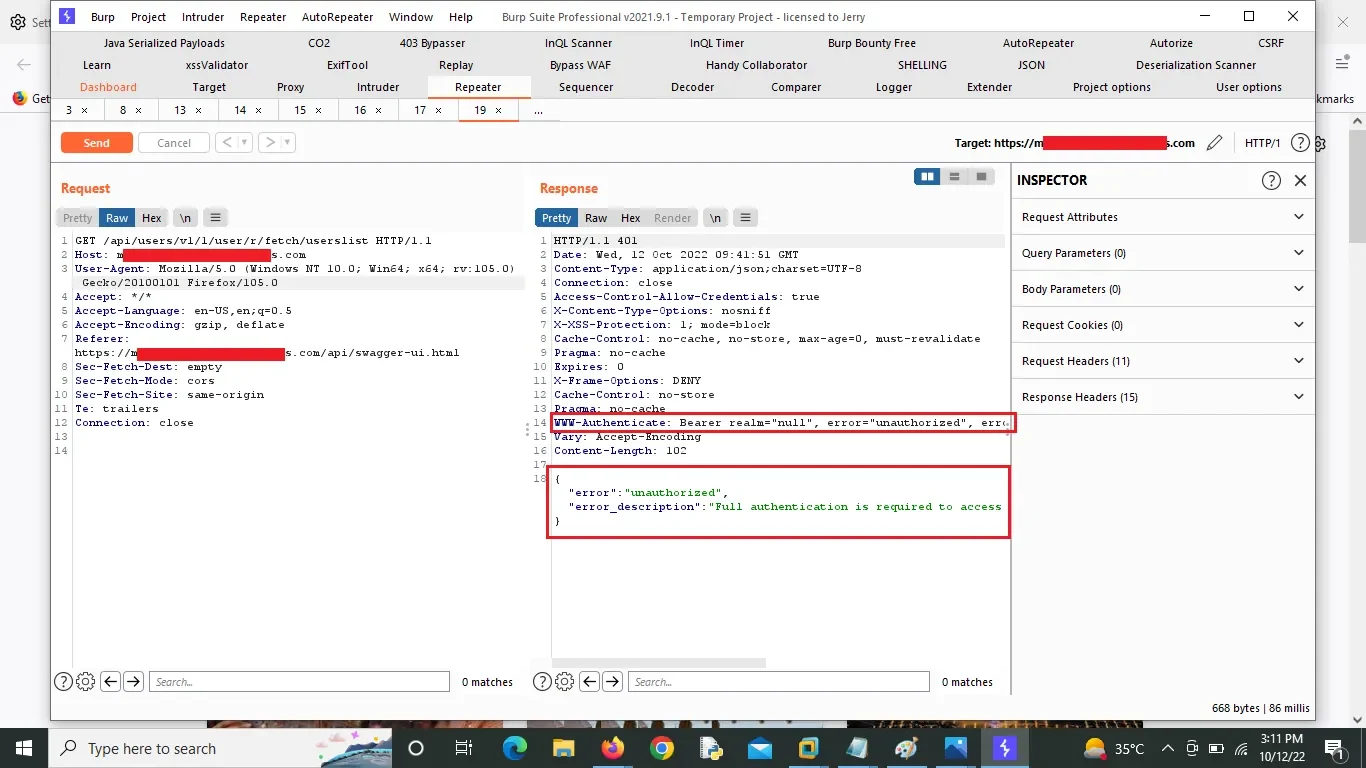
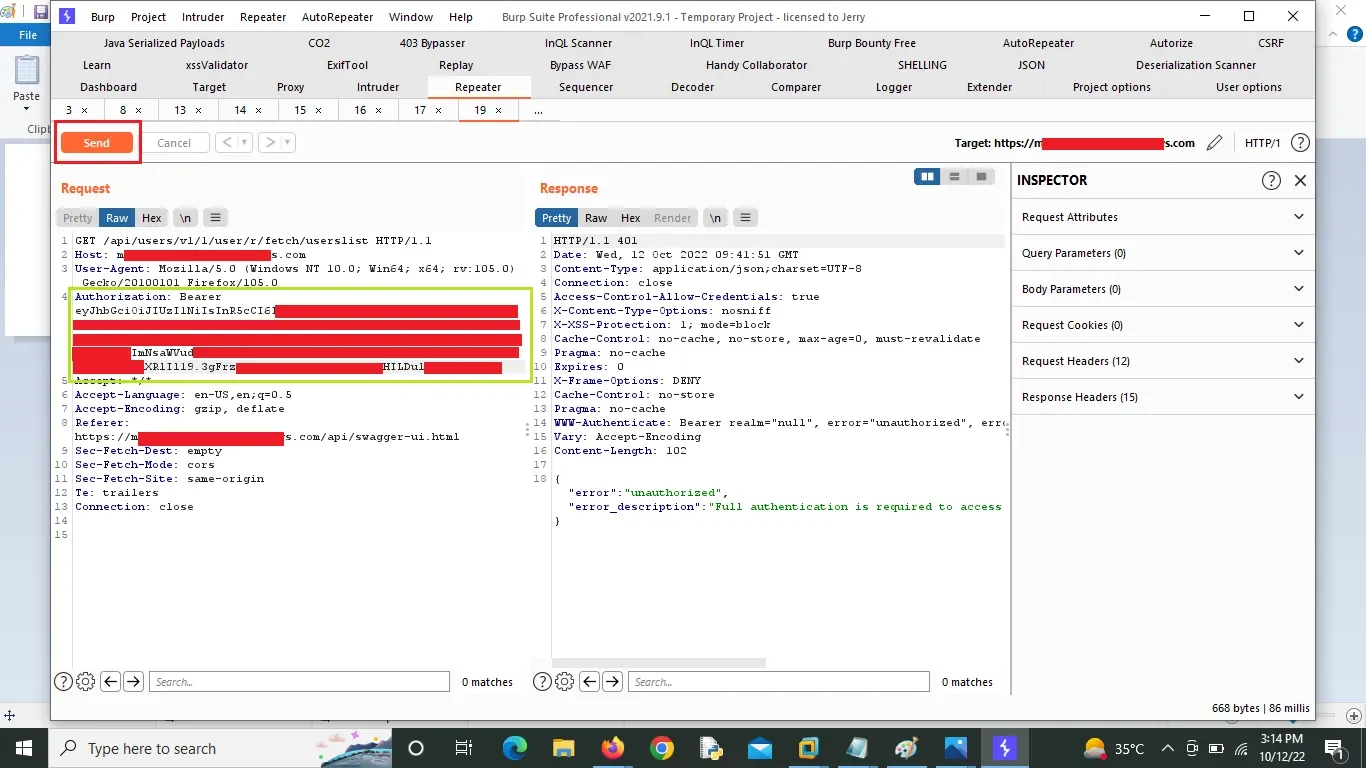
Requesting the SwaggerUI endpoint without credentials returned an error: "Unauthorized, Full authentication is required to access". What caught the researcher's eye was the WWW-Authenticate response header, whose value started with Bearer. That tells the client that an Authorization request header starting with Bearer is expected.
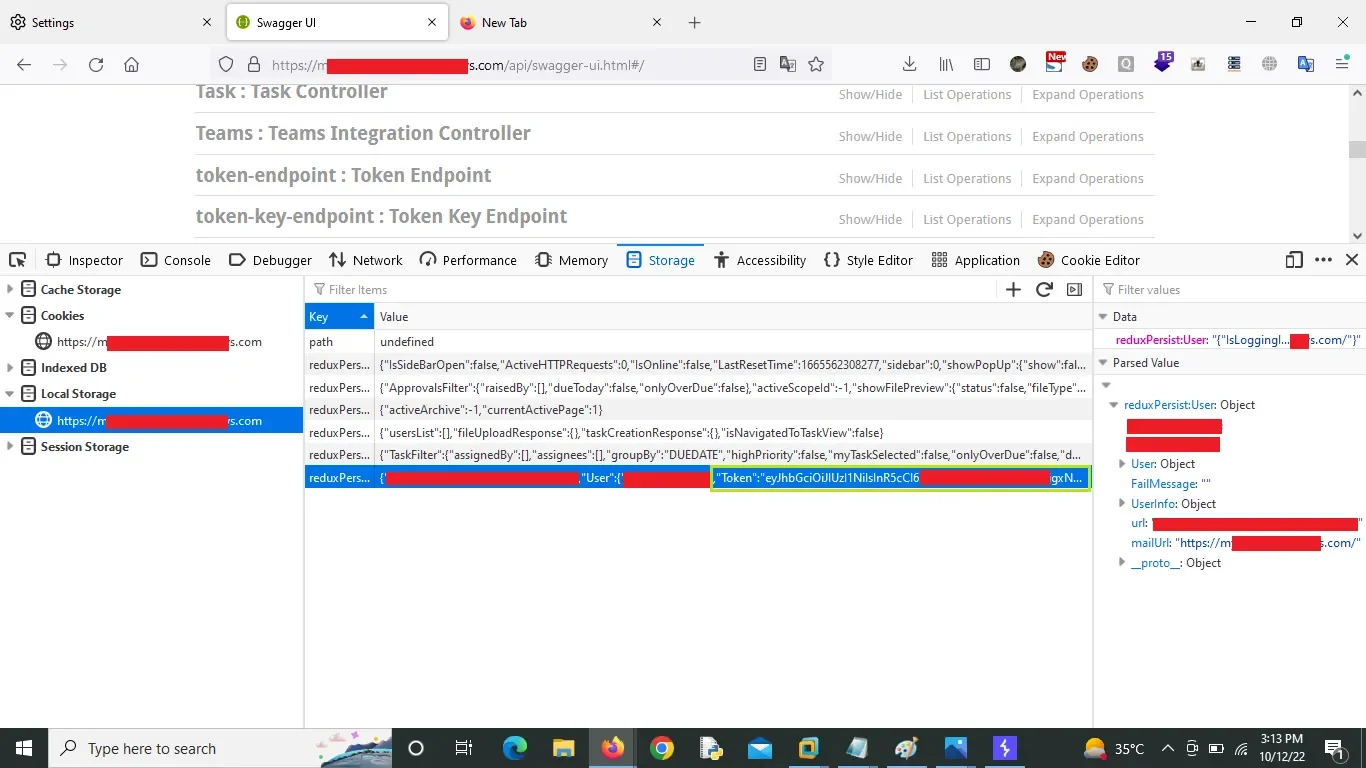
A search through the requests turned up no token, so the researcher looked in cookies, local storage and session storage. An authorisation token was being stored in the application's local storage. Copying that token into the request and changing the {serviceIdentifier} value to 1 allowed enumeration of the user list, which contained employee details: first name, last name, employee ID, email, department name and phone number.
Exploitation
Step 1: Reach the SwaggerUI endpoint
The researcher went to the target SwaggerUI endpoint, intercepted the request, sent it to Repeater and clicked Send.
Step 2: Look for the token in local storage
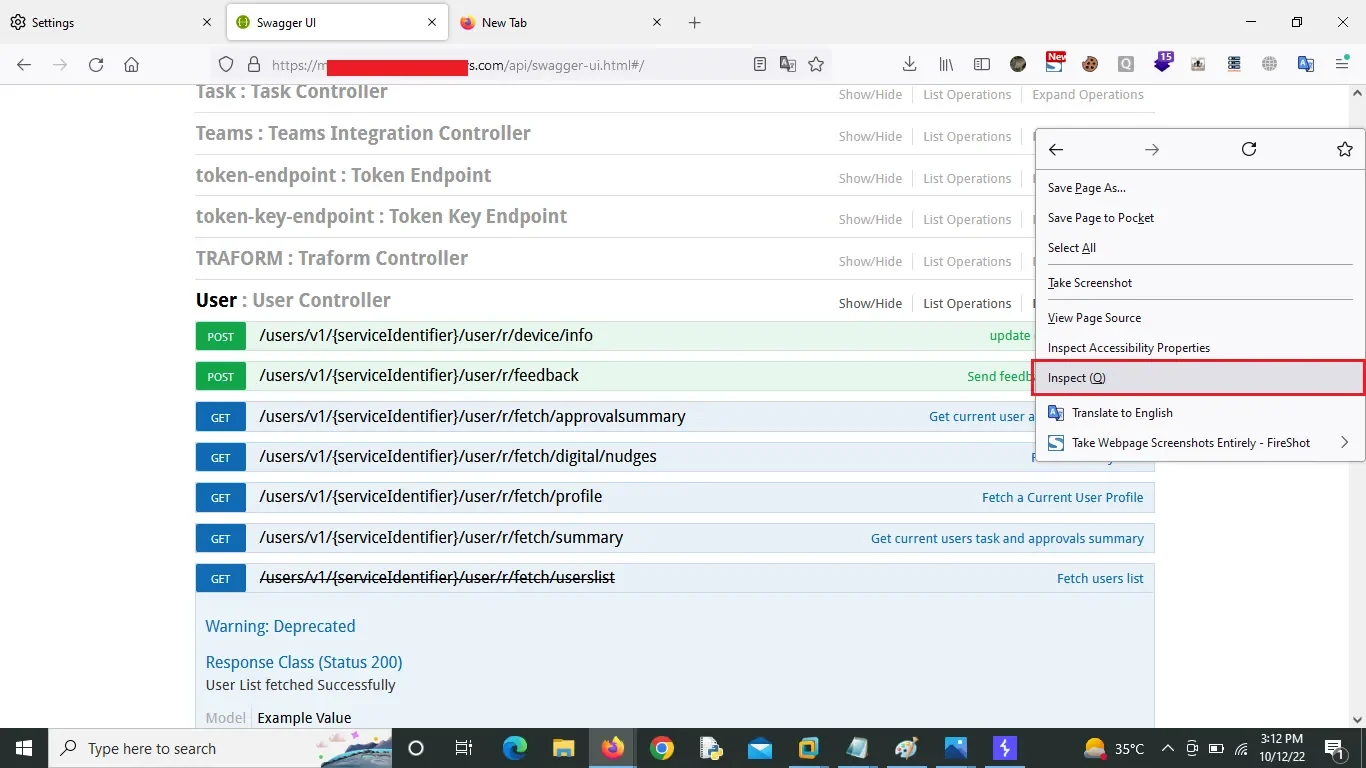
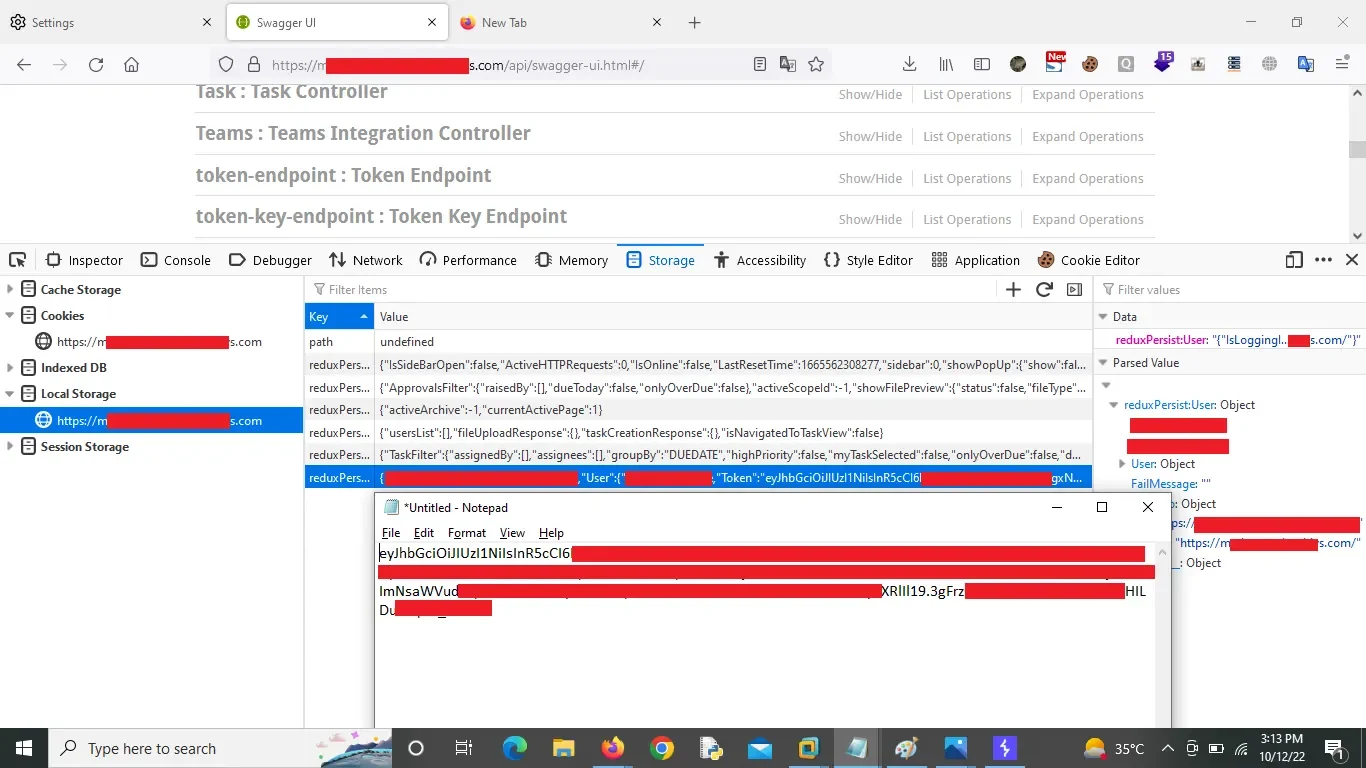
With the page open, the researcher right-clicked, chose Inspect, then Storage, then LocalStorage, and searched for an authorisation token there.
Step 3: Copy the token out
The authorisation token was copied from local storage and pasted into a file so it could be reused in a request.
Step 4: Add the Authorization header
The Authorization header was added to the request, with the starting value Bearer followed by the authorisation token.
Step 5: Send and read the response
Clicking Send returned user details.
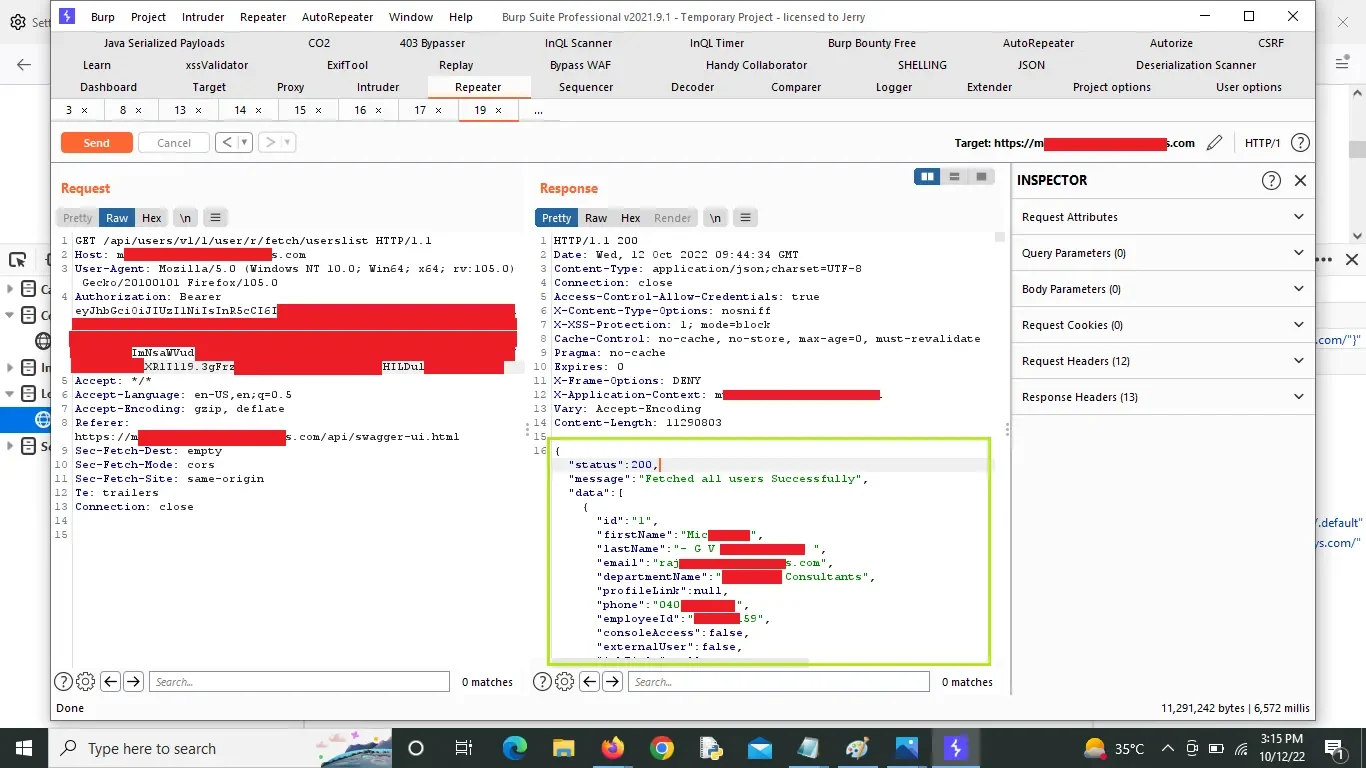
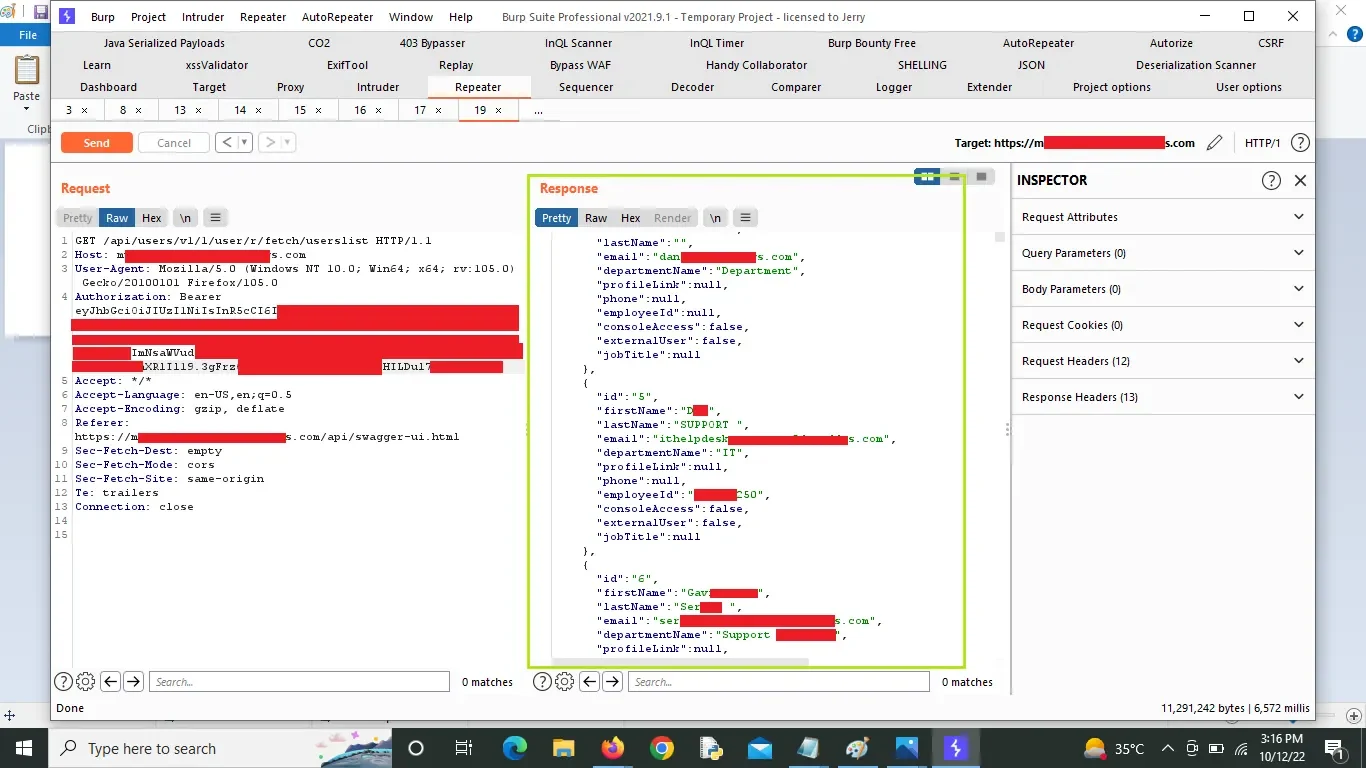
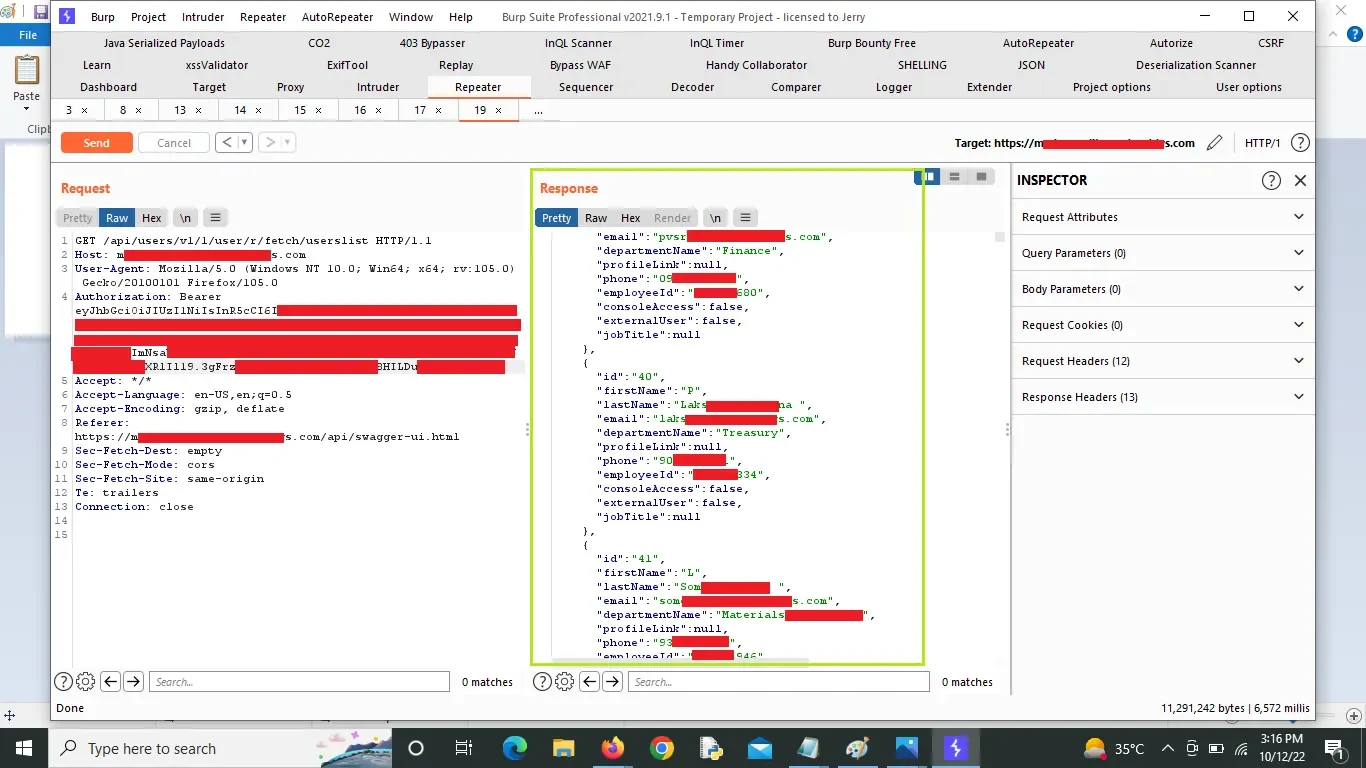
Using the copied token and changing the {serviceIdentifier} to 1 allowed enumeration of the user list with the employee fields listed above.
Root cause
In the researcher's opinion two issues combined to create the vulnerability:
- The SwaggerUI endpoint was accessible.
- The authorisation token was overly permissive.
An authorisation token was found in the application's local storage, and that token was accepted by the API to return user records. The WWW-Authenticate: Bearer response was the hint that a bearer token was the expected credential, and the token sitting in local storage supplied it. The report does not describe the server-side code, so the exact check that failed is not shown;
Impact
Any user could easily access all the user information that they should have been restricted from accessing. The exposed fields were first name, last name, employee ID, email, department name and phone number. The researcher calculated a CVSS 3.0 vector of CVSS:3.0/AV:N/AC:L/PR:N/UI:N/S:C/C:L/I:N/A:L, scoring 7.2 High. The report does not state a bounty amount or the program's final severity rating.
Fix
The report proposes two mitigations:
- Restrict the SwaggerUI endpoint.
- Grant proper permissions to the generated authorisation token.
An application should have two types of authorisation, one for the normal user and another for the admin user, and only the admin user's token should have permission to access the details via the SwaggerUI endpoint.
Variants to test
- Request a SwaggerUI or OpenAPI documentation endpoint without credentials and read the response headers. A positive result is a
WWW-Authenticateheader starting withBearer, which tells you the credential format the API expects. - Inspect local storage, session storage and cookies for bearer tokens after logging in as a low-privileged user. A positive result is a token that the API accepts on endpoints returning data beyond that user's own records.
- Take a low-privileged token and replay it against documented endpoints, varying identifier parameters such as
{serviceIdentifier}. A positive result is a response containing other users' records. - Compare what a normal user token and an admin token can reach through the documentation endpoint. A positive result is no difference in access, which points to missing role checks rather than a documentation exposure alone.
What happened, in plain words
A website had a page that lets developers try out its API, the way a restaurant might leave a menu on the table so you can see what is on offer. That page was reachable, and an authorisation token found in the browser's local storage was powerful enough to read other people's details through it. The researcher found the key sitting in the browser's storage, put it into a request, changed one number in the request, and got back a list of employees with their names, employee IDs, emails, departments and phone numbers.
Before going further, a few words that will come up constantly.
An API (Application Programming Interface) is the part of a website that programs talk to, rather than people. When you click a button on a page, the page often sends a small message behind the scenes to the API saying "give me this data" or "save this change", and the API answers with data. A useful comparison is a restaurant: the dining room is the website you see, the kitchen is the API, and the waiter carries your order to the kitchen and brings the food back. You never walk into the kitchen yourself; you talk to the waiter.
Swagger UI is a ready-made web page that lists an API's endpoints and lets you send test requests to them from the browser. An endpoint is one specific address inside the API that does one specific job, like one particular dish on the menu. Swagger UI is meant to make developers' lives easier: instead of writing code to try a request, they fill in a form on the page and press a button. The catch is that if that page is left open to the world, anyone can see the menu and try the dishes.
A token is a short piece of text that acts like a wristband at an event. You show your ticket once at the entrance, you get a wristband, and after that the staff only look at the wristband, not your ticket. Websites do the same: you log in once, the server gives your browser a token, and the browser sends that token with every later request so the server knows who you are. A bearer token is a token where simply having it is enough, like a coat-check ticket: whoever holds the ticket gets the coat, no questions asked. That is why tokens must be kept secret and must not be too powerful.
Local storage is a small storage box inside your browser that a website can write to and read from. It survives page reloads and even closing the tab, unlike a cookie, which is a smaller note the browser sends to the server automatically with every request. Session storage is similar to local storage but is wiped when the tab closes. All three are places a website might keep a token, which is why the researcher looked in all of them.
API misconfiguration means the API was set up in a careless way: something that should have been locked was left open, or a permission that should have been narrow was left wide. It is not a bug in the code's logic so much as a door left unlocked. The related idea of privilege escalation is when someone with low rights manages to do something only a higher-level user should be able to do, like a visitor using a staff key.
Finally, an intercepting proxy is a tool that sits between your browser and the website and lets you pause a request, look at it, change it and send it on. Repeater is the part of such a tool where you can resend the same request over and over with small edits, which is exactly what you need when you are testing whether one number in a request changes what comes back.
The setup
The work was done on a private bug bounty program, which is a scheme where a company invites independent researchers to look for problems in its systems and report them, usually for a reward. Because the program is private, no hostnames or software versions appear in the report, and none are given here either.
The only tools described are an intercepting proxy with a Repeater function and the browser's own developer tools, reached through Inspect, then Storage, then LocalStorage. No accounts, roles or credentials are described beyond the token that the application itself stored in the browser.
Finding it
Requesting the SwaggerUI endpoint without credentials returned an error: "Unauthorized, Full authentication is required to access". In plain terms, the page said: you are not allowed in, you need to prove who you are.
What caught the researcher's eye was a response header called WWW-Authenticate, whose value started with Bearer. A response header is a small label the server attaches to its answer, alongside the actual data, carrying instructions or information about the answer. WWW-Authenticate is the server's way of saying which kind of proof it will accept. Seeing Bearer there tells the client that an Authorization request header starting with Bearer is expected. An Authorization request header is the line in your request where you present your wristband: the word Bearer, a space, and then the token itself.
A search through the requests turned up no token, so the researcher looked in cookies, local storage and session storage. An authorisation token was being stored in the application's local storage. The server was asking for a token, and an authorisation token was stored in the browser's local storage.
Copying that token into the request and changing the {serviceIdentifier} value to 1 allowed enumeration of the user list. Enumeration means walking through a list of records one by one, or pulling the whole list at once, to see what is there. {serviceIdentifier} is a placeholder in the request that stands for some identifier the API uses to decide which service or group of records you are asking about; the report does not say what the identifier means beyond that. The list that came back contained employee details: first name, last name, employee ID, email, department name and phone number.
Exploitation, step by step
Step 1: Reach the SwaggerUI endpoint
The researcher went to the target SwaggerUI endpoint, intercepted the request, sent it to Repeater and clicked Send.
Why this step: before you can test anything, you need to see the request the browser actually sends. Intercepting pauses it so you can read it, and Repeater gives you a copy you can resend and edit as many times as you like without starting over. The screenshot shows the request and its response side by side in Repeater.
Step 2: Look for the token in local storage
With the page open, the researcher right-clicked, chose Inspect, then Storage, then LocalStorage, and searched for an authorisation token there.
Why this step: the server had said it wanted a bearer token, but the requests did not contain one. If the browser is not sending a token, the next question is whether the site has stored one somewhere it can be picked up. Inspect opens the browser's developer tools, Storage lists the places a site can keep data, and LocalStorage shows the contents of the local storage box. The screenshots show the developer tools open and the local storage entries listed.
Step 3: Copy the token out
The authorisation token was copied from local storage and pasted into a file so it could be reused in a request.
Why this step: a token is just text, and you need it somewhere you can copy from repeatedly. Putting it in a file keeps it to hand while you build the request. The screenshot shows the token value as found in local storage.
Step 4: Add the Authorization header
The Authorization header was added to the request, with the starting value Bearer followed by the authorisation token.
Why this step: the server had already told the researcher the format it wanted, through the WWW-Authenticate: Bearer header. This step simply follows that instruction: the word Bearer, then the token. The screenshot shows the header in place in the request.
Step 5: Send and read the response
Clicking Send returned user details.
Why this step: this is the moment the theory is tested. If the token is accepted and the endpoint returns records, the request worked. The screenshots show the responses containing user details.
Using the copied token and changing the {serviceIdentifier} to 1 allowed enumeration of the user list with the employee fields listed above. In other words, the token got the researcher through the door, and the identifier in the request decided which records came back.
Why it happened
In the researcher's opinion two issues combined to create the vulnerability:
- The SwaggerUI endpoint was accessible.
- The authorisation token was overly permissive.
Think of a building where the staff entrance is propped open and the staff keycard also opens every office. Either problem alone is bad; together they mean anyone who wanders in can read everything.
An authorisation token was found in the browser's local storage, and that token was accepted by the API to return user records. The WWW-Authenticate: Bearer response was the hint that a bearer token was the expected credential, and the token sitting in local storage supplied it. The report does not describe the server-side code, so the exact check that failed is not shown; A role check means the server asks not just "are you logged in?" but "are you allowed to see this particular thing?". A scope is a limit written into a token saying what it may be used for.
Impact
Any user could easily access all the user information that they should have been restricted from accessing. The exposed fields were first name, last name, employee ID, email, department name and phone number. That is personal data about employees.
The researcher calculated a CVSS 3.0 vector of CVSS:3.0/AV:N/AC:L/PR:N/UI:N/S:C/C:L/I:N/A:L, scoring 7.2 High. CVSS is a standard scoring system for vulnerabilities: a vector string is a compact list of characteristics, and the score turns them into a number from 0 to 10.
The fix
The report proposes two mitigations:
- Restrict the SwaggerUI endpoint.
- Grant proper permissions to the generated authorisation token.
An application should have two types of authorisation, one for the normal user and another for the admin user, and only the admin user's token should have permission to access the details via the SwaggerUI endpoint. In the building comparison: close the staff entrance to the public, and make sure the staff keycard only opens the doors that member of staff actually needs.
Things worth trying on your own
- Request a SwaggerUI or OpenAPI documentation endpoint without credentials and read the response headers. A positive result is a
WWW-Authenticateheader starting withBearer, which tells you the credential format the API expects. - Inspect local storage, session storage and cookies for bearer tokens after logging in as a low-privileged user. A positive result is a token that the API accepts on endpoints returning data beyond that user's own records.
- Take a low-privileged token and replay it against documented endpoints, varying identifier parameters such as
{serviceIdentifier}. A positive result is a response containing other users' records. - Compare what a normal user token and an admin token can reach through the documentation endpoint. A positive result is no difference in access, which points to missing role checks rather than a documentation exposure alone.
Glossary
- API: the part of a website that programs talk to, sending requests and receiving data, rather than the pages people click.
- API misconfiguration: an API set up carelessly, for example left reachable when it should be locked, or given permissions that are too wide.
- Endpoint: one specific address inside an API that performs one specific job.
- Swagger UI: a ready-made web page that lists an API's endpoints and lets you send test requests to them from the browser.
- OpenAPI: a written description of what an API offers, which Swagger UI uses to build its page.
- Token: a piece of text a website gives your browser after login, which the browser sends back to prove who you are.
- Bearer token: a token where simply holding it is enough to use it, with no further proof required.
- Authorization header: the line in a request where a token is presented, in the form
Bearerfollowed by the token. - Response header: a small label attached by the server to its answer, carrying information or instructions about the answer.
WWW-Authenticate: a response header in which the server says which kind of proof it will accept.- Cookie: a small note stored by the browser and sent to the server automatically with requests.
- Local storage: a storage box inside the browser that a website can write to and read from, which survives reloads and closing the tab.
- Session storage: like local storage, but emptied when the tab closes.
- Intercepting proxy: a tool that sits between browser and website and lets you pause, read and change requests.
- Repeater: the part of such a tool where you resend a request repeatedly with small edits.
- Enumeration: pulling or walking through a list of records to see what is there.
{serviceIdentifier}: a placeholder in the request that the API uses to decide which service or group of records is being asked about.- Privilege escalation: doing something that only a higher-level user should be able to do.
- Role check: the server asking not only whether you are logged in, but whether you are allowed to see this particular thing.
- Scope: a limit written into a token saying what it may be used for.
- CVSS: a standard scoring system that turns a vulnerability's characteristics into a number from 0 to 10.
- Bug bounty program: a scheme where a company invites independent researchers to look for problems and report them, often for a reward.
- Private program: a bug bounty program that only invited researchers can take part in, so details such as hostnames are not published.


