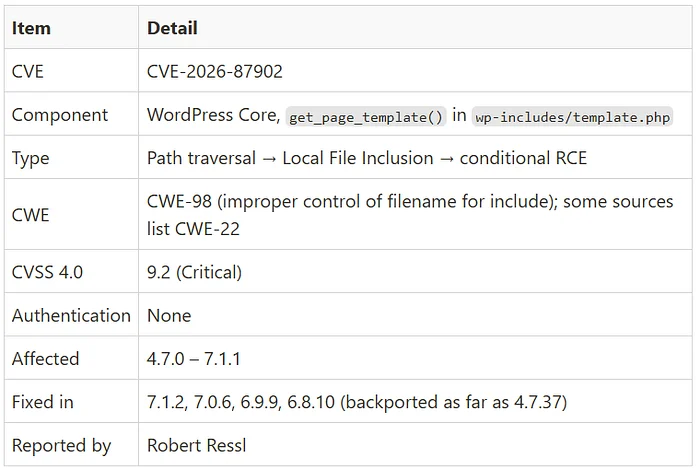
CVE-2026–87902: Unauthenticated LFI (and Conditional RCE) in WordPress Core, Explained Line by Line
WordPress core built a page template filename from the request's pagename value without running it through the path-safety check used for other template candidates, so a percent-encoded traversal sequence survived sanitisation and was decoded later into a real ../. An unauthenticated attacker could make WordPress include a readable .php file outside the theme, and where pearcmd.php and register_argc_argv were present, could write a PHP file to disk and reach code execution.
 Published on medium.com
WordPress
The full write-up lives on its author's site
It belongs to its author, so we link to it rather than copy it. The other two tabs are our own rewrites, checked against it.
Context
WordPress 7.1.2 is a security-only release containing a single fix, and that fix is CVE-2026-87902. Every release from 4.7.0 through 7.1.1 is affected, which is close to a decade of versions. The attacker needs no account and no cookie: one crafted request can make WordPress include another PHP file on the server. Exploitation attempts showed up on the same day the patch shipped.

The feature involved is page template selection. When WordPress renders a page, it has to decide which theme file draws it. get_page_template() does that in two steps:
- It builds a list of candidate filenames, ordered by priority (something like
page-about.php, thenpage.php). - It hands the list to the template loader, which looks for each candidate in the theme directory and
includes the first one that exists.
The important detail is that some of those candidates come from the request. pagename holds the page slug from the URL. So user input ends up inside a file path, which is exactly the situation where validation is mandatory.
Setup
The bug is unauthenticated: no account and no cookie are needed. A valid page_id that resolves to a real page, sent alongside pagename, is a precondition for reaching the vulnerable code. Without it the query returns nothing, WordPress serves a 404, and the template step never runs.
On the server side, exploitation depends on the active theme having a top-level directory whose name starts with page-, and on the target being a readable .php file. The code shown in the write-up is taken from Patchstack's publication of the vulnerable function in WordPress 7.1.1 and earlier.
Finding it
The one-sentence version of the bug:
The template filename built from the request's
pagenamevalue was never run through a path check
This is the relevant part of get_page_template() in WordPress 7.1.1 and earlier:
// wp-includes/template.php, get_page_template(), WordPress <= 7.1.1if ( $template && 0 === validate_file( $template ) ) { $templates[] = $template;}if ( $pagename ) { $pagename_decoded = urldecode( $pagename ); if ( $pagename_decoded !== $pagename ) { $templates[] = "page-{$pagename_decoded}.php"; } $templates[] = "page-{$pagename}.php";}
The first block: a candidate that is validated
if ( $template && 0 === validate_file( $template ) ) { $templates[] = $template;}
$template is the template slug an admin picked for the page. Before it goes into the candidate list it must pass validate_file(), WordPress's path-safety helper. Roughly, it flags things like ../ and returns non-zero for unsafe input, so 0 === validate_file(...) means "safe". WordPress knew this kind of value could be dangerous and guarded it.
The second block: a candidate that is not
if ( $pagename ) { $pagename_decoded = urldecode( $pagename ); if ( $pagename_decoded !== $pagename ) { $templates[] = "page-{$pagename_decoded}.php"; } $templates[] = "page-{$pagename}.php";}
Line by line:
| Code | Meaning |
|---|---|
if ( $pagename ) |
Continue only if the request carries a pagename |
urldecode( $pagename ) |
Turn URL-encoded sequences such as %2f back into real characters (/) |
$pagename_decoded !== $pagename |
True when the value contained encoded characters |
"page-{$pagename_decoded}.php" |
Build a candidate filename from the decoded value and add it to the list |
The validate_file() call that protects $template three lines earlier is missing here. The guard existed; it just was not applied to the branch that needed it.
Exploitation
Step 1: get past the slug sanitizer
WordPress does sanitise slugs before they reach this code. The sanitizer behaves like this:
- Literal dots and slashes are rewritten or cut off, so a plain
../../does not survive. - Escaped octets such as
%2fand%2eare deliberately preserved.
So a payload that is percent-encoded passes sanitisation looking harmless. Later, get_page_template() calls urldecode(), and the encoded characters turn back into a real ../:
- Sanitizer sees an encoded string and lets it through
urldecode()restores the real../- The restored value is used in a file path with no validation
That is a classic decode-after-check bug. It also explains why real attack traffic uses double encoding (%252f and friends): the request pipeline decodes once, and urldecode() decodes a second time, leaving the raw characters at the point of use.
Step 2: satisfy the path constraints
Controlling part of the path is not the same as reading any file. The code always produces a filename of this shape:
page- + (attacker value) + .php
That gives two constraints:
- The
page-prefix. The value has to continue a real directory whose name starts withpage-, so the active theme needs a top-level directory such aspage-templates. Legacy default themes and a number of popular third-party themes have one. Conceptually, the payload continuespage-templates/and then climbs out of the theme directory. - The
.phpsuffix. The extension is appended automatically, so the target must be a readable.phpfile.
Real exploit requests almost always send a valid page_id alongside pagename, as noted above: it is a precondition for reaching the sink.
Step 3: walk the request through the four stages
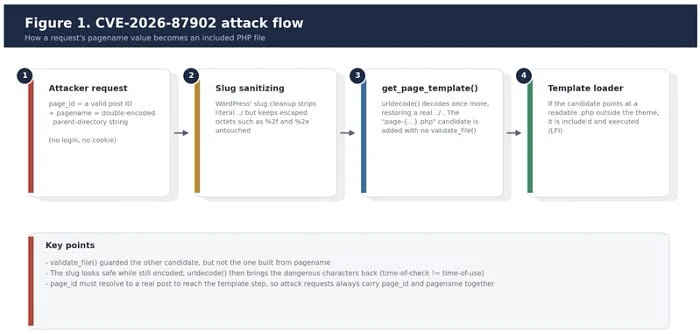
Figure 1 shows the four stages a single request goes through. The coloured strip on each card marks how much attention that stage deserves.
- Attacker request (red). A valid
page_idplus an encodedpagename. No login, no cookie, which is what makes the bug so dangerous. - Slug sanitising (amber). The sanitizer strips literal
../but keeps%2fand%2e. Amber means "looks like a defence, but incomplete". get_page_template()(blue). The vulnerable code above.urldecode()restores a real../, and the resultingpage-...phpcandidate enters the list withoutvalidate_file().- Template loader (green). The loader opens the candidate. If it points at a readable
.phpoutside the theme, that file getsincluded and executed.
The "Key points" box at the bottom repeats the three lessons: validation was missing on exactly one candidate, the check and the use happen at different moments, and page_id must accompany pagename.
Step 4: from LFI to RCE
File inclusion always works. Code execution only works when the server happens to line up. Including a local file runs what that file already does, not code the attacker wrote.
So the attacker needs a file that does something useful just by being included. The well-known candidate is PEAR's pearcmd.php. It handles command-line arguments, and when PHP runs with register_argc_argv enabled, the web request's query string is exposed to the script as $argv and gets treated like command-line arguments. pearcmd includes a file-creation feature, so the result can be a PHP file with attacker-chosen content written to disk.
register_argc_argv is on by default in the official PHP Docker images and in cPanel environments on PHP below 8.5, so calling it an unusual configuration undersells how common it is.
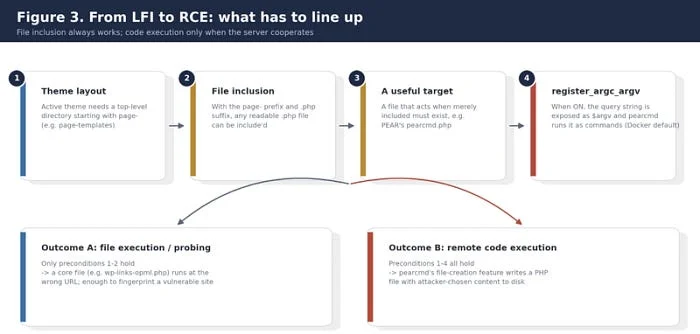
Figure 3 shows four preconditions and two possible outcomes.
- Theme layout (blue). The active theme needs a top-level
page-directory. - File inclusion (amber). With the
page-prefix and.phpsuffix, any readable PHP file can be included. This is the vulnerability itself. - A useful target (amber). A file like
pearcmd.phpmust exist on the server. register_argc_argv(red). Once this is on, the query string becomes command input, and risk jumps.
The bottom row is the result. Outcome A (preconditions 1 and 2 only) means a core file runs at the wrong URL, which is enough for an attacker to fingerprint a vulnerable site. Outcome B (all four) means remote code execution through a file write.
Root cause
The mistake is a missing path check on one candidate. The validate_file() guard that protects $template was not applied to the filename built from $pagename_decoded. The sanitizer that runs earlier preserves percent-encoded octets, and urldecode() in get_page_template() turns them back into traversal characters after the check has already happened. Check and use occur at different moments, so the value that reaches the file path is not the value that was inspected.
Impact
Every release from 4.7.0 through 7.1.1 is affected, and no account or cookie is required. The inclusion itself is limited by the page- prefix and the .php suffix: controlling part of the path is not the same as reading any file. Whether that becomes code execution depends on the server: a page- directory in the active theme, a useful includable file such as pearcmd.php, and register_argc_argv enabled. Without the last two, the result is file inclusion rather than code execution.
Fix
WordPress shipped two changes.
Fix 1: add the missing check
// wp-includes/template.php, WordPress 7.1.2if ( $pagename_decoded !== $pagename && 0 === validate_file( $pagename_decoded ) ) { $templates[] = "page-{$pagename_decoded}.php";}
The only change is && 0 === validate_file( $pagename_decoded ). The decoded value is now validated, so if urldecode() restored a ../, the candidate never enters the list. This closes the exact gap described above.
Fix 2: a containment check for every template path
function _wp_is_template_path_allowed( $path ) { global $wp_stylesheet_path, $wp_template_path; if ( 0 === preg_match( '#(?:^|/)\.\.[. ]*(?:/|$)#', wp_normalize_path( $path ) ) ) { return true; } $real_path = realpath( $path ); }
Step by step:
wp_normalize_path( $path )converts separators so the rest of the function sees a consistent/.- The regular expression
#(?:^|/)\.\.[. ]*(?:/|$)#looks for a..path segment:(?:^|/): at the start of the string or right after a/\.\.: two dots[. ]*: optionally followed by more dots or spaces, which catches sneaky variants(?:/|$): ending at a/or at the end of the string
- If there is no
..segment, the function returnstrueimmediately. Ordinary paths pass here. - If there is one, it resolves
realpath()and requires the result to sit inside an allowed directory. According to Patchstack, those are the stylesheet directory, the template directory, andtheme-compat(the part elided as// ...above).
Fix 1 alone would have closed the reported bug. Adding Fix 2 shows the WordPress security team treating template resolution as a class of problem instead of a single defect: whichever code path produced the path, it must now end up inside an allowed theme directory. That reads as a hedge against similar bypasses elsewhere.
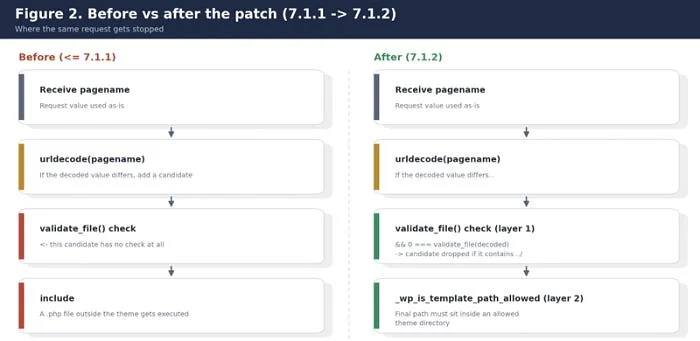
Figure 2 compares the same request before and after the patch.
- Left (before).
pagenameis received, decoded, and included. The red strip on the third card shows that this candidate had no validation at all, so the fourth card ends with a.phpfile outside the theme being executed. - Right (after). The third card is layer 1: the decoded value goes through
validate_file()and a../removes the candidate. The fourth card is layer 2: the final path is checked against the allowed theme directories. Green marks the points where the request is now stopped.
Patched releases exist for every supported branch: 7.1.2, 7.0.6, 6.9.9 and 6.8.10, with backports down to 4.7.37. Older sites can take the fix without a major version jump.
What attackers did next
Things moved fast after the patch. Patchstack's timeline:
| When | What |
|---|---|
| 2026-09-22 | WordPress 7.1.2 released, advisory GHSA-7hp8-65ch-5whp published |
| 2026-09-22 11:49 UTC | First exploitation attempt seen, probing core files (built from the patch diff) |
| 2026-09-22 15:34 UTC | First attempt to write a file to disk via pearcmd |
| 2026-09-23 | Public scanners and a named Nuclei template in circulation; traffic more than 10x the first evening |
Attack traffic falls into three stages:
- Is the inclusion live? Point the include at an ordinary core file such as
wp-links-opml.phpand see if it executes. - Is pearcmd reachable? Check that pearcmd exists and the
$argvtrick works. - Write a file. Drop a PHP file into
/tmpor/var/tmp. Some payloads only write a marker string (building a list of vulnerable hosts); others write a tag that runs a shell command when the file is accessed.
A file in /tmp is not normally reachable over the web, so on its own it is proof of execution rather than a persistent backdoor. But the same write primitive can target more useful locations, so from the attacker's side the host is already compromised.
Detection and mitigation
Gauge your exposure
- Does the active theme have a top-level directory starting with
page-? - Is
register_argc_argvenabled? If it is off, the pearcmd route to RCE is closed and you are left with file inclusion. - Does the server have
pearcmd.phpor other readable PHP entry points that behave usefully when included?
These checks estimate your RCE exposure. They do not tell you whether the core flaw is present; only your version does.
If you cannot update right away
- Reject
pagenamevalues that contain traversal sequences. A real page slug never does, so this is safe for normal traffic. - Disable
register_argc_argv. It does not fix the inclusion, but it breaks the pearcmd chain and turns code execution back into a file-inclusion problem.
Log-hunting indicators
- A
pagenamecontaining%2e%2eor%252e%252e, in the query string or the POST body - A
pagenamebeginning withtemplates%2for anotherpage-directory name pagenameandpage_idtogether on the site root or/index.php- Any request containing
pearcmd,+config-showor+config-create - User agents
cve-2026-87902-poc/1.0andnuclei-cve-2026-87902/1.0(most traffic spoofs browser user agents, so do not rely on this alone) - OPML or RSS content returned from an ordinary page URL means a stage-one probe worked; treat any pre-patch exposure window accordingly and review historical logs
- Unexpected
.phpfiles in/tmpor/var/tmpmean a file-write attempt succeeded, and the host should be treated as compromised
Variants to test
- Double-encoded traversal in
pagename. Send%252e%252eor%252fvariants with a validpage_id. A positive result is apage-candidate resolving outside the theme, visible as a core file such aswp-links-opml.phpexecuting at an ordinary page URL. - Other
page-directory names. Trytemplates%2fand other top-level theme directories beginning withpage-. A positive result is the same out-of-theme inclusion, confirming the prefix constraint is satisfiable on that theme. - pearcmd reachability. Probe for
pearcmdwith+config-showor+config-createin the request. A positive result is pearcmd responding to the query string as command-line arguments, which is the precondition for the file-write path. - File-write confirmation. Look for unexpected
.phpfiles in/tmpor/var/tmpafter a pearcmd attempt. A positive result means the write primitive worked and the host should be treated as compromised. - Stage-one fingerprinting. Point the include at an ordinary core file and check whether OPML or RSS content comes back from an ordinary page URL. A positive result identifies a vulnerable site without needing the RCE preconditions.
What happened, in plain words
WordPress is a free system for building websites. You install it on a web server, pick a design (called a theme), and write pages. It runs on PHP, a programming language that web servers use to build pages on the fly.
On 22 September 2026, WordPress released version 7.1.2. It contained exactly one fix, for a security flaw tracked as CVE-2026-87902. A CVE is a public catalogue number given to a known security problem so people can talk about it unambiguously. Every WordPress version from 4.7.0 through 7.1.1 had the flaw, which is close to a decade of releases.
The flaw let anyone on the internet, with no account and no login, send one specially crafted request that made WordPress include another PHP file on the server. People started trying it on the very day the fix came out.
This article walks through the faulty code, explains in everyday terms why it works, and then looks at what the fix changes. It is written for someone who has never studied security before, so every term is explained where it first appears.
The feature involved is page template selection. When WordPress shows a page, it has to decide which file in the theme draws it. A function called get_page_template() does that in two steps:
- It builds a list of candidate filenames, ordered by priority (something like
page-about.php, thenpage.php). - It hands the list to the template loader, which looks for each candidate in the theme directory and
includes the first one that exists.
include is a PHP instruction that means "read this other file and run it as if its contents were written here". It is how PHP assembles a page out of pieces.
The important detail is that some of those candidates come from the request. pagename holds the page slug from the URL. A slug is the readable part of a web address that identifies a page, for example about in example.com/about. So text typed by a visitor ends up inside a file path, which is exactly the situation where validation is mandatory. Validation means checking that a value is of the expected shape before you trust it, the way a bouncer checks a ticket before letting someone in.
Setup
The bug is unauthenticated: no account and no cookie are needed. A cookie is a small piece of data a website stores in your browser so it can recognise you on the next request; normally it is what proves you are logged in. Here, no cookie is required at all.
A valid page_id that resolves to a real page, sent alongside pagename, is a precondition for reaching the vulnerable code. page_id is the internal number WordPress gives each page. Without it the query returns nothing, WordPress serves a 404 (the "page not found" response), and the template step never runs. Think of it as needing a real house number before the postman will walk up the path.
On the server side, exploitation depends on the active theme having a top-level directory whose name starts with page-, and on the target being a readable .php file. A directory is a folder on the server; a theme is the folder of design files that draws the site. The code shown below is taken from Patchstack's publication of the vulnerable function in WordPress 7.1.1 and earlier. Patchstack is a security company that publishes details of WordPress flaws.
Finding it
The one-sentence version of the bug:
The template filename built from the request's
pagenamevalue was never run through a path check
In other words: WordPress took a piece of text supplied by the visitor, glued it into a filename, and never asked whether that filename pointed somewhere it should not.
This is the relevant part of get_page_template() in WordPress 7.1.1 and earlier:
// wp-includes/template.php, get_page_template(), WordPress <= 7.1.1if ( $template && 0 === validate_file( $template ) ) { $templates[] = $template;}if ( $pagename ) { $pagename_decoded = urldecode( $pagename ); if ( $pagename_decoded !== $pagename ) { $templates[] = "page-{$pagename_decoded}.php"; } $templates[] = "page-{$pagename}.php";}
This is PHP code. A variable is a named box that holds a value; names starting with $ are variables. $templates is a list (PHP calls it an array) that collects candidate filenames. $template is the template slug an administrator picked for the page. $pagename is the slug taken from the request.
The first block: a candidate that is validated
if ( $template && 0 === validate_file( $template ) ) { $templates[] = $template;}
Line by line:
if ( $template && ... )means "only continue if$templatehas a value and the next condition is also true".&&means "and".validate_file( $template )calls WordPress's path-safety helper. A helper is a small routine that does one job. This one inspects a filename and flags dangerous things such as../.0 === validate_file(...)means "the helper returned zero", which is its way of saying "safe".===is a strict comparison: are these exactly equal?$templates[] = $template;adds the value to the end of the candidate list.
So WordPress knew this kind of value could be dangerous and guarded it. The guard is like a metal detector at a door: it exists, and it is switched on, for this entrance.
The second block: a candidate that is not
if ( $pagename ) { $pagename_decoded = urldecode( $pagename ); if ( $pagename_decoded !== $pagename ) { $templates[] = "page-{$pagename_decoded}.php"; } $templates[] = "page-{$pagename}.php";}
Line by line:
| Code | Meaning |
|---|---|
if ( $pagename ) |
Continue only if the request carries a pagename |
urldecode( $pagename ) |
Turn URL-encoded sequences such as %2f back into real characters (/) |
$pagename_decoded !== $pagename |
True when the value contained encoded characters |
"page-{$pagename_decoded}.php" |
Build a candidate filename from the decoded value and add it to the list |
A word on URL encoding. Web addresses cannot contain every character directly, so browsers and servers write some of them as a percent sign followed by two characters. %2f means a forward slash /, and %2e means a dot .. urldecode() is the function that turns those codes back into the real characters. It is like reading a shorthand note and writing it out in full.
The validate_file() call that protects $template three lines earlier is missing here. The guard existed; it just was not applied to the branch that needed it. The metal detector was at one door, and the attacker walked in through the other.
Exploitation
Step 1: get past the slug sanitizer
WordPress does sanitise slugs before they reach this code. Sanitising means cleaning input: removing or rewriting characters that could be misused. The sanitizer behaves like this:
- Literal dots and slashes are rewritten or cut off, so a plain
../../does not survive. - Escaped octets such as
%2fand%2eare deliberately preserved.
An octet here just means one encoded character. So a payload that is percent-encoded passes sanitisation looking harmless. A payload is the piece of data an attacker sends to trigger a bug. Later, get_page_template() calls urldecode(), and the encoded characters turn back into a real ../:
- Sanitizer sees an encoded string and lets it through
urldecode()restores the real../- The restored value is used in a file path with no validation
What does ../ mean? In a file path, two dots mean "go up one folder". So ../ is the way to climb out of the folder you are supposed to be in, like walking out of a room through a door marked "staff only" and ending up in the corridor.
That is a classic decode-after-check bug. The check happens on the encoded text, and the decoding happens afterwards, so the thing that gets used is not the thing that was inspected. It also explains why real attack traffic uses double encoding (%252f and friends): the request pipeline decodes once, and urldecode() decodes a second time, leaving the raw characters at the point of use. %252f is %2f with its percent sign itself encoded, so the first decode produces %2f and the second produces /.
Step 2: satisfy the path constraints
Controlling part of the path is not the same as reading any file. The code always produces a filename of this shape:
page- + (attacker value) + .php
That gives two constraints:
- The
page-prefix. The value has to continue a real directory whose name starts withpage-, so the active theme needs a top-level directory such aspage-templates. Legacy default themes and a number of popular third-party themes have one. Conceptually, the payload continuespage-templates/and then climbs out of the theme directory. A prefix is text stuck on the front; the attacker cannot remove it, only build on it. - The
.phpsuffix. The extension is appended automatically, so the target must be a readable.phpfile. A suffix is text stuck on the end. The attacker cannot choose the file type; it must be PHP.
Real exploit requests almost always send a valid page_id alongside pagename, as noted above: it is a precondition for reaching the sink. The sink is the dangerous line of code where the attacker's data finally gets used.
Step 3: walk the request through the four stages
Figure 1 shows the four stages a single request goes through. The coloured strip on each card marks how much attention that stage deserves.
- Attacker request (red). A valid
page_idplus an encodedpagename. No login, no cookie, which is what makes the bug so dangerous. - Slug sanitising (amber). The sanitizer strips literal
../but keeps%2fand%2e. Amber means "looks like a defence, but incomplete". get_page_template()(blue). The vulnerable code above.urldecode()restores a real../, and the resultingpage-...phpcandidate enters the list withoutvalidate_file().- Template loader (green). The loader opens the candidate. If it points at a readable
.phpoutside the theme, that file getsincluded and executed.
The "Key points" box at the bottom repeats the three lessons: validation was missing on exactly one candidate, the check and the use happen at different moments, and page_id must accompany pagename.
Step 4: from LFI to RCE
Two acronyms to unpack. LFI stands for local file inclusion: making the server load a file that already exists on it. RCE stands for remote code execution: making the server run code the attacker wrote. The first is a way in; the second is the prize.
File inclusion always works. Code execution only works when the server happens to line up. Including a local file runs what that file already does, not code the attacker wrote. It is the difference between replaying a recording and getting the band to play your song.
So the attacker needs a file that does something useful just by being included. The well-known candidate is PEAR's pearcmd.php. PEAR is an older package manager for PHP, a tool for installing libraries; pearcmd.php is one of its files. It handles command-line arguments, and when PHP runs with register_argc_argv enabled, the web request's query string is exposed to the script as $argv and gets treated like command-line arguments. The query string is the part of a URL after the question mark, where parameters are passed. $argv is the list of arguments a command-line program receives. register_argc_argv is a PHP setting that decides whether those arguments are made available.
pearcmd includes a file-creation feature, so the result can be a PHP file with attacker-chosen content written to disk. In plain terms: a tool that was designed to be used from a terminal can be tricked into doing its job through a web address, and one of its jobs is writing files.
register_argc_argv is on by default in the official PHP Docker images and in cPanel environments on PHP below 8.5, so calling it an unusual configuration undersells how common it is. Docker images are prebuilt server packages; cPanel is a popular hosting control panel. Both are widespread.
Figure 3 shows four preconditions and two possible outcomes.
- Theme layout (blue). The active theme needs a top-level
page-directory. - File inclusion (amber). With the
page-prefix and.phpsuffix, any readable PHP file can be included. This is the vulnerability itself. - A useful target (amber). A file like
pearcmd.phpmust exist on the server. register_argc_argv(red). Once this is on, the query string becomes command input, and risk jumps.
The bottom row is the result. Outcome A (preconditions 1 and 2 only) means a core file runs at the wrong URL, which is enough for an attacker to fingerprint a vulnerable site. Fingerprinting means working out what software and version a site runs, so it can be targeted later. Outcome B (all four) means remote code execution through a file write.
Root cause
The mistake is a missing path check on one candidate. The validate_file() guard that protects $template was not applied to the filename built from $pagename_decoded. The sanitizer that runs earlier preserves percent-encoded octets, and urldecode() in get_page_template() turns them back into traversal characters after the check has already happened. Check and use occur at different moments, so the value that reaches the file path is not the value that was inspected.
Security people call this time-of-check to time-of-use, or TOCTOU. A homely comparison: a guard checks your bag at the entrance, you walk through, and someone swaps the bag in the corridor before you reach the counter. The check was real; it just did not cover the object that arrived.
Impact
Every release from 4.7.0 through 7.1.1 is affected, and no account or cookie is required. The inclusion itself is limited by the page- prefix and the .php suffix: controlling part of the path is not the same as reading any file. Whether that becomes code execution depends on the server: a page- directory in the active theme, a useful includable file such as pearcmd.php, and register_argc_argv enabled. Without the last two, the result is file inclusion rather than code execution.
Fix
WordPress shipped two changes.
Fix 1: add the missing check
// wp-includes/template.php, WordPress 7.1.2if ( $pagename_decoded !== $pagename && 0 === validate_file( $pagename_decoded ) ) { $templates[] = "page-{$pagename_decoded}.php";}
The only change is && 0 === validate_file( $pagename_decoded ). The decoded value is now validated, so if urldecode() restored a ../, the candidate never enters the list. This closes the exact gap described above. The metal detector has been moved to the second door.
Fix 2: a containment check for every template path
function _wp_is_template_path_allowed( $path ) { global $wp_stylesheet_path, $wp_template_path; if ( 0 === preg_match( '#(?:^|/)\.\.[. ]*(?:/|$)#', wp_normalize_path( $path ) ) ) { return true; } $real_path = realpath( $path ); }
This is a new function, _wp_is_template_path_allowed, which answers one question: is this path allowed? function is how PHP defines a reusable block of code; $path is the value handed to it. global pulls in variables defined elsewhere in the program, here the paths of the stylesheet and template directories.
Step by step:
wp_normalize_path( $path )converts separators so the rest of the function sees a consistent/. Windows uses backslashes in paths, and normalising means rewriting them so one check works everywhere.- The regular expression
#(?:^|/)\.\.[. ]*(?:/|$)#looks for a..path segment. A regular expression is a pattern language for matching text. Piece by piece:(?:^|/): at the start of the string or right after a/\.\.: two dots[. ]*: optionally followed by more dots or spaces, which catches sneaky variants(?:/|$): ending at a/or at the end of the string
- If there is no
..segment, the function returnstrueimmediately. Ordinary paths pass here. - If there is one, it resolves
realpath()and requires the result to sit inside an allowed directory.realpath()asks the operating system for the true, final location of a path, with every..and shortcut resolved. According to Patchstack, the allowed directories are the stylesheet directory, the template directory, andtheme-compat(the part elided as// ...above).
Fix 1 alone would have closed the reported bug. Adding Fix 2 shows the WordPress security team treating template resolution as a class of problem instead of a single defect: whichever code path produced the path, it must now end up inside an allowed theme directory. That reads as a hedge against similar bypasses elsewhere. A hedge, in this sense, is a precaution taken against problems you have not seen yet.
Figure 2 compares the same request before and after the patch.
- Left (before).
pagenameis received, decoded, and included. The red strip on the third card shows that this candidate had no validation at all, so the fourth card ends with a.phpfile outside the theme being executed. - Right (after). The third card is layer 1: the decoded value goes through
validate_file()and a../removes the candidate. The fourth card is layer 2: the final path is checked against the allowed theme directories. Green marks the points where the request is now stopped.
Patched releases exist for every supported branch: 7.1.2, 7.0.6, 6.9.9 and 6.8.10, with backports down to 4.7.37. A branch is a maintained line of versions; a backport is a fix copied from the newest line into an older one. Older sites can take the fix without a major version jump.
What attackers did next
Things moved fast after the patch. Patchstack's timeline:
| When | What |
|---|---|
| 2026-09-22 | WordPress 7.1.2 released, advisory GHSA-7hp8-65ch-5whp published |
| 2026-09-22 11:49 UTC | First exploitation attempt seen, probing core files (built from the patch diff) |
| 2026-09-22 15:34 UTC | First attempt to write a file to disk via pearcmd |
| 2026-09-23 | Public scanners and a named Nuclei template in circulation; traffic more than 10x the first evening |
An advisory is the public notice describing a flaw. A patch diff is the before-and-after view of the changed code; reading it tells a skilled person exactly what to attack. Nuclei is a tool that runs ready-made checks against many sites at once, and a template is one such check. UTC is a common time standard so people in different countries can compare timestamps.
Attack traffic falls into three stages:
- Is the inclusion live? Point the include at an ordinary core file such as
wp-links-opml.phpand see if it executes. Core files are the ones that ship with WordPress itself. - Is pearcmd reachable? Check that pearcmd exists and the
$argvtrick works. - Write a file. Drop a PHP file into
/tmpor/var/tmp. These are temporary folders on a Linux server.
Some payloads only write a marker string (building a list of vulnerable hosts); others write a tag that runs a shell command when the file is accessed. A marker string is a harmless piece of text used to prove the write worked. A shell command is an instruction to the server's operating system.
A file in /tmp is not normally reachable over the web, so on its own it is proof of execution rather than a persistent backdoor. A backdoor is a way back in that survives after the first attack. But the same write primitive can target more useful locations, so from the attacker's side the host is already compromised. A primitive here means a basic capability that can be reused for different ends.
Detection and mitigation
Gauge your exposure
- Does the active theme have a top-level directory starting with
page-? - Is
register_argc_argvenabled? If it is off, the pearcmd route to RCE is closed and you are left with file inclusion. - Does the server have
pearcmd.phpor other readable PHP entry points that behave usefully when included?
These checks estimate your RCE exposure. They do not tell you whether the core flaw is present; only your version does.
If you cannot update right away
- Reject
pagenamevalues that contain traversal sequences. A real page slug never does, so this is safe for normal traffic. Traversal means using..to climb out of a folder. - Disable
register_argc_argv. It does not fix the inclusion, but it breaks the pearcmd chain and turns code execution back into a file-inclusion problem.
Log-hunting indicators
A log is the record a web server keeps of requests it received. Hunting through it for these patterns shows whether anyone tried:
- A
pagenamecontaining%2e%2eor%252e%252e, in the query string or the POST body - A
pagenamebeginning withtemplates%2for anotherpage-directory name pagenameandpage_idtogether on the site root or/index.php- Any request containing
pearcmd,+config-showor+config-create - User agents
cve-2026-87902-poc/1.0andnuclei-cve-2026-87902/1.0(most traffic spoofs browser user agents, so do not rely on this alone) - OPML or RSS content returned from an ordinary page URL means a stage-one probe worked; treat any pre-patch exposure window accordingly and review historical logs
- Unexpected
.phpfiles in/tmpor/var/tmpmean a file-write attempt succeeded, and the host should be treated as compromised
A user agent is the label a browser or tool sends to say what it is. Spoofing means claiming to be something else. OPML and RSS are formats for lists of articles; seeing them come back from a page that should show ordinary content is a sign the include worked.
Variants to test
- Double-encoded traversal in
pagename. Send%252e%252eor%252fvariants with a validpage_id. A positive result is apage-candidate resolving outside the theme, visible as a core file such aswp-links-opml.phpexecuting at an ordinary page URL. - Other
page-directory names. Trytemplates%2fand other top-level theme directories beginning withpage-. A positive result is the same out-of-theme inclusion, confirming the prefix constraint is satisfiable on that theme. - pearcmd reachability. Probe for
pearcmdwith+config-showor+config-createin the request. A positive result is pearcmd responding to the query string as command-line arguments, which is the precondition for the file-write path. - File-write confirmation. Look for unexpected
.phpfiles in/tmpor/var/tmpafter a pearcmd attempt. A positive result means the write primitive worked and the host should be treated as compromised. - Stage-one fingerprinting. Point the include at an ordinary core file and check whether OPML or RSS content comes back from an ordinary page URL. A positive result identifies a vulnerable site without needing the RCE preconditions.
Glossary
- Advisory: the public notice that describes a security flaw and which versions it affects.
- Backdoor: a way for an attacker to get back into a system after the first break-in.
- Backport: a fix copied from a newer version line into an older one.
- Branch: a maintained line of software versions, such as 7.1.x.
- Cookie: a small piece of data a site stores in your browser to recognise you on later requests, often proving you are logged in.
- Core files: the files that ship with WordPress itself, as opposed to themes or plugins.
- CVE: a public catalogue number given to a known security flaw.
- Directory: a folder on a computer or server.
- Docker image: a prebuilt software package used to run a server or application consistently.
- Double encoding: encoding an already encoded value, so it takes two decoding steps to become readable.
- Fingerprinting: working out what software and version a site runs, so it can be targeted.
- Function: a named, reusable block of code that does one job.
- Global variable: a variable defined outside a function that the function can still read.
- Helper: a small routine that performs one supporting task.
- Include: a PHP instruction that reads another file and runs it as if its contents were written in place.
- LFI (local file inclusion): making a server load a file that already exists on it.
- Log: the record a server keeps of the requests it received.
- Marker string: harmless text written to a file to prove that a write succeeded.
- Nuclei: a tool that runs ready-made security checks against many sites; each check is a template.
- Octet: here, one encoded character such as
%2f. - OPML / RSS: formats for lists of articles or feeds.
- Patch diff: the before-and-after view of changed code.
- Payload: the piece of data an attacker sends to trigger a bug.
- PEAR: an older package manager for PHP;
pearcmd.phpis one of its files. - PHP: the programming language WordPress is written in and that web servers use to build pages.
- Prefix: text stuck on the front of a value.
- Primitive: a basic capability that can be reused for different ends.
- Query string: the part of a URL after the question mark, carrying parameters.
- RCE (remote code execution): making a server run code the attacker wrote.
- Regular expression: a pattern language for matching text.
- Sanitising: cleaning input by removing or rewriting characters that could be misused.
- Shell command: an instruction to the server's operating system.
- Sink: the dangerous line of code where attacker data finally gets used.
- Slug: the readable part of a web address that identifies a page.
- Spoofing: claiming to be something else, such as a tool pretending to be a browser.
- Suffix: text stuck on the end of a value.
- Theme: the folder of design files that draws a WordPress site.
- Time-of-check to time-of-use (TOCTOU): a bug where a value is checked at one moment and used at another, after it has changed.
- Traversal: using
..in a path to climb out of the intended folder. - Unauthenticated: reachable without any account, login or cookie.
- URL encoding: writing characters as a percent sign plus two characters, such as
%2ffor/. - User agent: the label a browser or tool sends to say what it is.
- UTC: a common time standard used to compare timestamps across countries.
- Validation: checking that a value has the expected shape before trusting it.
- Variable: a named box in a program that holds a value.



