Duplicate Registration - The Twinning Twins
The application allowed two accounts to share the same username, and the password reset token was derived from the username, so resetting one account's password also changed the other's. An attacker could register a duplicate username and then reset the victim's password to take over their account.
 Published on shahjerry33.medium.com
I would like to share one of my unique finding about a bug called Duplicate Registrationwhich led to Account Takeover.Using this bug it was possible to takeover any account with the same username.
The full write-up lives on its author's site
It belongs to its author, so we link to it rather than copy it. The other two tabs are our own rewrites, checked against it.
Context
The target is a web application with public user profiles and a self-service registration and login flow. Login accepts either a username or an email address. The password reset flow starts with a choice presented to the user:
Which did you forget : Password or Username
Selecting the password option asks for a username, after which a reset link is sent to the email address on file. Because profiles are public, usernames and email addresses of other users are easy to enumerate. The report does not name the application or the platform it was reported on.
Setup
The researcher used two browsers to keep two sessions separate:
- Browser A: Firefox.
- Browser B: Firefox Private.
Two trial accounts were created, both with the username UserTwo but with different email addresses. The report does not give the email addresses used. No special tools, versions or intercepting proxy are mentioned; the work was done through the normal registration, login and password reset pages.
Finding it
The researcher first tried to register with an email address that was already in use, and that attempt failed. Registering with a username that was already in use, however, succeeded. That is the duplicate registration: the application enforces uniqueness on email but not on username.
At first this looked harmless, because login accepts either identifier and each account still had its own email. The problem appeared when the password reset flow was considered. The reset link is sent to the email address, but the account is selected by username. With two accounts sharing a username, the reset logic has no way to tell them apart.
Exploitation
Step 1: create the first account
An account was created on browser A (Firefox) with the username UserTwo.
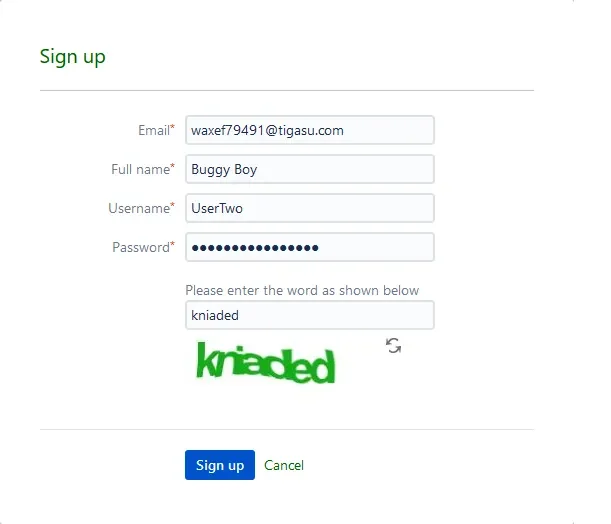
Step 2: create a second account with the same username
A second account was created on browser B (Firefox Private) with the same username UserTwo but a different email address. The registration was accepted.
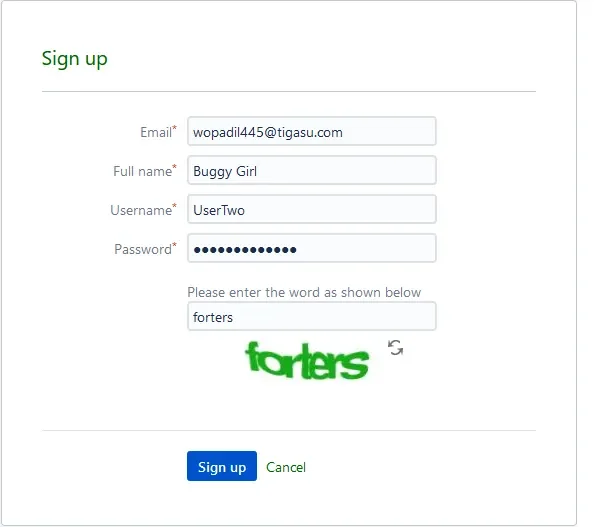
Step 3: log in to the first account
The first account was logged in on browser A.
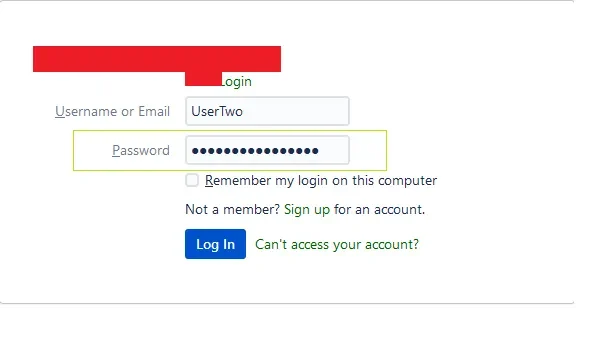
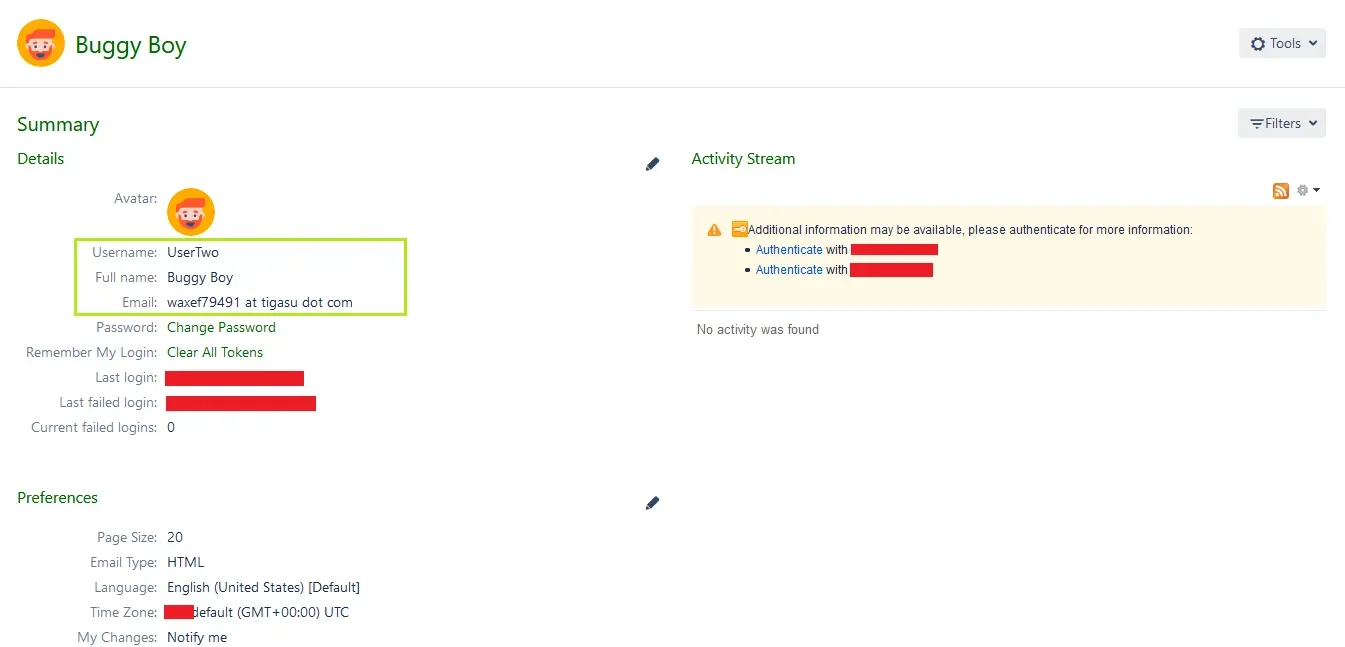
Step 4: log in to the second account
The second account was logged in from browser B (Firefox Private). Both sessions were now active at the same time.
Step 5: reset the password
The researcher logged out and opened the password reset page on browser A.
After resetting the password, both accounts could be accessed using their different email addresses with the same new password. The password change applied to both accounts because both are keyed by the same username.
Root cause
The report explains the mechanism directly: the password reset token was the same for both accounts because the usernames of both accounts were the same. The password reset token was the same for both accounts because the usernames of both accounts were the same.
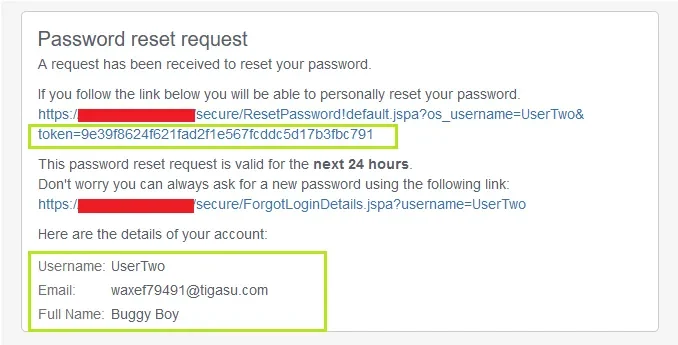
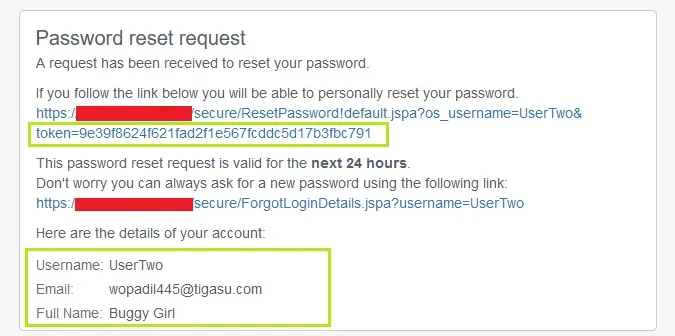
In the screenshots the token and the username are the same for both accounts. The application accepted a second registration with an existing username, so the collision was allowed to exist.
Impact
Anyone can take over the account of any user without their knowledge. The conditions are:
- The victim's username is known. In this application all profiles were public, so usernames and emails of different users were easy to identify.
- The attacker registers a second account with the victim's username and a different email address.
- The attacker runs the password reset flow, receives the link at their own email, and sets a password that now applies to both accounts.
- The attacker logs in using an email address rather than the username. The report notes that an attacker needs to log in with email because same usernames cannot have the same password, but different email addresses can have the same password.
The report does not quantify how many accounts were affected or whether the issue was rewarded.
Fix
The recommendation in the report is that an application should always check for duplicate entries of usernames, emails and phone numbers to avoid this class of flaw. The report recommends checking for duplicate entries of usernames, emails and phone numbers.
Variants to test
- Register with an existing username and a new email. A positive result is a second account created successfully where the first already exists.
- Register with an existing email and a new username. A positive result is acceptance where the first attempt should have been rejected.
- Register with an existing phone number where the application uses phone numbers for login or recovery. A positive result is a second account bound to the same number.
- Request a password reset for two accounts sharing a username and compare the tokens in the links. A positive result is identical tokens, or a token that is a predictable function of the username.
- Change the password on one of the colliding accounts and try the new password on the other. A positive result is that the second account accepts it.
- Try logging in with the username and the new password on both accounts. A positive result is that the new password works on both accounts when logging in with email.
- Check case and whitespace handling on usernames (
Bob,bob,Bob). A positive result is that the application treats them as distinct at registration but as the same during reset or login.
What happened, in plain words
A website let two different people sign up with exactly the same username, as long as they used different email addresses. That sounds like a small annoyance, but it turned into a way to take over someone else's account.
Here is the everyday comparison. Imagine a gym where your membership is looked up by your first name only. Two members are both called Sam. When one Sam asks for a replacement key card, the front desk sends it to the address on file for "Sam", and the system cannot tell which Sam is asking. Now the wrong Sam can walk in. The website in this report works the same way: it looks accounts up by username, and it never checked that usernames were unique.
The researcher found this by accident. They tried to register with an email address that was already taken, and the site refused. Then they tried registering with a username that was already taken, and the site accepted it. That gap is the whole bug. It is called duplicate registration: the application allows more than one account to share an identifier (here, the username) that it later treats as unique.
Once two accounts share a username, the password reset feature becomes dangerous. The reset flow asks for a username, then emails a reset link. Because the username is the only thing used to pick the account, the reset applies to both accounts at once. An attacker can register a second account with a victim's username, reset the password, and end up with a password that works on the victim's account too.
A few terms before we go further:
- Account takeover means someone else gains control of your account, usually by getting your password changed or your session stolen. Here it happens without the victim doing anything.
- Authentication is the process of proving who you are when you log in. Broken authentication means the login or recovery logic has a flaw that lets someone prove they are somebody they are not.
- A session is the state of being logged in. When you log in, the server gives your browser a small piece of data (often a cookie) so it can recognise you on the next page load. Two browsers, or a normal window and a private window, keep separate sessions, which is why the researcher used two.
- A token is a value, usually a long random-looking string, that stands in for something. A password reset token stands in for "this person proved they own the email address". If two accounts get the same token, the server cannot tell them apart.
The target and the features involved
The target is a web application with public user profiles and a normal sign-up and login flow. Two features matter here:
- Registration: the page where you create an account with a username, an email address and a password.
- Login: the page where you sign in. This application accepts either your username or your email address as the identifier.
- Password reset: the "forgot password" flow. It starts with a choice:
Which did you forget : Password or Username
That line is the exact wording shown to the user. If you pick the password option, the site asks for your username, then sends a reset link to the email address on file. The link contains a token, and following it lets you set a new password.
Because all profiles on this application were public, anyone could browse other users' profiles and read their usernames and email addresses. That made it easy to find a target. The report does not name the application or the platform it was reported on.
Setting up the test
The researcher used two browsers so that two logins would not overwrite each other:
- Browser A: Firefox, a normal window.
- Browser B: Firefox Private, a private browsing window.
Private browsing keeps its cookies separate from the normal window, so the two sessions stay independent. Think of it as two different people using two different computers, except it is one person testing both sides.
Two trial accounts were created, both with the username UserTwo but with different email addresses. The report does not give the email addresses used. No special tools, versions or intercepting proxy are mentioned; everything was done through the ordinary registration, login and password reset pages.
Finding it
The first experiment was to register with an email address that was already in use. The site refused. That is the expected behaviour: email addresses are treated as unique.
The second experiment was to register with a username that was already in use. The site accepted it. That is the duplicate registration. The application enforces uniqueness on email but not on username.
At first this looked harmless. Login accepts either identifier, and each account still had its own email address, so each person could still sign in with their own email. The problem only appears when you look at the password reset flow. The reset link is sent to the email address, but the account is selected by username. With two accounts sharing a username, the reset logic has no way to tell them apart.
Exploitation, step by step
Step 1: create the first account
An account was created on browser A (Firefox) with the username UserTwo.
The screenshot shows the first account, labelled "Account 1", after registration. This is the account that will play the role of the victim.
Step 2: create a second account with the same username
A second account was created on browser B (Firefox Private) with the same username UserTwo but a different email address. The registration was accepted.
The screenshot shows the second account, labelled "Account 2". The important detail is that the username is identical to the first account's. The site did not complain. This is the moment the bug is confirmed: the application has two accounts that it will later confuse.
Why use a private window for this? Because the first account is still logged in on browser A. A separate session keeps the two accounts cleanly apart.
Step 3: log in to the first account
The first account was logged in on browser A.
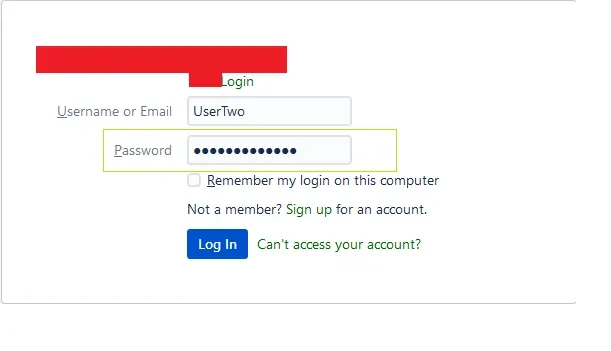
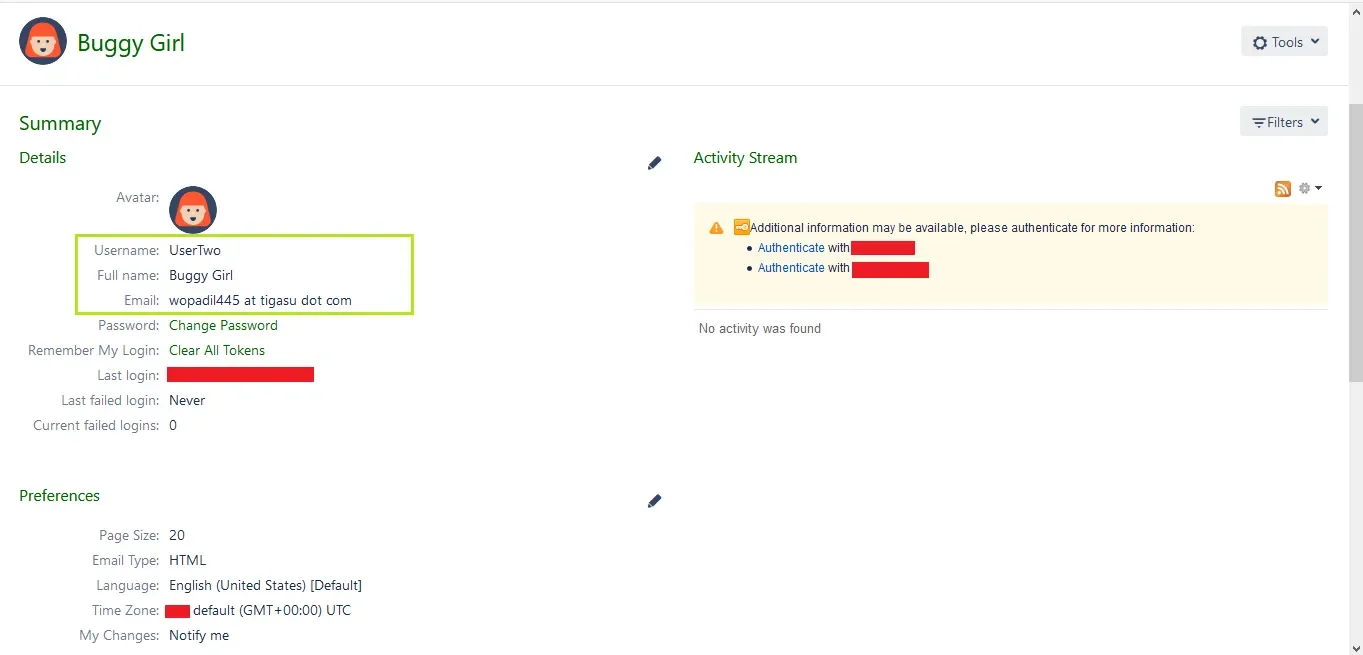
The first screenshot shows the login form being used for Account 1. The second shows the account after login. This step proves the first account works normally on its own.
Step 4: log in to the second account
The second account was logged in from browser B (Firefox Private). Both sessions were now active at the same time.
The first screenshot shows the login for Account 2, the second shows it logged in. Having both sessions open at once is what lets the researcher compare the two accounts side by side later.
Step 5: reset the password
The researcher logged out and opened the password reset page on browser A.
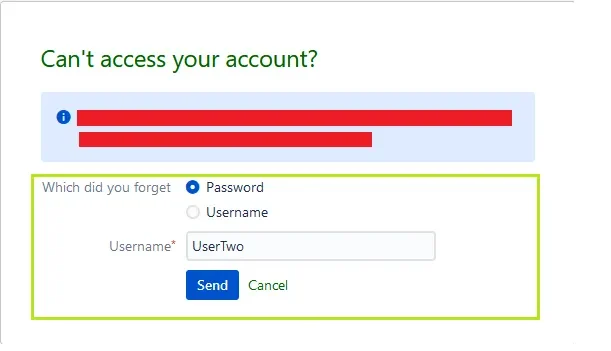
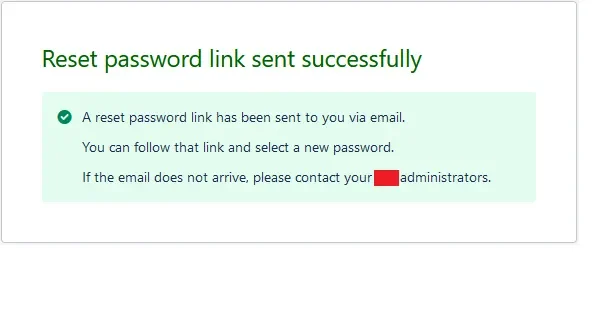
The first screenshot shows the password reset page. The second shows the confirmation that the reset link was sent. The researcher opened the password reset page and requested a reset link.
After resetting the password, both accounts could be accessed using their different email addresses with the same new password. The password change applied to both accounts because both are keyed by the same username.
This is the payoff. The attacker never needed the victim's old password. They only needed the victim's username, which was public, and their own email address to receive the reset link.
Why it happened
The report explains the mechanism directly: the password reset token was the same for both accounts because the usernames of both accounts were the same. The password reset token was the same for both accounts because the usernames of both accounts were the same.
In the screenshots the token and the username are the same for both accounts. The first screenshot shows the reset link for Account 1, the second the link for Account 2; the token and the username are the same in both.
Think of the token as a claim ticket at a cloakroom. If the cloakroom hands out the same ticket number to two different coats, whoever holds that number can collect either coat. Here the ticket number is built from the username, so both accounts get the same ticket.
The application accepted a second registration with an existing username, so the collision was allowed to exist.
Impact
Anyone can take over the account of any user without their knowledge. The conditions are:
- The victim's username is known. In this application all profiles were public, so usernames and emails of different users were easy to identify.
- The attacker registers a second account with the victim's username and a different email address.
- The attacker runs the password reset flow, receives the link at their own email, and sets a password that now applies to both accounts.
- The attacker logs in using an email address rather than the username. The report notes that an attacker needs to log in with email because same usernames cannot have the same password, but different email addresses can have the same password.
That last point deserves a plain explanation. If two accounts share a username and also share a password, the login form cannot tell which one you mean when you type the username. But if you type an email address, the form has a unique identifier to work with. So the attacker logs in with their own email address and the new password, and the server lets them in. The victim's account now has the same password, so the attacker can use it there too.
The report does not quantify how many accounts were affected or whether the issue was rewarded.
Fix
The recommendation in the report is that an application should always check for duplicate entries of usernames, emails and phone numbers to avoid this class of flaw. The report recommends checking for duplicate entries of usernames, emails and phone numbers.
In everyday terms: the cloakroom should give every coat its own ticket number, and the front desk should refuse to write the same name on two memberships.
Variants to test
If you want to look for this kind of bug yourself, these are the checks the report's reasoning suggests. Each one is a small experiment you can do in a browser.
- Register with an existing username and a new email. A positive result is a second account created successfully where the first already exists.
- Register with an existing email and a new username. A positive result is acceptance where the first attempt should have been rejected.
- Register with an existing phone number where the application uses phone numbers for login or recovery. A positive result is a second account bound to the same number.
- Request a password reset for two accounts sharing a username and compare the tokens in the links. A positive result is identical tokens, or a token that is a predictable function of the username.
- Change the password on one of the colliding accounts and try the new password on the other. A positive result is that the second account accepts it.
- Try logging in with the username and the new password on both accounts. A positive result is that the new password works on both accounts when logging in with email.
- Check case and whitespace handling on usernames (
Bob,bob,Bob). A positive result is that the application treats them as distinct at registration but as the same during reset or login.

The final screenshot accompanies the mitigation section, closing the report with the recommendation to check for duplicate entries.
Glossary
- Account takeover: a situation where someone other than the owner gains control of an account, for example by changing its password.
- Authentication: the process of proving who you are when you log in.
- Broken authentication: a flaw in login, registration or account recovery logic that lets someone prove they are somebody they are not.
- Cookie: a small piece of data a website stores in your browser so it can recognise you between page loads.
- Duplicate registration: allowing more than one account to be created with the same identifier, such as a username, email address or phone number.
- Email address: the address a reset link is sent to; in this application it was treated as unique.
- Hash: a fixed-length value computed from some input, often used to represent data without storing it directly.
- Identifier: the piece of information used to look up an account, such as a username or an email address.
- Password reset: the "forgot password" feature that emails a link allowing you to set a new password.
- Private browsing: a browser mode that keeps its cookies and history separate from the normal window, useful for keeping two sessions apart.
- Public profile: a profile page visible to anyone, including people who are not logged in.
- Registration: the process of creating a new account.
- Session: the state of being logged in, maintained by the server using a cookie or similar value.
- Token: a value, often a long string, that stands in for proof of something, such as ownership of an email address during a password reset.
- Username: the name you choose for your account; in this application it was not enforced as unique.
- Vulnerability: a weakness in an application that can be used to make it behave in a way its owners did not intend.





