From Phone Server to Domain Controller in 32 Minutes: Lessons From the Mitel MiCollab Zero-Days
Five unauthenticated flaws in Mitel MiCollab's conferencing component, including a blind command injection rated CVSS 10.0, were exploited as zero-days before a patch. An attacker could bypass authentication, upload files, run commands, gain root, recover LDAP credentials and reach a domain controller.
 Published on medium.com
On 16 November 2026, Mitel published advisory MISA-2026-0012, fixing five flaws in the Audio, Web and Video Conferencing (AWV) component of MiCollab 10.3 (10.3.0.18) and earlier. All five can be exploited without logging in.
The full write-up lives on its author's site
It belongs to its author, so we link to it rather than copy it. The other two tabs are our own rewrites, checked against it.
Context: an internet-facing collaboration server that knows your directory
MiCollab is Mitel's collaboration product: it handles calls, messages and meetings. The flaws discussed here sit in the Audio, Web and Video Conferencing (AWV) component of MiCollab 10.3 ([redacted]) and earlier. Because the product has to be reachable for people to join calls and meetings, it is often exposed to the internet, and it is connected to Active Directory so that users can sign in with their usual accounts. That combination, an outside entry point plus credentials that work inside, is what makes the server interesting to an attacker.
On 16 November 2026, Mitel published advisory MISA-2026-0012, fixing five flaws in AWV. All five can be exploited without logging in. The most severe, CVE-2026-133323, is a blind command injection rated CVSS 10.0. Mitel's advisory does not mention attacks.
Accenture's APEX Labs then reported that these flaws had been used before the patch existed: it found web-shell activity at one victim before 23:00 UTC on 15 November. CISA added all five CVEs to its Known Exploited Vulnerabilities (KEV) catalogue on 25 November.
Setup: versions, preconditions and sources
The affected range is MiCollab 10.3 ([redacted]) and earlier, with the flaws in the AWV component. No account is needed: every one of the five can be exploited without logging in, which is the precondition that matters most for an internet-facing deployment. The intrusion timeline below comes from Accenture APEX Labs, the CVE list from Mitel's advisory, and the exploitation status from CISA's KEV catalogue.
The five CVEs are:
| CVE | Type | CVSS |
|---|---|---|
CVE-2026-133323 |
blind command injection | 10.0 |
CVE-2026-133303 |
XML injection using pre-staged content | 9.0 |
CVE-2026-133311 |
unauthorized access to sensitive information | 5.9 |
CVE-2026-133275 |
arbitrary file upload | 5.3 |
CVE-2026-133324 |
authentication bypass | 5.3 |
Finding it: what the defenders saw
There was no bug bounty submission or researcher-led test here. The discovery came from incident analysis: Accenture's APEX Labs reconstructed one intrusion from the attacker's first request and timed each stage. The first sign it reports is web-shell activity at one victim before 23:00 UTC on 15 November, a day before Mitel's advisory and patch appeared. That ordering is what makes these zero-days in practice: the flaws were exploited while no fix was public.
Exploitation: one intrusion, minute by minute
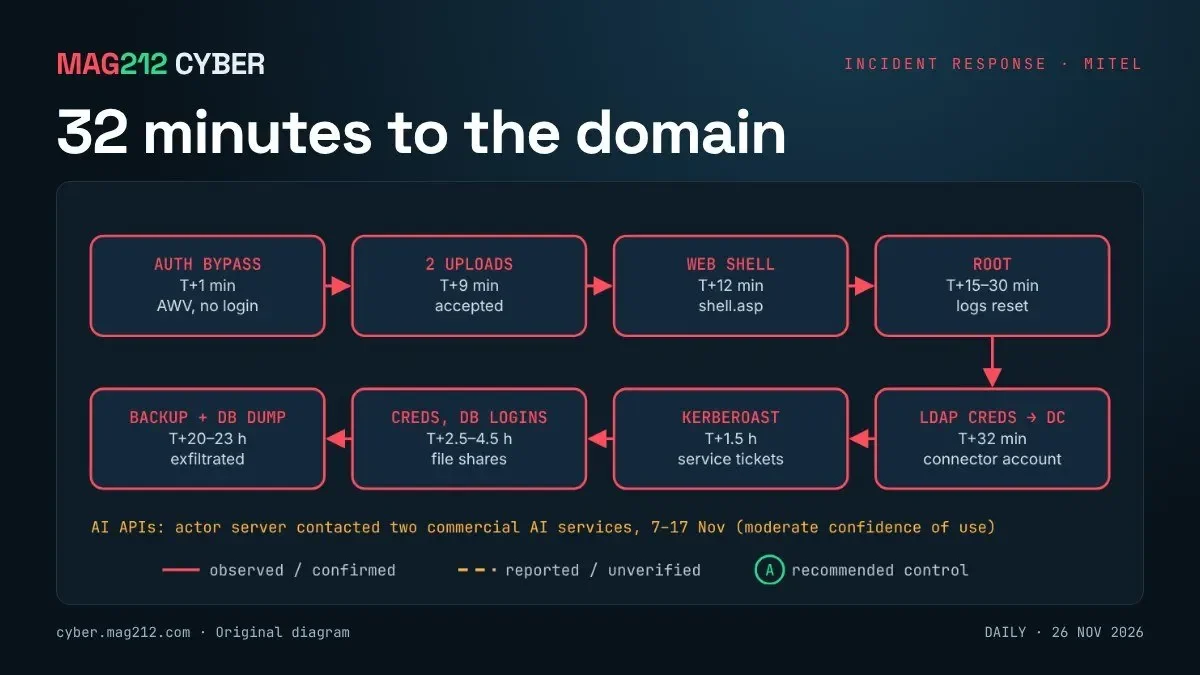
Accenture timed the intrusion from the attacker's first request. The stages, as reported:
Step 1: authentication bypass (1 minute)
An unauthenticated request bypassed AWV authentication. This is the entry point that makes everything else possible without credentials.
Step 2: file uploads (9 minutes)
Two file uploads were accepted. Two file uploads were accepted. The report does not tie each stage to a specific CVE.
Step 3: first web-shell command (12 minutes)
The first web-shell command ran, as the web service account. At this point the attacker has code execution, but only with the privileges of the web server.
Step 4: privilege escalation to root (15 to 30 minutes)
The attacker became root. System logs were reset as a side effect of this stage.
Step 5: directory credentials and a domain controller (32 minutes)
The attacker recovered the LDAP connector's directory credentials and connected to a domain controller. This is the pivot from a compromised appliance to Active Directory, and it is the reason the title counts minutes rather than days.
Step 6: covering the web-shell tracks (36 minutes)
Web-shell requests were filtered out of the server's logs.
Step 7: Kerberoasting (1.5 hours)
A Kerberoasting script ran, to crack service-account passwords offline. Kerberoasting requests service tickets for accounts with service principal names and attacks the ticket material offline, so it leaves little on the wire beyond the ticket requests themselves.
Step 8: credential harvesting from file shares (2.5 to 4.5 hours)
Database credentials and plaintext credential files were taken from file shares.
Step 9: lateral movement and database dumps (20 to 23 hours)
The attacker moved to a backup server and a database server and dumped databases.
Accenture also reports that the attacker's server talked to two unnamed commercial AI services between 7 and 17 November, and that this traffic restarted in the same second the bypass request was sent. Accenture has moderate confidence that the attacker used these services. It has not linked the activity to a named group, and assesses it as likely data-theft extortion. Whether a person or an AI agent typed the commands, the speed is the point: detection and response have to work in minutes, not days.
Root cause
The report does not include source code or a patch diff, so the root cause can only be described at the level the advisory supports. Five separate flaws in the AWV component, all reachable without authentication, were exploited in one intrusion: an authentication bypass, file uploads, a web shell and a command injection rated 10.0. From there the appliance's own design did the rest: it holds an LDAP connector account with directory credentials, so root on the box yields a path into Active Directory. The entry points required no login, and web-shell requests were filtered out of the server's logs at 36 minutes, so the server's own logs could not be trusted for detection.
Impact
The impact went beyond the appliance: the attacker recovered directory credentials and connected to a domain controller. Under the conditions seen here, an attacker who reaches AWV without credentials can obtain code execution as the web service account, escalate to root, recover the LDAP connector's directory credentials, and connect to a domain controller. From there the reported activity includes Kerberoasting against service accounts, theft of database credentials and plaintext credential files from file shares, and database dumps after moving to a backup server and a database server. Accenture assesses the activity as likely data-theft extortion, with moderate confidence on the AI-service usage and no attribution to a named group.
Fix
Mitel published advisory MISA-2026-0012 on 16 November 2026, fixing five flaws in AWV. The remediation steps given are:
- Apply Mitel's KB000129195 on [redacted], upgrading first if you are on an older release, or move to a later release. Servers also missing older MiCollab fixes need those too.
- Contain before you patch: block external access to the AWV component, including any path published through a MiVoice Border Gateway, and take a forensic image of MiCollab and gateway servers before patching or rebuilding.
- Hunt using the indicators below, and if you find signs, treat it as an Active Directory incident: reset the LDAP connector account and any Kerberoastable service accounts, rotate admin, SIP trunk and file-share credentials the server could reach, and review domain controller logons and access to backup and database servers.
You are done when MiCollab runs a fixed release and AWV is not reachable from the internet, no unknown files, accounts or outbound connections remain, the connector and service accounts have new passwords, and identity tools show no unexplained domain controller activity.
Indicators to hunt for
Accenture's report lists what to look for:
- New files under
/pictures/, such asshell.asporshell.jsp - POST requests to
/awcuser/cgi-bin/followed by new files in picture folders - Scripts and archives in
/tmp, such asroast*.py,testcreds.pyand.tgzfiles - HTTP PUT requests to
/bkup/, and traffic to204.76.203[.]204(from 6 November) or204.76.203[.]216(from 12 November) - The LDAP connector account logging on to many domain controllers, and bursts of RC4 Kerberos service-ticket requests
On the MiCollab server (Linux), after imaging, these read-only commands give a first look:
ls -la /tmpfind / -path '*pictures*' \( -name '*.asp' -o -name '*.jsp' \) 2>/dev/nullss -tnp
Paths vary by install. Local logs may have been edited, so rely on proxy, firewall and identity logs too. These commands were not tested by MAG212.
Variants to test
- Unauthenticated reachability of AWV. From outside the network, request the AWV paths, including any path published through a MiVoice Border Gateway. A positive result is a response from AWV without any authentication step.
- Upload handling. Send POST requests to
/awcuser/cgi-bin/and check whether files appear under/pictures/. A positive result is a new file such asshell.asporshell.jspin a picture folder after the request. - Backup endpoint writes. Send HTTP PUT requests to
/bkup/. A positive result is a successful write where the endpoint should not accept one. - Directory account exposure. Check which account the LDAP connector uses and what it can read. A positive result is an account whose credentials, once recovered from the host, allow a logon to a domain controller.
- Kerberos ticket patterns. Look for bursts of RC4 service-ticket requests and for the connector account logging on to many domain controllers. A positive result is either pattern outside expected behaviour.
- Log integrity. Compare the server's own logs with proxy, firewall and identity logs for the same period. A positive result is requests present in the network logs but absent from the server logs.
Sources
- Mitel MISA-2026-0012: https://www.mitel.com/support/security-advisories/mitel-product-security-advisory-misa-2026-0012
- Accenture APEX Labs: https://accenture.github.io/cyber-intelligence/micollab-exploitation/
- CISA KEV catalogue: https://raw.githubusercontent.com/cisagov/kev-data/develop/known_exploited_vulnerabilities.json
What happened, in plain words
Imagine a company phone system that also runs meetings and chat, and that lets staff sign in with the same username and password they use for everything else at work. That is convenient, and it is also a door. If someone outside can reach that system over the internet, and the system holds a key to the company's internal accounts, then breaking into the phone system can be a shortcut to breaking into the whole company.
That is what this story is about. A product called MiCollab, made by a company called Mitel, had five security mistakes in one of its parts, the part that handles audio, web and video conferencing (AWV). All five could be used by someone who had not logged in at all. The most serious one is a blind command injection, rated 10.0 on a 10-point scale called CVSS, which is the maximum.
Mitel published a fix on 16 November 2026. But a security research group, Accenture's APEX Labs, later reported that attackers had already been using these mistakes before the fix existed. It found traces of an attacker's hidden control program, called a web shell, on one victim's server before 23:00 UTC on 15 November, the day before the fix. A US government agency, CISA, added all five to its list of vulnerabilities known to be exploited in the real world on 25 November.
A vulnerability that is used before the maker has a fix available is called a zero-day. The name comes from the idea that the defender has had zero days to prepare. This article walks through what happened, in the order it happened, and then through what a defender should do about it.
The basics: what MiCollab is, and why it matters
MiCollab is Mitel's collaboration product. In everyday terms, it is the software behind phone calls, messages and meetings in an office. The flaws described here are in the Audio, Web and Video Conferencing (AWV) component of MiCollab version 10.3 (specifically [redacted]) and earlier versions.
Two things about this product matter for security:
- It has to be reachable from the internet. If staff are travelling or working from home, they need to join calls and meetings from outside the office network. So the server often sits on the public internet, where anyone in the world can send it requests.
- It is connected to Active Directory. Active Directory is Microsoft's directory service: the company's central list of users, computers and permissions. It is how staff sign in with one username and password across many systems. MiCollab connects to it so that people can use their usual work accounts.
Put those two together and you have an outside door plus a set of keys that work inside. That is exactly the combination an attacker wants. A server that only talked to itself would be a nuisance to break into. A server that can log in to the company directory is a stepping stone to everything else.
The five flaws, and what the ratings mean
On 16 November 2026, Mitel published a security advisory numbered MISA-2026-0012. An advisory is the maker's public notice: here is a problem, here is what it affects, here is the fix. This one fixed five flaws in AWV. All five could be exploited without logging in.
The five are listed below. CVSS is a scoring system from 0 to 10 that tries to express how bad a flaw is: 10.0 is the worst possible, and anything above 9.0 is usually called critical.
| CVE | Type | CVSS |
|---|---|---|
CVE-2026-133323 |
blind command injection | 10.0 |
CVE-2026-133303 |
XML injection using pre-staged content | 9.0 |
CVE-2026-133311 |
unauthorized access to sensitive information | 5.9 |
CVE-2026-133275 |
arbitrary file upload | 5.3 |
CVE-2026-133324 |
authentication bypass | 5.3 |
A CVE is a public catalogue number for a known vulnerability. Think of it like a case number at a police station: it lets everyone refer to the same problem without confusion. The format is always CVE, then the year, then a sequence number.
Here is what each type of flaw means, in plain terms:
- Blind command injection means the attacker can slip their own operating-system commands into something the server processes, and the server runs them. It is called blind because the attacker may not see the output directly; they have to find other ways to learn what happened. It is like being able to add a line to a recipe that the kitchen will follow without asking who wrote it.
- XML injection using pre-staged content means the attacker can insert their own instructions into XML, a structured text format used for exchanging data, and the server treats those instructions as legitimate. Pre-staged content means the attacker first places material on the server, then uses it in the injection.
- Unauthorized access to sensitive information means someone who should not be able to read certain data can read it.
- Arbitrary file upload means the attacker can put any file they like onto the server, including a program. It is like being able to drop any package into a building's mailroom, including one that starts working on its own.
- Authentication bypass means getting past the login check without knowing a username or password. It is like a door that opens if you push it in a particular way, no key needed.
Mitel's advisory does not mention any attacks. That is normal: advisories describe the flaw and the fix, not necessarily who has used it.
How the discovery happened
There was no bug bounty submission or researcher-led test here. A bug bounty is a programme where companies pay outside researchers to find and report flaws. That is not what happened. Instead, the discovery came from incident analysis: Accenture's APEX Labs reconstructed one real intrusion from the attacker's first request and timed each stage.
The first sign it reports is web-shell activity at one victim before 23:00 UTC on 15 November, a day before Mitel's advisory and patch appeared. A web shell is a small program an attacker uploads to a web server so they can send it commands through their browser or a script, as if the server were a remote terminal. That ordering, exploitation before a public fix, is what makes these zero-days in practice.
The intrusion, minute by minute
Accenture timed the intrusion from the attacker's first request. The stages below are as reported. Each one is explained in plain words, including why the attacker would do it.
Step 1: authentication bypass (1 minute)
An unauthenticated request bypassed AWV authentication. In other words, the attacker sent a request to the server without logging in, and the server treated it as if it came from someone allowed in. This is the entry point that makes everything else possible without credentials. Without it, the attacker would need a valid username and password first.
Step 2: file uploads (9 minutes)
Two file uploads were accepted. Two file uploads were accepted. The report does not tie each stage to a specific CVE. Why upload files? Because a file can be a program. If the server will store a file and later run it, the attacker has a way to get their own code onto the machine.
Step 3: first web-shell command (12 minutes)
The first web-shell command ran, as the web service account. At this point the attacker has code execution, but only with the privileges of the web server. Code execution means the attacker's instructions are now running on the machine. The web service account is the limited user the web server runs as, deliberately given only the permissions it needs. It is like getting a staff badge that opens the front office but not the server room.
Step 4: privilege escalation to root (15 to 30 minutes)
Privilege escalation means going from a limited account to a more powerful one. Here the attacker became root. Root is the all-powerful administrator account on Linux systems: it can do anything, read anything, change anything. System logs were reset as a side effect of this stage, which means the record of what happened on the machine was partly wiped, whether on purpose or not.
Step 5: directory credentials and a domain controller (32 minutes)
The attacker recovered the LDAP connector's directory credentials and connected to a domain controller. This is the pivot from a compromised appliance to Active Directory, and it is the reason the title counts minutes rather than days.
A few terms here. LDAP is the protocol used to talk to a directory service like Active Directory. The LDAP connector is the piece of MiCollab that holds an account and password so it can query the directory. A domain controller is the server that runs Active Directory and checks logins. So the attacker found the stored password for the connector account, used it to log in to the directory, and was now inside the company's identity system. The appliance had become a key to the kingdom.
Step 6: covering the web-shell tracks (36 minutes)
Web-shell requests were filtered out of the server's logs. Logs are the server's diary of what happened. By removing the attacker's own requests from that diary, the attacker made the server's local records unreliable for anyone investigating later. This is why defenders are told to keep logs somewhere else as well, such as on a separate log server or firewall.
Step 7: Kerberoasting (1.5 hours)
A Kerberoasting script ran, to crack service-account passwords offline. Kerberos is the authentication system used by Active Directory: when you log in, Kerberos issues you a ticket that proves who you are. A service account is an account that a program uses, rather than a person. Kerberoasting requests tickets for accounts that have service principal names, then takes those tickets away and tries to guess the passwords offline, on the attacker's own machines, where there is no lockout and no alarm. It leaves little on the wire beyond the ticket requests themselves, which is why it is hard to spot.
Step 8: credential harvesting from file shares (2.5 to 4.5 hours)
Database credentials and plaintext credential files were taken from file shares. A file share is a folder on a server that other machines can open over the network. Plaintext means the password was stored in readable form, not scrambled or hashed. Finding such files is like finding a notebook with every password written in it.
Step 9: lateral movement and database dumps (20 to 23 hours)
Lateral movement means moving from one compromised machine to another inside the network. Here the attacker moved to a backup server and a database server and dumped databases. A database dump is a full copy of a database's contents, taken out of the building.
The AI-service detail
Accenture also reports that the attacker's server talked to two unnamed commercial AI services between 7 and 17 November, and that this traffic restarted in the same second the bypass request was sent. Accenture has moderate confidence that the attacker used these services. It has not linked the activity to a named group, and assesses it as likely data-theft extortion.
Moderate confidence means the evidence points that way but is not conclusive. Data-theft extortion means stealing data and demanding payment to keep it quiet or to return it. Whether a person or an AI agent typed the commands, the speed is the point: detection and response have to work in minutes, not days.
Why it worked: the root cause in plain terms
The report does not include source code or a patch diff, so the root cause can only be described at the level the advisory supports. Five separate flaws in the AWV component, all reachable without authentication, were exploited in one intrusion:
- An authentication bypass to get in.
- An arbitrary file upload to place a web shell.
- A command injection rated 10.0 to run commands.
From there the appliance's own design did the rest: it holds an LDAP connector account with directory credentials, so root on the box yields a path into Active Directory. The entry points required no login, and web-shell requests were filtered out of the server's logs at 36 minutes, so the server's own logs could not be trusted for detection.
A useful comparison is a building where the front door has a faulty latch, the mailroom accepts any parcel, and the reception desk keeps a master key in an unlocked drawer. Each problem alone is bad; together they let someone walk in, leave a device, and take the key.
What the damage actually is
The impact went beyond the appliance: the attacker recovered directory credentials and connected to a domain controller. That distinction matters. If only the phone server were damaged, you would rebuild it and move on. Here, an attacker who reaches AWV without credentials can obtain code execution as the web service account, escalate to root, recover the LDAP connector's directory credentials, and connect to a domain controller. From there the reported activity includes Kerberoasting against service accounts, theft of database credentials and plaintext credential files from file shares, and database dumps after moving to a backup server and a database server. Accenture assesses the activity as likely data-theft extortion, with moderate confidence on the AI-service usage and no attribution to a named group.
What to do: the fix, step by step
Mitel published advisory MISA-2026-0012 on 16 November 2026, fixing five flaws in AWV. The remediation steps given are below, with the reasoning for each.
- Apply the patch. Apply Mitel's KB000129195 on [redacted], upgrading first if you are on an older release, or move to a later release. Servers also missing older MiCollab fixes need those too. A knowledge base article, KB followed by a number, is the maker's support document with the exact instructions. Patching closes the door the attacker used.
- Contain before you patch. Block external access to the AWV component, including any path published through a MiVoice Border Gateway, and take a forensic image of MiCollab and gateway servers before patching or rebuilding. A MiVoice Border Gateway is Mitel's gateway that publishes internal services to the outside. A forensic image is an exact byte-for-byte copy of a disk, taken so evidence is preserved. Why before patching? Because patching changes the machine, and you may need the original state to work out what the attacker did.
- Hunt for signs, then treat it as an Active Directory incident if you find them. Reset the LDAP connector account and any Kerberoastable service accounts, rotate admin, SIP trunk and file-share credentials the server could reach, and review domain controller logons and access to backup and database servers. To rotate a credential means to change it. A SIP trunk is the connection that carries phone calls between systems. If the attacker had the connector's password, changing it removes their access.
You are done when MiCollab runs a fixed release and AWV is not reachable from the internet, no unknown files, accounts or outbound connections remain, the connector and service accounts have new passwords, and identity tools show no unexplained domain controller activity.
What to look for on the server
Accenture's report lists what to look for. Each item is a clue that someone may have been there:
- New files under
/pictures/, such asshell.asporshell.jsp. A path like/pictures/is a folder on the server. Files ending in.aspor.jspare web programs, not pictures, so a program sitting in a picture folder is suspicious. - POST requests to
/awcuser/cgi-bin/followed by new files in picture folders. A POST request is one of the standard ways a browser sends data to a server, typically when you submit a form. CGI is an older way for a web server to run programs. So this pattern is: someone submitted data to a program folder, and shortly afterwards a new file appeared in a picture folder. - Scripts and archives in
/tmp, such asroast*.py,testcreds.pyand.tgzfiles./tmpis a temporary folder on Linux where programs put scratch files. A script is a small program;.pymeans Python. An archive is a compressed bundle of files;.tgzis one such format. Attackers often leave their tools in/tmp. - HTTP PUT requests to
/bkup/, and traffic to204.76.203[.]204(from 6 November) or204.76.203[.]216(from 12 November). PUT is an HTTP method used to upload or replace a file on a server./bkup/looks like a backup folder. The addresses are IP addresses, the numeric addresses computers use to find each other; the square brackets are a common way of writing them in reports so they are not clickable links. - The LDAP connector account logging on to many domain controllers, and bursts of RC4 Kerberos service-ticket requests. A normal connector logs on to the directory in a predictable way. Logging on to many domain controllers, or a sudden burst of ticket requests, suggests someone is using that account to explore.
On the MiCollab server (Linux), after imaging, these read-only commands give a first look:
ls -la /tmpfind / -path '*pictures*' \( -name '*.asp' -o -name '*.jsp' \) 2>/dev/nullss -tnp
Line by line, in plain words:
ls -la /tmplists the contents of the/tmpfolder, including hidden files (-a) and details such as size and date (-l). You are looking for scripts and archives that should not be there.find / -path '*pictures*' \( -name '*.asp' -o -name '*.jsp' \) 2>/dev/nullsearches the whole filesystem (/) for files whose path containspicturesand whose name ends in.aspor.jsp. The2>/dev/nullpart throws away error messages, such as permission denials, so the output stays readable. You are looking for web programs hiding in picture folders.ss -tnpshows current network connections (-tfor TCP,-nfor numeric addresses,-pfor the program using them). You are looking for connections you cannot explain, such as the attacker's server still talking to the machine.
Paths vary by install. Local logs may have been edited, so rely on proxy, firewall and identity logs too. These commands were not tested by MAG212.
Checks you can run on similar systems
- Unauthenticated reachability of AWV. From outside the network, request the AWV paths, including any path published through a MiVoice Border Gateway. A positive result is a response from AWV without any authentication step. In plain terms: can a stranger on the internet reach the meeting component at all?
- Upload handling. Send POST requests to
/awcuser/cgi-bin/and check whether files appear under/pictures/. A positive result is a new file such asshell.asporshell.jspin a picture folder after the request. In plain terms: can someone make the server store a program where it should store pictures? - Backup endpoint writes. Send HTTP PUT requests to
/bkup/. A positive result is a successful write where the endpoint should not accept one. In plain terms: can someone drop files into the backup folder? - Directory account exposure. Check which account the LDAP connector uses and what it can read. A positive result is an account whose credentials, once recovered from the host, allow a logon to a domain controller. In plain terms: if someone got root on this box, what could they do with the connector's password?
- Kerberos ticket patterns. Look for bursts of RC4 service-ticket requests and for the connector account logging on to many domain controllers. A positive result is either pattern outside expected behaviour. In plain terms: is the directory seeing activity that does not match normal use?
- Log integrity. Compare the server's own logs with proxy, firewall and identity logs for the same period. A positive result is requests present in the network logs but absent from the server logs. In plain terms: does the server's diary disagree with everyone else's?
Sources
- Mitel MISA-2026-0012: https://www.mitel.com/support/security-advisories/mitel-product-security-advisory-misa-2026-0012
- Accenture APEX Labs: https://accenture.github.io/cyber-intelligence/micollab-exploitation/
- CISA KEV catalogue: https://raw.githubusercontent.com/cisagov/kev-data/develop/known_exploited_vulnerabilities.json
Glossary
- Active Directory: Microsoft's directory service, the central list of users, computers and permissions that lets staff sign in with one account across many systems.
- Advisory: a public notice from a software maker describing a security flaw, what it affects, and how to fix it.
- Arbitrary file upload: a flaw that lets an attacker put any file they choose onto a server, including a program.
- Archive: a single file that bundles and usually compresses several files, such as a
.tgz. - Authentication bypass: getting past a login check without valid credentials.
- AWV (Audio, Web and Video Conferencing): the part of MiCollab that handles calls and meetings, and where the five flaws sit.
- Blind command injection: a flaw that lets an attacker slip operating-system commands into something the server processes, without necessarily seeing the output.
- Bug bounty: a programme where a company pays outside researchers to find and report security flaws.
- CGI: an older way for a web server to run programs in response to requests.
- Code execution: the point at which an attacker's own instructions are running on a machine.
- Command injection: a flaw that lets an attacker insert their own operating-system commands into a program's input.
- Confidence (moderate): an assessment term meaning the evidence points a certain way but is not conclusive.
- Credential: a username and password, or anything else used to prove identity.
- CVE: a public catalogue number for a known vulnerability, in the form CVE, year, sequence number.
- CVSS: a 0 to 10 scoring system for how severe a vulnerability is; 10.0 is the maximum.
- Data-theft extortion: stealing data and demanding payment to keep it quiet or to return it.
- Database dump: a full copy of a database's contents taken out of the system.
- Domain controller: the server that runs Active Directory and checks logins.
- File share: a folder on a server that other machines can open over the network.
- Forensic image: an exact byte-for-byte copy of a disk, taken to preserve evidence.
- HTTP PUT: an HTTP method used to upload or replace a file on a server.
- IP address: the numeric address computers use to find each other on a network.
- KB article: a knowledge base document from a software maker with support instructions, identified by a number such as KB000129195.
- Kerberoasting: requesting Kerberos tickets for service accounts and attacking the ticket material offline to guess passwords.
- Kerberos: the authentication system used by Active Directory, which issues tickets that prove identity.
- KEV catalogue: CISA's list of vulnerabilities known to be exploited in the real world.
- Lateral movement: moving from one compromised machine to another inside a network.
- LDAP: the protocol used to talk to a directory service such as Active Directory.
- LDAP connector: the part of MiCollab that holds an account and password so it can query the directory.
- Log: a server's record of what happened, such as requests received and actions taken.
- MiCollab: Mitel's collaboration product for calls, messages and meetings.
- MiVoice Border Gateway: Mitel's gateway that publishes internal services to the outside.
- Mitel: the company that makes MiCollab.
- Patch: a software update that fixes a flaw.
- Plaintext: stored in readable form, not scrambled or hashed.
- POST request: a standard way a browser sends data to a server, typically when submitting a form.
- Privilege escalation: going from a limited account to a more powerful one.
- Root: the all-powerful administrator account on Linux systems.
- Rotate (a credential): change a password or key so the old one no longer works.
- Script: a small program, often written in a language such as Python.
- Service account: an account used by a program rather than a person.
- Service principal name: an identifier that ties a service to an account in Active Directory, used in Kerberoasting.
- SIP trunk: the connection that carries phone calls between phone systems.
- TCP: the common protocol that carries most internet traffic reliably.
- Web service account: the limited user account a web server runs as.
- Web shell: a small program uploaded to a web server that lets an attacker send it commands remotely.
- XML: a structured text format used for exchanging data between systems.
- XML injection: inserting instructions into XML so the receiving system treats them as legitimate.
- Zero-day: a vulnerability exploited before the maker has a fix available.



