OpenSSH “sshole” (CVE-2026–123158): Oversized Passwords Log In to Alpine and musl Linux, Now
A password-authentication bypass in OpenSSH on musl-based Linux without PAM lets an attacker log in to accounts whose password field is an asterisk by sending a password longer than 256 bytes. Attackers could gain a shell, and on Alpine cloud images a default user with passwordless doas may allow escalation to root.
 Published on medium.com
Attackers are logging in to Alpine Linux and other musl-based systems over SSH without knowing any password. The flaw, nicknamed “sshole” and tracked as CVE-2026–123158, lets a password of 257 to 1,024 bytes unlock accounts whose password field is just an asterisk.
The full write-up lives on its author's site
It belongs to its author, so we link to it rather than copy it. The other two tabs are our own rewrites, checked against it.
Context
OpenSSH's sshd normally verifies a password by hashing the supplied string with crypt() and comparing the result against the stored password field. On Linux builds that use PAM, sshd hands the authentication check to PAM. On builds without PAM, sshd does the work itself, and that is where the flaw nicknamed "sshole" (CVE-2026-123158, CWE-394, unexpected return value) lives.
The affected product is sshd on Linux built with the musl C library and without PAM. In practice that means Alpine's openssh-server package, or openssh-server-pam running with UsePAM no. The bug allows a password of 257 to 1,024 bytes to authenticate against accounts whose password field is just an asterisk, so an attacker logs in without knowing any password.
OpenSSH shipped a fix in 10.6p2 on 5 November 2026. The first exploitation attempt against a honeypot was reported within hours, and on 9 November CISA added the CVE to its Known Exploited Vulnerabilities catalogue with a federal deadline of 12 November 2026.
| Item | Detail |
|---|---|
| CVE | CVE-2026-123158 (CWE-394, unexpected return value) |
| Affected | sshd on Linux built with musl libc and without PAM (Alpine's openssh-server, or openssh-server-pam with UsePAM no) |
| Fixed in | OpenSSH 10.6p2 upstream; Alpine packages for every branch from 3.16 to edge |
| Exploited | Yes. CISA KEV, honeypot root access reported, botnet and cryptominer activity reported |
| Deadline | Added to KEV 9 Nov 2026, federal due date 12 Nov 2026, forensic triage flagged |
| Workaround | PasswordAuthentication no, or disable SSH on the host |
| CVSS | Not verified (no vendor or NVD score confirmed at press time) |
Setup
No special tooling is needed to reach the vulnerable code path. The preconditions are properties of the host and its accounts, and Alpine lists five that must all hold for a host to be exploitable:
- sshd is the
openssh-serverpackage built without PAM, oropenssh-server-pamrunning withUsePAM no; PasswordAuthentication yesis in effect, which is the default;- a target account has
*in its password field; - another local account has a
$5$or$6$password hash; - the attacker sends a password between 257 and 1,024 bytes long.
Hosts are not affected if they run openssh-server-pam with UsePAM yes, have password authentication disabled, lock accounts with ! rather than *, have no $-style hashes, or are containers that never start sshd. Root logins are protected by the default PermitRootLogin prohibit-password, unless another login-capable account can escalate, for example through doas.
Alpine says its affected tiny-cloud images run from 3.18.11 to 3.24.3, and the fixed point releases are 3.21.10, 3.22.8, 3.23.8 and 3.24.4. According to SOCRadar, as reported by Help Net Security, those AWS and Azure tiny-cloud images also ship a default alpine user with passwordless doas, which turns a non-root login into root.
The researcher behind the finding, Özgün Kültekin of Wakefield, also names OpenWrt, Buildroot, Yocto and many Docker images as musl-based systems worth checking. Debian, Ubuntu, Fedora, Dropbear and OpenBSD are reported as not affected.
Finding it
The root cause sits outside sshd itself, as the OpenSSH release notes state. Without PAM, sshd checks each password attempt by hashing it with crypt(). When an account's stored field is too short to contain a salt, sshd borrows another account's salt so the comparison still runs.
Alpine explains that musl's crypt() fails on keys longer than 256 bytes and returns the string *. If the target account's stored password field is also *, the two match and sshd accepts the login.
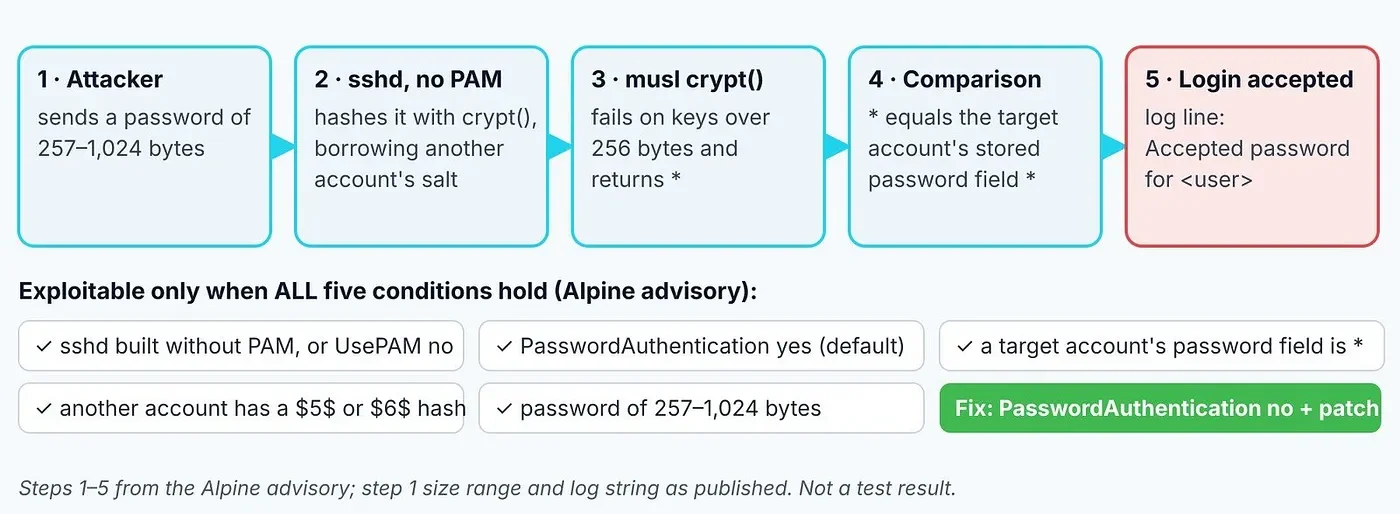
That is the whole trick. A locked account whose field is * is supposed to be unauthenticatable, but the error return from crypt() is the same string, so the equality check succeeds. The condition that another local account holds a $5$ or $6$ hash matters because it supplies the salt that sshd borrows when the target's field is too short.
Exploitation
Step 1: send an oversized password
Connect to sshd on an affected host and authenticate to an account whose password field is *, supplying a password between 257 and 1,024 bytes. The report does not publish a specific payload string; the length range is the operative detail. Because musl's crypt() fails on keys longer than 256 bytes and returns *, and the stored field is also *, sshd accepts the login.
Step 2: look around
In Previdian's honeypot the attacker ran id, uname and hostname after logging in, the usual first look around.
Step 3: escalate
On the tiny-cloud images described by SOCRadar, the default alpine user has passwordless doas, so a non-root login becomes root. Previdian confirmed that the attacker reached root on an Alpine honeypot. That timing, a first attempt less than nine hours after the CVE was published, is a single-source claim.
Step 4: monetise
SecurityWeek reported on 9 November that botnets and cryptominers are now using the flaw. The report does not describe the payloads beyond that.
Root cause
The mistake is a type of error handling problem: musl's crypt() fails on keys longer than 256 bytes and returns the string *, which sshd then compares against the stored field. When the stored password field is also *, the comparison of two identical strings succeeds and authentication is granted.
The salt-borrowing behaviour is what lets the comparison run at all for an account whose stored field cannot contain a salt. The default PermitRootLogin prohibit-password still blocks direct root logins, but any login-capable account with an escalation path such as doas removes that barrier.
Impact
An attacker who can reach sshd on an affected host can log in to an account whose password field is *, without knowing a password, provided all five conditions hold. On Alpine tiny-cloud images the default alpine user with passwordless doas turns that into root. Previdian confirmed root on an Alpine honeypot, and botnet and cryptominer activity has been reported.
The exposure is not universal. Hosts running openssh-server-pam with UsePAM yes, hosts with password authentication disabled, hosts that lock accounts with !, hosts with no $-style hashes, and containers that never start sshd are not affected. The report does not state how many hosts are exposed worldwide or what payloads attackers deploy beyond the reported botnet and cryptominer activity. No vendor or NVD CVSS score was confirmed at press time.
Fix
OpenSSH 10.6p2, released on 5 November 2026, includes an sshd change to avoid a password-authentication bypass on some Linux systems built and run without PAM. The project describes it as a critical workaround for Linux systems that combine musl with PAM disabled. Alpine published its own advisory the same day and shipped fixed packages for every branch from 3.16 to edge; the fixed point releases are 3.21.10, 3.22.8, 3.23.8 and 3.24.4.
If you cannot patch immediately, disable password authentication or turn SSH off on the host. OpenSSH's Damien Miller urged affected users to switch off password authentication or disable SSH immediately rather than wait for a maintenance window.
Alpine Linux, root shell, makes changes: upgrade all packages including openssh, then restart sshd.
apk upgrade -U -a rc-service sshd restart
Alpine Linux, root shell, makes changes (workaround): create /etc/ssh/sshd_config.d/00-no-passwords.conf containing the single line PasswordAuthentication no, then validate the configuration and restart only if validation passes.
sshd -t && rc-service sshd restart
Alpine Linux, root shell, read-only: confirm the effective setting.
sshd -T | grep -i passwordauthentication
Alpine notes that upgrading the package does not restart a running sshd, so the restart step is not optional. The commands above were not tested by the author; syntax is taken from the Alpine advisory, and the vendor advisory should be read before running anything in production.
To confirm a host is clean: the installed openssh package matches or exceeds the fixed version for the branch; sshd was restarted after the upgrade (check the process start time); sshd -T reports passwordauthentication no wherever the workaround was applied; and a fresh log search shows no new Accepted password for entries for passwordless accounts.
Variants to test
- Other musl-based distributions. Check OpenWrt, Buildroot and Yocto builds, and Docker images, for sshd built without PAM. A positive result is a successful login to an account whose password field is
*using a password between 257 and 1,024 bytes. Many OpenWrt-based routers and access points use Dropbear rather than OpenSSH, so check each vendor rather than assume either way; the report found no network-vendor advisory at press time. openssh-server-pamwithUsePAM no. The package name alone does not protect a host. A positive result is the same oversized-password login succeeding when PAM is configured off.- Accounts locked with
*versus!. Enumerate accounts whose password field is*and confirm whether another local account holds a$5$or$6$hash. A positive result is a login to the*account; hosts that lock accounts with!are not affected. - Escalation after login. On images that ship a default
alpineuser with passwordlessdoas, a successful non-root login should be followed by a root shell. A positive result is root without a further password prompt. - Log and account hunting. Search
/var/log/messagesforAccepted password foron accounts such asalpine,rootand key-only users, and reviewdoasuse, newly created users and changes toauthorized_keysfiles. A positive result is any successful password login on an account that should not have one. Alpine's advice is blunt: "If a login cannot be ruled out, treat the machine as compromised." For containers and cloud images that usually means rebuilding from a patched image and rotating any credentials the host held.
One published source address appears in the report: all eight attempts Previdian observed came from 89.116.89[.]18. Treat it as a single data point, not a blocklist.
Previdian warns that proof-of-concept code circulating on GitHub is unverified and may itself contain malware. Do not run it to "test" production.
What we still don't know
- A verified CVSS score from the vendor or NVD.
- How many internet-facing hosts meet all five conditions.
- What attackers install after logging in, beyond the reported botnets and cryptominers.
- Whether network and IoT vendors that build on OpenWrt, Buildroot or Yocto ship vulnerable OpenSSH builds.

What happened, in plain words
Imagine a block of flats where every front door has a lock, and the building manager keeps a list of which residents are allowed in. Some flats are marked "nobody lives here, do not open", and the manager writes a single asterisk (*) next to those doors as a shorthand for "locked for good". Now imagine a locksmith who, when handed a key that is too long to fit in the lock, panics and writes down the same asterisk on his clipboard. The manager compares the clipboard with the list, sees two asterisks, and cheerfully opens the door. Nobody needed a real key.
That is, in essence, the bug nicknamed "sshole", tracked as CVE-2026-123158. On certain Linux systems, the program that accepts remote logins over SSH (called sshd) can be tricked into letting someone in without knowing any password, simply by sending a very long password. The systems affected are those built with a particular set of low-level libraries, most notably Alpine Linux, a small and popular Linux distribution often used for containers and cloud servers.
OpenSSH, the project that makes sshd, shipped a fix on 5 November 2026. The first exploitation attempt against a honeypot (a deliberately exposed machine used to watch attackers) was reported within hours. On 9 November, CISA, the US government's cybersecurity agency, added the bug to its Known Exploited Vulnerabilities (KEV) catalogue, a public list of flaws that are being used in the wild, with a federal deadline of 12 November 2026.
The facts at a glance
| Item | Detail |
|---|---|
| CVE | CVE-2026-123158 (CWE-394, unexpected return value) |
| Affected | sshd on Linux built with musl libc and without PAM (Alpine's openssh-server, or openssh-server-pam with UsePAM no) |
| Fixed in | OpenSSH 10.6p2 upstream; Alpine packages for every branch from 3.16 to edge |
| Exploited | Yes. CISA KEV, honeypot root access reported, botnet and cryptominer activity reported |
| Deadline | Added to KEV 9 Nov 2026, federal due date 12 Nov 2026, forensic triage flagged |
| Workaround | PasswordAuthentication no, or disable SSH on the host |
| CVSS | Not verified (no vendor or NVD score confirmed at press time) |
A few of those terms deserve a plain explanation before we go further.
- CVE stands for Common Vulnerabilities and Exposures. It is a unique ID number given to a publicly known security flaw, so that everyone in the world can refer to the same bug without confusion. Think of it as a registration plate for a vulnerability.
- CWE-394 is a category label from a different list, the Common Weakness Enumeration. It groups bugs by the kind of mistake that caused them. CWE-394 means "unexpected return value": a program asked another program to do something, got back an answer it did not expect, and mishandled it.
- musl libc is a small, lightweight implementation of the C standard library, the bundle of basic functions that almost every program on Linux relies on. Alpine uses musl instead of the more common glibc. It is smaller and simpler, which is why Alpine is popular for containers, but it also behaves slightly differently in edge cases.
- PAM (Pluggable Authentication Modules) is a standard framework Linux uses to check who is logging in. When PAM is present,
sshdhands the password check to PAM. When PAM is absent,sshddoes the check itself, and that is where the bug lives. - CVSS is a scoring system that rates how severe a vulnerability is, from 0 to 10. At the time of writing, no official score had been confirmed by the vendor or by NVD, the US National Vulnerability Database.
- KEV is CISA's Known Exploited Vulnerabilities catalogue. Being on it means the flaw is confirmed to be used by real attackers, and US federal agencies are required to fix it by a set date.
Who is affected
Not every Linux machine is vulnerable. Alpine's own advisory lists five conditions that must all be true at the same time for a host to be exploitable:
- sshd is the
openssh-serverpackage built without PAM, oropenssh-server-pamrunning withUsePAM no; PasswordAuthentication yesis in effect, which is the default;- a target account has
*in its password field; - another local account has a
$5$or$6$password hash; - the attacker sends a password between 257 and 1,024 bytes long.
Let us unpack each one.
- The package and PAM setting. Alpine ships two variants of the SSH server package. One is built without PAM support at all. The other,
openssh-server-pam, includes PAM, but you can switch PAM off in the configuration with the lineUsePAM no. Either way, if PAM is not doing the password check,sshddoes it itself, and the bug becomes reachable. - Password authentication is on. SSH supports two main ways to prove who you are: a password, or a cryptographic key pair (a private key on your computer and a matching public key on the server). Password authentication is the older, simpler method, and it is enabled by default. If you have turned it off and rely only on keys, this bug cannot be triggered against you.
- An account with
*in its password field. On Linux, user accounts are listed in a file called/etc/shadow, and each line has a field for the password. A real password is stored there as a long scrambled string called a hash. An asterisk (*) is a conventional marker meaning "this account is locked, nobody can log in with a password". The bug turns that marker into a way in. - Another account with a
$5$or$6$hash. The$5$and$6$prefixes identify particular hashing algorithms (SHA-256 and SHA-512 respectively). The presence of at least one such hash on the system matters because of howsshdhandles the comparison, which we will explain in the next section. - A password between 257 and 1,024 bytes. A byte is roughly one character. So the attacker sends a password of at least 257 characters, up to 1,024. That is far longer than any normal password, and it is the trigger for the bug.
Hosts are not affected if they run openssh-server-pam with UsePAM yes, have password authentication disabled, lock accounts with ! rather than *, have no $-style hashes, or are containers that never start sshd. The ! marker is another way to lock an account, and it does not trigger the bug. Root logins are protected by the default PermitRootLogin prohibit-password, which means the root (administrator) account cannot log in with a password, unless another login-capable account can escalate, for example through doas.
doas is a small utility, common on Alpine and BSD systems, that lets an ordinary user run commands as root, similar to sudo on other distributions. If the default alpine user can use doas without typing a password, then anyone who logs in as alpine becomes root immediately.
Alpine says its affected tiny-cloud images run from 3.18.11 to 3.24.3, and the fixed point releases are 3.21.10, 3.22.8, 3.23.8 and 3.24.4. "Tiny-cloud images" are pre-built virtual machine images Alpine publishes for cloud providers. According to SOCRadar, as reported by Help Net Security, those AWS and Azure tiny-cloud images also ship a default alpine user with passwordless doas, which turns a non-root login into root.
The researcher behind the finding, Özgün Kültekin of Wakefield, also names OpenWrt, Buildroot, Yocto and many Docker images as musl-based systems worth checking. Debian, Ubuntu, Fedora, Dropbear and OpenBSD are reported as not affected. OpenWrt, Buildroot and Yocto are frameworks used to build custom Linux systems, often for routers and embedded devices. Docker images are pre-packaged filesystem snapshots used to run containers. Dropbear is a different, smaller SSH server, so systems that use it are not running the vulnerable code.
How the attack works
The root cause sits outside sshd itself, as the OpenSSH release notes state. Without PAM, sshd checks each password attempt by hashing it with crypt(). Hashing means running the password through a mathematical function that produces a fixed-length scrambled string. The server stores only the hash, never the password itself, and compares the hash of what you typed with the stored hash. If they match, you are in.
When an account's stored field is too short to contain a salt, sshd borrows another account's salt so the comparison still runs. A salt is a random value mixed into the hash so that two users with the same password do not end up with the same hash. A stored field of just * is far too short to contain a salt, so sshd looks elsewhere on the system for one.
Alpine explains that musl's crypt() fails on keys longer than 256 bytes and returns the string *. If the target account's stored password field is also *, the two match and sshd accepts the login.
The image illustrates this: musl's crypt() fails on keys longer than 256 bytes and returns the string *, and if the target account's stored password field is also *, the two match and sshd accepts the login.
That is the whole trick. A locked account whose field is * is supposed to be unauthenticatable, but the error return from crypt() is the same string, so the equality check succeeds. The condition that another local account holds a $5$ or $6$ hash matters because it supplies the salt that sshd borrows when the target's field is too short.
Exploitation, step by step
Step 1: send an oversized password
Connect to sshd on an affected host and authenticate to an account whose password field is *, supplying a password between 257 and 1,024 bytes. The report does not publish a specific payload string; the length range is the operative detail. Because musl's crypt() fails on keys longer than 256 bytes and returns *, and the stored field is also *, sshd accepts the login.
In plain terms: you open an SSH connection, type a username that belongs to a locked account, and when asked for a password you paste a very long string of characters. The server's password-checking function gives up, returns an asterisk, and the server compares that asterisk with the asterisk in the account file. They match, so the door opens.
Step 2: look around
In Previdian's honeypot the attacker ran id, uname and hostname after logging in, the usual first look around.
These are ordinary Linux commands. id prints which user you are and which groups you belong to. uname prints information about the operating system and kernel. hostname prints the machine's name. An attacker runs them first to understand what kind of system they have landed on and how much power they have.
Step 3: escalate
On the tiny-cloud images described by SOCRadar, the default alpine user has passwordless doas, so a non-root login becomes root. Previdian confirmed that the attacker reached root on an Alpine honeypot. That timing, a first attempt less than nine hours after the CVE was published, is a single-source claim.
"Root" is the administrator account on Linux, the one that can do anything. "Escalate" means moving from a limited user to root. If the alpine user can run doas without a password, then anyone who logs in as alpine becomes root immediately.
Step 4: monetise
SecurityWeek reported on 9 November that botnets and cryptominers are now using the flaw. The report does not describe the payloads beyond that.
A botnet is a network of compromised machines controlled remotely, often used to send spam or launch attacks. A cryptominer is software that uses the victim's computer power to mine cryptocurrency for the attacker. Both are ways to turn a break-in into money.
Root cause
The mistake is a type of error handling problem: crypt() signals failure by returning a pointer to the string *, and sshd's no-PAM comparison path treats that return value as a hash to compare rather than as an error. When the stored password field is also *, the comparison of two identical strings succeeds and authentication is granted.
A pointer is simply a memory address, a way for one program to tell another "the answer is over there". The function is supposed to return a hash, but for long keys it returns an asterisk instead, and sshd compares that with what is stored.
The salt-borrowing behaviour is what lets the comparison run at all for an account whose stored field cannot contain a salt. The default PermitRootLogin prohibit-password still blocks direct root logins, but any login-capable account with an escalation path such as doas removes that barrier.
Impact
An attacker who can reach sshd on an affected host can log in to an account whose password field is *, without knowing a password, provided all five conditions hold. On Alpine tiny-cloud images the default alpine user with passwordless doas turns that into root. Previdian confirmed root on an Alpine honeypot, and botnet and cryptominer activity has been reported.
The exposure is not universal. Hosts running openssh-server-pam with UsePAM yes, hosts with password authentication disabled, hosts that lock accounts with !, hosts with no $-style hashes, and containers that never start sshd are not affected. The report does not state how many hosts are exposed worldwide or what payloads attackers deploy beyond the reported botnet and cryptominer activity. No vendor or NVD CVSS score was confirmed at press time.
Fix
OpenSSH 10.6p2, released on 5 November 2026, includes an sshd change to avoid a password-authentication bypass on some Linux systems built and run without PAM. The project describes it as a critical workaround for Linux systems that combine musl with PAM disabled. Alpine published its own advisory the same day and shipped fixed packages for every branch from 3.16 to edge; the fixed point releases are 3.21.10, 3.22.8, 3.23.8 and 3.24.4.
If you cannot patch immediately, disable password authentication or turn SSH off on the host. OpenSSH's Damien Miller urged affected users to switch off password authentication or disable SSH immediately rather than wait for a maintenance window.
Alpine Linux, root shell, makes changes: upgrade all packages including openssh, then restart sshd.
apk upgrade -U -a rc-service sshd restart
Line by line:
apk upgrade -U -aruns Alpine's package manager,apk, and tells it to upgrade all installed packages.-Umeans update the package index first, and-ameans upgrade everything, not just the packages you name.rc-service sshd restartuses Alpine's service manager,rc-service, to restart the SSH server. Restarting is essential because the old, vulnerable program is still running in memory until you do.
Alpine Linux, root shell, makes changes (workaround): create /etc/ssh/sshd_config.d/00-no-passwords.conf containing the single line PasswordAuthentication no, then validate the configuration and restart only if validation passes.
sshd -t && rc-service sshd restart
Line by line:
sshd -tasks the SSH server to test its configuration file without actually starting. If there is a syntax error, it reports it and exits with a failure code.&&means "only run the next command if the previous one succeeded". So the restart happens only if the configuration is valid. This prevents you from locking yourself out with a broken config.rc-service sshd restartrestarts the SSH server, as above.
Alpine Linux, root shell, read-only: confirm the effective setting.
sshd -T | grep -i passwordauthentication
Line by line:
sshd -Tprints the full effective configuration of the SSH server, after all defaults and included files have been applied.|is a pipe: it sends the output of the first command into the second.grep -i passwordauthenticationsearches that output for the line containingpasswordauthentication, ignoring case (-i). You should seepasswordauthentication noif the workaround is in place.
Alpine notes that upgrading the package does not restart a running sshd, so the restart step is not optional. The commands above were not tested by the author; syntax is taken from the Alpine advisory, and the vendor advisory should be read before running anything in production.
To confirm a host is clean: the installed openssh package matches or exceeds the fixed version for the branch; sshd was restarted after the upgrade (check the process start time); sshd -T reports passwordauthentication no wherever the workaround was applied; and a fresh log search shows no new Accepted password for entries for passwordless accounts.
Variants to test
- Other musl-based distributions. Check OpenWrt, Buildroot and Yocto builds, and Docker images, for
sshdbuilt without PAM. A positive result is a successful login to an account whose password field is*using a password between 257 and 1,024 bytes. Many OpenWrt-based routers and access points use Dropbear rather than OpenSSH, so check each vendor rather than assume either way; the report found no network-vendor advisory at press time. openssh-server-pamwithUsePAM no. The package name alone does not protect a host. A positive result is the same oversized-password login succeeding when PAM is configured off.- Accounts locked with
*versus!. Enumerate accounts whose password field is*and confirm whether another local account holds a$5$or$6$hash. A positive result is a login to the*account; hosts that lock accounts with!are not affected. - Escalation after login. On images that ship a default
alpineuser with passwordlessdoas, a successful non-root login should be followed by a root shell. A positive result is root without a further password prompt. - Log and account hunting. Search
/var/log/messagesforAccepted password foron accounts such asalpine,rootand key-only users, and reviewdoasuse, newly created users and changes toauthorized_keysfiles. A positive result is any successful password login on an account that should not have one. Alpine's advice is blunt: "If a login cannot be ruled out, treat the machine as compromised." For containers and cloud images that usually means rebuilding from a patched image and rotating any credentials the host held.
/var/log/messages is a standard log file where many Linux systems record system events, including logins. authorized_keys is the file that lists which public keys are allowed to log in to an account; an attacker who adds a key there can come back later without a password.
One published source address appears in the report: all eight attempts Previdian observed came from 89.116.89[.]18. Treat it as a single data point, not a blocklist. The square brackets around the dot are a common way of writing an address so that it is not turned into a clickable link.
Previdian warns that proof-of-concept code circulating on GitHub is unverified and may itself contain malware. Do not run it to "test" production. A proof of concept is a small piece of code that demonstrates a bug. Because this bug is easy to exploit, attackers often publish fake versions that install malware on anyone who runs them.
What we still don't know
- A verified CVSS score from the vendor or NVD.
- How many internet-facing hosts meet all five conditions.
- What attackers install after logging in, beyond the reported botnets and cryptominers.
- Whether network and IoT vendors that build on OpenWrt, Buildroot or Yocto ship vulnerable OpenSSH builds.
Glossary
- SSH: a protocol for logging in to another computer securely over a network, usually on port 22.
- sshd: the SSH server program that runs on the machine you connect to and checks your credentials.
- OpenSSH: the most widely used implementation of SSH, maintained as an open-source project.
- CVE: Common Vulnerabilities and Exposures, a unique ID number for a publicly known security flaw.
- CWE-394: a category label meaning "unexpected return value", where a program mishandles an error returned by another function.
- musl libc: a small, lightweight C standard library used by Alpine and some embedded systems instead of glibc.
- PAM: Pluggable Authentication Modules, a Linux framework that handles login checks; when absent,
sshddoes the check itself. crypt(): a standard function that turns a password plus a salt into a hash.- Hash: a scrambled, fixed-length string produced from a password so the original password does not need to be stored.
- Salt: a random value mixed into a hash so identical passwords produce different hashes.
/etc/shadow: the Linux file that stores password hashes and account lock markers.*and!: markers in the password field meaning the account is locked;*triggers this bug,!does not.$5$and$6$: prefixes identifying SHA-256 and SHA-512 password hashes.doas: a small utility, similar tosudo, that lets a user run commands as root.- Root: the administrator account on Linux, with unrestricted power.
- Escalation: moving from a limited user account to a more powerful one, usually root.
PermitRootLogin prohibit-password: an SSH default that stops root from logging in with a password.PasswordAuthentication: the SSH setting that controls whether password logins are allowed.UsePAM: the SSH setting that controls whether PAM handles authentication.- Honeypot: a deliberately exposed machine used to observe attackers.
- Botnet: a network of compromised machines controlled remotely by an attacker.
- Cryptominer: software that uses a victim's computer power to mine cryptocurrency.
- CISA: the US Cybersecurity and Infrastructure Security Agency.
- KEV: Known Exploited Vulnerabilities, CISA's catalogue of flaws confirmed to be used in attacks.
- CVSS: a scoring system that rates vulnerability severity from 0 to 10.
- NVD: the US National Vulnerability Database.
- Proof of concept: a small piece of code that demonstrates a vulnerability.
- Container: a lightweight, isolated runtime environment built from an image.
- Docker image: a pre-packaged filesystem snapshot used to run containers.
- OpenWrt, Buildroot, Yocto: frameworks for building custom Linux systems, often for routers and embedded devices.
- Dropbear: a small alternative SSH server, not affected by this bug.
/var/log/messages: a standard Linux log file recording system events, including logins.authorized_keys: the file listing public keys allowed to log in to an account.apk: Alpine's package manager.rc-service: Alpine's service manager, used to start, stop and restart services.sshd -t: a command that tests the SSH server configuration without starting it.sshd -T: a command that prints the full effective SSH server configuration.grep: a command-line tool that searches text for a pattern.- Pipe (
|): a shell operator that sends the output of one command into another. &&: a shell operator that runs the next command only if the previous one succeeded.- Byte: a unit of data, roughly one character of text.
- Tiny-cloud image: a pre-built virtual machine image Alpine publishes for cloud providers.

