Check Point CVE-2026–123039 Exploited: Hunt and Patch Guide
A local privilege escalation flaw in Check Point's DynamicCLI process allows any local user who can run code to send commands to a world-writable, unauthenticated root socket and execute them as root. Attackers reportedly chained this with an unauthenticated PHP RCE on Mobile Access portals to gain root on firewalls and management servers.
 Published on medium.com
Check Point’s sk1000362, “Local privilege escalation to root in the DynamicCLI process via local world-writable control socket”, was created on 8 November and modified on 12 November. It states that Check Point “observed an active exploit of this vulnerability against a couple of dozen customers” .
The full write-up lives on its author's site
It belongs to its author, so we link to it rather than copy it. The other two tabs are our own rewrites, checked against it.
Context
Check Point security gateways and their management components run a root-owned daemon called dynamic_server, which listens on a local control socket at /tmp/dynamic_socket. That socket is the interface for DynamicCLI, the mechanism through which local callers ask the daemon to carry out privileged operations. Because the daemon runs as root, anything that can talk to the socket and is trusted by it effectively executes with root privileges.
The vulnerability covered here is tracked as CVE-2026-123039 and described in Check Point's advisory sk1000362, "Local privilege escalation to root in the DynamicCLI process via local world-writable control socket". The advisory was created on 8 November and modified on 12 November. Check Point, acting as CNA, published the CVE on 12 November with a CVSS 3.1 score of 7.8 (AV:L/AC:L/PR:L). CISA added it to the KEV catalogue on 13 November, with a remediation due date of 16 November.
The status of the different claims in this story is not uniform. Exploitation is confirmed by the vendor: sk1000362 states that Check Point "observed an active exploit of this vulnerability against a couple of dozen customers". The initial-access chain (PHP2Shell against Mobile Access) and the post-exploitation tooling are reported by secondary sources citing Check Point Research; MAG212 could not reach Check Point Research to verify them. There is no public attribution.
Setup
The vulnerability is local. The precondition is that an attacker already has the ability to run code on the appliance as a local user; the escalation then takes that foothold to root. The advisory's CVSS vector reflects this: local attack vector, low complexity, low privileges required.
Affected products:
- Force Firewalls (Quantum Security Gateways)
- Management and Log Servers
- Multi-Domain Security Management and Multi-Domain Log Server
- Maestro Orchestrator
Not affected: Spark Firewalls and Smart-1 Cloud.
Affected releases: R82.20, R82.10, R82, R81.20, R81.10 and R81. R81.10 and R81 are end of support, and no fix is listed for them.
There is a conflict worth knowing before you scope your estate. The CVE record lists vulnerable takes as "R82.20 Take 10 or below; R82.10 Take 50 or below; R82 Take 130 or below; R81.20 Take 173 or below". Takes in the gap (R82.20 T11 to T13, R82.10 T51, R82 T131) are ambiguous, so treat them as vulnerable until you reach the fixed take given in the sk. Secondary coverage gives a wider "R80.30 to R82.20" scope. If you still run R80.x, confirm with Check Point Support.
The commands in this article are copied from official documentation and were not tested by MAG212. Run them only on systems you are authorised to administer.
Finding it
The weakness is in how the DynamicCLI control socket is created and protected. The root process dynamic_server listens on /tmp/dynamic_socket, and that socket is world-writable and unauthenticated. Any local user who can already run code can therefore connect to it and send commands that the daemon executes as root.
Two details make this detectable after the fact. First, the daemon records the commands it receives in /var/log/dynamicCli.log. Second, legitimate requests arrive through a Clish wrapper, so a received command that lacks that wrapper stands out. The wrapper prefix is:
CPprofile.sh >> /dev/null; export SP_DISTRIBUTE=0; set -o noglob;
Lines in the log without that prefix deserve review. The system() sink pattern Received = #return_value# is also uncommon in legitimate traffic.
Exploitation
The chain as reported runs in four stages, of which only the escalation is vendor-confirmed.
- Initial access (reported, not verified by MAG212): PHP2Shell (CVE-2026-109618/-109619, unauthenticated PHP RCE, in KEV since 26 Oct) against an internet-facing Mobile Access portal.
- Privilege escalation (confirmed): the root process
dynamic_serverlistens on/tmp/dynamic_socket. The socket is world-writable and unauthenticated, so any local user who can already run code can send it commands that run as root. - Post-exploitation (reported): webshells, the TSGA backdoor and TSProxy.
- Impact (reported): pivot to ESXi and deployment of a wiper.
Secondary sources citing Check Point Research say attackers chained PHP2Shell on Mobile Access portals with this escalation from 30 October. Unknown: the actor, how targets were chosen, and dwell time.
Do not conflate this with Dream's report of 24 compromised firewalls in a PHP2Shell campaign. The Record's editor's note identifies those devices as Palo Alto Networks, not Check Point.
Step 1: Hunt for commands that bypassed the Clish wrapper
On each cluster member, management server and log server, in Gaia Expert mode, search the daemon log for received commands that did not use the standard wrapper:
grep "Received =" /var/log/dynamicCli.log | grep -vF "CPprofile.sh >> /dev/null; export SP_DISTRIBUTE=0; set -o noglob;"
The first grep selects every received command; the second removes lines containing the legitimate wrapper prefix, matched as a fixed string with -F. Any output is a request that did not use the standard wrapper and should be reviewed against admin activity. No output means no such requests in the retained log, which depends on log retention. The command is read-only.
Step 2: Hunt for the system() sink and exploitation keywords
Still in Expert mode:
grep -F "Received = #return_value#" /var/log/dynamicCli.log grep -EI "Received =.*( id;| whoami| /etc/shadow| ncat| nc -| /dev/tcp| curl | wget | base64| useradd| authorized_keys)" /var/log/dynamicCli.log
This surfaces the uncommon #return_value# pattern and commands Check Point associates with exploitation. A hit is high-priority for triage, but correlate it with admin sessions before declaring compromise: administrators may legitimately run curl or base64 during troubleshooting, so a keyword hit alone is not proof. Pair any hit with change tickets and the admin session record. The command is read-only.
Step 3: Check socket permissions and the daemon process
ls -l /tmp/dynamic_socket ps auxw | grep -v grep | grep 'dynamic_server'
Expect srw-rw---- root config (0660) after the fix. srwxrwxrwx (0777) means the host is vulnerable. If you applied the interim mitigation, dynamic_server should not appear in ps. The command is read-only.
Step 4: Confirm the installed Jumbo Hotfix take
Use cpinfo in Expert mode or Clish:
cpinfo -y all
show installer packages
Compare the reported JHF take with the fixed-take table. sk98028 also lists GUI routes: Gaia Portal > Upgrades (CPUSE) > Status and Actions, and SmartConsole on R81.20 T38 and later. show version all is not in sk98028, so MAG212 does not print it as verified. The commands are read-only.
Step 5: See blocked attempts after the fix
grep "Rejected connection from unauthorized uid" /var/log/dynamicCli.log
Entries mean something attempted to use the socket after the fix. A non-zero UID such as 99 (nobody) indicates an attempted escalation; investigate which process ran as that UID. The command is read-only.
Root cause
The daemon that performs privileged DynamicCLI operations runs as root and accepts commands over a local socket that is world-writable and unauthenticated. Legitimate requests go through a Clish wrapper, so lines without that wrapper deserve review. After the fix the socket is expected to be srw-rw---- root config (0660), and the daemon logs "Rejected connection from unauthorized uid" for blocked attempts.
Impact
Firewalls and management servers sit above everything they protect. A root foothold there lets an attacker read traffic, steal VPN and integration secrets, and reach hypervisors, so a local-only CVSS 7.8 bug becomes an enterprise-wide incident once attackers already have code execution on the box. CISA's three-day KEV window shows how little time defenders get.
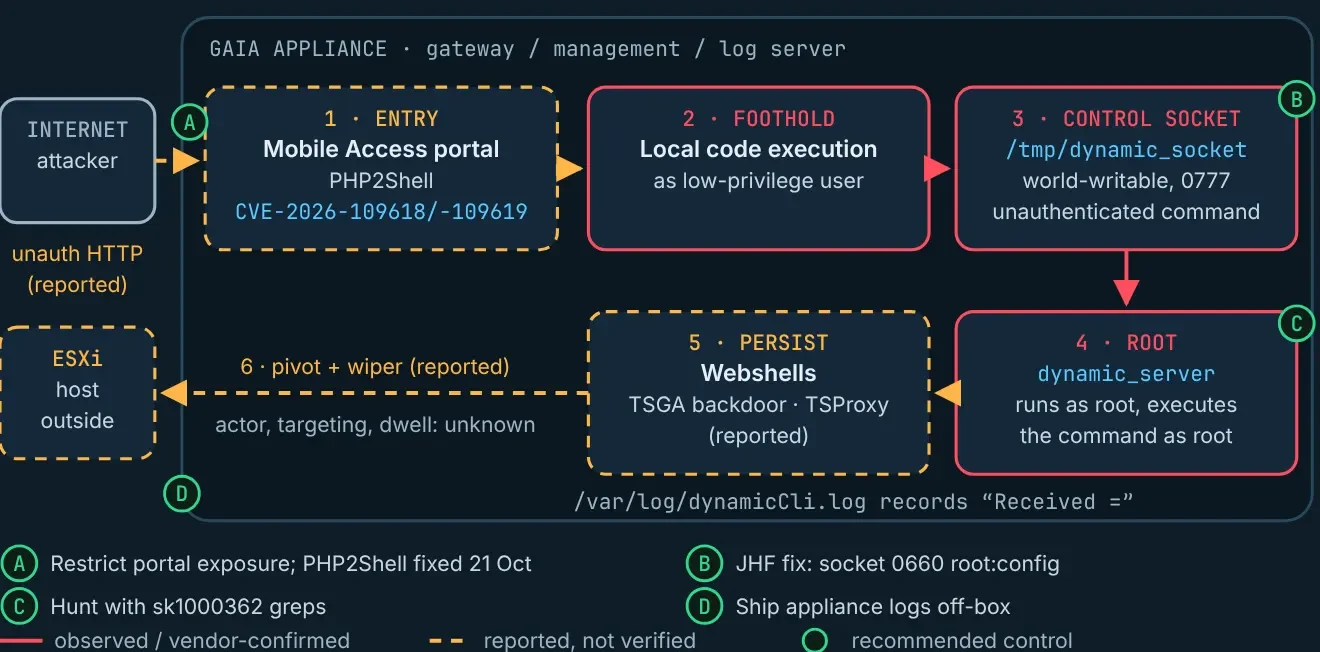
The reported post-exploitation impact goes further: webshells, the TSGA backdoor and TSProxy, then a pivot to ESXi and wiper deployment. Those stages are reported by secondary sources, not confirmed by the vendor. The escalation itself requires a prior foothold; it is not remotely exploitable on its own.
Fix
Check Point's fix is the Jumbo Hotfix take for your release, as listed in sk1000362. R81.10 and R81 have no fix and must be upgraded. The order of work:
- Restrict internet exposure of Mobile Access and portal interfaces using an upstream control.
- Preserve logs before patching or rebooting: copy
dynamicCli.logand the Mobile Access and web server logs off-box. Run the hunting greps on every cluster member, management server and log server, not only the active gateway. - Install the fixed Jumbo Hotfix take for your release.
- If you cannot patch immediately, stop
dynamic_serverand prevent it from restarting using thedbsetprocedure in sk1000362. This breaks the Dynamic CLI commands listed in sk144112. To revert, set the value back to true and save. MAG212 does not reproduce thedbsetkey; copy it from the sk. - If you find evidence of exploitation, treat the appliance as root-compromised: rebuild from trusted media with Check Point Support, and rotate administrator, VPN and integration secrets from a clean system.
- Upgrade R81.10 and R81 systems, which have no fix.
After patching, confirm the installed take with cpinfo -y all or show installer packages, confirm the socket is now 0660, and check for "Rejected connection from unauthorized uid" entries. Test VPN authentication and HA failover.
Because the CVE needs a prior foothold, every hit must be paired with a hunt for the initial-access vector, starting with the Mobile Access portal. If the secondary reports of an ESXi pivot apply to you, review hypervisor management logins that originate from firewall or management IP addresses (MAG212 inference).
Prevention: keep management and Mobile Access interfaces off the open internet where the business allows, ship appliance logs off-box, retire end-of-support releases, and track PHP2Shell (fixed 21 October) in every appliance with a PHP-backed web UI.
Variants to test
- Check the socket mode on every appliance you own with
ls -l /tmp/dynamic_socket. A positive result issrwxrwxrwx(0777) rather thansrw-rw---- root config(0660). - Run the wrapper-bypass grep against retained
dynamicCli.logfiles on management and log servers, not just gateways. A positive result is anyReceived =line without theCPprofile.sh >> /dev/null; export SP_DISTRIBUTE=0; set -o noglob;prefix. - Search for the
Received = #return_value#sink and the keyword set in the same log. A positive result is a hit that also correlates with an admin session or change ticket. - After patching, look for "Rejected connection from unauthorized uid" with a non-zero UID such as 99 (
nobody). A positive result points to a process that tried to use the socket after the fix. - Treat the single-sourced leads from the earlier draft as hunting leads only, not confirmed IOCs: modified
zz*.tplportal templates,/tmp/CPconfigdaemon,/lib/libcpfwcommon.so, artifacts under/opt/CPcvpn-R81.20/tmp/, and IP 130.94.19[.]204. Treat any of these present on a host you administer as a hunting lead only, not as a confirmed IOC.

What happened, in plain words
A company called Check Point makes security appliances: specialised computers that sit at the edge of a network and decide which traffic is allowed in and out. One of the programs on those appliances, called dynamic_server, runs with the highest level of permission on the machine, the level usually called root. Root can do anything: read every file, change every setting, install software.
That program listens for instructions on a small local channel called a socket. Think of a socket as a private letterbox on the machine: other programs drop a note in it and the program behind it reads the note and acts on it. The problem is that this particular letterbox was open to everyone on the machine and asked for no identification. Anyone who could already run a program on the appliance could drop a note in and have it carried out as root.
That weakness is tracked as CVE-2026-123039. A CVE is a public catalogue number for a specific security flaw, so people around the world can refer to the same bug unambiguously. Check Point documented it in a support article numbered sk1000362, titled "Local privilege escalation to root in the DynamicCLI process via local world-writable control socket". That article was created on 8 November and modified on 12 November.
Check Point also acts as a CNA, a organisation authorised to assign CVE numbers to flaws in its own products. In that role it published the CVE on 12 November with a CVSS score of 7.8. CVSS is a standard 0 to 10 scale for how serious a flaw is; 7.8 is in the high range. The vector behind that score is AV:L/AC:L/PR:L, which in plain terms means: the attacker must already be on the machine (local), the attack is easy to carry out (low complexity), and the attacker needs only ordinary low-level access to start (low privileges).
On 13 November, CISA, the US government's cybersecurity agency, added the flaw to its KEV catalogue. KEV stands for Known Exploited Vulnerabilities: a list of flaws that are not just theoretical but have actually been used in real attacks. Being on that list comes with a deadline for government agencies to fix it, and here the due date was 16 November, three days after listing.
Not every claim in the story has the same level of proof, and it is worth keeping them apart:
- Confirmed by the vendor: Check Point's own article says it "observed an active exploit of this vulnerability against a couple of dozen customers". In other words, real attackers used it against real customers.
- Reported by secondary sources: the way attackers got in first, and the tools they used afterwards, come from other publications that cite Check Point Research. MAG212 could not reach Check Point Research to check those details.
- Unknown: nobody has publicly said who the attackers are. There is no public attribution, meaning no official naming of a group or country behind it.
Who is affected
Because the flaw is local, the precondition is that an attacker can already run code on the appliance as an ordinary user. The escalation then turns that small foothold into full control. This is why the CVSS vector says local, low complexity, low privileges: the hard part (getting any code running at all) happened earlier, and this bug does the rest.
A privilege escalation is exactly that: going from a limited account to a more powerful one. A everyday comparison is a hotel guest who finds that the staff-only door opens with the same key card as their room. The guest already had a card; the flaw lets that card open doors it should never open.
The affected products are:
- Force Firewalls (Quantum Security Gateways)
- Management and Log Servers
- Multi-Domain Security Management and Multi-Domain Log Server
- Maestro Orchestrator
Not affected: Spark Firewalls and Smart-1 Cloud.
The affected software releases are R82.20, R82.10, R82, R81.20, R81.10 and R81. R81.10 and R81 are end of support, meaning the vendor no longer issues fixes for them, and no fix is listed for those two.
There is a conflict worth knowing before you count your own machines. The CVE record lists the vulnerable takes as "R82.20 Take 10 or below; R82.10 Take 50 or below; R82 Take 130 or below; R81.20 Take 173 or below". A take is a numbered build of a release, like a specific printing of a book: same title, slightly different contents. Takes that fall in the gap between those numbers and the fixed take named in the support article (R82.20 T11 to T13, R82.10 T51, R82 T131) are ambiguous, so treat them as vulnerable until you reach the fixed take. Secondary coverage describes a wider range, "R80.30 to R82.20". If you still run R80.x, confirm with Check Point Support.
The commands in this article are copied from official documentation and were not tested by MAG212. Run them only on systems you are authorised to administer.
How the attack works
The chain as reported runs in four stages, and only the escalation is confirmed by the vendor.
- Initial access (reported, not verified): PHP2Shell (CVE-2026-109618/-109619, an unauthenticated PHP remote code execution flaw, in KEV since 26 Oct) against an internet-facing Mobile Access portal. "Unauthenticated" means the attacker needs no username or password. "Remote code execution" means they can make the machine run their own code over the network. PHP is a programming language commonly used for web pages, and a portal is the web page staff use to log in from outside.
- Privilege escalation (confirmed): the root process
dynamic_serverlistens on/tmp/dynamic_socket. The socket is world-writable and unauthenticated, so any local user who can already run code can send it commands that run as root. - Post-exploitation (reported): webshells, the TSGA backdoor and TSProxy. A webshell is a small program hidden on a web server that lets an attacker run commands through the browser. A backdoor is a hidden way in that survives normal logins being changed. TSProxy is named in the report without further description.
- Impact (reported): pivot to ESXi and deployment of a wiper. ESXi is VMware's software for running many virtual machines on one physical server, so reaching it means reaching the layer underneath many other systems. A wiper is malware whose purpose is to destroy data.
Secondary sources citing Check Point Research say attackers chained PHP2Shell on Mobile Access portals with this escalation from 30 October. What remains unknown: the actor, how targets were chosen, and dwell time, the period an intruder stays inside a network before being noticed.
One clarification so two stories do not get mixed up. Do not conflate this with Dream's report of 24 compromised firewalls in a PHP2Shell campaign. The Record's editor's note identifies those devices as Palo Alto Networks, not Check Point.
Finding it
The weakness is in how the DynamicCLI control socket is created and protected. The root process dynamic_server listens on /tmp/dynamic_socket, and that socket is world-writable and unauthenticated. "World-writable" means the file permissions allow every account on the machine to write to it. Any local user who can already run code can therefore connect to it and send commands that the daemon executes as root.
Two details make this detectable after the fact. First, the daemon records the commands it receives in /var/log/dynamicCli.log, a log file, which is a running diary of what a program did. Second, legitimate requests arrive through a Clish wrapper, so a received command that lacks that wrapper stands out. Clish is Check Point's command-line shell, the text interface administrators type commands into. The wrapper is a fixed piece of text placed in front of each legitimate request, and it looks like this:
CPprofile.sh >> /dev/null; export SP_DISTRIBUTE=0; set -o noglob;
Line by line: CPprofile.sh >> /dev/null runs a setup script and throws its output away (that is what >> /dev/null does, sending text to a place where it is discarded). export SP_DISTRIBUTE=0 sets an environment variable, a named setting the program can read, to zero. set -o noglob turns off wildcard expansion, so characters like * are taken literally instead of being expanded into file names. The point for a defender is not what each part does but that the whole string is a fingerprint of the normal path.
Lines in the log without that prefix deserve review. The system() sink pattern Received = #return_value# is also uncommon in legitimate traffic. A sink is the place in a program where data ends up being acted on; here it is the point where a received command is handed to the operating system to run.
Step 1: Hunt for commands that bypassed the Clish wrapper
On each cluster member, management server and log server, in Gaia Expert mode, search the daemon log for received commands that did not use the standard wrapper:
grep "Received =" /var/log/dynamicCli.log | grep -vF "CPprofile.sh >> /dev/null; export SP_DISTRIBUTE=0; set -o noglob;"
Line by line: grep "Received =" /var/log/dynamicCli.log reads the log file and prints every line containing the text Received =, which is how the daemon marks a command it received. The vertical bar | passes those lines to the next command. grep -vF "..." prints only the lines that do not contain the given text, and -F means treat it as plain text rather than a pattern. So the whole line means: show me received commands that did not come through the normal wrapper.
Why this step: the normal path always leaves the wrapper behind, so anything without it is a request that arrived some other way, which is exactly what an attacker using the socket directly would produce. Any output is a request that did not use the standard wrapper and should be reviewed against admin activity. No output means no such requests in the retained log, which depends on log retention: if logs are only kept for a short time, old activity is simply gone. The command is read-only, meaning it changes nothing.
Step 2: Hunt for the system() sink and exploitation keywords
Still in Expert mode:
grep -F "Received = #return_value#" /var/log/dynamicCli.log grep -EI "Received =.*( id;| whoami| /etc/shadow| ncat| nc -| /dev/tcp| curl | wget | base64| useradd| authorized_keys)" /var/log/dynamicCli.log
Line by line: the first part, grep -F "Received = #return_value#" /var/log/dynamicCli.log, looks for the exact text Received = #return_value#, the unusual pattern tied to the sink. The second part, grep -EI "Received =.*(...)" /var/log/dynamicCli.log, looks for lines that start with Received = and later contain any of a list of words. -E allows the pattern syntax used here, and -I skips binary files. The words in the list are commands an intruder commonly runs: id; and whoami show who you are, /etc/shadow is the file holding password hashes on Linux, ncat, nc - and /dev/tcp are ways to make network connections, curl and wget download things, base64 encodes data, useradd creates accounts, and authorized_keys is the file that holds the public keys allowed to log in by SSH.
Why this step: it surfaces the uncommon #return_value# pattern and the commands Check Point associates with exploitation, so you can find the moment an attacker used the socket to run something. A hit is high-priority for triage, the first sorting of alerts by urgency. But correlate it with admin sessions before declaring compromise: administrators may legitimately run curl or base64 during troubleshooting, so a keyword hit alone is not proof. Pair any hit with change tickets (the record of approved maintenance work) and the admin session record. The command is read-only.
Step 3: Check socket permissions and the daemon process
ls -l /tmp/dynamic_socket ps auxw | grep -v grep | grep 'dynamic_server'
Line by line: ls -l /tmp/dynamic_socket lists that one file with its details, including its permissions. ps auxw lists the running processes, the programs currently active on the machine. | grep -v grep removes the line for the grep command itself, which would otherwise always match. | grep 'dynamic_server' keeps only lines mentioning the daemon, so you can see whether it is running.
Why this step: it answers two questions at once. Are the socket permissions still open, and is the vulnerable program still running? Expect srw-rw---- root config (0660) after the fix. The leading s means the file is a socket, and the permission string shows that only the owner and the group may read and write it. srwxrwxrwx (0777) means the host is vulnerable, because everyone may read, write and execute. If you applied the interim mitigation, dynamic_server should not appear in ps. The command is read-only.
Step 4: Confirm the installed Jumbo Hotfix take
Use cpinfo in Expert mode or Clish:
cpinfo -y all
show installer packages
Line by line: cpinfo -y all is a Check Point tool that prints information about the installed software, and -y all asks for the full list of installed packages and their versions. show installer packages is the Clish equivalent, listing installed packages from the shell administrators normally use.
Why this step: a fix is only real if it is actually installed, and on a cluster you must check every member, not just the one you happen to be logged into. Compare the reported JHF take with the fixed-take table. JHF stands for Jumbo Hotfix, Check Point's bundled collection of fixes, and the take is its build number. sk98028 also lists GUI routes: Gaia Portal > Upgrades (CPUSE) > Status and Actions, and SmartConsole on R81.20 T38 and later. Those are the graphical ways to see the same information. show version all is not in sk98028, so MAG212 does not print it as verified. The commands are read-only.
Step 5: See blocked attempts after the fix
grep "Rejected connection from unauthorized uid" /var/log/dynamicCli.log
Line by line: this searches the daemon log for the exact phrase the patched program writes when it turns a caller away. A UID is the numeric identifier the operating system gives each account; root is 0, and 99 is often the account called nobody, which has almost no rights.
Why this step: after the fix, the daemon should refuse callers that are not allowed, and it records each refusal. Entries mean something attempted to use the socket after the fix. A non-zero UID such as 99 (nobody) indicates an attempted escalation; investigate which process ran as that UID. The command is read-only.
Root cause
The daemon that performs privileged DynamicCLI operations runs as root and accepts commands over a local socket that is world-writable and unauthenticated. Legitimate requests go through a Clish wrapper, so lines without that wrapper deserve review. After the fix the socket is expected to be srw-rw---- root config (0660), and the daemon logs "Rejected connection from unauthorized uid" for blocked attempts.
In everyday terms: the letterbox was open to all, and the person emptying it never asked who had posted the note. The fix puts a lock on the letterbox and adds a check of the sender.
Impact
Firewalls and management servers sit above everything they protect. A root foothold there lets an attacker read traffic, steal VPN and integration secrets, and reach hypervisors, so a local-only CVSS 7.8 bug becomes an enterprise-wide incident once attackers already have code execution on the box. CISA's three-day KEV window shows how little time defenders get.
The reported post-exploitation impact goes further: webshells, the TSGA backdoor and TSProxy, then a pivot to ESXi and wiper deployment. Those stages are reported by secondary sources, not confirmed by the vendor. The escalation itself requires a prior foothold; it is not remotely exploitable on its own.
Fix
Check Point's fix is the Jumbo Hotfix take for your release, as listed in sk1000362. R81.10 and R81 have no fix and must be upgraded. The order of work:
- Restrict internet exposure of Mobile Access and portal interfaces using an upstream control. In plain words, put something in front of the portal so the whole internet cannot reach it directly.
- Preserve logs before patching or rebooting: copy
dynamicCli.logand the Mobile Access and web server logs off-box. "Off-box" means to another machine, because a reboot can wipe or rotate the evidence. Run the hunting greps on every cluster member, management server and log server, not only the active gateway. - Install the fixed Jumbo Hotfix take for your release.
- If you cannot patch immediately, stop
dynamic_serverand prevent it from restarting using thedbsetprocedure in sk1000362. This breaks the Dynamic CLI commands listed in sk144112. To revert, set the value back to true and save. MAG212 does not reproduce thedbsetkey; copy it from the sk. - If you find evidence of exploitation, treat the appliance as root-compromised: rebuild from trusted media with Check Point Support, and rotate administrator, VPN and integration secrets from a clean system. "Rotate" means replace every password and key, and do it from a machine you know is clean, because the compromised one may be recording what you type.
- Upgrade R81.10 and R81 systems, which have no fix.
After patching, confirm the installed take with cpinfo -y all or show installer packages, confirm the socket is now 0660, and check for "Rejected connection from unauthorized uid" entries. Test VPN authentication and HA failover. HA means high availability: two appliances paired so that one takes over if the other fails, and failover is that takeover, which is worth testing because a patch can disturb it.
Because the CVE needs a prior foothold, every hit must be paired with a hunt for the initial-access vector, starting with the Mobile Access portal. If the secondary reports of an ESXi pivot apply to you, review hypervisor management logins that originate from firewall or management IP addresses (MAG212 inference).
Prevention: keep management and Mobile Access interfaces off the open internet where the business allows, ship appliance logs off-box, retire end-of-support releases, and track PHP2Shell (fixed 21 October) in every appliance with a PHP-backed web UI.
Variants to test
- Check the socket mode on every appliance you own with
ls -l /tmp/dynamic_socket. A positive result issrwxrwxrwx(0777) rather thansrw-rw---- root config(0660). - Run the wrapper-bypass grep against retained
dynamicCli.logfiles on management and log servers, not just gateways. A positive result is anyReceived =line without theCPprofile.sh >> /dev/null; export SP_DISTRIBUTE=0; set -o noglob;prefix. - Search for the
Received = #return_value#sink and the keyword set in the same log. A positive result is a hit that also correlates with an admin session or change ticket. - After patching, look for "Rejected connection from unauthorized uid" with a non-zero UID such as 99 (
nobody). A positive result points to a process that tried to use the socket after the fix. - Treat the single-sourced leads from the earlier draft as hunting leads only, not confirmed IOCs: modified
zz*.tplportal templates,/tmp/CPconfigdaemon,/lib/libcpfwcommon.so, artifacts under/opt/CPcvpn-R81.20/tmp/, and IP 130.94.19[.]204. An IOC, indicator of compromise, is a trace left behind by an intrusion. "Single-sourced" means only one source reported it. Treat any of these present on a host you administer as a hunting lead only, not as a confirmed IOC.
Glossary
- Backdoor: a hidden way into a system that keeps working even after normal passwords are changed.
- CISA: the US Cybersecurity and Infrastructure Security Agency, which publishes the KEV list.
- Clish: Check Point's command-line shell, the text interface administrators type commands into.
- CNA: CVE Numbering Authority, an organisation authorised to assign CVE numbers to flaws in its own products.
- Correlate: to compare one piece of evidence with another (an admin session, a change ticket) before drawing a conclusion.
- CVE: a public catalogue number for one specific security flaw, so everyone can refer to the same bug.
- CVSS: a standard 0 to 10 scale for how serious a flaw is, with a vector string explaining the score.
- Daemon: a program that runs in the background on a machine and waits for work.
- dbset: a Check Point procedure, referenced in sk1000362, used to change a stored setting; the report does not reproduce its key.
- Dwell time: how long an intruder stays inside a network before being noticed.
- End of support: a state where the vendor no longer issues fixes for a software release.
- ESXi: VMware's software for running many virtual machines on one physical server.
- Expert mode: the Check Point shell that gives full command-line access on the appliance.
- grep: a command-line tool that searches text and prints matching lines.
- HA (high availability): two appliances paired so one takes over if the other fails; the takeover is called failover.
- Hypervisor: the layer that runs virtual machines, underneath the operating systems on a server.
- IOC (indicator of compromise): a trace left behind by an intrusion.
- JHF (Jumbo Hotfix): Check Point's bundled collection of fixes, identified by a take number.
- KEV: Known Exploited Vulnerabilities, CISA's list of flaws actually used in real attacks, with remediation deadlines.
- Log: a running diary a program writes of what it did.
- Off-box: copied to a different machine from the one being examined.
- PHP: a programming language commonly used to build web pages.
- PHP2Shell: the name used in the report for the initial-access flaw (CVE-2026-109618 and CVE-2026-109619), an unauthenticated PHP remote code execution issue.
- Privilege escalation: going from a limited account to a more powerful one.
- Read-only: a command that inspects something and changes nothing.
- Remote code execution: making a machine run an attacker's code over the network.
- Root: the highest permission level on a Linux system, able to do anything.
- Rotate: replace every password and key, ideally from a clean system.
- Socket: a local channel on a machine through which programs pass messages to each other.
- Take: a numbered build of a software release, like a specific printing of a book.
- Triage: the first sorting of alerts by urgency.
- UID: the numeric identifier the operating system gives each account; root is 0 and 99 is often
nobody. - Unauthenticated: accepted without any username, password or other proof of identity.
- Webshell: a small program hidden on a web server that lets an attacker run commands through the browser.
- Wiper: malware whose purpose is to destroy data.
- World-writable: file permissions that allow every account on the machine to write to the file.

