From Recon to Bypassing MFA Implementation in OWA by Using EWS Misconfiguration
A service account's credentials were found in a public GitHub repository, but the account was not enrolled in the organisation's MFA. The attacker discovered that the Exchange Web Services (EWS) endpoint did not enforce MFA, allowing them to log in and read the account's inbox.

Bug Report / Web Apps / Write-Up
The full write-up lives on its author's site
It belongs to its author, so we link to it rather than copy it. The other two tabs are our own rewrites, checked against it.
Context
The target was a web application on an in-scope asset that offered two ways to sign in: as an employee using a domain account, or as a user whose account was created specifically for that application. Choosing the employee path redirected the browser to an ADFS endpoint on a different TLD, for example from .com to .net. The practical conclusion the author drew was that a valid domain account is enough to get into the application.
The application itself was not the final objective. The goal was to use a domain account to reach Exchange data. Exchange Web Services (EWS) is a web-based API enabled on Exchange servers that Microsoft recommends for client applications that need to interface with Exchange; it allows applications to interact with email messages, contacts, calendar and more from a user's mailbox. The author quotes Beau Bullock's research for that definition, and quotes Nick Landers' DerbyCon talk for the key property: two-factor authentication does not apply to EWS or to the NTLM authentication on the Autodiscover page. In the program owner's own explanation, even when ADFS is protected by MFA, the system owner sometimes forgets to enforce MFA on other endpoints, in this case EWS.
Setup
The tools used were:
- GitHub search for credentials, following the approach in Th3g3nt3lman's Github Recon and Sensitive Data Exposure talk.
- Sudomy, the subdomain enumeration tool by Screetsec.
- MailSniper, downloaded from
https://github.com/dafthack/MailSniper, run from PowerShell. - Black Hills Infosec research on bypassing two-factor authentication on OWA and Office365 portals, and the related MailSniper research on mailbox permissions and password spraying.
The precondition for the whole chain was a valid domain account whose password was found in a public repository, and an EWS endpoint that did not enforce the MFA applied at ADFS. The account found was a service account, named in the report with the pattern svc_nameofsvc.
Finding it
The author first tried some common weak passwords against the application's login, without success. Switching to the employee login path showed the redirect to ADFS on the other TLD, which reframed the problem: find a domain account, and the application is reachable.
A first GitHub recon pass turned up an interesting repository and led to a finding that was triaged and rewarded in two days; the author does not discuss that finding in the article.

After two further small issues, the author returned to GitHub and searched with the keyword password ".target.net", using the .net domain rather than .com. The previously found repository had been removed, and the new search returned a repository ranked fifth on the first page. The search results themselves contained no password information. The reasoning that kept the author going was that credentials are not always placed behind parameters, so the repository was worth exploring anyway.
Exploitation
Step 1: read the repository and extract the credentials
The repository held more than 3,000 lines of code. Lines 6 to 27 described an AD account and a connection string, but contained no credentials. At line 394 the author found two strings that looked like credentials, on the basis that no developer would invent parameters that difficult:
string Table = "file.xlsx";
XYZEndpoint endpoint = new XYZEndpoint("username_here", "very_complex_password_here");
string response = endpoint.GetCollectionData(Table);
The two arguments to the endpoint constructor are the username and password. The author's assumption that the developer had hardcoded credentials in the repository turned out to be correct.
Step 2: try the credentials at ADFS
Logging in at the ADFS endpoint on the .net domain with the found account did not give access. The account was not enrolled on the MFA in use, and an account has to be enrolled with the applied MFA before it can log in. The author deliberately removed the name of the MFA product from the report to avoid it being read as a vendor vulnerability; it is not one.
Step 3: try other entry points
The author then tried other endpoints, such as VPN services, and tested about three VPN endpoints. None of them allowed a login with the account. At this point at least more than four attempts had been made from the author's country, and an alarm was expected to trigger.
Step 4: enumerate subdomains for an EWS endpoint
The author did not yet know whether an EWS misconfiguration existed on the target, so ran subdomain enumeration with Sudomy. The common implementation is to place EWS on a mail, email or webmail subdomain, and the enumeration confirmed a mail subdomain.
Visiting mail.target.com redirected to the ADFS endpoint on the .net TLD, the same MFA-protected path as before. On the second attempt the author placed the EWS path behind mail.target.com, and the endpoint returned a login prompt instead of the ADFS redirect.
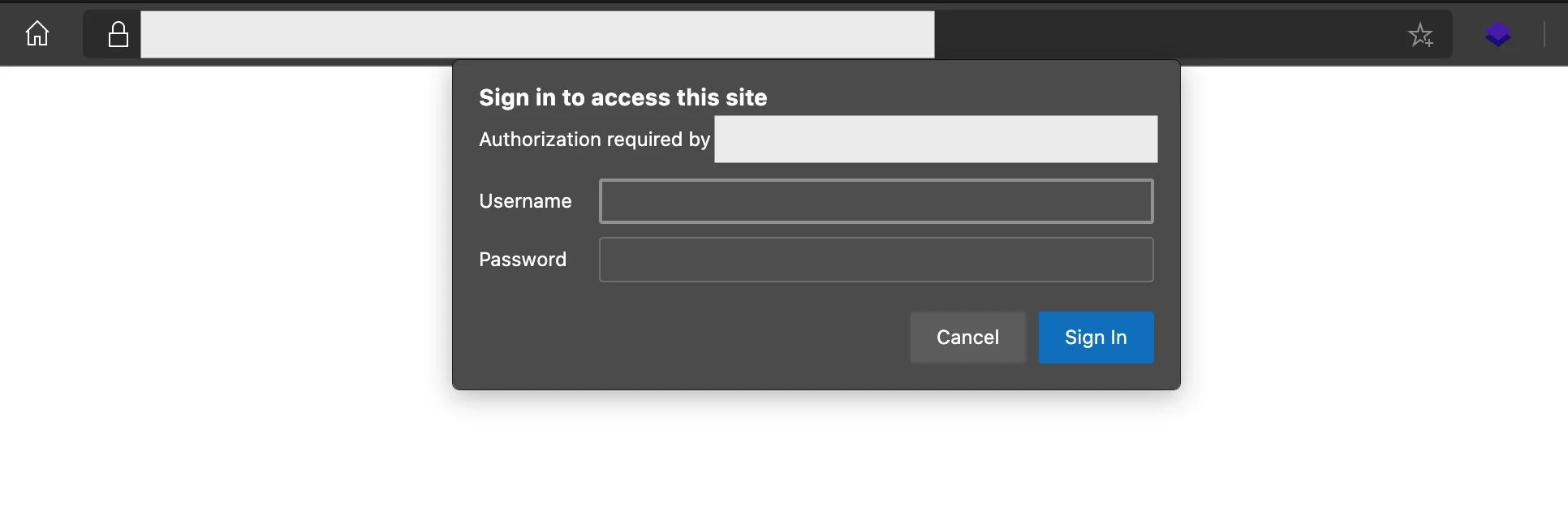
Step 5: log in to EWS with the found credentials
Entering the found credentials at that prompt succeeded. The login completed without any MFA prompt and without the account being enrolled with the MFA used elsewhere. No inbox is displayed at this point, because this is EWS rather than OWA.
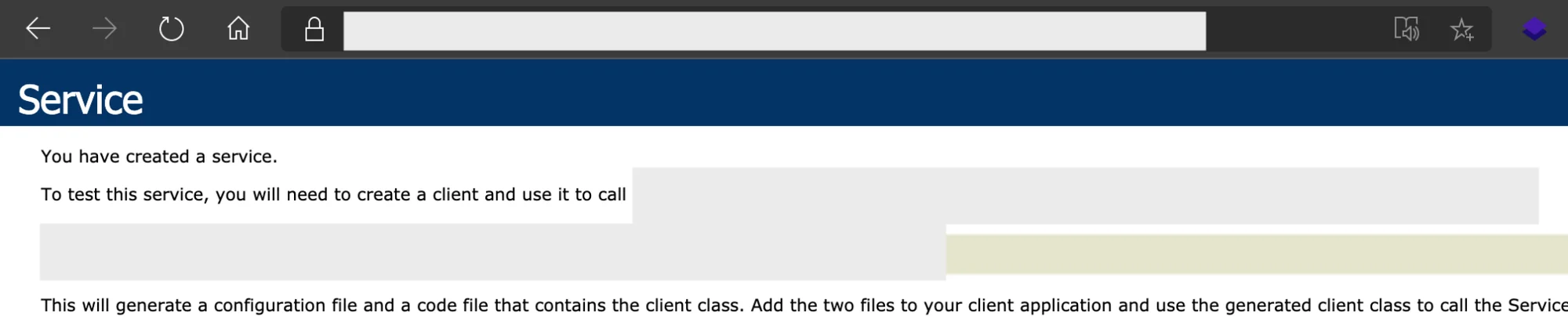
Step 6: read the inbox with MailSniper
MailSniper was downloaded and PowerShell started. The commands executed were:
C:\Users\YoKo\Tools> powershell.exe -exec bypass
Windows PowerShell
Copyright (C) Microsoft Corporation. All rights reserved.

Try the new cross-platform PowerShell https://aka.ms/pscore6

PS C:\Users\YoKo\Tools> cd .\MailSniper-master\
PS C:\Users\YoKo\Tools\MailSniper-master> Import-Module .\MailSniper.ps1
PS C:\Users\YoKo\Tools\MailSniper-master> Invoke-SelfSearch -Mailbox [redacted] -ExchHostname mail.domain.tld -Remote
Two commands matter: Import-Module .\MailSniper.ps1 loads the module, and Invoke-SelfSearch -Mailbox [redacted] -ExchHostname mail.domain.tld -Remote searches the mailbox through the remote Exchange host. After the second command a credential box pops up asking for the credentials of [redacted]; the same credentials are typed again.
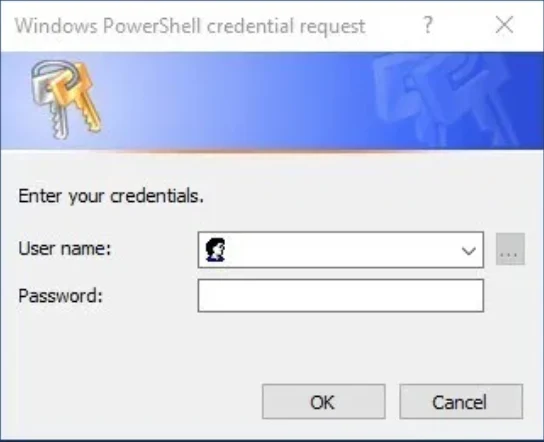
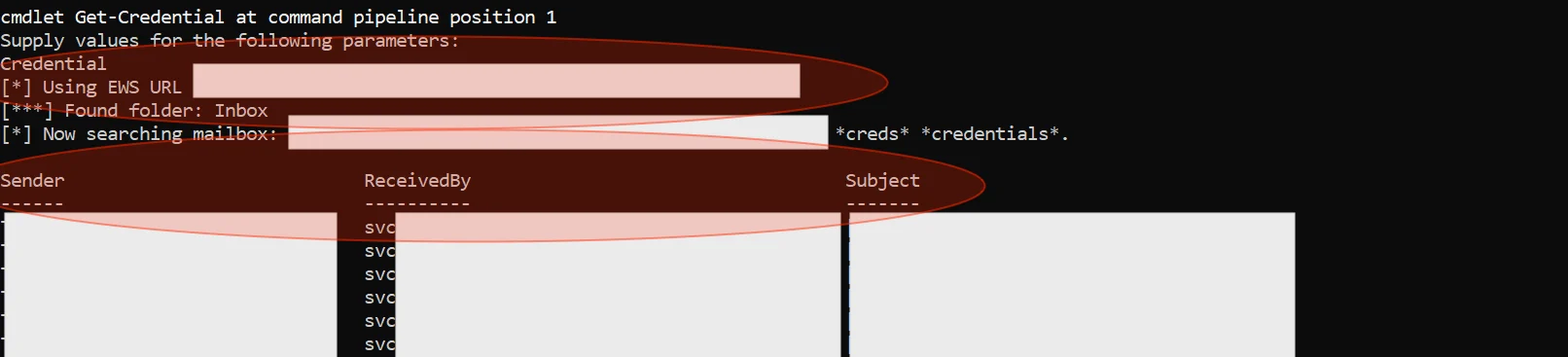
When everything is correct, the tool reports that it found an Inbox folder:
[*] Trying Exchange version Exchange2010

cmdlet Get-Credential at command pipeline position 1
Supply values for the following parameters:
Credential
[*] Using EWS URL https://mail.domain.tld/EWS/Exchange.asmx
[***] Found folder: Inbox
[*] Now searching mailbox: [redacted] for the terms *password* *creds* *credentials*.
The tool resolves the Exchange version, builds the EWS URL https://mail.domain.tld/EWS/Exchange.asmx, finds the Inbox folder and searches the mailbox for the terms *password*, *creds* and *credentials*. The inbox was read successfully.
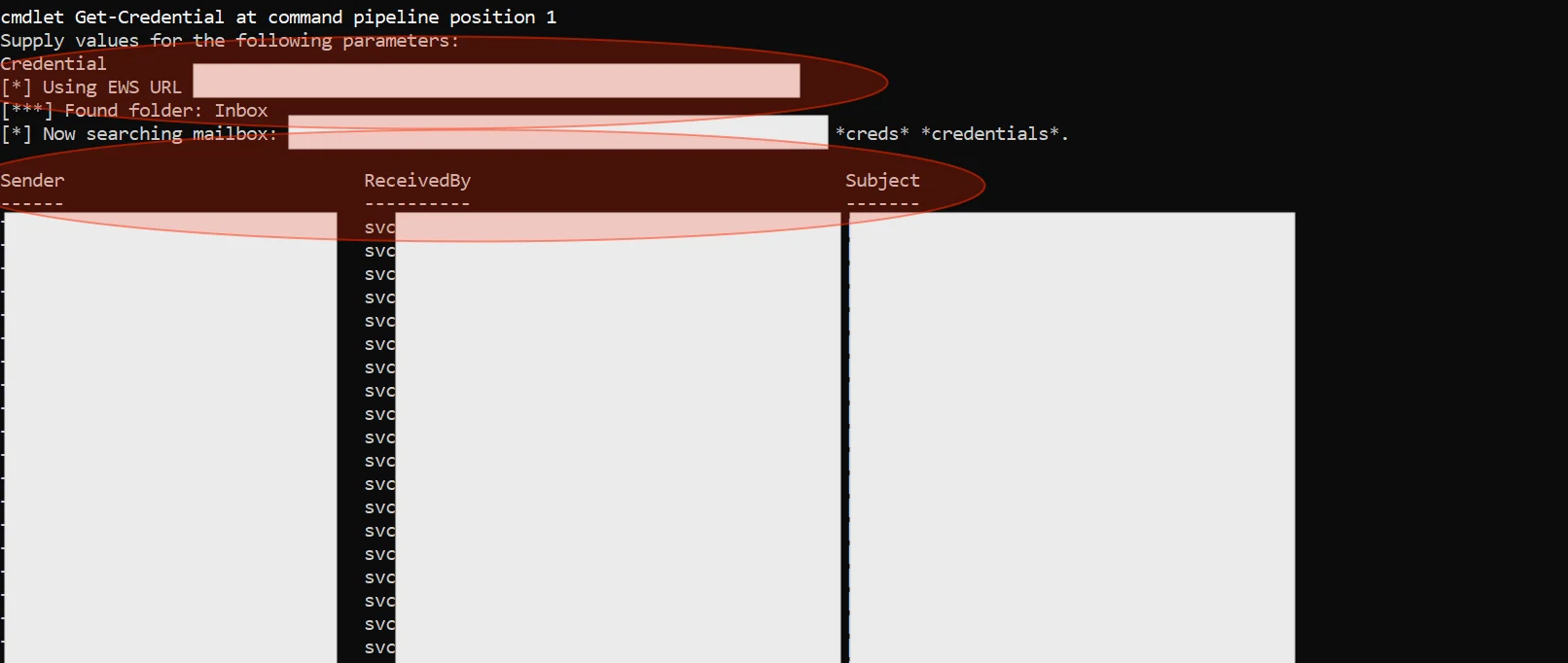
Step 7: review the results
After a few minutes, depending on how many emails match the keywords, results come back. In this case the material relating to password, creds or credentials was social media information. To confirm the result was genuine, the author logged in to that social media service with the same account and password. The credentials were correct, but the service's behaviour protection asked for the correct phone number, which is expected when logging in from a different country.

Step 8: assess escalation without executing it
The account could not be used for VPN access and gave no path into the internal network, so the author looked for further impact in the MailSniper research. The premise is a common mistake with multiple service accounts: the same password may be reused for another service account or another account the owner manages. If the Global Address List can be dumped, other service accounts with the same naming pattern can be identified, and password spraying can be run against all of them with the single found password. Only that one password would be tested, because the author believes the enterprise has rate-limit protection.
The two references are Abusing Exchange Mailbox Permissions with MailSniper, where the way to dump the Global Address List is in the Invoke-OpenInboxFinder section, and Attacking Exchange with MailSniper, which notes that the EWS password spraying method is significantly faster: Invoke-PasswordSprayOWA and Burp Intruder with 15 threads each took about 1 hour and 45 minutes to spray 10,000 users, while spraying the same list against EWS took 9 minutes and 28 seconds.
The author did not execute the dump or the spraying, because doing so without permission is not acceptable in bug hunting, even though a real attacker would not ask.
Step 9: consider a social engineering variant
A further scenario is for an external attacker to combine the issue with social engineering: pose as the owner of the found account, communicate with the victim through email spoofing on the target.tld domain, build a relationship with the internal team, and persuade them to enrol the account with an MFA device or phone number the attacker controls, giving full access. The author is not sure how effective this is but considers it worth weighing as a risk.
Root cause
MFA was enforced at the ADFS endpoint, but not on the EWS endpoint. The account was valid and its password was exposed in a public repository, so the only remaining barrier was the second factor, and EWS did not ask for one. As the program owner explained, this is a deployment gap: the identity provider is protected while another Exchange endpoint is left out of the policy. The author's quoted research puts it more generally: two-factor authentication does not apply to EWS or to NTLM authentication on the Autodiscover page.
The credentials themselves leaked because a developer hardcoded a service account username and password in source code in a repository found on GitHub. The author's working heuristic, that credentials are not always behind obvious parameter names, is what led to reading past the search results and into the file.
Impact
With a valid domain account and an EWS endpoint outside the MFA policy, an attacker can authenticate and read the mailbox contents, including any credentials or sensitive material stored in email, without enrolling in or possessing the second factor. In this case the mailbox yielded social media credentials, which were confirmed valid against the external service.
The author argues the same access could allow dumping the Global Address List and then spraying the single found password across other service accounts, which would widen the compromise. That step was described as a possibility and was not executed. The account gave no VPN or internal network access, and the social engineering path to full account takeover is presented as a scenario whose effectiveness is uncertain.
Fix
The report was triaged and rewarded in one day and fixed in the next day. The author does not describe the specific change made. The measure the finding points to is enforcing the same MFA policy on EWS and other Exchange endpoints as on ADFS, so that a valid password alone is not enough to reach mailbox data.

Variants to test
- Search GitHub for the organisation's other TLD and for credential-shaped strings, not only for obvious parameter names. A positive result is a repository containing a username and password pair that authenticates against the identity provider or another exposed endpoint.
- Take any valid low-privilege domain account and try it directly against the EWS path on the mail subdomain, for example
https://mail.domain.tld/EWS/Exchange.asmx, instead of the OWA login. A positive result is a login prompt that accepts the credentials without an MFA challenge. - Enumerate
mail,emailandwebmailsubdomains for both TLDs and check whether each redirects to ADFS or serves EWS directly. A positive result is an endpoint that does not redirect to the MFA-protected identity provider. - With EWS access confirmed, run
Invoke-SelfSearchagainst the mailbox for terms such aspassword,credsandcredentials. A positive result is mailbox content containing reusable credentials. - Where permission exists, dump the Global Address List and compare service account naming patterns, then spray only the single known password. A positive result is another service account accepting the same password.
Lessons learned
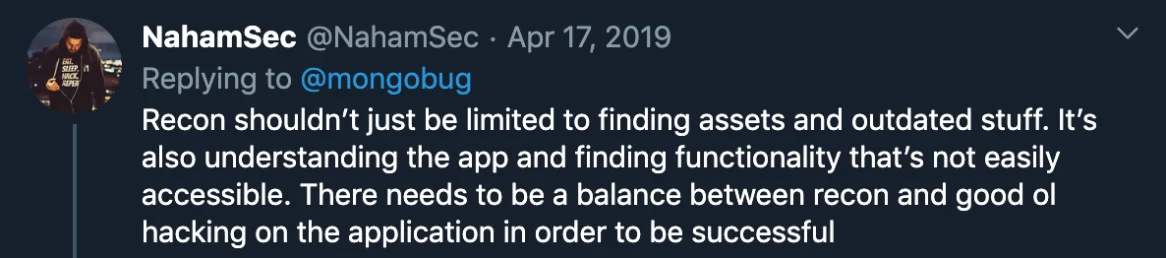
The author's closing points are about method rather than tooling. Recon is not only asset discovery: it is also learning how the API works and how the target's development culture operates, and there needs to be a balance between recon and direct testing of the application. Every line of a repository found during GitHub recon is worth reading, or at least skimming for parameters and flow. Credentials are not always behind parameters. Testing legal, official targets, including ones that offer only responsible disclosure, builds familiarity with technologies that do not appear in everyday work. And going back to basics is often what moves a stuck assessment forward.

What happened, in plain words
A security researcher found a username and password for a company account sitting in a public code repository on GitHub. The company's main login page was protected by a second check beyond the password, called multi-factor authentication (MFA), so the password alone was not enough to get in. But the company ran a second, older way of reaching the same mailboxes, called Exchange Web Services (EWS), and that door did not ask for the second check. Using the found password at that door, the researcher could read the account's email inbox. The company triaged and rewarded the report the same day and fixed the problem the next day.
This article walks through the whole story for someone who has never done security testing. Every technical word is explained the first time it appears, and there is a glossary at the end.
Background: what the target was
The target was a website that offered two ways to sign in:
- As an employee, using a company (domain) account.
- As a user whose account was created specifically for that website.
When you choose the employee option, the website sends your browser to a different login page, hosted on a different top-level domain (TLD). A TLD is the last part of a web address, such as .com or .net. In this case the redirect went from a .com address to a .net address. That second login page is an ADFS endpoint. ADFS (Active Directory Federation Services) is Microsoft software that acts as a central identity checkpoint: instead of every application checking passwords itself, the application trusts ADFS to do it. Think of it like a building where every office door sends you to one shared reception desk to show your badge.
The practical conclusion the author drew was simple: if you have a valid company account, you can get into the application.
The application itself was not the final goal. The goal was to reach the company's email data. That data lives on Microsoft Exchange, the mail server software many organisations use. Exchange offers a web-based API called Exchange Web Services (EWS).
An API (Application Programming Interface) is a way for one piece of software to talk to another, like a service counter at a shop: you hand over a request in a fixed format and get an answer back, without going into the back room yourself. EWS is a web-based API enabled on Exchange servers that Microsoft recommends for client applications that need to interface with Exchange. It lets applications interact with email messages, contacts, calendar and more from a user's mailbox.
The author quotes Beau Bullock's research for that definition, and quotes Nick Landers' DerbyCon talk for the key property: two-factor authentication does not apply to EWS or to the NTLM authentication on the Autodiscover page. In plain words: the front door has a second lock, but a side door into the same building does not.
In the program owner's own explanation, even when ADFS is protected by MFA, the system owner sometimes forgets to enforce MFA on other endpoints, in this case EWS. An endpoint is simply one addressable service on a server: a specific URL that accepts requests.
The tools used
- GitHub search for credentials, following the approach in Th3g3nt3lman's Github Recon and Sensitive Data Exposure talk. GitHub is a website where developers store and share source code; much of it is public, and anyone can search it.
- Sudomy, the subdomain enumeration tool by Screetsec. Subdomain enumeration means finding the smaller names that sit under a main domain, such as
mail.example.comunderexample.com. It is like listing every labelled door in a large building instead of only the main entrance. - MailSniper, downloaded from
https://github.com/dafthack/MailSniper, run from PowerShell. PowerShell is Microsoft's command-line tool for Windows: you type commands instead of clicking buttons. MailSniper is a collection of ready-made commands for searching and reading Exchange mailboxes. - Black Hills Infosec research on bypassing two-factor authentication on OWA and Office365 portals, and the related MailSniper research on mailbox permissions and password spraying. OWA (Outlook Web Access) is the normal webmail page where a person reads email in a browser. Password spraying means trying one single password against many accounts, rather than many passwords against one account, so that account lockouts are avoided.
The precondition for the whole chain was a valid company account whose password was found in a public repository, and an EWS endpoint that did not enforce the MFA applied at ADFS. The account found was a service account, named in the report with the pattern svc_nameofsvc. A service account is an account created for software to use, not for a person; it often has broad access and its password is rarely changed.
Finding it
The author first tried some common weak passwords against the application's login, without success.
Switching to the employee login path showed the redirect to ADFS on the other TLD. That reframed the problem: find a company account, and the application is reachable. Instead of guessing passwords at the front door, look for a real password that leaked somewhere.
A first GitHub recon pass turned up an interesting repository and led to a finding that was triaged and rewarded in two days; the author does not discuss that finding in the article.
After two further small issues, the author returned to GitHub and searched with the keyword password ".target.net", using the .net domain rather than .com. The previously found repository had been removed, and the new search returned a repository ranked fifth on the first page.
The search results themselves contained no password information. The reasoning that kept the author going was that credentials are not always placed behind parameters, so the repository was worth exploring anyway. A parameter here means an obviously named field such as password= or api_key=; the point is that a password can sit in a line of code without any such label.
Exploitation
Step 1: read the repository and extract the credentials
The repository held more than 3,000 lines of code. Lines 6 to 27 described an AD account and a connection string, but contained no credentials. AD (Active Directory) is Microsoft's directory of user accounts for a company network. A connection string is a line of text that tells a program how to connect to a database or service.
At line 394 the author found two strings that looked like credentials, on the basis that no developer would invent parameters that difficult:
string Table = "file.xlsx";
XYZEndpoint endpoint = new XYZEndpoint("username_here", "very_complex_password_here");
string response = endpoint.GetCollectionData(Table);
Line by line:
string Table = "file.xlsx";declares a piece of text (a string) calledTableand sets it to the filenamefile.xlsx. This is just a spreadsheet name; it is not a secret.XYZEndpoint endpoint = new XYZEndpoint("username_here", "very_complex_password_here");creates an object that represents a connection to some service, and hands it two values in quotes. In code like this, the first quoted value is almost always the username and the second the password. The author's judgement was that nobody would make up such a complicated value unless it had to work for real.string response = endpoint.GetCollectionData(Table);asks that connection to fetch data from the spreadsheet and stores the answer inresponse.
The two arguments to the endpoint constructor are the username and password. The author's assumption that the developer had hardcoded credentials in the repository turned out to be correct. Hardcoded means the value is typed directly into the source code instead of being stored safely elsewhere, so anyone who can read the code can read the secret.
Step 2: try the credentials at ADFS
Logging in at the ADFS endpoint on the .net domain with the found account did not give access. The account was not enrolled on the MFA in use. Enrolment is the setup step where a person registers their second factor, such as a phone app or a hardware key, with the login system. The author deliberately removed the name of the MFA product from the report to avoid it being read as a vendor vulnerability; it is not one.
Step 3: try other entry points
The author then tried other endpoints, such as VPN services, and tested about three VPN endpoints. A VPN (Virtual Private Network) is a service that lets a remote computer join a company's internal network as if it were inside the building. None of them allowed a login with the account. At this point at least more than four attempts had been made from the author's country, and an alarm was expected to trigger. Security teams watch for repeated failed logins from unusual locations; each extra attempt raises the chance of being blocked or noticed.
Step 4: enumerate subdomains for an EWS endpoint
The author did not yet know whether an EWS misconfiguration existed on the target, so ran subdomain enumeration with Sudomy. The common implementation is to place EWS on a mail, email or webmail subdomain, and the enumeration confirmed a mail subdomain.
Visiting mail.target.com redirected to the ADFS endpoint on the .net TLD, the same MFA-protected path as before. On the second attempt the author placed the EWS path behind mail.target.com, and the endpoint returned a login prompt instead of the ADFS redirect. In other words, the same hostname behaved differently depending on which path was requested: the normal webmail path bounced to the MFA-protected desk, while the EWS path asked for a username and password directly.
Step 5: log in to EWS with the found credentials
Entering the found credentials at that prompt succeeded. The login completed without any MFA prompt and without the account being enrolled with the MFA used elsewhere. No inbox is displayed at this point, because this is EWS rather than OWA: EWS is a machine-facing API, so it answers with data rather than a web page with folders and messages.
Step 6: read the inbox with MailSniper
MailSniper was downloaded and PowerShell started. The commands executed were:
C:\Users\YoKo\Tools> powershell.exe -exec bypass
Windows PowerShell
Copyright (C) Microsoft Corporation. All rights reserved.

Try the new cross-platform PowerShell https://aka.ms/pscore6

PS C:\Users\YoKo\Tools> cd .\MailSniper-master\
PS C:\Users\YoKo\Tools\MailSniper-master> Import-Module .\MailSniper.ps1
PS C:\Users\YoKo\Tools\MailSniper-master> Invoke-SelfSearch -Mailbox [redacted] -ExchHostname mail.domain.tld -Remote
Line by line:
C:\Users\YoKo\Tools> powershell.exe -exec bypassstarts PowerShell. The-exec bypasspart tells it to ignore the machine's script execution policy, a setting that normally restricts which scripts may run. This is a standard step when running security tools on your own machine.- The next lines are just PowerShell's banner and version notice, printed automatically.
PS C:\Users\YoKo\Tools> cd .\MailSniper-master\changes the current folder to the downloaded MailSniper folder.cdmeans change directory.PS C:\Users\YoKo\Tools\MailSniper-master> Import-Module .\MailSniper.ps1loads the MailSniper script file into the current session, which makes its commands available. A module is a bundle of extra commands you load on demand.PS C:\Users\YoKo\Tools\MailSniper-master> Invoke-SelfSearch -Mailbox [redacted] -ExchHostname mail.domain.tld -Remoteruns the search.-Mailboxnames the mailbox to search,-ExchHostnamenames the Exchange server to talk to, and-Remotesays to connect over the network rather than to a local installation.
Two commands matter: Import-Module .\MailSniper.ps1 loads the module, and Invoke-SelfSearch -Mailbox [redacted] -ExchHostname mail.domain.tld -Remote searches the mailbox through the remote Exchange host. After the second command a credential box pops up asking for the credentials of [redacted]; the same credentials are typed again. The pop-up is Windows asking for a username and password in a small dialog, the same kind of box you see when a program needs you to sign in.
When everything is correct, the tool reports that it found an Inbox folder:
[*] Trying Exchange version Exchange2010

cmdlet Get-Credential at command pipeline position 1
Supply values for the following parameters:
Credential
[*] Using EWS URL https://mail.domain.tld/EWS/Exchange.asmx
[***] Found folder: Inbox
[*] Now searching mailbox: [redacted] for the terms *password* *creds* *credentials*.
Line by line:
[*] Trying Exchange version Exchange2010shows the tool guessing which version of Exchange it is talking to, because different versions answer slightly differently.cmdlet Get-Credential at command pipeline position 1and the two lines after it are PowerShell announcing that it is about to ask for a username and password. A cmdlet is simply a built-in PowerShell command.[*] Using EWS URL https://mail.domain.tld/EWS/Exchange.asmxshows the exact address the tool is using.Exchange.asmxis the standard EWS entry point on an Exchange server.[***] Found folder: Inboxconfirms the login worked and the mailbox is readable.[*] Now searching mailbox: [redacted] for the terms *password* *creds* *credentials*.shows the keywords being searched for. The asterisks are wildcards meaning "anything before or after", so*password*matches any message containing the word password anywhere.
The tool resolves the Exchange version, builds the EWS URL https://mail.domain.tld/EWS/Exchange.asmx, finds the Inbox folder and searches the mailbox for the terms *password*, *creds* and *credentials*. The inbox was read successfully.
Step 7: review the results
After a few minutes, depending on how many emails match the keywords, results come back. In this case the material relating to password, creds or credentials was social media information. To confirm the result was genuine, the author logged in to that social media service with the same account and password. The credentials were correct, but the service's behaviour protection asked for the correct phone number, which is expected when logging in from a different country. That protection is the social network noticing an unfamiliar location and asking for an extra confirmation.
Step 8: assess escalation without executing it
The account could not be used for VPN access and gave no path into the internal network, so the author looked for further impact in the MailSniper research. The premise is a common mistake with multiple service accounts: the same password may be reused for another service account or another account the owner manages. If the Global Address List can be dumped, other service accounts with the same naming pattern can be identified, and password spraying can be run against all of them with the single found password. The Global Address List is the company-wide address book inside Exchange, listing every mailbox and often every account. Dumping it means downloading the whole list at once.
Only that one password would be tested, because the author believes the enterprise has rate-limit protection. A rate limit is a cap on how many attempts a system accepts in a period; exceeding it usually triggers a block.
The two references are Abusing Exchange Mailbox Permissions with MailSniper, where the way to dump the Global Address List is in the Invoke-OpenInboxFinder section, and Attacking Exchange with MailSniper, which notes that the EWS password spraying method is significantly faster: Invoke-PasswordSprayOWA and Burp Intruder with 15 threads each took about 1 hour and 45 minutes to spray 10,000 users, while spraying the same list against EWS took 9 minutes and 28 seconds. Burp Intruder is a tool that sends many variations of a request automatically; threads are parallel workers, so 15 threads means 15 attempts at a time.
The author did not execute the dump or the spraying, because doing so without permission is not acceptable in bug hunting, even though a real attacker would not ask. This is the difference between testing within agreed rules and actually attacking.
Step 9: consider a social engineering variant
A further scenario is for an external attacker to combine the issue with social engineering. Social engineering means manipulating people rather than machines: pretending to be someone trustworthy to get a person to do something. The attacker would pose as the owner of the found account, communicate with the victim through email spoofing on the target.tld domain, build a relationship with the internal team, and persuade them to enrol the account with an MFA device or phone number the attacker controls, giving full access. Email spoofing means sending a message that appears to come from an address the sender does not actually own. The author is not sure how effective this is but considers it worth weighing as a risk.
Root cause
MFA was enforced at the ADFS endpoint, but not on the EWS endpoint. The account was valid and its password was exposed in a public repository, so the only remaining barrier was the second factor, and EWS did not ask for one. As the program owner explained, this is a deployment gap: the identity provider is protected while another Exchange endpoint is left out of the policy. The author's quoted research puts it more generally: two-factor authentication does not apply to EWS or to NTLM authentication on the Autodiscover page. NTLM is an older Microsoft authentication method; Autodiscover is the Exchange feature that lets mail programs find the right server settings automatically.
The credentials themselves leaked because a developer hardcoded a service account username and password in source code in a repository found on GitHub. Committing means saving a change into the code repository's history, which for a public repository means publishing it. The author's working heuristic, that credentials are not always behind obvious parameter names, is what led to reading past the search results and into the file.
Impact
With a valid company account and an EWS endpoint outside the MFA policy, an attacker can authenticate and read the mailbox contents, including any credentials or sensitive material stored in email, without enrolling in or possessing the second factor. In this case the mailbox yielded social media credentials, which were confirmed valid against the external service.
The author argues the same access could allow dumping the Global Address List and then spraying the single found password across other service accounts, which would widen the compromise. That step was described as a possibility and was not executed. The account gave no VPN or internal network access, and the social engineering path to full account takeover is presented as a scenario whose effectiveness is uncertain.
Fix
The report was triaged and rewarded in one day and fixed in the next day. Triaged means the receiving team reviewed the report, confirmed it was real and assigned it for handling. The author does not describe the specific change made. The measure the finding points to is enforcing the same MFA policy on EWS and other Exchange endpoints as on ADFS, so that a valid password alone is not enough to reach mailbox data. Rotating a password means replacing it with a new one, so the old leaked value stops working.
Variants to test
- Search GitHub for the organisation's other TLD and for credential-shaped strings, not only for obvious parameter names. A positive result is a repository containing a username and password pair that authenticates against the identity provider or another exposed endpoint.
- Take any valid low-privilege company account and try it directly against the EWS path on the mail subdomain, for example
https://mail.domain.tld/EWS/Exchange.asmx, instead of the OWA login. A positive result is a login prompt that accepts the credentials without an MFA challenge. - Enumerate
mail,emailandwebmailsubdomains for both TLDs and check whether each redirects to ADFS or serves EWS directly. A positive result is an endpoint that does not redirect to the MFA-protected identity provider. - With EWS access confirmed, run
Invoke-SelfSearchagainst the mailbox for terms such aspassword,credsandcredentials. A positive result is mailbox content containing reusable credentials. - Where permission exists, dump the Global Address List and compare service account naming patterns, then spray only the single known password. A positive result is another service account accepting the same password.
Lessons learned
The author's closing points are about method rather than tooling. Recon is not only asset discovery: it is also learning how the API works and how the target's development culture operates, and there needs to be a balance between recon and direct testing of the application. Every line of a repository found during GitHub recon is worth reading, or at least skimming for parameters and flow. Credentials are not always behind parameters. Testing legal, official targets, including ones that offer only responsible disclosure, builds familiarity with technologies that do not appear in everyday work. Responsible disclosure is a programme where a company invites reports of security problems but does not pay a reward. And going back to basics is often what moves a stuck assessment forward.
Glossary
- AD (Active Directory): Microsoft's directory of user accounts and permissions for a company network.
- ADFS (Active Directory Federation Services): Microsoft software that acts as a central login checkpoint, so applications trust it to check passwords instead of doing it themselves.
- API (Application Programming Interface): a fixed way for one program to request data or actions from another, like a service counter.
- Autodiscover: the Exchange feature that lets mail programs find the correct server settings automatically.
- Bounty: a payment a company makes for a valid security report.
- Burp Intruder: a tool that automatically sends many variations of a request.
- Cmdlet: a built-in PowerShell command.
- Commit: to save a change into a code repository's history; in a public repository this publishes it.
- Connection string: a line of text telling a program how to connect to a database or service.
- Credentials: a username and password pair.
- Dump: to download a whole set of data at once.
- Endpoint: one addressable service on a server, reached at a specific URL.
- Enrolment: the setup step where a person registers their second factor with the login system.
- EWS (Exchange Web Services): a web-based API on Exchange servers for reading mail, contacts and calendars programmatically.
- Global Address List: the company-wide address book inside Exchange, listing mailboxes and often accounts.
- Hardcoded: a value typed directly into source code instead of stored safely elsewhere.
- Identity provider: the system that checks who you are on behalf of other applications, here ADFS.
- MailSniper: a collection of PowerShell commands for searching and reading Exchange mailboxes.
- MFA (multi-factor authentication): a login that requires a second proof beyond the password, such as a phone app or hardware key.
- Module: a bundle of extra commands loaded into a shell on demand.
- NTLM: an older Microsoft authentication method.
- OWA (Outlook Web Access): the normal webmail page where a person reads email in a browser.
- Parameter: a named input to a program or URL, such as
password=. - Password spraying: trying one password against many accounts, rather than many passwords against one account.
- PowerShell: Microsoft's command-line tool for Windows.
- Rate limit: a cap on how many attempts a system accepts in a period.
- Recon (reconnaissance): gathering information about a target before testing it.
- Responsible disclosure: a programme where a company invites security reports but does not pay a reward.
- Rotate: to replace a password or key with a new one so the old value stops working.
- Service account: an account created for software to use rather than a person.
- Social engineering: manipulating people rather than machines to get access.
- Spoofing: making a message appear to come from an address the sender does not own.
- String: a piece of text in programming.
- Subdomain: a smaller name under a main domain, such as
mail.example.comunderexample.com. - Subdomain enumeration: finding all the subdomains that exist for a domain.
- Sudomy: a subdomain enumeration tool by Screetsec.
- Threads: parallel workers in a tool, so 15 threads means 15 attempts at a time.
- TLD (top-level domain): the last part of a web address, such as
.comor.net. - Triaged: reviewed and confirmed as real by the receiving team.
- VPN (Virtual Private Network): a service that lets a remote computer join a company's internal network.
- Wildcard: a symbol such as
*that matches any characters before or after a search term.