Reflected XSS di Halaman Login Pemerintah Kabupaten [REDACTED] via Parameter p
The login page reflected the URL parameter p into the HTML response without proper output encoding, so an attacker could inject HTML and JavaScript. A crafted link would run script in a victim's browser, allowing session cookie theft, phishing, defacement or redirection.
 Published on icikiwirsol.medium.com
Bug Hunter
The full write-up lives on its author's site
It belongs to its author, so we link to it rather than copy it. The other two tabs are our own rewrites, checked against it.
Context
The target is the public service portal of Pemerintah Kabupaten [REDACTED], a local government in Indonesia. The researcher, Primandito Adi Setiya, was testing the login page at the following path:
The feature involved is the login page itself. The report does not describe what the p parameter normally does on that page; it only states that the application takes input from the URL parameter p and reflects it back into the HTML response.
The vulnerability is a Reflected Cross-Site Scripting (XSS) issue. The researcher rates it Medium severity. The report gives no CVSS score and no formal weakness classification beyond the XSS label.
Setup
The report does not mention any accounts, roles, tools or software versions. The only precondition is that the login page is reachable and that the p parameter is reflected into the response. Testing was done on 12 November 2025.
Finding it
While testing the login page, the researcher noticed that the value of the p parameter was echoed back into the HTML page without proper sanitisation. Because the input was reflected into the HTML body, it looked like a candidate for reflected XSS: if the reflection is not output-encoded, an attacker can break out of the surrounding context and inject markup.
To check whether a basic filter was in place, the researcher used a mixed-case trick, writing the tag as <sCrIpT> rather than <script>. The reasoning given is that a naive sanitiser might block the lowercase <script> tag directly while letting the mixed-case form through.
Exploitation
Step 1: Identify the target
Open the login page:
Step 2: Inject the payload
Insert the following payload into the p parameter of the URL:
"><sCrIpT>alert(1)</sCrIpT>
The payload starts with ">, which is intended to close an existing attribute value and the surrounding tag so that the following <sCrIpT> element is parsed as markup rather than as text. The mixed-case tag name is the filter-evasion trick described above. alert(1) is the proof-of-execution call.
The report notes that the payload is encoded in the URL as:
?p=%22%3E%3CsCrIpT%3Ealert(1)%3C/sCrIpT%3E
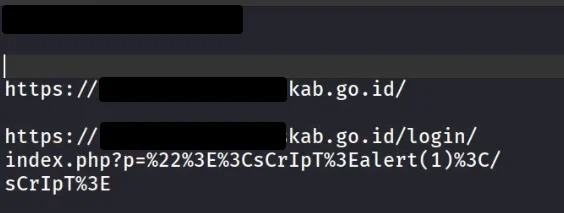
The screenshot shows the payload being placed into the p parameter of the URL.
Step 3: Execution and verification
When the crafted URL is opened, the browser processes the reflected payload. A pop-up alert box displaying the number "1" appears, which confirms that the injected JavaScript executed in the page context.
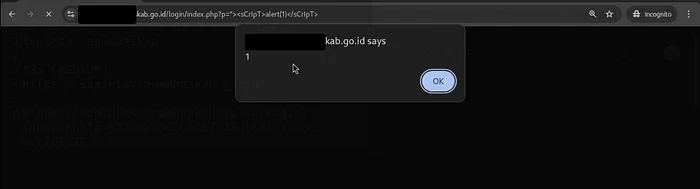
The screenshot shows the alert box with "1" after the URL is loaded.
Step 4: Post-fix verification
After the report was submitted, the affected party appears to have fixed the issue silently. Accessing the same URL with the same payload is now blocked with an HTTP 403 Forbidden response.
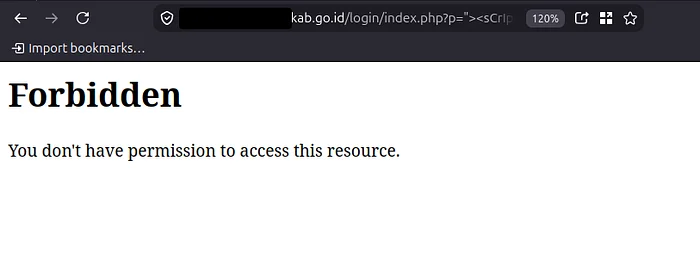
The screenshot shows the 403 Forbidden response returned for the previously working payload URL.
Root cause
The application accepts input from the URL parameter p and reflects it into the HTML response without proper output encoding. Because the value is written into the page as markup rather than as encoded text, the "> sequence in the payload can terminate the surrounding attribute and tag, and the injected <sCrIpT> element is then parsed and executed by the browser.
The researcher used a mixed-case tag in case a basic sanitiser blocked the lowercase <script> string. The mixed-case form <sCrIpT> was used in case such a filter was present.
Impact
The report lists four ways an attacker could use the vulnerability:
- Cookie/session theft: steal session cookies from a logged-in user, leading to account takeover.
- Phishing: manipulate the login page's appearance to trick users into entering credentials.
- Defacement: temporarily alter the page's appearance.
- Malicious redirect: send users to an attacker-controlled site.
The report does not demonstrate any of these impacts beyond the alert(1) proof of concept.
Fix
The report states that the issue was fixed silently: the same payload URL now returns HTTP 403 Forbidden.
The report recommends three measures:
- Output encoding: apply HTML entity encoding to
<,>,",'and&on all input that is reflected into HTML pages. - Input validation: restrict the characters allowed in URL parameters and reject suspicious input.
- Content Security Policy (CSP): deploy a strong CSP to mitigate the impact of XSS if it occurs.
Variants to test
- Different HTML contexts: if the reflection lands inside an attribute, a
<script>tag, or a JavaScript string, try context-appropriate breakouts such as"><img src=x onerror=alert(1)>or';alert(1)//. A positive result is an alert box or other JavaScript execution. - Case and encoding variations: if a lowercase
<script>is blocked, try mixed case (<sCrIpT>), nested or malformed tags, or HTML entity encoding of the angle brackets. A positive result is execution despite the filter. - Other reflected parameters: test other URL parameters on the same page and on other pages of the same application for the same reflection behaviour. A positive result is any parameter whose value is echoed unencoded into the HTML.
- Event-handler payloads: try attributes such as
onerror,onloadoronfocuson injected elements. A positive result is execution without a<script>tag, which bypasses filters that only block script tags. - Post-fix regression: re-test the original payload and its encoded form after a fix to confirm the block is consistent, and check whether other payload variants still execute. A positive result is any payload that still runs.
What happened, in plain words
A security researcher was looking at the login page of a local government website in Indonesia, the public service portal of Pemerintah Kabupaten [REDACTED]. While testing that page, he found that one part of the web address, a parameter called p, was being copied straight back into the page without being cleaned first. That let him make the page run a small piece of JavaScript of his own choosing. This kind of flaw is called Reflected Cross-Site Scripting, or XSS for short.
To show it worked, he made the page pop up a box with the number "1" in it. That is the classic harmless proof that code you supplied actually ran in someone else's browser. He rated the issue Medium severity. The report gives no CVSS score and no formal weakness classification beyond the XSS label.
He reported it on 12 November 2025. The site was later fixed quietly, without any reply to him, and the same crafted link now returns an HTTP 403 Forbidden error. He re-checked on 5 October 2026 and published the write-up as a portfolio piece.
A few words before we start, because they come up constantly:
- A URL parameter is the part of a web address after a question mark, like
?p=hello. It is a way of passing a small piece of information to the page. Think of it as a note you hand to the page along with the address. - HTML is the language web pages are written in. It is made of tags such as
<script>, which tells the browser "run the code between these tags". - JavaScript is the programming language browsers understand. It is what makes pages interactive, and it is also what attackers try to get a page to run.
- A cookie is a small piece of data a website stores in your browser so it can recognise you on the next request, for example to keep you logged in. If someone can read your cookies, they may be able to act as you.
- Sanitising or encoding input means converting dangerous characters into harmless text before showing them on a page, so the browser displays them instead of treating them as instructions.
The target and the feature
The target is the public service portal of Pemerintah Kabupaten [REDACTED], a local government in Indonesia. The researcher, Primandito Adi Setiya, was testing the login page at this path:
Line by line: https:// means the connection is encrypted. redacted.redactedkab.go.id is the site's address; the .go.id ending is used by Indonesian government bodies. /login/index.php is the file that serves the login page. index.php is a common name for the main script of a folder, written in the PHP language.
The feature involved is the login page itself. The report does not describe what the p parameter normally does on that page; it only states that the application takes input from the URL parameter p and reflects it back into the HTML response. "Reflects" here means the page takes your value and writes it into the page it sends back to you, like a mirror.
The vulnerability is a Reflected Cross-Site Scripting (XSS) issue. In plain terms: the page repeats something you typed, and if it repeats it without cleaning it, your text can stop being text and start being instructions the browser obeys. The researcher rates it Medium severity.
Setup
The report does not mention any accounts, roles, tools or software versions. The only precondition is that the login page is reachable and that the p parameter is reflected into the response. Testing was done on 12 November 2025.
Finding it
While testing the login page, the researcher noticed that the value of the p parameter was echoed back into the HTML page without proper sanitisation. Because the input was reflected into the HTML body, it looked like a candidate for reflected XSS: if the reflection is not output-encoded, an attacker can break out of the surrounding context and inject markup.
"Breaking out of the context" needs a quick picture. Imagine the page's HTML contains something like value="...", where the dots are where your input lands. Your input sits inside quotation marks, inside a tag. If you type ordinary text, it stays text. But if you type a " character, you close the quotation marks early, and if you then type >, you close the tag itself. Everything after that is read by the browser as fresh HTML, not as part of the original value. That is the breakout.
To check whether a basic filter was in place, the researcher used a mixed-case trick, writing the tag as <sCrIpT> rather than <script>. The reasoning given is that a naive sanitiser might block the lowercase <script> tag directly while letting the mixed-case form through. HTML tag names are not case-sensitive, so the browser treats <sCrIpT> exactly like <script>, but a simple text-matching filter might not.
Exploitation
Step 1: Identify the target
Open the login page:
This step is just about knowing where you are. Before trying anything, you load the page normally and confirm it exists and behaves as expected. The reason to start here is that you cannot test a reflection until you know which page reflects your input.
Step 2: Inject the payload
Insert the following payload into the p parameter of the URL:
"><sCrIpT>alert(1)</sCrIpT>
Line by line, in plain words:
"closes whatever quotation mark the page had opened around your value.>closes the HTML tag that the quotation mark belonged to.<sCrIpT>opens a script tag. The browser now expects JavaScript until the closing tag.alert(1)is the JavaScript instruction: show a pop-up box containing the number 1. It does nothing harmful; it is only proof that code ran.</sCrIpT>closes the script tag.
The payload starts with ">, which is intended to close an existing attribute value and the surrounding tag so that the following <sCrIpT> element is parsed as markup rather than as text. The mixed-case tag name is the filter-evasion trick described above. alert(1) is the proof-of-execution call.
The report notes that the payload is encoded in the URL as:
?p=%22%3E%3CsCrIpT%3Ealert(1)%3C/sCrIpT%3E
Why the strange characters? A URL cannot contain spaces or many punctuation marks safely, so browsers replace them with a percent sign and two hexadecimal digits. %22 is ", %3E is >, %3C is <. This is called URL encoding, and it is automatic: you type the payload, the browser encodes it when it sends the request. The server decodes it back to the original characters before using it, which is why the payload still works.
The screenshot shows the payload being placed into the p parameter of the URL.
Step 3: Execution and verification
When the crafted URL is opened, the browser processes the reflected payload. A pop-up alert box displaying the number "1" appears, which confirms that the injected JavaScript executed in the page context.
"In the page context" means the code ran as if it were part of the government site itself. It can therefore read what the site can read in that browser tab, which is why this matters beyond a silly pop-up.
The screenshot shows the alert box with "1" after the URL is loaded.
Step 4: Post-fix verification
After the report was submitted, the affected party appears to have fixed the issue silently. Accessing the same URL with the same payload is now blocked with an HTTP 403 Forbidden response.
HTTP status codes are the web's short answers to a request. 200 means "here is the page". 403 means "I understood you, but I refuse". Seeing 403 instead of the page with the pop-up is the evidence that the payload URL is now blocked.
The screenshot shows the 403 Forbidden response returned for the previously working payload URL.
Root cause
The application accepts input from the URL parameter p and reflects it into the HTML response without proper output encoding. Because the value is written into the page as markup rather than as encoded text, the "> sequence in the payload can terminate the surrounding attribute and tag, and the injected <sCrIpT> element is then parsed and executed by the browser.
The researcher used a mixed-case tag in case a basic sanitiser blocked the lowercase <script> string. The mixed-case form <sCrIpT> was used in case such a filter was present.
A useful comparison: a bouncer with a list of banned faces will stop the person on the list, but not the same person wearing a hat. A proper fix is not a better list of faces; it is checking every guest properly, which in web terms means encoding every character that has special meaning in HTML.
Impact
The report lists four ways an attacker could use the vulnerability:
- Cookie/session theft: steal session cookies from a logged-in user, leading to account takeover. A session cookie is like a wristband at an event: whoever holds it is treated as the person who checked in. If your code can read it, it can be sent elsewhere and reused.
- Phishing: manipulate the login page's appearance to trick users into entering credentials. manipulate the login page's appearance to trick users into entering credentials.
- Defacement: temporarily alter the page's appearance, for example to embarrass the organisation or to spread a message.
- Malicious redirect: send users to an attacker-controlled site, for instance a fake login page that harvests passwords.
HttpOnly is a setting that hides a cookie from JavaScript; if it is set, the cookie-theft path is blocked even when XSS exists. The report does not demonstrate any of these impacts beyond the alert(1) proof of concept.
Fix
The report states that the issue was fixed silently: the same payload URL now returns HTTP 403 Forbidden.
The report recommends three measures:
- Output encoding: apply HTML entity encoding to
<,>,",'and&on all input that is reflected into HTML pages. Entity encoding replaces each special character with a safe code, so the browser shows the character instead of acting on it. It is the difference between a page that displays the word "script" and a page that runs a script. - Input validation: restrict the characters allowed in URL parameters and reject suspicious input. If
pis only ever supposed to hold a short identifier, then angle brackets and quotes have no business being there. - Content Security Policy (CSP): deploy a strong CSP to mitigate the impact of XSS if it occurs. CSP is a rule the site sends to the browser saying which sources of code are allowed. It is a seatbelt rather than a brake: it does not stop the crash, but it limits the damage.
Variants to test
Once you understand the idea, you can look for the same pattern in other shapes. These are the variants the technical write-up suggests, each with the reason behind it:
- Different HTML contexts: if the reflection lands inside an attribute, a
<script>tag, or a JavaScript string, try context-appropriate breakouts such as"><img src=x onerror=alert(1)>or';alert(1)//. A positive result is an alert box or other JavaScript execution. The reason: the characters needed to escape depend on where your input lands. - Case and encoding variations: if a lowercase
<script>is blocked, try mixed case (<sCrIpT>), nested or malformed tags, or HTML entity encoding of the angle brackets. A positive result is execution despite the filter. The reason: filters often match exact strings and miss equivalent spellings. - Other reflected parameters: test other URL parameters on the same page and on other pages of the same application for the same reflection behaviour. A positive result is any parameter whose value is echoed unencoded into the HTML. The reason: if one parameter was forgotten, others probably were too.
- Event-handler payloads: try attributes such as
onerror,onloadoronfocuson injected elements. A positive result is execution without a<script>tag, which bypasses filters that only block script tags. The reason: browsers run JavaScript from many places, not just script tags. - Post-fix regression: re-test the original payload and its encoded form after a fix to confirm the block is consistent, and check whether other payload variants still execute. A positive result is any payload that still runs. The reason: a fix that blocks one exact string may leave the underlying flaw in place.
Glossary
- XSS (Cross-Site Scripting): a flaw where a site lets an attacker's code run in another user's browser as if it were the site's own code.
- Reflected XSS: the specific kind where the malicious input is echoed straight back in the response to the same request, usually via a crafted link.
- Payload: the piece of input an attacker sends to trigger the flaw, here a short HTML and JavaScript snippet.
- Parameter: a named value passed in a URL after a question mark, such as
pin?p=.... - URL encoding: replacing characters that are not safe in a URL with
%followed by two hexadecimal digits, for example%22for". - HTML: the markup language that describes the structure of a web page.
- Tag: an HTML instruction such as
<script>or<img>that tells the browser what an element is. - Attribute: a setting inside a tag, usually written as
name="value". - JavaScript: the programming language browsers run to make pages interactive.
alert(1): a JavaScript call that opens a pop-up showing the number 1, commonly used as harmless proof that code executed.- Sanitisation: cleaning input so that dangerous characters cannot act as instructions.
- Output encoding: converting special characters such as
<,>,",'and&into safe representations before writing them into a page. - HTML entity encoding: the specific form of output encoding that replaces those characters with codes the browser displays rather than interprets.
- Filter: a check that tries to block dangerous input, often by matching known bad strings.
- Mixed-case trick: writing a tag such as
<sCrIpT>so that a filter matching lowercase<script>misses it, while the browser still treats it as a script tag. - Context: the place in the HTML where your input lands, such as inside an attribute, a tag or a script; it determines which characters let you break out.
- Cookie: a small piece of data a site stores in your browser to recognise you, often used to keep you logged in.
- Session: the period during which a site treats you as logged in, usually tracked by a session cookie.
- Session hijacking: taking over someone's logged-in session, typically by stealing their session cookie.
- Account takeover: gaining control of another person's account.
HttpOnly: a cookie setting that prevents JavaScript from reading the cookie, which limits cookie theft via XSS.- Phishing: tricking someone into entering credentials or other sensitive data on a page controlled by the attacker.
- Defacement: changing a website's appearance without permission.
- Redirect: sending the browser from one address to another.
- HTTP status code: the short numeric answer a server gives to a request, such as 200 for success or 403 for refusal.
- 403 Forbidden: the server understood the request but refuses to fulfil it.
- CSP (Content Security Policy): a rule set a site sends to the browser listing which sources of code and content are allowed.
- CVSS: a standard scoring system for rating the severity of a vulnerability; the report gives no score.
- Severity: a rough rating of how serious a flaw is, here Medium.
- PoC (proof of concept): a minimal demonstration that a flaw is real, here the pop-up showing 1.
- Silent fix: a fix applied without telling the reporter or confirming the report.
- Regression test: re-running the original test after a fix to confirm the problem is really gone and stays gone.
- Bug hunter: someone who looks for security flaws, often to report them and sometimes for a bounty.




