Reflected XSS di Portal Anggaran Pemerintah [REDACTED] via Parameter anggaran
The anggaran URL parameter was reflected into the HTML page without proper output encoding, allowing an attacker to inject an SVG element with an onload handler that executed JavaScript in the victim's browser. This could lead to session cookie theft, phishing, defacement, or redirecting users to malicious sites.
 Published on icikiwirsol.medium.com
Bug Hunter
The full write-up lives on its author's site
It belongs to its author, so we link to it rather than copy it. The other two tabs are our own rewrites, checked against it.
Context
The target is a public service portal belonging to the Government of [REDACTED], reached at the host redacted.redacted.go.id. The feature involved is the filter on the "Anggaran" (budget) page, which takes a value from the URL and reflects it back into the HTML response. The researcher, Primandito Adi Setiya, found that the value of the anggaran parameter was returned to the page without proper output encoding, which allowed a reflected cross-site scripting (XSS) payload to execute in the browser.
The write-up classifies the issue as a reflected XSS with a medium severity, with the vector being the URL parameter anggaran. The stated impact is arbitrary JavaScript execution in a victim's browser, session cookie theft and potential session hijacking. The report was fixed silently, without confirmation or reply from the affected party.
Setup
No accounts, roles, tools or versions are described. The testing was manual: the researcher opened the budget page, injected a payload into the anggaran parameter and observed the browser's behaviour. The only precondition is that the target page is reachable and that the anggaran parameter is reflected into the HTML response.
Finding it
On 13 November 2025, while doing vulnerability testing on the portal, the researcher was testing the filter feature on the "Anggaran" page. The input from the anggaran parameter was not sanitised correctly before being displayed back into the HTML page, so the value was reflected into the response without proper output encoding. That made it possible to insert HTML/JavaScript that the victim's browser would execute.
For the payload, the researcher used an <svg> tag with an onload attribute rather than a <script> or <img> tag. The reasoning given is that this is a good alternative for bypassing basic sanitisation filters that may only block <script> or <img> tags.
Exploitation
Step 1: Identify the target
The budget page is opened at the following URL:
The URL carries an id parameter and the filter value is supplied through anggaran.
Step 2: Inject the payload
The following payload is inserted into the anggaran parameter of the URL:
<svg/onload=alert(document.domain)>
The <svg> element carries an onload handler that triggers the JavaScript. alert(document.domain) is used as the proof: the dialog shows the target's domain name.
The payload is URL-encoded, giving the following query string:
?id=13&anggaran=%3Csvg%2Fonload%3Dalert(document.domain)%3E&result=1

Step 3: Execution and verification
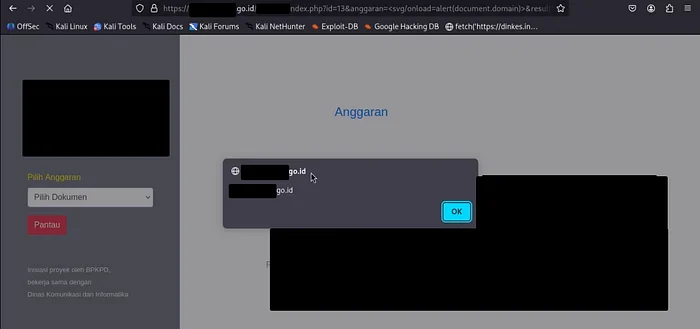
When the URL is accessed, the browser processes the reflected payload. An alert box appears showing the target's domain name (redacted.redacted.go.id), which proves that the JavaScript was executed in the context of the target origin.
Step 4: Post-fix verification
After the report, the affected party appears to have fixed the issue silently. Accessing the URL with the same payload no longer triggers JavaScript execution. This verification was carried out on 9 October 2026.
Root cause
The application accepts input from the anggaran URL parameter and reflects it into the HTML response without correct output encoding. The value is reflected into the HTML response without correct output encoding, so injected markup can execute.
The report does not describe the server-side code or any filter that was in place. The researcher chose <svg onload> as an alternative for bypassing basic sanitisation filters that may only block <script> or <img> tags; the report does not say this target had such a filter.
Impact
According to the report, an attacker can use this XSS to:
- Steal cookies/session: steal the session cookie of a logged-in user, leading to account takeover if the cookie is not set with
HttpOnly. - Phishing: manipulate the page's appearance to trick users into entering sensitive data.
- Defacement: temporarily change the appearance of the web page.
- Malicious redirect: send users to a malicious site controlled by the attacker.
The cookie-theft scenario depends on the session cookie lacking the HttpOnly flag.
Fix
The recommendations given are:
- Output encoding: always apply HTML entity encoding (converting the characters
<,>,",',&) to all input that is displayed back into the HTML page. - Input validation: restrict the characters allowed in URL parameters and reject suspicious input.
- Content Security Policy (CSP): deploy a strong CSP to mitigate the impact of XSS if it occurs.
Variants to test
Timeline
- 13 November 2025: vulnerability found and PoC verified.
- 13 November 2025: vulnerability reported to the affected party.
- Late 2025: silent fix applied; the payload no longer executes.
- 9 October 2026: re-checked and confirmed the issue is closed; the write-up was published as portfolio documentation.
The report received no official reply and was fixed silently. The researcher notes that silent fixes are common for bug hunters and that the important point is that the vulnerability can no longer be exploited.
What happened, in plain words
A security researcher was testing a public website run by a government body. The site had a page about the budget ("Anggaran" in Indonesian). That page had a filter whose value came from the anggaran URL parameter, and the page showed that value back. The researcher discovered that the page showed the value back without cleaning it first. That means a visitor could put a small piece of code into the address of the page, and the browser would run that code as if the website itself had written it.
This kind of flaw is called reflected cross-site scripting, or reflected XSS. "Reflected" means the bad value bounces straight back from the server into the page you see. "Cross-site scripting" means someone else's code ends up running inside the website's own page, in your browser, with the website's permissions.
To prove it, the researcher made the browser show a pop-up box containing the website's own domain name. That pop-up is the classic proof: it shows the code ran, and it shows which website it ran on. The researcher reported the problem, the site appears to have been quietly fixed, and later the same trick no longer worked.
A quick comparison before we start. Think of a website page as a printed form the receptionist hands you. The filter is a blank line on the form where you write your name, and the receptionist reads it back to you. Normally that is harmless. But if the receptionist reads back whatever you wrote, word for word, including instructions like "now open the cash drawer", then anyone who can hand you a filled-in form can make the receptionist do things. Cleaning the value before showing it back is the equivalent of the receptionist only reading out letters and numbers, never instructions.
1. Executive summary, explained
The report opens with a short summary. Here is what each line means.
- Vulnerability type: reflected cross-site scripting (XSS). XSS is a family of bugs where an attacker gets their own JavaScript to run inside someone else's website page. "Reflected" is the simplest variety: the malicious value travels in the link, the server echoes it back into the page, and the browser runs it.
- Vector: the URL parameter
anggaran. A URL parameter is the part of a web address after a question mark, made of name and value pairs. In?anggaran=100, the name isanggaranand the value is100. The vector is simply the route the attack takes: here, that parameter. - Impact: arbitrary JavaScript execution in the victim's browser, session cookie theft, potential session hijacking. JavaScript is the programming language that browsers run to make pages interactive. If an attacker can run their own JavaScript on a site, they can do anything the site's own scripts could do. A session cookie is a small piece of data the site stores in your browser after you log in, so it can recognise you on the next page. If someone steals it, they can pretend to be you, which is session hijacking.
- Status: silent fix. The site was repaired, but nobody replied to the researcher to confirm it. This happens often.
- Severity: medium. A rough label for how serious the problem is. The report gives no score, just this word.
2. Introduction, explained
The researcher introduces himself as Primandito Adi Setiya, a bug hunter. A bug hunter is someone who looks for security flaws in websites, often without being asked, and then reports them to the owner. On 13 November 2025 he was testing a public service portal belonging to the Government of [REDACTED].
While testing the filter feature on the "Anggaran" page, he found the reflected XSS. The cause, in his words, is that input from the anggaran parameter was not sanitised correctly before being shown back inside the HTML page.
Two words to unpack there. HTML is the language in which web pages are written: it is a set of tags like <p> for a paragraph or <b> for bold, and the browser reads those tags and draws the page. Sanitising means cleaning a value so that it cannot be mistaken for HTML or code. If you do not sanitise, the browser cannot tell your text apart from the site's own markup, and it will happily treat your text as instructions.
3. Vulnerability details, explained
The application takes the value of the anggaran URL parameter and reflects it into the HTML response without proper output encoding. Output encoding is the specific act of converting dangerous characters into harmless ones before placing a value into a page. For example, the character < becomes <, which the browser displays as a literal less-than sign instead of treating it as the start of a tag. Without that conversion, an attacker can insert HTML and JavaScript that the victim's browser will execute.
For the payload, the researcher chose an <svg> tag with an onload attribute. A payload here just means the piece of text you feed in to prove the bug. <svg> is an HTML tag for drawing vector graphics. onload is an attribute, meaning an extra setting on a tag, that names code to run when the element finishes loading. So <svg onload=...> means: draw this graphic, and when it is ready, run this code.
Why not the obvious <script> tag? Because many sites have a basic filter that blocks the word <script>, and often <img> too. The researcher's reasoning is that <svg onload> is a good alternative for getting past filters that only look for those two tags. Note that this is a general reason for choosing the technique; the report does not say that this particular site had such a filter.
4. Steps to reproduce, explained
This section is the recipe. Anyone with a browser can follow it, which is the point: a bug report is only useful if someone else can confirm it.
Step 1: Identify the target
The budget page is opened at this address:
Reading it piece by piece: https:// is the secure version of the protocol browsers use to fetch pages. redacted.redacted.go.id is the host, the name of the server. /redacted/index.php is the path to a particular file on that server. Then comes the question mark, and after it the parameters. Here there is one: id=13. The URL carries an id parameter, and the filter value is supplied separately through anggaran.
Why this step first? Because you cannot test a filter until you have found the page that has one, and you need the exact address so that your test is repeatable.
Step 2: Inject the payload
The following payload is inserted into the anggaran parameter of the URL:
<svg/onload=alert(document.domain)>
Line by line, in plain words:
<svgstarts an SVG element, the drawing tag mentioned earlier./is a shorthand that closes the opening part of the tag immediately, so the browser does not wait for a separate closing tag.onload=attaches the load event to that element: when the element loads, run what follows.alert(document.domain)is the code to run.alertis a built-in browser function that shows a pop-up box with a message.document.domainis a built-in value that holds the domain name of the page you are on. So the pop-up will display the site's own domain.>ends the tag.
Why alert(document.domain) rather than something harmful? Because a harmless pop-up is enough to prove the code ran, and it also proves where it ran: the domain shown is the target's, not the attacker's. That distinction matters, and we will come back to it.
The payload is URL-encoded, giving this query string:
?id=13&anggaran=%3Csvg%2Fonload%3Dalert(document.domain)%3E&result=1
URL encoding is a way of writing characters that are not allowed, or are ambiguous, in a web address. Each one is replaced by a percent sign and two hexadecimal digits. Here %3C is <, %2F is /, %3D is =, and %3E is >. The & separates one parameter from the next, so this string carries three: id=13, anggaran= with the encoded payload, and result=1.
Why encode at all? Because a raw < or > in an address can confuse the browser or the server about where the address ends and the content begins. Encoding keeps the address valid while delivering exactly the same characters to the server.
Step 3: Execution and verification
When the URL is accessed, the browser processes the reflected payload. An alert box appears showing the target's domain name (redacted.redacted.go.id), which proves the JavaScript was executed in the context of the target origin.
"Origin" is the combination of protocol, host and port that browsers use as a security boundary. Code running on one origin cannot normally read data belonging to another. That is why the domain in the pop-up is the whole proof: the code is not running on some attacker's page, it is running as part of the government portal, with the portal's access to its own cookies and content.
Step 4: Post-fix verification
After the report, the affected party appears to have fixed the issue silently. Accessing the URL with the same payload no longer triggers JavaScript execution. This verification was carried out on 9 October 2026.
Why re-test? Because "we fixed it" and "it is fixed" are different claims, and a researcher who re-checks can say which one is true. Here the check was done by the researcher himself, and the result was that the pop-up no longer appeared.
5. Root cause, explained
The application accepts input from the anggaran URL parameter and reflects it into the HTML response without correct output encoding. The value is reflected into the HTML response without correct output encoding, so injected markup can execute.
That sentence is the heart of the whole bug, so it is worth restating slowly. The server builds a page by gluing text together, and one of the pieces it glues in is whatever the visitor put in the URL. If that piece is inserted as text, the browser shows it as characters on screen and nothing more. If it is inserted as markup, the browser reads it as instructions. The server did the second when it should have done the first.
The report does not describe the server-side code or any filter that was in place.
6. Impact, explained
According to the report, an attacker can use this XSS to do four things.
- Steal cookies and sessions. A cookie is a small label the site sticks on your browser so it can recognise you. The session cookie is the one that says "this is a logged-in user". If JavaScript on the page can read it, it can send it elsewhere. The attacker then loads that cookie into their own browser and is treated as you. This is account takeover. The report adds a condition: this works if the cookie is not set with
HttpOnly.HttpOnlyis a flag that tells the browser to hide the cookie from JavaScript, so even injected code cannot read it. - Phishing. The attacker can change what the page shows, for example by drawing a fake login box on top of the real site. Because the address bar still shows the real government domain, the trick is far more convincing than a lookalike site.
- Defacement. The attacker can temporarily alter the page's appearance, which is embarrassing and undermines trust even if no data is stolen.
- Malicious redirect. The attacker can send the visitor on to a site they control.
The cookie-theft scenario depends on the session cookie lacking the HttpOnly flag.
7. Fix, explained
The recommendations given are:
- Output encoding. Always apply HTML entity encoding to all input that is displayed back into the HTML page. The characters to convert are
<,>,",'and&. Each becomes a named or numbered entity that the browser displays literally instead of interpreting. - Input validation. Restrict the characters allowed in URL parameters and reject suspicious input. If a budget filter only ever needs digits, then letters and angle brackets have no business being there.
- Content Security Policy (CSP). A CSP is a set of instructions a site sends to the browser saying which sources of script are allowed. A strong policy means that even if an attacker gets markup into the page, the browser refuses to run the injected code.
Why three layers? Because each one can fail on its own. Encoding is the real fix, validation narrows the door, and CSP limits the damage if something slips through.
8. Variants to test, explained
9. Timeline, explained
- 13 November 2025: vulnerability found and proof of concept verified. A proof of concept, or PoC, is the smallest working demonstration that the bug is real.
- 13 November 2025: vulnerability reported to the affected party.
- Late 2025: silent fix applied; the payload no longer executes.
- 9 October 2026: re-checked and confirmed the issue is closed; the write-up was published as portfolio documentation.
The report received no official reply and was fixed silently. The researcher notes that silent fixes are common for bug hunters and that the important point is that the vulnerability can no longer be exploited.
10. Closing thoughts, explained
The researcher's parting point is that input sanitisation on filter features is often overlooked. Filters feel like a small convenience, so they get less attention than login forms, yet they take text from the URL and put it on the page, which is exactly the pattern that produces reflected XSS. He also notes that a silent fix is normal in this work, and that documentation like this is worth keeping as a portfolio: proof of a real contribution to keeping a site safe.
Glossary
- Anggaran: Indonesian for budget; here, the name of the page and of the URL parameter that was vulnerable.
- Attribute: an extra setting written inside an HTML tag, such as
onloadon an<svg>element. - Bug hunter: a person who looks for security flaws in websites and reports them to the owner.
- Content Security Policy (CSP): instructions a site sends to the browser listing which sources of script are allowed to run.
- Cookie: a small piece of data a site stores in your browser so it can recognise you later.
- Cross-site scripting (XSS): a flaw where an attacker's JavaScript runs inside another website's page, with that site's permissions.
- Defacement: unauthorised change to the visible appearance of a web page.
- Domain: the name of a website, such as
redacted.redacted.go.id. - Event handler: code attached to an element that runs when something happens to it, such as loading.
- HTML: the tag-based language web pages are written in.
- HTML entity encoding: replacing characters like
<and>with safe codes so the browser shows them as text instead of reading them as markup. - HttpOnly: a cookie flag that hides the cookie from JavaScript, blocking theft by injected code.
- Impact: what an attacker could actually do if the flaw is exploited.
- Input validation: checking and restricting what a user is allowed to submit.
- JavaScript: the programming language browsers run to make pages interactive.
- Origin: the combination of protocol, host and port that browsers use as a security boundary between sites.
- Output encoding: converting a value into a safe form before placing it into a page.
- Parameter: a name and value pair in a URL after the question mark, such as
anggaran=100. - Payload: the piece of text or code used to demonstrate a vulnerability.
- Phishing: tricking a user into entering sensitive data, often by imitating a trusted page.
- Proof of concept (PoC): the smallest working demonstration that a vulnerability is real.
- Reflected XSS: XSS where the malicious value travels in the request and is echoed straight back into the response.
- Sanitising: cleaning a value so it cannot be mistaken for markup or code.
- Session: the state of being logged in, tracked by the site across pages.
- Session hijacking: taking over someone's logged-in session, usually by stealing their session cookie.
- Severity: a label for how serious a vulnerability is; this report says medium.
- Silent fix: a vulnerability repaired without any reply or confirmation to the reporter.
- SVG: an HTML tag for drawing vector graphics, which also supports event handlers like
onload. - URL: the address of a resource on the web.
- URL encoding: writing characters in a URL as a percent sign plus two hexadecimal digits, such as
%3Cfor<. - Vector: the route an attack takes, such as a particular URL parameter.




