Reflected XSS di Portal Data IKM Pemerintah [REDACTED] via Parameter Pencarian
The search parameter q on a government data portal was reflected into the HTML response without proper output encoding, allowing an attacker to inject HTML and JavaScript. An attacker could execute arbitrary JavaScript in a victim's browser, potentially stealing session cookies and hijacking the session.
 Published on icikiwirsol.medium.com
Xss Attack
The full write-up lives on its author's site
It belongs to its author, so we link to it rather than copy it. The other two tabs are our own rewrites, checked against it.
Context
The target is a public service portal belonging to the Government of [REDACTED], and the specific page involved is the "Portal Data IKM" page, which presents data for small and medium industries (IKM). The page has a search feature that takes a query from the URL and shows the results back to the visitor. The researcher, Primandito Adi Setiya, was testing that search feature on 12 November 2025 and found that the query is reflected into the HTML response without proper output encoding.
The vulnerability is a reflected cross-site scripting (XSS) issue in the URL parameter q. The researcher rates it Medium severity. The report does not give a CVSS score or a formal weakness classification.
Setup
No accounts, roles, special tools or software versions are described. The testing was done against the live public page, and the only precondition is that the page can be reached and its search parameter supplied in a URL. The researcher used a browser to load the crafted URL and observe the result.
Finding it
The search feature accepts input through the q parameter and reflects it into the HTML response. What made this look wrong is that the reflected value was not output-encoded, so HTML and JavaScript supplied in the query were interpreted by the browser rather than displayed as text. The researcher chose an <img> tag with an onerror attribute to trigger JavaScript, a common technique for getting past basic sanitisation filters.
Exploitation
Step 1: Identify the target
The page under test is the Portal Data IKM:
Step 2: Inject the payload
The following payload is placed in the q query parameter of the URL:
"><\]<img src=x onerror=alert(document.domain)>
When the image fails to load, the onerror handler runs alert(document.domain), which proves code execution in the context of the target origin.
The encoded form of the payload, as it appears in the full URL together with the other parameters, is:
?q=%22%3E%5C%5D%3Cimg%20src%3Dx%20onerror%3Dalert%28document.domain%29%3E&category=&page=
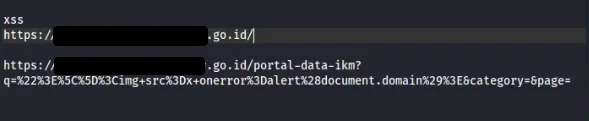
Step 3: Execute and verify
When the crafted URL is opened, the browser processes the reflected payload. An alert box appears showing the target's domain name ([REDACTED].go.id), which confirms that the JavaScript executed.
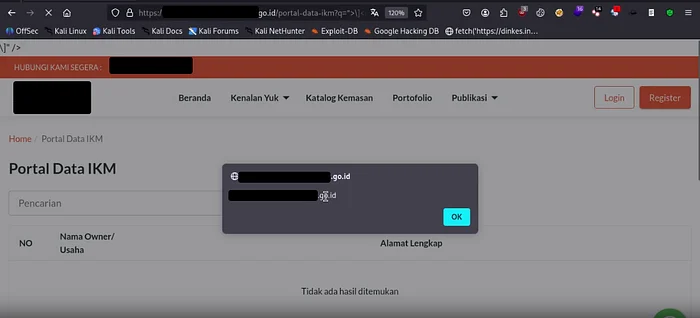
Step 4: Verify the fix
After the report was sent, the affected party appears to have fixed the issue quietly. The same payload no longer triggers JavaScript execution.
Root cause
The application takes the value of the q URL parameter and reflects it into the HTML response without proper output encoding. Because the value is written into the page as markup rather than as inert text, an attacker can break out of the surrounding context and add new elements and event handlers. The report does not describe the server-side code, so the exact point where encoding is missing is not shown. The researcher used an <img> tag with an onerror attribute, a common technique for getting past basic sanitisation filters.
Impact
According to the report, an attacker could use this XSS to:
- Steal session cookies of logged-in users, leading to account takeover.
- Phish users by manipulating the page so they enter sensitive data.
- Deface the page temporarily.
- Redirect users to a malicious site controlled by the attacker.
The report also does not describe any authentication on the portal, so which users would be affected is not specified.
Fix
The recommendations given are:
- Output encoding: apply HTML entity encoding to the characters
<,>,",'and&on all input that is reflected into HTML pages. - Input validation: restrict the characters allowed in the search parameter and reject suspicious input.
- Content Security Policy: deploy a strong CSP to reduce the impact of XSS if it occurs again.
Variants to test
- Try the same
qparameter with other event-handler vectors, such as<svg onload=alert(document.domain)>or<body onload=alert(1)>. A positive result is an alert box showing the target domain. - Try breaking out of different contexts, for example a single-quoted attribute (
' onmouseover='alert(1)) or a JavaScript string, to see which encoding is missing. A positive result is execution when the element is interacted with or the page loads. - Try the
categoryandpageparameters that appear alongsideqin the URL, since they may be reflected too. A positive result is the same alert from a different parameter. - Try payloads that bypass simple blacklists, such as mixed case (
<ImG sRc=x OnErRoR=alert(1)>) or HTML entities in the handler. A positive result is execution where the plain payload was blocked. - Check whether the reflection is stored rather than reflected, by submitting the payload through any form that saves search terms. A positive result is the payload executing on a later page load without the parameter in the URL.
What happened, in plain words
A security researcher was testing a public website run by a government body. The site has a page called "Portal Data IKM" that shows information about small and medium industries. That page has a search box, and the search term is also carried in the web address (the URL) so that a search can be shared as a link.
The researcher found that whatever you type into that search is placed back into the page exactly as typed, without being made safe first. That means if you type ordinary text, you see ordinary text. But if you type something that looks like part of a web page, the browser treats it as part of the web page and runs it. This class of bug is called reflected cross-site scripting, or reflected XSS.
To prove it, the researcher put a small piece of code into the search term. When the crafted link was opened, the browser ran that code and showed a pop-up box with the site's own domain name in it. That pop-up is the proof: code that the researcher wrote was running inside the target site's page.
The researcher rated the issue Medium severity and reported it. The site was fixed quietly, with no reply to the report, and the same trick no longer works. The report does not give a CVSS score or a formal weakness classification.
Background you need first
A few ideas come up again and again below, so here they are from zero.
A URL and its parameters. A URL is the address you see in the browser's address bar. Some addresses carry extra information after a question mark, in the form name=value. Each name=value pair is called a parameter. For example, ?q=shoes means "the parameter named q has the value shoes". Websites use parameters to remember what you searched for, which page you are on, and so on. Think of a URL as an envelope and the parameters as notes tucked inside it: the site opens the envelope and reads the notes.
HTML. HTML is the language web pages are written in. It is made of tags such as <img>, which tells the browser to show an image. Tags can carry extra settings called attributes, written inside the tag, such as src (where the image lives). Some attributes are events, such as onerror, which tells the browser "when this goes wrong, do this".
JavaScript. JavaScript is the programming language browsers run. It is what makes pages interactive. A browser will run any JavaScript that appears in a page it trusts, which is exactly why it matters where that JavaScript came from.
Reflected input. When a site takes something you sent and immediately shows it back on the page, that is a reflection. A search results page saying "You searched for: shoes" is a reflection. It is convenient, and it is also where this bug lives.
Output encoding. Encoding means converting characters that have a special meaning in HTML into safe stand-ins, so the browser shows them as text instead of treating them as instructions. If a site encodes your input before showing it, typing <img> makes the page display the literal characters <img>. If it does not encode, the browser sees a real image tag. This is the single most important idea in this report.
Cross-site scripting (XSS). XSS is a bug where an attacker gets their own JavaScript to run inside someone else's website, in a victim's browser. "Reflected" means the malicious code travels in the link itself: it is not saved on the server, it bounces back off the page. The victim has to open the crafted link.
Sanitisation. Sanitising means cleaning input by removing or neutralising dangerous parts. A basic sanitiser might strip <script> tags. Attackers work around basic sanitisers, which is what happened here.
A cookie. A cookie is a small piece of data a website asks your browser to keep and send back on every visit. Sites use cookies to remember that you are logged in. If someone can read your cookies, they may be able to act as you. That is why cookie theft is serious.
Session hijacking and account takeover. A session is the period you stay logged in. Hijacking a session means stealing the proof that you are logged in and using it yourself. Account takeover is the end result: the attacker controls your account.
Phishing. Phishing is tricking someone into handing over information, usually by making a fake page look trustworthy. If an attacker can change what a real page shows, the fake part sits on a real address, which makes the trick more convincing.
Defacement. Defacement is changing what a page looks like, for example replacing content with the attacker's own message.
Content Security Policy (CSP). CSP is a set of instructions a site sends to the browser saying which sources of code are allowed. It is a safety net: if a bad piece of code gets onto the page anyway, a strong CSP can stop it from running.
HttpOnly. A cookie can be marked HttpOnly, which means JavaScript on the page is not allowed to read it. It is a defence against exactly the cookie theft described below.
The target and the feature
The target is a public service portal belonging to the Government of [REDACTED]. The page involved is "Portal Data IKM", which presents data for small and medium industries (IKM). The page has a search feature that takes the search term from the URL and shows results back to the visitor.
The researcher, Primandito Adi Setiya, was testing that search feature on 12 November 2025. He found that the search term is placed into the page's HTML without proper output encoding. The vulnerable spot is the URL parameter q, which is the search term. The researcher rates the issue Medium severity.
Setup
The report describes no accounts, no special roles, no special tools and no software versions. The testing was done against the live public page. The only precondition is that the page can be reached and that its search parameter can be supplied in a URL. The researcher used a browser to open the crafted link and watch what happened. That is worth noting for a beginner: this bug needed nothing more than a browser and a link.
Finding it
The search feature accepts input through the q parameter and reflects it into the HTML response. What made this look wrong is that the reflected value was not output-encoded. So HTML and JavaScript supplied in the query were interpreted by the browser rather than displayed as text.
To trigger JavaScript, the researcher chose an <img> tag with an onerror attribute. The idea is simple: point an image at something that will never load, and the browser's "this image failed" event fires. Attach code to that event and the code runs. This is a common technique for getting past basic sanitisation filters.
Exploitation
Step 1: Identify the target
The page under test is the Portal Data IKM:
This is the ordinary address of the page, with no tricks in it. The step exists to pin down exactly which page is being tested, so that anyone repeating the work starts in the same place.
Step 2: Inject the payload
The following payload is placed in the q query parameter of the URL:
"><\]<img src=x onerror=alert(document.domain)>
Line by line, in plain words:
">closes whatever attribute or tag the search term was sitting inside. If the page had written the search term inside something likevalue="...", these two characters end that value and that tag early. This is called breaking out of context.onerror=alert(document.domain)is the event handler. When the image fails to load, the browser runsalert(document.domain).alertshows a pop-up box.document.domainis the page's own domain name. So the pop-up displays the domain of the site the code is running on, which proves the code is running in the context of the target site and not somewhere harmless.
The encoded form of the payload, as it appears in the full URL together with the other parameters, is:
?q=%22%3E%5C%5D%3Cimg%20src%3Dx%20onerror%3Dalert%28document.domain%29%3E&category=&page=
This is the same payload written the way URLs must carry special characters. A URL cannot contain spaces or many punctuation characters directly, so they are written as a percent sign followed by two characters. For example %22 is a double quote, %3C is <, %3E is >, %20 is a space and %28 and %29 are the round brackets. The browser converts these back before the site sees them, so the site receives exactly the payload above. The line also shows two other parameters travelling alongside q: category and page, both empty here.
Step 3: Execute and verify
When the crafted URL is opened, the browser processes the reflected payload. An alert box appears showing the target's domain name ([REDACTED].go.id), which confirms that the JavaScript executed.
This step matters because a payload appearing in the page source is not the same as a payload running. The pop-up is the difference: it is the browser itself confirming that the code executed.
Step 4: Verify the fix
After the report was sent, the affected party appears to have fixed the issue quietly. The same payload no longer triggers JavaScript execution. Re-testing after a fix is good practice: it confirms the problem is actually gone rather than merely reported.
Root cause
The application takes the value of the q URL parameter and reflects it into the HTML response without proper output encoding. Because the value is written into the page as markup rather than as inert text, an attacker can break out of the surrounding context and add new elements and event handlers. The report does not describe the server-side code, so the exact point where encoding is missing is not shown. The use of an onerror handler on an <img> tag suggests that whatever sanitisation existed was basic and did not block event-handler attributes.
Impact
According to the report, an attacker could use this XSS to:
- Steal session cookies of logged-in users, leading to account takeover.
- Phish users by manipulating the page so they enter sensitive data.
- Deface the page temporarily.
- Redirect users to a malicious site controlled by the attacker.
These outcomes depend on a victim opening a crafted URL and on the value of the cookies that are reachable from JavaScript. It also does not describe any authentication on the portal, so which users would be affected is not specified.
Fix
The recommendations given are:
- Output encoding: apply HTML entity encoding to the characters
<,>,",'and&on all input that is reflected into HTML pages. In plain words, turn the characters that HTML treats as instructions into text the browser will only display. - Input validation: restrict the characters allowed in the search parameter and reject suspicious input. In plain words, decide what a search term is allowed to contain and refuse anything else.
- Content Security Policy: deploy a strong CSP to reduce the impact of XSS if it occurs again. In plain words, tell the browser in advance which code it may run, so a stray payload has less chance of doing damage.
Variants to test
These are follow-up ideas for the same kind of bug, useful if you want to practise on a site you are allowed to test:
- Try the same
qparameter with other event-handler vectors, such as<svg onload=alert(document.domain)>or<body onload=alert(1)>. A positive result is an alert box showing the target domain. - Try breaking out of different contexts, for example a single-quoted attribute (
' onmouseover='alert(1)) or a JavaScript string, to see which encoding is missing. A positive result is execution when the element is interacted with or the page loads. - Try the
categoryandpageparameters that appear alongsideqin the URL, since they may be reflected too. A positive result is the same alert from a different parameter. - Try payloads that bypass simple blacklists, such as mixed case (
<ImG sRc=x OnErRoR=alert(1)>) or HTML entities in the handler. A positive result is execution where the plain payload was blocked. - Check whether the reflection is stored rather than reflected, by submitting the payload through any form that saves search terms. A positive result is the payload executing on a later page load without the parameter in the URL.
Glossary
- URL: the address of a page in the browser's address bar.
- Parameter: a
name=valuepair carried in a URL after the question mark, used to pass information to the site. - HTML: the language web pages are written in, built from tags and attributes.
- Tag: an instruction in HTML such as
<img>, which tells the browser to show something. - Attribute: a setting inside an HTML tag, such as
srcoronerror. - Event handler: an attribute that tells the browser to run code when something happens, such as an image failing to load.
- JavaScript: the programming language browsers run to make pages interactive.
- Reflection: when a site shows your input straight back on the page.
- Output encoding: converting characters with special meaning in HTML into safe text so the browser displays them instead of acting on them.
- Sanitisation: cleaning input by removing or neutralising dangerous parts.
- Cross-site scripting (XSS): a bug where an attacker's JavaScript runs inside someone else's website in a victim's browser.
- Reflected XSS: XSS where the malicious code travels in the link itself and is not stored on the server.
- Payload: the piece of code an attacker sends to trigger a bug.
- Breaking out of context: using characters such as
">to end the surrounding HTML early and start your own markup. - Cookie: a small piece of data a site asks the browser to keep and send back, often used to remember that you are logged in.
- Session: the period during which you stay logged in to a site.
- Session hijacking: stealing the proof that someone is logged in and using it yourself.
- Account takeover: an attacker gaining control of someone else's account.
- Phishing: tricking someone into handing over information, often with a page made to look trustworthy.
- Defacement: changing what a page looks like, for example replacing its content.
- Content Security Policy (CSP): instructions from a site to the browser about which sources of code are allowed to run.
- HttpOnly: a cookie setting that stops JavaScript on the page from reading that cookie.
- CVSS: a standard scoring system for rating the severity of a vulnerability.
- Severity: a rating of how serious a vulnerability is, here Medium.
- Silent fix: a fix made without any reply or confirmation to the person who reported the issue.
- PoC (proof of concept): a small demonstration that a vulnerability is real, such as the pop-up in this report.




