Unauthorized access to admin setpassword page BY bypassing 403 Forbidden
An admin setpassword page was protected by a 403 Forbidden response, but appending a .css extension to the URL bypassed the restriction and exposed the page. An attacker could then access the admin password reset interface without authorisation.
 Published on notifybugme.medium.com
My name is Santosh Kumar Sha, I’m a security researcher from India(Assam). In this article, I will be describing how I was able to access the Admin setpassword page by just bypassing 403 Forbidden.
The full write-up lives on its author's site
It belongs to its author, so we link to it rather than copy it. The other two tabs are our own rewrites, checked against it.
Context
This write-up describes how an exposed administrative password-setting page was reached by bypassing a 403 Forbidden response. The researcher, Santosh Kumar Sha, frames it as a recon-driven find: rather than brute-forcing directories against a single host, he resolved a large set of subdomains and appended candidate paths to each one, looking for exposed admin panels and setpassword dashboards.
The page of interest is an admin setpassword.jsp endpoint; the hostnames in the commands and screenshots are placeholders such as target.com, example.com and devadmin.example.com. The report does not describe what the application does beyond that, nor which organisation owns the target; the hostnames in the commands and screenshots are placeholders such as target.com, example.com and devadmin.example.com.
Setup
The researcher used two tools:
- Subfinder, for subdomain enumeration:
https://github.com/projectdiscovery/subfinder - httpx, for probing the resulting hosts and printing response metadata:
https://github.com/projectdiscovery/httpx
No accounts, roles or credentials are described. The precondition is simply that the target has a large subdomain footprint and that some administrative path exists on one of those hosts. The report mentions a target with 30k+ domains, which is why per-host manual checking was impractical.
Finding it
The starting idea was to avoid classic directory brute-forcing against a single host. Instead, the researcher appended a path to every subdomain and resolved the results, so that any host exposing an admin panel or a setpassword dashboard would surface in the output.
Subdomains were collected first:
subfinder -d target.com -silent
He then appended /admin and /setpassword to each subdomain:
subfinder -d target.com -silent | sed ‘s/$/\/admin/’

subfinder -d target.com -silent | sed ‘s/$/\/setpassword/’
Because the target had 30k+ domains, checking one by one was too slow. He piped the results into httpx with -title, -status-code and -content-length to narrow the output down:
subfinder -d target.com -silent | sed ‘s/$/\/admin/’ | httpx -title -status-code -content-length
No admin dashboard was exposed by this pass. What caught his attention in the httpx output was a single URL that returned status 302 with a content length of 111, sitting among the 404 results. He does not say what that URL was or what it redirected to, only that he was stuck at that point.
He then extended the same pipeline to brute-force files and directories at the same time, using a shell loop to test a word as both a directory and a .jsp file. The proof of concept used a single word:
for word in $(echo test); do echo “$file” | xargs -I% sh -c ‘echo “example.com” | httpx -silent -path /%/%.jsp -title -status-code -content-length’ ;done
The output was:
https://example.com/test/test.jsp
The -path /%/%.jsp argument places the word twice in the path, once as a directory and once as a file name with the .jsp extension. The loop was then run against the whole target with a wordlist:
for files in $(cat wordlist.txt); do echo “$files” | xargs -I% sh -c ‘subfinder -d example.com -silent | httpx -silent -path /%/%.jsp -title -status-code -content-length’ ;done
This produced a URL with status code 403:
https://devadmin.example.com/admin/setpassword.jsp
Exploitation
Step 1: Confirm the block
Visiting the admin path in a browser returned a 403 Forbidden error. The report uses https://testadmin.target.com/admin as the illustrative URL for this step.
Step 2: Append a static-file suffix
After searching online, the researcher found a post describing that appending .css to the end of a URL can bypass a 403. He added it and reopened the URL:
The URL as reported ends with ?.css. The response was the admin setpassword page, which he had not been able to reach directly.
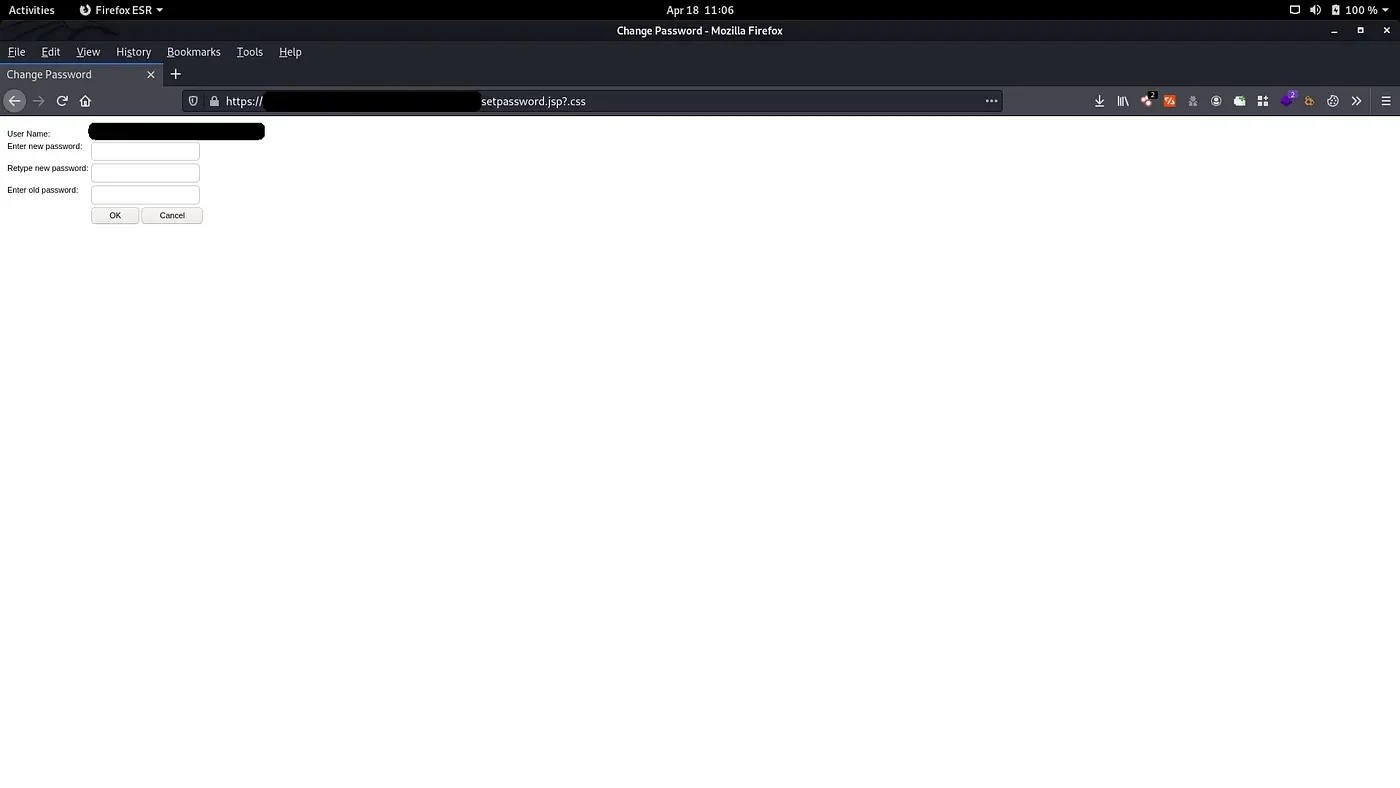
The screenshot shows the setpassword page reached through the modified URL.
Step 3: Report
He reported the bug, and within an hour the report was triaged as critical.
Root cause
The report does not include the server configuration or code responsible. What it shows is that the access control on /admin/setpassword.jsp was applied to the request as originally formed but not to the same resource requested with a .css suffix in the query string. The report does not explain why the modified URL returned the page instead of 403. The report does not confirm which of these applies.
Impact
Under the conditions shown, the admin setpassword page that was meant to return 403 could be reached. The researcher describes the class of issue as admin dashboard takeover and says he has reported many similar cases through HackerOne using this process.
Fix
Variants to test
- Append a static-file suffix to a blocked admin path, for example
?x.cssor.cssafter the path, and compare the status code and body with the original403. A positive result is the protected page being served instead of403. - Try other static extensions in the same position (
.js,.png,.ico,.json) where the server or WAF may treat them differently from the protected path. - Run the same subdomain-plus-path pipeline with a wordlist and
.jsp(or the target's own server-side extension) to find administrative endpoints that return403rather than404; a403is a candidate for this bypass. - Watch for anomalous status codes and content lengths in httpx output, such as a
302with a short body among404results, and follow the redirect to see where it leads. - Test whether the bypass works on other protected paths on the same host, to determine whether the weakness is specific to one endpoint or to the access-control layer as a whole.

What happened, in plain words
A security researcher found a web page that was supposed to be off limits to ordinary visitors: an administrator's "set password" page. When he opened the address in his browser, the server answered with an error saying access was forbidden. He then changed the address slightly, adding a small piece of text to the end of it, and the same page loaded normally. He reported it, and the report was triaged as critical within an hour.
The interesting part is not a complicated attack. It is a small trick with the address bar, plus a way of searching a very large number of web addresses at once to find pages worth looking at. This article walks through both, assuming you have never done security work before.
A few ideas you need first:
- A web server and a web page. When you type an address into your browser, your browser sends a request to a computer somewhere (the server), and the server sends back a page. That is all that is happening under the surface.
- A status code. Every response from a server carries a three-digit number saying how it went.
200means "here is the page".404means "there is nothing at this address".403means "this exists, but you are not allowed to see it".302means "the thing you asked for is somewhere else, go there instead". Think of a403as a locked door with a sign on it, and a404as an empty plot where no building stands. - A subdomain. A large organisation rarely has one website. It has many, each with its own name in front of the main domain, such as
shop.example.com,mail.example.comordevadmin.example.com. Each of those is a subdomain. Finding them all is called subdomain enumeration, and it matters because forgotten ones are often less protected than the main site. - A path. The part of the address after the domain, such as
/admin/setpassword.jsp, tells the server which page you want./adminis a folder-like name, andsetpassword.jspis a file inside it. The.jspending tells you the page is generated by a Java server program rather than being a plain file sitting on disk. - A query string. Anything after a
?in an address is extra information sent along with the request, not part of the page's location. Inpage.jsp?colour=blue, the server still servespage.jsp;colour=blueis just a note attached to the request. - A wordlist. A plain text file with one word per line, used as a list of guesses: common folder names, common file names. Tools read it line by line and try each guess against a target.
- A command line. A text window where you type instructions to programs instead of clicking. The commands below are typed there. The vertical bar
|is called a pipe: it takes the output of the program on its left and feeds it as input to the program on its right, like connecting a hose from one machine to the next. - Broken authorization. This is the category the finding falls into. Authentication is proving who you are (logging in). Authorization is what you are allowed to do once you are known. Broken authorization means the server fails to enforce those permissions properly, so someone who should be refused gets through anyway.
The tools
The researcher used two programs, both free and open source:
- Subfinder, for finding subdomains:
https://github.com/projectdiscovery/subfinder - httpx, for sending a request to each host it is given and printing back details about the response:
https://github.com/projectdiscovery/httpx
The only precondition was that the target organisation owned a very large number of subdomains, and that at least one of them had an administrative page on it. The report mentions a target with 30k+ domains, which is why visiting them by hand was out of the question.
Finding it
The plan was deliberately different from the usual approach. Normally, someone hunting for hidden admin pages picks one website and tries thousands of folder names against it. Here, the researcher turned that around: he took every subdomain he could find and attached a likely admin path to each one, then checked which of those combined addresses responded. Any host with an exposed admin panel or set-password dashboard would then appear in the results.
First, collect the subdomains:
subfinder -d target.com -silent
Line by line:
subfinderruns the subdomain-finding tool.-d target.comsays which domain to investigate.target.comis a placeholder standing in for the real domain.-silenttells the tool to print only the results, without banners or progress chatter, so the output is a clean list of subdomains, one per line.
Next, he attached /admin and /setpassword to every subdomain in that list:
subfinder -d target.com -silent | sed ‘s/$/\/admin/’

subfinder -d target.com -silent | sed ‘s/$/\/setpassword/’
Line by line:
subfinder -d target.com -silentproduces the list of subdomains, as before.- The
|pipe hands that list to the next program. sedis a text-editing tool that works line by line. The expressions/$/\/admin/means: substitute (s) the end of the line ($) with the text/admin. In other words, append/adminto every line. The backslash before the slash is there because a plain/would otherwise be read as part of the command's syntax.- The second command does the same thing with
/setpasswordinstead.
So if the list contained devadmin.example.com, the output would contain devadmin.example.com/admin. You now have a list of candidate addresses rather than a list of hosts.
With 30k+ domains, checking each result by eye was far too slow. So he piped the results into httpx and asked it to print three extra pieces of information per address:
subfinder -d target.com -silent | sed ‘s/$/\/admin/’ | httpx -title -status-code -content-length
Line by line:
- The first two parts are exactly as above: find subdomains, append
/adminto each. httpxreceives each address and actually requests it.-titleprints the page title, the text shown in a browser tab. A title like "Admin Login" is a strong hint.-status-codeprints the three-digit response code, so you can tell a real page (200) from a missing one (404) from a forbidden one (403).-content-lengthprints how large the response body is. Pages that are all the same size are usually the same generic error page; a different size is worth a look.
This pass found no exposed admin dashboard. What did catch his eye in the output was a single address that returned status 302 with a content length of 111, sitting among a sea of 404 results. A 302 means a redirect, and a very short body is typical of a redirect notice rather than a real page. The report does not say which address this was or where it redirected to, only that he was stuck at this point.
He then extended the same pipeline so that it tried files and folders at the same time. The idea: a word from a list is used twice, once as a folder name and once as a file name with the .jsp ending. He first tested the idea with a single word:
for word in $(echo test); do echo “$file” | xargs -I% sh -c ‘echo “example.com” | httpx -silent -path /%/%.jsp -title -status-code -content-length’ ;done
Line by line:
for word in $(echo test); do ... ;doneis a loop that runs the commands betweendoanddoneonce for each item. Here there is only one item, the wordtest.echo “$file”prints the value of a variable namedfile. Note that the loop variable is calledword, so this line as written prints an empty value; the report shows the command exactly as it was used.| xargs -I% sh -c ‘...’takes that printed value and runs a small shell command for it.-I%says: wherever you see%in the following command, put the value instead.- Inside the quoted command,
echo “example.com”prints a hostname, which is piped intohttpx. -silentkeeps httpx's output to results only.-path /%/%.jspis the key part. The%is replaced by the word, so the path becomes/test/test.jsp: the word as a folder, then the word again as a file with the.jspending.-title -status-code -content-lengthask for the same three details as before.
The output was:
https://example.com/test/test.jsp
That is the address httpx built and requested. The word is used twice in the path, once as a folder and once as a file name.
He then ran the same loop against the whole target, reading words from a file:
for files in $(cat wordlist.txt); do echo “$files” | xargs -I% sh -c ‘subfinder -d example.com -silent | httpx -silent -path /%/%.jsp -title -status-code -content-length’ ;done
Line by line:
for files in $(cat wordlist.txt)reads the wordlist file and loops once per line.echo “$files”prints the current word.xargs -I% sh -c ‘...’substitutes that word for%in the quoted command.- Inside,
subfinder -d example.com -silentfetches the subdomains of the target again, and pipes them into httpx. httpx -silent -path /%/%.jsp -title -status-code -content-lengthrequests the constructed path on every subdomain and prints the title, status code and size.
This produced an address with status code 403:
https://devadmin.example.com/admin/setpassword.jsp
A 403 is the interesting signal here. It means the page exists but the server is refusing to show it. A 404 would mean there is nothing there. So this address was a locked door worth pushing on.
Getting in
Step 1: Confirm the block
Opening the admin path in a browser returned a 403 Forbidden error. The report uses https://testadmin.target.com/admin as the illustrative address for this step.
Step 2: Add a static-file ending
After searching online, the researcher found a post saying that appending .css to the end of a blocked address can get past a 403. He added it and reopened the address:
Look closely at the ? before .css. The suffix is not added as part of the page's location; it is placed in the query string, the extra information attached to the request. The modified address returned the set-password page instead of 403.
The response was the admin set-password page, which he had not been able to reach directly.
The screenshot shows the set-password page reached through the modified address.
Why would this work? The report does not include the server's configuration or code, so the exact cause is not confirmed. The report does not explain why the modified address was allowed through. The page itself was still produced by the application.
Step 3: Report
He reported the bug, and within an hour the report was triaged as critical.
What it means
As shown, the admin set-password page that was meant to answer 403 could be reached. The researcher describes this class of issue as admin dashboard takeover and says he has reported many similar cases through HackerOne using this process.
How to fix it
If the same page is served, the same check must run, whether or not a query string or a file ending has been added to the address.
Things worth trying
- Add a static-file ending to a blocked admin path, for example
?x.cssor.cssafter the path, and compare the status code and the page you get with the original403. Success looks like the protected page being served instead of403. - Try other static endings in the same position (
.js,.png,.ico,.json) where the server or a web application firewall may treat them differently from the protected path. - Run the same subdomain-plus-path pipeline with a wordlist and
.jsp(or whatever server-side ending the target uses) to find admin pages that answer403rather than404. A403is a candidate for this bypass. - Watch for odd status codes and sizes in httpx output, such as a
302with a short body among404results, and follow the redirect to see where it leads. - Test whether the bypass works on other protected paths on the same host, to learn whether the weakness is specific to one page or to the access-control layer as a whole.
Glossary
- 403 Forbidden: a server response meaning the page exists but you are not allowed to see it.
- 404 Not Found: a server response meaning there is nothing at that address.
- 200 OK: a server response meaning the request succeeded and here is the page.
- 302 Found: a server response meaning the requested thing is elsewhere; the browser is told to go to another address.
- Admin panel: a web page meant for administrators, giving access to settings and management features ordinary users do not get.
- Authentication: proving who you are, usually by logging in.
- Authorization: what you are allowed to do once your identity is known.
- Broken authorization: a flaw where the server fails to enforce those permissions, letting someone through who should be refused.
- Bypass: getting past a control, such as a block, without satisfying it.
- Content length: the size of the response body, in bytes; a useful fingerprint for telling pages apart.
- Domain: the main name of a website, such as
example.com. - Subdomain: a name in front of the domain, such as
devadmin.example.com, giving a separate site under the same organisation. - Subdomain enumeration: discovering all the subdomains an organisation owns.
- Path: the part of an address after the domain, such as
/admin/setpassword.jsp, naming the page you want. - Query string: the part of an address after a
?, carrying extra information with the request rather than naming a different page. - JSP: JavaServer Pages, a way of generating web pages with Java on the server; the
.jspending marks such a page. - Static file: a file served as-is, such as a stylesheet or image, without being generated by a program.
- CSS: Cascading Style Sheets, the files that describe how a web page looks;
.cssis their file ending. - Wordlist: a text file of words, one per line, used as guesses for folder and file names.
- Brute-force: trying many possibilities systematically until one works.
- Recon: short for reconnaissance, the information-gathering stage before attacking anything.
- Command line: a text interface where you type commands to programs instead of clicking.
- Pipe (
|): a way of feeding the output of one command into another as input. - Loop: a command-line construct that repeats a set of commands, once per item in a list.
- Variable: a named placeholder in a command that holds a value, such as
$file. - Subfinder: a tool that finds subdomains for a given domain.
- httpx: a tool that requests a list of addresses and prints details about each response.
- Web application firewall (WAF): a filter placed in front of a web server that inspects requests and blocks ones it considers suspicious.
- Triage: the stage where a bug report is reviewed and its severity assessed.
- Critical: the highest severity rating for a security issue.
- HackerOne: a platform where security researchers report bugs to organisations.
- Admin dashboard takeover: gaining control of an administrative interface that should have been inaccessible.

