Unauthorized access to Django Admin Dashboard by endpoint leaked on GitHub
The Django admin dashboard was accessible without authentication at a hidden endpoint that was leaked on GitHub. An attacker could log in and access the admin interface.
 Published on notifybugme.medium.com
My name is Santosh Kumar Sha, I’m a security researcher from India(Assam). In this article, I will be describing how I was able to Unauthorized access to Admin Dashboard by endpoint leaked by GitHub.
The full write-up lives on its author's site
It belongs to its author, so we link to it rather than copy it. The other two tabs are our own rewrites, checked against it.
Context
This is a write-up of an unauthorised access issue against a Django admin dashboard. The target is referred to throughout as example.com, with everything under *.example.com in scope. The specific host involved is testdev.admin.example.com on port 8080, and the feature at the centre of the report is the Django admin dashboard, reached through the path /django/next/admin/dashboard. Normally that dashboard is an authenticated administrative interface; here it was reachable without any login.
The researcher is Santosh Kumar Sha (@killmongar1996), and the report was disclosed on 10 May 2021. The weakness is described as missing authentication combined with forced browsing.
Setup
The work was done entirely from outside, with no accounts or credentials on the target. The tools used were:
- Subfinder (https://github.com/projectdiscovery/subfinder)
- httpx (https://github.com/projectdiscovery/httpx)
- gau (Corben), https://github.com/lc/gau
- waybackurls (tomnomnom), https://github.com/tomnomnom/waybackurls
- Aquatone
The report does not state any precondition beyond the target having subdomains and public GitHub activity. The report does not give any version numbers for the target software or the tools.
Finding it
The researcher started with passive and active subdomain enumeration, combining internet archive sources with Subfinder. The commands used to gather subdomains were:
subfinder -d example.com silent
gau -subs example.com
waybackurls example.com
To reduce the chance of missing a subdomain, the archive tools were piped into unfurl to keep only domains, and Subfinder output was saved alongside:
gau -subs example.com | unfurl domains>> vul1.txt
waybackurls example.com | unfurl domains >> vul2.txt
subfinder -d example.com -silent >> vul3.txt
The collected lists were then resolved and screenshotted in one pass, with Aquatone taking both URLs and domains as input:
cat vul1.txt vuln2.txt vul3.txt | httpx -silent | aquatone -ports 80,443,8080,8433,8090,8009
While reviewing the screenshots, one URL stood out because it returned a "Django not found" error, an error page the researcher had not seen before. The URL was:
https://testdev.admin.example.com:8080/
Source and JavaScript inspection of that page produced nothing, and directory brute forcing against it also failed. The researcher then turned to GitHub recon on the hostname testdev.admin.example.com, looking for secrets that would grant access to the Django server.
Exploitation
Step 1: Search GitHub for secrets tied to the hostname
Because the organisation was large (the report mentions more than 200 users), searching each user individually was impractical. The approach was to target organisation users with dorks of this shape:
"testdev.admin.example.com" user:<username> <keytosearch>
Concrete dorks tried, none of which returned a leak:
"testdev.admin.example.com" user:<username> auth_token
"testdev.admin.example.com" user:<username> apikey
Step 2: Pivot to organisation-wide searches with Django as a keyword
The search was widened to the organisation name together with Django:
"testdev.admin.example.com" org:<name of organisation> "Django"
This returned results containing the Django keyword. Attempts to pull a password or auth key from those results used:
"testdev.admin.example.com" org:<name of organisation> "Django" api_key
"testdev.admin.example.com" org:<name of organisation> "Django" auth_token
"testdev.admin.example.com" org:<name of organisation> "Django_admin"
None of these produced a usable secret.
Step 3: Search for the admin path instead of credentials
Rather than hunting for credentials, the researcher searched for the path or endpoint of the Django server:
"example.com" org:<name of organisation> "Django" /admin/dashboard
This returned an endpoint of the form:
/django/next/admin/dashboard
Step 4: Request the leaked endpoint directly
The endpoint was appended to the host and port that had produced the "Django not found" screenshot:
https://testdev.admin.example.com:8080/django/next/admin/dashboard
Requesting that URL logged the researcher straight into the Django admin dashboard, with no authentication step.
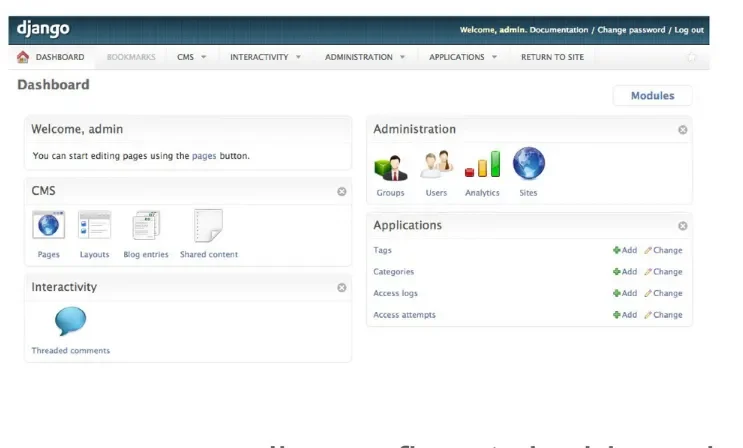
The screenshot shows the Django admin dashboard reached at that URL, confirming the unauthenticated access.
Step 5: Report
The bug was reported immediately and was triaged as critical the following day.

Root cause
What the behaviour shows is that the admin dashboard path was served without any authentication check: the endpoint leaked on GitHub was enough to reach an administrative interface directly. The path was published in a GitHub search result.
Impact
Anyone who found the leaked endpoint could open the Django admin dashboard on testdev.admin.example.com:8080 without credentials. The host name suggests a test or development deployment, but the report does not confirm what it contained.
Fix
Variants to test
- Screenshot-driven triage: run Aquatone over resolved subdomains and look for framework error pages such as "Django not found". A positive result is an error page that reveals the framework.
- GitHub dorks for paths rather than secrets: search for the hostname or domain together with framework names and path fragments, for example
"example.com" org:<name> "Django" /admin/dashboard. A positive result is a repository containing an internal admin path. - Direct request to the leaked path: request the discovered path on the host and port where the error page appeared. A positive result is an admin interface rendered without a login redirect.
- Path guessing around the leaked prefix: try sibling paths under the same prefix, such as other dashboard or admin routes.
- User-scoped dorks: search
"host" user:<username> auth_token,apikeyandsecretfor organisation members. A positive result is a committed credential.

What happened, in plain words
A security researcher found a private-looking administration page on a company's website that anyone could open, without a username or password. He did not guess his way in. He found the address of the page because someone had published it on GitHub, the public code-sharing site.
The page was part of a web application built with a tool called Django. Django is a popular framework, meaning a ready-made set of building blocks that programmers use to build websites faster. One of the things Django gives you for free is an admin dashboard: a control panel where the people running a site can look at and change the data behind it. Think of it like the back office of a shop, where staff can see the stock, the orders and the customer records. Normally that back office has a locked door with a login screen in front of it.
Here, the door was not locked. The only thing standing between a stranger and the control panel was that nobody was supposed to know the address. That is not real protection, because the address had been written down in public on GitHub.
The researcher is Santosh Kumar Sha (@killmongar1996), and the report was published on 10 May 2021. The type of problem is described as missing authentication (no login check at all) combined with forced browsing. Forced browsing means going directly to a page by typing its address, instead of clicking links to reach it. If a page is only hidden because no link points to it, forced browsing finds it anyway.
Throughout the report the real target is replaced with the placeholder example.com, and everything under *.example.com was allowed to be tested. The * is a wildcard meaning "any subdomain". A subdomain is a prefix added to a domain name, like shop.example.com or mail.example.com, so *.example.com covers all of them. The specific machine involved was testdev.admin.example.com, and the service was running on port 8080. A port is a numbered channel on a computer; the normal website channel is 443 for secure sites, and 8080 is a common alternative used by test and development setups. The page itself lived at the path /django/next/admin/dashboard. A path is the part of a web address after the domain name that points to a particular page, like a folder route inside a building.
The tools and the starting position
The work was done entirely from the outside, with no account and no password on the target. The tools used were:
- Subfinder (https://github.com/projectdiscovery/subfinder)
- httpx (https://github.com/projectdiscovery/httpx)
- gau (Corben), https://github.com/lc/gau
- waybackurls (tomnomnom), https://github.com/tomnomnom/waybackurls
- Aquatone
A few words on what these do, because the whole story depends on them. Subfinder is a program that hunts for subdomains of a domain by asking public sources. gau and waybackurls are programs that query internet archives, services that have stored copies of web pages over the years, and list every address they have ever seen for a site. httpx is a program that takes a list of addresses and checks which ones actually respond. Aquatone takes a list of addresses, opens each one in a headless browser (a browser with no visible window) and saves a picture of what each page looks like.
The report does not state any precondition beyond the target having subdomains and public GitHub activity. The report does not give version numbers for the target software or for the tools.
Finding it
The researcher began with subdomain enumeration, which simply means making a list of every subdomain that exists for a domain. He combined archive sources with Subfinder. The commands used to gather subdomains were:
subfinder -d example.com silent
This asks Subfinder to look for subdomains of example.com. The -d flag means "domain", and silent tells the tool to print only the results, without banners or progress messages, so the output is a clean list.
gau -subs example.com
This asks gau to fetch known addresses for example.com and all of its subdomains. The -subs flag means "include subdomains". gau gets its data from public archives, so it returns addresses that were once seen online, even if they are gone now.
waybackurls example.com
This does the same job with a different archive tool: it prints addresses for example.com that the Wayback Machine, an archive of the web, has recorded.
To reduce the chance of missing a subdomain, the archive tools were piped into unfurl to keep only domains, and Subfinder output was saved alongside:
gau -subs example.com | unfurl domains>> vul1.txt
The vertical bar | is a pipe: it takes whatever the first program prints and hands it to the next program as input. unfurl is a small helper that pulls one piece out of a long address; here domains tells it to keep only the domain part and throw away the rest of the path. The double arrow >> appends the result to a file called vul1.txt instead of overwriting it.
waybackurls example.com | unfurl domains >> vul2.txt
Same idea with the other archive tool, saved into a second file, vul2.txt.
subfinder -d example.com -silent >> vul3.txt
Subfinder's results go into a third file, vul3.txt. Keeping three separate files means the researcher can combine them later and also see which source produced which name.
The collected lists were then resolved and screenshotted in one pass, with Aquatone taking both URLs and domains as input:
cat vul1.txt vuln2.txt vul3.txt | httpx -silent | aquatone -ports 80,443,8080,8433,8090,8009
cat prints the contents of files one after another, so this glues the three lists together. httpx -silent then checks each name and keeps only the ones that actually answer, quietly. Finally aquatone visits each surviving address on the listed ports and saves a screenshot. The -ports option tells it which numbered channels to try: 80 and 443 are the standard web ports, and the others are common alternatives used by development servers. The point of the screenshots is speed: a human can glance at hundreds of pictures far faster than opening hundreds of pages.
While reviewing the screenshots, one URL stood out because it returned a "Django not found" error, an error page the researcher had not seen before. The URL was:
https://testdev.admin.example.com:8080/
This is the address of the machine itself, with no particular page after it. The https:// part means the connection is encrypted, the name is the machine, and :8080 is the port. The error message was interesting because it named the framework: it told the researcher that a Django application was running there.
Inspecting the page's source code and its JavaScript produced nothing useful. Source code here means the HTML that the browser receives, and JavaScript is the programming language that runs inside the browser; both can sometimes contain comments, addresses or keys that were never meant to be public. Directory brute forcing against the machine also failed. Brute forcing a directory means trying a long list of common folder names, such as /admin or /backup, and seeing which ones exist. The researcher then turned to GitHub recon on the hostname testdev.admin.example.com, looking for secrets that would grant access to the Django server. GitHub recon means searching public code repositories for information that was committed by mistake, such as passwords, keys or internal addresses.
Exploitation
Step 1: Search GitHub for secrets tied to the hostname
Because the organisation was large (the report mentions more than 200 users), searching each user individually was impractical. The approach was to target organisation users with dorks of this shape:
"testdev.admin.example.com" user:<username> <keytosearch>
A dork is just a search query with special operators. The quotes mean "find this exact phrase". user:<username> restricts the search to repositories owned by one particular GitHub account, and <keytosearch> is a placeholder for the word you are hunting for. The idea is that an employee is more likely to leak something than the organisation itself, because an individual may paste an internal address into a personal project without thinking.
Concrete dorks tried, none of which returned a leak:
"testdev.admin.example.com" user:<username> auth_token
This looks for the exact hostname next to the words auth_token, meaning an authentication token. A token is a long string of characters that acts like a temporary password: whoever holds it can prove to a server that they are allowed in, without typing a password each time.
"testdev.admin.example.com" user:<username> apikey
This looks for the hostname next to apikey, an API key. An API is a way for one program to talk to another over the network, and an API key is the password that program uses. If one were found, it might unlock the service.
This is a broader sweep for the word secret, which people often use in code when storing a password or key.
Step 2: Pivot to organisation-wide searches with Django as a keyword
The search was widened to the organisation name together with Django:
"testdev.admin.example.com" org:<name of organisation> "Django"
Here org:<name of organisation> restricts results to repositories owned by the whole organisation rather than one person, and "Django" requires the word Django to appear as well. This returned results containing the Django keyword, which told the researcher that the organisation's own code mentioned Django alongside the hostname.
Attempts to pull a password or auth key from those results used:
"testdev.admin.example.com" org:<name of organisation> "Django" api_key
This adds api_key to the search, hoping a key sits in the same file as the hostname and the framework name.
"testdev.admin.example.com" org:<name of organisation> "Django" auth_token
Same idea, looking for an authentication token instead.
"testdev.admin.example.com" org:<name of organisation> "Django_admin"
This looks for the literal string Django_admin, a name people often give to the account or setting that controls the Django admin area.
None of these produced a usable secret.
Step 3: Search for the admin path instead of credentials
Rather than hunting for credentials, the researcher searched for the path or endpoint of the Django server:
"example.com" org:<name of organisation> "Django" /admin/dashboard
An endpoint is simply a specific address that a service answers on; it is the door you knock on. This query asks GitHub for any file in the organisation that mentions the domain, the word Django and the fragment /admin/dashboard. The fragment is the interesting part: it is a guess at the shape of the admin address, and the search engine will match files that contain something similar.
This returned an endpoint of the form:
/django/next/admin/dashboard
This is the path part only, without a domain in front of it. It tells the researcher that somewhere in the organisation's code, this exact route was written down.
Step 4: Request the leaked endpoint directly
The endpoint was appended to the host and port that had produced the "Django not found" screenshot:
https://testdev.admin.example.com:8080/django/next/admin/dashboard
This is the whole address put together: the encrypted scheme, the machine name, the port, and the leaked path. Requesting that URL logged the researcher straight into the Django admin dashboard, with no authentication step. In other words, the browser was not redirected to a login page and no password was asked for; the control panel simply appeared.
The screenshot shows the Django admin dashboard reached at that URL, confirming the unauthenticated access.
Step 5: Report
The bug was reported immediately and was triaged as critical the following day. Triaged means the receiving team reviewed the report, confirmed it was real and assigned it a severity; critical is the highest level.
Why it worked
What the behaviour shows is that the admin dashboard path was served without any authentication check: the endpoint leaked on GitHub was enough to reach an administrative interface directly. Middleware is code that sits in front of every request and decides whether to let it through, much like a receptionist who checks badges before anyone walks into the office. The path was published in a GitHub search result.
What the impact was
Anyone who found the leaked endpoint could open the Django admin dashboard on testdev.admin.example.com:8080 without credentials. The host name suggests a test or development deployment, but the report does not confirm what it contained.
How to fix it
Variants to test
- Screenshot-driven triage: run Aquatone over resolved subdomains and look for framework error pages such as "Django not found". A positive result is an error page that reveals the framework.
- GitHub dorks for paths rather than secrets: search for the hostname or domain together with framework names and path fragments, for example
"example.com" org:<name> "Django" /admin/dashboard. A positive result is a repository containing an internal admin path. - Direct request to the leaked path: request the discovered path on the host and port where the error page appeared. A positive result is an admin interface rendered without a login redirect.
- Path guessing around the leaked prefix: try sibling paths under the same prefix, such as other dashboard or admin routes.
- User-scoped dorks: search
"host" user:<username> auth_token,apikeyandsecretfor organisation members. A positive result is a committed credential.
Glossary
- Admin dashboard: a control panel inside a web application where staff can view and change the data behind the site.
- API: a way for one program to talk to another over a network, usually exchanging data in a fixed format.
- API key: a long string that a program presents to prove it is allowed to use an API, like a password for software.
- Aquatone: a tool that opens a list of addresses in a headless browser and saves a screenshot of each page.
- Authentication: the check that someone is who they claim to be, usually by asking for a password or token.
- Authorisation: the check that an authenticated person is allowed to do a particular thing.
- Auth token: a string of characters that acts as proof of identity for a session, so the user does not retype a password each time.
- Brute forcing a directory: trying a long list of common folder names against a site to discover which ones exist.
- Django: a framework, meaning a ready-made set of building blocks, for building websites in the Python language; it includes a built-in admin dashboard.
- Domain: the main name of a site, such as
example.com. - Dork: a search query that uses special operators, such as
user:ororg:, to narrow results. - Endpoint: a specific address that a service answers on.
- Forced browsing: reaching a page by typing its address directly, rather than following links, which defeats hiding a page by not linking to it.
- Framework: a collection of pre-built code that programmers use as a base for an application.
- gau: a tool that lists addresses seen in public web archives for a domain and its subdomains.
- GitHub: a public website where people store and share code, including its history of changes.
- GitHub recon: searching public code repositories for information that was published by mistake, such as passwords, keys or internal addresses.
- Headless browser: a browser that runs without a visible window, used by tools to load pages automatically.
- httpx: a tool that checks a list of addresses and keeps the ones that respond.
- JavaScript: the programming language that runs inside a web browser and makes pages interactive.
- Middleware: code that sits in front of every request and decides whether to let it through, for example by checking a login.
- Missing authentication: a flaw where a page or service can be used without any login check at all.
- Organisation (on GitHub): a shared account that owns repositories on behalf of a company or group.
- Path: the part of a web address after the domain name that points to a particular page.
- Pipe: the
|symbol in a command line, which passes the output of one program into another. - Port: a numbered channel on a computer that a service listens on; 443 is the standard encrypted web port and 8080 is a common alternative.
- Repository: a project's folder of code stored on GitHub, including its history.
- Resolve: to look up whether a domain name points to a working machine, so dead names can be filtered out.
- Screenshot triage: reviewing automatically captured page images to spot interesting pages quickly.
- Secret: any value that must stay private, such as a password, token or key.
- Subdomain: a prefix added to a domain name, such as
shop.example.com. - Subfinder: a tool that discovers subdomains of a domain from public sources.
- Triaged: reviewed and confirmed by the receiving team, usually with a severity assigned.
- unfurl: a helper tool that extracts one part of a long address, such as just the domain.
- Wayback Machine: a public archive that stores copies of web pages over time.
- waybackurls: a tool that lists addresses for a domain from the Wayback Machine.
- Wildcard (
*): a symbol meaning "any value here", so*.example.commeans every subdomain ofexample.com.

