How I hacked Apple.com (Unrestricted File Upload)
An Apple subdomain was backed by an S3 bucket that allowed anonymous users full read and write access. An attacker could upload a phishing page served from the Apple subdomain, read files stored in the bucket, and potentially steal cookies shared across the apple.com domain.
 Published on medium.com
Today we will take closer look at insecure server configurations.Examples are misconfigurations that permit directory listing or unrestricted file uploads.
The full write-up lives on its author's site
It belongs to its author, so we link to it rather than copy it. The other two tabs are our own rewrites, checked against it.
Context
This write-up looks at insecure server configurations, with directory listing and unrestricted file upload as the examples. The target chosen is Apple.com, picked because it is described as the most powerful brand in the world, because Apple runs a responsible disclosure process, and because it has a Hall of Fame for pentesters. The goal was to claim a place in that Hall of Fame.
The feature at the centre of the finding is Apple's use of AWS S3 to host files used by its subdomains. If a bucket behind one of those subdomains can be written to, the attacker effectively gains control over content served from an Apple subdomain.
Setup
Aquatone, from its GitHub repository, is used for discovery. Aquatone has four commands:
- Aquatone-discover: looks up different subdomains from open sources and tries commonly used subdomains.
- Aquatone-scan: scans the result from step 1 for open ports.
- Aquatone-gather: creates a screenshot of every subdomain and combines all the results in an HTML report.
- Aquatone-takeover: tries to find inactive subdomains that are hosted by external hosters or services. If one is found, you go to the external host, register an account with the subdomain and earn your bounty. A GitHub list of external services that allow takeovers is referenced for this.
For the S3 step, the AWS Command Line Interface is needed, installed from the AWS documentation.
Finding it
Discovery starts with Aquatone-discover against the domain. The screenshot of the discovery run is censored for obvious reasons.
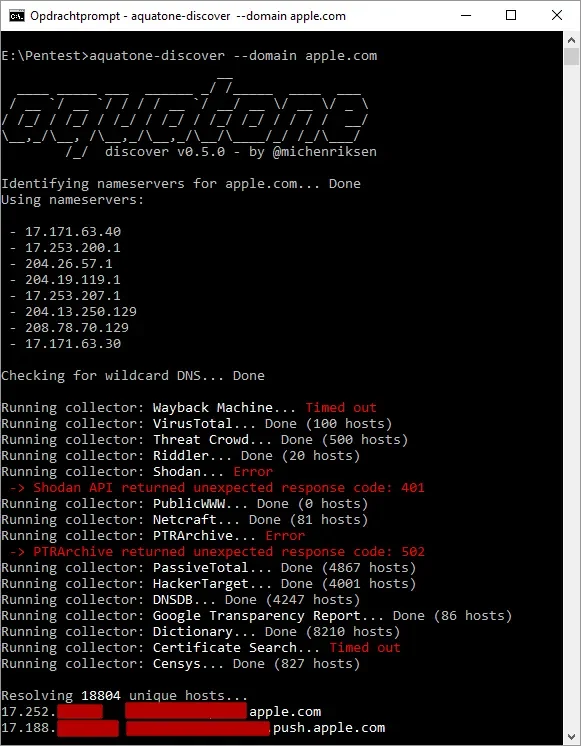
Aquatone-discover (censored for obvious reasons)
Normally discovery, scan and gather take a few minutes. Against Apple.com the run took a staggering 30 minutes and produced an 84 page report with 18k unique hosts to scan. The author notes that others have certainly used Aquatone against Apple.com before, but that they certainly did not read all 84 pages. The reading therefore starts at page 50, covering only the last 34 pages.
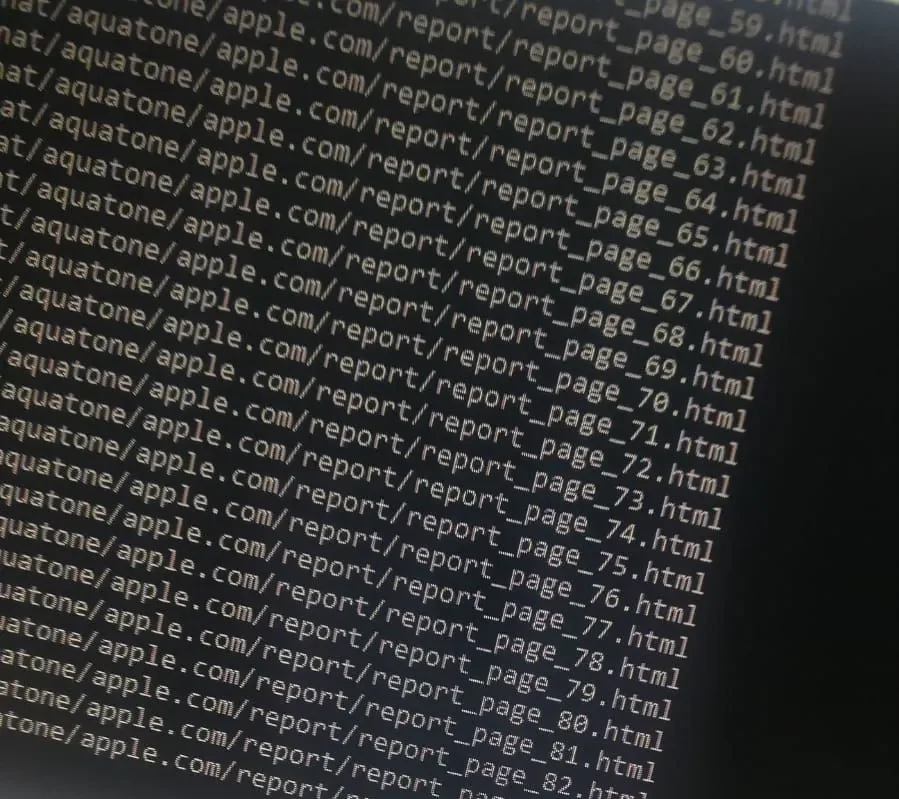
Report output of Aquatone
After 50 minutes of reading reports, patterns appear. One of them is that Apple.com sometimes uses AWS S3 for hosting the files used by its subdomains. The reasoning follows directly: if write access to one of those S3 buckets can be gained, that gives access to one of Apple's subdomains.
Long lists of subdomains
Reading all 84 reports is boring, so the approach changes. Every report contains the headers sent by the server, and S3 buckets always send the X-Amz-Bucket-Region header. Searching the reports for that string narrows the list down.
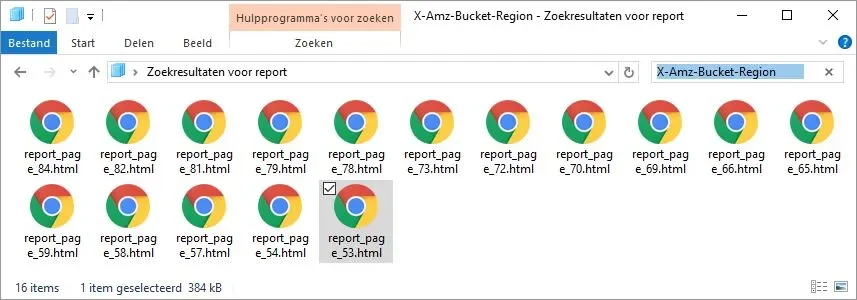
Search results of reports containing S3 response headers
Each hit is then opened manually. Almost all of the subdomains return an Access denied response when visited.

S3 response if you open the subdomain
Exploitation
Step 1: find the subdomain that behaves differently
One subdomain does not return Access denied:
http://live-promotions.apple.com
Opening it returns an S3 response that contains the bucket name and the directory contents.
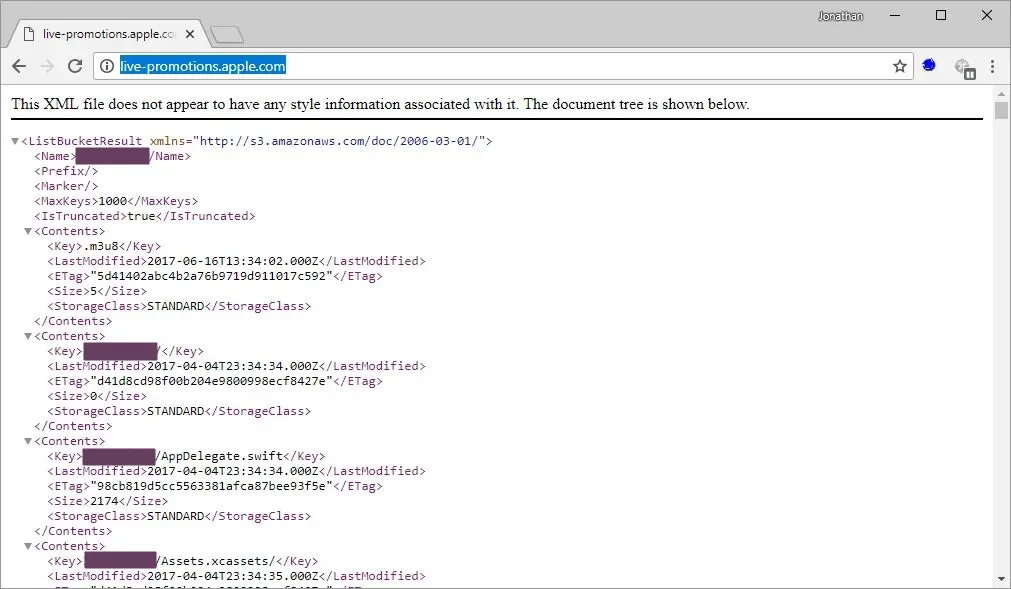
S3 response, containing the bucket name and directory contents.
With the bucket name known, it is possible to connect to the bucket directly.
Step 2: connect to the bucket with the AWS CLI
The AWS CLI reference for S3 is used to look up how to access the bucket. The CLI is installed, and the bucket is opened using the name taken from the response above.
Step 3: upload a file and grant public read
A fake login phishing HTML file is uploaded, and the upload is made readable by everyone so it can be opened in the browser:
aws s3 cp login.html s3://$bucketName --grants read=uri=http://acs.amazonaws.com/groups/global/AllUsers
The --grants read=uri=http://acs.amazonaws.com/groups/global/AllUsers part grants read permission to the AllUsers group, which makes the uploaded object publicly readable.
Uploading our files. HTML with fake phishing login and alert with our cookies.
The result is full read and write access to an Apple S3 bucket, with the files accessible through one of Apple's subdomains.
Root cause
The bucket allowed anonymous users full read and write access. S3 buckets are private by default, so this is a configuration mistake rather than a platform flaw.
Impact
The author lists three consequences:
- A phishing website can be uploaded on live-promotions.apple.com.
- Subdomain shared Apple.com cookies can be stolen from visitors.
- Confidential files can be stolen from the bucket; it contained xcode projects.
Fix
The recommendation is simple: never allow anonymous users full read and write access. Securing an S3 bucket is easy because buckets are private by default, and the AWS access control overview is referenced for the details. In this case Apple confirmed the bug within 4 hours, fixed it the same day, and added the author to the Hall of Fame.
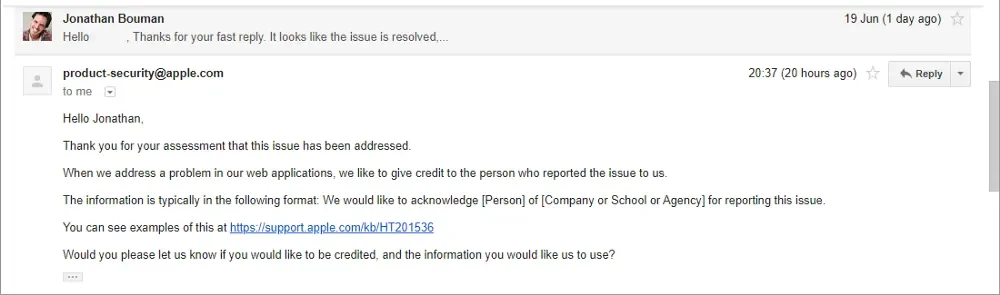
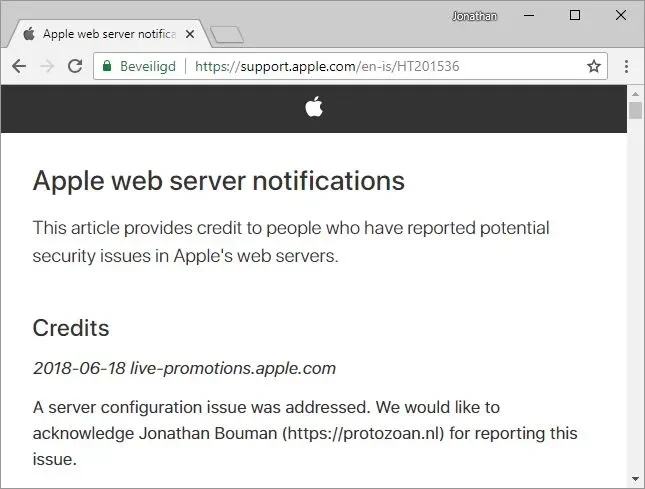
Hall of Fame. Hi mom!
Timeline:
| Date | Event |
|---|---|
| 19-06-2018 | Discovered and reported bug |
| 19-06-2018 | Apple confirmed the bug |
| 19-06-2018 | Apple fixed the bug |
| 22-06-2018 | Apple mentioned me in the Hall of Fame |
| 22-06-2018 | Published this blog |
Variants to test
- Search gathered reports for S3 headers. Run Aquatone-discover, scan and gather against a target, then grep the HTML reports for
X-Amz-Bucket-Region. A positive result is a subdomain whose report contains that header; open each hit and look for anything other thanAccess denied. - Open every S3-backed subdomain manually. A positive result is a response that lists the bucket name and directory contents instead of denying access.
- Try an upload with a public-read grant. Using the bucket name from the response, run the
aws s3 cpcommand with--grants read=uri=http://acs.amazonaws.com/groups/global/AllUsers. A positive result is a successful upload whose object is then reachable through the subdomain. - Check for subdomain takeover. Run Aquatone-takeover to find inactive subdomains hosted by external services, then check the referenced list of services that allow takeovers. A positive result is a subdomain you can claim by registering an account with the external host.
- Read the later pages of large reports.
What happened, in plain words
A security researcher found that one of Apple's web addresses, live-promotions.apple.com, was serving files out of a storage service called Amazon S3. That storage area had been left open so that anyone on the internet could read it and also write to it. Because the storage area sat behind an Apple subdomain, anything the researcher uploaded appeared to visitors as content on Apple's own domain. The researcher uploaded a fake login page to prove it, and could also have read files that were already stored there. Apple confirmed the problem within four hours, fixed it the same day, and added the researcher to its Hall of Fame.
This article walks through the whole thing slowly, assuming you have never done security work before. You only need to be comfortable using a browser and a computer.
Background: what kind of mistake is this?
The write-up is about insecure server configurations. A server is the computer somewhere on the internet that sends web pages and files to your browser when you visit a site. A configuration is the set of settings that decide how that server behaves: who may look at which files, who may change them, and so on. A misconfiguration is when those settings are wrong in a way that lets people do things they should not be able to do.
Two examples are named:
- Directory listing: the server shows a list of every file in a folder, like a shop leaving its stockroom door open so anyone walking past can read the inventory.
- Unrestricted file upload: the server lets anyone upload files, and those files then get served to other visitors. This is the one that matters here.
The target chosen is Apple.com. The author picks it for three reasons: it is described as the most powerful brand in the world, Apple runs a responsible disclosure process (a formal way for strangers to report security problems to a company), and Apple keeps a Hall of Fame, a public page listing people who have reported valid bugs. The stated goal is to get a place on that page.
The feature at the centre of the finding is Apple's use of AWS S3 to host files used by its subdomains. S3 stands for Simple Storage Service: it is Amazon's online storage, a bit like a giant shared network drive in the cloud where you can put files and folders. Each storage area is called a bucket. If a bucket behind one of Apple's subdomains can be written to, the attacker effectively controls content served from an Apple subdomain.
A subdomain is a name that sits in front of a domain. If apple.com is the main building, live-promotions.apple.com is a named office inside it. Visitors trust anything under apple.com, which is exactly why a mistake there is serious.
Setup: the tools used
The only tool used for discovery is Aquatone, taken from its GitHub repository. GitHub is a website where people publish code; a repository is a project folder hosted there. Aquatone is a program that helps you map out which subdomains a company has.
Aquatone has four commands:
- Aquatone-discover: looks up different subdomains from open sources and tries commonly used subdomains.
- Aquatone-scan: scans the result from step 1 for open ports.
- Aquatone-gather: creates a screenshot of every subdomain and combines all the results in an HTML report.
- Aquatone-takeover: tries to find inactive subdomains that are hosted by external hosters or services. If one is found, you go to the external host, register an account with the subdomain and earn your bounty. A GitHub list of external services that allow takeovers is referenced for this.
A few words in there need unpacking. A port is a numbered doorway on a server; different services listen on different doorways, so scanning ports tells you what is running. Open sources means public information, such as certificate records or search engines, rather than breaking in anywhere. A screenshot here means the tool visits each subdomain in a headless browser and saves a picture of what it sees, so you can skim many hosts quickly. An HTML report is a web page you open in your browser that collects all those results.
Subdomain takeover is the fourth command's subject: sometimes a subdomain points at an external service that nobody has claimed, so a stranger can register an account there and effectively take over that name. The author frames it as a bonus path to a bounty.
For the S3 step, the AWS Command Line Interface is needed, installed from the AWS documentation. A command line interface (CLI) is a program where you type instructions as text instead of clicking buttons.
Finding it
Mapping the subdomains
Discovery starts with Aquatone-discover against the domain. The screenshot of the discovery run is censored for obvious reasons.
Aquatone-discover (censored for obvious reasons)
Normally discovery, scan and gather take a few minutes. Against Apple.com the run took a staggering 30 minutes and produced an 84 page report with 18k unique hosts to scan. That is 18,000 distinct addresses. The author notes that others have certainly used Aquatone against Apple.com before, but that they certainly did not read all 84 pages. The reading therefore starts at page 50, covering only the last 34 pages.
Report output of Aquatone
Spotting a pattern
After 50 minutes of reading reports, patterns appear. One of them is that Apple.com sometimes uses AWS S3 for hosting the files used by its subdomains. The reasoning follows directly: if write access to one of those S3 buckets can be gained, that gives access to one of Apple's subdomains.
Long lists of subdomains
Reading all 84 reports by eye is boring, so the approach changes. Every report contains the headers sent by the server. Headers are small pieces of information a server attaches to every response, like the label on a parcel telling you where it came from and how to handle it. S3 buckets always send the X-Amz-Bucket-Region header. Searching the reports for that string narrows the list down to hosts that are probably S3.
Search results of reports containing S3 response headers
Checking each hit
Each hit is then opened manually in a browser. Almost all of the subdomains return an Access denied response when visited. Access denied is the storage service saying: this exists, but you may not look inside. That is the correct, safe behaviour.
S3 response if you open the subdomain
Exploitation
Step 1: find the subdomain that behaves differently
One subdomain does not return Access denied:
http://live-promotions.apple.com
This is simply the address typed into the browser. The http:// part is the protocol, the way the browser and server agree to talk. live-promotions.apple.com is the subdomain itself. Opening it returns an S3 response that contains the bucket name and the directory contents.
S3 response, containing the bucket name and directory contents.
Seeing the bucket name and a listing of files is the giveaway: the bucket is not private. With the bucket name known, it is possible to connect to the bucket directly, without going through the Apple subdomain at all.
Step 2: connect to the bucket with the AWS CLI
The AWS CLI reference for S3 is used to look up how to access the bucket. Documentation like this is the official manual for the tool. The CLI is installed, and the bucket is opened using the name taken from the response above. The point of this step is to move from looking at files in a browser to having a tool that can also put files there.
Step 3: upload a file and grant public read
A fake login phishing HTML file is uploaded, and the upload is made readable by everyone so it can be opened in the browser:
aws s3 cp login.html s3://$bucketName --grants read=uri=http://acs.amazonaws.com/groups/global/AllUsers
Line by line, in plain words:
awsis the name of the AWS command line program.s3says which part of AWS you want to talk to, here the storage service.cpmeans copy, the same idea as the copy command on your own computer: take a file from here and put it there.login.htmlis the local file being uploaded. It is an HTML page, the kind of file a browser displays, and in this case it imitates a login screen to look convincing.s3://$bucketNameis the destination.$bucketNameis a placeholder for the name read from the earlier response; thes3://prefix says the destination is a bucket rather than a folder on your disk.--grants read=uri=http://acs.amazonaws.com/groups/global/AllUserssets who is allowed to read the uploaded file. TheAllUsersgroup means everyone, including people who are not logged in to anything. So this option makes the uploaded object publicly readable.
Uploading our files. HTML with fake phishing login and alert with our cookies.
The result is full read and write access to an Apple S3 bucket, with the files accessible through one of Apple's subdomains. Read access means the researcher could download what was already there; write access means new files could be added and served.
Root cause
The bucket allowed anonymous users full read and write access. Anonymous means no login at all. S3 buckets are private by default, so this is a configuration mistake rather than a platform flaw.
Impact
The author lists three consequences:
- A phishing website can be uploaded on live-promotions.apple.com. Phishing is a fake page that looks like a real login screen so visitors type their password into it.
- Subdomain shared Apple.com cookies can be stolen from visitors. A cookie is a small piece of data a website stores in your browser so it can recognise you on the next request, much like a cloakroom ticket that proves which coat is yours. If an attacker controls a page on the same domain, they may be able to read cookies that are shared across that domain.
- Confidential files can be stolen from the bucket; it contained xcode projects. Xcode is Apple's software for building apps, so those projects are source code.
Fix
The recommendation is simple: never allow anonymous users full read and write access. Securing an S3 bucket is easy because buckets are private by default, and the AWS access control overview is referenced for the details. In this case Apple confirmed the bug within 4 hours, fixed it the same day, and added the author to the Hall of Fame.
Hall of Fame. Hi mom!
Timeline:
| Date | Event |
|---|---|
| 19-06-2018 | Discovered and reported bug |
| 19-06-2018 | Apple confirmed the bug |
| 19-06-2018 | Apple fixed the bug |
| 22-06-2018 | Apple mentioned me in the Hall of Fame |
| 22-06-2018 | Published this blog |
Variants to test
If you want to look for the same class of mistake on a target you are allowed to test, these are the checks described:
- Search gathered reports for S3 headers. Run Aquatone-discover, scan and gather against a target, then grep the HTML reports for
X-Amz-Bucket-Region. Grep is a text search tool. A positive result is a subdomain whose report contains that header; open each hit and look for anything other thanAccess denied. - Open every S3-backed subdomain manually. A positive result is a response that lists the bucket name and directory contents instead of denying access.
- Try an upload with a public-read grant. Using the bucket name from the response, run the
aws s3 cpcommand with--grants read=uri=http://acs.amazonaws.com/groups/global/AllUsers. A positive result is a successful upload whose object is then reachable through the subdomain. - Check for subdomain takeover. Run Aquatone-takeover to find inactive subdomains hosted by external services, then check the referenced list of services that allow takeovers. A positive result is a subdomain you can claim by registering an account with the external host.
- Read the later pages of large reports.
Glossary
- Access denied: the storage service's reply when something exists but you are not allowed to see it.
- Anonymous user: someone using a service without logging in at all.
- Aquatone: a tool that discovers subdomains, scans them, takes screenshots and builds an HTML report.
- AWS CLI: Amazon's command line program for controlling AWS services by typing commands.
- AWS S3: Amazon's cloud storage service, where files live in containers called buckets.
- Bucket: a named storage area inside S3, roughly like a folder in the cloud.
- Configuration: the settings that decide how a server or service behaves.
- Cookie: a small piece of data a site stores in your browser so it can recognise you later.
- Directory listing: a server showing the contents of a folder to anyone who asks.
- Domain: the main name of a website, such as
apple.com. - Header: extra information a server attaches to a response, such as where the content came from.
- HTML: the language web pages are written in, which browsers display.
- HTML report: a web page that collects tool results so you can browse them.
- Hall of Fame: a public page where a company lists people who reported valid security bugs.
- Insecure server configuration: server settings that are wrong in a way that lets people do more than they should.
- Open sources: publicly available information used during research.
- Phishing: a fake page that imitates a real login screen to capture credentials.
- Port: a numbered doorway on a server where a particular service listens.
- Read access: permission to download or view what is stored.
- Responsible disclosure: a formal process for reporting security problems to a company.
- Screenshot (in Aquatone): a picture the tool takes of each subdomain by visiting it.
- Subdomain: a name in front of a domain, such as
live-promotions.apple.com. - Subdomain takeover: claiming a subdomain by registering an account on an external service it still points to.
- Unrestricted file upload: a server accepting files from anyone and serving them to visitors.
- Write access: permission to add or change what is stored.
- Xcode: Apple's software for building apps; its projects are source code.