Blind SSRF in repository mirroring using DNS rebinding
A blind SSRF vulnerability existed in GitLab's repository mirroring feature, allowing an attacker to make the server send requests to localhost by using DNS rebinding to bypass the localhost block. The attacker could then cause the server to connect to internal services, though the impact was limited to blind SSRF.

GitLab
Originally disclosed on GitLab
- Fixed in 10 months
- Disclosed after 10 months
HackerOne report #1462437 by ashish_r_padelkar on 2022-01-28, assigned to @dcouture:
Report | Attachments | How To Reproduce
Report
Summary
Hello,
I found a Blind SSRF issue in repository mirroring using DNS rebinding.
Steps to reproduce
- Go to
https://lock.cmpxchg8b.com/rebinder.htmland put any ip address in A and 127.0.0.1 in B. - Now login to your project and go to
https://gitlab.com/<NameSpace>/<ProjectName>/-/settings/repository#js-push-remote-settings - In
Mirroring repositoriesput the url generated in step 1 for eghttp://ac41fb4e.7f000001.rbndr.usinGit repository URL. - Use
Pushas mirror direction. - It may block several times giving you reason as localhost not allowed(expected as it will switch to localhost in dns rebinding) but keep trying several times till it gets added .
- Once added, use the refresh icon near url several times and after few tries you should see message like below.
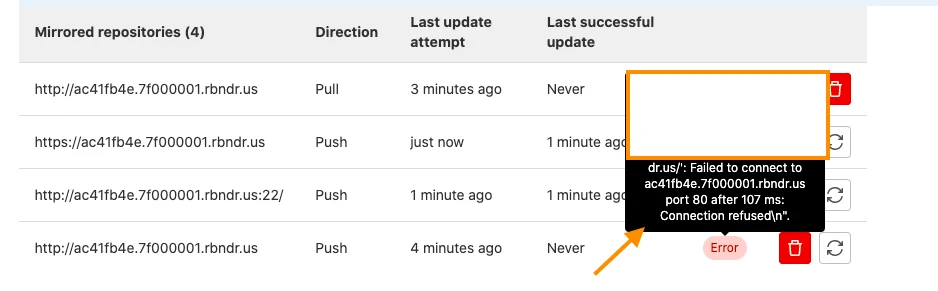
- This indicates that request reached localhost but connection got refused as port is closed.
Examples
If you want i can add you in my project for POC where i have already added the urls and you can see the error messages.
https://gitlab.com/[REDACTED]/githubimport/-/settings/repository#js-push-remote-settings
What is the current bug behavior?
Blind SSRF using DNS rebinding
What is the expected correct behavior?
Request should be blocked to localhost !
Output of checks
This bug happens on GitLab.com
Regards,
Ashish
Impact
Blind SSRF in repository mirroring using DNS rebinding
Attachments
Warning: Attachments received through HackerOne, please exercise caution!
How To Reproduce
Please add reproducibility information to this section:
Steps were explained clearly by the reporter above, also see the video in https://gitlab.com/gitlab-org/gitlab/-/issues/353018#note_845509652
Not written yet. The AI write-up for this report has not been written yet. The Original tab links to the source.
How it worked
Root cause
Likely the application checked the hostname against a blocklist before resolving it, but did not re-check after DNS resolution, allowing DNS rebinding to bypass the localhost restriction.
Impact
An attacker could cause the GitLab server to make requests to localhost, potentially accessing internal services, though the SSRF is blind and the connection may be refused if the port is closed.
What the attacker needed
A GitLab account; ability to create or manage a project; access to a DNS rebinding service
The fix
Requests to localhost should be blocked to prevent DNS rebinding attacks.
How it was found
- Go to a DNS rebinding service and set one IP to any address and the other to 127.0.0.1.
- Log in to GitLab and navigate to a project's repository settings.
- In the mirroring repositories section, enter the generated rebinding URL as the Git repository URL.
- Select 'Push' as the mirror direction.
- Keep trying to add the mirror until it is accepted despite localhost blocks.
- Use the refresh icon near the URL several times until an error message indicates the request reached localhost.
Explained by bugbounty.wiki with AI from the original and checked against quotes from it; it can still be wrong. Read the original before relying on a detail.
Not written yet. The AI write-up for this report has not been written yet. The Original tab links to the source.
This report describes a way to trick GitLab's server into making requests to its own internal network (localhost) by using a technique called DNS rebinding. Normally, GitLab blocks such requests, but the attacker used a special domain that changes its IP address to bypass the block. This is called a blind SSRF because the attacker cannot see the response, only infer that the request was made.
What is SSRF?
The server can be made to fetch an address the attacker chooses, reaching internal services, cloud metadata or other customers' data.



