Email Notifications not being sent on important security event like disabling 2FA
GitLab did not send an email notification or add an entry to the authentication log when a user disabled two-factor authentication. An attacker who had compromised a session could silently disable 2FA without the victim being alerted.

GitLab
Originally disclosed on GitLab
- Fixed in 19 months
- Disclosed after 19 months
HackerOne report #476268 by rgupt on 2019-01-08, assigned to asaba:
Summary: Gitlab does not sends an email notifications to users when important security events occur like when a user disables 2FactorAuthentication. It's extremely important to notify users on important security events like this and all the major sites does this like Github, Hackerone etc..
The purpose of sending these email notifications is because, if the user's sessions is compromised due to an XSS Attack or Browser Hijacking, the hacker can silently disable user's 2Factor Authentication and the victim might not even realize that their 2Factor Authentication was disabled. Hacker can then continue to perform further damages to the victim's account.
Steps To Reproduce:
- Login to Gitlab with an account which has 2FA enabled.
- Navigate to Settings -> Account Page and click on the button to Disable two-factor authentication.
- Check if there is an email sent to the Victim when the 2FA is disabled. Gitlab does not sends any email to users when the 2FA was disabled.
- Navigate to Settings -> Authentication Log Page. As per Gitlab's documentation, it is mentioned that Authentication Log is a security log of important events involving your account. However even in this section, there is no log added indicating that the 2FactorAuthentication was disabled.

When I tried the same steps on Github, it notifies the users when 2FA was disabled. Please check this screenshot:
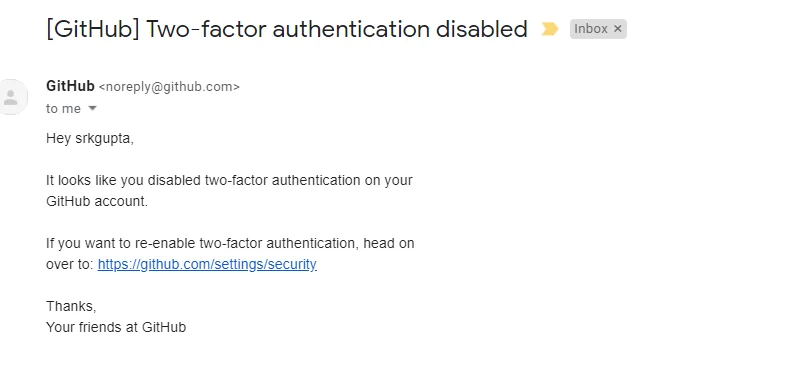
Impact
If Victim's session is compromised due to an XSS attack, hacker can silently disable user's 2Factor Authentication and can cause further damages in the future.
Attachments
Warning: Attachments received through HackerOne, please exercise caution!
Not written yet. The AI write-up for this report has not been written yet. The Original tab links to the source.
How it worked
Root cause
Likely the application did not treat disabling 2FA as a security-sensitive event that triggers a notification or audit log entry.
Impact
If a victim's session is compromised (for example via XSS), an attacker could silently disable 2FA and cause further damage, with no notification to the victim.
What the attacker needed
Attacker has compromised the victim's session; victim has 2FA enabled
How it was found
- Log in to GitLab with an account that has 2FA enabled.
- Go to Settings -> Account and click the button to disable two-factor authentication.
- Check whether an email is sent to the victim; GitLab does not send one.
- Go to Settings -> Authentication Log; no log entry is added for the 2FA disable event.
Explained by bugbounty.wiki with AI from the original and checked against quotes from it; it can still be wrong. Read the original before relying on a detail.
Not written yet. The AI write-up for this report has not been written yet. The Original tab links to the source.
If someone else gets into your account, they might turn off 2FA without you noticing. This report says GitLab did not warn the user by email or in the security log when 2FA was turned off.
What is Account takeover?
Getting into someone else's account through a flaw in sign-in, password reset, second factor, single sign-on or session handling.


