HTML injection in Child item search on issue page leads to XSS on self hosted instances
The issue page's child item search rendered user-controlled task names through v-safe-html without proper escaping, allowing HTML injection. On self-hosted instances without a strict CSP, an attacker could use an SVG use element to bypass DOMPurify and achieve XSS in Firefox and Safari.

GitLab
Originally disclosed on GitLab
- Fixed in 6 months
- Disclosed after 6 months
⚠️ Please read the process on how to fix security issues before starting to work on the issue. Vulnerabilities must be fixed in a security mirror.
HackerOne report #2655757 by joaxcar on 2024-08-14, assigned to @kmorrison1:
Report | Attachments | How To Reproduce
Report
Summary
HTML injection in issue page when adding Child item. Leading to XSS on self-hosted instances without proper CSP
See this code
 formatResults(input) {
      if (!this.searchTerm) {
        return input;
      }
      return highlighter(`<span class="gl-text-black-normal">${input}</span>`, this.searchTerm);
    },
...
<div v-safe-html="formatResults(dropdownItem.title)" class="gl-text-truncate"></div>
where dropdownItem.title ends up in v-safe-html
This allows an attacker to inject any HTML that can get through DOMPurify to the page. As shown in https://hackerone.com/reports/2654010 its possible to use svg/use to bypass the current DOMPurify filter to gain XSS in Firefox and Safari.
Steps to reproduce
!! Use Firefox/Safari !!
- Create a new group called
group1(public) - Create a subgroup in
group1calledassets(public) - Open dev-tools and go to the
inspectorand search in the DOM forassets/icons-find any url that looks like this/assets/icons-454317f5123bdb93dcb695c6092c458fb0ec6c862d0a56857aefa1c73469f743.svg#sidebar(the long hash value will depend on the gitlab instance) copy theicons-<hash>.svgname - In
group1/assets/create a project calledicons-<hash>.svg(the full hash name from step 3) (public) - In the new project create a file called
test.svgwith this content
<?xml version="1.0"?>
<svg id="main" xmlns="http://www.w3.org/2000/svg">
    <image href="1" onerror="alert(document.domain)" />
</svg>
- Go back to the main group
group1and create a new project calledproject1(public) - In
project1create a newissue, call itissue1 - When
issue1is created you land on the issue page, now clickAdd->New Taskand name the newtask
<svg><use href="..\..\..\assets/icons-<hash>.svg/-/raw/main/test.svg#main"/></svg>
where you replace <hash> with the hash from step 3 (!! important)
9. Now go to group1/project1/-/issues/new again and create a new issue issue2
10. When the new issue is created click Add->Existing Task
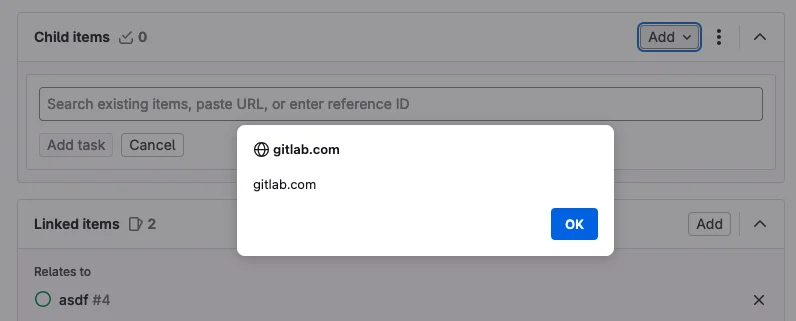
11. The alert should pop
In an attack scenario, its a victim user that created the issue2 but this shows the injection
In this image I have disabled CSP on gitlab.com
What is the current bug behavior?
User-controlled content is sent directly into v-safe-html
What is the expected correct behavior?
Task name should be HTML escaped
Impact
HTML injection on gitlab.com and XSS on self-hosted servers
Attachments
Warning: Attachments received through HackerOne, please exercise caution!
How To Reproduce
Please add reproducibility information to this section:
Not written yet. The AI write-up for this report has not been written yet. The Original tab links to the source.
How it worked
Root cause
Likely the task title was inserted into v-safe-html without sufficient sanitisation, and the sanitiser could be bypassed with an SVG use element.
Impact
HTML injection occurred on gitlab.com, and XSS could occur on self-hosted servers that lack a proper CSP; the exploit worked in Firefox and Safari.
What the attacker needed
Self-hosted instance without strict CSP; Firefox or Safari browser; attacker can create public projects and issues; victim views the issue page
The fix
Task names should be HTML-escaped before being rendered.
How it was found
- Create a public group and a public subgroup called assets.
- Find an asset icon URL in the page source and note the hashed SVG filename.
- Create a public project named after that hashed SVG file and add a malicious SVG file.
- Create a public project with an issue, then add a new task whose name contains an SVG use element pointing to the malicious file.
- Create a second issue and use Add->Existing Task to trigger the payload.
Explained by bugbounty.wiki with AI from the original and checked against quotes from it; it can still be wrong. Read the original before relying on a detail.
Not written yet. The AI write-up for this report has not been written yet. The Original tab links to the source.
A task name is shown in a search dropdown without proper cleaning, so special code in a task name could run in another user's browser on some servers.
What is XSS?
Script an attacker supplies runs in another user's browser, on the target's origin, with that user's session.



